Top 5 Productivity Hacks to Win Back 4 More Hours in a Day
Akhil Jabbar shares five ways to reclaim four hours daily: watch videos and podcasts at 1.25-1.5x speed, strip your phone home screen to one page with only essential apps, batch similar work on the same days to cut context-switching, calendar everything or it won't happen, and use 45-minute focus blocks with 15-minute breaks instead of the standard Pomodoro.
Chapters
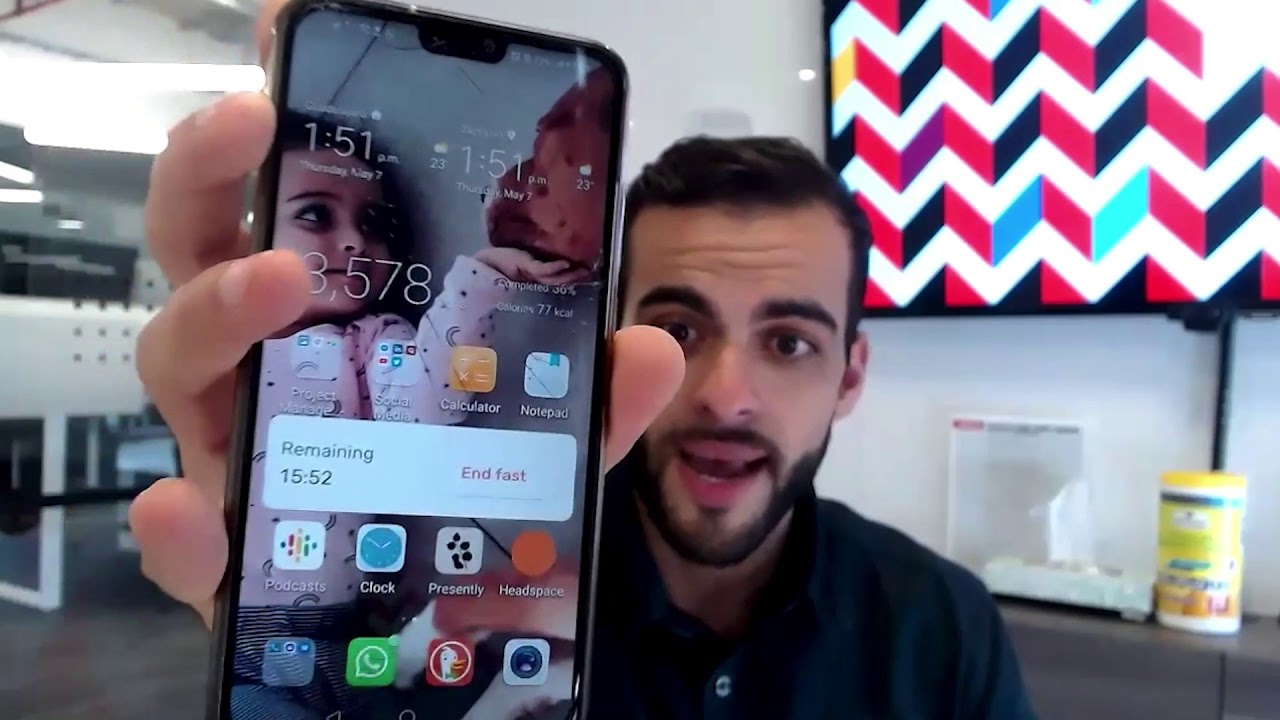
Hey guys, Akhil Jabbar here, and welcome back to another video of Horizon Capital's SaaS District. So on today, what I want to talk about is 5 productivity hacks to win back more time in your day. And become more efficient in your day-to-day routine. All right, so let's get into it. Number 1, watch videos, listen to audio at 1.5x the speed. Now what do I mean by that? Rather than listening to videos or watching videos such as this one right here on YouTube at regular speed the way I'm speaking right now, watch it at a higher speed setting such as 1.5x. So I just want to tell you a quick story. I remember when I used to live and work in downtown Calgary as an engineer, I used to live about 20 minutes away from where I used to work. So I used to walk there, 20 minutes there, 20 minutes back. And I would wake up in the morning, I'd put on my headphones, I'd throw on a podcast. Typically these podcasts were about 30 minutes long. So I'd put them on, start walking to work, 20 minutes there, and I wouldn't be able to finish my entire podcast. Then I'd have to wait till the end of the day when I come back. Listen to the last 10 minutes and then maybe, maybe start the next one. I didn't really want to get halfway and then forget what I was listening to. So then what I realized was, what if I increased the speed of it and start seeing if I could still understand it as well? So then I increased it to 1.3x and I found, you know what, I was able to do it a lot quicker and listen to more audio and gather more information. And then I went up all the way to 1.5x. So basically those 20-minute commutes, I was able to listen to an entire podcast, a 30-minute podcast One going there, one coming back. So now I was able to listen to 2 podcasts every single day. Now you can imagine the compound effect and the compound value of listening to 2 podcasts every single day over time versus just listening to 1 or 1.5. Okay, so what I want you guys to do today before we continue to the next step, go down here to the settings of YouTube, click on the corner there where it says settings. Go to the speed and increase this video to 1.25x at the minimum. Okay, and once you— I know people who can, as you train your ear and get better and better at it, you can go up all the way to 2x and you can still understand and process the information. Okay, so number 2, what I want to talk about then, the next one is about your phone. As you guys know, your phone is probably the biggest hinder of productivity and distraction in our lives, even though we can't live without them. Nonstop distractions. So what I like to do is first thing is make your cell phone screen as simple as possible and put everything on a single screen. So it's really easy to get caught up with hundreds and hundreds of different apps. I like to put everything on a single screen. So you can see here, I'll show you. So I have my podcast in the corner. I have my clock for my timer. I have the Presently app for my gratitude and then Headspace for my meditations. Every morning I wake up, I don't have 10 different apps to scroll through. I don't have social media to review. Everything is there that I need. I also have my Zero app there so I can see my timer for fasting. So as you can see, I'm still fasting for another couple minutes. And I also have my steps. So you can see I'm only at 4,000, less than 4,000 steps. So everything I have is in one single screen. So I'm not distracted when I look in here. I don't have a bunch of notifications, a bunch of different apps that just distract the mind and get you all kind of confused. And then you start clicking and playing through different things. I just use this for what I need it for, which is making phone calls and obviously messages. And then all the kind of productivity tools that I use to make my life easier. Okay? Second thing on the phone, turn off your notifications. If you guys aren't already doing this, go over to your settings. Okay, simply just go to your settings and turn off any nonessential notifications, especially social media. So if you're getting an email, so those are the 2 biggest things. Shut off your emails. You're not getting a ping every time you get an email. You can schedule that to check them when you have time. That comes secondary. Same with your social media. Turn all that off. You know, maybe there's some emergency. You know, maybe you keep your, obviously your calls. Maybe there's some WhatsApp messages, you know, text messages, all these other things that are maybe distractive and they're not emergency. Turn that off. I guarantee you, you will check your phone less and you will check it only when you need it and you won't miss out on anything. Okay? So that's number 2. Single screen, have all your apps on one app and then if you need to go through it and you need more apps, open it up. Just click here. I do have more apps. I just have to take another step. I have to open it up and I have to scroll. Just by having to do another 2, 3 steps or adding that extra barrier, it stops me from navigating and mindlessly playing through my phone. OK? So that's number 2. Number 3, batch your days by themes. Now what do I mean by that? Set your themes instead of having Mondays where I'm going and doing email in the morning, then I'm going to go to meetings, then I'm going to do interviews, and then I'm going to go manage the team, and then I'm going to go record a podcast. What I do is I like to batch my days by themes of important tasks. For example, right now I'm recording this on a Thursday. So Tuesdays and Thursdays for me are recording days. That's when I record my YouTube videos. That's when I record my podcasts, all my podcast interviews. Because I have everything already set up here, I already have the microphone, I have the camera, I have the nice background, the settings. I'm already dressed up slightly better. Now I can just go batch them back to back. So when people go and try to book an interview with me for a podcast, They go into my calendar. They only see Tuesdays and Thursdays because those are the only days that I control, that I decide that I want to do interviews. Okay? It makes my life easier. So I'll do 2 or 3 in a day versus— and then Mondays I'll do, for example, managing. So I'll worry about the team management, what needs to be planned for the week. Wednesdays I do all my meetings. So team meetings. I have 3 or 4 team meetings with different members and I just batch them on Wednesdays. Because I don't want to be jumping from meeting to meeting every single day. The other days of the week I have other things I want to focus on. So think about it from your perspective. Maybe your Monday is, I'm going to focus on marketing. OK? I'm going to focus on my social media marketing. Maybe I'm going to create content and I'm going to post it and batch it and schedule it out for the entire week. So now your Monday, you don't even have to think about social media or marketing for the rest of the week. Now anything that comes up after you've completed that is all gravy. That's extra. So if you finish that task of what you need to do, then you can go and start scheduling those times. I also recommend, you know, you schedule those times such as emails as well. So, you know, keep certain times for that, which we'll talk about on the next point. So you're not constantly living and, you know, dictating your schedule based on other people's requirements such as, you know, Slack, email, all that good stuff. Okay? So that's number 3, which is batch and schedule. Set up your days and your schedule based on themes. Okay, so the next one, number 4, we're gonna get into the screen here and I'll show you the next hack. All right, so let's get into hack number 4, which I just talked about, and this leads in from hack number 3. So what I like to do is plan and schedule everything in my calendar. If it's not on my calendar, I don't do it. Okay, I like to use Google Calendar. You can use Outlook or any other planning tool. But if it's not on your calendar, you're not going to be as productive and you're not going to be able to manage your time as efficiently because people are going to start taking over your time. They're going to start controlling you versus you getting control of your time. So here you can see, you know, I put my workouts, uh, you know, all my meditation in here. So you can see today's, you know, a bunch of recordings, which I just talked about. You know, Wednesdays is all my meetings. Uh, and I also have days where, you know, I do focus on, you know, team stuff. Interviews, so interviews or any hiring, I have on a specific day, so I don't do interviews every single day, but I plan everything. So if you're not, if I, if anything that comes up, hey, I'm going for dinner. If I'm going to be sending emails, I put in here, hey, I'm going to be doing emails for the next hour and I batch that into my calendar. Otherwise the emails start to take over my day and then I become less efficient and less effective as a leader. Okay. Finally, Hack number five is the Pomodoro technique. If you guys aren't familiar with it, here's an app I really really love. It's called right over here as you can see it. The one it's called Be Focused. So this is the one I love to use. What I like to do, you know, I think that the the standard time of a Pomodoro technique is twenty five minutes work and five minutes break. I personally, you know, you can adjust it. You can go up to sixty minutes. Or longer. I like to do 45 minutes. So I work for 45 minutes straight, no distractions, very deep and focused work where I'm doing 45 minutes of no work, no distractions and whatnot. And then 15 minutes of a short break. And what you do is you get into this cycle of very, very deep focused work. And then you can go take 15 minutes break, actually be intentional about your break. You know, check your phone, check your emails, whatever it is, because you've set that aside. And then you can go back and do another cycle. So by this, continue doing these cycles, you do 3 of them and then you take a longer break. So you can do this from 9:00 AM, let's say for, you know, till 12, you do 3 cycles and then you go take a 30 or 45-minute break and then come back and do it again. As you know, studies find that, you know, you're probably efficient at most for these 2 to 3-hour cycles. After that, you know, your brain is just not as effective as it should be. So download this app. It's called Be Focused. It's free. You can also get the premium version, get it on your, on your laptop and make sure you use it every single day and you'll see your output increase dramatically. All right guys, hope that was helpful. Those are the type 5. If you guys enjoy this type of podcast or video, please let me know in the comments below and we'll see you on the next one. Thank you.
More from Akeel

Get a mentor as soon as possible — and make sure it’s a mentor in your space.



Keith Gillispie: Why Most New Investors Fail & How to Avoid the Common Traps #250 | SaaS District