Social Cheatcodes To Grow Your Email List + Your Following FAST
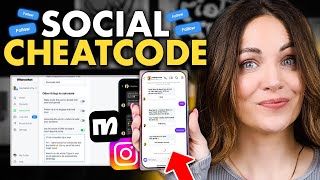
Alex Cattoni walks through three new ManyChat features for growing your email list and followers. Quick Automations lets you set keyword triggers on posts to send DMs automatically. Follow Me First checks if commenters already follow before giving them a link, and In-DM Email Collection captures emails directly in messages.
Chapters
Oh my gosh, you guys. Manychat just released three new features that are going to make growing your social media following so much easier. And honestly, these are like the ultimate social growth cheat codes. In this video, I'm going to show you how these features work and how to set them up for yourself so you can automate your social growth and list building and free up more of your time to do the things that really matter right now in 2025, like building your personal brand and connecting with your dream clients. So keep watch. Hey posse, what's up? It's Alex. Now if you've been around here for a while, then you already know how much I'm obsessed with ManyChat. ManyChat was one of the very first automation tools that I incorporated into my business several years ago. I mean, they helped me initiate 114,000 DM conversations with you, my posse, in 2024 alone. And I never going back. So when they reached out to me to sponsor this video, I was like, yep, I love you guys. And they are going to give everyone from the posse a full 30 days to try out ManyChat Pro for free. All you got to do is click the link in the description box below and use my code Alex to sign up. Now listen, before I started using manychat, I would send people to my link in bio to get a free resource, which was honestly kind of clunky and confusing and like so 2016. So I am not kidding, I would resort to manually DMing people, links and resources every single day because it was just such a way better experience for my followers. But as my account started to grow, I mean, obviously that became virtually impossible to do. Not to mention that people would end up having to wait like hours or sometimes days for a response from me. Manychat helped me automate this entire process so that I could deliver exactly what my followers needed, exactly when they asked for it. And I Even named my ManyChat automation Benny the Bot. And let me tell you, people freaking love Benny. He gets like a lot of love in our DMs. Over time, I started incorporating more complex Manychat automations and building what they call flows, which look a little something like this. And this allowed me to do way more with the tool. In addition to automatically DMing people links they wanted at like light speed, I could also follow up with them a few days later to see if they loved it, send reminders, ask questions, stuff like that. This saved so much time and manual work for me and my team, but it also helped us engage with our most active followers and best customers. Now, while I absolutely love our fancy manychat flows, I will be the first to admit that setting them up was a little bit clunky and I definitely needed someone who was a bit more tech savvy on my team to help me. But I have such good news for all of my fellow manychat lovers or for those of you who want to try manychat but don't have a single techie bone in your body. Hello, it's me. Manychat has now solved complexity issue with three amazing new features so that just about anyone can easily set up automations literally in like 10 minutes or less. And I'm going to walk you through these features right now, step by step. But first, if you want to follow along with me using Your very own ManyChat account, hit the link in the description box below to sign up using my code Alex to get a free 30 day trial of ManyChat Pro. All right, now let me show you how these features work because they are so, so cool. The first feature is Quick Automations. So this is so good. Manychat rolled out a brand new visual builder so that you can set up Quick Automations from your desktop or even your phone without the complexity of the full flow builder that you saw earlier. Now this new quick interface is called Quick Automations and it's perfect for setting up. You got it. Quick Automations. Specifically you can use it to set up automatic DMs in response to user comments on Instagram, Facebook and even WhatsApp, which is so so great for boosting engagement. And even if you have zero experience with this tool, it is so easy to use. Here's what you need to do. So once you log into your new ManyChat Pro account on the Home Dashboard right below where it says Start here you want to select where it says Auto DM links from comments. Then you're going to select either a specific post or reel or any post or reel. Now just keep in mind that if you select any post or reel then anytime a person comments the keyword on any post on your account they are going to receive your automatic D. If you do it just for a specific post or reel, then only when the keyword is commented on that post will this automation be triggered. And I like to do it like that because then you can really customize the experience for different types of content and posts and calls to action. So then you are going to hit next. Now it's going to ask you to set your keyword so this is what you'll ask people to comment on the specific post in order to get an automatic dm. Or you can also select any word and this will DM anyone who commented basically anything on that post. You can see for this post we used results as the keyword, so I just typed that into the keyword box and you can see exactly what that will look like on your feed right in the Visual builder. I freaking love that. Now one more really cool feature is that you can add additional keywords here. You're not limited to just one, so this is really great. If there are any common misspellings of the keyword that you're using, or any other variations or words that you think would be important to include here, then you're going to hit next again. And now you have two options for how you can deliver the link. You can just straight up send them the link in their DMs right away. So really easy. All you do is type out a short message, paste in the link, and customize the button text and you are all set. But the downside here is that once you send them that link, you cannot continue the conversation or follow up with them or do any of the other things that I'm going to talk about in this video like ask them to follow you or add them to your email list. Yeah, this is about to get good. And that's because there are pretty strict rules around messaging automation at Meta, which is a really great thing to protect users from spammers and people who would take advantage of this. But of course it is highly likely that your followers would absolutely love to hear from you again and have that two way conversation with you. So if you select an opening dm, this allows you to then first initiate the conversation by asking them directly if they would like you to send them the link. And you can see that this adds a message before sending them the link. So here's what we've said in our hey, want a free copy of my subject line split test report? Just click below and I'll send you the link right away. And then once they click the button, they've now initiated that two way conversation with me and now I can follow up with them and send them additional DMs, including asking for them to follow me or join my email list. So I personally always go with this opening DM option because I think starting a conversation is so so important for creating trust and building that long term relationship with your followers and your customers. But of course the choice is totally yours. It really just depends on your goals. But either way, remember to customize the text to fit your voice. And keep it simple. No one wants a novel in their DMs. All right, then you're gonna hit next again and ManyChat is gonna ask you if you wanna automate anything else. You can add auto replies to your comments, which I love to do. Again, just customize this text to fit your brand voice. This really helps with engagement. You can also set up an automation to follow up with them if they do not click the link previously. Which is is really, really great because a lot of people just forget, right? And this leads me to the second new awesome feature that ManyChat just released. The follow me first feature. Okay, this is like the most epic cheat code for social growth. As you probably know, people who comment on your post for a link aren't necessarily already following you, right? They could just be someone who randomly found you. Maybe they just happened to stumble across your post on the discovery page. Or maybe someone they know shared it on their stories. And I can speak from personal experience here that when I come across a post this way, I almost never go and follow the person after getting the goods that I signed up for. Not because I don't want to, but honestly, like, I just don't really think about it. Plus, it kind of takes a little bit of work, right? First you have to leave the post, then you have to go click on their profile, hit follow, and then go back to the DMs to dig into whatever it is they asked for. Yeah, I just don't do that. And neither do most people. So that is why this is so freaking cool. After you start the DM conversation, this automates automatically verifies whether they are already following you. If they are great, they will get the link right away. Awesome. If they are not following you already, they'll get a simple message asking them to follow you first in order to get access to that free thing they asked for. Then once they hit the follow button, the automation will automatically send them the link. How cool is that? But you guys, we are not even done yet. You also have the option to collect their email address. And that brings me to feature number three. Collecting emails instantly in the DMs. I can't even tell you how big of a deal it is that you can get people to sign up to your email list in your DMs without having to send them off the app to sign up on a website or a landing page. I mean, think about that for a second. The Whole point of social media is to attract new leads for your business, right? But we all know that even when you get the follow, the percentage of people who actually see your posts, even when they follow you is like so frustratingly small. Which is exactly why you want to build your email list. And this is the best way to do that with social media. Honestly, I have never found a better strategy. Listen, you already know this because I am constantly talking about the power of email marketing. Like constantly. Not only does email have a higher view rate than organic social media, but it also has a higher click through rate and conversion rate. And look at this a way way higher roi. So use social media to attract new qualified leads to your business and then get them on your email list. And ManyChat helps you do both. Hello, that is what we call a win win. So how do you set this up? Well we come back to this part of our automation and select Ask for Emails in dms. Then you can type in your customized message here. We said link is headed your way. FYI I sent exclusive content like this but better to my email list every week. Want in on the action? Type your address to be automatically added. It is super simple. You don't need anything too long or wordy. But make sure to give them a really good reason why to join your email list. If they don't enter their email address, they will still receive the free thing or the link they're asking for. And if they do enter their email address, amazing. It will be passed into ManyChat, which you can then easily integrate with your email sender by going to Settings and then scrolling down to integrations. You can either integrate your email sender directly there within manychat, or you can add the email address to a spreadsheet and then once you have a list you can just manually upload it. I have my manychat and Kit accounts integrated so it is completely seamless lead generation from my DMs to my email list. But you guys, we are not done yet. There is one extremely important last step and whatever you do, do not skip this. Whether you're just sending a quick link or implementing all of these amazing features, once you have finished setting up your automation, make sure to click Go live in the top right corner. That is really important. And voila. You just spent less than 10 minutes setting up a simple and easy automation through ManyChat. That won't only help you boost engagement, but can also help you grow your social following and your email list. So give me a thumbs up below if you found this video helpful and if you want to try these features out for yourself, don't forget to click the link in the description box below and use code Alex to try out Manychat Pro for free for 30 whole days. And if you want to learn more marketing tips to grow your online business, make sure to check out this next video from me where I explain my exact marketing strategy using both organic social media and email. I will see you next week with a brand new video. Until then, I'm Alex. Ciao for now. All right guys, if you enjoyed that video, make sure to check out the next one for me right here, here. And you can click right here to get a free gift. Social Media or Email Marketing which Strategy is Better for Promotions and Profit? As someone who uses both social media and email marketing in my business every single day, I'm going to give you an honest, side by side breakdown of how these marketing channels and strategies compare with real stats from my own business. Keep watching.
More from Alex





Best Instagram Marketing Strategy For Small Business 2026 (PROVEN & PROFITABLE)

You know those headlines that make you click even when you swear you won’t? 👀