This is a YouTube video titled "Chapter 3 Agent Status with Quiz" created in August 2025. The content is a single-speaker instructional explanation by Sam about how to update agent status during work shifts, including managing availability, breaks, and the impact on customer service and productivity tracking. There is no indication of multiple speakers or involvement of Wendy Davis.
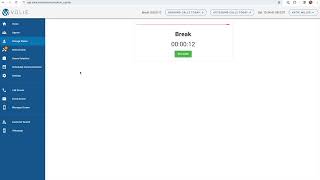
You'll want to update your status when you're not available and not actively communicating with customers. By selecting the Change status drop down on the left, you'll have the option to switch between statuses of available break, lunch and meeting. You'll want to make sure you complete your current activity and disposition. Any call you may have just finished before you're able to adjust your status depending on your account. As you see here, your manager may have created custom statuses. If there are other reasons you're away from your desk during the day to switch your status, you'll select that here as I will for break. You'll then be placed in a pause screen which shows how long you've been in that status. When you leave your desk, you'll want to make sure you switch your status. When you come back, you'll hit the resume button. If you don't update your status, your productive time could be negatively impacted and wrongly noted for your manager, so it's important to make sure you stay on top of this. Also, it's important to note that if you don't update your status, Volley may think you're available to answer an inbound call and will attempt to to serve you a call. This could keep a customer waiting longer and negatively impact your customer satisfaction. When I'm finished, I'll hit resume and now I'm back to my campaigns and queues and able to resume my work. Sam.