Chapter 4 Dashboard with Quiz
1 Jul 2024 · 2 min
2:22
A walkthrough of a communication center dashboard showing how to track inbound and outbound calls, agent statuses, messaging activity, and filter data to monitor team performance.
A walkthrough of a communication center dashboard showing how to track inbound and outbound calls, agent statuses, messaging activity, and filter data to monitor team performance.
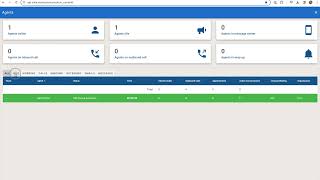
We have a dashboard within the communication center that can give you the opportunity to check and see not only your metrics for today, such as the inbound calls, outbound calls and appointments, but also if, for instance, you're getting ready to go on break and want to make sure your team has coverage. On the top left. Second from the top is the agent dashboard. When I click into the dashboard, it will show a high overview of all of the agents currently logged into Volley. You can see how many agents are idle. Idle meaning they're not currently taking calls or working on texts or emails. Potentially they just logged in for the day or maybe they went to lunch or break. You'll also be able to see in the top right how many agents are in the messaging center as well as how many agents are in inbound calls, outbound calls, or in a wrap up stat. Wrap up is the time between calls, when the call has ended and you're submitting the disposition or the outcome of the call. By default it will show the working agents, but you can choose all on the left. You can also choose to filter by calls, inbound, outbound emails or messages. You'll see a total bar on the top which is the total for your team. You'll also see the team they belong to, their name, their current status and how long they've been in that status. You'll also see the number of inbound and outbound calls and the appointment tally for the day. When we look at active conversations and longest waiting, those are in regards to the SMS message screen. What is the longest waiting text they're working on and then active conversations is how many they're working on. If you have more than one store within your Volley account, the organization at the end will note that. You can also see on the far right what campaign they're working on. At the top you can filter for all agents, agents who are in idle or non working statuses, agents who are only on phone calls, only on inbound or outbound, or agents who are only working on emails or only responding to text messages.

Fixed Ops Roundtable: The TCPA Compliance Panel ft. Scott Davis and Josh Stevens





