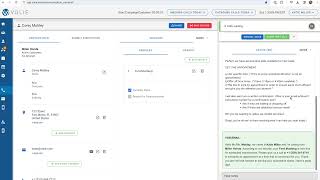
This is a YouTube video titled "Chapter 9 Communication Center Scripts with Quiz" containing a detailed instructional monologue explaining the use of phone scripts in a call center environment, including how to use callback numbers, scripting information, call notes, and disposition handling for customer interactions. The content is a single-speaker instructional guide without multiple participants or conversational elements.
On the right hand side of your call screen is the phone script. At the very top it will include a callback number. You can leave this number in a message to the customer in case you did not reach them. In the scripting itself, we will populate information to help you with your phone calls. So we may include the customer's name, the customer's vehicle, your name or the dealership's name, etc. The information we will include in this scripting area is based on the campaign as well as the vehicle for which they were enrolled. If you'll notice in the middle tab section under Vehicles, we also utilize the checkbox Reason for Communication to fill in the information in the scripting. If there's more than one script located in the campaign, you can choose the drop down arrow to toggle back and forth between multiple scripts. There may be additional scripting included such as rebuttals, information about add on services, etc. At the very bottom of the scripting section you're going to have call notes. You'll want to be sure to include anything from your conversation with the customer that's important or relevant either for yourself or for other teammates to know. In the future, this information could be used internally within your bdc, perhaps for future phone calls, or depending on the outcome of the call, we may automate an email alert to a team member within your dealership. For instance, if you would select the disposition of CSI concern that could potentially send an email alert to a member of your team and any notes you take may be sent in that email notification. The call notes under the scripting also copy over and work hand in hand with the call notes included in the Submit Disposition section. So any changes you make to one section of the call notes will reflect in the other. Sam.