4 MLOps Lessons Learned from Bootstrapping an AI Startup (talk)
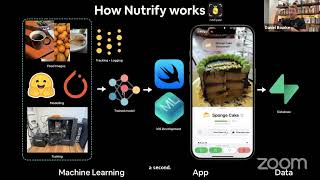
In this livestream talk, Daniel Bourke walks through the end‑to‑end MLOps workflow he built while bootstrapping Nutrify, a mobile app that identifies foods from a photo and provides nutrition information. He introduces himself, his background in food science and machine learning, and the inspiration behind Nutrify (a Pokédex‑style food guide). He then details the product’s current state (420 foods, ~300k images, 90% test accuracy, ~80% production accuracy) and the technical stack: a Vision Transformer backbone from Hugging Face’s TIMM library, fine‑tuned on a mixed dataset of scraped internet images and manually collected real‑world photos, with labels managed via an annotations file and auto‑labeling using foundation models (SigLIP, CLIP). The data pipeline is tracked in Weights & Biases (experiment, artifact, and table logging) and stored in Supabase (PostgreSQL). Models are converted to Core ML and run on‑device using Apple’s Neural Engine for fast inference. He shares several practical MLOps lessons: 1) start simple and copy what works; 2) data is the most important factor – combine internet scraping with extensive real‑world collection; 3) use lightweight model selection (parameter‑to‑accuracy ratio) and fine‑tune; 4) automate labeling and feedback loops; 5) prioritize on‑device deployment to avoid API latency and cost. He also discusses future directions (expanding to 500+ then 1,000+ foods, possible generative models, on‑device LLMs) and reflects on alternative approaches (bootstrapping with LLM APIs today). The talk ends with a brief Q&A about accuracy definitions and food coverage methodology.
Chapters
Hello there, Daniel Bourke here. So this morning, nice and early, I had a really fun time giving a presentation about MLOps lessons learned building my startup Nujify. But you'll hear about all of this stuff in the upcoming talk. What I've done is the talk was from the MLOps Learners Discord, and it was livestreamed to YouTube. So I've just extracted my portion of the talk and reposted it on my channel. I'll leave a link to the original talk in the description below. There were 4 other people who shared amazing lessons as well, so I'd really recommend you go check out the MLOps Learners YouTube as well as the MLOps Learners Discord. I'll put the link below. It's run by the amazing Chip Hewitt, who's the author of this book, Designing Machine Learning Systems, which I'd highly, highly recommend if you're looking to build machine learning applications. A lot of the lessons I learned from this book I've implemented into Nutrify which is me and my brother's startup to help people learn about food. But if you have any other questions about my talk, leave a comment below. I haven't edited it at all. I went a bit over time, of course, but yeah, I'll be happy to answer them. So enjoy.
So for the next person, Daniel, are you here? Are you ready?
Yes, I'm here. Can you hear me?
Yes, I know this like 6 AM your time, right? So thank you so much for making time. But the contact I should have met—
Yeah, you go.
Yeah, I met Daniel many years ago. He gave a guest lecture for my class when I was at Stanford, and I have seen him doing really cool stuff on his YouTube, and I know that he started a company and it's entirely bootstrapping as well. So, uh, yeah, Daniel, take it away.
Good morning, everyone, from Australia. It is nice and early here. I'm just going to try and share my screen. I've got a keynote. Is that working?
Yep.
Okay, beautiful. Okay. So hello, everyone. This is a little bit about me. This is probably a little bit out of date too, like a few of my pages on my blog that's kind of been by the wayside for the time being. But I make YouTube videos about machine learning. I am a machine learning engineer. And they're, well, the videos that I make are all beginner-friendly. So they're basically targeted at people who have no idea about machine learning and basically want to go from, I don't know how to code, to writing state-of-the-art PyTorch code or replicating research papers. So that's my sort of target audience. My current major project is Nutrify, which is an app to allow you to take a photo of food and learn about it. So that's Quite simple in a nutshell. The background here is that I graduated with a food science and nutrition degree in 2015, but have since then got into computers, and Nutrify is like the combination of those two, machine learning and food science and nutrition. So this is the— where I am right now, actually. That's the background there. And this is the office. It's my brother. He's a co-founder. We work on Nutrify a few days a week. And then, of course, my main business is creating machine learning resources and teaching online on— oh, we have our own platform, zeromastery.io. So my brother builds the iOS portion of things. So the front end, all the beautiful interface that you see, that's him. And then I handle all the machine learning stuff. So if the model makes a mistake, you can blame me. And if the app is janky, you can blame him. And so this is sort of Nootify in a nutshell. It's a Pokédex for food for now. We want to get it to, so inspiration comes from, I played Pokémon as a kid. Many people probably played Pokémon at some point. And I wanted to, as soon as I got into machine learning, I'm like, I wanna replicate like the Pokédex and I love food. So I'm like, I'm gonna narrow it down rather than identifying everything. I'm gonna just make it really good for food. And so, um, the whole goal of Nutrify is to make it— make learning about whole foods fun. So of course there's a lot of advertising budget for different big food brands and whatnot, but we thought if we can make learning about whole foods fun, um, then if people eat more whole foods, well then that's going to be beneficial for not only farmers but for health in general. So this is a sort of workflow interface None of this is, uh, um, just marketing slides anyway. You can download Nootify on the iOS App Store right now and try it out on your phone. Some basic features for now is to, you can make goals. It'll link in with Apple Health and sync a bunch of already tracked metrics. So if you have an Apple Watch, it'll, uh, map food intake to heart rate. It's really actually interesting to watch your heart rate go up as you consume caffeine. And then you can set goals. All foods get logged. You get a summary. This is automatically just created off the diary of categories. So this is my actual summary. I mostly eat fruit, drink, of course, water, tea, coffee, vegetable dish, then a timeline, and then breakfast foods. I love sparkling water. And then we get a breakdown here. So the fun part about Nutrify, the Pokédex-inspired part, is the Nutridex. So it encourages you It helps you teach you about foods that you already know, like common foods, and gives you a little bit of an incentive to learn about foods that you don't know. So you might go out and go, oh, I've never had black beans before, I'm going to go find them and try them out. And so the first time you take a photo of food, it will unlock it in your NutriDex, just like the Pokédex. If you want to read about everything I'm talking about here, it's in the launch blog post. We actually launched about 2 months ago. And back to that picture I showed in the lounge room, we're all bootstrapped. So this is just running. I have a deep learning PC upstairs, so all the models are trained in-house and it's all developed in the lounge room. And we're self-funding all of this. So what does Nutrify do currently? 420 foods across 20 categories via simple image classification. Keep it nice and simple. We currently have about 300,000 images in our database, and that's a combination of real-life images. So literally images that we've taken of foods, and then, of course, internet images. 90% test accuracy. Of course, foods get confused. The confusion matrix is very fun to look at. We use a Vision Transformer backbone for our vision models, just from Hugging Face. We fine-tune them on our dataset. Nutrition information is sourced from open-source food databases. So Food Data Central, which is by the US Department of Agriculture, and Food Standards Australia and New Zealand, which are reputable nutrition entities. It is a native iOS app, so it's built from the ground up in Swift. The model's running Core ML, and we launched 2 months ago. We've basically done next to zero marketing apart from like my YouTube channel, which isn't actually food focused, but we're at 1,000 downloads and 10,000+ photos taken so far. And the production accuracy is about 80%. And so now that's a very big caveat here because it's only on 420 Foods. So it doesn't actually really include foods that we don't do, but on simpler foods, it works basically 100% of the time.
Daniel, for accuracy, is it just like whether it predicts the category of food correctly, or what's the accuracy here?
So this is, so this one, this accuracy.
Yeah.
Is that what you mean? So this is like predicting the food that's in frame correctly. So if, is it an apple or is it a mandarin or is it a, a sandwich or something like that? So the categories are quite general. So it won't be like it's a sandwich, it'll, but it won't be like beef sandwich with lettuce, tomato, mayonnaise, all that sort of stuff. It's like one photo, one food. Very simple workflow for now, but soon later on we've got a whole bunch of models in the pipeline. But we're sort of— I'll get to the data engine in a second, but we're refining that a lot more. And soon the next update will be 500+ foods. So we'll go from 420 to 500+. End of 2024, we've got data being sourced for 1,000+ detection-based 2025 onwards. All known foods, potentially a generative style setup, maybe. I'm not sure. I kind of want these models to run on device, so we'll see what that looks like.
So how many types of foods are there in total? So you saw like a thousand, like, but how many are there?
Well, well, that's actually a very good question. So that's, um, uh, um, one big thing about figuring out which foods to cover is what, like, what is a food or what's the population. So there's no really database that sort of tracks, like, most popular foods. So basically what we're doing for that is bootstrapping by, uh, just scraping the internet, like going through Wikipedia, searching for articles with traffic, and just extracting the food entities from those. So then you can kind of create, uh, an inverted list of, like, which Wikipedia articles get the most hits and then take the food entities from that and just cover kind of like the, I guess, the 95 percentile first. And then obviously food is very, really long-tailed. So it's biased towards all the foods that we have access to in Australia for now. But once we sort of start leveraging more internet data, we can really start to ramp it up, expand it to many more foods than that. So there is no dedicated list of like, these are the top 1,000 foods in the world, at least not what I found. If you, if you have that list, I'd really like to know. So yeah, that's a great question. And so this is not a demo. I've really got skeptical of AI demos, but this is the caveat here is I do have the sort of pre-release version, but this is going to come out in the next update. But basically all the workflow you see here is what you'll get in the— oh, misclick. Um, what you'll get if you download the app today. And I don't know if sound works, but so basically it's all live camera feed. This is what I took at the market the other day. Um, and so, and of course it's— it uses Australian names, so rocket is arugula in other regions. And then I think I take a photo somewhere here. Wonderful. So then you get, you can track the weight of stuff like that, category. This is all accessible in terms of like it will speak it out to you if you want it to, that is. And so that's all built in with like Apple's accessibility platform. So if you're vision impaired, Nutrify will read out foods as you're sort of looking at them, and then it will give you information of nutrients, micronutrients, macronutrients, all that sort of stuff. So if you download Nutrify on the App Store right now, that's the sort of workflow that you'll get. That's our App Store link and website, nutrify.app. Now for the fun part, I wanted to make it as simple as possible for how it to work because we're a bootstrap startup. I just want it, and I only have one GPU, so one GPU, one dream. I wanted to keep it as, yeah, simple as possible. So our workflow is we have just basically a giant folder of images and then an annotations document that gets updated as a— on the fly iteratively. Modeling models come from Hugging Face, specifically TIMM, which is Torch Image Models. We just— I'll show you in a second. We just take the, the TIMM results, invert the, find the models with the lowest parameter count but highest accuracy. So highest parameter accuracy ratio. We fine-tune that on our own dataset, track and log via Weights and Biases, deploy the model to Core ML so it runs live. So that's why inference is really fast. And then we have a beautiful interface designed by my brother. That was actually our launch cake a couple of months ago. So Nutrify launch sponge cake. And as I said, yeah, it's very general at the moment. So it's just gonna be like, this is, looks like a sponge cake. And it gives you a rough estimate of what one serving of sponge cake would have. And then the data is all tracked in Supabase, just in a, a PostgreSQL type setup. So that way, when we eventually come to Android, you can just scrape the database and the accounts will be the same. Lesson learned number 1, or number 0, is find something or keep it simple. This is part 1. Find something that works and copy it. So as I'm sure many of us have taken inspiration from Andrej Karpathy, I remember watching his talks on Tesla's data engine and I'm like, hmm, I want to replicate that for food images. And so I did. And there's a YouTube video on my YouTube channel which basically talks about this workflow. And that's how I just want to have a data source, which is a folder of images. I wanted to track that data and the labels, train a model, see what the results are, evaluate, Find the most wrong examples. So like invert, find the examples with the most loss, but they were wrong. Oh, sorry, highest prediction probability, but wrong. Fix the labels, repeat. And so that's still basically the workflow that we do today to improve the models. And this is probably a little out of date now, but it is very much how Nutrify works in a nutshell. We leverage Weights and Biases heavily. So we use Artifact tracking, experiment tracking, and Weights and Biases tables, just because it's so simple to integrate. The whole system runs on about 4 or 5 Python scripts, which is beautiful, plus storage. And so I'll just show you, this is, yeah, so the train model results get logged in Weights and Biases, and then we iteratively update it using Label Studio, which is, and actually I don't actually use that much manually anymore. This kind of auto-label correction is done a lot by foundation models like SigLIP and CLIP and whatnot. So this is, yeah, still keep it simple. We find the most wrong examples. So use the model to help with labeling. So for samples like this, you download it from the internet. The true class is hot chocolate because that might be the image tag that's associated with it. From, like, an internet download. And then, but our model predicted chocolate cake, which to me would be more correct. So we kind of just find the most wrong predictions on training and test sets, and then we start up Label Studio, and you can just automatically select the right label, submit that, and that's going to, in the next training run, improve the model. But now, as I said, a lot of this is getting sort of just automated. So my main role as a machine learning engineer now is the model is frozen, the data kind of gets automatically updated. I just find better data sources. That's, that's really what my main sort of setup is at the moment. Lesson number 1 is the thing that we all kind of already know is that it's always about the data, part 1. So internet data is perfect to get started, but As you imagine, you search red apple and you get some good quality red apple images, but the real-life data is required for reliability. So you can train a pretty good model and have it running on a phone by just scraping internet data. But to get it to work really reliably, you need actual real-life data. So we've, as I said, we've collected probably closer to 60,000 manual food images now across a whole bunch of different categories. And that really just makes the model incredibly robust. So different lighting, different scenarios, cut up, not cut up, in half, angles, high, low perspectives, all that sort of stuff really helps the model. So just simple data collection. I can't emphasize that, that enough, actually. Lesson number 1, it's all about the data part too. So models are really, really good with the right data. So this is, of course, Andrew Ong, and I really take this presentation that he did at SCaLE conference to heart, and that is the free— that frees the code base, specifically the model architecture. I'll show you our model architecture in a second or how we do that. And that we just ensure—
just to time check, like, yeah, we—
sorry, okay, I'll go really quick. Freeze the model and we just focus on getting more data. So this is, we just find the best model with high parameters and accuracy on Timm, and then we just fine-tune that on our dataset. We deploy and find out what's wrong. So we have a food-not-food model. We simplify the problem because what are people, what if something's not food, right? And then if we have feedback loop by design, is this correct? And we offer different options. So just put the top K predictions in there. And then if text— if vision models don't work, we just stack models. So we run image classification and text detection simultaneously because that can help. So object detection is expensive. We just run 2 classification models, one to decide if it's food or food classification. And then we have feedback by design. So ML models are going to make mistakes, make it easy to correct. When model— one model isn't enough, use another. So we stack models. Of course, foundation models can do this, but they can't yet run on device. Optimization matters. So our previous model wasn't using the neural engine, and our new model uses the neural engine. So it's way quicker. And I have a thing where I'm like, I don't really like using API calls. I want it to run on device because it has to be fast. And so it's really fast. This matters in real life, even just on load up and whatnot. So we'll get through that. And then the bonus of model optimization is that inference is free and deployment pipelines are really simple. So I can just text my brother a new model whenever it comes out. So summary, keep it simple, copy something that works. It's always been about the data, deploy and see the whole picture. Model optimization matters, and bonus, you can get really far with a single GPU. Clever data filtering. Foundation models for auto-labeling. A data flywheel and a dream. Some great resources and questions. Sorry for going over time. I didn't test that.
Yeah, no worries. I think we have a bunch of questions on Discord. So Eugene wants to jump in quickly with one question before we move on.
I get a sense of what I know your response will be after your later slides, but if you had to rebuild this again today with existing technology and vision-based transformers via an API call, would you still have taken this route and try to get product-market fit with an on-device LLM, try and train it yourself? Or— yeah. Yes, that's a great question. So definitely today, if I was starting, I would probably bootstrap with the API. So like an LLM, VLLM, GPT-4, Gemini or something like that, and then move more and more closer to on-device running. So yeah, definitely if I was starting fresh today, I would bootstrap and just start and get something working. I read a great blog post the other day about GPT being the Heroku of machine learning. So I think it'd be great to just get started with that first. And in fact, we'll probably integrate that at some point. But yeah, for now, we train all our own models. But if I was starting fresh, I would definitely use a VLM to bootstrap it. Thank you.
Thank you so much. Thank you so much, Daniel Bourke. Hey, we have the last demo of the day from a very interesting project. I know Wenyon— sorry, I'm not sure if I say the name right.
More from Daniel

Small Language Models (SLMs) Are the Future: Fine-Tuning AI That Runs on Your iPhone

Introducing Sunny - A MedGemma-Powered Skin Health Tracking App (Kaggle Competition Entry)


Benchmarking: NVIDIA DGX Spark & NVIDIA RTX 4090 | Part 4 - Comparing the results

Benchmarking: NVIDIA DGX Spark & NVIDIA RTX 4090 | Part 3 - Running LLMs on the RTX 4090

Benchmarking: NVIDIA DGX Spark & NVIDIA RTX 4090 | Part 2 - Formalizing the tests

Benchmarking: NVIDIA DGX Spark & NVIDIA RTX 4090 | Part 1 - Creating a series of tests


Local Multimodal RAG on the NVIDIA DGX Spark | Part 4 - Publishing our demo to Hugging Face


Local Multimodal RAG on the NVIDIA DGX Spark | Part 3 - Putting it all together