A recipe for 50x faster local LLM inference | AI & ML Monthly
Daniel Bourke shows how to speed up local LLM inference by 50x. The video covers optimization techniques and recipes for running language models faster on your own hardware without relying on cloud services.
Chapters
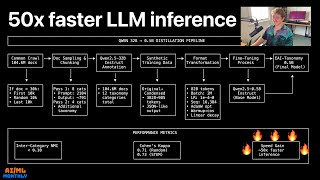
Ladies and gentlemen, welcome to Machine Learning Monthly for June 2025. I'm Daniel Bourke, machine learning engineer, and this is a video walkthrough of a text-based newsletter I send to your inbox once per month, which covers the latest and greatest in machine learning with a specific focus on open source. If you need a link to the newsletter, it'll be below, as well as timestamps and links to all the resources that we cover. So let's jump into it and see what happened in June. Let's jump right into it. We scroll down a little bit. We've got my work. So I'm excited to say that the Zero to Mastery object detection project with Hugging Face Transformers has been finished. We're going to take some data, train an object detection model to predict on that data, and then we finish with the demo. All of the code and text has been completed. So if you scroll through here, there's a fair bit going on, but it's essentially a zero to one for object detection with Hugging Face Transformers. And we train a model to have pretty poor predictions here. This is a randomized This is just downloaded straight from Hugging Face. As you can see, not that great. But then we make it do much better on images of hand, trash, and bin to incentivize people with the Trashify app to pick up trash in their local area for points. As you can see here, it's detected hand twice. That maybe benefits from some NMS, which is non-maximum suppression. And all the code is available, open source and text and the videos. If we scroll right back up to the top, coming soon. So they're— I'm recording them at the moment and they'll be edited probably by the next time Machine Learning Monthly comes out. And then if you remember on my YouTube channel a couple of months ago, I posted a video of entering a Kaggle competition. I actually ended up coming third in that Kaggle competition to use Gemini to track every item in my house and store it to a database. And so as a result of that, my brother and I decided to take the prize money and invest it in building an actual app. And so the Keep Track app is now available on the Apple App Store. So we've released that. So you can take photos of things. Gemini will autofill the details about it. You can of course turn AI off if you don't want it. So you can create reports for everything you own for insurance purposes or just tracking stuff that you want to take note of. So that is now available on the App Store. You can go and try that out. And it's— yeah, it's a fun app. Works really nice. So that's from me. That's my work. But let's get out of that and we'll go back to the article. And we'll jump through from the internet. So the first thing that we have is The Case for More Ambition in AI Research by Jack Morris. So Jack Morris is a great writer. I've liked some of his other articles. We've also put that in previous Machine Learning Monthlies. So this is one of my favorites. There are no new ideas in AI, only new datasets. But this is about this, The Case for More Ambition in AI Research. And Jack argues in this that there is many more papers, but are we really getting that many ideas? And of course, LLMs are taking over almost everything, but is that just making it— the space isn't really expanding. So there's a lot more people in there, and they're going into the space rather than expanding it. So look, different takes on this. I personally feel like we're making good progress in the field of AI, but I like this, uh, ambition. So good research takes ambition, this point here. My theory for why most research isn't territory expanding is because the odds of producing something groundbreaking with a project are directionally proportional to its chance of failure. Meaning, if you're trying to do something crazy that has never been done, your chance of failure is quite high. So this means that if you set out to change the world, you will probably fail. The converse here is that if you set your sights low and, and choose a topic that's more likely to bear fruit in some way, then your chances of success publishing something, as in a research paper, are higher, but the chances of expanding the space of knowledge are smaller. My take on this is, sure, for the people who want to make something groundbreaking, go for it. But if you just need to build something practical that works for you, go for that too, because in the end, it all adds up to progress in the field. So Jack Morris, go subscribe to his Substack, some great reads on different things in AI. Up next, we have a great practical blog post to save money on AI audio transcriptions by speeding up the audio. So this is George Mandis. And if we go into this, it's a well-written article, but the premise of this is if transcripts— transcription costs bill per token, as in how many words essentially you send to— spoken words you send to OpenAI— why not speed up the audio? So if you measure 10 minutes of audio and it's 1,000 tokens— I'm making these numbers up— but then you halve that to 5 minutes of audio and it's 500 tokens because you've sped up the audio twice, it's still the same audio, right? And so it turns out that you can speed it up 2 to 3x and get the same results. So he had the use case of transcribing Andrej Karpathy's newest video, and the 1x speed was 2300 seconds. And it was too long because I believe they have a 25-minute limit or something like that. And so he sped it up twice, and then it halved the duration, of course. And so it had 11,800 tokens, and it cost $0.07 or $0.07, and the outputs were $0.02. But then it went 3x and it was 8,000 tokens and it cost nearly half the amount. So 33% less, but it still got good results. But then he went to 4x and I believe— is that here? 4x was too fast. And so the cool thing about this is that of course models are like people. And if you listen to a podcast on 2x speed, I personally don't really speed up audio, but you can kind of understand what's going on there because models have been trained on so much audio data. You can speed it up and still get transcriptions, but there's a limit to that. Just like if you were to listen to audio at 3x, you could probably decipher most of it, but you get to 4x and then it crosses this threshold of just way too fast to understand. So I really like this practical use case of getting the most out of AI models. And so I wonder if this works for video as well. Like if you had a video that you needed to transcribe or extract information out, could you play the video at 2x speed and you're going to miss some frames potentially, but you may get the same results using less tokens. So really cool blog post. Go and check out George Mandis's blog and see how you can save money by speeding up your audio. Up next, we have Answer AI and they release Read Bench to test how well VLMs can read. Now, I love this simple classification or simple problem reframing. So of course LLMs are great with text, but if you're using VLMs, which I'm noticing more and more to read text from images for OCR, for example, one easy way to sort of benchmark that is you take all of the text-based benchmarks and you turn them into images and then you get it to perform the same test but on the image rather than the text now. So if we scroll down, I'll let you read through the blog post. But essentially a lot of models have a performance degradation over their ability to read the same text from an image as the text itself, which to me makes sense because they are, after all, predominantly trained on pure text rather than reading the text from an image. But some models are worse than others. So for example, Gemini 2.0 Flash and 1.5 Pro had quite a significant drop once you get to multiple pages. And that's what they actually found out. Across all models is, as you see here, the— so this is the difference in performance from reading from an image versus reading from text and answering the same question. We see that all of them have quite a point drop. GPT-4o doesn't have the— has the least point drop. But then as you go up multiple pages, you get the errors get amplified. So they all perform relatively close to their original performance. For one page, but then multiple pages down the track. And when this makes sense, the more data you feed to the model, you're kind of going to assume that it will slowly over time perform less. At least that makes sense to me. I know if I read an 8-page document, the chances of me getting everything right from that 8-page document versus a 1-page document are probably significantly less. And so really cool insight here. And then we got Overall, on short context, most models do okay, though they experience some degradation even on harder tasks. Longer context inputs trigger much more noticeable degradation, to the point where you might have second thoughts about— this is an important practical step— passing multiple pages to your visual RAG pipeline. This is consistent with anecdotal reports and other people's results. And so they find that, yeah, GPT-4o is exceptionally good, and the Qwen 2.5 VLs are exceptionally good as well. And I Personally find that as well. The Quen 2.5 VL7B is one of my favorite open source models for almost everything. It's a really strong baseline model, uh, that you can run on. I run mine on my RTX 4090 over there. So if you're doing any kind of reading or OCR with these larger models, this is a great blog post to inspect, especially also if you're doing visual RAG. And now we are up to Daniel Bourke's open source of the month. So the first thing is Black Forest Labs release Flux.1 context in dev mode. So it's an open weights image editing model. And this, this model is known for its ability. So the context is German, so they spell context with a K, whereas in Australia we spell context with a C, is known for adhering to the input image. So it keeps the context. So you could put this image in, say remove the dog and it edits it, keeps the image there. And then same with this little gremlin. You can say, hey, put a mustache on that gremlin. And then even with text, it's pretty good. So there's another demo here. This squiggly Sharpie-like image, add some text to that, Black Forest Labs. And then let's make this doll ride a skateboard. So the weights are open source. And as you can see here, it follows through a bunch of different stuff here. Sorry, retains context over a bunch of different scenes here. And performance on benchmarks, I personally find image generation benchmarks quite hard to interpret. I prefer to just try out the model with generating a bunch of different images. And that's what I did here to test out its, its text capability. So FluxOne Context, this is the demo. I put in the COVID photo of Machine Learning Monthly and said change AI and Machine Learning Monthly to ML is cool and keep monthly. So it retained— not only did it retain the overall feel of the image, but it image generation models have been notoriously imperfect with text in the past, but this text is perfect. So if you're doing text-based images on editing or text-based editing on images, you might want to check out FluxOne Context. And there is, of course, a non-open source version which is supposedly performs much better. I personally haven't tried that. I've just tried out the open source. And then finally, there's a little bonus here. Hugging Face sent out an article here with, you can fine-tune your FLUX-1 dev models on consumer hardware. So if you have a specific use case for generating images, maybe you want a certain style or a certain branding, this is a great guide to customize the latest open-source model from the Black Forest Labs team. I'm going to give that an upvote there. Okay. Up next, we have Gemma 3N models are fully released. So we previewed these at Google I/O, but now the Gemma 3N models, which are two small multimodal— they're actually the most multimodal models that have been open source in my— that I've found. They have audio, image, text, and video capabilities, and they're small enough to run on mobile devices. So we have two different variants here. I'm going to focus on the Instruct ones. But if we have a look at these models, there's a different— so they have effective parameters here, which is a little bit confusing to me because it's, it's a new concept. But the model, the 2B version has 6B parameters, but only 2 billion of them are active when they get used. So it needs less memory. But to me, like, it still needs the memory to to store the entire model, but the less parameters get run. So we're still in that space of exploring how to best run these models, but can take inputs of text, inputs of images, inputs of audio. And they got— did they mention video here? Oh, they haven't mentioned video here. I think they mentioned that in here. Video. Okay, there we go. And then there's also the 4 billion version, which is the E stands for effective parameters. So if we look for effective— yeah, effective parameters, and I think that's in the technical blog post. We'll have a look at that in a second. All the resources I've got for Gemma 3N, I've put it here. There's a great series of cookbooks and a Kaggle competition. And finally, it runs off the Audio Encoder, and we've got the developer blog post here. In a second, we'll go through each of these. So if you want to fine-tune the Gemma N models to your own Custom dataset. Hugging Face have a bunch of different recipes here. We've got audio, video, and then right down here we've got notebooks here. There we go. So you can fine-tune Gemma 3N on audio inputs, you can fine-tune it on image inputs. There's one there. And then multimodal inference. So some great resources there. If you want to enter a Kaggle competition, there's the Gemma 3N Impact Challenge. So the goal here is to create a use case for the Gemma 3N model and to use its optimized on-device performance, many-in-one flexibility. Because it's on-device, you can run it offline, which is really cool. And so the challenge is to build something of impact. So can you use the Gemma 3N model to enhance accessibility? And maybe you use the visual capabilities of the model to create visual, visual descriptions for people. Education, because it runs completely offline, you could create an education-based app. Health and wellness, environmental sustainability, and aid in crisis response. Because again, the, the really cool thing— this is— I love this trend— is we're going— we're starting to get into that era of LLMs and especially multimodal LLMs running on device. So check that out. As for the audio encoding, I really liked this technical blog post. So audio input, visual and text input, the vision encoder uses MobileNet V5, and I believe that's coming, uh, the paper is coming for that soon, and the multi— the, the model weights are coming for that soon. I haven't personally found them. I think that was supposed to be in Timm, but I've tried to find in the Timm library torch image models. I haven't found it there. So once they get launched, I'll include that in a future Machine Learning Monthly. But this is the architecture. And so this is the per-layer embeddings. So I'm still understanding this. I've tried to run Gemma3n, and I've run it just as a normal model using Hugging Face Transformers. But I believe there might be more and a more optimized way to run it if you're going on low compute devices. So this is where they get away with their active parameters or effective parameters because they're caching a large number of the embedding layers. And so when you actually run it, it only activates 2 billion parameters rather than the entire model parameters there. So we got the visual encoder, that's MobileNet V5, and then we've got the audio encoder, that's the Universal Speech Model, which I don't believe is open source as an encoder. Which apparently performs better than the Whisper model. I'm not sure which version of Whisper this is though. So whereas Whisper is open source, that's from OpenAI. And if we scroll down here, the vision, vision encoder, there we go. So MobileNet V5 300 mil. So this is state-of-the-art performance for multimodal tasks on edge devices Designed for flexibility and power on constrained hardware. So MobileNet V5 gives developers native support of different resolutions, broad visual understanding. So it's co-trained on extensive multimodal datasets. It excels at a wide range of image and video comprehension tasks. High throughput, so up to 60 frames per second on a, on a mobile device, a Google Pixel, enabling real-time on-device video analysis and interactive experience. So apparently it performs a significant scaled-up architecture featuring a hybrid deep pyramid model that is 10x larger than the biggest MobileNet V4. And is ViT-G— yeah, benefiting from novel architecture designs and advanced distillation techniques, MobileNet V5 300 mL substantially outperforms the baseline shape-optimized ViT in Gemma 3. So this is the, the whole Gemma 3 model, not Gemma 3N. N is for, I believe, nano. Because there's a variant of Gemini Nano which runs on device, trained with SigLIP, no distillation. On a Google Pixel Edge TPU, it delivers a 13x speedup with quantization, or 6.5x without, requires 46% fewer parameters, and has a 4x smaller memory footprint while providing significantly higher accuracy on vision language tasks. So that's really cool, and we're excited to share more about the work behind this model. Look out for our upcoming MobileNet V5 technical report, which will deep dive into model architecture, data scaling strategies, and advanced distillation techniques. So I hope that the encoder for MobileNet V5 comes out with the tech technical report. If you know where the MobileNet V5 encoder open source weights are, I'd love to see them. Up next, we have NumaiN releasing NuExtract 2.0 models for multimodal structured data extraction. So the models are based off the QuEN 2 and 2.5 series, and they're designed to do structured output. So there we go, we've got different variants there, and they perform quite well over the baseline models. But the real cool part is, of course, the demo. And here's one I've prepared earlier. So this is the demo. You can just design a structure that you want and some default fields that are going to be of a certain type. So verbatim string or just plain old string, number, multi-label, datetime, etc. And you put in an image or text because they're multimodal And then what the model is designed to do is take your input structure format, take the input data, and then output what it can find. If it doesn't find a specific field, it will output either an empty list or null here. So you can kind of tell if it doesn't— hey, maybe this invoice doesn't have a price per item, then it'll output a blank list. So really cool set of models here if you want to do structured data extraction at scale. They're available at the NuMind Hugging Face repo. There's several variants, and for more, check out the demo or the blog post there. Up next, we have a release from Essential AI, and they released Essential Web v1.0, which is 24 trillion tokens of organized web data. So they filtered the 100 terabytes of Common Crawl and enabled it to be filtered with SQL-like filtering. So if you wanted the math-related documents, you can just search using subject==math. But one of my favorite things that they did was, of course, there's a paper. But if we go here, there's a collection associated with this paper, and that's Essential WebV 1.0. And there's a paper, there's the dataset, and my favorite thing is the model that they released. So eai-distill-0.5b is a fine-tuned version of Qwen 2.5 0.5b Instruct designed for document classification across 12 taxonomic categories. This model is optimized for high-throughput classification of web documents and produces structured metadata for large-scale data curation Now, this is— I don't have a direct use for this particular model, but I really liked the recipe that they released in their paper. So if you read through the paper, the model was designed— it took labels from QuEN 2.5 32B Instruct on 104 million document dataset, and then they took those labels that QuEN 32B produced and fine-tuned 0.5B to reproduce those labels. And it found that the similarity. So Cohen's kappa, or K, which is a score for agreement, was within 3% difference. So the small model that they fine-tuned was within 3% of what the big model produced. Excuse me. And so if you want the prompts that they use, they're also on GitHub. But let's have a look at this workflow now. So QuEM32B is what they started with. And then they wanted to distill that to a much smaller model because they found that QuEN 32B could produce good labels because no one's going to annotate 104 million plus documents, right? You need to do that with a model. So they took the Common Crawl docs or a subset of them, and then you did sampling and chunking. You annotated them with QuEN 2.5 32B. You have synthetic training data now. So the output of QuEN 32B is your synthetic training data. and then you fine-tune this much smaller model to reproduce the outputs of the QoIM 2.5 32B, and then you get the final model, which is 0.5B or billion. And so what do you get? Well, you get 50x faster annotation. So shrinking the 0.5B parameter model, removing the prompt so that you don't have an input prompt, so you just use the document as the input, because if you fine-tune the model to do a specific use case, you can now remove the input prompt and just put in the target text because it's focused on doing one thing. And you condense the generation output. So this boosts the throughput of 1.4 documents per second to 70 requests per second per GPU. So if you scale that up to a multi-machine, all of a sudden you've got a scalable workflow that you can label hundreds of millions of documents. Minimal quality loss. So the average annotator K, so Cohen's kappa, if you want to look at that, go on Wikipedia. And stem sets of EAL, EAI Distill 0.5B falls by 3%. So slightly small, slightly worse performance, but much faster annotation. And then domain coverage intact. So on an unseen 102 million document sample of Common Crawl, Math and code recall remain within 1 percentage point of 32B Instruct while keeping the same compact filtered sets, less than 5% of the data. So incredible paper, incredible release. My favorite thing is this recipe here. So if you want to fine-tune a large language model such as 32B, QWEM 32B, which performs incredibly but takes a fair bit of compute, you can use it for synthetic data, data synthetic data generation and then fine-tune a small version of the Qwen model or another smaller large language model. Qwen 3 is actually out now, and then you can have much faster throughput with a small performance degradation. That is really cool. Up next, so speaking of Qwen 3 model being out, the Qwen team are releasing quite fast. There is now embedding models and re-ranker models, uh, released by the Qwen 3 team. So if you're building a RAG system, You generally need a— we'll start with the embedding, an embedding model to represent your inputs in numerical fashion. And then if you do retrieval, you often need— you don't need a re-ranker model, but it often improves performance. So you retrieve, say, by similarity matching with embeddings, 1,000 results, and then you get the top 100, and then you use a re-ranker model to go, hey, given these top 100, which actually suits the query best. So these are incredibly performing models and they're all open source from the Qwen team. Up next, we have a foundational model for organismal images, and that is BioCLIP-2. So if we have a look at this, it is an open source contrastive language image pre-training model and it is trained on the Tree of Life dataset. So if you're doing any sort of image work in the biology space, this might be a model for you to look at. We've got a large dataset here. So again, if you need to train a custom model for any kind of biological system, you might want to look into the Tree of Life dataset, 200 million images there. But the really cool thing about this model is that it's able to do zero-shot detection. We have a demo here. Demo is coming soon. I believe it's already up there. Maybe they need a pull request for this link. So I'm going to like that. But you can now take your photos and I have one here, like all good cooking shows, prepared. Of the species that you see in your everyday life. So this is a kookaburra that I took on my clothesline there. And then if I submit that, the model can do zero-shot image-to-text base, or in this case, species matching. Laughing kookaburra. How cool is that? So then you can find out different information about the species that you're looking at. And because it's been trained on such a large dataset, well, then it can do a large amount of species. And if we go to the model, there's one thing on the homepage which they also found. So that's emergent properties. So because the model, again, trained on a large dataset, it can decipher between the same sort of species. We've got a juvenile here. They create embeddings that are in a similar space. So the juvenile are grouped together, but then the adults are also grouped together without explicitly being told which are juvenile and which are adult. The same thing goes for the male and female of it, of the same species. So we have male version of this yellow bird and a female version, and in the embedding space they become quite similar once you line them up. So really cool model release, really cool dataset release. If you're in the biology space or just interested in identifying the different species that you see around day to day, check out BioClip 2. Up next, we have Meta releasing vJEPA2. Now, JEPA stands for Joint Embedded Prediction Architecture. Let me see if I— yeah, there we go. Joint Embedding Predictive Architecture. So Meta Video Joint Embedding Predictive Architecture 2, vJEPA2, is a world model that achieves state-of-the-art performance on visual understanding and prediction in the physical world. Our model can also be used for zero-shot robot planning to interact with unfamiliar objects in new environments. So there's a— not only is the model weights available on Hugging Face, but they also have different benchmarks. Here's an architecture overview. So we train V-JEPA-2 using self-supervised learning from video, which allows us to train on video without requiring additional human annotation. So essentially the main prediction of V-JEPA-2, as I understand it, is to take in videos or frames of videos and to predict what happens next. So if you mask out some of the frames, V-JEPA-2, the goal is to learn an embedding that represents what's going to happen next given this sequence of frames. So for a kickflip or an ollie here, you might predict that the next frame is going to be the person is out of the scene. So it's comprised of an encoder which takes in raw video and output embeddings that capture useful semantic information about the state of the observed world, and a predictor which takes in a video embedding and additional context about what to predict and outputs predicted embeddings. And so what can you use this for? You can use this to initialize your robotics, any robotic, robotic arm or robotic system that needs to plan in the video space about what's going to happen next. V-JEPA can be your world model embedding initialization. There's a number of different benchmarks here, such as INTFIS2, where the goal is to go, hey, given this initial series, is this possible for the next to happen, for the next video to happen. And then there's an impossible. So there's— this is to try and get the model to understand physics. Impossible and possible video series. If we keep going, there's minimal video pairs. So similar videos, but they have something slightly different as far as I understand. Casual— causal VQA, based on what you've seen here, what would happen next? So there's a number of different benchmarks here, which arguably, if we go back to the original Jack Morris blog post that we talked, is an important step forward for any type of thing that you're trying to test. It's good to have a benchmark because then you can go, okay, I'm going to try this new experiment and see how it compares to what's previously been done before. But again, always be skeptical of benchmarks until you test things on your own problem sets. Let's go back to the article. Up next, we have the Glener X Series, or GLI-NER, named entity recognition release. And these are some powerful models which can extract any named entity from any body of text. And I believe it's better to show an example first. So we have the model, we load it in here from Hugging Face, and then we have the text. So in this case, uh, it's a food caption. A plate of steak, white rice, guindilla peppers, olives, parmesan cheese, olive oil drizzle. A pint of Guinness sits in the background with a glass of water next to it. And say, for example, we wanted to extract food and drink items. You can use the Glenna X-Series to extract the target entities. So we could even put this as labels if you had, say, uh, financial institution. Institution, right? If we put that there, we can extract that. But if we start with the food items, we got plate, steak, white rice, peppers, olives, Parmesan cheese, olive oil. And then for drinks, we have Guinness and water. And if we run this, do we have financial institution? It should be nothing depending on how the model goes. We're testing this live. It's running on CPU too, by the way, so it might take a little bit longer. Guinness is a financial institution. Well, that's kind of actually correct because it is a company, but that's— so this is what you can use Glenna for. So if you needed to extract entities at scale, it's a zero-shot model, so you don't necessarily need to train it. You can download it straight from the Hugging Face Knowledge Gator page, and it comes in a variety of different sizes. So there's large, base, and small. So if you need to do large-scale entity extraction, go and check out the Glenna X series from Knowledge Gator. Up next, we have OCR edging towards its ChatGPT moment. And what I mean by that is that OCR is getting really good. I remember the days when I first started machine learning, you would pass in a PDF or something and OCR would do okay. But now we're getting to the stage where you can extract— of course, the OCR of the past would just do text, but now we're getting to the stage where the new Nanonets model, OCR-S model, can do LaTeX equations, images, signatures, watermarks, checkboxes, tables, you name it. It's got it all. There we go. LaTeX equation recognition, intelligent image description. So it can describe images and documents, signature detection and isolation. It uses signature tags for that, just like HTML docs, watermark extraction, and even checkbox handling where it can— if a checkbox is unticked, it will return a blank checkbox. If it's ticked, it will return a ticked, and if it's X'd, it will return an X. So that is really cool. There's a blog post where you can see some demos here. So if we have the input, which is a paper, we've got the output, which is going to be a markdown version. There's a raw model output and there's a comparison to Mistral OCR where of course it might be cherry-picked, but the Nanonets model seems to perform quite well on a variety of different data types. And if we have a look here, let's look at this signature one. So see how this invoice has a signature there. We look at the output of the model. Yeah, it's got a signature tag, Jay Walker. And if we look at that, is that Jay Walker? I'm not sure. I can't really read that. Maybe it's a different name. But yeah, output really cool there with the signature tags. Same with the watermark tags. We have the input, which is an invoice, and then the output is going to show where the watermark generally appears. So it's kind of— yeah, I'd kind of say it starts there in the consulting services. Output, you can see where the watermark is. And then there's checkbox handling. We got some ticked checkboxes here and some unticked ones down here and here. If we look at the output, we can see that we get the unticked checkboxes there and the tick checkboxes. So if we scroll down, yeah, we get the, yeah, the character there for an unticked checkbox. So really cool release here from Nanonets with their OCR model. It's available on Hugging Face if you need to do some high-quality OCR, and it's getting a fair bit of traction there, which is a pseudo-metric, not, not perfect for showing how good it might actually be working in the real world. And then of course, there's the Monkey OCR model. I haven't personally tried this out in comparison, but it also seems to be using a similar pattern to the Nanonets model. But that's where we're getting to with OCR. It's getting incredibly good. And so I think a lot of these models are using the Qwen 2.5 VL series to fine-tune on specific OCR tasks. Where you get not only text, but you get document structure as well. And if you need to do Chinese text extraction, that's what MonkeyOCR is focused on as well as English. So I think Nanonets might only be English. Yeah, English-only model. So go and try those models if you need to do some incredibly high-performing OCR. Up next, we've got TorchVista, which is a visualization tool for the forward pass of PyTorch models. So if you're downloading a model, you might want to look out how tensors flow through it, and it's based on PyTorch, of course. So we've got some demos here, but we've got some live code. So I'm using the Timm library for the computer vision model backbone here, loading MobileNetV4. That downloads, and then from torchvista import trace_model. And then if I trace the model with an example input, we get an interactive diagram here where we can just tap through each of these and learn the shapes and how our tensors get manipulated as they move through the network, right down to the output down here. And then of course it works for simpler models. So we just have a one-layer linear model, we have an input of shape 210, and then it goes through the linear module and then it becomes an output there. So really cool, small, simple package to visualize the forward pass of your PyTorch models. So big shout out to Sachin Ho Hosmani, Sachin Hosmani for open sourcing the TORSVista visualization package. Up next, we have OVIS-U1-3B, which is a unified model that combines several different modalities. So there's the architecture there. We have a generator and an understander. So what that means is not only can it understand images, you can input an image, ask questions, you can input an image or input text and get an image generated, and you can input an image and text and have it edited. So let's jump into the demo and bring in our trusty bird image. Hey, so if we put in our bird image and what do we want it to edit, maybe let's say put a hat on the bird. And let's see, of course this is quite a small model at 3 billion parameters. Let's see what it comes up with. I'll fast forward to when the image comes out. There we go. Okay. Okay. Well, it did what it said, right? It's put a hat on the bird. Not the greatest looking image, but again, this is quite a small model. So if we go to the next one, let's go an image of a kookaburra sitting on a clothesline. Clothesline. Let's see what it can generate. Hey, there we go. Okay, again, yeah, it's, it's sort of a kookaburra. I wouldn't say that's a kookaburra, but it is kind of sitting on a clothesline. Not the highest quality image, but let's go one more and we'll put in this for image understanding. Let's go, what bird is in the image? Where would you find this bird? What is it known for? So because I live in Australia, I know I see a lot of these kookaburras. This is on my own clothesline in the backyard. It's a beautiful bird. So the bird in the image is the kookaburra. Great. Kookaburras are native to Australia and are known for their distinctive appearance and behavior. They have a large round head with a prominent crest, a long tail, and a strong hooked beak. Found in woodlands. Do they know Unique hunting behaviour. They are skilled at catching prey such as insects, small mammals, and even birds. Their strong beaks and keen eyesight allow them to spot and catch their prey from a distance. Yeah, there we go. Okay, this is what I was looking for. For their loud distinctive calls, which are often described as sounding like laughter. So, these kookaburras, if you hear them in Australia, they sound like they're just having the best time when they start laughing. So yeah, really cool model here that not only can edit images, generate images, but it also understands the images. So you can ask questions. Well, understands— it generates text based off images. So I really like this trend of unifying models. So there was also recently the Bagel model from ByteDance, which is a slightly, well, 3 to 4 times larger model, but it has a similar thing of understanding, generating, and editing images. So go and check those out if you want to experience the new world of unified models. And up next, we have Baidu releasing the ERNIE 4.5 series of foundation models. So this is quite the collection. So we have 4.5 Vision-Language model, which is a massive model at 424 billion parameters with active of 47 billion, right down to— I think the smallest one was, yeah, 0.3B, which I think is text only, not VL. So incredible release here from the Baidu team. If you want large-scale foundation models, I believe if we go to— where is the flagship? I think this is the flagship in PaddlePaddle. There's also a PyTorch version. It, as you can imagine, the blog post— if we go to the blog post release, it performs on par or better than other flagship models that are open source. So Qwen3, competitive versions there. Deepseek V3, GPT-4.1, it's definitely up there with some of the best models that are out there. And multimodal models as well, OpenAI's O-1 there. So incredibly released there from the Baidu team. If you need a large-scale open-source foundation model, go and check out Ernie 4.5. So they're the open-source releases of the month. Let's get on to some other kinds of releases. So this is Google Colab. You can now use OpenHuggingFace models with Google Colab. You can now use Terminal in Google Colab on free instances. And Google Colab now has Gemini 2.5 Flash built in. So Hugging Face, the release here, if you go to the Transformers library, you can now open models directly in Google Colab. And even if I think if you want to create an example of how to use your model. Yeah, this is what I highlighted from this article. If a model repository on Hugging Face now includes a file called notebook.ipynb, the Hugging Face Hub will prioritize that over the auto-generated notebook content. So if you want to open in Google Colab, it will load your demo notebook that you've saved with this file path. So if you want to show people how to use your model in Hugging Face, you can now create not only a README but a default notebook that it will open to in Google Colab. And if you want to use Terminal in Google Colab, it is now free to use for free users. So I find Terminal really useful when I'm using Google Colab to view how much GPU my space is using or instance is using. So with NVIDIA SMI, and also now you can navigate the file tree from the terminal. And then finally, you have AI built into Google Colab. So you've got Gemini 2.5 Flash, which comes in a little bar down the bottom that you can now use the context of your Colab notebook and it will generate some code in a little Gemini-based cell. But just something to be aware of. I've got a little demo here. If we go to Keynote, I took this screenshot. So it does quite well because of course Gemini 2.5 models are quite good at coding. But a caveat is that it— if you use Gemini in Google Colab, Google basically read and can use your data. So there's some note here. When you use generative AI features in Google Colab, Google collects prompts, related code, generated output, related feature usage information, and your feedback. Google uses this data to provide, improve, and develop Google products and services and machine learning technologies, including Google's enterprise products such as Google Cloud. So TL;DR, do not upload sensitive information if you're going to use Gemini in your Google Colab notebooks. So really cool feature to be able to access Gemini for free, but at the cost of giving Google all of your data. So just beware, use it if you're working with non-sensitive data. Up next, Apple hosted their WWDC 2025 event, and a lot of people are saying Apple are behind on AI. And of course, if we're looking at pure benchmark results, I would agree. But with their update to the foundation models on device, I think they're slowly catching up now. Of course, slowly is with a big caveat. If they ever do get to the sort of the GPT level, that's another thing. But this is a great read on how they created their important— I like it— importantly, on-device foundation models. So of course, data preprocessing, pre-training, post-training optimization, Apple Foundation models. And there's also adapters that you can now take Apple's foundation models on the iPhone. It'll run on device for devices that are compatible, and then you can train an adapter layer to also run on device. So that's really cool. No API calls needed. So model architecture, I'll let you read through the specifics of the blog post, but I had some great takeaways from this down at the results. If we compare the human evaluation, so for on-device models, the Apple-trained models are similar results to similar based sized models. So their on-device models are 3 billion parameters. So if we look at Qwen 2.53B, it performs similarly, actually wins more than it loses. But then if we go to newer models such as Qwen 3.4B and Gemma 3, it's, it's slightly— those models perform slightly better than Apple's on-device models. So, and then if we have the server models, which are Apple-based server models, which are larger parameter-based. It's fairly competitive with models like Llama 4 Scout, Qwen 3, but not as, not as good as GPT-4o there. As you see, the lose is higher than the win, but we still get a fairly significant number of ties. And then this is for visual evaluation, image responses there. Apple on-device models perform quite well because they've specifically focused on improving their models for on-device visual reasoning or visual understanding. So I've got some takeaways. LLMs for data extraction. So when they're filtering data to train the models, that— so like we saw with the Essential AI paper, we incorporated LLMs into our extraction pipeline, particularly for domain-specific documents, as they often outperform traditional rule-based methods. So really cool to see LLMs being used at scale for data filtering. And then more model-based filtering here. And then of course, a big step up in synthetic data. We use synthetic image captioning data to provide richer descriptions. We developed an in-house image captioning model capable of providing high-quality captions at different levels of detail, ranging from keywords to paragraph-level comprehensive, comprehensive description, generating over 5 billion image-caption pairs that we used across the pre-training stages. And for text-to-visuals, To improve our model's text-rich visual understanding capabilities, we curated various sets of text-rich data including PDFs, documents, manuscripts, infographics, tables, and charts via licensed data, web crawling, and in-house synthesis. We then extracted the text and generated both transcriptions and question-answer pairs from image data. Visual Encoder, more tokens too. So now it's not only English-based, it's multiple languages. So they increase their tokenizer from 100K to 125— 150K tokens that it can handle. For tool use, they— so for tool use during supervised fine-tuning, and this is what I really like about the, this post, is not only it shares data preprocessing steps, but it also shares annotation. So when you annotate a model or annotate a data struct. So we designed a process supervision annotation tool where annotators issued a query to a tool use agent platform returning the platform's entire trajectory. So all of the steps including the tool invocation details, corresponding execution responses, and the final response. This allowed the annotator to inspect the model's predictions and correct errors, yielding a tree structure dataset for teaching. So that's a fairly comprehensive process, but it also goes to show how important annotation still is in the large-scale data usage. If you want a custom use case, you better get used to annotating that custom use case. So our evaluations showed significant gains with RLHF, reinforcement learning from human feedback, for both human and auto benchmarks. And while we introduced multilingual data in both the SFT, supervised fine-tuning, and RLHF, reinforcement learning from human feedback, stages, we found that RLHF provided a significant lift over supervised fine-tuning, leading to a 16:9 win-loss rate in human evaluations. And this is where I really liked, uh, the release is they now have an on-device foundation model that is open to developers for structured generation. So you put in a struct in Swift, which is like a dictionary in Python, and you say, hey, generate me data based on this struct. And the model that is on device is really good at structured generation for that type. It's specifically for that structure that you've given it. It's been specifically trained to do that. So next, an OS daemon employs highly optimized complementary implementations of constrained decoding and speculative decoding to boost inference speed while providing strong guarantees that the model's output conforms to the expected format. Based on these guarantees, the framework is able to reliably create instances of Swift types from the model output. And there's some information here about customizing the 3B parameter model. So provides a Python toolkit for training Rank32 adapters. So if you want to adapt the foundation model to your own use case, and then if we go to— if you want to see more of that, there's a playlist on the Apple Developers YouTube channel, which has all of the foundation models information about the foundation models framework. So if we jump through to guided generation. Yeah, there we go. Generate a list of suggested search terms for an app about visiting famous landmarks. So you can scroll through. We scrub through the video. Where's the struct? There we go. So you define it as a generable and you say, hey, it has to create search terms, which is string, and it says this is a list of strings, sorry, a list of suggested search terms with a count of 4. So this will use constrained generation to make sure that what comes out of the foundation model adheres to this structure. So if you're developing Apple apps or if you're interested about how Apple Intelligence works, go and check out this blog post on Apple's machine learning research page. It is a terrific read through into how a foundation model comes to be, and especially one that works on device. That's really cool. Up next, we have some researchers from the larger players. We've got Anthropic with a great detailed write-up here of how they built their research system. So if you're into a technical-based report for how Anthropic create their own agent for doing deep research, Be sure to go and check that out. And then Google are on quite a streak at the moment with their releases. Imagen 4 is now in the Gemini API. Gemini 2.5 Pro and Flash are now stable, and there's even a new version of Gemini 2.5 Flash Lite, which is their cheapest, most efficient model. Gemini CLI is open source. All of the code is on GitHub. Gemini Code Assist is live, and Gemini also released a deep research, uh, open source project with LangGraph. So if we jump through all of these, ImageGen 4, I'm finding, is out doing outstanding image generation. I'm doing it for some synthetic data generation for my own projects that I'm working on, two of them. And it— so I want some vision data, and instead of sourcing it manually, I'm getting synthetic data and then training models on that synthetic data. Of course, always evaluate on real data, but it performs really well with text as well. There's two versions, the base model and the ultra version. The ultra is about twice the cost of the base version, but it's supposed to be better, and I found it much of a muchness. I think they're both pretty good in my own use case. And then Gemini 2.5, we now have 2.5 Pro is generally available, so out of preview. Flash is now generally available out of preview and Flashlight is now in preview. So I've even found Flashlight to perform incredibly well for things that I was previously using Gemini Pro for. So now we've gone from like with the 1.5 Pro to 2.5. 2.5 Flashlight is now to me in my use cases, kind of like what 1.5 Pro used to be. And then 2.5 Flash and 2.5 Pro are exceptionally better. There's also the CLI for Gemini. I personally haven't used it. There are a bunch of YouTubers who've made great videos about this, but what I'm hearing is that it's got the biggest free use of people. And my favorite thing, of course, is that it's open source and it's got 54,000 stars already. So if you want to see how it works, that's— I think that's really important, is that you can dive into the code. And now just beware, usually if something's free, as we saw in Google Colab, if it's free, your data might be the cost. So just keep that in mind. There's now a dedicated website, of course, for Gemini Code Assist. And finally, there is a full-stack LangGraph for Gemini Research. So this is a React application that uses a Gemini model that goes and performs research on the web and brings back information from those web sources and into a chat application. And this is, I believe, powered by React and LangGraph. So if you want to see how a research agent, not only Anthropic have their research system published, a blog post of how it was built. Google have released a full stack Gemini version that you can run locally on your own machine, of course, with API calls. So go and check those out. To finish off, Andrej Karpathy did an excellent talk on Software 3.0. So we had the software 1.0, which is code, software 2.0, which is— I'm just going to put this on mute so it doesn't play out loud. Then I'll play a small section of this. Yeah, there we go. Software 1.0, computer code, programs, computer. Software 2.0, weights, programs, neural net. So I remember reading this blog post by Andrej probably 2017 or so, software 2.0, and was really inspired by it. That's one of the things that got me into machine learning in general. Now we're up to Software 3.0, which is prompts which program an existing LLM. So an LLM is a programmable neural net. So a lot of Software 2.0 is still you program the data and the neural net will learn from that. Now we're up to English programs the neural net and it will do tasks on that. But the future is, of course, a combination of all three. You still need— let's not forget how cool LLMs are. Let's not forget, though, how important software 1.0 is. You put in code and you get something reliably out. That's, that's the beauty of computers to me, is the repetition. Whereas prompts are still in that state where you put something in, you're not guaranteed something out on the other side because it's a probabilistic model. One of my favorite takeaways from here is the designing an LLM-powered application. So I took this slide screenshot of it. So package information into a context window. So if your application needs excess information that isn't built into the LLM, that's where context engineering comes in. What information can you get into that LLM? Orchestrate multiple LLM models. So not only multiple LLM models, but multiple other models. So for example, you might need an LLM to summarize something, but you might need an embedding model to find information to summarize. You might need a vision model to identify objects in an image. So there's a lot of models that can be run behind the scenes rather than just an LLM. And then 3, application-specific GUI. So there was a quote from one of the— I'm not sure if it was in his talk, but in another talk, which was the, the GUI is the product. So when you're building a product, for most people, what they see is the product itself. So make sure you're designing that to be for LLM-based applications. And then finally, the autonomy slider. So you can start with zero autonomy and then you can scale that up if you want full autonomy. So for example, in the Keeptrack app, keeptrack.app, we use Gemini to extract information from photos. But if you want no autonomy, you can just turn it off and then you just have a photo based app where you can just track information that you enter manually. So that's something that we've already implemented in KeepTrack that's out there in the world now. So really cool anatomy of an LLM-driven app. And then finally, to finish off, I have two channels to recommend to you, which is Pivot to AI, which has some great videos and takes on almost every day of different things in the AI news cycle. It's, it's mostly focused towards basically pointing out where a lot of LLM and AI BS is, which I really love, rather than hyped takes. And then finally, Nate B. Jones. I love his also almost daily videos and takes on very nuanced takes on just AI in the world in general. And if we go into this, this is one of my favorite recent videos is Using AI Backwards. So rather than generating answers, Nate, in this point, the point that I took away from this, rather than just getting straight answers, use it as a curiosity expander. I love that. So rather than just giving you the knowledge, use it to expand your own curiosity and own knowledge. So that has been AI and Machine Learning Monthly for June 2025. If you want the next issue, you can go to the link that will be in the description. You can enter your email. It's free, no paywalls. Subscribe and you'll get the July 2025 issue in your inbox. Next month. Happy machine learning!
More from Daniel

Small Language Models (SLMs) Are the Future: Fine-Tuning AI That Runs on Your iPhone

Introducing Sunny - A MedGemma-Powered Skin Health Tracking App (Kaggle Competition Entry)


Benchmarking: NVIDIA DGX Spark & NVIDIA RTX 4090 | Part 4 - Comparing the results

Benchmarking: NVIDIA DGX Spark & NVIDIA RTX 4090 | Part 3 - Running LLMs on the RTX 4090

Benchmarking: NVIDIA DGX Spark & NVIDIA RTX 4090 | Part 2 - Formalizing the tests

Benchmarking: NVIDIA DGX Spark & NVIDIA RTX 4090 | Part 1 - Creating a series of tests


Local Multimodal RAG on the NVIDIA DGX Spark | Part 4 - Publishing our demo to Hugging Face


Local Multimodal RAG on the NVIDIA DGX Spark | Part 3 - Putting it all together