Apple M3 Machine Learning Speed Test (M1 Pro vs M3, M3 Pro, M3 Max)
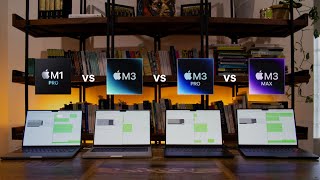
Daniel Bourke benchmarks M3, M3 Pro, and M3 Max MacBook Pros against an M1 Pro and NVIDIA GPUs on five machine learning workloads. The M1 Pro often matches or beats the base M3, while dedicated NVIDIA GPUs are 2-10x faster at training. For serious ML work, upgrading RAM first matters more than the chip itself.
Chapters
Hello everyone, Daniel Bourke here, machine learning engineer. As you can see, I've got 4 MacBook Pros here. These are the M3 variants, the brand new ones from Apple, M3, M3 Pro, and M3 Max. This is my M1 Pro 14-inch that I've been using for the past 2 years. And of course, I'm a machine learning engineer. I want to figure out, are these new machines good cost to performance against 3 other machines I use regularly? So I've got a deep learning PC upstairs in Google Colab. We've got 5 machine learning tests. We're going to benchmark all of these and see how they go. Now, a quick overview of what you're looking for when you're buying a machine learning PC. Whether you're going with a MacBook Pro or something else, these are standard across the board. 1, processing power. Now, if you're wanting to build deep learning models, which is what you're seeing in all the AI revolution, it's all based on deep learning. So, what you want there is GPU processing power and memory. So, all RAM. Or GPU RAM if you're not using a— if you're using an NVIDIA GPU. However, since we're focused on MacBook Pros, these all have integrated RAM. So the GPU, CPU, RAM is all on one chip. Now the M3 base model has 8GB of unified memory and starts at $1,599 USD. And then we have the M3— oh, this is the M3 Max. This is the M3 Max, has 36GB of unified memory. And this is— these are all the baseline models of the variants. So M3, M3 Pro, M3 Max. M3 Max starts at $3,999 USD. And then finally we have the M3 Pro, which the baseline model— you can of course upgrade all of these. This starts with 18GB of unified memory. So the more GPU cores you have, the more numbers your computers can crunch. And machine learning algorithms are all based on just finding patterns in numbers. And the more memory you have, the bigger the model you can store in, in memory and crunch numbers with. And the bigger the model you have, the more parameters it can use, the more patterns it can find in data. Now that's a big broad overview, but essentially more GPUs, more memory equals better. So if I was to place a bet on which one I think would perform the best out of all these three, of course it's going to be the M3 Max, but We're probably all not surprised by that. We're gonna find out with the test. So what tests are we going to run? Well, we've got 3 M3 variants. We've got my daily driver, which is an M1 Pro. I've been using this for the past 2 years. I've got a deep learning PC upstairs. I use this in collaboration with that to build Nutrify, train computer vision models almost every day on that. And then of course, we have to compare them to everyone's favorite, Google Colab. We have 2 PyTorch tests, a computer vision, natural language processing test. And we have 2 TensorFlow tests, a computer vision and a natural language processing test. And then of course, something I'm really excited about, a Llama 2 test. So we're going to test the Llama 2 7B variant, which is a large language model for text generation. We're gonna see how many tokens per second each of these machines can generate. Now hopefully, if I've got all my code correct, it's going to run across all the machines. Let's do it. So let's check out some results. But before we do, I have two small things to show you. Number one is if you'd like all the code to the tests that I ran in this video, it's all available on GitHub. I'll put that link in the description so you can set up your own Mac and try to run the test yourself. And then If you'd like to learn machine learning, particularly if you're a beginner and you'd like to learn right from the start in a code and beginner-friendly way, I teach machine learning from Python to Pandas, Scikit-Learn, and NumPy in my beginner-friendly machine learning course, to deep learning with TensorFlow and PyTorch. In fact, all of the code we run in these videos are taught in these courses. So there's two links to those there. They'll be in the description. But without any further ado, let's get into some results. We have first up PyTorch ResNet-50 CIFAR-100 batch size versus time per epoch. Lower is better. Let's see how all of these machines went. Oh, there we go. Out front with the M1 Pro, then we have the M3, then the M3 Pro, M3 Max. NVIDIA Titan RTX did outstanding, and same with the Tesla V100. Far out. Now, the first trend you probably notice here is that as the batch size increases, we get lower and lower epoch times. Now, why is this? Well, because modern hardware, especially modern GPUs or hardware accelerators— these are all— this is what we're focused on, by the way, is GPU power, is that's what's going to influence our computing, uh, or our times here the most. Modern GPUs are very good at crunching numbers. So the more data you can fit on the GPU, in other words, a larger batch size. Now, something to keep in mind is that CIFAR-100 is quite a small dataset, 32 by 32 images. So with this batch size of 16, to me, that's actually not that practical. I kind of just had that there to, to start off with. You're not really going to see this in practice with a small dataset on modern hardware. It's only really once we get up to these larger batch sizes that it's, it's It's more of a practical example. Ignoring these first 3 batch sizes, you can inspect them if you want, but from about 128 onwards, I see the M3 series basically all has the same performance. In fact, the M3 Max slightly performs worse on many of the smaller batch sizes. Now, I'm not sure exactly why, but my intuition is that it's got a larger surface area on the chip. It's got more GPU cores, more CPU cores. So it actually takes a little bit more effort to move the data around. But then once we get up to the higher batch sizes, it really does even out. The M series, although they're capable, the NVIDIA dedicated cards perform 5x, maybe even 10x in this case, better. But let's move on. We'll go to the next one. Now, this is a larger dataset. This is Food-101, 100,000 images of size 224 by 224. It's actually the same image size that I use for training the computer vision models that, uh, power Neutrify at the moment, that is. So this is a much more practical example, especially for me. So we want lower is better here, and we see right from the start the M1 Pro actually outperforms the M3. And that is, just keep in mind, because I upgraded my M1 Pro when I first bought it. So if we go to Google— oh, sorry, if we go to GitHub, and then if we go down here— oops, spoiler alert— we have, yeah, my M1 Pro 14-inch, 2 years old, has 16-core GPU, whereas the M3, the baseline model, the baseline M3 MacBook Pro you can get, has only a 10-core GPU. So if we jump back into here, uh, so it outperforms it there, but then we get a little bit of a trend as we increase the M3 Pro faster, as we go to the M3 Max faster again. But then, same as before, the NVIDIA chips perform the best, especially here on the Titan RTX, performing almost 3 times as fast here than the M3 Max. And these little fire emojis, we got one here for the M3 of a batch size of 64, means that the RAM capped out. It couldn't hold 64 images with ResNet-50 and the size of the images at 224x224 in memory. So that's something to keep in mind. We'll get to that later on. But if you want to train larger models and, or at least use larger models and then perhaps even train them with a larger batch size, you'll definitely want more RAM than the base M3 has to offer. And you see here, even for a higher batch size, we're maxing out the M3 Pro. So if we go quickly back, what did we have here? M3 Pro has 18GB of RAM, whereas my M1 Pro has 32GB of RAM. Just something to keep in mind if you're looking for a new machine. Let's jump into— now this is probably the biggest model that we tested throughout these experiments. So in this case, higher is better. Keep that in mind. Samples per second. So DistilBERT is quite a modern natural language processing model. IMDb is a bunch of IMDb reviews, and this test was text classification. So classifying something into, was it positive or negative with a sample, with a vector size of about 200, I believe. So higher is better here. We have the M3. So the M3, and by the way, this is a transformer-based model. Whereas ResNet-50 is a convolutional neural network-based model. So that may influence, uh, hardware implementations. So if we go to here, M1 Pro performs quite well. M1 Pro actually outperforms the M3 Pro, but just be in mind, keep in mind that, that I did upgrade that. What's the difference here in GPUs? M3 Pro— oh, so we have 2 more GPUs on the M1 Pro. This is training, so rather than, um, inference, this is actual training. So it wasn't the whole model, it was the top 2 layers plus one of the top transformer layers. The M3 Max improves upon the M1 Pro and the M3 Pro. However, as we saw before, the NVIDIA GPUs go right ahead and just crunch the numbers, um, I would say 50 or so, and then we go Uh, maybe this maxes out 141, closest to 150. So nearly 2.5 to 3x here, um, the M3 Max versus the NVIDIA chips. And then we see the little flame emojis. The Apple M3 bowed out at 32 batch size. 64 didn't make it there. 128, of course it's not going to make it there. And then once we get to a really large batch size of 256, we start to see other ones drop off. M3 dropped off way ago, but then M3 Pro drops off here. And then the NVIDIA Tesla V100 with its 16GB of VRAM drops off there. And then none of the machines can make the 512 batch size. Next up, we have TensorFlow. And something to note with TensorFlow is that versus PyTorch, I, in my experience, have noticed that TensorFlow is slightly faster. Controlling for the model and the dataset. However, this is likely because of my poorly written PyTorch training loops. I mean, not poorly written. They could just be probably optimized a bit more, like I'm sure TensorFlow's have. So what do we have here? We have, again, a very similar trend to what we saw. This is a CIFAR-100 dataset. We saw this before with PyTorch. As the batch size increases, all the time goes— starts to go down before it starts to saturate up here. Now, why is that? Because we want to reduce the amount of data that we're copying back and forth from memory. We want to pack the GPU with as much data as possible so it can leverage parallelization. I'll practice saying that for next video. But then we have a similar story. The M3 series is on the decline here, as in we have the, the bigger the chip, The faster the time is, right across the board, the M3 performs probably the slowest across all examples almost, except for the start here, the smaller batch size. I'm paying most attention to 64 and up on this smaller dataset, maybe even 128 and up. But then of course we get same story, the NVIDIA GPUs just leaps and bounds ahead, or actually not leaps and bounds in this case. The M3 Max is quite, quite, on par with the Tesla V100. However, for the NVIDIA Titan RTX, that just rips ahead on CIFAR-100 for ResNet-50. Now we have Food-101, which is again a larger dataset. And what do we have here? Batch size 32, that's actually not too bad. Um, M3— the M1 Pro performs— outperforms the M3 Pro across the board. Now that is pretty darn good for a 2-year-old machine, mind you. And then it's not actually that quite of a jump here from my 2-year-old M1 Pro to the M3 Max. So that just goes to show is that you might have seen a lot of benchmarks and, um, uh, Geekbench scores and whatnot of the M3 Pro and M3 Max. Of course they're going to be improved with the M1 Pro. However, you're probably not going to want to train neural networks with over 100,000 images That's how many images are in Food 101 with the M3 chip. Um, you could write up code and then train it somewhere else, but if you want to actually train models, I'd be going M3 Pro and above. But the trend continues— NVIDIA chips here perform the best. Not, not as big as a gap as there was before, but definitely still, uh, possibly 2x better performance with a dedicated GPU. Finally, we have TensorFlow IMDb Dataset Small Transformer. This is a transformer network, attention-based. I've just— it's just one layer, so just a relatively small model, just really to do some benchmarks. Uh, again, as we increase the batch size, we slightly get an improvement in average time per epoch, but same story here across the board is that we get an improvement as the M series chips go up we get lower— lower is better here. We get a lower time on the M3 Max compared to the M3 Pro compared to the M3 compared to the M1. That makes a lot of sense. This is a 2-year-old machine after all. And then we see here at a larger batch size, we've got the fastest performance from the NVIDIA chips. And this one, that might as well be— let's call that 15. 15 for the Titan RTX. I could have put numbers here, that would have been much easier. But it looks nice and aesthetic though. So 15 here, and then the M3 Max, what's that, about 115 maybe? So almost an 8-9 performance boost on a Titan RTX. Again, this is a relatively small model. Uh, we did see a bit of closer performance with larger datasets, um, and more information packed into those GPUs. So let's finish up these results. With the llama.cpp-python. Now this is the Python version or bindings of llama.cpp. I'll put all the links in the, in my GitHub in the description and whatnot. And then we have a llama-2-7B chat model, Q4, which means quantized 4, so really minimized,.gguf. So this is a sample or a format that has been specifically designed to run on Apple Silicon or almost anywhere. So we have samples per second, higher is better. So we can see straight from the start that the trend here is that the more GPU cores you have— in this case, my Apple M1 Pro that I bought 2 years ago, uh, it was worth upgrading those cores because now it's performing faster than an M3 Pro, which is— has literally just come out. It does have 2 more cores GPU cores, but again, they are 2 years old. So this is— I'm really happy with the M1 Pro. Uh, M3, kind of knew that samples per second, this makes a lot of sense. And this line, this trend line here makes a lot of sense as well. The Apple M3 Max with those 30 GPU cores, it's just able to generate on average about 48 tokens per second on the M3 Max, 35 tokens per second So the test here was I asked Llama to 7B Chat 100 different questions and then let it generate tokens up to about 500 tokens per question and then measured the average token generation speed across 100 different questions. So yeah, pretty exciting results there. And then we have here Geekbench ML scores. Now this is— I've seen Geekbench for almost everything else like film editing and cinema and all that sort of jazz, but I haven't quite yet seen it for ML. But there is an official Geekbench ML app, and I ran it across all of the M series machines that I have. And just keep a note that it was with v0.6.0, so these results may vary as the version increases. And all of the tests on the Geekbench ML, uh, by inference only, so it's not training. So as we can see here, the M3 Max has the highest CPU score. The CPU scores here weren't actually that different across the board, uh, from the M3 series, that is, too. Like, they're within 50 points of each other despite the fact that the M3 Max has 14 cores versus the M3 having 8 cores. However, we're going to pay most attention to the GPU score because that's what we're focused on for modern machine learning. and we see the trend that we've seen throughout the, the rest of the results. And this makes a lot of sense. More GPU cores, higher the score. However, my M1 Pro had— has more GPU cores but a lower score than the M3. But as we saw in the training examples on TensorFlow and PyTorch, the M1 Pro performed better, uh, or on par than the M3. And sometimes even better than the M3 Pro. So keep that in mind. I always take these Geekbench scores with a grain of salt. I like to try things that I would practically actually do, and that's why I included the TensorFlow and PyTorch tests, because that was training actual models, writing actual code. And then we have the Neural Engine score. Um, not too surprising here to see that the M1 Pro is the lowest. They all have a 16-core Neural Engine. Uh, the M3 8399 was slightly below the M3 Max, but then I'm not sure what happened here. The M3 Pro had the highest Neural Engine score, and I ran these two a bunch of different times to see M3 Max, M3 Pro. I thought they'd be basically the same, but they're not. I ran them 3 to 4 times Who knows what exactly is going on there? But yeah, GPU score-wise, the M3 Max just leaps and bounds over everything else, as expected. But Neural Engine, to be honest, I don't think you'd notice much of this in practice. The Neural Engine is mostly for inference on Core ML, as far as I know. However, there may be one thing coming in the future that may aid the use of the Neural Engine. But at the moment, the Neural Engine to me is still a little bit of dark magic. Let's jump into a discussion. Now, I've hinted at some of these things throughout the video. However, for the M series chips, they're good for entry-level ML tasks. If you're learning machine learning, they're fantastic. You're going to— they're great machines. I use an M1 Pro. I've used it every day for 2 years. It's excellent for everyday use. And as we've seen, From the test, it's quite future-proof. My M1 Pro, 2 years old, is still performing on par with brand new machines. Uh, the M series chips as well, they seem to be maturing in terms of software. This is really important. I didn't have any hiccups during setup. So if you go to the GitHub with all the code, I ran this setup process across 4 different machines and it worked every single time. So no hiccups there. Of course, it took me a bit to refine this, but this will get you up and running and running code, especially machine learning code in about 10, 15 minutes. So that's really good to see. More RAM and GPU cores equals better. We kind of knew that from the start. Machines with larger RAM and GPU cores equals better on larger datasets. That makes a lot of sense. Larger RAM means you can store bigger models, use bigger models. Larger batch sizes, more GPU cores means you can crunch numbers faster. And in my experience, I've noticed TensorFlow is slightly fi— faster than PyTorch. With, again, I'm not training super large state-of-the-art models, but I am training pretty sophisticated models. But this is likely because of my own hand-coded PyTorch loops. Finally, a dedicated NVIDIA GPU is still gonna perform best. This is my deep learning PC. I use an M1 Pro, goes into that. Trains computer vision models on there all the time, and it works like a charm. Finally, recommendations for ML. If you're looking at buying an M series chip, please avoid the 8GB unified memory. If you're going to upgrade anything, you get the base M3, but please upgrade the memory because you're just, just going to run into a lot of headaches trying to load modern machine learning models. Ideally, you'll increase the RAM in this order: RAM first and then GPU cores. RAM is just going to allow you to train larger models, larger batch sizes. All of the GPU cores across the new M3 series are quite quick. So if you have the budget, upgrade the RAM. If you have even more budget, upgrade the GPU cores. However, if you want to save some money on upgrading your just Mac, if you just buy one of the baseline M3 Pros with 18GB of RAM or potentially upgraded save your money on that and buy a dedicated NVIDIA GPU because that's going to give you the best, uh, bang for your buck. You're going to be able to train models much faster on a, on a dedicated chip. For now, Apple may do something that improves their M-series chips. And the good news is that if you have an existing M-series chip, uh, you don't need to upgrade, or you're likely not need to. I'm personally not upgrading my M1 Pro to an M3 Pro because, as you saw, my M1 Pro kind of already outperforms the M3 Pro. So if you do buy a new M3 series, and this goes for M2 as well, it'll likely be good for at least 3 to 5 years. So, um, I think Apple went a little too hard on the M1 because it is still performing incredible, and we kind of see the M3s and go, oh, I'm kind of expecting the same quantum leap that we had with the M1. But this is not necessarily a bad thing because you don't need to upgrade your machine every year. And then finally, one little extra, something to check out for the future. And I've put a little thinking face here because I've only just stumbled upon this, and that is MLX, an array framework for Apple Silicon developed by Apple Machine Learning Research. And so potentially, MLX might take advantage of all of the beautiful features of Apple Silicon in the future. I haven't tried it out too much, but that might get us some further speed increases in the future rather than using TensorFlow and PyTorch bindings. If something's— if a framework is developed specifically for a certain type of hardware, generally it's going to perform better. So check that out, and, uh, potentially that's going to warrant some future speed tests. But happy machine learning, and I'll see you in the next video.
More from Daniel

Small Language Models (SLMs) Are the Future: Fine-Tuning AI That Runs on Your iPhone

Introducing Sunny - A MedGemma-Powered Skin Health Tracking App (Kaggle Competition Entry)


Benchmarking: NVIDIA DGX Spark & NVIDIA RTX 4090 | Part 4 - Comparing the results

Benchmarking: NVIDIA DGX Spark & NVIDIA RTX 4090 | Part 3 - Running LLMs on the RTX 4090

Benchmarking: NVIDIA DGX Spark & NVIDIA RTX 4090 | Part 2 - Formalizing the tests

Benchmarking: NVIDIA DGX Spark & NVIDIA RTX 4090 | Part 1 - Creating a series of tests


Local Multimodal RAG on the NVIDIA DGX Spark | Part 4 - Publishing our demo to Hugging Face


Local Multimodal RAG on the NVIDIA DGX Spark | Part 3 - Putting it all together