Completing the Deeplearning.ai Specialization on Coursera | Learning Intelligence 18
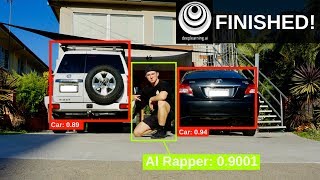
The creator finishes the deeplearning.ai specialization with a live submission of an autonomous-car assignment using YOLOv2 object detection. He breaks down how the algorithm works: grid-based bounding boxes, score thresholding, and Intersection-over-Union filtering. He also explains the difference between facial recognition and verification using iPhone X as an example.
Chapters
Alright guys, so what you're seeing on screen here is a live submission status. I just submitted my car or autonomous driving car assignment for the Coursera DeepLearning.ai course as a project assignment. Notebook successfully submitted and we'll click OK. Here it is here. Here's the assignment and let's see how I did. We got in here. Did I pass? Yes! Look at that. I'll prove to you that it was live. Look, 15th of January. 4:37 PM, and it is now 4:38 PM, if you can read that. Welcome to Learning Intelligence 18. Thank you so much for tuning in, and this episode's going to be good fun. I might not be able to get onto the Artificial Intelligence Nanodegree for a few days yet. Reason being is, I'm not sure what happened, but I paid to sign up for term 2, but I don't have access to it yet. So, I emailed support, and I'm waiting for a response back, and I did get a response back, like an automated one, and it said they weren't, or they're out of office for the time being. Should be back within 24 to 48 hours. That doesn't matter to me. I'm going to keep going through with the deep learning AI specialization on Coursera. I just finished, as you saw, completing that autonomous— I'll show you, I'll show you— car detection with YOLOv2. What is YOLO? Well, YOLO is an object detection algorithm. And if you— I don't know if I mentioned in the last episode, but object detection deals with when there's more than one item in an image. So in last week's, last week's classes, we went through image classification, which is deciding whether an object is in an image, so, or what's in an image, sorry. The example I gave in last week's episode was, is my friend smiling or not smiling? The, what the algorithm would do is just like decipher if the face is smiling or not smiling, just as easy as that. And what object detection does is it looks for multiple objects in an image. Say for example you're driving a self-driving car, or you won't be driving it, but the object detection system will be looking for multiple objects. Of course, you got plenty of different cars out there, you got traffic lights, you got stoplights, you got pedestrians, you got crazy birds flying at your windscreen. But that's enough talking from me, let me show you an example. So if we look here, I'll go straight into the code, object detection. Now, the dataset was provided by drive.ai, which is a startup working on autonomous vehicles. And so this is what object detection looks like. You'll have your scenery there, and it's probably a bit out of focus. I don't know if you can see that really, but this is a road, got a road, traffic lights, and object detection means putting a box around the main object in screen, in this case a car. And let me go through to a better example. And that is the final output of my algorithm. It found 7 boxes for test.jpg, and there's a car, car, bus, car, car, car, car. And now look at that. I hardly even saw this bus in the first image, but this is what the algorithm we built, and it's called the YOLO detection algorithm. If you want to know what YOLO stands for, apart from "you only live once," it stands for "you only look once." And so what this algorithm does is it only looks once at the image, so it saves a lot of computation power rather than continually looking over the image over and over and over again. And I won't fully go in depth in explaining the YOLO algorithm. However, I do have a good resource for you to learn more. It's Siraj's video. And now I haven't watched this, but I can tell it's good. Look how many views it's got. And Siraj is a wizard. So come on, you know what he puts out is good stuff. I'm going to watch this video because I've just passed the assignment. So I'm really happy with that. I'll let you check out the video as well and learn more about YOLO object detection. Tomorrow I'm going to get into week 4, which is the final week about convolutional neural networks, which is on facial recognition. So, I'm really excited for that and we'll check in once I've done some more. Guys, it's been a massive day. Probably one of the biggest days I've had in a while. Definitely the biggest day of 2018 in terms of learning and completing goals and whatnot. I'm definitely well and truly ready for bed. I'm going to show you guys what I've been up to today and I'm dressed in my PJs already. Check out the Captain America shirt. I haven't worn this one in a while actually. I think my mom got it for me. So, thanks mom. Let's check out what I've done. First off, we completed this assignment. Which was art generation with neural style transfer. And what essentially this is, is using neural networks or using deep learning to combine the style of one image with the content of another image to create something completely new. So I'll show you what I did. There's a photo of my face, which gets a fair bit of workout on these, these image tests. And there's one of Picasso's paintings. I don't know exactly which one it's called. Here's the combination after about, I think that's 20 minutes of training. What do you think? Eh? Eh? Which one looks better? I actually like that. That looks pretty cool. But then we moved on. So, we finished that one, we passed that assignment, which was really fun. And then we did facial recognition for the Happy House. In the last clip, I think I mentioned that, or in the last video, I'm not sure, that I did the image recognition assignment that involved designing a model that wouldn't let people into a house unless they were smiling. So, this one was really fun, and I learnt about the difference between facial recognition and facial verification. Facial verification is— face verification is comparing it to one image, and facial recognition, uh, it's not on the screen there, but let me give you an example. So facial verification is, say you're going through the airport, right, and you give someone your passport and they put it on a scanner, and the scanner compares your passport photo with your face image. So that's facial verification, only comparing one image to one image. Essentially, it's an image of you compared to your actual face. Whereas facial recognition is, say for example, in Baidu, which is a big Chinese internet company, like Google in China, and they have a facial recognition system to let people into their building. So, facial recognition deals with one face, aka my face if I was walking into the building, comparing it with thousands of other faces or more than one other face. And in the case of Baidu, if I was to try to walk in their building and their facial recognition system picked up my face, they would compare my face with all the other staff there and see if I was in their database and wouldn't let me in if I wasn't part of it. That's a quick difference between facial verification and facial recognition. And in the case of the iPhone X, I've used that as an example before, that's facial verification because it's comparing your face to your real-life face to the saved data on the iPhone. So, that's facial verification rather than facial recognition. We've got a few more tabs to work through and then, uh, and then we'll wrap it up. And for that assignment, actually, if you're working on it, if you're working on the facial recognition assignment for course 4 of the deeplearning.ai specialization, there is a post here from a Coursera engineer. So it actually took me a while to get that one submitted because there's an error in, in the programming assignment and I had to run these two codes to fix it up. I'll leave that forum link in the description so you can access it if you need it. But they said they should fix it up relatively soon. So we'll see if that's fixed if you're up for that. And there we go. Look at that. I'm really proud of this one. That was probably one of my favorite courses so far. I rated it 5 stars and left a good review for it because I had so much fun going through the convolutional neural networks. And that's 4 out of 5. Look at that. That's what I completed today, week 4. I did a week's worth of classes and programming assignments in one day. How did I get through it all? Because that's— what is it? It rates it at about 2 hours per programming assignment and about 2 hours worth of classes, about 6 hours worth of learning. And ideally, you could get that done quite easily over a week, but I just fast-forwarded and got it done in a day. I'll show you what my breakdown is of what I do on a general day. I have the privilege at the moment, I'm really lucky that I can study 5 days a week. I can get up and just devote my time to learning. And I'll show you, this is my rough routine of what I do pretty much every day. Wake up, that'll be around 6-7 AM, and then this will read for an hour at least, and then I have a study 1.5-hour block. No interruptions there, that's really important. That's with all these blocks as well. No interruptions. I'm focusing on one single task at a time. I study 1.5 hours, then I have a 1-hour break and I eat then, that's breakfast. That'll be around 11, 12 o'clock. And I study for another 1.5 hours or until I've reached my study goal for the day. I make sure at the start of the day I have one major goal that if I completed that, the rest of the day would be a good day. Because once you get that one major thing out of the way, the rest of the day is on, you can go on autopilot almost and just cruise. So, get the biggest task out of the way first. Study 1.5 hours, then finish, or finish the goal. Then I have a 30-minute break, and then if I haven't finished the goal, I'll study for an hour again. Usually by about this point, I'm zoned out, and that's when I need to go and work out, which is what I did today and why I'm doing this clip at 9:36 PM at night, because I finished learning for the day, and then I went and worked out, had an awesome session to clear my head. When I finished studying today, I was— my brain was all over the shop. I was— it was ready to shut down. I could go for a nap and not wake up till tomorrow, I think. The workout cleared my head, and now I'm ready to actually talk again. I couldn't record a clip before because I would, would not be able to talk. We're going to get moved through these tabs. It's going to be the longest clip I've ever done. Here's my beautiful certificate. Look at that. I just realized the camera was zoomed in on my face. That's all right.
Look at this.
Daniel Bourke, Convolutional Neural Networks, an online non-credit course authorized by deeplearning.ai and offered through Coursera. I'm so stoked with this. That's number 4. That's the 4th certificate. I'll show you them all once I've finished the whole course. This is the last one. Course 5 out of 5 for deeplearning.ai. This is what I'm going to do next and it's not released yet. So it's on sequence models. Sequence models are used for like voice recognition, text recognition and whatnot, anything that's in a sequence or a time sequence. So text on a page, that can be in a sequence. What's it called when they make sound waves? Sound waves over time, that's a sequence. So like when you say, "Hey Siri," and your iPhone goes, "Ding." That's essentially using voice recognition. So that's a sequence model. And then let's register with the MIT Artificial General Intelligence course together. To sign up for this one, the link is in the description, by the way. I know I mentioned in the last video, Oh, I need to unlock MasterPass 1Password to save this. We'll cancel that. I'll just save it in Google. There we go. So, we're signed up to the MIT Artificial General Intelligence course. That'll be going soon. And last but not least is this film clip. I'm not going to do the whole thing, but check it out. Justin Timberlake's new video has a reference to deep learning in it. Look at the first clip. Here we go. Pan Asia Deep Learning Conference Kuala Lumpur, Malaysia, 2028. I don't know if you saw that. I'll leave a link in the description. That is Justin Timberlake's latest song and it references deep learning and AI. What could be better? Artificial intelligence and deep learning meets Justin Timberlake. Is this true?
Yes, it is.
It's amazing. Check it out. But guys, that's it. I'm going to do some reading before I go to bed. I'm going to get back up in the morning and I'm going to go over my notes for the past 2 days because I haven't heard back from the artificial intelligence nano degree term 2 yet. I've completed all that's available on the Coursera deep learning AI specialization so far. So the sequence models, course isn't out yet, but I'm signed up for notifications, so when it comes out, I'll let you know and I'll show you my progress. We'll catch you tomorrow. And, uh, that was a long clip. Thank you for bearing with me.
Okay guys, so since I'm finished the all the courses in the deeplearning.ai, all the ones that are available, I've just been going over the last 2 weeks worth of content, week 3 and week 4 of course 4, the convolutional networks course. And I was pulling out some key points and I thought I'd share with you what my favorite key points were from the object detection classes and the computer vision using YOLO, the YOLO algorithm. So first of all, object detection and classification, what are the differences? So what are localization and detection? So if we look at image classification, right, that is just what is in the image. So in this one, it's a car. So you think of image classification as what. And I think of image localization as where. So we know that there's a car, right? And but with localization, we want to know where it is. So what are the y and x coordinates? And what can we do with these? Well, I'll show you later what we can do. But then if you take it a step further and we go to detection, now detection is a combination of both of these, so image classification and localization, but with multiple objects. So if we see here, we have car, that could be number 1, and this could be number 2. And then even if we draw some red boxes up here, we've got some traffic lights. And even way back down here, we've got a street sign that we could also classify as an object. So really you have 3, 4, 5, 6 objects. So multiple objects. And as a combination of localization Alright, we have x and y coordinates for all of those. And also another, another coordinate of this is, or another number, another variable we can pull out is the height and the width of the box around. But we'll check that out in a second. Actually, I think it's on this slide. Oh, and P.S., all of this is from the, wherever you see the source label here, so down in the bottom, it's from the deeplearning.ai course. So make sure you check that out. The link will be in the description. And we go here. So what we're trying to figure out when we do object detection or object classification or object localization is find the target label y. And what is y? Well, y, we come down here, and essentially y is a list of numbers, aka an encoding, which is here. But we'll get on to that in a second. So y, look at this box. So this is what we're trying to turn this into. We're trying to turn this image into Y, the output. And now first, the first major thing, or major, actually forget about here for the time being. So that's just calculating different coordinates of Y, but I'll cover the first major component of Y is PC. So this is the main one we want to find out first. And what's PC? Well, I like to think of it as the principal component, but I don't know if that's the exact terminology, but this is how I think of it because it's easy, easy to remember. And the principal component, what that essentially is asking is this little green circle here. Is there any object? And if there is an object, which in this image there is, you have the car here, we're going to put a 1 because 1 is yes and of course 0 is no. And look at this image, there is no car in here. That's what we're looking for. And now if we do have a 0, right, we essentially don't care about the rest of the parameters, because why would we expend extra computing power if the object we are looking for is not in the image? So we're just going to not care about these, right? We don't need these, these extra parameters. But what are these actual parameters? Well, if we look back over to this box, we got here, we've got bx, by, bh, bw, 0, 1, 0. What exactly do these mean? We've got x and y coordinates as well. So bx, if we come up here, is the position in the box. Let's change to a different colour. So imagine x is, x is down here and y is here. So we want to know bx is the position of this box on the x-axis, so this axis here, and by is the position of this box on the y-axis. And then we got bh is the height of this box. Alright, and then bw is the width of this box. Okay, so that's, that's the components that we have here. There's the variables, the main ones. We have 1, yes, there is an object, and then we have where the object is on the— in the x and the whole image, where it is in the y, and the height and the width of it. Now that's very useful information because what we can then use is that to further calculate these 3. And now where do these 3 numbers come from? Well, they come from up here. Alright, so this is our list of potential things. So we've got a pedestrian, car, motorcycle, background, and then 5, if you wanted to add in, might be in the case of a self-driving car, traffic lights, and then 6, you could have pedestrians, but we won't— the list could go on and on and on and on and on, right? But if we look back to this little section here, we've got 0, 1, 0. And now that is— that only has 3 components, but in the case of a real self-driving car, you might have 0, 1, 0, and it would just keep going. In the example we we used in the lectures, it had 80 different classifications. So you have pedestrians, traffic lights, stop signs, road signs, etc., etc., etc. But in this case, we're just keeping it simple. We have 3 different items and it has a number 1 for car. So no pedestrians in this image, no motorcycles, but there is a car. And remember, we don't care about any of these because it's just a background. Right, and now what can we do with these numbers? So remember, computers love numbers. I'm going to put that in purple writing here so you, you understand it. Computers— oh, I'm trying to get around my head as well— love numbers. All right, so computer does— has no idea what a car is, but it does know what a big list of numbers— what this list of numbers, and remember it's going to be bigger in real life— actually is. Well, sorry, It can compare this list of numbers to, say, we had a database of other lists of numbers, right? So then we got our, our car, our pedestrians, our traffic lights, our stop signs, our buses, our trucks, and it's going to go, okay, let's compare, let's compare our car. So this, this number here, let's compare that to our database of different numbers and figure out Which one of these matches up best? Okay, so we've got a car. Now, what can it do with this? Once it knows that it's a car there, what can it do? Well, in the case of a self-driving car, it might go back to the main computer and then give it some directions. So does it need to go forward, left, back, or right? Well, it might need to go forward. It doesn't need to go right. It doesn't need to go left. It doesn't need to go back. But forward, okay, well, how close is it? That's when other sensors can come in, and then we can calculate how fast do we need to go forward. Remember, as we talked about before, and as I mentioned, I think in the face example, the face example before, I said what a computer is doing is pulling out components from this. We have here finding a list of numbers and then comparing it to a database. And these two lists of numbers are called encodings. So whenever you hear the word encoding, I know it took me a long time to get around this, I don't know why, but encoding essentially means turning an image or turning a piece of raw data into a list of numbers so we can compare it to another list of encoding. All right, and then another cool part was the YOLO algorithm. So this is the state-of-the-art computer vision model. So state-of-the-art, it's— and what I mean by that, it's, it's, it's probably the best one that's out there. And now it's, it's actually YOLOv2 at the moment, so this should really be YOLOv2, but we won't worry about that too much. There's, there's other YOLO algorithms out there. I'll leave the link in the description, by the way, to Siraj's video on the YOLO algorithm. And he does a great explanation of it. And so this, this, all this information is sourced from here. So thank you to PJ Reddy. And if we look at what does the YOLO algorithm actually do, well, we'll start off, we start off with an image much like we did in the previous slide. And the YOLO algorithm stands for You Only Look Once. So it's only going to look at this image one time.
All right.
And what it does in that one time is it creates a grid. So we've got a grid here, see all these My lines are really roughly drawn. And then what it does in the next step is it uses that grid that it made and it creates all these little boxes here. So you can see all these little boxes and each one of these, each square in this grid will have 5 boxes. So imagine this is one box. So that means this box has 1, 1, 1, 1, 1, 1, 1, 1. So a whole box doesn't have to be in there for a box to be counted. If this box here, this one here had another box like this, that would mean it would have 2 because it's got the corner of the orange and corner of the white box. So it's— each one of these is going to have about 5. It could be a different number depending on what type of, uh, YOLO algorithm you're using, what type of parameters you're using. But what it will do then is it will run the image through a CNN, which outputs an encoding. Remember what an encoding is? List of numbers, right? So we're just— this is our end goal. Our end goal always with, with many deep learning models is a list of numbers. Okay, and then what? Well, how does it, how does it go from here to here? What's the significance of, of all these little boxes, all these tiny ones in this section here and tiny ones in this section here? Well, you see how this one is thicker, this here, this, this yellow box, this red box, and this green box in the back, if you can see that. What that's going to do is it's going to translate, it's going to bring those over, and then we finish up here with the dog, a bicycle, and a car. That's what we're left with because these boxes were the thickest. And now how does it do that? How does it find out which boxes are the thickest? Well, that's where we come down to this last major step, which is we filter through all the boxes using a score threshold, right? We'll get to that in a second. And we only keep the boxes of high accuracy, so those that pass the score threshold. So say our score threshold was, uh, 0.8, right? So if a box is— boxes, uh, with high accuracy, if it is— if the accuracy is higher than 0.8, we're going to keep that box, right? So that's, that's an example. Now 0.8 is just an arbitrary number. It will vary depending on what parameters you want to use for your YOLO algorithm. And then We can also combine that with an intersection over union algorithm to eliminate the overlapping boxes. So if we look up at this image, look how many there are. There are hundreds, if not 1,000+ boxes in here, and they're all overlapping everywhere. So there's a big cluster right in here. They're all overlapping. So how do you work out what— actually, how do you work out if there's another thick box around the dog, how do you work out which one to keep? Well, if they both pass the scoring threshold, what you can use is the intersection over union to further eliminate overlapping boxes. And now let's take a look at that. So the intersection over union is a further way to narrow down how you can find in your image where's your dog, where's your bicycle, and where's your car. So this is one of the last steps you can do in the YOLO algorithm. So But look here, where's the union? So— oh, sorry, the intersection. The intersection of these two boxes is this little yellow part here, and the intersection— we're going to scribble over the yellow— is the whole area of both boxes. So let's start from fresh. We have two boxes, two really roughly drawn squares there. This is the intersection, this little yellow part here. So we're going to take that area and we're going to put that, the size of the intersection, up in this this, uh, the denominator— oh no, sorry, the numerator. And then we have here, and the delis— this is the union. So all this area including the, the intersection, we're going to take that area and we're going to put it there, right? And that's how we calculate the ratio, right? So if there's two boxes here, this purple one, this purple box here, it's still got the car in it, but it's not as good a fit as the as the one in the red. And you can't really see anything here anymore because I've colored over it, but just think of the red as a better fit. And now this is where we bring in another threshold. So correct, the label is correct if it passes an IOU of, of or greater than, equal to or greater than 0.5. And what you can also do is up this ratio, so you could have 0.6, or you could have 0.7, or you could have 0.8. It really depends on how accurate or, or what, what threshold you've discovered when using your YOLO algorithm. And now, as a whole, the IOU is a measure of the overlap between two bounding boxes. Okay, and now that is how we use the combination of score thresholding. So say, for example, this yellow box here had a threshold of 0.8, and it was 0.83 that it was a dog, so it would make it through. But then there's another, another one here that was 0.84 that would make it through. Then you'd use the IOU algorithm to work out which one of these we're going to keep. Same goes for the bicycle, same goes for the car, same goes for all of these. That's why we don't keep any of them because they don't pass our score threshold and they don't pass our intersection over union algorithm. So let me give you a quick demo of the YOLO algorithm running live on video. And of course, the algorithm works great on images, But it needs to work in the case of a self-driving car on video. And I mean, video is just essentially a lot of images being played really quickly. So as you can see, it's picking up different boxes around different items, but there is still some space in there, which, or some items that don't have a box around them. And so these boxes are just part of the database that doesn't have encodings for yet. So I, as I mentioned, the YOLO algorithm we tried out in the classes in the deeplearning.ai specialization, had 80 different classes. So as, as computing gets more powerful and more powerful, it will— more classes will be available. In the case of a self-driving car, you'll need to make sure you've got all the classes covered for, for road conditions. In the case of other robots, maybe a chef robot, you should, or a chef computer vision thing, or a food detector, it will need to have lots of different food classes. And remember, classes, encodings, just think of them as a list of numbers. And whenever it tries to figure out what the item is. It compares that, that list of numbers that it discovers for that person to the database of other people and figures out, okay, is this a match? Does this pass our threshold? And does this pass our intersection over union algorithm? And so there's some of the, there's some of just the quick, my quick takeaways. There's a lot more in the, in the classes, but remember, if you want to find out more, you can go to the— where is a clean one? You can go to the deeplearning.ai course on Coursera. The link will be in the description.
Thank you for your patience through that last clip, guys. I know it was a bit lengthy. And if you want to see more of that, leave in the comment below. Do you want it in a separate video? Or do you want to just not see any of that and just want to see what I'm doing now, like a face-to-face vlog thing rather than a sort of educational type stuff? I'm trying to mix these up to give you guys as much variety as possible and really dive into how I'm experiencing studying on my own and learning these things. So they were some of my favorite takeaways with the YOLO algorithm and the object detection and whatnot. I have two more things I want to show you all. I'm not sure how many, I think it's two, two more things I want to show you before we wrap up this video, get to some shoutouts, and then talk about what's going to happen in next week's video. Term 2 of the Artificial Intelligence Nanodegree is a go. We now have access. So next week's video will definitely be covering everything I'm working on through here. I did a bit of work on it today, but we'll save that for next week's video. The last thing I want to leave you with is this new course I found. Sorry, it was running last year, but this is the 2018 version, Deep Learning for Self-Driving Cars. And of course, the links to, to everything, as always, will be in the description. So check it out there. But this is an introduction to the practicing of deep learning for self-driving cars. I'm really excited for this. It's all free. I'm going to be checking it out. So I, if you want to, if you guys want to do it with me, let me know. I think it's starting relatively soon, so, or it already has started. We can catch up on all the lectures on YouTube anyway. I was about to start checking this one out here, Lecture 1, Deep Learning, by this guy who's an absolute legend. I think he is Lex, Lex Fridman. Check out his channel, guys. He's got about 20,000 subscribers, so definitely putting out some valuable content. And if you really wanted to, you could get the self-driving car t-shirt. Check that out. Pretty cheap. I think the link's in there, in their YouTube description of the course, or it will be somewhere here. Again, I'll put this link in the description. But now it's time for some shoutouts. Alrighty guys, thank you so much for watching right through to the end of Learning Intelligence 18. This video saw the wrap-up of the deeplearning.ai course, which is probably, I'm gonna be honest, is one of the best courses I've ever done. Definitely in the top 3. And that's, that's without a doubt. By far, it is It's extremely well made. The forums are great. The content is great. The teaching method is great. I really enjoyed that course. So if you're thinking about getting into deep learning, have a go, try it out. deeplearning.ai. You can find it on Coursera. Of course, the link will be in the description. But now it is time for— drum roll please— shoutouts of the week. Okay, so these people either reached out to me via email, left a comment in the YouTube section, or wherever else on the internet, you can find me, you can reach out to me at any time. My email is daniel@mrdbourke.com. I'm happy to answer any of your questions regarding my learning journey, AI, machine learning, health, fitness, anything I can, I'll do my best to help you out. Otherwise, if you want to help everyone else out, leave a comment below of any sort of advice you have for me, anything you have for others. And this week's question of the week is, what's one of your favourite courses? Courses that you've ever done. So mine is the deeplearning.ai course. Leave a comment below of what a course that you've done either in the past or you're doing right now that's really, really, you think is really great and should be shared with others. Without any further ado, thank you to Madison. Thank you so much for the question on AI versus blockchain. That made me think a lot. And I think you guys can see that question in the last video that'll be in the comment section. Antonio, thank you for your kind words.
You're very, very generous.
Justin, all the best with learning AI. Sebastian, good luck with the deep learning Nanodegree if you give it a go. Don't be afraid to jump in. When I first started, I only had 3 weeks of Python knowledge and I'm so glad I went through with it. Jeffrey, thank you so much for the words as well. I really appreciate it. Haasaf, thank you for being active in the comment section. You've left a comment on almost every one of my latest videos. So thank you so much. Your contribution is very valued. I very appreciate it. Shiran, thank you again for your words. I really appreciate all of this, guys. It's really, it really drives me forward to see this stuff in the comments. Adnan, all the best with learning AI, and I'm very honoured to be able to inspire your learning journey. That's what I'm really trying to do with others. So I'm having so much fun doing what I'm doing, and I make these videos so I can at least share that with all you guys. To wrap it up, we've got one more question actually. Leave a comment below. Why did I choose the thumbnail I did? I'll give you a clue. It relates to something in the video. Leave a comment below if you get that one as well. Next week's video is going to be covering my progression in the artificial intelligence nano degree term 2. So I'm really excited for that. We're starting off with computer vision. Subscribe, leave a like, leave a comment if you want to see anything in the future. Otherwise, you know what it is.
Keep learning.
More from Daniel

Small Language Models (SLMs) Are the Future: Fine-Tuning AI That Runs on Your iPhone

Introducing Sunny - A MedGemma-Powered Skin Health Tracking App (Kaggle Competition Entry)


Benchmarking: NVIDIA DGX Spark & NVIDIA RTX 4090 | Part 4 - Comparing the results

Benchmarking: NVIDIA DGX Spark & NVIDIA RTX 4090 | Part 3 - Running LLMs on the RTX 4090

Benchmarking: NVIDIA DGX Spark & NVIDIA RTX 4090 | Part 2 - Formalizing the tests

Benchmarking: NVIDIA DGX Spark & NVIDIA RTX 4090 | Part 1 - Creating a series of tests


Local Multimodal RAG on the NVIDIA DGX Spark | Part 4 - Publishing our demo to Hugging Face


Local Multimodal RAG on the NVIDIA DGX Spark | Part 3 - Putting it all together