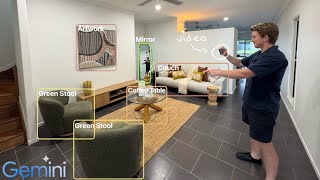
Daniel Bourke built Keep Track, a system that uses Google Gemini to turn a smartphone video of your house into an inventory database for insurance. Processing a 10-minute video costs under ten cents thanks to context caching, and the system runs three passes to extract, expand, and validate items.
Chapters
Hello, I'm Daniel Bourke, machine learning engineer, and in this video I'm going to show you how I built Keep Track, a system which goes from smartphone video to the Gemini API and creates a structured database of all of the items in your house so that you can keep them for a personal record or to give to an insurance company to get a personalized quote, all for under 10 cents. I'm moving house, and like many people, I've got too much stuff. One of the questions my insurance company has asked is, "How much should we insure you for?" Um, good question. I could estimate a higher value, but then I might end up paying too much. Or I could estimate a lower value, but then I might not be fully insured. Then I thought, wouldn't it be great if I could be insured for what I actually have? But keeping track of every major item in your house is a tedious task. You could write down every item you have, or you could take a photo of every item you have, but depending on how much stuff you've got, both of these could take quite a bit of time. What about a video? Just do a lap of your house and highlight the most important items. Then have Gemini go through the video and write down everything from names of items to the estimated worth. You could then review all of this information in a web interface to make sure it's correct, and then pass it on to your insurance provider and get a quote for what you actually have. Or you could even just keep track of your stuff for your own personal records. Hint: this workflow can work for more than just household items. Gemini's video capabilities are very flexible. Let's get specific about the Gemini API features that make this possible. 1. Video processing. 2. Long context windows. And 3. Context caching. One of the most powerful features of the Gemini API is that it can handle video inputs. Gemini can harness the audio, the visuals, and even the text-based information in video frames. From a developer standpoint, the benefit here is that Gemini can work with almost any data type, including information-rich videos. Long context windows. Generative models like Gemini generate outputs based on their inputs, and Gemini's long context windows mean that they can create outputs based on incredibly large amounts of input data. Gemini Flash can handle 1 million input tokens, and Gemini Pro can handle 2 million input tokens. This long context window is important in our use case because video data requires far more tokens words. In Keep Track, our 4,000-word text-based instructions equals about 11,000 tokens. However, our 10-minute 720p house tour video equals 165,000 tokens. This means that even with 176,000 total input tokens, Gemini still has plenty of room to move if we needed to input a longer video or more instructions. Without a long context window input, our use case wouldn't be possible. Context caching. Gemini's context caching ability is incredibly helpful when you need to go over the same piece of information more than once. In Keep Track, we perform 3 passes of the same video to generate an accurate structured data output of household items. Rather than process the video from scratch for each pass, context caching means that we can process it once and use it as inputs to a subsequent step at far lower cost. From a developer standpoint, context caching means 4 times cheaper input token processing. And from an end user standpoint, context caching means more accurate results due to the Gemini model being able to do multiple rounds of looking at the data. And thanks to context caching, processing a 10-minute video 3 times and extracting high-quality itemized information cost less than 10 cents. So how does it happen? We use 3 major steps. One is the initial extraction and then a check afterwards. Two is a secondary prompt to expand upon the initial extraction and then a check afterwards. And then 3 is a final check on the combined outputs of 1 and 2. And 2 major model instances: one Gemini model for doing video inference with a different input prompt at each step, and 2, another Gemini model for performing CSV validation checks. There's plenty more that I haven't covered in this video, but have left in the bonus and appendix sections in the notebook, such as tidbits, takeaways, future work and ideas, and even more powerful Gemini features such as bounding box detection. If you have any questions, please leave a comment and I'll answer it.