LLM Post-Training 101 + Prompt Engineering vs Context Engineering | AI & ML Monthly
In this September 2025 episode of AI & ML Monthly, the host (Daniel Bourke) walks through a curated set of AI/ML updates with a focus on open‑source. The segment begins with a personal intro and a preview of a new LLM fine‑tuning tutorial. The core of the episode is a deep dive into a "Post‑Training 101" guide that explains how to adapt a pre‑trained LLM to downstream tasks via supervised fine‑tuning, preference training, and various RL variants (RLHF, RLAF, RLVF). The host then showcases Hugging Face’s TRL library now supporting vision‑language fine‑tuning, and discusses prompt engineering versus context engineering, citing an Anthropic guide. A substantial portion is devoted to the recent avalanche of Qwen open‑source models (Qwen‑3 Omni, Next, Guard, VL) and their architectural tricks (active‑expert sparsity, hybrid attention). The episode highlights Modal Notebooks as a fast, low‑latency alternative to Colab, and presents case studies: FineGrain’s object‑cutter pipeline, TensorZero’s cost‑effective fine‑tuning, Thinking Machines’ deterministic inference kernels, and Stephen Tolkan’s tokenizer quirks. Additional resources include EmbeddingGemma, MobileCLIP‑2, a 5‑TB vision dataset (FineVision), OCR model releases (MinerU, PointsReader, PPOCR‑V5, Granite‑Docling), GLM‑4.6, Mistral’s Magistral‑Vision, Gemini Robotics 1.5, and new foundations for time‑series and video models. The host wraps up with a quote from Demis Hassabis and invites listeners to subscribe to the text‑based newsletter.
Chapters
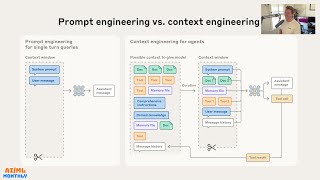
Ladies and gentlemen, welcome to AI and Machine Learning Monthly for September 2025. This is the video-based version of a text article I send out at the start of every month, which covers the latest and greatest in the world of AI and machine learning with a particular focus on open source. In this month's issue, we got Post-Training 101, an excellent guide, an avalanche of Qwen open source models, 5 terabytes of OpenVLM data, and Christmas for OCR models. Let's get started. Let's jump right into it. We've got September 2025. We'll start off with my work, a few things I've worked on in the past month or so, which is a birthday article. I turned 32 at the start of September. Happy birthday to me. Uh, I've got another article here for 23, 24, 25, 26, 27, 28, 29, 30, 31. Phew! Of just things that I've learned over the past year or so. Quotes, stories, anecdotes, you name it. Not necessarily machine learning and AI related, but A bunch of fun is in there. Read that if you like. Work in progress. I've started on an LLM fine-tuning tutorial which will be on the learnhuggingface.com website. Speaking of that, object detection with Hugging Face Transformers tutorial. Of course, all the code is done if you want to create your own custom object detection model to detect where things are in images. The video course videos are very close to being finished editing, and as soon as they are, The link will be here and you'll be able to go through the step-by-step video course where we'll code this entire pipeline, every line of code together. And let's jump back. Yeah, the LLM fine-tuning tutorial, it will be in the same manner as this because after all it is just tokens in, tokens out. So if you have a desired set of tokens you'd like to put in and a desired set of tokens you'd like out, well then we can create our own custom LLM for that. So I'm working on that. Stay tuned for updates. Let's jump into some resources from the internet. So number 1 is I found this a great guide to Post-Training 101. So typically the LLM workflow is you have pre-training, which you essentially train the next token prediction objective. So you have the internet worth of text and you go, hey, the brown fox jumped over the and you predict that next token, but you scale that up to every possible combination you can imagine that is available on the internet. And so post-training is you take that base representation model and you customize it to a specific use case. It might be a chatbot, it might be structured data extraction, you name it. So this is where this article comes in and it is excellent. I particularly like the data examples of just showing, hey, this is an input. We train the model to produce this output. So in this case, we might have a prompt, which is the system prompt. You are a helpful assistant. Role: What is a capital city of the US? And then we might train it to complete something like this. And so if we keep going down, there's some great hands-on examples how to do it with training objectives. And then if we go down RL, so after post-training, you might— as part of your post-training, you might have preference training. So you can go pre-training, post-training, preference training so that the outputs of your model are outputs that humans prefer. So we'll go down to another data example. So if we have this, what is the capital of the US? So response A, you notice how it puts a question mark here because it's essentially when it's trained for next token completion, that is the right objective. But a person would obviously prefer just the answer. We don't need the question mark as long as well as the explainer text. We might just want, hey, what's the capital of the US? Answer rather than complete the entire sentence. And then if we scroll down, we have more examples for math. A lot of the new reasoning models are trained to be very good at math. And so what you can do is use RL with verification. So RLVF. So there's RLHF, which is human feedback, reinforcement learning from human feedback, RLAF or AIF, reinforcement learning from AI feedback. So the AI gives feedback to the model. And then finally there's RLVF, which is— do we have RLVF with verified feedback? Oh, sorry, verified rewards. So verified rewards. And so if we go down to the grader. Yeah, there we go. So essentially what we can do with an RLVR, so verified rewards, is we have an input to our system and then we have an exact response answer that we want. And if it gets that exact response, no matter what the working, we give it a +1 point. So if you imagine a reasoning model and it's been trained to predict next text, maybe not so great at doing math, but we can fine-tune it with some math examples of examples of tokens that lead to the correct solution. And so that what we're doing is we're teaching the model, hey, how do I get to this final answer? And then with the reward, if you get the exact reward according to this grader, you get +1. And if you don't, you get 0. So we're training the model to always want +1s. And then if we keep going down, there are some great extra resources. We got different reinforcement learning. So GRPO, how do we evaluate models? So this is basically the Post-Training 101. Yeah, well, that's what it's called, right? But anyone who wants a resource on post-training, I'm going to send them to here because it is fantastic. So go and check this out if you want to learn more about post-training. Again, my favorite is the hands-on data examples because that's how my brain works. It understands things tokens in, tokens out. If you you see, the inputs that you want to give to your model, and the outputs that you desire. That to me is a very— and then the model, of course, is in between those. That to me is a very fundamental way of understanding a machine learning system. So big shout out there to Han Fang and Karthik Abhinav Sakaraman. Forgive me if I'm pronouncing those wrong. That is Post-Training 101. Up next, we have Hugging Face TRL, so Transformers Reinforcement Learning. Now supports native vision fine-tuning. So TRL is a library for fine-tuning your large language models and it can do— I'm going to upload that there. Vision language model alignment in TRL. When someone says alignment, I just think of that as fine-tuning. It's like, hey, we want our model to do this. Given this input, do this. So again, my way of viewing it is always just what tokens do you want to go in? What tokens do you want to come out? And so with TRL, you could previously fine-tune. If we go to TRL GitHub, large language models, so just text only. And in fact, that's what we're going to use. We're going to use TRL in the upcoming tutorial I'm building for fine-tuning large language models. And you could do it with supervised fine-tuning. So if we look into Post-Training 101, the previous article, that is, hey, given this example, produce this output. And they also have several reinforcement learning algorithms. Available. And so now it natively supports vision as well. So you can put in text and images with some desired outputs and train it using supervised fine-tuning or a handful of reinforcement learning algorithms such as MPO, GRPO, GSPO, and RLU— reinforce, leave one out. My personal preference is supervised fine-tuning still because To me, that's the simplest paradigm that I understand. It's like, I have this input and I desire this output model. Please replicate that. So now you can do it with images as well. So I'm going to get hands on to that probably after I finish the LLM tutorial. I'll do a VLM tutorial of fine-tuning a VLM and will likely use TRL as well. So if you want to see that in a future video, please leave a comment below. Otherwise, Vision Language Model Alignment is now available. Or fine-tuning. I call alignment fine-tuning. Now available in TRL. Oh, and a little bonus, speaking of TRL or fine-tuning. This is a tweet from Nathan Lambert, who's a researcher at AI2, one of my favorite AI institutes, and author of the RL-FH book. So reinforcement learning from human feedback. Oh, I've got a typo there. That's how you know it's written by me, not AI, because there's typos. Um, so the question was asked by Nando here. If you have 10K data instances, would you SFT, so supervised fine-tune, an LLM with 10,000 data, or learn a reward with 5K and RL on the LLM with the remaining 5K with the learned reward? Other, explain. So this is easy. Small model, less than 15 billion parameters, all SFT. Bigger models, 70 billion plus, or RL. Yeah, so that's my hunch. This aligns with my hunch. If you have a small model, just SFT. RL, from my experience, tends to require a much bigger scale because the signals aren't as strong as SFT. SFT is, yeah, I've got this input, I want this output. RL is sort of like, I prefer this output over this one, but they're both really similar. So yeah, if you've got a small model, SFT. If you've got a big model, RL. And up next we have Ethan Ding, who's one of my favorite writers recently in the AI space of just I guess you could say economics of AI and cloud. So writes about agents and clouds. Now, if you have an AI agent, do you— well, an AI model— do you build the agent first and then the cloud, kind of like Anthropic are doing? They have the really good model and they're building Claude code to go along with it, and that's turning into apps and whatnot. Or if you have a cloud, then you build an agent. So Google kind of has the cloud existing, but now they're building Gemini and they're fusing them together. So they're attacking it from both different ways. And OpenAI, you could say, as an agent, is moving towards building a cloud. And so there's a few startups in between, like Bolt and Lovable. They're users of agents. And Netlify and Supabase are providers of cloud services. So Supabase is databases, Netlify is hosted compute. And so I really like this sort of picks and shovels mentality. The real bottom, I'm providing bare metal compute, like Modal. Modal's coming up, by the way. Really like Modal. And then in between, you have other tools here such as Supabase for your database, Bolt and Lovable, which are streamers of tokens. They just ingest a bunch of, or when you go to Lovable and you say, hey, can you create me a website for this? They ingest a bunch of tokens and output some stuff. And then you have integrated agents, limited hosting bundled with the model, and that's Claude and Anthropic. So I like this two-pronged approach. For me, what's been most useful, of course, is yes, the agents help you to code, but you still need these fundamental tools like Supabase, For example, Nutrify runs off Supabase. That's our database. We use AI models that we train ourselves over here and through API like Gemini, but we still store everything in a tried and true database. So if we go to this article, I'll just scroll through it so you can see it, let you read it. Go to Ethan Dings' Substack. It's great. I like these articles. We've mentioned them before, but we scroll down. You notice that during, after the summer, Google Trends data on a bunch of AI-assisted coding. I personally haven't even tried Cursor yet or Claude Code. I've tried a little bit of Lovable, Replit, and— oh no, not Windsurf— Bolt, sorry. And all down. I'm still in the brain coding phase. I don't know. Not the live coding phase, brain coding phase. Maybe it's because I'm getting older. You know, I just turned 32, so I still like using my brain. So the trends seem to be down for those. I'm not sure why. But maybe it's because the summer is over and people have less free time. But then if we scroll down, it does some good math on tokens control cloud consumption. So yeah, it's very hard for tokenomics if you provide $20 per month fee, but then someone decides, I'm going to use 100 million tokens or something like that because there's no cap, then your kind of economics go out the window, right? Because you're burning far more compute than you can, uh, —more than $20 worth of compute to produce those $100 million tokens. So yeah, Bolt hemorrhages $50 in Anthropic tokens to generate a $20 subscription. If we go down, I'll show you where I got this graphic from. There we go. There's that graphic. So really good article from Ethan Ding. Thank you for— Speaking of Modal, and we got Modal up here, just here, they've released Notebooks. Now this is getting close to a Colab replacement for me. So I use Google Colab for all of my entry-level experiments. But Modal Notebooks are essentially a Jupyter Notebook with a backend that is possibly the fastest loading I've ever seen. So if you know Jupyter Notebooks, you know Modal Notebooks. But I want to see if I can give you an example of how quick this starts up. So I'm going to go to Notebooks. This is on my account and I'm just going to go here. This is one of their demo notebooks from the documentation. So we can go over here, we can set our GPUs, um, we can increase this all the way up to 8. I'm not going to do that because that's $32 an hour, but I'll just say— I just say I wanted to use one, a H100, and I'm going to click start, and I'll put a timer on screen and we'll see how long it takes to start. There we go, initializing, running. That was incredible. What was that, 30 seconds if that? So if we run this, there we go. Device name NVIDIA H100. And of course it's a paid service, but if you only need to use it for a few hours, that's awesome. Cheaper than buying a H100. There we go, H100 is available. So let's go H100 price to buy, $25,000 to $30,000 USD. Versus we get it for $4 an hour. That is really cool. Now we'll turn it off. They also have automatic stopping for 30 minutes. If you'd like a more of an in-depth guide on Modal Notebooks, please let me know because I'm starting to practice injecting these into my workflow. If I need a GPU that has more memory than my RTX 4090 over there, which is 24GB, we get nearly 4x here so we can load larger models. So really cool release from Modal and that is very impressive how fast they speed up or load up. Sorry. Up next, we have a case study from FineGrain and the case study is Hugging Face is all you need to build model quality. So let's just go to FineGrain. I'll show you what they make to begin with. And I've used almost all of these before, but let's go Object Cutter. So the Object Cutter is you upload an image. Do I have an image I could use? Sausages. Oh, these are food images because I'm trying to train Nutrify to, uh, let's just see this one. Let's see if it works on here. So let's cut out the avocado and see what happens. There we go. So really good object cutter image. This is the type of models that FineGrain build. So that's a high-quality object cutter. And then if you want to use something like a plant, there we go, cut that out. So if you're doing product photography, that's a really handy model to be able to use, and it's text-based. I believe they use Grounding Dino in their app to detect the box, and then they pass that box to, uh, a segmentation model which allows you to cut that out. So fine-grained. And if we go back to here, model quality is all you need. So this is very similar to the workflow I've been using with NUTRIFY as well as a client lately, is a simple web app that lets human testers play with the eraser model. So what's the eraser model? Okay, so we're just deleting objects from an image. Um, pick an image, brush over an object to erase, and carefully inspect the result. A way to report any issues. Yeah, so that's probably— I would even go to a higher level of Hugging Face is all you need. To me, an experiment loop is all you need. So what I mean by that is, okay, we train a new model, we put that into a demo or a pipeline, we practice with that, we try it out, and then we figure out where the errors are, and then we fix those errors. And the way we fix those errors is we report them from issues. So that's exactly what I'm doing with a client at the moment. Computer vision problem. I train a new model, upload it to a demo on Hugging Face. I send that demo to the person who can try upload an image, see what happens. and then we just record issues via Slack or Google Sheets. Very simple. And then I train a new model and we repeat that process. So Hugging Face allows you to do that via creating Gradio. I use Gradio as well, deployed as a Hugging Face space. They collect their own dataset and— oh, sorry. Yeah, they train their own custom model and then to collect data for feedback, they save there's a text interface on the web app and they save information from that to a Hugging Face dataset. So you can inspect that later on. So access control. So because they're a company, you might want— might not want your demo getting accessed by the public. So you can select, hey, these people only have access to this and not that. And then down here is a demo of what the image looks like, or the app, sorry. So the workflow: upload an image, erase the person or object, and then you've got a before and after out here. And then if you want to, you can add some text here to report what went wrong. That will save to a database. Later on, you can inspect that, retrain another model, deploy to this exact same interface, and then try again and see what happens. So really cool case study for using Hugging Face for building your experimentation loop. Up next, we have another case study from TensorZero, which finds out you can save 30x on cost and 4x on inference time by fine-tuning models. And this is a really good insight. So let's just read the summary. Fine-tuning small models on programmatically curated high-quality outputs from a large model can beat large model performance while reducing inference costs by up to 30% and inference time by up to 4x. We benchmark closed-sourced OpenAI, Google, and open-source Qwen models on data extraction, There's different benchmarks here. Multi-turn maze navigation, agentic RAG, and agentic tool use. And you can reproduce all of this using TensorZero, which is an open source LLM ops tool, even without a GPU. So that is really cool. If we go down to here. So this is— let's just look at the graph here. So cost per success by task. This figure illustrates cost normalized by model performance across tasks. While GPT-4.1, that's the sort of base model that they're using to compare to, it incurs substantially higher cost per successful task completion, cost per task divided by success rate, compared to the fine-tuned alternatives. Fine-tuned models like Gemini 2.0 Flash or GPT-4.1 Mini achieve dramatic cost reductions while maintaining competitive task success rates. So yeah, if we go GPT-4.1, it's about 30 cents per, uh, task on TBench. But then if we have fine-tuned models, we drop to 6s 6x less because that's under 50%, under $0.50, sorry, under $0.05. I need to get better at reading, don't I? So this is Gemini 2.0 Flash fine-tuned. All of the other models here are fine-tuned versions. And this is my experience too, is that yes, the flagship models are incredible at zero-shot or in-context learning, but you'll almost definitely always get better results if you fine-tune a model for a specific task. Because yes, the models may have 100 billion 200 billion, a trillion parameters. But it takes a lot of, I guess, of those parameter bandwidth to store information for every possible task. Whereas you can take a model like Gemma 3 270M, 270 mil, 270 million parameters, fine-tune those specifically for your task and get great results. And so if we go down, here are the cost savings relative to GPT-4.1. So if you fine-tune Gemini 2.0 Flashlight, you can get equivalent results at 31x less cost. That's incredible. But to me, that's still a fine-tuned, closed-source model. If you wanted to do it with an open-source model, Qwen-38B, it's still 18x less. So that's incredible. And I'll let you read through here. There might be some benchmarks or datasets that relate more to yours, but essentially the story's the same across the board. GPT-4.1 performs great on every task, but then you fine-tune— well, better than other models that aren't fine-tuned. Then you fine-tune all the other models and they perform on par or sometimes surpassing GPT-4.1. So go and check that out. If you're looking to use an LLM for your own service, you might want to fine-tune one and get a better performance on not only inference time but cost. Up next, we have one of my favorite blog posts that I've read in a long time, and that's Thinking Machine's Discovering and Publishing How to Make LLMs Deterministic. So what does deterministic mean? It means input in, same output out, no matter what. Well, sorry, if you put the same input in 100 times, you should get the same output 100 times. But if you've used an LLM, you probably know that that's not necessarily the case. So how do you fix that? Well, that's where this blog post comes in, and it's by Horace He, in collaboration with others at Thinking Machines. So Horace He posts an article. I'll go back here. I've linked it here. Such as Making Deep Learning Go Brrr from First Principles. I advise you to read it if you want to get deep into the deep learning side of things. Horace's articles are research-grade quality, but explained in a way that you and I can understand. So if we scroll through here, we come, we come down. There's a lot of information here. I'm not going to read it out step by step, but we come, we find the reason is because of Batch invariasm. Here we go. In other words, the primary reason nearly all LLM inference endpoints are non-deterministic is that the load, and thus the batch size, non-deterministically varies. This non-determinism is not unique to GPUs. LLM inference endpoints served from CPUs or TPUs will also have this source of non-determinism. So if we'd like to avoid non-determinism non-determinism— that's a hard word for me to say— in our inference service, service, servers, we must achieve batch invariance in our kernels. In order to understand how that can be achieved, let's first take a look at why kernels don't have batch invariance in the first place. So there are 3 operations, because they involve reduction, so making something smaller, that you can fix to make LLMs batch invariant. And they are RMSNORM, so that's an activation function, matrix multiplication, so the workhorse of LLM layers, and attention, of course, the operation in self-attention for LLM layers. So Horace steps through here of how to make them batch invariant, because if we look up at the graphic, that user requests are deterministic to the model, but then if we deploy it to a server, other user requests on a deployed model are non-deterministic. So when they— if they get put into a batch, this is how I understand it. It makes the overall input non-deterministic because you won't always have the same request from other people, even though yours will be the same. Does that make sense? So if I send a request to an LLM and it's just me, I can get a deterministic result. But if we're all pinging the same LLM, and there's— we have a batch size of 32, there's 31 other requests. We can't guarantee that all of those other users' requests are the same. That's how I understand it. And so if you read through here, there is ways to fix that. And if we go right down the bottom, there is some code so that you can replicate it yourself. They used Quen 3 235B A22B active 22 billion parameters instruct and they sample 1000 completions. So before they generated 80 unique completions with the most common of these occurring 78 different times. So they show there's some differences. And then once they add their deterministic code, it does increase the— because it's non-optimized, it does increase the inference time, but it does make them the 1,000 sequences all the same. And we have GitHub somewhere here. There we go. Thinking Machines batch invariant ops. So if you want to make your LLMs deterministic, go and check out this repo there. And if you want to check out some awesome blog posts, go to Thinking Machines website as well as Horace He's personal blog. Up next, we have Stephen Tolkan's blog is an excellent read for more on tokenizers. So tokenizers are probably the forgotten middle ground in a lot of APIs or even just machine learning processing in general. Before a machine learning algorithm can process your data, it needs to turn it into numbers, and that's what a tokenizer does. And so I found this particularly interesting is that, of course, not all tokens are made the same. So if you have Amsterdam, one tokenizer might turn it into a single token. But if you lowercase Amsterdam, so no capital A at the start, you might get 3 tokens. Now, of course, at enough scale, you would think that the models— okay, it understands that a lowercase Amsterdam probably means a similar thing to an uppercase Amsterdam. Not always the case, but a lot of the time, yes. So 3 tokens instead of 1. And what Steven has found is that it can actually decrease performance. So if we have the original, ModernBERT is 57.68. If you have lowered, it drops the performance by nearly 1.8, uh, 1.7 or so percentage points. And then if you have decased, it improves it a little bit over just plain lowered. And then for E5, it kind of has the reverse effect. It's better with the decased versus the original. So the decase is you go into the tokenizer and you make it, no matter what case the Amsterdam comes in, it always is the same token, one token. So if that's important to you in terms of performance, you want to squeeze every last bit out of your language models for clustering or retrieval, you might want to look in how your tokenizers work. And actually, Steven's blog on a whole is just great for general quirks about tokenizers and things that I didn't really think about until I read them. So big shout out to Stephen Tolkan's great blog. Up next, we have Anthropic release a guide on prompt engineering versus context engineering. So in last month's AI and Machine Learning Monthly, we covered a bunch about context engineering. So if we go context engineering, there we go. Why Context Engineering Matters by Drew Brewing. Brunig, sorry. If you go check that out, that's a great collection of articles. And if we go to here, Anthropic have a guide. So the short version I've deduced this is prompt engineering is usually one step. For example, prompt in, text out, whereas context engineering is multiple steps. So the previous steps influence future steps. You can add in documents, tools, and more. But let's jump in to the blog post. And if we go down here, there's a great graphic. Yeah, I think that summarizes the, the most of it there. So prompt engineering for single-turn queries. There's your context window. We've all experienced— well, many of us have experienced this when you talk to a chatbot, you type in something, something comes out. But now if you're an engineer like myself, you're looking more at doing this sort of stuff. So you have a bunch of resources, you have input prompts, you have memory, you have tools, you have history, and then you pass that, or you might, yeah, curate it. I think that's a big step here of the engineering part is curating that because models have a big context window, 1 million tokens, some have even larger than that. But you don't necessarily want to use that entire context window every single time. One, efficiency. Two, cost. But then we put that into the context window, then we put that to our assistant, it might call a tool, which then goes back into the original, then we curate it, etc., etc. So this is N steps versus prompt engineering is generally just one step. So I'll let you read through that article. Excellent overall resource for context engineering. My favorite quotes I've taken out here. The opening paradigm or the opening question: What configuration of context is most likely to generate our model's desired behavior? So in our case for Nutrify, we're building a multi-food detection. So our goal is to give the model the best set of tokens to generate our desired output. And then if we narrow it down on what good context engineering is— so the bold is mine here— good context engineering means finding the smallest possible set of high signal tokens that maximize the likelihood of some desired outcome. Implementing this practice is much easier said than done. Yeah, so what is the smallest possible amount of tokens you can send to get your desired outcome? Now that's going to take a lot of experimenting, isn't it? Practical tips: providing examples. So this is probably my favorite one. Providing examples is a well-known best practice and something we continue to advise. So that's from Anthropic themselves. They continue to advise putting in examples. I personally like putting in at least 3, 3 to a dozen examples depending on how complex the task is. And finally, a simple definition for agents: LLMs autonomously using tools in a loop. That's probably my favorite one so far. And that's very much what this graphic shows is an LLM using tools autonomously in a loop. We could go that for one step. We could do that for 10 steps. Up next, we have Daniel's Open Source AI of the Month. And to begin, we have— look, Qwen has caused an avalanche in the last month and they are well in front for my unofficial Open Source AI Team of the Year trophy. Because if you go to huggingface.com, huggingface.co, sorry, /models. Many of the front page models are Qwen models. IBM are really good there. That's excellent. Qwen, Qwen, Qwen, Qwen. So big shout out to the Qwen team. And then Zed.ai, we'll have a look at that one later on. But we have 3 or 4 major releases from Qwen in the last month, which is Qwen 3 Omni, Quinn3 Next, Quinn3 Guard, and Quinn3 VL, my personal favorite. Quinn3 Omni is, if we go into the instruct version, is a model which can take in multiple different sources and output multiple different sources. So what I mean by that is different modalities. So we have text input and we can have audio output. We could have image input and we can have text output. We can have— which one have I missed? Audio input. And then text output. So it supports 119 different text languages, 19 speech input languages, and 10 speech output languages. And it is state-of-the-art on 32 out of 36 automatic speech recognition, audio understanding, and voice conversation performance. Um, it's comparable to that of Gemini 2.5 Pro. So incredible release there for Qwen 3 Omni if you need something to do speech recognition or interact with multiple modalities at once. Open source available Apache 2.0. Qwen3 Next is an efficient version of their architecture. So over the past few months, we have observed increasingly clear trends towards scaling both total parameters and context lengths in pursuit of more powerful and agentic artificial intelligence, AI. We are excited to share our latest advancements in addressing these demands centered on improving scaling efficiency through innovative model architecture. Architecture. We call this next generation foundation models Qwen3 Next. So we've got 80 billion total parameters, but 3 billion is active. That's really important for when it comes to inference. You can store an 80 billion parameter model on a bunch of GPUs, but then when inference time comes, it's only using 3 billion of those that are active during inference. So it does that through mixture of experts. That's that architecture there. So you get faster rather than computing you have an input, rather than computing information for 80 billion parameters, you only use 3 billion of those. So if we read the highlights here for Qwen3Next-80B Active 3B: hybrid attention replaces standard attention with the combination of gated DeltaNet and gated attention, enabling efficient context modeling for ultra-long context length. High sparsity mixture of MOE, that's what we said before, achieves an extreme low activation ratio in MOE layers, drastically reducing the flops per token, so floating point operations, while preserving model capacity. Stability optimizations includes techniques such as zero-centered and weight-decayed layer norm and other stabilizing enhancements for robust pre-training and post-training. Multi-token prediction boosts pre-training model performance and accelerates inference. So if we look at some results, Qwen3 Next 80B A3B base outperforms Qwen3 32B base on downstream tasks with 10% of total training costs. So that's insane. 10% of the total training costs and it gets the same results. So imagine just you're training a model, it took you 10 days, now you can train it in 1 day, uh, and 10 times inference throughput for context over 32K tokens. That's another insane thing. So say it took you 10 days to train and then 10 days to inference on a large dataset. You've now done it one day to train, one day to inference. Quen3 Next-80B-A3B Instruct performs on par with Quen3-235B-A22B. So 4 times the total parameters and 6 times the active parameters, and it performs nearly on par with that. So there we go in the red. Let's see if we can have a look at this. So Quen 3 Next is within reaching of Quen 3 235B. It's basically on par there, slightly above in this, uh, these two benchmarks, LiveCodeBench V6 and ArenaHard V2, and slightly above here on LiveBench. So incredible release there from Quen, the Quen team. For the next series of models. I wonder if a lower parameter version is coming out, maybe like a 30B with Active 3B or something like that. But let's go on to the next. We have Qwen3 Guard, which is— this is for prompt protection. So is a series of safety— so Qwen3 Guard is a series of safety moderation models built upon Qwen3 and trained on a dataset of 1.9 or sorry, 1.19 million prompts responses labeled for safety. The series includes models of 3 sizes: 0.6B, 4B, and 8B, and features 2 specialized variants: Qwen3 Guard Gen, a generative model that frames safety classification as an instruction-following task, and Qwen3 Guard Stream, which incorporates a token-level classification head for real-time safety monitoring. So this is if you have a production system and you might, in between your input that a person puts in, and your database or LLM or something like that, you might have a prompt guard which goes, no, that type of prompt is not allowed. So for Nutrify, if we only care about food, our prompt guard might be, hey, you can't put in any messages that aren't to do with food or drinks. That, that's a simple example. But if you're a bank, you might want to prevent people from doing something else. I'm not sure, but that's what a prompt guard does. And if we have a look at the classification results, The Quen3 Guard prompts are basically the best on different benchmarks across both English and Chinese versus— there's Llama Guard, we've seen that one in a previous Machine Learning Monthly. So if you need a prompt guard model that's open source, go and check out Quen3 Guard. And then finally we have Quen3 VL, which I've been tinkering with in Modal, but I've got a little demo here. We have a series of models ranging from 30B with Active 3B. So this is probably the sweet spot for me. I think this model here can run on a single H100 because it's FP8. And then we have the big dog here, which is their state-of-the-art, uh, text model but has been added with a vision head. So visual agent, visual coding boost, uh, it can do detection, which I'll show you in a second. So can detect where an object is, um, in an image with both 2D and 3D grounding. Does video as well. Incredible performance on OCR, optical character recognition. If we go down to the benchmarks, is basically on par or better than Gemini 2.5 Pro, which in my experience is the best vision model. So really cool to see that this is open source and available on Novita through the API. So how cool is that? So if we go to settings, is— we have view models. I like this table. There we go. So I want to look for— is VL here? Yeah, there we go. Quen3 VL instruct, and we have it there at $0.30 per million input and $1.50 per million output, and a quite a good latency. So it's available there. Do we have any other VL models? Okay, there's another one, the smaller. So only one provider at the moment for the biggest model, but you might be able to use a modal notebook for a big model like that. If we go back, I have an example of where I used Quen 3 VL to extract some information. So I'm just going to zoom in here so you don't lose my head. But this is a really cool use case of simultaneously getting bounding boxes and information from those bounding boxes. So this was all I input to Quen as an image with this box of food. I believe there was sesame snaps or something like that. And I said the input prompt, provide bounding box coordinates from the nutrition panel as well as ingredients list and return the text listed in them in JSON. So extract structured data from non-structured data. So it gave me— not only did it give the coordinates for the bounding boxes for the nutrition panel and the ingredients list, I then used Quin3 VL because it can also handle text in, text out. To turn it into markdown. So now I have in one step taken a photo of this and exported it into a structured data manner which I can now use. So if you had a million packages of food and you just wanted to just create a production line of documenting all of those nutrition values and ingredients, you can use a model like Quen3 VL to do that. Is it going to be perfect? No, but it's certainly— this took about 8 seconds to do. So that's probably a lot faster than what I can just type in there manually. So you could start with this, do it automatically, and then go and review it later on if you wanted to. But as you can see, I'll let you compare these step by step, but from my eyes, it seems to be 100% correct. So really cool, uh, thing for QuemVl is not only can you get localization, you can get extraction from that localization into a format that you want because it not only has vision, it has a language model built in underneath. So Quen 3 VL, and I believe that is our collections from Quen for the month. So big shout out to the Quen team. Thank you so much for that avalanche of open source models. Up next, we have Google DeepMind release EmbeddingGemma, a 308 million parameter embedding model. So what does an embedding model do? Here's a blog post. So if you need to numerically represent text, and then you can use it for retrieval. So say I embed a textbook and then I want to type in a query. If I want to build a RAG pipeline, there's a video on my YouTube channel of how to do that. You can use EmbeddingGemma for that. And the beautiful thing about EmbeddingGemma is that it's small enough, 300 million parameters, to run on a local computer, and its performance is not off the chart, but very close to the top. If you see here, compared to all of the other open source embedding models that are available. So really cool release here from the Gemma team of Google DeepMind. They are on an absolute tear at the moment with Gemma, Gemma 3 270 mil as well as Gemma embedding. So if you need a really good embedding model, go and check out Embedding Gemma 300 mil. And if you want to use it, don't forget this is a great reference blog post actually. I think this should really be in the model page on the Hugging Face. I'm not sure if it was. But you have to append a task to the front of your model. So say you wanted to embed a document. We have a textbook and then we want to use that for search. We need to embed that document with this prefixed to the document text. So title=None text= the text that's in the document we want to embed. And then if we want to do a search, we need to embed— sorry, prefix this task.search_result: Query is, here's my search. So just keep that in mind if you're using EmbeddingGemma. It's been trained with specifics. And here's an example of how you can use it with Sentence Transformers, one of my favorite libraries. We load it from the Hugging Face hub. We have our query here. We have our documents. Now the Sentence Transformers library automatically does those prefixing for you. So encode the query, encode the documents, and then we calculate the similarities and then we can sort them. Which is the most relevant quick or document given this query. So which planet is known as the Red Planet? So Mars should be number 1, and that is index, what, 0, 1. So that should come first. Yes, it is. Beautiful. So Embedding Gemma, if you need a good embedding model, go and check that out. Up next, we have Apple releasing MobileClip 2. So if you've got an iPhone and you search in your photos, photos of Georgia by, by the beach, that's potentially what's powering it right now. MobileCLIP 2. So CLIP stands for Contrastive Language Image Pre-training, and MobileCLIP 2 is a great bump on MobileCLIP 1, which was already kind of state of the art for mobile-based CLIP models. So it not only gets faster inference time, it gets better performance than other models that are similar to it on mobile devices. That's why it's called MobileCLIP. It runs locally on your device. So if we compare it to SigLIP2 of equivalent size, the S4 model, see out here, is still 25 milliseconds or thereabouts. So that's close to real time. But then if we go down here, it's probably the sweet spot actually of 15 milliseconds for S3 at 80 or 81% or so ImageNet 1K zero-shot accuracy. So that's, that's an incredibly powerful model in under 15 milliseconds. Running on device. So that's faster than real time, right? There's a demo app in the space if you want to see how it works. So we take an image and what you can do is upload a set of class names and it's going to match those to whichever text best matches the image. That's the model's training objective. And then we have a series of models all available on Hugging Face. There we go. There. And if we go to the demo, I just want to give you an example of— this is on my Hugging Face— of how it works. So we load a model, we can select any one we want. We'll stick with the default. And then I'm going to upload an image. Maybe I— that was my brother's dinner the other night. Where are the ones that I've just added today? Okay, this is a good one. So we have, what is some text that will best match this? This is some goji berries that I just took a photo of in the office. I'm going to zoom out a bit so we can see everything that's going on. And so if I send this to goji berries and then if I send cherries, what do we get? Classify. Goji berries, 100%. Yeah, it's definitely not cherries, right? But now what if I did goji berries in a packet? And then if I did goji berries in a blue package being held by a hand, and then we go microwave in the background, right? Because there's a microwave, that's Chef Mike we've got. And if we go there, goji berries in a packet, in a blue package being held by hand. Okay, so, hmm, now what if we Being held by hand, we add dried goji berries. So you get the point, right? It can classify images the best. Typically the best— this is an interesting case— typically the best, maybe shorter sequences are better. The most descriptive text usually matches, uh, with the highest score. So goji berries in a packet, maybe this is just a simple one, or maybe I have a typo here. Blue package being held by a hand. If we go to the keynote, I've got another example here. So if we put up the actual graph from the MobileClip2, so a graph showing results. So it works on text as well, right? This is— you can put in text-based images or whatnot. A graph showing results of CLIP models such as SigLIP2 and MobileClip2 got the highest score there, whereas these are a graph, a graph showing results of models, a graph showing results of CLIP models. Are correct, but this one is typically the most correct. So the better text-to-image match, generally the higher score, except here you could argue which is the better text match. So if you need a really fast CLIP model, go and check out MobileCLIP-2. Up next, we have 5 terabytes of high-quality vision data ready for training via FineVision. So this is such a beautiful resource as well as a paper. Or blog post, but technical report, whatever you want to call it. I just love how this is laid out. Why this dataset? Why do we build it out? Essentially, what is Fine Vision? If we go back, I've got some stats here, quick stats. 24 million vision samples, 200 datasets combined into a similar interface. So that's a lot of what I do as a machine learning engineer. I didn't work on Fine Vision, by the way. This is just— I'm telling you what it is. It's data curation. It's making the data into the way that you want it. And then training the model that you want. 17 million images, 89 million question-answer turns, 10 billion answer tokens, and total of— we've said this before— 5 terabytes of data. And so Fine Vision was a giant act of data curation. We started by collecting publicly available datasets and augmenting underrepresented categories. We then evaluated all datasets for duplicated data internally and benchmark contamination. This data is then cleaned and rated before being added to the final mixture. So if you want to— yeah, there you go— 200 text-image-text datasets from various public available sources and process them to unify their formatting. And we have a list of all the datasets that have been collected, many, many, many there. But now we have them in an easy-to-use way through one dataset. They use QuEN VLM as a judge. So Qwen3-32B as the text-based rater and Qwen2.5VL-32B-Instruct as the vision-based rater. And so they gave each image-text pair or each image as well as text a score. So for formatting, for relevance, for visual dependency, image correspondence, 1 through 5. And then what you can do with that is basically you'd assume images with a 5 rating or text as well, are quite good. 4 is pretty good. And then they probably get worse and worse as they go on. And so an interesting finding. Oh yeah, by the way, they used NanoVLM as their testing. So NanoVLM is a great resource of possibly the most condensed resource that you can see online of how to build a VLM, which is LLM Backbone. Vision backbone, and you fuse those with a connection layer. But this is what they did. They use this to standardize their experiments. And so they trained NanoVLM, or using that architecture, with a series of different datasets. So Cauldron, Lava Vision, Cambrian 7M, Fine Vision, and then did a bunch of evals. And of course, if we go down here, we see that Fine Vision gets the best ranking results. A model trained on that gets the best ranking results after 20,000 steps compared to other models. So it does perform the worst or one of the worst at the start, but then slowly over time, likely because of the quality of the dataset, it gets better and better towards the end. And an interesting tidbit that I found was— I put it in the blog post— was rather than searching through this. Yeah, here we go. Another interesting insight based on whether it's important to only— so if you had ratings of samples of 0 to 5, right, you might think, why don't I only just train on the 5s? But then they did that test of training on only high-quality samples. So samples with an average of rating X or above. So they did 1 and above, 2 and above, 3 and above, 4 and above, 5 only. So simple training, simply training on the most diverse data, that one containing all samples outperforms in benchmarks. This could mean multiple things, so just train on all the data, gets the best results. We can see almost the same distribution in the ranks across all filters, from best to worst with an increase in the rating threshold. For example, the visual dependency and the image correspondence rating both result in exactly the same distribution of rankings, corresponding to the natural order of options 1 through 5. This could indicate that with a sufficiently large dataset that you train on long enough, It hurts more to remove samples, even if they were judged to be of low quality, than to train on them. So it seems the combination of both scale and high-quality samples is what results in the best performing model. So really cool. If you need a really large dataset for VLMs, go and check out FineVision. Up next, we have the Ettan decoder and— oh, sorry, encoder and decoder pairs of models which outperform modern BERT. So this is a really cool release. Not only did they— I'm going to upload that— did they release a series of encoder models. So that's the difference. So encoder models use bidirectional attention, so the tokens can be seen by the model forwards and backwards, whereas decoder models, which is like ChatGPT, for example, as far as I know, use causal attention. So tokens can only see previous tokens and then generate autoregressively. Autoregressively is, hey, given the last X steps, what should be the next one? So if you have 7 steps, generate token 8. If you have 8 tokens, look at those, generate token 9, and then progressively so on and so on. Whereas encoder models, everything is visible. So if we go down, the sizes here really impressed me as well. They have right down to 17 million, all the way up to 1 billion, and then 4 models in between. So 32 million, 68 million, 150 million, 400 million. They have a 3-phase training process. All of the data is open source. So pre-training, context extension, and then decay. And then finally, if we go down to the results, basically against all other models of their same class, they perform on par or slightly above the state of the art, including the recent ModernBERT encoders. But they're— all their training data is open source. And then the same thing goes for the decoders. They're also, uh, on average state-of-the-art or slightly on par with other models of similar size. And so the release is for every decoder there's an encoder. So there we go, encoder 17 mil, decoder 17 mil, encoder 32 mil, decoder 32 mil. So this is what I'm saying with a— if, if we go back to that post that TensorZero did How small can you get a model to reproduce the task that you want to do? So I've been using Gemma 3 270 mil, which is 270 mil, to, uh, fine-tune— 270 mil, there we go— fine-tune for a specific task. And I'm finding it performs nearly on par once it's fine-tuned with GPT-OSS-120B. So I'm now wondering, can I make that even smaller? It's a decoder. So it can generate any sequence that you want. Can I make it 4x smaller by going to 68 million parameters? Potentially. That's an experiment I might have to run. So what I'd encourage you to do is if you have a language model that you're trying to fine-tune, try out an Ettan decoder because that's— or an Ettan encoder, because that is exactly what— we go into the next, next one. That's exactly what Tiny Lettuce encoders did. So if we go to Tiny Lettuce, this is for hallucination detection with 17 to 68 million parameter encoders. So this is from the ETTEN encoders that we just saw. So the task here for Tiny Lettuce, what's it supposed to do? We're releasing a pipeline for generating synthetic training data for hallucination detection and training Tiny ETTEN decoders on it. So Tiny Lettuce 17 mil reaches 90.1 or thereabouts F1 score on synthetic test data, outperforming GPT-5 Mini, GPT-OSS 120B, and Qwen 3 235B. So that's incredible. So this is what I'm saying is the power of a fine-tuned model for a specific task outperforms these— I don't know how many parameters GPT-5 Mini has, but GPT-OSS, which is a great model, I've used it, has 120 billion. So what's the multiple there? 120 billion into 17 million. Let's go to— speaking of, uh, let's go to Claude. I was about to go to ChatGPT. So 120B parameters ratio into 17 mil parameters ratio. Let's see what this does. We'll leave that computing because it's so small it can run in real time. On CPU with low latency and large throughput. Synthetic data generation generates training data significantly cheaper than manual annotation. That's true, I've tried that. Complete end-to-end pipeline. So if we go down, what does it do? So detection hallucinations, real-time, uh, detect hallucinations real-time on CPU. So we start our detector, we load the Tiny Lettuce model, we do spans predict. So we give it some context. So The context is ibuprofen is an NSAID that reduces inflammation and pain. The typical adult dose is this amount every 6 to 8 hours, not exceeding 2,400 milligrams daily. So, the question is, what is the maximum daily dose of ibuprofen? And so, if the answer was this, 32 milligrams, that would be wrong according to the context. And so what it has done is that it has detected that the incorrect output is this span and it's so that token. So start and end. So that's pretty cool. And this is another example of how to generate training synthetic data. So if you need a bunch of synthetic data for a specific task, so GPT-5, it's going to generate hallucination data based on this example. That is cool motivation. So if you need some small models or if you want to see an example workflow of how you can use synthetic data to train a small model to do a specific task, please go and check out the Etten encoders as well as Tiny Letters. So— oh no, that's a safety. Oh well. Okay, I think it's— what's that, 120 billion? We could just do— why don't we just use our brain? So this has 9 zeros and this has 6 zeros. So that's 1,000x smaller. That's incredible. Thanks, Claude. Glad that was a safety detection. Up next, we have Christmas for OCR models. It's Christmas in September. Well, it's October now, but we have Miner U 2.5, Points Reader, PPOCR V5, and Granite Docklin 258M. So, uh, Miner U 2.5 is a VLM with 1.2 billion parameters. So maybe out of the size of what you might be able to run on your system depends on what kind of model you do. But if we look at it, we've seen DOTS OCR in a previous ML Monthly. And of course, Qwen 2.5 VL 72B is a great model. We've seen Nanonets in a previous Machine Learning Monthly. But MinerU basically, uh, not eclipses, but outperforms all of the other models according to their set of benchmarks. So of course, give that a try on your own. Data. But just be aware of the license, it's AGPL 3.0, that may influence your usage. Then we have PointsReader, which I actually really liked the research paper for this one. It's a great OCR model by benchmarks and the demo. But for me, the paper was important. So if we go to here, so let's look at— can we quickly find the they made a lot of synthetic data to bootstrap their model training. This is what really stood out for me. So synthetic— so pre-training. Yeah, there we go. So large-scale synthetic data generation to ensure that our data distribution closely resembles real-world scenarios. We generate data with a high degree of diversity. However, arranging and combining the aforementioned key document elements in various layout configurations results in an enormous number of possible configurations, making the data construction process highly complex. To address this, we aim to maximize data diversity while simultaneously simplifying the construction process. Consequently, we have created 4 categories of data: plain text only, text with mathematical formulas, text with tables, and multi-column layouts with tables— containing tables. The data generation process consists of 2 main steps. First, we design category-specific prompts and employ a large language model to generate the corresponding text. Second, for tables and formulas, we apply rule-based filtering, the same as those described in the next section. Next section, the filtered data is then converted into HTML using templates for single, two, and three column layouts and rendered as images via Chrome's headless mode. The resulting text-image pairs are used to fine-tune a general vision language model, thereby enhancing its ability to extract and output document elements in a unified format. So I love that. Plain text, tables, mathematical formulas. So do we have the pipeline? Okay, so this is a two, two-stage training pipeline. So Uniform Format White Stage, this is the synthetic data. So if you have documents, right, they can have text, they can have tables, they can have images. So you could just generate random document layouts with perfect ground truth data because you know exactly where they are coordinately, you know exactly what the text should be, and then you bootstrap your model training on those synthetic data. So that's how I understand they've, they've worked it here. So a large language model, create formulas, create text, create table formatting, put it into HTML templates such as 1-column, 2-column, 3-column. And then as we read before, with text and math, with text and tables, etc. Turn those into that ground truth text into a PDF template using Chrome to create HTML. Then we bootstrap our model training on that synthetic data because we have perfect data, we have perfect ground truth, and then we can go use that to bootstrap large-scale real-world documents from labeling— sorry, annotation with real-world documents to fine-tune our base model on actual information. So I find that really cool. It's like you train in simulation and then you fine-tune on real-world data. So if you need a great read on how to create a synthetic data workflow, go and check out the paper there. Or if you need a great model, go and try, try out the PointsReader model. Then we have PPOCRV5, which is— this is a smaller side of models. So this is using PaddlePaddle. This is in the 100 million parameter zone. So much smaller than the other models we've seen. But if we go— do we have hundreds? I believe they said it here somewhere. Yeah, there we go. Having fewer than 100 million parameters. So if you check out that for a small OCR model, that's very good. And then finally, Granite Docling, which is Docling— we've seen a previous Machine Learning Monthly— produces Docling-style tags. Which I really like. You can— in that way it's sort of like HTML tags that you can get bounding boxes as well as context of what you put in. So do they have an example of the tags that they do? Yeah, here we go. Full conversion, convert this page to Docling chart will be within the chart tags, formula, code, table, etc. And oh, this is what I found interesting as well. It's built upon SigLib 2. It uses the Vision Language Connector Pixel Shuffle Projector, as in IDFX3, and a small-large— small-large language model of Granite 165 mil. And I believe they also used— did they use NanoVLM? Yeah, there we go. The model was trained using the NanoVLM framework. So we've seen that before. If you want your own custom VLM, go and check out NanoVLM. Anyway, here's something I prepared earlier. Actually, I lied. I don't have a Docling example. Oh no, here we go. So copy image address. Let's view this. Oh, Vicky Boykiss tech blog. There's a great one I think I missed out. Walk around the app. If you're building something, make sure you walk around the app. Shout out to Vicky Boykiss. Great blog. And here's our Docling example. So I put in the same output that we extracted from Quen which was nutrition information. Here's the markdown version, and this is what Docling outputted. So we've got doc tags, section header, nutrition information, then we have the location. Notice that there's a bounding box around this text, and then we have servings per pack, 3, text, location there. And then we have a table which outputs it in an interesting format, which would take a little bit of breaking down. But that's all right. You could figure that out. And then we have some more bounding boxes down here. And then finally it converts it. We have a conversion from DocTags to Markdown. So very, very— we're being very blessed here at the moment with the state of OCR models. And I really like this because it shows how you can take an open source model such as SigLIP to an open source language model such as Granite 65 mil and fine-tune it on a dataset for your specific task. That is the power of fine-tuning. At a small— that's a small model, 258 mil. You can run that locally on your Mac or something like that. Okay, up next we have ZAI, which releases GLM 4.6. Now I haven't personally, uh, tried this out, but from the benchmarks it looks like it's basically on par or, um, exceeding Claude 4. Claude Sonnette 4, by the way, and Claude Sonnette 4.5, even though Claude Sonnette 4.5 just got launched. And that's a great model in itself. And you can use it with OpenCode, which is something that I've just found out as well, which is so you can use open source, I believe, like Claude Code. This is what it's like with an open source model, GLM 4.6, which apparently saves you price on input/output tokens. That's something I have to to look into more, but that's what I've seen people posting about on the internet. So OpenCode, I might cover that in next month's Machine Learning Monthly, but big shout out to the Zed.ai team for GLM 4.6, a great improvement there. And then another improvement. Speaking of improvements, we have Mistral with Magistral with Vision. So Magistral is, uh, the Mistral's reasoning model. It has 24 billion parameters. It is Apache 2.0. and it has, um, now has vision available. So updates compared to Mistral Small 1.1: multimodality— the model now has a vision encoder, can take multimodal inputs, extending its reason capabilities to vision. Performance upgrade— should give you significantly better performance than Magistral Small 1.1. Better tone and persona. Finite generation— less likely to generate infinite loops. And special think tokens— so now it will do its thinking between the think tokens. So you can easily pass that, say Python replace, uh, remove the thinking or extract the thinking. We're using regex or something like that. Apache 2.0, and it is— it has a great bump over Mistral Small, or Magistral Small, sorry, 1.1. That's nearly 20% improvement. I mean, 5% absolute here, 20% improvement on AIME-2023. Before. So really cool release from Mistral. Vision has now been added to Magistral. Thank you to the Mistral team. And so we have a couple more releases here. I'm going to spend a little less time on these because I wanted to just focus— that was the open source AI of the month. But Gemini releases Gemini Robotics 1.5, and the highlight for me was how good this model's spatial understanding is. So it's really good at generating points. I tried it out in a notebook. So why do you need points? Well, if you're a robot trying to pick up things, you need to point to things in a visual space. Well, at least that's how they're doing it now and go, okay, this is the laptop, that's the pen, that's the blue pen, the green notebook, the marker, the brown tray. So really cool to see this all happening in a single model. I wonder if these are real time. I don't know. But really cool release. It is available via API. So if we look at— let's go to my keynote. Here's something I prepared earlier. So Nutrify, we're interested in the food space, obviously, no secrets about that. We have GPT-5 models here which are increasingly better but not as great as Gemini at pointing. So Gemini 2.5 Flashlight, Gemini 2.5 Flash are pretty good at pointing, but then Gemini Robotics er— I'm not sure what er means, maybe embodied robotics— 1.5 is really good at pointing. So I just said point to all the unique foods and it returned these coordinates. So if you want to go try out Gemini 1.5 robotics, there is an example notebook on GitHub that I've included there, robotics er. So really cool here to see— do they have the demo images? Maybe they Maybe they don't. Oh no, they're not saved to the notebook. But you can run this in Google Colab. You just need a Gemini API key. So cool release from the Gemini team. François Chollet has his Deep Learning with Python 3rd Edition. This is how I got started with deep learning with this book. It is available to read online for free. How cool is that? You can also buy the hard copy, which I have done. Here's an example chapter on text generation. So thank you, François Chollet, for all of the work you do. And this is a beautiful book available online at deeplearningwithpython.io. Hugging Face releases TrackIO, which is a drop-in experiment tracking release— uh, sorry, library. Basically falls in line with Weights and Biases for experiment tracking. Not as fleshed out as Weights and Biases, as I've found out. I've tried this with a recent project, but it is open source. So that's really good. So if you need to track your experiments with a lightweight library that needs to be open source, go and check out Track.io. You get a cool interface. Is it going to show you? Yeah, something like this. Very similar to TensorBoard. And yeah, works really well. And then finally, we'll do quick— a quick round. We have Google releasing Grounding with Google Maps in the Gemini API. Claude Sonnette 4.5 is out. It's the best coding model yet. I've tried it in the Claude AI and it works really great. OpenAI launched Sora 2 and whoo, there is a lot more to unpack there. But hey, it's for some, not really for me, but it's a cool example of how far video generation has come. So go and check out that if you're interested in video generation. As for research, these two are lining up. We're starting to The breakthrough we had with large language models was that they're zero-shot reasoners. But it turns out video models and time series foundation models are also zero-shot learners or few-shot learners. So this paper here from Google DeepMind realized that you can take a video model and it can do well at perception, modeling, manipulation, can even do segmentation. How cool is that? So you can segment a parrot. Keypoint localization. This is also with a few-shot learning. So really cool. I think we're going to see a lot more of this over the next couple of years is, is video models having their sort of, or image models having their sort of ChatGPT moment where they become, okay, I can just go type it in. Segment X and it will just automatically know what that means. And then time series foundation models are also getting their sort of time in the sun with this sort of step. Now, in a previous course, we've built the nBeats architecture, which was at the time state of the art for time series prediction. But now with Google's recent release on time series foundation model, they have a really cool thing here is with in-context fine-tuning. So say I want to predict the electrical usage for Brisbane, which is a city that I live in. I have a time series foundation model. I can go, hey, here's the last 12 or 11 months of, uh, forecasts for electricity usage in Brisbane, and then can you use that to predict the next month? So that's what in-context fine-tuning would be, and it performs on par or well, basically on par as a fully fine-tuned model. So versus, say, I try fine-tune a Time Series Foundation model on a lot of data, I could just pass it previous examples of the time series forecast I want and get very similar results. So if you're in the world of time series forecasting, go and check out, um, Time Series Foundation models. And Google have just released on Hugging Face, I believe— I don't have it there Time Series, or Times-FM 2.5. If we go down there, there we go, Times-FM 2.5 PyTorch. So Time Series FM is Time Series Foundation Model, is pre-trained, uh, time series foundation model developed by Google Research for time series forecasting. So that's an open source model available Apache 2.0. And then finally, let's finish up. There was a great talk by, uh, Demis Hassabis Google DeepMind CEO at the All In Summit. And it's a— I just love Demis. He's, he's great. I love his sort of— he's just excited. He's a great research scientist. I'm not going to go through the full talk, but you can go and check out that on the All In YouTube channel. My favorite quote was at 18:52. So you often hear some of our competitors talking about these AI systems having PhD-like intelligences. They're not PhD intelligences. They have some capability that are PhD level. They are not particularly general. So I'm going to leave it. That's going to be the end of— I really like that. Out of all the AI sort of big labs, I like listening to Demis the most because it's little tidbits of realistic wisdom. I— well, obviously I agree with this— that make it so. So if you enjoyed this, you can read the text version. You can sign up for the next month, I believe, right up the top here. It'll get delivered straight to your email at the start of next month. And you can put your email in there. It's for free. Somewhere in here you can sign up. Anyway, if you want to see anything in a future episode, please let me know. Otherwise, happy machine learning, and I'll see you next month.
More from Daniel

Small Language Models (SLMs) Are the Future: Fine-Tuning AI That Runs on Your iPhone

Introducing Sunny - A MedGemma-Powered Skin Health Tracking App (Kaggle Competition Entry)


Benchmarking: NVIDIA DGX Spark & NVIDIA RTX 4090 | Part 4 - Comparing the results

Benchmarking: NVIDIA DGX Spark & NVIDIA RTX 4090 | Part 3 - Running LLMs on the RTX 4090

Benchmarking: NVIDIA DGX Spark & NVIDIA RTX 4090 | Part 2 - Formalizing the tests

Benchmarking: NVIDIA DGX Spark & NVIDIA RTX 4090 | Part 1 - Creating a series of tests


Local Multimodal RAG on the NVIDIA DGX Spark | Part 4 - Publishing our demo to Hugging Face


Local Multimodal RAG on the NVIDIA DGX Spark | Part 3 - Putting it all together