What does it take to build a Realistic RAG in 2025? | AI & ML Monthly
Daniel Bourke walks through what it actually takes to build a working RAG system in 2025. The talk covers practical requirements, real architectures, and the actual challenges you hit when you try to ship one.
Chapters
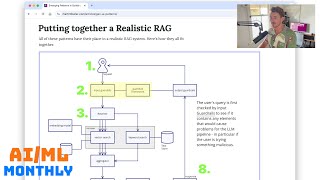
Hello and welcome to the March 2025 edition of Machine Learning and AI Monthly. I'm Daniel Bourke, machine learning engineer. This will be a video walkthrough of the text-based version of my free newsletter that I send at the beginning of every month with the latest and greatest, but not always the latest. We like to keep things evergreen around here in the world of machine learning and AI with a specific focus on open source. So if you want to read along or sign up to the email, the link will be below. Otherwise, links to all the resources will be in the timestamps as well. So enjoy and happy machine learning. Let's jump right into it. March 2025, Machine Learning and AI Monthly. So we'll start off with my work. And I know in the last video I said that I'd have this finished by this— the time this video came out the next month. However, I've had some family issues come up in the last month or so. So a little bit of a delay here, but it will come out soon. Long story short, we create an object detection model and demo with Hugging Face Transformers on a custom dataset. We build Trashify. So the goal of Trashify is to detect trash, hand, and bin in images to incentivize people to clean up their local area. So that is still coming soon, uh, working very hard to get that out. But anyway, let's jump into some posts from the internet. So Hamel, Hamal, Hamel, I hope I'm saying this right, Hussain is one of my favorite writers in the AI space. And, uh, he wrote an article just recently on a field guide to rapidly improving AI products. And I'm not going to go through the whole article, but essentially there's 6 main topics here. The most common mistake: skipping error analysis. And so this is all based on the paradigm that one of the most important things you can do in any AI project is to analyze your errors repeatedly and in a more simple way rather than having generic metrics like helpfulness or conscientiousness or tone or whatnot. If they relate to your actual project, go for that. But you want things that are very succinctly, and that's Hamal or Hamel is in favor of a simple binary metric. Yes, no, pass, fail. And then once you've done that, you can dive deeper. The most important AI investment, a simple data viewer. I totally agree. When building Nutrify, got a new Food Vision model training over there at the moment. One of the things that helps us the most is viewing our own custom data. And now I'm finding myself more and more to use AI-assisted tools like Cursor. I personally don't use Cursor, but AI-assisted tools to just create a data viewer, a custom data viewer for whatever dataset I'm working with, just to look at 1,000 random samples. And then we have number 3, empower domain experts to write prompts. So, uh, if you're like me, you— we're all getting much better at prompt engineering, but sometimes the expert themselves on the whatever domain you're working on can also just go directly into the prompt. They can inject their knowledge and write straight into it. Prompts are mostly English after all, right? And then we have number 4, which is bootstrapping your AI with synthetic data is effective even with zero users. And we're at that stage now where LLMs and image generation models can generate samples that are so like what you would find in the real world that they can be bootstrapped or they can be used as example training scenarios. And then of course, when your project gets traction, you can start to replace those samples with real samples. So you can definitely test the workflow. I think the example here is for a real estate agent chat platform where they created a different, a whole bunch of different features that they needed for synthetic dataset and then used that to test their system. So really cool there. And then of course maintaining evaluations. So my favorite, one of my favorite sayings is that evals last forever and evaluations of course are tests on your own custom dataset. Evaluations last forever, but the models are always changing. So whenever a new model comes out every 3 days, if you've got a good set of evaluations on your own custom data, you can test them out. And then if we go into the final one, which is my favorite one, your AI roadmap should count experiments, not features. So as I said, there's a new model training over here for Nutrify, and that's model— I think, uh, we've done 1,000 or 1,500 training runs over the last year or so. And so we're just constantly experimenting, trying to find the errors and then improving based on the errors. I call it model-driven development. So you train a model, you find where the errors are in the model, and then you focus on improving those. So really cool article by Hamel or Hamal. Apologies if I'm pronouncing it wrong. But if you're building AI features or any AI product, I'd highly recommend reading this article. And now on to the next. And so we have Airbnb with two different articles. Uh, there's the first one, Embedding-Based Retrieval for Airbnb Search, and then Accelerating Large-Scale Test Migration with LLMs. So from the embedding search side of things, we see how they implemented, I believe it was a two-tower strategy. Oh yeah, another important point was how to create a dataset if you're looking to do embedding-based retrieval, and they share how they searched for negative examples. So a negative example would be if you searched for somewhere on Airbnb and then you didn't book the first 5 places but you booked place number 6. Well, those first 5 places would generally be considered negative samples. Really cool way to construct a dataset there. And then as for the model architecture, they go with the 2-tower approach, which is quite common in embedding-based retrievals. So you have the listing feature, which is the Airbnb listing. You encode that into a feature space and then you have the query feature. So when I or you go to search on Airbnb, we type in what we want. That gets turned into an embedding feature that's in the same feature space as the listing. And then they get merged in terms of the similarity function. The closer the listing feature vector to the query feature vector, the higher the score, the higher the similarity. Hopefully it returns samples which are most relevant to your query. And they found at the end of all of this is that they had, yeah, notably the bookings lift from this new retrieval system was on par with some of the largest machine learning improvements to our search ranking in the past 2 years. So goes to show how powerful an embedding retrieval system can be in a production setting. And then over here, I really love this one, is not only are we seeing LLMs in products, but we're also starting to see them in the tooling. And now, of course, always buyer beware with these sort of things. But what they had to do was translate 3.5 React component test files from Emzyme as a testing framework to use React Testing Library, RTL. So in fact, this is one of the use cases where LLMs can be quite, very beneficial in the sense that it's almost a translation problem. It's going from one thing to another. but the underlying functionality still has to remain. The test still has to pass. And so the cool thing is that they thought this would take 1.5 years of engineering time to do by hand, but using a combination of Frontier models and robust automation, they finished the entire migration in just 6 weeks. So that's 1.5 years, which is about, let's say, uh, 78 weeks to 6 weeks. So a 12x reduction in time. And they have just this— this was a relatively simple retry loop. So when it didn't work, you'd keep trying. And then if it got to a certain number of steps, 10 attempts, then they'd flag that one for manual review. So this is a beautiful case of using LLMs with a simple retry loop to just continually keep going, a brute force approach basically, until it gets the right answer. And I think the most valuable thing that they found was improving the context. So yeah, we found the best— so in terms of prompt engineering, when the prompt had the most context, this is what I'm noticing as well when I do a lot of my prompt engineering. If I have a specific output that I'd like to create, alongside using structured outputs, I put many different examples of exactly the inputs and outputs in the context of the prompt. And then I find that the LLM adheres to that structure a lot better if, if, if I'm not using pure structured output. So context for me, I would go just simple instructions and then context and then context plus structured output. That's what I find is my workflow at the moment. But they found context was the most improved, offered the most improvements for them. So Alex Strick van Linschoten. Sorry if I'm pronouncing that wrong, Alex. But again, another one of my favorite writers in the space of machine learning and AI. So this is Learnings from a Week of Building with Local LLMs. And so with the likes of Gemma 3 and Mistral Small, which has been upgraded recently as well, 3.1, we'll see that later on. Gemma 3, we'll also see that later on. That got released just this month from Google. And what I— what my favorite takeaway from this was, the, the smaller models need more context. Yeah, where it is. Yeah, context matters significantly more than we might assume for smaller models. So I found this too. When you're using larger models, they kind of just get what you want straight away. This may be because of larger parameter space. They've got just got more ability to keep different concepts in their weights. But with smaller models, the more context, the better, without, of course, getting too large. That's another kind of thing that I've found with smaller models. If you put too much in there, then they can kind of can't sort through the weeds. So it has to be really specific context. And then the one more thing is that for robust results with local models, I found implementing a reflection, iterate, and improve pattern significantly enhances performance. So we're now definitely getting at the stage where, uh, with Gemma 3 and Mistral Small, that local models are performing for— can do a lot of the sort of mundane tasks like, um, captioning an image or extracting structured data from a piece of text or something like that, all working on your local device. And then another one that I found really cool was FastHTML as a compelling choice. So FastHTML, let's look that up, which is a Python-based modern web application framework from FastAI or Jeremy Howard. And it basically lets you write a web application in Python, but then it renders that to HTML. And so Hamal actually recommended FastHTML too of building a custom custom data viewer or a custom way to explore your data or even label data. And so Alex writes here, the reduced cognitive overhead and natural integration with Python, Python-based workflows makes FastHTML a compelling choice for ML practitioners who prefer to minimize context switching between languages and paradigms. So, um, check out this article if you want to read about how Alex found using local LLMs. And also a couple of good recommendations here in the end appendix for using tools like FastHTML for your own custom AI applications. And then we also have Alex's experiences using MCP. So if you've seen this all over the internet, Model Context Protocol. Model Context Protocol is as I understand it, an open source protocol introduced by Anthropic. We'll see, um, this is mentioned later on, but we might just cover it now while we're in context. And what Model Context Protocol allows you to do is creates a way for you to basically link up your database or your own custom data to LLM applications. And so there's a few paradigms that they cover, which is if we go to the Quick Start Guide. Yeah, so the core MCP content concepts is resources. So resources are file-like data, so essentially a database, tools, so tools that the LLM can use, and then prompts. So a workflow might be you write a prompt for the LLM to access a tool which manipulates the resource. And so MCP is kind of like this, its attempt to standardize that workflow so that many different LLMs can use it. And I believe OpenAI have adopted the MCP protocol as well. So still very new. So just tread with caution, but looks like a promising way for the, for going forward to have a sort of standardized workflow of allowing LLMs to access resources, tools, and prompts. But Alex, I kind of like these anecdote stories of someone using them for their own use case. And so what he did was he built an MCP server to allow Claude Desktop to access his data on Beeminder, which is kind of like a congregation of all many different apps to help track your habits and whatnot. So that way you could interact directly with Claude to say, how was I doing this week? So if you go, um, can you give me a table of my most recent handful of data points? So here's some information here. 9 total postcards, postcard per day. So that's cool. Very early days for this, but now we're sort of starting to see that one sort of thing here is though, to think about this, if you give an LLM access to your data and you're some company and they can just access it directly via the MCP protocol, what point do people have to use your app now? So if you're Uber and you just write an MCP protocol to allow people to go to ChatGPT or Claude and go, hey, get me an Uber to my address, then they never even open the Uber app. Um, maybe that's, that's still a business model for Uber, but I believe they probably want to keep people inside their ecosystem rather than just hand it over to an AI company. So on one point, it's, it's very useful if you wanted to just access your own data with an LLM, But from a business standpoint, it might be detrimental because people are just going to start using the chat interface rather than directly going to your app. On to the next. So we have Emerging Patterns in Building GenIA Products by Martin Fowler. So if we go to the article here, now this is another one of those beautiful articles that's just written in like basic pure HTML almost. And it's just, just straight experience translated into an article. So there's Martin Fowler there. And there's Baharani, or Baharani, who has both contributed to this article. So Martin has been educating professional software developers for 3 decades, so a lot of experience. But what this article does is goes through a whole bunch of different building patterns for GenAI applications, from direct prompting to creating embeddings to building evals to fine-tuning a model. When should you fine-tune versus just using direct prompting? Guardrails. How do you make sure the LLM is outputting what you want as well as what's going into the LLM is what you want? Hybrid retriever, query rewriting, re-ranking, and retrieval augmented generation. So really high quality article here if you're looking to start and understand different ways of building generative AI or LLM-based applications. So the simple one. Is you just have a direct prompt. You send a prompt to the LLM, the response comes straight back to the user. That's very similar to how the chat apps work. And then if we go evals, so evaluate the responses of an LLM in the context of a specific task. So how does your, uh, for your specific use case, how does the model perform? You could have an LLM as a judge, you could have it self-evaluate. For example, rate your confidence on this decision. Human evaluation, which is vibe checking, right, is a very tedious and time-consuming one to do, but also is— it's a quality assurance thing. If it doesn't pass the vibe check but it passes the metrics, well, is the model still performing well? That's for someone to decide, right? And then if we go down, we have embeddings. So turn something into a learned numerical representation, such as for retrieval. If we keep going down, so that's food embeddings. Hey, that's similar to what we're doing in Nutrify. And then if we scroll through retrieval augmented generation. Now I'm going to skip a few of these because I'll let you go through the article, but I really like getting right down to the bottom here. There's a graphic of what a, what an actual application might look like in practice. So if we put together a realistic RAG, Right? There's many, and this is a beautiful interactive graphic. So let's step through this. So if we start off, we have the user puts in a request. And then this is those guardrails I was talking about before. That someone, to make sure that request is in line with what you want your app to work with. So say if we're at Nutrifier food app, we might want only requests that have something to do with food to be input to our model. 'cause we don't want it to be a general model, we just want it to be food. And so we make sure that with guardrails and that can be done with a guardrail framework. And then if the query isn't very good, so we might have a model rewrite that. So query rewriting creates several variations of the query or we could have it rewrite it not once but like 5 times in different ways. And then that sends them in parallel to a hybrid retriever. And so the retriever could not only do vector search, so embedding comparison for similarity scores, it could do keyword search. So keyword search is just, if I just search Apple, it's not only going to embed that, that keyword search of Apple, it's going to look for items which have exactly Apple in them. So this is where we have an embedding model and a vector store, and we match those two vectors. Keyword search, in a text store. So this is just maybe a straight up dictionary of just keywords mapped to results. And then we have an aggregator, which could be, um, just combine the two into a set. And then we have a re-ranker, which the re-ranker would take that set of maybe the top 10 results, um, that have come through all these steps so far, and then, or top 100 maybe, and then, uh, filter it down to be the top 20. And then we have a filter here as well. And then we have the conversational LLM, which will take those top 20 results, aggregate them in some special way, which you may have prompted the model to do so. And then you have the output guardrails, which are going to make sure that that response from your LLM is in the format that you want for your app. So that could be structured generation or something along those lines. So a really cool workflow here of just showing how many steps there can be in a production, um, retrieval augmented generation. So not just the vector matching and feeding their results to the LLM, but the guardrails, the rewriter, the combin— combined search, the aggregation, the re-ranking, the filtering, um, and then the input and output guardrails. So really cool article here and really well written. So check that out if you're building AI applications. Up next, we have a breakdown of LLM benchmarks, avows, and tests by ThoughtWorks. So this article was actually referenced in the previous one, and it's, it's hinging on a lot of the, the sort of the stuff that we've been talking about, uh, in throughout this video on terms of how do you evaluate, uh, an LLM model. And so this is in there. I broke— I created this graphic as a breakdown of what's in the article. But essentially you have benchmarks, evals, which is short for evaluations, and tests. So the benchmarks are very broad and they're sort of a standardized set of tests that you'll see when a company like OpenAI, Google, Anthropic, or Deepseek release a new foundation model. They compare their large models against all of these benchmarks. So they're standardized tests. Eval, however, get very specific to your own use case. So whatever problem you're working on, say for example it's food images, I might have some evaluations that specifically do with food images. Or in Apple's case, this is just an example, they had HUA, which is an evaluation metric for the humanizing word error rate for automatic speech recognition, recognition. And they use that to deliver transcripts in their podcast app. So Really cool article there if you want to check that out, how they created their own evaluation metric for a specific use case. And then finally, there are tests which are very specific. And so these are pass/fail. So kind of like a test, a unit test in code. If you have a specific test that a generative AI must pass before you deploy that. So that's kind of how, how you'll find them in terms of release. So as soon as a model comes out, you'll see the benchmarks. and then if you've created your own set of evals, you might test that, new model on your evals. And then finally, before you deploy, you'll have some very specific tests, and checks to make sure, your model or your application passes those as a final check before going to deployment. So if we come back here, this is, another great article of just real-world use cases of classical AI models. So in the case of binary classification, you might have accuracy, precision, and recall, but in the— for predicting whether an email is spam or not spam. And the thing is with classical machine learning models is that they are constrained to that binary output. So spam or not spam, whereas an LLM could generate, maybe not a modern foundation model, you could probably get it pretty well just to always output spam or not spam. But let's just say because the LLM has an infinite output space rather than just binary, not infinite, but it has the output space of all of natural language. So it could output spam, not spam, promotional, unsubscribe. How do you now measure accuracy, precision, recall? Because you have true positives, true negatives, false positives, and you have hallucinations. So that's just where you want to have some sort of benchmarks, a combination of benchmarks, evals, and tests for your LLM models. So if you want to look at, if you want a great article on evaluating and benchmarking your models, check out this article from ThoughtWorks. Now up next, we have Neural Magic showing how to get faster VLM models through quantization. So this is another one of my favorite topics, is optimizing an existing model to perform faster. So what they showed is up to 3 times faster vision language models, uh, with still keeping the same level of performance. So if you compress Pixtral Large, which is a model from Mistral— Pixtral Large, there we go. So quite a good VLM, vision language model. What they've done here is, so the baseline would be BF16, so BFloat 16. And let's just say, for example, that's 100 gigabytes, that file. And I'm not going to have the exact number, but it's, let's say 100 gigabytes. And then FPW8 might be half that. So it's 50 gigabytes. And then INTW8A8 is maybe even less. So that's 30 gigabytes. And then INTW4A16 is maybe even smaller again, so it's 25 gigabytes. So we get smaller and smaller as we go along. But what they found is that they can compress— because these models have so many parameters to begin with, a lot of them are redundant for certain tasks. Now, of course, these are benchmark, academic benchmark datasets, so it's always with a grain of salt that you take these metrics because you'll want to, as we've discussed before, evaluate these models on your own custom dataset. And that's very important too in the world of quantization, because, because these are standardized benchmarks, a lot of models can often overfit on them. And so what that means is, yes, when you quantize them for, uh, any of these types of quantization, they still maintain good performance on the benchmarks, but then they drastically drop on your own certain tasks. So just keep that in mind. They did it for a bunch more different models as well. So kept 98% at 4 bits and above 99% retained performance at 8-bit precision. So that's really cool. And even better is that all of them are available on Hugging Face. Essentially smaller models performing faster, maintaining, maintaining their performance. And if we go on here, this is the quantized version. So let's have a look at a really big model. This is Qwen 2.5 VL. And then if we have a look at the original Qwen 2.5 VL 72B, we go to Hugging Face. So this is the quantized version and this is the original version. So 73.4 billion parameters, quantized version, 12.5 billion parameters. And if we have a look, there is 9— so let's say 8 times 5 gigabytes, 40, 43 gigabytes total, thereabouts. But if we look at the original version, we have 38 of these at 4 to 2.5 gigabytes. So let's just average them out at 3.8. So 3.8 times 38 is 144 gigabytes versus about 43 gigabytes. So about a 60% reduction. Well, if I'm doing the math incorrectly, it's quite a large reduction. So you can go from needing quite a large GPU to run this in float16 to, uh, almost being able to run this 72 billion parameter model in Google Colab on an A100. So with, with, according to Neural Magic, very similar performance. So really cool release. Um, go and give Neural Magic a follow. On Hugging Face so you can get quantized models. Up next, we have Daniel Bourke's top OpenAI resources of the month. So let's jump into OLM-OCR. This is the first one. It's, so it's a 7B parameter model, which has been, I think it's, yeah, Quentoo VL 7B, fine-tuned on 250,000 pages of PDF documents to be a high-quality OCR model. So optical character recognition, so extracting text from documents. Some highlights include that it's 32 times cheaper than GPT-4o at the time of testing, and you can extract 1 million pages of documents for $190 USD, and it can run on your own hardware. It outputs structured data reliably because it was— the model was, if you read the paper, was extensively fine-tuned on structured outputs. So that means that because it's been fine-tuned on structured outputs, it outputs them naturally. Then we have LoRA. So low-rank adaptation model had a higher loss than the fully fine-tuned model. That's, that's in the paper as well. So LoRA fine-tuning is you fine-tune a small weight matrix. So let's say instead of all 7 billion parameters, you maybe train 100,000 parameters and attach that to the model, whereas fine-tuning the whole model had better results overall, but it is more research, uh, or sorry, resource intensive. And then researchers note— I found this cool in the GitHub, uh, when exploring the code base— the order of the outputs in the JSON generation schema, that's, that's what they think. This is not concrete, but they thought that it helps the model to examine the whole page first, uh, before outputting specific information. So the schema asks the model to output metadata about the page first rather than extracting text. So metadata meaning, is the page the right orientation? How many pages are there when you upload it? Because it can handle multiple pages. And so they believe that that might encourage the model to scan the whole page first before just starting to output text directly. And here's an example I tried on just an image I took at home of the back of, I believe, is a loaf of bread. Yeah. Superseded loaf. And the model output to Markdown pretty well. It even got the table, which is not like— it's not easy to read. It wasn't the greatest photo. I just wanted to see how it would go, uh, immediately of just taking a photo of— you took this out of the cupboard, take a photo and upload, and it did pretty well. So there's code on GitHub, model on Hugging Face. There's also a blog post write-up, a paper, and a demo. Which I've got here. And like all good machine learning cooking shows, we are going to test with the attention paper. So I'll just show you what this looks like. We have the front page of Attention Is All You Need, and we're going to try and OCR that. Another thing is that the model works quite fast. So here we go. We take this, this is just an image, it's not even a real PDF, it's a screenshot. And if we zoom in there, attention is all you need. I think the model has been trained to ignore headers and footers, so just keep that in mind. Then we have a bunch of emails and authors' names, and it even gets like the, that L, Lukasz has an aperitif on the L. I'm not sure what you would call that, but it even picked that up. You'd hope it would get the attention paper right. There might be many examples of this paper in its training dataset. And then if we go even down the bottom, equal contribution, listing order is random. Uh, Jacob proposed replacing RNNs with self-attention and started the effort to evaluate this idea. Ashish with Ilya designed and implemented the first transformer models and has been crucially involved in every aspect of this work. So really good model. And here's that metadata that I was talking about. So it scans for language, and then is it the valid rotation? And rotation correction is required for zero. Actually, I wonder if, if I rotate this Let's try again with a rotated image. So I've just rotated this once to the left, and let's see if the model is able to still do it after we've rotated it. So there we go. I haven't actually tried this. Oh, it looks like it didn't work as well on the rotated document. It got the abstract, but not a other points. So maybe something for a future pipeline is to, uh, use a bunch more data augmentation to work better on rotated documents. But if you're looking for a really good OCR model that's open source, go and check out OLM OCR from Allen AI. Up next we have Teapot LLM, which is a relatively small language model— large language model in by today's standards. But the really fun, fascinating thing about this is that it's 800 million parameters, but it's also trained on Google Colab. So that is the benefit of, um, for 10 hours on an A100 provided by Google Colab. And then the dataset was also synthetic, so it was created of Q&A pairs with a variety of task-specific formats generated by DeepSeq. So I found that really cool. And on things like SynthQA evaluation, um, compared to like some other open source LLMs like Gemma, Quen 2.5, SmallLM, Teapot LLM performs really well and it's fast because it's so small. So this is to me what my favorite thing is. I haven't necessarily tried this out, the model per se, but I really like that it's the training details, it's very accessible. So this is very encouraging to me to sort of create my own kind of LLM for a specific use case. So shout out to TPoT, TPoT team for creating TPoT LLM. Really inspiring to me to see someone or a team going out and just going, hey, we want an LLM for this specific use case. Let's just create some synthetic data and train it on free hardware. And then it turns out it outperforms several open source models from large companies on the SynthQA evaluation. But of course, take it with a grain of salt. Always check it on your own evals. Up next, we've got Moshi Viz, which Moshi or Moshi, there's the model, it's open source. But if we go to the project page and we see Moshi is a text-to-speech model, but now they've added the ability to interact with it visually. So you can upload an image and then talk to the model. So if we have a listen to this, let's see what it sounds like. Hey there, how is it going? Hi Moshi, please give me a detailed description of this image. I see two green metal structures with a mesh top, and they're surrounded by large trees. What do you see in the background? In the background, you can see a building with a light brown exterior and a black roof, which appears to be made of stone. Now that is pretty cool. And the way that they do this is they have, uh, Moshi, which is the, the base or the backbone, which is 7 billion parameter text-to-speech model, but then they train 206 additional parameters on top of a frozen MoSHI. That sounds like a dessert. And so yeah, here's the pipeline. So for the visual encoder, they use PaliGemma2. Is that listed here? I believe PaliGemma— yeah, there we go— which is another open source model. So a really cool, uh, way here to combine modalities. So you have the, the frozen vision backbone of PaliGemma, which is going to encode the images, then it's going to use cross-attention to infuse the speech LLM with the, this is the MoSHI model. And then output here is going to the speech LLM outputs audio as well as text. So that in turn enables you to chat with an image. And one of the beautiful things is that it works real time on commodity hardware, such as a Mac mini with an M4 Pro chip. So it only adds a tiny little bit of latency to the already fast MoSHI model. So if you want to talk to it or see some demos, there's a Furby demo. Can even read text and has general knowledge because again, PaliGemma2 is a foundation vision model, so it has a great understanding of images. And then when you combine that with an already great speech model, you get a pretty cool interactive model. So really cool release there. Go and check out Moshi Viz if you want to build something in the speech and image space. Up next, Deepseek released Deepseek V3. Deepseek are just on an absolute roll— or sorry, V3.0324, which is their March update for the Deepseek base model. And as we can see here, it performs either on par or better than all of the recent best models on the benchmarks. So if we have GPT-4.5, which is only just released last month, it's in the ballpark or even better on the MATH benchmark there, better on the AIME 2024, and better on LiveCodeBench. So it's right up there with capabilities of GPT-4.5, but it is also open source. So if we want to test it here, hello, my name is Daniel Bourke. Oh, okay. So just be careful. Um, apparently— oh, I've got billing disabled. So will this work? Hello, my name is Daniel Bourke. So pretty cool model. Awesome release from Deepseek. Um, very large model, very performant. But so you— if you don't have the hardware, you probably have to use it through API. But If you want to generate some synthetic data, I would say Deepseek would probably be the go-to model at the moment because open source license, and you could generate a whole bunch of samples for your own custom workflow, train your own custom models on that, and then deploy. And right after Deepseek, we have Mistral Small 3.1, which is another model that's under the Apache 2.0 license. It is quite a bit smaller than the Deepseek model at 24 billion parameters. But this is an upgrade of Mistral Small 3, which we covered in, uh, the last episode, or maybe even the episode before, which adds state-of-the-art vision understanding. So now it can do vision, not just text only, and also adds long context capabilities up to 128 tokens. So if you go on to the Mistral website, we find that its performance is, uh, in terms of latency, it's a lot faster than even GPT-4o Mini with better performance and the recently released Gemma 3 instruction tune 27B. So, um, really cool model at 24 billion parameters. You can probably run this on a lot of the new, uh, M4 or M3 series chips with increased RAM or an RTX 4090 GPU, um, in the quantized version. But if we go through a whole bunch of different benchmarks here, it's on par or better than Google's recent Gemma 3, um, instruction-tuned 27B model. And GPT-4o Mini, it's either on par or better as well. Even Claude 3.5 Haiku. So an incredible model release here from Mistral under the Apache 2.0 license. So big shout out, thank you to Mistral for that. Up next, we have Quen 2.5. Now there's two releases here. Quen 2.5 VL 32 billion struct is a model that we saw Quen 2.5 VL or 72B VL before, and this is a model with basically half the parameters, but it performs at a similar level. So you save on GPU space but still get the same performance, or thereabouts. Again, mileage may vary depending on your own problem, but check out this model if you want a very performant vision language model At 32 billion parameters, again, you can probably run that on a lot of modern consumer GPUs and hardware. And we have also Qwen 2.5 Omni 7B. So this is an end-to-end multimodal model which goes from video to text, video to audio, text to text, text to audio, audio to text. It just combines all different modalities into one single model. So that is really cool to see the sort of the direction that the Quen team are going with their models. And at 7B, there's likely a lot of room here to improve it for the larger parameter models that the rest of the Quen 2.5 series have been released at. So go and check that out if you want to be able to chat with videos or with audio or have audio outputs from the same model. So a lot going on in one model there, but really cool releases there from the Quen team. Up next, we have one of my favorite releases over the past few months, and that is SmallDocling 256 mil. So 256 mil is quite a small model in today's world. But essentially what this is, this model is focused on doing is information extraction from documents. So it's an image text-to-text model, a VLM, but it's been specifically designed to do optical character recognition, layout and localization, code recognition, formula recognition, chart recognition, table recognition, figure classification. Caption correspondence, and a whole bunch more. But it's been trained to do this in a beautiful way. So I'll let you read through for the extensive information. But what they've essentially— what they've created is a special doc tags format. So rather than explicitly trying to get a model to do many different things on a document, this— well, this model does many different things, but it's— they've created a special type of data format that not only captures, um, just the text but the figures, the tables, the headings, and then it outputs them in XML-like tags. So for example, this list item will have not only the text itself, but it will have that the fact that it is a list item, so it's getting classified, as well as its location. So it turns out that this provides really great results, and for a 256 mil model performs quite well. And you can even run it on MLX. I'm a bit too zoomed in here, which is, uh, Apple's machine learning framework. And so if I take, uh, again, the input image slash PDF— so it takes an image or a PDF and then extracts the information from that digital document— I've got that running live here. This is just using the code directly from Hugging Face on my Mac Mini. So if we run, uh, python test-dokling.py, it's going to download the model here, and then it's going to interact with this image here. And then as you can see, it's streaming the output here. So that's— that all just ran live on my Mac Mini. That is really cool. Now it isn't perfect because there's a few layout issues, but that worked really fast and running locally on my machine. So the encouraging thing for me is that could this be replicated for other different specific types of documents? So, and it's 256 million parameters, so that means it can run on, uh, many different types of hardware. I'm imagining a world where you could just have this running live on your phone, and if you need to digitize a document, you just take a photo of it and now you have the, the plain text version of it. So really cool release here from Hugging Face and the IBM research team. So if you want, if you need a really small model, OlmOCR or LLM OCR was 7 billion parameters. This is about 30 times smaller than that at 256 million parameters. So go and check it out if you need a really fast and quick OCR model, and read the paper as well if you want a good overview of how to build a custom synthetic dataset. Up next, we have RoboFlow with the release of RF RF stands for RoboFlow and DETR stands for Detection Transformer. The really cool thing about this is that it's Apache 2.0 license, which means it's basically open source software. You can do what you want. Now it's a real-time detection of object detection model. So RFDETTR is small enough to run on the edge, making an ideal model for deployments that need both strong accuracy and real-time performance. So the problem with YOLO and other similar models is that the license isn't that permissive. Whereas Apache 2.0 is about as permissive as you can get. So if you have a look at the benchmarks here, I wonder if we can zoom in on this image. We have RF-DETA, which— these are the latest and greatest real-time object detection models. So this is, um, FPS or milliseconds. So at 5 or about 6 milliseconds, it can perform at 54 or thereabouts, 53 map on the COCO dataset, whereas the best-in-class D-FINE, which is an open-source model, however the code base isn't as quite as polished as the RF-DETA model, performs slightly better. But then as you go up in resolution, the RF-DETA model is the first real-time detection model to perform an over 60 map on, um, the COCO dataset. So if we have a look at COCO dataset which is Common Objects in Context. So, uh, quite a large dataset with 330,000 images and 80 different objects. And then if we have a look at the RF100, um, which is, uh, a dataset of 100 different types of datasets, the RF database model performs the best across all of those. So this is rather than just one single dataset, this is the average performance against many different datasets. So take, take it with a grain of salt. Of course, always best to test these models on your own dataset. And the beautiful thing about that, speaking of your own dataset, is that you can infer straight out of the box, perform inference. But if you want to train on your own dataset, you can format it in the COCO format. So Common Objects in Context. If you want to fine-tune a model, you can take the pre-trained model from the CoCoA checkpoints and then train it. They have a notebook here in Google Colab how to train it on your own dataset. So that is a really cool release. If you want— have your own custom object detection dataset and you want to train your own custom model, make sure you go and have a look at this notebook here, which will guide you through creating a custom model. In this case, They trained it on different— I believe that might be Chinese characters or tokens. And there you see, as, as the model trains on the custom dataset, the average precision goes up and the validation training loss goes down. So that's the, that's the loss curves we love to see. So really awesome release there from RoboFlow. So thank you for that. Up next, we have Google introduced Gemma 3, an open source series of VLMs. Now we've kind of covered these throughout this notebook because, I mean, there's been so many releases in the last month or so. But all the models are on Hugging Face. There's a blog post and there is also a dedicated Gemma library on GitHub. And one of my favorite things is that if you go to the paper for the Gemma report, if we search for Gemini 1.5, the model Gemma 3-27B performs basically on par or with Gemini Flash, or even equaling Gemini 1.5 Pro. So this is an open source model that is now competing with Google's flagship model, Gemini 1.5, albeit they do have Gemini 2 and now 2.5 released. But it's an open source model at 27 billion parameters, and there's a 12B parameter one and even a 4B parameter one, but the 27B is performing slightly better than Flash on some things, but even competitive with Gemini 1.5 Pro on some things. So really cool release from Google and DeepMind here. The Gemma library is a dedicated library that's built on top of JAX, which enables you to not only use the Gemma models to inference, but it also has fine-tuning and LoRA examples in a dedicated library built by the DeepMind team. So if you want to fine-tune your own Gemma models or an LLM, because they can do, they can do vision as well as text. If you want to fine-tune them, I'd say have a look at the Gemma library, which is a dedicated library for fine-tuning with LoRA, fine-tuning with parameter efficient fine-tuning, and then just fine-tuning the whole model as well. So really cool release there. Paper. Library blog post on Hugging Face. I'll let you read through that. Uh, essentially Gemma 3 performs incredibly well and it fits on— where was it? There's a nice graphic here where it fits on a single GPU. Maybe that's in the Google blog post. Gemma 3, yeah, that's what we want. So this is in the Chatbot Arena. So when you compare it to Deepseek R1, which is 671 billion parameters, you need quite a few GPUs. But when you're running Gemma 3.27b, you need just one GPU. And then, of course, then we have Mistral, Mistral Small 3.1, which performs apparently on par or better than Gemma 3.27b. So take your pick this month of all the awesome model releases in the open source world. And then finally, this is back to that graphic that we were talking about before of building a realistic RAG application. Where you have a guide rail model or a guide rail system. This is what ShieldGemma 2 is. It's a model that sort of makes sure the inputs to your model or the outputs of your model are safe, essentially. So if you wanted to make sure that your VLM, if you deployed it, didn't take essentially explicit content, so the model won't accept that as input. Or dangerous content as input, or violence/gore content as input. Maybe you don't want that in your production system. And then of course, if you're generating, generating outputs, the model can monitor the outputs as well. So maybe you don't want to output any of these things. So you could have a Shield Gemma on either side of your model input and output flow to protect your application and your user experience from poor outputs. So go and check out that Shield Gemma open source model, and it performs favorably across all different benchmarks against things like LavaGuard, the original Gemma 3 4B instruction tune. So this is not a Shield-focused model, and then GPT-4o Mini as well. So really cool scores here. So go and check that out. If you need a guide rail model, probably something to look into there. Shield Gemma 2. Up next, we have NVIDIA releasing Canary 1B Flash, Canary 180mm Flash, and they are right up the top there of the automatic speech recognition leaderboards. So they are automatic speech recognition models. Phi-4 Multimodal Instructor is still right up the top there as of April 2025. But the cool thing about Canary-1B Flash and Canary-180ml Flash is the real-time factor is 1000x. So 1000x real-time for Canary-1B Flash. So 1000 times faster than real-time transcription. And then the 180ml, of course, is faster again because it's a lot less parameters. So if we check out this model, 180ml Flash, is there a demo here? Here we go. Take 3. The previous 2 takes failed because the audio I recorded didn't actually get uploaded. So now let's check, test the NVIDIA Nemo Canary 1B flash model to transcribe and translate audio. I just want to focus on the transcribe function for now. Apparently this model works at 1,000 times real-time factor. And I'm recording the audio for Machine Learning Monthly March 2025. The latest and greatest, but not always the latest in the world of machine learning. Hope you enjoy. Let's see if it works with an audio file. There we go. Okay, so third time's a charm. Take 3. The previous 2 takes failed because the audio recorded didn't actually get uploaded. So now let's test the NVIDIA NeMo Canary 1B flash model to transcribe and translate audio. I just want to focus on the transcribe function for now. Apparently this model works at 1000 times real-time factor. I'm recording The audio for Machine Learning Monthly, March 2025. The latest and greatest, but not always the latest in the world of machine learning. Hope you enjoy it. Wow. That was basically, took a few tries to get going, but that was basically a perfect transcription. And you can even generate timestamps if you wanted to. So if you need to do some large-scale speech-to-text, check out Canary, the Canary models. You might wanna compare them to the Whisper models. So really cool release from NVIDIA there. Thank you so much. Up next, we have StarVector, which is an Apache 2.0 Foundation model for generating SVG code from images and text. So if we go to the demo here, the model is available on Hugging Face. There's the architecture there. There's a paper to go alongside with it. Let's see if we can get some SVG code from an image. Do they have any examples? So here's an example. Does this work? The last time I tried this, it was out of order because— oh, there we go. Okay, so I might let this run for a few seconds and then we'll see what it looks like. Okay, so that one didn't output anything. I think it got cut short. We might try another one. I'm going to increase the max output tokens. And if we try this other one— okay, I've been trying to get this to work on my own custom image here of a Nutrified Cheeseburger. But it keeps to seem it goes into a bit of a re-repeat loop, like it repeats the same, uh, pattern over and over again. I've tried it a few times here, but we'll let this run for a bit and see if it outputs anything. But I tried the demo one here and then copied the output code into this SVG viewer, and it looks like it replicated it pretty well. But again, this is another one of those things where just always be testing on your own custom data to see if it works for your particular workflows. So we'll let that run and see if we can remember to come back to it later. Up next is a really cool model from SpatialLM, and they— there's a bit of a demo there, that's a spoiler alert. So there's two variants. There's one that was trained on Llama 1B and another one that was trained on, uh, Qwen. But let's have a look at this if we go to max screen. So what it does is it takes a 3D point cloud scanned from RGB data. So if you walked around, say, this room with your, uh, device and it recorded a video, that's going to record it in red, green, blue pixels with an optional depth option if you have a LiDAR scanner. And then it takes those point cloud information or those frames, um, and then re— or sorry, recreates, turns the frames into a point cloud, and then uses that point cloud information to label it with semantic information such as 3D grounding 3D bounding boxes and the type of thing that it's, it's, uh, within that box. So really cool thing here for the future of, say, room scanning. You could just go through this, go through a room, track all the items in there, and have not only a database of what items are in there but where they are spatially. So both different types of models are available for download on Hugging Face. There's Llama 1B and Quen 0.5B. The 1B model, um, Llama version works slightly better than the 0.5 version, 0.5B model, because it's got more parameters. But this is the code they build upon, which is MasterSLAM. So real-time dense SLAM. So SLAM stands for Simultaneous Localization and Mapping with 3D Reconstruction Priors. So really cool, um, technology here. It's just going through a room, capturing frames, and then mapping those frames to a spatial map. That's the stuff that's out of science fiction. I mean, where's this technology going to be in a few years, you know, right? So really cool research and model release from ManyCore Research. How's our Vector going? Oh, I think it's stuck in a loop here generating the same sequence over and over again. Oh well, we'll let it go to the end of the video. But there is some, yeah, there's a website, there's code for yourself, and the models are on Hugging Face. So up next, we have some releases. So releases are notable. So Gemini, Google released Gemini 2.5 Pro, which is the best model on many different benchmarks so far. And I was trying it out. I found it to be incredibly good for OCR, so recognizing the structure of a document and then extracting that document to, say, structured data. It's available in the AI Studio. But yeah, here we go. It just performs incredibly well on a whole bunch of different benchmarks here. Notably, Humanity's Last Exam is still at about 20%, so it's one of the only benchmarks at the moment that hasn't quite been saturated by modern models. It's, it's enhanced reasoning, so Gemini 2.5 Pro is the reasoning is built in. So it's going to generate a lot of thought tokens to begin with and then make a better answer. Coding is much better. I found it to be kind of on par for me with Claude 3.7 in terms of my coding use. So that's just generating simple web apps or stuff like that. But it's an incredible model. And I believe it just got released in pricing mode. So if we go Gemini API docs, The pricing is now available. Pricing for Gemini 2.5. Yeah, there we go. So you can use it for free in AI Studio, but your data will be used to improve the products. But if you pay for it, it's $1.25 per million tokens under 200,000 tokens for the input prompt. And then the output is $10 per million tokens. For under 200,000 tokens, and then the price goes up slightly if your prompt is above 200,000 tokens. So quite a bit expensive than Gemini 2.0 Flash, but in my experience, if you want really high quality, uh, this is the only use case I've been able to test it for so far because it's only been out a week or so, is, um, really good for OCR. And then of course, Gemini 2.0 now has native image input and output. So, um, this was a really cool one, was, uh, text rendering. And was there a recipe? Yeah. So if you ask it to create a recipe, it creates— not only creates the recipe, but creates images for that recipe as well. So step 1, to mix the butter and sugar together, and then step 2, to beat the eggs together, and then step 3, whisk together all of the dry ingredients. So this is interleaving, uh, images with text. Now how about we try this out? So aistudio.google.com. Let's make sure we are on image generation, uh, and let's go. Make me a recipe for gluten-free hummus, please generate. Images for each step of the way. Let's see if this works. So there's the recipe. Hummus is generally gluten-free anyway, but there we go. Start with the chickpeas, uh, add the tahini in a food processor. Not a perfect image, but understandable. Add garlic and optional cumin and add the chickpeas gradually. So that is really cool. Add water or reserve chickpea liquid, adjust consistency and flavor, and then it ends up being that. Serve and enjoy. Okay, so, or we can eat it with some, uh, carrot sticks and cucumber sticks. So yeah, and that was all within 30 seconds. We've got a step-by-step recipe with pictures. Now that is pretty cool and really fast. Gemini 2.0, that's the one thing I've noticed about it, it is really fast and quite good on the majority of different use cases that I've tried it for. And so really cool releases from Google there. Gemini 2.0, uh, sorry, Gemini 2.0 Native Image Generation and Gemini 2.5 with incredible performance on many different benchmarks. And then, uh, right at the end here, we'll finish off with OpenAI announcing that they'll release an open-weight language model soon. So their first open-source model since GPT-2. So they're asking for open model feedback, which I think is— I don't know, it's slowing them down a bit if they're just getting feedback. For me, it would be make it small enough so that many consumers can use it on their own devices. That would be my biggest request. I'll probably fill out this form in my own time shortly. But I think whatever model they sort of release, it's going to be pretty good. So I'm a big fan of just release and then get feedback and iterate from there. But I guess they're going the feedback first, maybe to drive some hype up and whatnot. But that'll be really cool. I'll be sure to cover that in a future episode of Machine Learning Monthly, maybe even a dedicated video. And then, um, oh yeah, there's Sam Altman, CEO of OpenAI. We are excited to release a powerful new open-weight language model with reasoning in the coming months, and we want to talk to developers to see how to make it maximally useful. So go and fill out the form if you want to see a model there, uh, from OpenAI, or what you want to see in that model. And then GPT-4.0, speaking of native image generation with Gemini 2.0, GPT-4.0 also has image generation. So let's try the same prompt for GPT-4.0 image generation, but this time with the same— sorry, the same prompt comparing Gemini 2.0 native image generation with GPT-4.0, uh, image generation. Now this one takes a bit longer, so we might just, uh, wait a second and we'll fast forward till we get the result. Oh, there we go! I like this reveal that it does. Gluten-free hummus. Okay, so this was just recipe sort of screenshot almost. But maybe we go, can you change the image to be a step-by-step infographic on how to make gluten-free hummus? E.g., the first tile starts with ingredients and then goes one by one through to the finished product. Let's see how this goes. Wow. Okay, that was, that was really cool. It's still not quite what I wanted, but it'll do. I mean, you could probably post that to Pinterest or Instagram or something and it would, yeah, it does what it says it's supposed to do. What's that? It's got a little artifact there on the tahini. But really cool releases there from OpenAI, and I'm very excited to see what their OpenWeight language model comes with reasoning in the coming months. So stay tuned for that in a future issue of Machine Learning Monthly. In the meantime, I've got a model to— oh, it's on this side. I've got a model to go and evaluate and some sunshine to get outside. But happy machine learning, and if there's anything you want in a future episode, let me know.
More from Daniel

Small Language Models (SLMs) Are the Future: Fine-Tuning AI That Runs on Your iPhone

Introducing Sunny - A MedGemma-Powered Skin Health Tracking App (Kaggle Competition Entry)


Benchmarking: NVIDIA DGX Spark & NVIDIA RTX 4090 | Part 4 - Comparing the results

Benchmarking: NVIDIA DGX Spark & NVIDIA RTX 4090 | Part 3 - Running LLMs on the RTX 4090

Benchmarking: NVIDIA DGX Spark & NVIDIA RTX 4090 | Part 2 - Formalizing the tests

Benchmarking: NVIDIA DGX Spark & NVIDIA RTX 4090 | Part 1 - Creating a series of tests


Local Multimodal RAG on the NVIDIA DGX Spark | Part 4 - Publishing our demo to Hugging Face


Local Multimodal RAG on the NVIDIA DGX Spark | Part 3 - Putting it all together