Why "Context Engineering" Matters | AI & ML Monthly
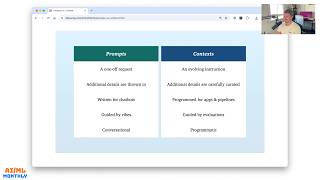
Daniel Bourke covers August 2025 AI releases and highlights Drew Bruneig's concept of "context engineering" - a systematic way to craft prompts for LLMs, not just ad-hoc tweaking. He critiques "vibe-coding" as legacy code without real software fundamentals, and reviews dozens of new open-source models including Mistral Pixtral, Qwen, and NVIDIA Canary.
Chapters
Ladies and gentlemen, Daniel Bourke here, machine learning engineer. Welcome to Machine Learning and AI Monthly for August 2025. This is the video walkthrough of the text-based newsletter I do every month covering the latest and greatest in machine learning with a specific focus on open source. Check out the links in the description for everything, or if you just want to read what's going on. But this is an absolute doozy of a month. We got Dyno V3, Gemma 3.2 70ml, LangExtract, GPT-OSS, OVIS 2.5, and that's not even the half of it. So let's jump right in. August 2025. Let's go. By the way, if you want to get this article emailed directly to you next month, you can type in your email here. It's free and it's awesome. So let's start with my work. So it's coming very soon. The ZTM object detection project with Hugging Face Transformers will take an existing object detection model on Hugging Face and fine-tune it for a specialized use case. So if you want to build your own object detection model as well as a demo, please go and check out the tutorial. The code and text are all open source and they're completely done. And the video course is— the videos are getting edited now, so that'll be live on the ZTM platform very shortly. And I've begun work on— spoiler alert— the ZTM LLM fine-tuning with Hugging Face Transformers. So very shortly you'll see here that, or maybe in here, that there'll be a fine-tuning LLM project coming soon. So we'll fine-tune an LLM for our own specific use case. And that way we can run it on our own hardware. We won't need to make any API calls. So if you want to learn how to fine-tune an LLM, stay tuned for that. Anyway, let's jump into From the Internet. So these are some of the favorite blog posts or my favorite blog posts I caught up with over the past couple of weeks. So Vibe Code is Legacy Code by Steve Kraus, and there is a great video to go along with it. I won't show it all here, but it's a 35-minute talk and it's the role of the human brain in programming. And a lot of these pieces actually are quite related and we'll go through them in a second. But I love this take on vibe code. We already have a phrase for the code that nobody understands, legacy code. And if you're not sure what vibe coding is, I'll put up the original definition on the screen by Andrej Karpathy. Basically using an LLM to help you code and then forgetting that the code even exists. Of course, there are many different definitions from that, that's— I would agree with the original definition of just use an LLM to build things that you don't really mind or care about or to learn from. So great read through here. Serious coding with AI in 2025. Yeah, here's a follow up from Andrej Karpathy, who originally coined the term vibe coding. So if you're building something serious that you intend to maintain in 2025, Andrej has the right, right of it. Keep a very tight leash on this new overeager junior intern savant with encyclopedic knowledge of software, but who also bullshits you all the time, has an overabundance of courage, and shows little to no taste for good code. An emphasis on being slow, defensive, careful, paranoid, and always taking the inline opportunity— learning opportunity, sorry— not delegating. Yeah, so if you want to build something that you want to know how to maintain, uh, either write it yourself or pay close attention to what the vibe code is coming out. If you want to prototype, go by all means. I've done many sort of HTML demo apps by just vibe coding. And if we go here, yeah, we already have a phrase for code that nobody understands, and that's legacy code. Have you ever jumped into— one of the hardest things that I've ever done in terms of programming is going into a code resource that either you wrote few years ago, and you haven't looked at in a couple of years, and trying to fix it, or going into a code repository that someone else wrote a couple of years ago, and you're trying to fix it or understand it, not even a couple of years ago, recently. So that's legacy code. And so the same thing with vibe-code, if it writes 1000 lines of code, and you don't know, it's in a language you've never used, or you don't know what's in there, well, then that technically is by definition also legacy code. Great blog post there from Steve Krause and a great talk to go along with it. There's another blog post here that I really like, and that's Writing Code Was Never the Bottleneck. So that almost sums up with my point of view on vibe coding in one, one line, and that's writing code was never the bottleneck. In all the years that I've been a software engineer or machine learning engineer, especially working with other clients, it's generally not the problem that we can't write enough code. That's what we do. That's our specialty as engineers. The problem is writing the right code, understanding the right problem. So let's read through this. This is from ordep.dev. So for years, I felt that writing lines of code was never the bottleneck in software engineering. The actual bottlenecks were and still are code reviews, knowledge transfer through mentoring and pairing, testing, debugging, and the human overhead of coordination and communication. That's a big one, right? Because as engineers, we love solving a problem, but which problem we're trying to solve is a part of coordination and communication. All of this wrapped inside the labyrinth of tickets, planning meetings, and agile rituals. These processes meant to drive quality often slow us down more than the act, act of writing code itself because they require thought, shared understanding, and sound judgment. Now, with LLMs making it easy to generate working code faster than ever, a new narrative has emerged: that writing code was the bottleneck, and we've finally cracked it. But that's not quite right. The marginal cost— cost— cost of adding new software is approaching zero, especially with LLMs. But what is the price of understanding, testing, and trusting that code? Higher than ever. LLMs shift the workflow. They don't remove it. Tools like Claude can speed up initial implementation. Still, the result is often more code flowing through systems and more pressure on the people responsible for reviewing, integrating, and maintaining it. This becomes especially clear when it's unclear whether the author fully understands what they submitted. The generated code introduces unfamiliar patterns or breaks established conventions. Edge cases and unintended side effects aren't obvious. So if we go down, I'll let you read through the full article, but we have here: LLMs are powerful, but they don't fix the fundamentals. There's a real value in faster prototyping, scaffolding, and automation. But LLMs don't remove the need for clear thinking, careful review, and thoughtful design. If anyone— if anything, those become even more important as more code gets generated. Yes, the cost of writing code hasn't dropped, but the cost of making sense of it as a team together hasn't. That's still the bottleneck. Let's not pretend it isn't. So outstanding article there from 4Dep. Is that how you pronounce it? Ordep.dev? LinkedIn, maybe? Pedro Tavares. So great article there, Pedro. Thank you very much for publishing that. Now, if we go back to Machine Learning and AI Monthly. So this is another article here by Jian Segato, which is Building AI Products in the Probabilistic Era. And I've pulled out a quote here. So having worked with ML models in production for a while now, I really liked the line, the goal isn't perfection. By definition, you can't nor should aim for it. The goal is to manage the uncertainty. So if we look for perfection, yeah, there we go. So this is when you work with a probabilistic model. So this whole article is talking about how do you build a product on, on top of an LLM, as in something that by nature outputs probabilistic outputs. And so I'm working on a computer vision problem now for a client, and it's to identify certain wildlife in computer vision. And there are a lot of species which look extremely similar apart from a few defining features. And so what ends up happening is that the model will output 3 similar looking species. But if you were an expert, you could tell those species apart by the very minute details. However, the problem is what we're working with is a single frame from maybe 100 feet away, 30 meters. And when you zoom in on that, in the pixel space that those features that tell the species apart basically wash out into black pixels. So the way we mitigate that is by displaying the most common predictions, the likely predictions, or items that also— species that look similar to those also that are predicted. So the goal isn't perfection. By definition, you can't nor should aim for it. The goal is to manage uncertainty. So past a certain point, intelligence and control start becoming opposing needs. So if you're trying to control an alarm system, you're kind of by default reducing its intelligence. So in the case of Nutrify, when we take a photo of food, we are constricting the model's output to the food space. We don't want it to talk about anything other than food. We just want to— so by default, we are reducing the model's knowledge. Now, intelligence and knowledge, I like the interchangeable— the one— the systems are incredibly knowledgeable, maybe not intelligent by default. So then if we go down here, there's an example. So Jian, Jian, who wrote it, used to work at Replit. So one of the things that really changes in a product space is if you're building on an LLM system, there may be certain features that don't yet quite work. So for example, when I entered the Gemini competition and used it for video, it was pretty good, but now it's much better a year later. And so this is what they found with Sonnet 3.5 to 3.7. Replit's president, Michele, Michele, had the company rewrite the entire product in less than 3 weeks. So if we look at— let's go back to the original article instead of my quote. There we go. In fact, when a new model drops, you should even consider literally tearing down the full system and building it back from the ground up. There are no sacred cows. When Replit moved from Sonnet 3.5 to 3.7, Replit's president Michele or Michelle, had the company rewrite the entire product in less than 3 weeks. We called it Replit V2. Yeah, I think the vibe around Sonic 3.7 was that it was the best coding model at the time, but that was quite an understatement. In reality, it was a brand new product. The architecture, data model, prompting technique, context management, streaming design, it was all new. 3.7 was highly agentic in an entirely novel way. Michelle understood it, and decided to lean into it instead of trying to control it. The team had to go through weeks of sleepless nights trying to beat the competition to market it successfully. Can you imagine what it takes to completely re-architect a product that was making almost $20 mil ARR— so that's $20 million annual recurring revenue— at the time, rebuild it from the ground up, and in just 3 weeks, uh, and to see its revenue inflect and end up growing to $100 million— so 5x in ARR— ARR, less than a quarter later. It takes a scientist. It's no coincidence that Michele is indeed a scientist by trade. So I like this. This is a good point. But then also the point after this kind of argues against it. So swapping models at the app layer is a big deal, which makes Frontier Labs stickier than they may look from the outside. It's not just a, just an API commodity. These models are not flat interfaces. They have personalities and quirks. That's why Gemini 2.5 Pro was not a Claude 3.5 killer despite being an exceptionally good model. It takes hard work to fully prove that any given model is superior to any other. So, oh yeah, here we go. Every model update doesn't necessarily mean a complete rewrite every time, but it does force you to fundamentally rethink your assumptions each time, making a rewrite— making a rewrite a perfectly plausible hypothesis. You have to follow an empirical method. Where the only valid assumption is, I don't know. Being an empiricist first is diametrically opposed to being an engineer first. I think engineering is also— has a very big hint of empiricism in it. So I really like this article. Basically goes to show like, how do you build a product in the probabilistic era? And of course it's experimental. It's always changing. You may have one model that makes your use case completely available, but the danger here is that if there's a new model in 6 months, someone else could just build on top of that new one and all of your engineered feature stack could now be not worthless, but not as worth as much as it was because now that new startup is passing off a lot of the sort of hardcoded engineering things to the model. But that won't always be the case, of course. So really good article here and big shout out to Jian Segato. Building AI Products in the Probabilistic Era. Up next, we have Why Context Engineering Matters by Drew Bruneig. I might not be saying that correctly, but I'll just say Drew. So this is the slides from a talk. And I like the term context engineering over prompt engineering. So if we go down to the difference, yeah, this is what Drew defines the difference as. So prompt engineering focused on one-off request. So if you're just writing something into the ChatGPT or Gemini or Claude window, and you know what you want, and you get a quick response, additional details thrown in. So you might say, put it in a table, or think hard on this one. Written for chatbots, guided by vibes, conversational. And so context engineering, whereas I feel like this is, this is sort of user interface. So if you go into the the chat window of the chatbot, whereas context engineering is more for API use cases. So focus on evolving instructions. So this is where I, I spend a lot of time in aistudio.google.com and you sort of start off with one prompt and then you iterate on the next, you delete the output, iterate on the next, and then once you've got something that's pretty good, then you can move it into like a VS Code or something like that. So additional details are carefully curated. So this is where you might use a RAG pipeline or something like that where you could use additional information into the context. You guide them by evaluations, which is a really important point, is that if you want to sort of deploy your prompt into a specific environment, product environment, you want to know that, hey, if I change this one sentence, how's that going to look in the output of my app? And then programmatic, you can save them to— at the moment my workflow is just I've got a bunch of TXT files and then I iterate on those because I mean, to me they were just the easiest to work with. And so you can iterate on them programmatically, whereas conversation is— context engineering, I feel like you want any— you've got an input, which is your context, and then the output, and you might not have anything after that. Whereas prompt engineering, you can go back and forth in the chat window much easier. So I really like this, and this is a great, um, presentation, but not only a presentation, it's a collection He defines it as well here. Context engineering. I think I copied the definition into here. Yeah. Context engineering is systematically, systematically engineer context in pursuit of an outcome. So yeah, you want your prompt or your context to generate some sort of outcome. So if we go following on from the previous post, how do you build an AI product in the probabilistic era? That's where context engineering would come in, is that you would have an evolving set of instructions that you're trying to get a repeatable output from. And so this is where I've collected more of Drew's posts because I really— every so often you stumble upon someone's blog and you basically read all of their articles. So Prompts vs Context, How Long Tech Context Fail and How to Fix Them, How to Fix Your Context. So Context engineering. Prompts first context. People associate prompts with short task descriptions you'd give an LLM in your day-to-day use, when in every industrial-strength LLM app, context engineering is the delicate art and science of filling the context window with just the right information for the next step. So if someone was building like an app like Cursor or something like that, where you have a product that is built on top of an LLM, You're— one of your most important points, or your most important task, is context engineering. And then we've got long context, how long context fail. Here we go. Context poisoning, context distraction. Another good point: while Gemini 2.4 Pro supports 1M token context, making effective use of it for agents presents a new research frontier. So even— yeah, even though something supports 1 million plus token context, it doesn't mean you necessarily have to use all of them. Context confusion, tool, tool calling, context clash. So all in all, if you want some great articles on context engineering and just general thinking about LLMs and AI, I would highly recommend going to Drew's blog. And checking out all of the recent articles. There we go. So this is a new one as well. Can chatbots accommodate advertising? I haven't read that one yet, so that's— I'll save that for me for later. Thanks, Drew, for those awesome articles. Up next, we have Tokens Are Getting More Expensive by Ethan Ding. So this is another great take from my opinion is models are getting cheaper, but they're getting used more, way more. So when a new model drops, they've got new capabilities, right? So before you could just do input tokens and output tokens. But of course now with reasoning models or thinking models, we have an unknown middle. We have the input tokens, your prompt or your context. Now they could be— most models options have a settable amount of tokens to use as the reasoning steps. So for example, Gemini, you can go, hey, you have a token budget of 2000 for reasoning, or with GPT you have low, medium, and high, I believe. And then you have the output tokens. So you could have many, many more use cases here with the reasoning trace. So before, you kind of knew that there would be an input and a direct output, but now there's this sort of unknown in the middle. And so if we go to this— a great article, Tokens Are Getting More Expensive. The models have gotten 10x cheaper, yes, and we'll have 90% margins if you're a LLM provider. But what happens when the volume increases 10,000x? So they go down 10x in price, but the amount of usage goes up 10,000. So there's a problem there, right? And so if we go to Max, here we go. So when you notice something, there's a little graph here of how the price per token of the most demanded model stays approximately constant. Because every time a new model comes out, it's usually the most expensive because it's the, the best and it hasn't been optimized yet. And so it's at that high price. And so the older model gets cheaper, yes, but no one really wants— if there's a better model available, do you really want to use the less performant model? Of course, by default, you always max out on quality. So if you can, you generally do. So when GPT-4 launched at $60, everyone used it despite GPT-3.5, the previous state-of-the-art, SOTA, being 26x cheaper. And so when Claude 3 Opus launched at $60, people switched despite GPT getting price cuts. So the 10x cost reduction is real, but only for models that might as well be running on a Commodore 64. So this is the first faulty pillar of the cost will drop strategy. Demand exists for the best language model, period. So yeah, if you're building an app and your app or product depends on quality, you're probably going to just default to the best model that's available. And the best model always costs about the same because that's what the edge of inference costs today. Saying that this car is so much cheaper now while pointing at a 1995 Honda Civic misses the point. Sure, that, that specific car is cheaper, but the 2025 Toyota Camry MSRP is $30K. When you're spending time with an AI, whether coding, writing, or thinking, you always max out on quality. Nobody opens Claude and thinks, you know what, let me use the shitty version to save my boss some money. We're cognitively greedy creatures. We want the best brain we can get, especially if we're balancing the other side with our time. So really great point there. And then if we go down, scroll through here. So this focuses on Anthropic, which ran into an issue with Claude code's pricing. So what they did was they have, uh, max unlimited, um, usage. And so what happened was I personally don't use that many tokens, but many people did. And what happened was they burned— instead of $20 a month when you went to the max unlimited experience, uh, experiment, they burned through way more tokens than what $20 would actually buy. So Claude Claude's max unlimited experiment was the most sophisticated attempt at weathering this storm we've seen. They tried every trick in the book and still got obliterated. Their playbook was genuinely clever. Charge 10x the price point— oh, so sorry, $200 per month when Cursor charges $20. Start with more buffer before the bleeding begins. So they give you— if you pay $200 per month, you can use Claude code MAX unlimited. Auto-scale model models based on load. Switch from Opus, $75 per million tokens, to Sonnet, $15 per million tokens when things get heavy. Optimized with Haiku for reading. Like AWS Auto Scaling, but for brains. They almost certainly built this behavior directly into the model weights, which is a paradigm shift we'll probably see a lot more of. Offload processing to user machines. Why spin up your own sandboxes when users have perfectly good CPUs sitting idle? And despite all this engineering brilliance, token consumption still went supernova. Yeah, so this is ViBrank, which is an app that tracks Claude Code usage. I'm not sure how it does that, but if we see here, this person has spent $51,000 over all time on Claude Code tokens. And of course, at $2,000 per day over the last 24 days, that's an incredible usage of Claude Code. And so if they're only paying $200 a month but they're burning $2,000 per day, Uh, that's the same insane amount of usage. So that more— they're using 10x their spend per day, their monthly spend per day. So if you times that by all of these other people, that's an incredible amount of usage. So what's the problem here? Well, that the flat fee for token usage, uh, in an app like Claude Code might not work. So really good article here. I'd encourage if you're looking to learn more about tokenomics, check out this article by Ethan Ding, Tokens Are Getting More Expensive. Up next, we have Mistral showing how to fine-tune, or showing how fine-tuning a vision language model can improve satellite imagery recognition. So Mistral open-sourced Pixtral-12B a fairly long time ago. Well, in the world of AI, about a year ago actually. So yeah, September 24— oh, 9. So we go here, unlocking the potential of vision language models. So if we look in here, if we go Pixtral, and so of course these models have been trained on the combination of vision and language. Pixtral 12B, so that's a fairly large model, and what they wanted to do was classify satellite images from the aerial image dataset. So really cool problem. I've worked on a problem similar to this when you're trying to find, uh, shipments and swimming pools and whatnot. So stadium, storage tanks, resort, pond, port, parking, forest, center, etc., bare land. So Pixtral 12B with no fine-tuning achieves decent results but falls short on ambiguous classes. So because this model, Pixtral, has an idea of vision and language combined, you can start with a system prompt. So you can go, hey, classify the following image into the category it belongs. These category labels are desert, bare land, railway station, mountain, parking, river, church, medium residential, uh, and so on for about 20 or so classes. Output your info result using exclusively the following schema. So output into a JSON schema, put your results between a JSON tag. That's actually a pretty good one there. Field info annotation string required equals true. And then without fine-tuning, it got pretty decent results, right? So not, not dramatically or not drastically bad, but it did miss out on some things. So like this one, viaduct, it didn't predict viaduct very much. And then it didn't get many for meadow, but it confused meadow with farmland. Okay. That makes sense. It got very confused on viaduct with wrong. Oh, okay. Not sure what that one was, but then playground also got confused with stadium. Okay, kind of makes sense. So fine-tuning Mistral model is easy as ABC. So they have an example of how you can fine-tune it with the platform. So this is the lab platform UI. Upload a JSON L file, selecting hyperparameters, and then fine-tuning helped boost the model performance by 1.6x. So yeah, after fine-tuning— I really love seeing this of taking— I love these before and afters. This is one of my favorite kind of comparisons, is it a model that's already kind of good in its own right, but then you fine-tune it on a specific dataset and it just gets much, much better. So when they do that, I believe it went from 56% accuracy So 56 is not too bad on 20-odd classes, then to 91, which is quite good. The model's hallucinations or performance became more consistent across classes and hallucinations were significantly reduced from 5% to 0.1%. So they're not 100% perfect. And of course— oh, 30 classes. There we go. They used 8,000 images to fine-tune it. Now, of course, they also mentioned that you could do this with a smaller model. But it just goes to show how performant VLMs can be. Not only are VLMs pretty performant out of the box, but they can be fine-tuned just like a normal smaller convolutional neural network or something like that. So they also have a cookbook down at the end here. So if you want to fine-tune a VLM or see an example of that, go and check out this end-to-end notebook here of Mistral doing fine-tuning with Pixtral 12B. Up next, we have Strategy Letter V, or Strategy Level 5, by Joel Spolsky. So Joel is a software developer that has been writing on software for over 20 years. So this article itself is from 2002. I wasn't even 9 yet, and I just turned 32 on Monday. So this is an article about macroeconomics and microeconomics. So macro was full of theories like low unemployment causes inflation, That never quite stood up to reality. But the micro stuff was cool and useful. It was of interesting concepts about relationships between supply and demand that really did work. For example, if you have a competitor who lowers their prices, the demand for your product will go down unless you match them. And so, if we go to the line here that I really like in the takeaway, uh, I'll let you read through the full article, is: Smart companies try to commoditize their product's complements. I'll just read that again. Smart companies try to commoditize their products' complements. So if we go back to what we had before, tokens are getting more expensive, or Ethan Ding also has another article here, which is OpenAI burns the boats. So is there a line? Complements. Yeah. Joel Spolsky wrote about this in 2002. Gwenn expanded on it, but the principle is older than software: commoditize your compliments. And so this post is about how OpenAI lowered their API pricing for GPT-5 as well as open-sourced GPT-OS, and we'll get to that in a second. But why did they do that? Well, if Anthropic is making a lot of money on their API, uh, but GPT or OpenAI is making a lot of money on their ChatGPT app, then if OpenAI wanted to take over Anthropic's sort of, or commoditize their business, they would just release really good open source models and lower the price of their API. So is OpenAI a smart company doing this if they try to commoditize their product's complements? Because Anthropic's Claude is ChatGPT's complement. So smart companies try to commoditize their product's complements. If you can do this, demand for your product will increase and you will be able to charge more and make more. When IBM designed the PC architecture, they used off-the-shelf parts instead of custom parts, and they carefully documented the interfaces between the parts in the revolutionary IBM PC Technical Reference Manual. Why? So that other manufacturers could join the party. So this is like a, an older version of, hey, your documentation is your product. If you have good documentation, people can use your product into interact with other things. As long as you match the interface, you can be used in PCs. IBM's goal was to commoditize the add-in market, which is a complement of the PC market, and they did this quite successfully. Within a short time, skrillions of companies sprung up offering memory cards, hard drives, graphics cards, printers, etc. Cheap add-ins meant, meant more demand for PCs. Yeah, so I really like this, this article on just strategy and micro macroeconomics in general. And it kind of feeds into the tokens are getting more expensive, as well as that other article we just saw of OpenAI building the boats and releasing open source models and making their API much cheaper. So really good article. I'd also recommend all of Joel's other articles if you're in the software engineering space. Highly, highly recommend. Up next, we have how the Zett— or Zett, I'm not sure how to pronounce that— but Zett storage layer improves uploads and downloads on Hugging Face. So Hugging Face stores 21 petabytes of data. So that's a lot of data, right? And you want to, of course, optimize it. And so the, the way that they do it, or one of these new updates that's impossible by, or made possible by, Zett storage layer and Apache Arrows Parquet, Parquet, Parquet, Parquet, Parquet content-defined chunking, CDC feature, enable more efficient and scalable data workflows. So the TL;DR here is that Parquet content-defined chunking, CDC— that is a mouthful to say— is now available in PyArrow and Pandas, enabling efficient deduplication of Parquet files on content-addressable storage systems like Hugging Face's Zett storage layer. CDC dramatically reduces data transfer and storage costs by uploading or downloading only the changed chunks. That's really important there. Um, enable CDC by passing the use_content_defined_chunking argument. So if you see any datasets on Hugging Face that use the.parquet format, you might see a lot of these. They can use— now use the content-defined chunking. So, uh, example, if you have a dataset with a million rows and you alter 1,000 of them, when you go to recommit your dataset to Hugging Face datasets, instead of recommitting the full million rows, it will only update the 1,000 that have changed and vice versa. When you download it, if there's 1,000 new rows, if you've already got 1 million stored locally, it will only download those new 1,000 unless they are different from— unless there are other different rows in the million. So really cool thing. I don't know if you've seen with downloading a Hugging Face model lately, it has been much faster, especially in Google Colab or even working locally. So really cool update here. Good to see some efficiency gains in uploading and downloading from the Hugging Face Hub. Alrighty, we now have Daniel's open source AI of the month, and first up we have AIDC AI release OVIS 2.5. Now these are some of my favorite VLMs or MLLMs, multimodal language or large language models. We'll give that collection an upvote here. We have OVIS 2.59B, OVIS 2.52B, and of course a paper to go along with it. So if we go into here, OVOS 2.5 9B is a vision language model. And if we compare it to other models that are of similar size and prowess, we can see that basically on every benchmark except for MMLU, it outperforms GPT-4o. So that is incredible. And this is the 9B version, by the way. And then the 2B version performs basically the best in class for its size, but falls short on a couple of things. They do incredibly well on OCR Bench V2 as well. So these are really high-quality VLMs and basically the latest, greatest state of the art. They do this by integrating the, the new Quentri LLM decoder on top of SigLIP2. I believe this might be mentioned in here. SigLIP2, there we go. So they are a combination of a Vision Transformer for the vision component, SigLIP2, and for the LLM of the smaller one, OVIS-2.52B, Qwen-3 1.7B. And then we have the same vision language model for— or sorry, Vision Transformer for the 9B version, but we have a much bigger LLM with Qwen-3 8B. And so, uh, some of my favorite use cases— I'll just go, I've got a little keynote presentation— and that is the grounding examples. So In a previous world, if you tried to OCR something like a table like this, you would get not the greatest outputs. But with a vision language model, you can now prompt it to get the kind of outputs that you want. And so if we go zoom in a little bit here, you're trying to extract the nutrition information from this table. So if we go CEP1 and what is that? So that is calories, energy. 273 kg, and there we go, 237 kg, 65 kcal. And then if we have here 5— 546 kg, 130 kcal. So this is a little bit of a pixelated image as well, and it's kind of rotated a bit. There's some artifacts here which are different colors of rows, but yet it gets basically everything correct as it extracts it into a JSON. So this is a really good workflow of like especially for, say, an app like Nujify, is you have 10,000 nutrient panels or nutrition panels of different products. You could use a model like OVIS-2.5 to extract them into JSON, and now all of a sudden you have structured data of image nutrition panels. It can also do text detection. So if you— or prompt-level box detection, sorry. So if you— one of the hard things with object detectors is having a big labeled dataset. So now you can use vision language models to label a dataset at scale using a prompt. So in this case, spot all the text in the image with WordLevel, please provide the bounding box coordinates. So in here, the model responds with text in a structured manner that you could extract and process in a way and then plot the boxes. Of course, they're not perfect, but to get boxes like this with a single line of text— if you've ever worked on an object detection pro— project before, you know that getting many different boxes can be quite time-consuming, but now you can do it at scale and then refine them over time. And then finally, one of my favorite use cases was take an image here and object detection. So I just said, hey, give me boxes for all the unique food items in the image, and it returned a very similar output to this, which I then post-processed to plot it. So we've got carrot sticks, green and black olives. This is all the coordinates and the titles were produced by the model. The image is the only input. Hummus with olive oil drizzle, cucumber slices, whole grain crackers, tomato slices, white cheese balls, arugula leaves. In Australia, we would call that rocket, but arugula is another term that's widely used as well. And red and orange bell pepper slices. So incredible performance. Of course, again, not perfect, but for an auto— automated output, I'll give that a good big tick there. So again, another thing that you could use to label detection data at scale. So that is OVIS 2.5. Go and check out the collection on Hugging Face. There's also demos that you can try out on your own images. And big, big, big shout out to AIDC AI for releasing the OVIS 2.5 series. Up next, we have Google DeepMind releasing Perch 2.0, which is a bioacoustics foundation model. So there's an article here if you want to read through how AI is helping advance the science of bioacoustics to save endangered species. And what Perch— the original Perch is a repository on GitHub, but it could recognize different bird sounds, hence the name Perch. But now it's opened it up to many more different species. So Perch, the original model, has been downloaded over 250,000 times. And let's just dive into the paper I found. So this is a blog post, just basically a media release saying what's going on. But if we look in here, Perch 2.0, read out the abstract. So Perch is a performant pre-trained model for bioacoustics. It was trained in supervised fashion, providing both off-the-shelf classification scores for thousands of vocalizing species, as well as strong embeddings for transfer learning. In this new release, Perch 2.0, we expand from training exclusively on avian species— so yeah, the original Perch was bird only, avian— to a large multi-taxa dataset. The model is trained with self-distillation using a prototype learning classifier as well as a new source prediction training criterion. Perch 2.0 obtains state-of-the-art performance on the BirdSet and Beans benchmarks. It also outperforms specialized marine models on marine transfer learning tasks despite having almost no marine training data. We present hypotheses as to why fine-grained species classification is particularly robust pre-training task for bioacoustics. So what they did is they've supervised it on— there's 1.5 million samples in there, um, and it's a— the model architecture is, yeah, an EfficientNet. So they wanted it to work on consumer-grade hardware. So for example, if you were out in the field and you had a small device and it wanted to work on a mobile phone, very similar to the problem that I'm working on with a company right now actually, except with vision. So they used an EfficientNet B3. So if we go Torchvision EfficientNet B3 model, There we go, which is a common model that you can find. It has 12.2 million parameters and it's about 47 megabytes, so definitely capable of running on a mobile device. I've used these models in the past, they're quite good. And it pre-trained on— do we have number of species? I believe it was 15,000. Yeah, there we go. So the output heads. So during training we have 3 output heads: a linear classifier, which projects EA into— so the embedding of the audio. So they embed the audio spectrogram with, uh, EfficientNet B3 into embedding space, and then they output it into 14,795-dimensional space of class labels. So that's the fine-grained classification. So not fully self-supervised because it's still outputting into a, um, a limited dimensional space of 14,795 species, but that's still a lot of species. And what they found is that you can fine-tune it very quickly. So if we go fine-tune, or if we search for classifier— yeah, so if you look at the conclusion here: though we have previously seen wide transfer of bird vocalization embeddings to a surprising number of bioacoustic tasks, we are confident that the expansion of training targets in Perch 2.0 will make it applicable to even wider range of problems. We have seen in this work that high-quality transfer learning does not require very large models, and that well-tuned supervised models using strong data augmentations and auxiliary training objectives can have strong performance. The simplicity of the final model and the linear separability of its embeddings ensure scalability to large datasets. So that means because the embeddings are quite general across 15,000 different species and they are linear— linearly separable, if you wanted to fine-tune them to your own dataset you definitely could, or just leave the embeddings fixed. So this is the next line here. In particular, transfer and classification on fixed embeddings, as opposed to model fine-tuning, means that embeddings can be computed once and then reused for large datasets. This represents a massive savings of resources for, e.g., one-shot retrieval through embedding vector search, i.e., query by example. So you have, hey, I have bird X, can you show me, uh, examples in my database which are like bird X? Which is an important first step to transfer learning through agile modeling. So really cool release from the Google DeepMind team, and the models are all available on GitHub as well as Kaggle. There we go. Perch V2 and Perch Hoplite is a set of open source tools. Yeah, there we go. Embed Audio V2. Speaking of widely applicable, uh, model backbones, we have DINO V3 self-supervised computer vision backbones from Meta. So if we look at the article here, DINO V3— if you haven't used the DINO models— are a form of self-supervised learning models. Now this DINO V3 basically steps it up from DINO V2. If we have how many samples? We've got 1.7 billion images and a model that is 7 billion parameters big. That's one of the biggest computer vision backbones I've ever seen. And so that is a lot of images. I think the last Dino V2 was trained on 142 million images. So if we go that to 1.7B, it's over 10x more images. And if we look at the performance of the different models here, the scale up really helps a lot. So Dino V2, we had 1.1 billion parameters. Dino V3 has 7 billion parameters. So about, let's say, 5.5x more, whereas SigLIP2 has 1.8 billion. And Perception Encoder, which we've covered before as well— so if we look at perception models, this is also from Facebook, or from Meta— perception modules, there we go, encoder, this is this big one here. It performs on par with those, but it actually outperforms them on several different tasks. So on ImageNet Real, basically the same performance and slightly worse on ObjectNet than PE, Perception Encoder. But this is— DynoV3 has been trained purely on vision only, so it doesn't have the language representation that SigLIP or Perception Encoder has. So it's just purely vision. So 1.7 billion images, self-supervised learning on that. And so if we go here, data curation, reading through the paper was actually really good to find out how they did their data curation. So they started with— there we go, features. So yeah, that's the benefit of using the Dyno features is that they can be tuned to several different tasks such as classification, object detection, depth perception, and many different things. But that's the blog post. Let's look at the paper. And look at Dino V3 and Hugging Face. And Dino— this is a website as well. I haven't even seen the website. Ah, okay, it's more of a— here's our resources. But we are more interested in all the models. Here we go. Dino V3, we have a series of different models. We have ViT-7B, the biggest. This is the big dog one, pre-trained on LVD-1689 million images. That is a lot of images. They got the images— if we go I wonder if I've got that in my keynote. I do. This is a really good read-through of the paper if you want to see how it's— these are all images from the paper, by the way. So the data collection and curation: we build our large-scale pre-training dataset by leveraging a large data pool of web images collected from public posts on Instagram. So really helpful to have, uh, Instagram as your sort of app that you own, because then you're just getting as much data as you can possibly handle. So these images already went through platform-level content moderation to help prevent harmful content, and we obtain an initial data pool of approximately 17 billion images. So they start with 17 billion and finish with 1.7 billion, so they negate about 10x. So using this raw data pool, we create 3 dataset parts. We construct the first part by applying the automatic curation method based on hierarchical k-means. We've covered that in a previous Machine Learning Monthly as well. There's a paper link to that. We employ DINOv2 as image embeddings. Oh, okay. So they filter the data with DINOv2, which is already a really good performing model, and use 5 levels of clustering within the number of clusters, from lowest to highest levels being 200 million, 8 million, 800k, 100k, and 25k clusters. After building the hierarchy of clusters, we apply the balanced sampling algorithm proposed in the same paper as before. This results in a curated subset of 1,689 million, or rounded up, 1.7 billion, named LVD-1689MIL. That guarantees a balanced coverage of all visual concepts appearing on the web. See, this is, of course, it says all visual concepts on the web, but it's, it's still limited by the 17 billion images that they've curated from Instagram. So it's— yes, it is all concepts on the web, but all concepts that are contained within the 17 billion images. So there's many, but I wouldn't necessarily say all. I don't think Instagram would necessarily have that many pictures of like PDF documents or something like that. For the second part, we adopt a retrieval-based curation system similar to the procedure proposed in Okwab et al. 2024. We retrieve images from the data pool that are similar to those from selected seed datasets, creating a dataset that covers visual concepts relevant for downstream tasks. For the third part, we use raw publicly available computer vision datasets, including ImageNet-1K, ImageNet-22K, and Mapillary street-level sequences. This final part allows us to optimize our model's performance for a specific task. So these are the results on classification datasets. So if we look at, uh, ImageNet on the default dataset, it's very close to SigLIP2 and PE-Core, which are recent state-of-the-art models which have the best-in-class zero-shot on ImageNet. But these of course are trained with language. Dyno V3 is vision only. But then if we look at other things, it's again either on par or best-in-class for various different tasks. So V2 PE-Core slightly beats it out again. SigLIP2 slightly beats it out on real, and then on other different items here. So outstanding backbone, Dino V3. And then if we look at the output feature quality, so here's where you can really sort of differentiate Dino V3 compared to other models. So if we're basing how much it understands a visual concept on the quality of its output features, the features in Dino V3 are by a long shot the highest quality of PCA. So you can definitely— you can see the T-Rex there. You can see the outline of it in other models. We're comparing it here to SigLIP2 PE Spatial. This one has even been tuned for spatial. And then Dyno V2 with regular, um, registers. Sorry, but yeah, Dyno V3, the output features are here are incredible. So if we go to Do they say fine-tuning? Yeah, here we go. So the DynoV3 backbones, uh, a family of versatile vision foundation models producing high-quality dense features and achieving outstanding performance on various tasks, including outperforming the specialized state-of-the-art across a broad range of settings without fine-tuning. So because the output features of DynoV3 are so high quality, you can just put a layer on top of the backbone of the model and then fine-tune that for, say, classification or object, object detection on your own custom dataset. And if we look at the models that they released, they have Vision Transformer backbones, which are generally the best performing for their size. Then they also have ConvNext models, which are pre-trained on the same dataset, and these are generally more efficient. So in terms of flops, So floating point operations. So while Convnext Tiny might not perform as well in terms of raw metrics or on par with VIT-S, VIT-Small, it definitely is more compute friendly. And so they've got some good models here for Convnext. So this is a really good release all in all. And so finally, if you want to read the paper, that is linked here as well. So really cool release from Meta. Thank you so much for Dyno v3. Speaking of more open source releases, we have Gemma 3.27 mil or 270, sorry, a small language model ready for fine tuning. And this is probably one of my favorite aside from Dyno v3, one of my favorite releases in the past month. And why is that? Is because we're into the era of small language models. So we have large language models that can do almost anything. But the era of small language models is going to be models that you fine-tune specifically for a task that you like. And I'm going to make a tutorial on that very shortly. So core capabilities of Gemma 3 270 mil. So if we— let's just go to the Hugging Face repo of this. I want to just show you straight off the bat the size of the model. So of course it's not going to be breaking results on benchmarks, but it's small enough that you can run it on smaller devices. So 536 megabytes. And what do we have here? Compact and capable architecture. Our new model has a total of 7— 270 million parameters, 170 million embedding parameters because it has a large vocab size, and 100 million for our transformer blocks. Thanks to the large vocabulary of 256k tokens, the model can handle specific and rare tokens. So that's a really cool thing, is that it The 256K tokens or the vocab means that if you have a really specific dataset of really specific symbols or different languages, it means that it can handle those. It's been trained on those. It can, it can understand those. So it makes it a strong base model to be further fine-tuned in specific domains and languages. So yeah, that's what they're really marketing this as. It's not going to be like a chat model that you talk back and forth with. It's going to be something that you want to fine-tune for specific domains. Extreme energy efficiency. A key advantage of Gemma 3 270ml is its low power consumption. Internal tests on a Pixel 9 Pro system on a chip show that the INT4 quantized model used just 0.75% of the battery for 25 conversations, making it our most power-efficient Gemma model. Instruction following. An instruction-tuned model is released alongside a pre-trained checkpoint. While this model is not designed for complex conversation use cases, it's a strong model that follows general instructions right out of the box. Product, uh, production-ready quantization. Quantization-aware training, uh, trained checkpoints are also available. So if you want to quantize the model— I actually just ran into this problem. I tried to quantize a model after training without quantize-aware training in place in the first place, and the performance degradation was Terrible. So if you want to quantize your model, you probably want to make sure that it was quantize-aware trained. So this one is in, in 4 precision. We'll also see this later on with the GPT open source releases, which is essential for deploying on resource-constrained devices. So I really like— this was my favorite takeaway here— when to use Gemma 3 270 mil. So here's the perfect choice: you have a high-volume, well-defined task So ideal for functions like sentiment analysis, entity extraction, query routing, unstructured to structured text processing, creative writing, creative writing. Sorry, I wouldn't, I wouldn't count this in here like a well-defined task. Creative writing, I don't know if creative writing is always well-defined, but they put it there. Compliance checks. So 270 mil before you, you need every millisecond and microcent to count. So 270 mil you can run on your own hardware quite easily. You need to iterate and deploy quickly. You need to ensure user privacy. Again, because you can host this as your own small model, it doesn't have to run on anyone else's hardware. It can run on your own hardware. You want a fleet of specialized task models. Yeah, here we go. Instead of using the API for everything, you can train models. Hey, this is a specific task that I need done the same way almost every time, and I have a lot of data, uh, behind the inputs and outputs. This is where Gemma 3 270 mil is going to come in. So get started with fine-tuning. There is an end-to-end guide here as well, I believe, for fine-tuning with Hugging Faces. Yeah, there we go. TRL, so Transformer Reinforcement Learning, and supervised fine-tuning trainer. And this can be run in Google Colab with a T4 GPU. So that's the power of a small language model, is it can be run on hardware that is accessible to many, many people. So big ups to Google for the release of Gemma 3.27m. And up next, we have OpenAI releasing GPT-OS-S 20B and GPT-OS-S 120B. Now, I don't know what OSS exactly stands for, and I'm guessing open source something. And in the short time I've had my hands on with these models, they're good. At least for what I typically use them for, and that's extracting structured data out of non-structured data and little helper functions here and there. And the cool thing about these is not only are they Apache 2.0, they are available in lmstudio.ai. So this is an app. My internet's going a bit slow. There we go. And you can actually run these locally on your machine. So I'll just get the blog post up, the release post. If you want to read through them, there are two reasoning large language models. This is the 20B version and the 120B version. But you might be a little bit surprised in a second. Don't take the parameter count as being gospel of the size. So Apache 2.0, agentic tasks, deeply customizable, and full chain of thought outputs. There's a website here that you can try them on, GPT-OSs. I'll let you have a look at that website. I'm going to show you running locally. They perform quite well, not quite as well as the flagship models such as O3 and O4 Mini, but definitely, definitely right up there. Definitely a high-quality model that you can run locally. You can get them on Hugging Face, VLLM, Ollama, Llama C++, and LM Studio, which is what I'm about to use. So let's have a look at it running locally first up. So this is the LM Studio app, which I've got running locally on my Mac, which is a Mac Mini M4. And so we can choose the reasoning effort here that we want our model to use. Low, of course, will be almost none. Medium and then high. Let's keep it on high just to see what comes out. And we'll go, write me a Python function to open any image path from the file system. Um, if the object is already an image, return the image. So just a simple Python helper function here. We wanted to open any image given a path or a string path But if it's already an image, just return that image. So as you can see here, it's thinking. I wonder if I can zoom in. Oh, there we go. So this is all running locally, by the way. There we go. CPU, because we've put reasoning on high, it's going to spend quite a bit of time thinking. There we go. This is the thinking output. It still actually hasn't finished. It loves to think. Now produce the final answer. Beautiful. So this is pretty fast running locally. This is the smaller version. I don't have enough RAM to run the larger version. So if it's an instance, return it. There we go. Okay, so there we go. We got about 36 tokens per second, 2100 tokens, and quite fast to the first token, half a second. And then what if I just say thank you? Is it just going to think? You're welcome. See? Okay, pretty good model. Now I haven't tested it for every possible use case. If you want to run LLMs locally, It's definitely probably the best LLM that you can run locally on your own system at the moment, and on many different systems, that is consumer level. And then we have the collection which is available on Hugging Face. So if we go to GPT-OSS, there we go. There's the two models there, downloadable and ready to run. Now, if you want to read up on them, I'd encourage, of course, the OpenAI blog post. But to me, I found the most helpful from a developer standpoint was the introductory post on the Hugging Face blog. So, welcome GPT-OSS, the new open source model family from OpenAI. And one of the points that I found in here that I sort of touched on before that was very helpful was the MXFP4. So yeah, here we go. The model weights are quantized in MXFP4 format, which was originally available on GPUs of the Hopper or Blackwell families, but now works on previous CUDA architectures. So if you have an older GPU, Ada, Ampere, or Tesla— I believe Ada is RTX 4090, so I have an RTX 4090 over there, could run there. So installing Triton 3.4 together with the kernels library makes it possible to download optimized MXFP4 kernels. So, um, this now enables you to achieve large memory savings With these components in place, you can run the 20B model on GPUs with 16GB of RAM. See, 20B, usually that'd be like 48GB of RAM. This includes many consumer cards, so 3090, 4090, 5080, as well as Colab and Kaggle. So, uh, don't let the 20B scare you off. In a previous release, that would scare me off, but because of MXFP4 kernels, we can now run it at— with a lot lower memory bandwidth. So Go and try those models out. You can try them out on the website here, or of course run them locally with apps like LM Studio on Mac or, um, Ollama. I found it to be an exceptional open source model. If you want the frontier, of course you want to use something like a GPT-5 or a Claude 4 or Gemini 2.5. But if you want to stick to running stuff locally, have a go at GPT-OSS. Oh, one more thing. If you want a visual breakdown of how the architecture is, Jay Alammar, which has over the years have, has had incredible explainer posts. He goes right through all of the, the whole architecture and shows how it's constructed. So you can scroll through even the different messaging format that they used, which is the Harmony output style. So really cool blog post there from Jay Alammar as well. Up next, we have Allen AI releasing MOLMO-Act. So if you're not familiar with MOLMO, MOLMO is a multimodal open source language model, and that was a really good model when it was released. But now they've had— they've combined MOLMO, which was a vision language model. Now they've combined the action space. So not only can it reason on language, it can also now draw paths in 3D point cloud space and then execute those paths. That's really cool. So the way it does it is this graphic is going to— there we go. Okay, so we get the dots there. 3D cameras pick up the 3D points and then the model is going to predict a path space in those 3D points. And these are from human— traced from human actions. They've also open sourced the dataset. The link will be in the blog post. And then the robot, after the trace is done on those 3D cloud point spaces, the robot follows that point space and then picks up the object or interacts with something in 3D space. So that's really cool. A combination of visual perception, reasoning in terms of pick up the kettle. So you have to think about what is, what is a kettle? And then it can go pick it up, draws the action space that it needs to take, including the claw clasps like a little crab. And then picks it up, pours it in the cup. So awesome release from the Allen AI or AI2 Institute. So open model and data. If we go, it was trained on NVIDIA H100 GPU. So if we look up, um, MOLMO-Act Hugging Face, we should see, yeah, there we go, 7B-D. MOLMO-Act, there's the model there. So MOLMO-Act, MOLMO-Act is a fully open-source action reasoning model for robotic manipulation developed by the Allen Institute for AI. MOLMO-Act is trained on a subset of OXE and MOLMO-Act dataset, a dataset with 10K high-quality trajectories of a single-arm Franka robot performing 93 unique manipulation tasks in both home and tabletop environments. It has achieved state-of-the-art performance among vision language action models on multiple benchmarks while being fully open source. You can find all the models in the MOLMO-Act family here. Learn more about MOLMO-Act in our announcement and blog post or the paper. So MOLMO-Act 7BD is based on Qwen 2.57B and uses SigLIP2 as the vision backbone. Oh, okay, so that's cool. And it's pre-trained on, or mid-trained, sorry, on the MOLMO-Act dataset. So here we go, which is a collection of frames and different annotations. So that is quite a big— yeah, there we go, 1.26 terabytes of data. So really cool release from the Allen Institute. And it's cool to see large language models not only transcend the text space but into vision and now into the 3D space. So if you're into robotics, make sure you check out MOLMO-Act. Up next, we have some outstanding momentum from the Qwen team, and they've released Qwen Image as well as Qwen Image Edit. So Qwen Image can generate images on par with GPT-1 Image, I believe, or GPT Image 1. And so it's a 20B open source image generation model, which you can of course get on Hugging Face, Qwen Image. And we can try here. Um, let's go create an image of a machine learning engineer doing a video recording of a machine learning newsletter. Let's see what it comes up with. I'm not sure how long that will take, but in the meantime, we'll look up Quen Image Edit. So if you're looking to edit images Quen Image Edit is built upon Quen Image, but it can take an image input and maintain that semantic information while you add different prompts to change it. So we have this bear as input, and if you go, add a colorful artboard and paintbrush in the bear's hands, position the bear standing in front of the board, the artboard, as if painting. And you can notice that the details of the bear are maintained while the extra information is drawn in. It even does a nice little shadow down the bottom here. There's a cooking bear, guitar playing bear, and whatnot. And then it even works across different— oh wow. So it's got good semantic understanding of, say, different personality traits. ENFP, that's the result I got when I did the test a couple of years ago. And then it can even create different viewpoints from an input image. Different style. There we go. I'm assuming this might be one of the developers. And then we've got the Ghibli style, 3D style, and then cartoon style. Add a sign. It even works with text. So that's really cool. And I like this one a lot, which is fine-grained object removal. So that's a tiny piece of hair there, right? And it's like, oh no, I took the image and for my restaurant and now it's not perfect. But then Quen Image Edit can just remove that piece of hair for you. Of course, your results may vary. So really cool release from the Quen team. And let's go while we're here, we'll check out their blog. They got anything else? They usually release at quite a quick, far, quick and fast pace. So that's August 19, Quen Image and Quen Image Edit. And we have— there we go. That's me, machine learning engineer, doing a recording of a machine learning newsletter. That's kind of like my setup. He's got darker hair than me though. So big shout out to the Quen team. Thank you for the release there. Up next, we have NVIDIA release a suite of updated models. So we have Canary 1B v2, uh, Parakeet TDT 0.6B v3, a bit of a mouthful there. And then, uh, NVIDIA NemoTron Nano 9B v2. So let's look at Canary 1B v2. So in a previous video, Machine Learning Monthly, we had Canary 1B, which was an outstanding translation as well as transcription model. So combined transcription and translation in one, and that— but it was English only. Now Canary 1B v2 has support for 25 total languages. So English plus 24 other European language, I believe. So we've got Bulgarian, Croatian, Czech, Danish. So if you're looking for a really high quality translation as well as transcription model, be sure to check out Canary 1B V2. You can get inside it state-of-the-art performance among models of similar size, comparable quality to models 3 times larger, but it is really fast. That's what they've done really well in the Canary models. It can put automatic punctuation and capitalization accurate word-level and segment-level timestamps. And as well, you can get segment-level timestamps available as well for translated outputs. So Canary, the difference between Canary and Parakeet might be a bit confusing because they're both speech-related, is Canary does speech recognition as well as translation. Parakeet is strictly automatic speech recognition, so takes a speech waveform and translates it into text. And ParaKit is a bit smaller. It's 600 million parameters. And a similar upgrade with ParaKit is that it now supports 24 more languages alongside English. It also enables you to do transcription of up to 24 minutes long or full or up to 3 hours long if you have a bigger GPU. So really cool. And they're both available under permissive CC BY 4.0 license. License, so available for commercial use. So why don't we check out Parakeet V3 while we're here? And I'm going to record some audio with the microphone. Testing 1, 2, 3. Is this going to record with my studio microphone? I am recording the Machine Learning Monthly newsletter, and my name is Daniel Bourke. I'm a machine learning engineer. Machine Learning Monthly is a newsletter I send out once per month which covers the latest and greatest in machine learning. But not always the latest, because we want to— some of the things that are the greatest stand the test of time. Purple Monkey Dishwasher. There's someone using a buzzsaw outside. I wonder if you can hear that. And of course, I decided to put in some random stuff at the end to see how it goes. But let's— what do we get? Transcribe. Okay, it's running. Transcription failed. Oh no. Okay. Looks like there's an error with the parakeet demo. So we're going to try Canary 1B V2. Let's record something here. Testing 1, 2, 3. Hello and welcome. My name is Daniel Bourke and this is the Machine Learning Monthly newsletter. Uh, once a month text-based newsletter, which I do a video walkthrough as well that covers the latest and greatest in machine learning and AI with a specific focus on open source. But of course, not always the latest because some things that are the greatest are things that have stood the test of time. Purple Monkey Dishwasher. There's someone with a buzzsaw working outside doing some construction. I wonder if you can hear them too. I added some random things on the end there to see how the model would go. I think it's loading there. Let's see what happens here. There we go. Okay, something here. Testing 1, 2, 3. Hello and welcome, my name is Daniel Bourke, spelled wrong, B-O-U-R-K. This is the Machine Learning Monthly newsletter. There we go. Purple monkey dishwasher. I think there's someone with a buzzsaw working outside doing some construction. I wonder if you can hear them too. Okay, beautiful. So that looks like a pretty good model. Canary-1B-v2. And then finally, NVIDIA NeMoTron Nano 9B, which is a smaller version of a language model on the smaller side these days, but it outperforms Quent-3 8B, so slightly larger because it is a pruned version of a 12B parameter model. But it does inference much faster. So if we go, we have— let me find you the inference speed. So I just went to the blog post here, Supercharge Edge AI with High Accuracy Reasoning Using NVIDIA NeMoTron Nano 2B or 2.9B. And we have a graph here that it performs better, so higher accuracy with much faster throughput. So about 6 times the throughput. This because it uses a hybrid transformer architecture. So if we go here, yeah, there we go, hybrid transformer architecture. So if you want a smaller model that performs really well with fast inference, definitely check out NVIDIA Neomotron Nano 2 9B. So it's even again smaller than— actually, this would be a good comparison, would be GPT-OS— OSS 20B. Versus this model depending on the hardware you were using. But check that out if you're interested in a well-performing smaller language model. And of course, if you need speech transcription, you've got Parakeet and Canary-1B. Up next, we have Google releasing LangExtract, an open source library for extracting entities from text with LLMs. So this is probably a good— I'm surprised it took this long to release a library like this. Because one of my main use cases is extracting structured information from non-structured information with VLMs or LLMs. But that's exactly what LangExtract does. And the beautiful thing about it is it's not locked to Gemini or something like that. Of course, Gemini support is out of the box, but it could use any cloud-based LLM or on-device open-source models. So what it does is it, it extracts information. So like named entity recognition from text, but it's precisely source grounded. So every extracted entity is mapped back, back to its exact character offsets in the source text. So you get an animation describing or showing what was extracted from the text as well. So reliable structured output. Define your desired output using LangExtract's data representation. And provide few-shot examples. LangExtract uses this to enforce a schema leveraging controlled generation in supported models like Gemini to ensure consistently structured outputs. So that's really cool. Optimized long-context information extraction, interactive visualization, flexible support for LLM backends, and flexible across domains. So you define the— that's where the examples come in. So you define information extraction tasks for any given domain with just a few well-chosen examples without the need to fine-tune an LLM. LangExtract learns your desired output and can apply it to large new text inputs. So there's a great example for medical text extraction. And then finally, utilizing LLM world knowledge. So in addition to extracting grounded entities, LangExtract can leverage a model's world knowledge to supplement extracted information. The information can be explicit, i.e., derived from the source text, or inferred, derived from the model's inherent world knowledge. So Quickstart, here's a great example. You can define a concise prompt of what to do, extract characters, emotions, and relationships. Then you provide examples. I really like this play. I think there should be more examples like this, or the structured way of doing examples should be more of a universal pattern. Rather than just for this. But we have the text of an input text, and then we have example extraction. So in this case, we have a character, which is Romeo. The emotional state is wonder. But soft, Romeo, but soft, what light through yonder window breaks? It is the east, and Juliet is the sun. Emotion: but soft. Relationship: Juliet is the sun. And so if we want it to repeat it on Lady Juliet gazed longingly at the stars, her heart aching for Romeo. And then down the bottom here we get, if we export the visual representation, we have Lady Juliet, which is a character, an emotion here which is gaze longingly, and the relationship is her heart aching for Romeo. So we can of course make it flexible for different domains by giving different examples. And so there's a demo here of extracting— actually worked on a problem that was exactly like this. which is we had doctor's notes and we had to extract structured data from it. But this is back in 2018, so it didn't perform anywhere near as what it could perform now. So, so we have a medical report and then we get details out here from LangExtract. How cool is that? But this is the object that it outputs. Match exact findings prefix, match exact. So that is really cool. And here's the input prompt. So kind of doing what we're already— all of us or many of us are already doing, but putting a structure on it. And then if we go, I've got an example here in the keynote of something that I worked on myself. So you know that it's not just a demo. So we have input instructions and examples. So in this one I wanted to extract food drinks, descriptions and states, e.g., what the food is cooked food, what the food is in, slash cooked, etc., in order of appearance. Use exact text for extractions. Do not paraphrase or overlap entities. Provide meaningful attributes for each entity to add context. So, on table— on the table was a plate of roasted chicken with golden skin served alongside a glass of red wine and a bowl of fresh salad. So, food, roasted chicken, drink, glass of red wine, food, fresh salad. And then I had a bigger input here And I chose the model to use was Gemini 2.5 Flash. And then we have here buttery toro sashimi, grilled unagi, miso soup, white rice, glistening ikura, tempura vegetables. And they were all foods and there were no drinks quite yet till down the bottom because it's cut off here. But awesome release. And of course all the code is on GitHub there if you want to go and try out LangExtract for yourself. If you need structured data extraction with large language models or just at scale, go and check out LangExtract. Up next, OpenGVLab and OpenBMB release InternVL 3.5 as well as MiniCPM v4.5. So InternVL 3.5 is a group of collection of open source VLMs with the largest being a 241B parameter with active 28 billion parameters. And if we go down, this is an incredibly well-performing model. It is only third on the frontier models in terms of overall or average performance across many different benchmarks. So we have Gemini 2.5 Pro comes in second only to GPT-5, newly released. And then we have internVL 3.5 slots in there at a nice comfortable third. And then basically for every other size in terms of number of parameters, 8B, internVL 3.5 is definitely a big contender. And it even outperforms here Claude 3.7 Sonnet. There's 1, 2, 3, 4 versions of the model that outperform Claude 3.7 Sonnet on an aggregation of different benchmarks. So if you need a very high-performing, uh, VLM, you can go check out Intern VL 3.5, and there are many different models here to suit your size or hardware requirements. We've got 1.1B parameters right up to 240 billion parameters. So incredible release from the OpenGV Lab team. Then we also have MiniCPM v4.5, which is a smaller model, 8.7 billion parameters. But it outperforms larger models such as GPT-4o, latest Gemini 2.0 Pro, and strong open source models like Qwen 2.5 VL72B. So a model that is almost 10 times the number of parameters, MiniCPM V4.5, at least on the OpenCompass benchmarks, performs at that level. So there's the architecture structure there. And there we get a star plot overview. And yeah, here's our performance. So non-thinking, it's a thinking and non-thinking model. So incredible release there. A lot of performance packed into a smaller model there. So big release from the OpenBMB team. Up next, we have Microsoft releasing VibeVoice 1.5 for long speaker— sorry, long multi-speaker speech generation. So apparently it can do up to 4 speakers. I've only tried 2. And well, let's try out this text that I tried initially. And the other day, to be honest, it seems like a popular model, but it didn't work too well for me. So maybe I'm using the wrong demo, but apparently it can do output speech length. It can do up to an hour of speech for multi-speakers, which is quite incredible. Oh, sorry, 90 minutes long with 4 to 5 speakers. So let's try it out. We've got a demo. I'm going to put it here and you can define which speaker does what. Speaker 0, speaker 1, speaker 0, speaker 1, and we'll go there. Now I'll let this run for a second and come back once it's been generated. Okay, so we have complete podcast. Let's listen to it together. Welcome to Machine Learning Monthly. This is the video walkthrough of the text-based newsletter that covers the latest and greatest in the world of AI and machine learning. But not always the latest. It's been a big month, so let's see what happened in August 2024. Okay, so it was okay, I guess. I did rate the first time I tried it to be a 5 out of 10, and I would say that's probably— maybe even that one was probably a little bit lower. So I won't be getting VibeVoice to really read out these newsletters in issues going forward. So you can bet on that. But hey, you might be able to get better results with some tinkering. So check out that VibeVoice 1.5B as well as VibeVoice Large. I believe there's another version of that. Yeah, maybe I need to try the large version. Or maybe that was the large version. VibeVoice, there we go. So great release there from Microsoft. Up next, we have some research, and the both of these are from Google actually. And so these caught my eye on the Google Research blog. The first one is MLE Star, a state-of-the-art machine learning engineering agent. And so the workflow here I really liked. I don't know if you've ever used like ChatGPT or Claude or something to produce machine learning related code. You probably have if you're watching these type of videos, but you'll find that they often recommend models such as like ResNet-50 or whatnot, which if you're paying attention to different use cases or different benchmarks, you'll know that— yeah, there we go. So the baseline uses ResNet for computer vision a lot. Is that ResNet models, although they are incredibly performant, they have been sort of replaced by Vision Transformers and newer architectures. And that's what MLE Star does. It encourages— it's basically an agent that encourages the Gemini or underlying large language model to search for newer research or search for newer models that suit the benchmark. And thus achieves better results overall. So really cool read-through of how you would design an agent if you wanted to, to be a machine learning engineer. And then up next, another research blog post was— I really like these— More Training Data Efficiency with High-Fidelity Labels. So they used a clustering technique to find examples. So say you had 100,000 samples and you're not going to label them by hand because that would take far too long. So you label them with an LLM. But then how do you find the samples which are most problematic? Most problematic? You find the samples which disagree or are close together in terms of clustering, but the labels disagree. And so this is a common technique. I've used it many times. And then you keep refining it until you find smaller and smaller subsets of that. And so that's what they did here. And then you take those most problematic samples and you label them either by hand because they're going to be a lot smaller than your overall sample piece. So in this case, they went from 100,000 down to 250 or 400, which is definitely manageable if you were labeling them by hand. For example, if you did 20 a day, you could do that in under a month or something like that. And so they found that when you fine-tune a model on 100,000 samples of a lower task complexity, um, you get a score of about 0.59. But if you do it with a higher task complexity, even with 100,000 labeled samples— and these are crowd-labeled— uh, you get a score of 0.41. Whereas if you take the even smaller subset size— so how many times does 100,000— so divided by 250— 400x smaller dataset So a higher task complexity, but you get nearly double the performance, right? And again, the evaluation data is probably not the best, uh, use here in terms of— I would, I would like to see this fine-tuning dataset size evaluated on the same dataset here. But the research basically showed that if you use a larger model, you get better results. Of course, we're no strangers to that, But if you have 100K crowd-labeled samples, which is again going to be not perfect labels, not the best labels, they perform not as good as just a really small subset of 250 or 400 expert-labeled solution samples. So really cool example of not necessarily training with the most data, but training with high-quality data leading to incredible results. And we'll finish off here with some quick releases. So the Gemini API can now directly ingest URLs in the prompt. So if you want to use the context, say, from two recipe websites, you can just put in the URLs directly with the HTTPS format and Gemini will extract what it can from that URL and then use that within the prompt. If, if it can get anything from that, it can't do things. We've got some limitations. It can't do things like paywalled content, YouTube videos, workspace files, video and audio files. So it just needs like a text or image-based website and then it can use that as input to your request. And the— you get charged for the tokens that the website uses itself. So that's a really cool use case there of being able to just directly retrieve information from a URL. And the example they give here is, hey, can you compare these two recipes from recipe 1 and recipe 2? And then up next, we also have Google release Gemini 2.5 Flash Native Image Generation, otherwise known as Nano Banana. Sam Witteven has a great breakdown of this. Oh, excuse me. Go subscribe to Sam's channel if you haven't seen it before, but I really enjoy all of Sam's breakdowns. But Gemini 2.5 Flash image generation and editing is probably the best model I've ever used in terms of image generation. I find that it, it produces images that you can put in so much detail, it's not funny, and the model will still generate because it's based off Gemini 2.5 Flash, which has all that world information knowledge. And then editing as well, you can get it to maintain character consistency. So for example, creating different collector cards using this same person here, change the shirt to red. You can draw things, create different rooms. So really, really powerful model. I'm excited to use it for synthetic data generation. So for computer vision task, if you needed to do a really specific thing such as food recognition for Nujify, hey, Gemini, generate me data at scale, label that with a smaller model, deploy it for a specific task. So go and check out that for really high quality image generation and editing. And then of course we have OpenAI releasing GPT-5 in the API and in the ChatGPT interface. I didn't spend as much time on this one because I want to focus on open source, but GPT-5, I found it to be a great bump over the previous models, not like GPT-3 to GPT-4 levels. But I feel like that this is a well-rounded release, at least for my use case. I know some people have been talking it down and whatnot, but I, I mean, it works. I think it's moving more to a product level and as in like it just feels like a bit of a polished release. Maybe it took too long, I don't know. But my favorite take on it was by Ethan Mollick. And it said GPT-5, it just does stuff. And that's why I would agree. I like this summary. It just does stuff. And so personally, I mostly use the thinking mode, but if I need something quick, it's cool to just be able to turn thinking off and the answer comes quite fast. Then two more videos to finish off. We have a great— if you want some, uh, a really good sort of prompting 101, I'd recommend this video. That's what I'm going to be sending people from now on. And if you've— if you're just getting into prompting or context engineering, as people like to call it now, Prompting 101 by the Anthropic YouTube channel is a great example. And then finally, we have Vibe Coding is the Worst Idea of 2025. Now, the title's a bit, a bit harsh, but I just like all the takes in here. And I've got one here. Just because you can vibe code doesn't mean the fundamentals of software engineering aren't still worth it. And I feel like I would be— if I was starting to learn to code right now, I'd be really intrigued by vibe coding. But I think if you build the fundamentals of software engineering, you can pick up vibe coding and get much more out of it with some— just some small amount of depth. So vibe coding gives you all the width you'll need, But practicing with your own hands gives you the depth that you need. So that has been Machine Learning and AI Monthly for August 2025. Go and check out all the links below. Give some, give some love to the people who've made some awesome resources. And if you want this text-based newsletter in your email inbox next month, be sure to type in your email. It's free. And yeah, you'll get my writing there next month. See you soon.
More from Daniel

Small Language Models (SLMs) Are the Future: Fine-Tuning AI That Runs on Your iPhone

Introducing Sunny - A MedGemma-Powered Skin Health Tracking App (Kaggle Competition Entry)


Benchmarking: NVIDIA DGX Spark & NVIDIA RTX 4090 | Part 4 - Comparing the results

Benchmarking: NVIDIA DGX Spark & NVIDIA RTX 4090 | Part 3 - Running LLMs on the RTX 4090

Benchmarking: NVIDIA DGX Spark & NVIDIA RTX 4090 | Part 2 - Formalizing the tests

Benchmarking: NVIDIA DGX Spark & NVIDIA RTX 4090 | Part 1 - Creating a series of tests


Local Multimodal RAG on the NVIDIA DGX Spark | Part 4 - Publishing our demo to Hugging Face


Local Multimodal RAG on the NVIDIA DGX Spark | Part 3 - Putting it all together