OpenNSM (Malware Traffic Analysis - Brad Duncan)
Brad Duncan walks through malware traffic analysis, from setting up vulnerable Windows VMs to dissecting exploit-kit payloads like Blackhole and Nuclear. He shares case studies of real infections, including a Blackhole kit spread through a daycare website and an Expiro worm outbreak, and explains how he documents them on malware-traffic-analysis.net.
Chapters
Go through the list. Now we don't really have any since I think we had the holidays. There's no really big updates or anything. We do have a Facebook group. And we have a mailing list. And we are starting to do meeting recordings now. We have 3 up available online on YouTube and Vimeo. However, we're still kind of working out the kinks with the audio quality and the video quality. We're trying to experiment with different software. And so it's just kind of a testing phase for us right now. And we have an IRC channel, irc.freedom.net. You can go #opennsm and hang out in there. There's a nice little bot that will give you a nice little CVE and related security feeds if you ask it. And let's go ahead and move on to the meeting section. So there was a security researcher released a potential vulnerability in LEP. If we can actually open up here this little link. Ah, less. Yeah, the ubiquitous less. In the subject title, on Linux less can probably get you owned. And it basically has to do with an option that less has called lessopen. Oh, there's another one called lessclose. And these allow— basically they're input preprocessors. Let me go ahead and increase the size of my screen. Font size here. So, let's just man less real quick. And if you go to the variables section, you can see there's a number of environment variables that less sets or that you can use that will interact with less and do particular things. And one of them is open, less open right here. So, it's a command line to invoke the optional input preprocessor. So basically, you call a program with less, less runs that program or that file, that text file or whatever it is, through the input preprocessor. And essentially this results in, if you have an input preprocessor that has a possible vulnerability, well, if you craft a particular file that someone will then open with less and they use that input preprocessor, then it's possibly exploitable depending on the application, the type of vulnerability in that preprocessor. So this happens on when you open less. One is LESS_CLOSE, which I guess on OS X, my version, it's probably a GNU LESS, but on the UNIX LESS, there's a LESS_CLOSE variable which actually runs the command on close through an output preprocessor. And you can see in my case, I actually use LESS_OPEN and I have it set to this. This is a syntax highlighting. I don't like to always open my source code into Vim. I can do it with less and it pipes it through and passes it as an argument to that script and then essentially colorizes it and then passes it to less. And you kind of see what it looks like here on a shell script that I have. Let's do /bin/shell. You can see now this is highlighted with less. That's kind of cool, right? Because normally less doesn't have syntax highlighting. It's kind of boring. Essentially, that's what that is. So, in this case, Michael or Mikhail, I'm not really sure how it's pronounced, he crafted a specific binary with CPIL and was able to use the preprocessor to actually exploit it with the overriding the bounds of a buffer. And he gives the examples here you can take a look at and he has this available. That this is potentially exploitable. So that was one of the more interesting things. What else do we have here? Docker vulnerabilities. So there's a few of them that came out. Actually, there's two in the past week. And so here's the two CVEs. And what essentially the first one is, CVE-2014-6407, Basically, when you extract an image, there is a potential for a hard link or symlink traversal, and this happens on the Docker load or Docker pull commands. So when the image is pulled in or loaded from a tarball, in the case of Docker load, it is then extracted, and it's possible because of link traversal to overwrite files on your host system from those inside the Docker image. But that has been patched. And Docker 1.3.2 remedies this. Also, there is 6408, and this was a potential, or a vulnerability that could lead to privilege escalation for container where specific security options are passed to the container in a malicious way. And I haven't gotten, I haven't seen any examples of this, but I think this actually goes back to In Docker 1.3, they released --security-ops, and that allowed you to pass AppArmor and SELinux policies to the container. So I feel like this is probably where that's coming from because it says it affects 1.3 and forward. So that option was introduced. So it looks like you can do some crafty stuff with the policies that will then enable you to potentially compromise the actual host running and not just the container. WireEdit. So this was a tool that I discovered on one of the programming lists that someone posted about. WireEdit is a full-stack, what-you-see-is-what-you-get editor for network packets, right? So we can actually open up a pcap file and edit the field of packets directly and save it. And it has a nice pretty interface or somewhat pretty interface. Right now it only runs on OS X, or excuse me, Linux and Windows. I can give you a quick demo to show you what it looks like outside of the video. I got a Windows VM open right here. And what we can do is just click on this. I didn't really play with this much, but I downloaded it last night. And let's open this pcap that I had. Shane, did you just hit record? I forgot to tell you. Okay, great, thank you. Alright, so here's a bunch of packets, right, and the timestamps, etc. And say we want to change this one, we can dive down into it. That's not the one I wanted. I wanted this EDP packet. And so it's kind of like similar to Wireshark in this particular packet view.— or the packet detail pane, what's called in Wireshark. And say you want to change a particular port or a particular piece of the packet, and we can change the destination port here. So we can right-click on it and then we can set some value and it could be anything. I'll just do 2900 because I'm uncreative right now. And hit OK. Then it will recalculate the checksum and then we can save it and essentially have that. So this allows you to sanitize some of your packets or potentially check out vulnerabilities in packet crafting software or just how they handle particular things by editing them and seeing how they respond to your changes. And then we can save it as— New pcap. There it goes. Alright, so that's a quick example of WireEdit. Fairly simple interface, there's only a few buttons here and you basically click on your packet and change the fields. Alright, and then, so Brian Krebs' new book came out. I know Waylon's read it and I started on it last night and it's really interesting so far. A lot of name dropping on people from the Russian business network. So it's highly recommended. One thing I discovered was that I'm reading on a Kindle Fire HDX is that now if a number of people highlight a particular passage, it actually recommends or says that, hey, 7 people have highlighted this, which is very distracting, but it's also kind of interesting to see what other people have highlighted. I highly recommend this book so far. It's been interesting. I've learned a number of new things. Security Engine now has packages for Snort 2.9.7 and the Data Acquisition Library 2.0.4. And if we go back, there's a number of new things that came out with 2.9.7. They had open— let's see here— oh yeah, open app ID detector content for the application identification preprocessor. And there's a number of new contents or modifiers like protected content rule. And then they actually have the ability to decompress Flash content with the deflate and LZMA algorithms. And you can use that from the HTTP preprocessor. There's a number of other improvements. So that gives you— you can actually view this link to see more information about what the new version allows you to do. Paper period. So paper period is where we like to review an academic paper. Or some piece of research and present on it. And I had planned to do this one, the Count Me In, a viable distributed summary statistics for securing high-speed networks. Traveling all day, by the time I got home, I didn't really want to do it. So I apologize, we'll do it next week. So signature selection. I'll move right on to that section. This is where if we find out some new interesting features came out for any particular IDS, we can talk about it. And Vlad actually got this into Bro now. So it's in the Bro policy in the frameworks under the software category. And he was— is Vlad here? Nope, he's not. So in this particular one, Vlad's using the Crypt.dll file to actually find out what version, basically the string of what is seen across the wire to find out what version of Windows. So it's a version detection piece. And you can see that particular event, HKEY_LOCAL_MACHINE is going to log that event. It checks for the host being of Microsoft.com, if there's a CRL subdomain host. And it looks for the Microsoft-CryptoAPI string. In the user agent field. And if it's in there, then it's able to call this event to say that the software has been found and then from there it will log it. It's essentially what this comes down to. So it's really cool, a way to do a detection. So you can see how he has this large table here doing the mappings where this is the version, if that is seen, then this is the version of Windows that it's on. See Windows major 5, minor, etc., etc. Any additional field he has, the year or the service pack. So it's a really cool script. Thanks for writing that, Vlad. And then, well, that summarizes all the beginnings now. We're gonna move on to our guest speaker here. So Brad is with us today. He's gonna be talking about malware traffic analysis and he runs the popular blog Malware-Traffic-Analysis.net, which is a really cool blog and many people are following it. It basically has a number of investigations each day or about every day from the work he's doing. And you can actually download the PCAPs and the pieces of malware and further investigate them. So it's a really cool site he's been working with. And we appreciate that. He's also had 21 years of classified intelligence experience for the US military. And now he's a traffic analyst. And I'm going to give it up to Brad. And Brad, I'm going to go ahead and make you a presenter.
All right.
Did you get the pop-up box?
I don't see it yet. OK. I've got an option to change the presenter over here. Let me give that a shot. There we go.
Ah, OK. So I guess he still had you on there too.
Cool.
Give me one second here, pull up your presentation, get it on our screen. Excellent. All right, I got you in full screen now on our projector, Brad.
All right, thanks, John. Hello everybody, my name is Brad. As John mentioned, I operate the blog malware-traffic-analysis.net. He asked me to speak here. And this is the first time I've done a presentation, which I've titled "Adventures in Traffic Analysis," just kind of give you a history on my particular career trajectory, some of the interesting traffic that I've analyzed over the past couple of years, and some other methods that I use to try to generate full infection chains for the blog. So we're going to go through— I'll describe how I started out. And I'll talk about gaining experience and developing skill in this particular line of work. Some of the interesting investigations that I've run across during the past couple of years. When I established the blog about a year and a half ago, and then we'll look at— see if I can generate a full infection chain while we're here during the meeting. So when I started out, I retired from one of the branches of the US military. I did classified intelligence work. I had a security clearance. Which was a prerequisite for a particular job for reviewing IDS events as a defense contractor, which when I left the military, I started doing that in the summer of 2010. I only had the security clearance. I didn't have any of the necessary experience, although I had plenty of analytical experience, just not in computer network traffic. So as long as I demonstrated that I could do the work and I could get the required certifications according to the Department of Defense regulation, DoD 8570, I was able to keep the job. By 2012, an opportunity had come up that was too good for me to pass by. And I moved over to the commercial sector. In the image there, you can see a bunch of companies, On the left associated with— on one side associated with government contracting and on the other side you see a bunch of commercial companies. I can say that I've worked at least one of the contract companies that's shown over there, but I cannot say that I've worked at any of the commercial companies in that image. So when I started as a defense contractor, there were a lot of pros with that particular place. It definitely was a more secure environment. This is a military network, so the mindset is that you're defending yourself against an adversary. That's one of the top things as a member of the military. Bases are guarded. The networks are, by definition, more secure, at least by design. And in that environment, it was very structured training and evaluation for the particular job that I had to do. So I was well trained to actually do that particular line of work in that particular environment. There were a few cons for my first analyst job. One thing in the defense contracting environment, at least in the area that I worked at, the there was strictly defined job rules. So I was an analyst, I was reviewing IDS events, so if I found something interesting, I had to pass that off to the incident response team who would then coordinate with the associated base or the associated post or the associated military installation and work with whatever communications organization that they had on that installation to resolve an infected computer or whatever issue was coming up. So within that work environment, you didn't have an opportunity to really branch out and grow and experience new things. You were contracted for a particular job, and that's the job that you would have to do. You were not expected, you were not encouraged to go outside of your job role. Another thing about my first analyst job is because it was a defense contractor job, contracts change every couple years or so. And they often go to the lowest bidder. So for example, 6 months after I had gotten my job as a defense contractor, that particular contract changed companies. So 6 months later, I had to change companies in order to continue doing my job. In my case, I got a small bit of a pay bump. But I was starting out pretty low. As a way to get my foot in the door. So a lot of people in some cases like this will actually see their wages decrease if they want to keep working the same exact job. There's also the sequestration that was going on at the time. 2012, we were starting to hear rumblings. If they're going to shut down the government, it's very hard to there is a question of making sure that you receive a regular paycheck. So when the opportunity came to go to a job in the commercial sector, and this particular opportunity at the company I'm currently working at, at the time it was just too good to be true. And for me, it was the right decision. And I've definitely learned a lot since I've moved over to the commercial sector. So how do you gain experience and develop skill to be able to look at IDS events? IDS events are reviewing network traffic, looking through IDS events, determining what's malicious, what's not, is not a widely known skill. People always seem to be looking— companies always seem to be looking for people that have experience in a SIEM reviewing IDS events. Events and analyzing network traffic. For me, coming into this particular career field, I did not have a sysadmin or network type of background. I did have an analysis background, but I needed to know what I was looking at. One of the first certifications I got in preparing for this line of work was Network+. So studying for that particular certification really helped me understand what networks were. There was a lot that I didn't know about. And starting out, if you don't know networks, that definitely is, in my personal opinion, a non-vendor or a vendor-neutral certification to start with. CCENT, the Cisco certification, the basic networking certification, is also another one that is on par with Network+. But it is a little more vendor-specific. You also have to be familiar with various types of operating system and network traffic that you encounter on a day-to-day basis. So if you're pulling up a network traffic and looking at a PCAP from a particular host on the network, there's going to be all sorts of traffic that unless you understand what it is, you might make the mistake of thinking that something that's completely normal looks suspicious, DHCP traffic for example, or NetBIOS name service over UDP port 137, stuff like that. You need to be able to know this stuff so you can actually filter all that out and concentrate on the important stuff, which would be the suspicious network traffic. Another thing that I found extremely helpful in this line of work is knowing Wireshark. I've been fortunate in the places that I've worked at to have access to full network traffic capture. So if we get an IDS alert on some suspicious activity and we're able to track down the IP address it's coming from, we can pull traffic on that particular IP address and be able to look at all the network traffic that was going back and forth between that one particular host. To be able to look at that in Wireshark to know how to display the information properly. This goes more than just following a TCP stream and looking at the text of a particular TCP session. This means being able to filter in Wireshark on particular types of traffic, being able to look at that information and organize and sort through it in a coherent manner. Another thing that's really helpful for this type of work is using virtual machines in Security Onion. There's a variety of virtual environments that you could use. Security Onion, which I believe Doug Birx spoke at one of the meetings here earlier this year, is definitely a godsend. It really helped me in my Travels in Network Traffic Analysis. However, the most helpful training that I got when I started out as a defense contractor was the SANS 503 Intrusion Detection in Depth and the GCIA certification that at the time was required by the DoD 8570 regulations for computer network defense analysts. Which is the position I was working at. So it definitely is expensive. I just checked the website yesterday to see how much it would cost if I were to purchase it on my own. And it's nearly $6,000. And this is a video— or an on-demand course. This is not counting in-person training. If you were to actually go to a conference and have an in-person instructor, It probably costs about $1,000 or $2,000 more. So I do not know yet anybody that has paid out of pocket for this certification on their own. And anybody that does have this certification— and I've known a couple of people. I've known at least 2 people that have had this certification. And then they switched jobs and they didn't need it. So they didn't bother to maintain it. And then one person actually interviewed with my current employer for a job, and we require this particular certification. Well, I should say that's one of the certifications that we desire, and all of our analysts will have it. However, it doesn't look very good when you're coming in for an interview and you're asked about the certification. You say, yeah, I had it, and then I let it go because I didn't need it. At my particular job. It basically means that you don't care about this line of work enough to keep an expensive certification. Another way of just knowing more about network security monitoring is this particular book. I would imagine that most of the people here are familiar with it, The Practice of Network Security Monitoring by Richard Betlick. He also did a previous book that I'm much more familiar with. I actually read through this book as part of a college course. And The Tower of Network Security Monitoring, the book on the one side of the screen there, is— go ahead.
I was lucky enough to have that book in one of my college courses as well. It's a great book.
It is, it is, and it was very good. The Practice of Network Security Monitoring is basically an update of the Tao of Network Security Monitoring. So the Practice of Network Security Monitoring was published in 2013. The Tao was published originally in 2004. This book is really the one to get for now. The practice covers Security Onion, whereas the TAO basically was using Snort running on FreeBSD as a method of generating IDS events. There are a few things to remember as you're trying to develop yourself as a security analyst. This type of work is very tedious. It requires attention to detail. It really does. You cannot come into this field and expect to be successful if you've got a cavalier attitude about this line of work. The most successful people that I've seen would probably have to be energetic and very anal retentive. You'll recognize different types of malicious traffic and file types only through repeated exposure. Now this is kind of basically a basic tenet of learning in general, but I've seen many people who will investigate a particular incident and they discover everything they need to know about it and they're not curious enough to like really follow up and see if they can generate the traffic again. And they're not reinforcing that knowledge. A few months go by, the same type of traffic happens again, and then they're basically starting all over. They don't know it. They can find out about it. They can investigate it and find the information, but they've lost that quick retrieval, that inherent knowledge of going through and looking at traffic, this type of traffic, that type of traffic on a day-to-day basis. To give you an example, here is an example of malware that I've noticed at least 2 people looked at that file name and said, "Oh, looks like it's an update to Flash Player." And this is not actually, it is— that I immediately think, VirDub, which is a click fraud bot, click fraud malware. Basically, click fraud being generating HTTP traffic in the background to drive up page hits and ad revenue. So I'll normally see this in drive-by web infections where the malware payload, what I know is Zemot, downloads VirDub, and then you start getting all sorts of click fraud traffic. Used to be associated with Ask Frogs. It's not actually from the Asprox botnet as far as I know. There are a couple people that have made great pains to explain to me that Rirdum is separate from the Asprox botnet malware. Another thing to realize is that you won't know everything. When I was first starting out at my current employer, one of the guys that had been there for a while very knowledgeable about this line of work, very deep into taking apart and dismantling malware and looking at it, he was telling me that there's a lot of things that he doesn't know. Basically, you're not going to know everything. You have to rely on your fellow workers. You have to rely on other people in the community to reach out and ask things if you've got ask questions, not be afraid to make mistakes. So really the key point I'm trying to make here in that you will not know everything is that you need to network, you need to talk to people, you need to attend meetings like this one to be able to make sure you're not missing out on some key piece of information that you just haven't run across or you're not that experienced in. Another thing to remember is that exploit kits and malware and the type of malicious network traffic that you will see as a security analyst, the traffic network traffic, this stuff will change. I'm sure everybody remembers the Blackhole kit that was really popular about a year or two ago, and then the Russian authorities arrested a guy by the name of Ponch sometime in late 2013. Basically, that traffic ceased to exist. There were other exploit kits that were being sold that took up the slack. And really, the best way to grow in this career field, and really for anything, is through hard-earned knowledge. I once worked with an analyst, and he had asked me, what's the best way to become a better analyst? How do I become a better analyst? And that's really the wrong way of looking at it. It's not how. You look at the stuff that's out there. You find what interests you, and then you start jumping in, and you start looking at stuff. You start making those mistakes. You start generating infection traffic. Start doing this on your own and making those mistakes and figuring out how to set up security on your own, figuring out how to set up the VM so we can get infected, figuring out, for example, that coming from the same IP address when you're trying to infect a vulnerable host will probably maybe have one chance before you have to switch to proxy through another IP. This is all stuff that you can be very, very smart and very, very good at what you do, but there are certain things that you just won't know unless you're actually getting your hands dirty yourself and going through and just diving in and making those mistakes. So the question isn't, how do I become better? Basically, the question that I used to ask a lot when I was first starting out is, why is this network traffic this way? Why is this happening? And as often as not, people couldn't tell me, and I had to research it on my own. And that definitely was hard-earned knowledge. So I'm going to take you through some interesting investigations that I've run through in the course of the last— 2, 3, 4 years. So at my current employer on the 15th of May in 2012 in the afternoon, I investigated network traffic that caused the following Snort alerts. So this is from the Snort, the VRT signature set, Talos I think they're called now. So we basically had a couple of alerts on Black Hole Exploit Kit. So the results after we used that full packet capture, discovered what the IP address was, looked at what was going to it, figured out who the user was, tracked that person down. That user on a Windows 7 laptop visited the website of her child's daycare center. Site had been compromised and kicked off the following traffic. So in May 2012, I was experienced enough to look at that, to find that in a pcap of network traffic and know, OK, this is some sort of exploit kit traffic. At the time, I couldn't tell you whether it was Blackhole or what, but it didn't matter because at the time, as a security analyst, as an incident responder, I just wanted to know, was it malicious? If it was malicious, did the computer get infected. So in this case, and I was looking back at the original notes that we had on this, we actually confiscated the woman's computer. And it was funny because we show up at her work section, me and another guy, and we have a chain of custody form so we could take the laptop and get an image of the hard drive and see if it had to determine if it had gotten infected, what it had gotten infected with. She was saying her coworker who was sitting right there with her, she said she was going to check the daycare site. He made some crack about, hey, you better be careful. It might be infected. And of course, it was. It generated the traffic, and we confiscated her computer. Now I include this not because it's necessarily a difficult thing to look at now in retrospect. I include it because at the time, at the time I didn't know enough and the people that were available to me at the time didn't know enough to determine was malware actually sent to the computer, which now I would be able to tell you having examined enough network, malicious network traffic, I could tell you if a malicious piece of software was actually sent. If you look where it says set.jar on the second to last— excuse me— on the second to last line there, that was the Java exploit that was used by that exploit kit.
Hey Brad, can I ask you a question real quick?
Go ahead.
When you say it kicked off the following traffic with these HTTP strings, was that from the Windows 7 laptop that visited the site after it downloaded some malicious binary?
No, that was after it visited the daycare center, if I remember correctly, and I don't have the traffic. I was looking at the write-up, the notes that we had. They visited the daycare center. There was some sort of redirect that pointed to the exploit kit. What you're looking at there is the black hole exploit kit traffic.
Okay, but that was coming from the laptop, not the website.
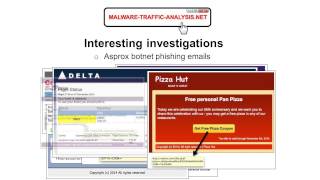
Yeah, the laptop was going to the website, and then the website redirected him to these malicious domains. These malicious domains were hosting the exploit kit, and it sent the malware— the exploit and malware to the computer, if that makes sense. Yes. Here's something that's much more interesting, and it's a good example of how you can be complacent and not realize that something very serious is happening right under your nose. So in October 2013, a little more than a year ago, I was on shift when we received a series of antivirus alerts for Expiro, which is a file replicator acting like a worm, basically. It doesn't need any user interaction. To start spreading and infecting files. It basically replicates itself in other files. This happened after normal business hours, so it was just me and one other person on shift. These alerts appeared in sequences, the malware infected any .exe files on that shared drive. It was a temporary shared drive. There were a limited number of people that were actually connected to it at the time. However, what basically happened was in alphabetical order you could just see the directory path and every .exe file that was found on there was showing up as malware, and people had stored some programs and some other stuff on there. And this activity did not trigger any network traffic alerts, we had no warning beforehand that a particular piece of malware had gotten on the file server. There was nothing on the network that triggered any alerts that we saw that would have indicated, hey, you've got malware that could possibly be going through your network. So me and my coworker worked with the sysadmins to take the file server offline. And to find out who was accessing that shared drive at the time. So in the 90 minutes from when we first saw the alerts till the time we got the file server offline, we saw 153 alerts on 231 infected files. They were all .exe files. Now a few days prior, a definition update for this particular antivirus caused a large amount of false positives and they were appearing in a similar manner. We were seeing a bunch of alerts that were triggering on a common system file. And while that quickly got resolved— so when we started seeing these alerts off hours, I'm looking at it, I'm going, ah, we're seeing the same exact thing. So I thought they were the same false positives. I didn't look at it close enough. Meanwhile, my coworker, about 10 minutes goes by and he says, huh, this looks a little weird, this looks a little different. And if it wasn't for him prodding me, I would have missed that particular infection. I'm so focused on the network traffic side of things, I wasn't paying as much attention as I should for other means of virus detection. At the time that these— the malware alerts started, and we had to determine where did the malware come from. Well, there was a person, he was just browsing the web, and what you see there in the image is the actual exploit kit activity. That would have generated the alerts. However, this traffic happened over a non-standard port for HTTP. So at the time, our particular IDS would— if this came over port 80, which is a— or any of the other normal ports defined for HTTP, it would have immediately caught this. But it didn't because it was on port 4150. And if you look at the patterns there, I recognize that it looks to me like it's a Sweet Orange exploit for actually sending the exploits and payload over non-standard HTTP ports. So we were able to track down the infection, we were able to get a sample of the original malware, the file server, because the antivirus caught it, we were actually able to get that cleaned up very, very quickly and get that back online with barely any loss of access to the file server. Another thing that was really interesting for me, it happened early last year when I first started noticing it, was exploit kits in the network traffic, you're following the TCP streams and you're looking at stuff and it's like, hmm, this looks like it should be a malware payload, this is where I've seen it before, but I'm seeing garbage or what looks like garbage. So here's a good example. This, I wanna say it was something probably Magnitude exploit kit. The type exploit kit doesn't matter. What matters is if you can look at that and see the particular pattern there. So what's the most common character you see there after the response headers? It's an asterisk. So this was a very big learning point for me because I extracted the file and there it is, all those asterisks in there. And I asked about it on a particular mailing list that I'm a part of. I said, hey, I found this traffic. We know the machine got infected. And in the case when I first saw this, it was actually instead of an asterisk, it was a 3. I saw the same thing with 3s. And I said, hey, but I don't understand what's going on here. And somebody emailed me back and said, hey, I recognize that, I've seen that before. Basically they XOR'd every byte, in this case with 2A. So anything that would normally show up in hex in the bytes as 00 showed up as 2A, and everything that wasn't a null byte actually was XOR'd with the 2A and would look like garbage. So that's a way that exploit kits have of disguising the malware as it sends across, and then it's deobfuscated or re-XORED on the localhost and then executed behind the scenes. So if you were to take this, and this guy— I always remember the guy's name because he was very helpful, and it was just an offhand thing. It's like, oh, this is XOR with two-way. Here's a Perl script. And it will go ahead and deobfuscate it for you. So I run the Perl script and there it is. It XORed every byte with 2A, in that case it was 33, and I was able to, hey, here's the malware, submit it to VirusTotal, put it through our local sandbox environment, see what callback traffic may or may not be happening on it. So here's another one that happened in December of 2013. In this one, this is the old Neutrino exploit kit and this is the malware payload that's being sent over and it's XOR'd with vk, lowercase v, lowercase k, so you can actually XOR the thing with a string of ASCII characters or hex characters. So you extract that particular payload from Wireshark if you can, if it's not chunked, export it, and then use a— I got another Perl script that one of my coworkers helped me work on to figure it out. You XOR it and there's your malware payload. So this is very much a learning point for me, and it really is interesting as we get new analysts with my current employer, we're sitting down, we're training them. This is something that many people don't realize happens, or if you do realize it happens, you're not intimately familiar with the ways that the payloads can be encrypted or obfuscated as they come across the wire. XOR is probably one of the easiest ways to do it. People will use RC4 as an encryption method and get some sort of cipher going. And this is beyond my technical capability at this time to figure out. But that's one of the things in my thirst for knowledge that at some point, whoo, start figuring out. And other interesting investigations, the Adbrox botnet. How many people— I assume at least a handful of you are familiar with the Adbrox botnet. So years and years and years, and it really sends a lot of obvious phishing emails. With zip file attachments, and it will send— as a trickier way, it will send your infected computers as part of a botnet will generate and send out mail traffic with these infected— I'm sorry, with these phishing messages that have links to malware. So Costco, there's an example of a Costco wholesale email sent by the Ausbox botnet. United States Postal Service. FedEx. Line. I think that's a UK thing. Notice that the links are actually going to places that are obviously not from these companies. The Amos Family, a funeral announcement. This— can you believe the nerve that the Ask Brock Spotnet has, or the people behind it, to fake funeral announcements? DPD home delivery notification. I think that may be a European thing, or a UK thing. Delta Airlines. They're trying to play on our desire for cheap air flights. Pizza Hut? Is nothing sacred? EasyPass. EasyPass. So if you've ever driven on a toll road— and amazingly enough, if you look at this, the EasyPass, and you think, oh, OK, well, I've used a toll road, but you don't look at it closely, you'll actually be fooled. I have two people that I've known And this didn't happen on my current employer's network because these messages are by and large almost every one of them is filtered out. Generally, if we see people infected by malware from a phishing email from the AskBrockz botnet, it generally is from their home email accounts or when they take their work laptop, they take it home, they get infected, they bring it back on the network, they plug it in, or connect to the wireless, we immediately start seeing the post-infection traffic and the associated alerts. And finally, one of the more recent ones, along with Pizza Hut, is Starbucks. An e-gift or an e-card. Is nothing sacred? But it's always interesting to me. I like investigating and looking into these because— not that it's not serious if you get infected— because I generally don't have to worry about the people at my workplace actually getting infected from these because these are generally blocked, or the few people that have seen these and they'll report them in from their home email or something, they generally recognize these as scams. Now what I'll also say is I look at these as— some people will call this stuff spam. This is not spam. I'll accept mal-spam because it's trying to distribute malware. I tend to look at this stuff as phishing because they're actually trying to get information. Now you could quibble on that because phishing indicates that you're trying to get information, steal information from somebody, and sometimes the malware that's sent by the Asterisks botnet isn't information stealer but more of a click fraud Trojan. So they're not actually trying to steal your information, they're just trying to take over your computer so it can be part of a botnet and start sending more emails and start generating click fraud traffic. Now at my current employer, we have had what's commonly described as advanced persistent threats where we've had what you look at and you can say it's targeting at people at my current employer. However, that stuff obviously I can't discuss. In some cases, are you exclusively targeted? Or are you targeted as part of a more wide-range effort with similar companies or other organizations that may not even be related? But so it really has been a fun ride with my current employer. They're treating me well. And I continue to run across new things. And it's very interesting. One of the things that I liked as a— when I was in the military doing classified intelligence type work is you have an adversary. And you're monitoring them in some shape or form. So you're trying to determine what they're doing, and through these sources of intel, you're able to figuratively have your finger on the pulse of whatever adversary that you're monitoring. So right now, and any one of us could do this, is you're— You've got a large cyber landscape that really is a battlefield, and there's a lot of adversaries out there. The AskFox botnet is probably a good example of that. Keeping an eye on the types of scams and the types of email templates that the AskFox botnet uses is very interesting. You've got your finger on the pulse of what they're doing. Occasionally checking the malware. That the Asprox botnet delivers and determining, okay, is it the same type of traffic patterns that we're seeing? Are these the same command and control servers that the infected computers are calling back to? That you've got your finger on the pulse of this criminal organization that is literally worldwide in its reach and you're able to understand and know what they're doing. I can't describe it as something that is— for me, it's addicting. For me, it is something that I get an incredible rush on. As I said earlier, the actual work itself is very tedious. However, the significance of what you're doing is very, very big in my mind. So at some point in the summer of 2013, I registered the domain name malware-traffic-analysis.net, set up a web server, and began a blog. When I started it, I just wanted something that was out there. It was more of a vanity project. I wanted to show that, okay, have something that I could point to, to my coworkers and my peers and say, hey, I kinda know what I'm talking about. I'm posting the stuff on the— stuff on Traefika that I'm seeing, sanitizing it so people don't know where it's coming from. But in my first post of June 18th, 2013, I didn't know about Security Onion. I didn't know what the different types of exploit kits that were out there. I was just more concerned to identify exploit kit activity in general. I only knew what I had with that particular traffic was an infection, and I wanted to post that information on the traffic patterns. And it took about, I don't know, 3 or 4 weeks after that before I started doing more posts. It wasn't too much longer after that that I discovered Security Onion. What I did do is those first— half dozen or so blog posts that I redid them. Because my first blog post was actually neutrino. I didn't know it at the time. And I figured out relatively quickly once I started diving in. So my goal initially was to do a blog entry every week or two. Just to kind of have something out there that kind of described the traffic. What I found was that there were other people— and I already knew this— but there were other people doing it, doing a much better job presenting the information out there than I was. So what I lacked in technical expertise, I decided to make up for in bulk, in volume, in sheer numbers. So by the time about Christmas time last year rolled around, I started every day or two just infecting VMs and getting the traffic and documenting it. And eventually, probably around March or April or May earlier this year, it kind of evolved into a particular format that I use. I've got templates, I've figured out a way to kind of tell a story and show the malware and show the alerts that are going on. Met a lot of people, ran across a lot of people through operating this blog who have taught me a lot. And in addition to my hard-earned knowledge, there is the knowledge that others have imparted to me, which is not as near and dear to my heart, but it definitely has helped me develop as an analyst. So if you haven't already been thinking to yourself or wondering how do you generate an infection chain, I'm just— anybody can do it. Just an average person off the street, what do I need? Now we'll look at the VM setup that I generally use, how to find compromised websites, and we'll try to infect a VM. So the VM setup, you should have a physical host with a quad-core CPU and at least 8 gigabits of RAM, preferably 16. You can use any virtualization software. I prefer VMware, the paid version, the VMware Workstation. It costs a little bit of money, but you might be able to get it on sale. VMware Fusion for Mac is significantly cheaper than VMware Workstation. The only problem is Macs more than make up for it in their cost. And the basic VM setup, I actually have usually 2, 3 VMs running at a time. So I've got Security Onion in one VM in my VMware setup. And then I've got the vulnerable Windows VM in the other setup. I have that set up, and in VMware you don't even really have to set anything else up. Security Onion, the interface that's sniffing the network traffic is running in promiscuous mode, so it's gonna see everything that's going to that Windows VM back and forth. How do I find compromised websites? That's a question I've gotten more than once from people who have emailed me about the blog and provided feedback and said, you know, said that they like it. And it's like, hey, how do you find these things? Threatglass.com lately is a site that I've kind of known has been out there, but I hadn't been using it until probably about the last couple of months. And I've been checking it lately and finding some good infection traffic. Scumware.org is another one. Scumware.org and CleanMX VirusWatch, those are ones— I used to use CleanMX a lot. Usually by the time a website is listed as compromised on Scumware or CleanMX, it usually is— more often than not, somebody's already addressed the issue. Malwaredomainlist.com is another one. Although I used to use it a lot earlier this year and late last year, I haven't been using it as much nowadays because it seems to be reporting not compromised websites that I can kick off an infection chain with, but it more seems to be reporting IP addresses and domain names of the exploit kits, which you can't just go to them and generate an infection chain. You basically have to have a full thing. You have to start at the compromised website. There are many other sites in addition to these that you can actually use. And for me, one of the things that I will use is I'll get a— say about once every day or two, we'll get an alert on some sort of traffic where there's a compromised website. And then our protective mechanisms for our network at my current employer will block any malicious traffic. So no infection occurs. We get our alerts, we look through it, and we say, OK, it's been blocked. Case closed. Move on. Well, I'll close the case and I'll take that information and take it home with me, or if I've got time at work, if there's nothing else going on, it's like, I'll fire up a couple VMs. I'll go to it and see if I can't infect a VM on my own and say, oh, that's what would have happened if we would have had an infection over our network. And I'm getting an increasing number of people that are actually sending me tippers saying, hey, I got infected after visiting this website, or people know what the exploit kits are and they'll just email me and it's like, hey, good job on the blog. By the way, this particular site is generating this particular type of exploit kit. And we're like, thanks, I'll use that. I'll definitely use that. So we can try and infect a VM. How are we doing for on time here?
Oh, you're good. You got about 20 more minutes at your discretion.
Excellent. All right. Well, so as you can see, I use VMware Workstation. Here's my infected— I'm sorry, my vulnerable VM, and here's Security Onion. What I'll show you before I do this is if you were to go to Threatglass and start looking at the various websites here that they've said are infected. Now what I like about Threatglass is these are the— basically, you go to a website, it infects you. So in order to save time, I actually— you could go to a site, go through and just download the packet capture. I've already done that to save some time. So if I were to look at this one, Fabrikon, whatever it is, this Russian website. It's like, OK, here's the— so they went to the website. And I looked through and it's like, OK, does anything look weird? It's like, well, it's kind of hard to tell if you're already going to a Russian website if you're seeing weird traffic. But I could tell you that these particular lines here remind me of Nuclear Exploit Kit, this caffeinebreak.co.vu. And so I can look at this stuff and say, okay, this looks like exploit kit activity. If I were to follow one of the streams. It's like, okay, here's malware right here. And it looks like it's sent a second time. I think it's the same thing, but let's say I just wanna check this. What you can do is you can go into Security Onion and you can play back the PCAP. So you got to do it as a root user. tcp replay interface 1 equals ethernet port 0, and then be able to play it through that way. So now it's processing the file. Let's look and see what we got here. Give it a couple of seconds. Interesting how some of those packets go back in time. Getting rid of some of these. Actually see over here, hopefully it's visible, you've got Nuclear Exploit Kit landing page. Okay, here's a payload URI structure. So you could easily take these pcaps that are on Threatglass and you can play them through— okay, there's some more here. There'll actually be some post-infection traffic. So for Security Onion, I'll use— what I've been using lately is Suricata as the IDS instead of Snort on Security Onion because emerging threats, that signature set tends for me to work a little better on that. And another thing is if it's a non-standard HTTP port, Suricata will inspect that. And from what I understand, I think maybe 2.9.7 of Snort version of Snort, the latest version may also do HTTP-type inspection on non-standard HTTP ports. But so I keep— I actually have Snort set up on a separate VM so I can look at it differently. Basically if you were to put emerging threats and the VRT signature set and the Emerging Threats Pro signature set which is what I have here, you'll— it'll be a bit too much. I find it a little too cumbersome, so I like to keep my exploit kit— I'm sorry, my signature sets separate. There are different categories I think in some of the Snort events as well. It's not that they're incompatible necessarily with each other, I just like to keep them separate so I have a pure VRT-type environment for my Snort events and I have a pure emerging threats environment for those particular signatures. So I also have the Emerging Threats Pro signature set. You can see some of the post-infection traffic. It's called TopSeaLoader. And I think that's it for this particular signature set. Brad? Yes.
Could you show that tc replay command that you entered again? Could I see that TCP replay command?
Here it is right there.
OK, that's just the PGM.
Yep. So in Snort, I've got a Debian distro where I've got Snort 2.9, not the 2.9.7, but 2.9.6.2, and I don't do the TCP replay on that one. I'll just go ahead and use Snort to read the pcap. In this case, it's actually much easier to do TCP replay on Security Onion. Right, in my case. So, and that really is the— I've only got one Ethernet port on this particular security onion setup on this VM, so the --intf 1 is the interface 1, the one interface that you're using for this, which is the interface that TCP Replay is sending the traffic of the pcap2, and then once it sends it there, it's like it's It's reading it now. You're gonna see the current time that it's through, so you won't see the actual PCAP time, but you will see all the IP addresses and associated ports and events and the time span. There are plenty of other options that you could use with TCP Replay. I just prefer to do it straight. You could actually play it back faster or you can play it back slower. It doesn't really do any good to play it back slower and you may actually miss stuff. Packets might be dropped if you play back the PCAP fast or faster than normal. Let's look at another one of these. So whatever, Lagu Reggae, Lagu Reggae. So I downloaded that earlier. Copy that into here. There it is. So as you can see here, I'm doing the same command, just with a different pcap. And if you're going to, you have to do it as root or sudo just because the interface is promiscuous mode. You can only do that as root. So here's what we're seeing. We're seeing a Sweet Orange redirection and we're seeing Sweet Orange events. If I were to actually go through and look at this PCAP, I've got my Wireshark display customized, so here's the redirect. We're to actually look at that, you can see that it looks like the original referrer was Ad Traffic. And if we were to actually go through and look at the payload right there under 200 OK, you can actually see an iframe from this particular redirect domain or gate. I tend to call them redirects, other people that I know will call them gates. I think redirect more accurately describes that. And then here, and here over TCP port 12101 is the Sweet Orange— it's the Sweet Orange exploit kit. And if I were actually to go back and look I could correlate that, it's like okay, the payload request is coming over port 12101, it's coming from that IP, it's what I got. If I were actually to follow this TCP stream, I would see the actual malware, and if I wanted to, I'm not gonna do it on this Windows computer, 'cause I'm not going to extract malware, on a Windows computer at all, but I could export this payload here and if I were to do that you'd be able to see the malware. I'm not gonna do that here. I generally, I'll use a CentOS host where I'll do, where I'll exploit, extract the traffic or maybe do it on Debian. The version that comes of Wireshark that comes with CentOS 6 is it's an earlier version that doesn't display HTTP traffic on non-standard HTTP ports if you were to list the HTTP GET requests. So we got another one we can try here. Internet-helper.ru. There it is. This one happened on the 24th. So after a while, one of the things that I can do now that I never used to be able to do— and this is definitely hard-earned knowledge. Is because I look at this stuff all the time, I can look at this and I can tell you just based on the traffic that this format here is Magnitude exploit kit. Here's some more stuff as it goes through. Here's some of the post-infection traffic. I just recognize it because I've seen it. Here's some more. It basically switches from the domain name, you see the 5.133.179.169 is the IP address. It's got this very big long domain name, and after a while it just does it from the same IP. If we were to actually look at the TCP stream, you could see the malware payload being sent in the clear. And if once again these pcaps that are on Threatglass, you can go through and here's one, they actually show up in the HTTP response headers, they call it a text file, it is not a text file. If we were to actually to look at it you can see even though it says it's a text file it is an executable. But you could export these, submit them to VirusTotal, detonate them in a VM, see what happens. There's a lot of stuff you can do here with these pcaps on Threatglass. And the thing I like about Threatglass is the stuff's already there and you can do a lot with it. It doesn't help you if If the malware is obfuscated or encrypted and you can't decrypt it for whatever reason, then you're kind of stuck. Another thing I like to do is I like to check www.scumware.org. I'll go to the reports section and wait for this thing to catch up. You gotta, every once in a while you gotta enter a code OK. And so let's see. I'll just pick a— I like to pick on the UK. Basically, I want to see for HTML Framer or some sort of JavaScript redirect. I don't see anything I like there. Yeah, but we can try what we can do to see about a live infection. Let's try this one. So what I'll do here is with Security Onion running, I'm gonna link to the AppData\Local\Temp in my vulnerable VM. I have got updated versions of Flash Player, Adobe Reader, Java, Silverlight. I'm on here, so I'm bound to get something. So let's give it a shot here. Dang it. The thing I like about using Bing is if Google knows the site's infected, it won't let you go to it. Microsoft, in their infinite wisdom, has decided to allow people to visit these compromised websites.
Ah, Gene Jones.
See that up there? That's one thing that I've noticed. So I can tell you right now, this is getting infected. Dang it. Ah! No!
No! Damn you, malware.
I forgot to disable that. Check something. OK, but I did get— Did get a copy of the malware payload. Meanwhile, I'm actually seeing the same type of traffic when we played back that pcap earlier. So I can tell you this is a NuclearExploitKit. I can tell you right now that we've got some payloads here. And it sends the— the exploit kit will send the same payload I don't have to go through the pcap to look through it, I could just go through the internet file cache and say I guarantee you that this is the malware payload. And right here is probably one of the Flash exploits. Something here. Ah, dang it. Did not want to do that. Okay, well, that's obviously HTML there. So I've seen Nuclear will send Java exploit, which it did not do in this case. So it tried to send the payload, and I just recognized the structure here. Looks like it tried to send the payload 1, 2, 3, 4, 5, 6 times. What I'll generally try to do— normally I'll have another VM running and record a pcap within that. But you can always go to the daily logs. Let's see if I can find the exploit kit traffic here. And there you go. Yep. This is all interesting stuff. Nuclear exploit kit has been around for a while. It generally does not encrypt the malware payload. So it's fairly easy to give a demonstration like this and just kind of show you how my workflow goes as I'm trying to, in fact, generate infection traffic for a blog entry.
Do you automate any of this stuff, Brad? Or are you just opening the Windows VM and clicking on those malicious links and then just— Then once you're infected, you do the analysis, and then you revert to your snapshot. Is that kind of how you're doing it? Are you auditing?
Yeah, I've got a snapshot, so I can go ahead and revert back to the previous snapshot before and set it up again. I've got different vulnerable Windows VMs. I've got a 32-bit. In 64-bit. I buy the licenses for these things. This is actually the— what is it? If it's an OEM license, you're paying a little under $100. If it's a retail version, you're paying close to $200, depending on where you get it from. I'll normally shop through Newegg if I need a copy. Of Windows for whatever reason, just to keep it all nice and legal. But yeah, so we've got this going here. I can just suspend it, and I should be able to revert back to my snapshot, not do it all over again. What I've found is sometimes with different versions of Java, this one This one with Internet Explorer 8 has Java, one of the outdated versions of Java 6. That one with Java 7, it's got a little more up-to-date version of Flash, but it's still out of date. And the latest one I have is— I got to update the Flash version. There's been a Flash— Flash Player vulnerabilities seem to be what the exploit kits are pushing out nowadays. So it seems like from my experience, I haven't seen much in the way of new Java exploits being out there. Normally when my VMs get infected now, it's either through Flash or through the Internet Explorer exploits. So here's the VM that I was using. It reverted back to the original. Got to get an SSD. This is going slow. I already have an SSD on this system. I just don't have it on the partition where I've got all the VMs stored. So there it is. It's all clean. Nothing in the AppData\Local\Temp folder, nothing in the temporary internet files. I could start all over again.
So what kind of IDSs do you usually use when you're working in the commercial environments?
There's a variety that you could use, really. For me, the ones that I have the most experience with are Sourcefire.
FireEye.
OK. And yeah, so the company that I'm currently at POC'd LastLine, so we tried using their services for a while. In the end, it wasn't a match, but I believe they use emerging threats and they use a snort-based signature set. For the SIMs that collate all the intrusion events and display them for you, in the government, as a defense contractor, I was using ArcSight. I also have experience with QRadar, IBM's QRadar, and AlienVault. Not too crazy. Go ahead.
Is that the OWSIM or is that—
It's the paid version of the OWSIM, yes.
Okay.
Gotcha. Cool. But yeah, I mean, it definitely is. The thing with, say, something like Security Onion, or WSIM is if you set those up, you're basically— unless you're outsourcing the support, you're supporting it in-house. If you get a solution like Sourcefire or FireEye or any of the other SIMs, any of these big-ticket items. You can purchase support if you need anything above the level of support that normally comes with that. And that definitely is— it's interesting from where I sit, from where I currently work at, to see how system problems are resolved. Sometimes I wonder— sometimes I think, eh, we should just do it on our own instead of going through all this hassle. And other times I think, thank God we got the support contract.
Yeah.
Double-edged sword.
Well, hey, Brad, it's about time. Thank you for donating your time to us. Yeah, thanks, Brad. It was a good presentation. We'd love to have you back in the future.
Well, great. I'll have to start attending some of these meetings. I like what I've seen so far. And I'll be curious to see some of the other speakers that you guys have. I'll have to check out the other videos as well.
Oh, excellent, excellent.
More from Jon


What No One Knows the Podcast / Vodcast featuring The Tampa Bay Wave and Jon Schipp

Meeting the Exposure Management Challenge: Key Use Cases for Success | @OfficialRapid7 #SolutionSpotlight

Spot Security Control Gaps and Non-Compliant Resources Across Your Attack Surface






