OpenNSM (OSX Collector - Ivan Leichtling)
The Open Network Security Monitoring (OpenNSM) meeting on April 27, 2015 featured community announcements (GoFundMe funding, donations, corporate sponsorship from Vigilant, NetSniffNG update, upcoming conferences, and job postings), followed by a deep dive into OSXCollector presented by Ivan Leichtling of Yelp. Ivan described the prevalence of macOS malware, the need for a forensic collection tool, and introduced OSXCollector—a single‑file, zero‑dependency Python script that performs dead‑disk forensics on macOS devices. The tool gathers OS version data, kernel extensions, downloads, installed applications, plists, SQLite databases, timestamps, file hashes, quarantine records, startup items, browser history, email data, and user/group information, outputting each artifact as a line of JSON. Ivan then explained an automated analysis pipeline built around a series of lightweight filters (domain extraction, blacklist matching, OpenDNS related‑domain lookup, VirusTotal and Shadowserver hash reputation checks, etc.) that annotate the JSON and surface suspicious indicators. He shared practical malware‑prevention tips (ad‑blockers, click‑to‑play, avoid free streaming sites), promoted community involvement (GitHub, a $5,000 Yelp dataset challenge, hashtags #DFIR and #MacForensics), and discussed hiring opportunities at Yelp. The session concluded with a brief Q&A covering common macOS attack vectors and how Yelp integrates OSXCollector with real‑time monitoring tools like osquery.
Chapters
Welcome to Open Network Security Monitoring meeting of April 27th. I'm Shane Rogers filling in for Jon Schipp today. Today we have a few announcements to make before we get started. We'd like to say that we have reopened our funding campaign on GoFundMe. The link's right here. On the bottom there. We've also received very generous donation from Doug Burks. Thank you, Doug, over at Security Onion Solutions. And we've also received a corporate sponsorship from Vigilant. Thanks, Ryan, for that. We have a little bit more information about them here in just a minute. NSM in the News covers a couple of items that Jon wanted to talk about, the NetSniffNG, and he'll do that here in just a second. The other ones are China's Man on the Side attack on GitHub, MS15-034 detection and Threat Spotlight links here for more information. Jon, did you want to tell us a little bit about the NetSniffNG?
Yeah, so Michael of Mozilla, he usually comments a lot on the security mailing list, he actually submitted a patch for NetSniffNG to support the kernel's packet fanout. So now you can do load distributions across sockets, each running a NISTFNG instance. And there's— I think the kernel supports like 4 different types for hashing and load balancing and failover. And there's another algorithm that I can't remember off the top of my head, but that was incorporated upstream in NISTFNG last week. And then that, along with a number of other changes by a guy named Vadim, who made a number of bug corrections and code. They've now released .5.9 RC5, so do check that out. It has a lot of new features and code updates and bug fixes in that version of NetSniffNG.
Thanks, Jon. Then moving on to Conference Corner, we do have a couple coming up later next month. ThoughtCon in Chicago, followed immediately by B-Sides in Chicago. Links there for more information. I'll be going to ThoughtCon. We had a good time last week. I attended the Hot Sauce Symposium here at University of Illinois. And then I followed Jon out to hear him talk about his tool, Iowit, in West Virginia at Marshall University AIDE Conference, which was a lot of fun. Bit of driving, but we had a good time. Next up is the opportunity outpost. We do have a couple jobs here from Vigilant, who I mentioned earlier. They are our corporate sponsor, and they specialize in analysis of network security monitoring. They've got a couple of jobs. They're looking for a hunt team analyst and a senior hunt team analyst. Links for more information on that can be found here on the notes.
And then, and, uh, just to point out, Vigilant does, um, managed NSM solutions for small businesses. So if you're running a small business and you're interested in having someone handle all the incident response identification of events, contact Vigilant. That's what they specialize in.
Thanks, Jon. All right, I mentioned the tool trade. We have some information here, GitHub for the MS15034 detector, which I mentioned earlier. Links for more information there. And on directly, we have no small talk or any white papers to mention today, so we're going to skip right into the big talk. Today we have Ivan Leichtwing. I'm not sure if I said that right. Sorry if I butchered it. He leads an amazing team of engineers focused on securing Yelp's visitors, mobile apps, websites, employees, and infrastructure. Ivan holds a BS in computer science from the Columbia University School of Engineering and Applied Sciences. Prior to Yelp, Ivan spent a dozen years writing software, building hardware, and leading teams at Microsoft. Ivan is an anagram of vain and as such appreciates Twitter followers at @cowow with the zero for the O-W and @yelpengineering. Ivan, would you like to tell us a little bit about the OSXCollector now?
Absolutely. Let me get my screen shared here. And we'll get this thing going. Can you see that?
Yes, I can see it.
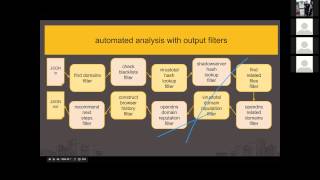
Awesome. I'm going to assume everybody can see it. I can see it. So, hey, thank you so much for inviting me to talk. I'm really excited to share about OSXCollector. From the slide, you can see this is me, not the dog. The dog is the dog at my work. But I'm Ivan, and OSXCollector is kind of a project that I worked on for a while, and we'll talk about in this talk, you know, what we're doing here. So what are we doing here? I'll give you a brief bit more introduction to me. We'll talk about what the problem is that OSXCollector is about, and it's really about dead disk forensic collection and analysis on OSX. We'll talk about what those really mean. And so then, details of the forensics collection, details of the forensics analysis, then the point in the presentation when you're all just wowed and can't believe how amazing this has been. So let's dive into this. A brief intro on me, but it's kind of been said already. I manage the security team at Yelp. We have a pretty decent-sized charter here. We handle the application security as well as, you know, that's our mobile apps, our web apps. Partnering with the teams through requirements, design, development, deployment, monitoring, alerting, incident response, kind of end-to-end. We also build different kind of foundational pieces for other teams to use in defenses. We work on the corporate side doing very similar stuff, and with our infrastructure, we also build a lot of tools ourselves for incident detection and response. OSEXCollector is one of those response tools that we've built. In the past, spent a lot of time at Microsoft building stuff. Um, and yeah, that's what I look like if you put a paper hat and a mustache in front of me. Um, so my job in a nutshell is to protect all this. Um, Yelp's cool. We're pretty big. I think we're in like 30 countries now. Um, you know, this isn't to like impress you with how big we got or whatever. Uh, really the point that you should take away from this and think about is, uh If you had to protect the desktops, uh, for a company about 3,000, 4,000 employees, 30, 30 locales, big offices in Hamburg, London, Dublin, New York, Scottsdale, Chicago, San Francisco, whatever, you need tools to do that. You need the right tools to protect a company and employees doing all this stuff. Lots of visitors means lots of people looking to see what can they do to your site or your employees or your company that you would rather they just maybe don't. Um, so this is sort of the environment in which we built OSXCollector. Um, ah, okay, so the problem that we're talking about, and I think this is a typical network diagram for most people, a typical corporate network diagram, a lot of stuff going on, you're not really sure what's going on. There's a lot of connections you may not be familiar with, but you know, okay, you've got something, you're going with it. From a security perspective, this is what we see. It's sort of like the Death Star on fire. Um, we've got a lot of monitoring in place to try to understand what's going on across our corporate networks, and we see stuff all the time, and we say like, whoa, why the heck are they doing those DNS requests out to that like known C2 address? Um, Or like, whoa, who created a new admin account in that service that like really doesn't need new admins? And like, hey, hey, is that malware on those boxes? And I never saw that kernel extension before, where'd that come from? You know, so alerts are just like non-stop. And so these are kind of happening. And so to sort of build an organization that deals with this kind of ecosystem at scale takes cool tools, takes really trying to figure out what's going on. So we've got all these alerts in place and they fire all the time, then we're like, cool, now we'll do something about it. And malware was a big deal. I bought OSXCollector because OSX has malware. It has lots of malware. Sometimes people are confused. They're like, oh, I thought Windows had malware and OSX was a fantasy world where everything works wonderfully. No, OSX, to be clear, has shit tons of malware. If you look for it, you will find it. If you have an OS X machine and you haven't looked for it yet, it's already probably found you. You probably have it. It doesn't— it's pretty easy to find malware on OS X, and there's a lot of it. And when we started looking in our corporation, we saw a lot of it, and we said, gee, we should really prevent this. This would be much better if we didn't have a shit ton of malware. And we needed a tool to do that because on the market today there's a lot of great tools for Windows to sort of help you prevent malware infections, diagnose malware infections, understand how did they happen. It's not so much on Mac. We couldn't figure out how to prevent the malware on the Macs until we knew where it came from, and there weren't tools that helped us see where they came from. On Windows, there's like a Mandiant Redline Collector. It's a great tool. So after you decide, hey, something's wrong with the box, you run Mandiant Redline Collector. It gathers all this information about what was going on the box. You read it with their cool tool, and you're like, yeah, that's what had happened. There's, you know, in this case, not so easy on, on Mac. So we need to figure out where it came from. Um, so OSXCollector is a tool I built. A number of other people at Yelp have helped me with different things. We've had patches from rando people on the internet, not so rando people on the internet, and it's kind of working for us. It's been working for a bunch of other companies, um, and it was kind of a solution, uh, to help us figure out where was malware coming from and then let us prevent it. So those are the goals. They're pretty easy. There's a lot of ways to go about this. OS X Collector is one way that works for us. There's other tools we use, other ways to go about it, but this works pretty good. This picture of Yelp, it has nothing to do with this presentation, but I'll say Yelp a lot. So in the presentation, I'll provide free malware prevention techniques. These are legit. Like, you don't want malware? Follow these techniques. They're not new. I didn't make them up. They're not fancy. They don't need to be. It turns out that tons and tons of malware propagates through Flash and Java zero days, or out-of-date Flash and Java. Enabling click-to-play in your browser, really good stuff, really good advice. Sounds like a grumpy old man telling you something, it actually works. So now let's talk about the project OSXCollector and sort of forensic collection, which is the first thing it does. So All of this that we're talking about is open source. It's all on GitHub. If you like the talk, do me a favor, go to GitHub and star the OSXCollector project. If you don't like the talk, starring it is free. You could do that anyway, like whatever, it's cool. But yeah, it's all up there, github.com/yelp/osxcollector. I would love for you to try it out. I would love to get pull requests or have issues opened on like what's wrong. Now. There's always something to fix, which is always fun. Um, so OSXCollector is easy to run. The first thing that happens is we get an alert somewhere and we say, hey, whoa, something's wrong with this machine, maybe, sort of, kind of. And so we go run OSXCollector on that machine where something went wrong. So one of the big decisions was let's make it really, really easy to run. So OSXCollector is built as a single Python file. And it has zero dependencies that aren't already on a stock install of OS X. That means if you can copy that one Python file onto the device, onto the, the Mac, you're good. You can run OS X Collector. Um, sometimes that makes it hard when we're developing it. Hey, how do we keep this working even though we're not gonna install any dependencies? Turns out we pretty much figured out we can do anything we want without installing more more Python packages or whatever. But in general, it's really easy. sudo osxcollector.py. You can name it, you know, you give the name of the output. So in this case, you know, delete_hedgehog is our output name. And you see, we just run that and it says, oh yeah, I output 35,000 lines of output. I tar gzipped them all and I'm cool. Um, it's really easy to run. It's really easy to get a machine, take a USB stick, shove it on a machine Install it over the network. Interesting side conversation is how you install forensics tools onto infected machines without infecting yourself or letting them get to the network. I don't know the answer. Um, so really easy to run. You could download this, this file, run it, cool stuff happens. Takes anywhere from a few minutes to a few more minutes to run. It basically is going to go through the whole hard drive of the device and through the operating system and interrogate to learn what does it want to know. So all of the output of OSXCollector is in JSON. And so for every piece of data that, that OSXCollector collects, it writes a line of JSON. I actually think JSON is kind of beautiful. Like, I actually go to the json.org website and look at the sidebar on the right-hand side that shows the drawing of JSON. And I think that's nice. I don't know why. I like it though. It's cool. It's cool. Um, JSON is also really, really easy to manipulate as far as data goes. There's tons of tools that input JSON, output JSON, and manipulate and transform. We'll talk about some of them. Um, but basic premise, we're gonna write lots and lots of JSON after looking at what's on these devices. So where do you get data if you want to look at OS X and be like, yeah, I want to know what's going on in OS X? You go and interrogate the file system. And this is called sometimes dead disk forensics. Um, there's other ways to find out information, like looking in RAM or something like that. We're not talking about that. We're going to talk about dead disk forensics. It's kind of cool. So on OS X, lots of data is stored in SQLite databases. Um, you know, on Windows, your data is in the registry mostly. Uh, your configuration data and operating system data, most in the registry. On OS X, a lot of it's in SQLite databases. That's cool because Python sort of loves SQLite databases. Me personally, I'm ambivalent. Funny side note, while I was making this presentation, I learned that the motto of SQLite is small, fast, reliable. Choose any 3. I was a little like, that might be humorous, guys, but you know, it does work, so cool on that. Um, so down here we have a couple of lines of code, Python code. If you read Python, uh, which probably a lot of people do, um, it basically interrogates a SQLite database and dumps pretty much all the data out of the database table by table. So you can see, like, this is not a lot of code. It's not a lot of complex code, yet very quickly we can get all the data out of a SQLite database. So a lot of what OSSCollector does is have a lot of lists of what are the cool databases. How's it that? Well, that was fun. Um, it has a list of, you know, hey, what are all the cool databases? And it kind of goes and interrogates them and asks them Hey, what's your data? Dumps it all out as JSON. The world gets a little better. Um, so plists are sort of the other place where OS X likes to store information. And again, they're probably a good analog to the registry on Windows. So plists are files of like XML-like stuff. Sometimes they're plain text, sometimes they're binary. They can be JSON files though. No one's ever seen a JSON plist. They do exist, um, but you can see they're pretty simple sort of, um, lists of properties, and they look a lot like, you know, key-value pairs of properties and kind of JSON dictionaries. Um, and so sometimes they're binary. If they're binary, there's some cool shell tools like plistbuddy that will print out, um, plists for you. Other ones are just plain text. You can just look at them. So here's an example of two plists. Um, OSXCollector knows how to read plists. It reads them all, it converts them into Python dictionaries, and then it introspects them and figures out what's going on. Basically, between SQLite DBs, um, and plists, most of the information about the operating system and installed programs is available. So we're just gonna go interrogate those, read those, and look for the stuff we want. Occasionally we want to do some more stuff beyond just read flat files or whatever. And so OSXCollector uses the Python Foundation package to read plists and other stuff. Foundation is a nice wrapper around the Objective-C system calls provided by OSX. So if you're familiar with Objective-C, you'll see these like nice long function names in these red boxes, right? This is Python code, yet we have a function called PropertyListFromDataImmutableOptionFormatErrorDescription, which like only, you know, an Objective-C developer would love. Python developers don't love that. But this makes it really easy. If something exists in Foundation, we can sort of just call it very directly, and it really lets us do a lot of powerful stuff in Python that might not immediately seem obvious or available. Foundation is just on every box. It's just there. You don't have to install it. It's cool. Foundation doesn't always work. Foundation doesn't always expose everything to us. In those cases, Python has two really useful packages we use, objc and ctype. Basically, we go and write Objective-C in Python when all else fails. And so here's some code down here, and in the comment, uh, in the second line of this code, it shows what we're doing. We're calling NSString NSString, strVal. Yeah, cool, we'll do that. Um, but you can kind of read this code, it's not too hard to parse how this is going on. It actually loads the obj C binary on your system, then from that binary, effectively a DLL, right? It, uh, if you're a Windows person, this would be just like a DLL, right? You, we, we load a class object for NSString, and then we sort of describe what does the stringWithUtf8 method look like. Inside of that binary, and after we've given the system enough of a description of it, it lets us call it. At this point, there is nothing we can't do on this box. If you could do it with native code, we could do it with Python. Maybe you'd prefer to do it with native code. Some days I think I would, but the idea is we have this one single Python file that we drop on boxes and do what we want with. Um, So let's go into like, what do we collect? Um, and at a high level, this is sort of major categories of what gets collected. So OS and system information, we want to know like, hey, what version of the OS is running, and, uh, very basic stuff like that. And so we collect a bunch of that stuff up, OS versions and simple stuff. Write that out. Um, then there's a whole bunch of files we want to look at. So kernel extensions, um, are the analog to drivers in Windows. This is stuff that runs in privileged mode, um, and kind of runs in the kernel, does what it wants, talks to dot devices, does cool stuff like that. If you're attacking a box, you'd like to be in the kernel. The kernel is highly privileged. So lots of malware persists with kernel extensions and attacks with kernel extensions. So when we're looking at a box and saying like, yo, what's going on with this box, we're looking at kernel extensions. Downloads, very simple, right? All your browser downloads, all your chat downloads, whatever, we want to know what those are about. Generally, if you've got like simple malware type stuff or malvertising or whatever, this stuff came from downloads. You downloaded something, you ran it, that wasn't a good idea, now you have malware. So if we learn about your downloads, we might figure out like what happened and how do we fix it. Installed applications, of course, very important. A tremendous amount of malware just installs itself as an application. So we want to look and see like what applications do you have. Other malware, like, sits co-resident with applications and tries to mess with it. Want to figure that out. That's cool. Um, we'll dig into a couple more of these things as we go. Let's talk a little bit about, like, downloads and kernel extensions and other kinds of files. So for all these things, OSXCollector gathers up a bunch of common properties. And so this is an example of a single file that OSXCollector is looking at. It's, um, it's looking at a plist here, and it's sort of saying, hey, uh, these are the hashes of the file. So we hash files. Why do we hash files? Um, because it generally generates a unique value to represent the file, and then we can go to other databases of like well-known file hashes and say like Is this bad? Is this good? What's going on here? Um, so we make lots of hashes. Um, really junky old APIs or lists of files use MD5s. Really cool ones use SHA-1. I have no idea why I put a SHA-2 there. That's just overboard, but we do it. Um, and you know, for each thing that we collect, for example, you'll see down towards the middle there's a section that says, hey, this is a kernel extension. Um, and we have file paths, we have timestamps with the signature chain, extended attributes we get from the file. For any kind of file we collect, we get all this stuff. Um, one thing that's really important is timestamps when you're doing forensics. You want to say like what happened at that moment that that machine went to the network and did that weird thing, like That'd be nice to know. And so timestamps are really valuable. In OSX, there's probably about, between different SQLite DBs, different SQLite DBs, excuse me, between different SQLite DBs, different plist, pardon me one second more. Yeah, I'm back here. So between different SQLiteDBs and different plists, there's a lot of different ways that timestamps get put into files. And so there's probably like 6 different ways that a timestamp is represented, which is pretty complicated. OSXCollector takes care of that for you. It says, It has heuristics that figures out what format is a timestamp, what data is a timestamp, and it converts it into very human-readable format, which is pretty awesome. That makes it really awesome to look at all— across a lot of different stuff and say, "Hey, what happened at this exact time?" It's all normalized. It's all cool. File hashes, as we talked about, are useful. Some people are kind of skeptical of file hashes now, and they say like, hey, antivirus or viruses, malware, whatever, they just recompile and they change one bit. And we all learned like, hey, hashes are really awesome. If one bit is different, a big file gets a different hash, like an entirely different hash. So, you know, maybe hashes aren't so valuable. Turns out hashes are valuable. If an attacker compiled some new, totally new code and put it onto your system, you know, one system, let's say at Yelp, odds are they're targeting Yelp and they'll put it on several systems at Yelp. So while maybe that, that hash isn't available across the whole world and I can't just ask everyone, hey, do you know if this hash is good or bad? After I know that hash is bad, then I can look for it. And maybe it's just bad for me, but that's good enough. Um, looking at hashes and doing hash-based comparison of files is a good practice. A lot of people say it's dead, you shouldn't do it anymore. It's good defense in depth. Occasionally you find reused hashes and you say like, oh, it's the same file as before, now I know about it. Defense in depth is a good principle. It doesn't die. You should do it. Um, yeah, so let's talk about some more stuff. Um, Quarantines is another thing that we go collect data on. So quarantines are these things, um, when you go and you download something and then you try to run it and it's like, you downloaded something from the internet, are you sure you want to run that? Whoa, that's what quarantines are. It's the information the operating system uses to be able to show you that dialog that says, hey, you sure you want to open this? It's not fun as a user, but it's actually super useful because those basically last forever in a plist. And so this example on the screen here, this is me downloading Alfred, which is a cool, you know, desktop manager for OS X. And so we see where it came from, cachefly.alfredapp.com. We see that Google Chrome was the one that down— was the tool that downloaded it. Um, we have a timestamp. And we even know that it was downloaded by me, Ivan, versus some other user on my machine. There are no other users on my machine, but when we see machines with lots of weird users, we know something's going on. But so quarantines are super useful. We really find out about a lot of stuff that got downloaded through quarantines. Um, so now startup items. Startup items are basically stuff that runs on boot. On Windows, this would be like stuff in a Run Once or, you know, start other startup items there. So there's a lot of places on OS X that there are startup items, a lot of places where stuff runs before you get fully booted or as your shell boots. There's some security researchers doing a lot of really cool work in this space exploring what runs and what vulnerabilities these things that run have. In this case, this is part of SSH key generation and GPG, from the GPG tools. And so this is sort of part of your OpenSSH or your SSH agent. And so we have hashes for it and paths and, you know, Simple stuff. One thing we collect is the signature chain for any file. So on OS X, binaries can be signed. And so when a binary is signed, you know, it's kind of like certificates for HTTPS or something. There's sort of a root in the signature chain and then intermediate in the chain and then finally leaf nodes. And it sort of says, hey, everyone says this binary is legit. On OS X, if you have a signed binary and it's been tampered with, OS X won't run if the signature has been tampered with. If it's not signed, however, OS X doesn't care and just lets it run, which is like a little bit of like, gee, thanks. And even more so, if you want to tamper with a binary that has been signed, OS X comes out of the box with command line tools that lets you do stuff like remove the signature from a binary so you can tamper it. It's important to notice, like, what binaries are tampered— sorry, what binaries are signed and what aren't. Um, in this case, one of the tools that helps establish your SSH agent and generate keys isn't signed. If you're an attacker, that's a great place to go into a launch agent that's not signed Go modify the binary, do whatever you want, too bad, nobody can notice, maybe. So, a little digression on signatures. They're really interesting. OSXCollector can do lots of signature collection for you. It's kinda cool. So, that's kinda the high level of forensics collection. We'll talk about a couple of the other places. Don't have special slides for them. But browser info is something we collect. So we collect all the browser history from the major browsers. We collect all the installed extensions. We collect information about when did you last, you know, wipe your history and things like this. And so with that browser information, we're gonna get a really good picture of what's going on on the device. And again, most infections start out through something on the web, probably You know, a lot of it comes from people browsing. A lot of it comes from people doing webmail, Gmail, Yahoo Mail, whatever, on their devices. So when we look at like deep browser information, we get a really good idea like what was going on, which is totally cool. Um, and so the next thing we collect is email information. So there's a couple of built-in email apps on OS X we go and interrogate those apps and we sort of say like, hey, email app, what's going on? Tell us all about what's going on. What have you downloaded lately and what mail and what accounts and whatever? That's super useful. That's like the stuff that's not in the browser, it's in the email apps. Um, and the last thing we collect is a lot of stuff about groups and accounts. Oh, that wasn't so good. Groups and accounts. So what users are on the device, what groups and permissions are on the device, um, That's super useful if you're gonna try to persist on a device some malicious behaviors, malicious malware, whatever. Maybe a great thing to do is go create a new account that's got like admin-level permissions and run your malware as that account. Um, that happens, so looking for it helps. Um, yeah, so those are some things. All right, malware prevention technique number 2. As we transition away from collection to talk about analysis, a good tip: use an ad blocker. Now, ad blockers are really, really good at blocking malware. Remember, I work for Yelp. We do make our money from ads, so the recommendation I have for you is download an ad blocker and whitelist Yelp. I personally make sure the ads are good on Yelp. Thus far, knock on wood, we haven't had a problem. So yeah, use an ad blocker, whitelist Yelp. It's a good idea, prevent a lot of malware. Um, yeah, so we talked about forensic collection, we talked about forensic analysis, uh, I'm sorry, we talked about forensic collection, now we'll talk about forensic analysis. Um, so forensic collection is generally seen as hard work and, and not terribly fun. Um, forensic analysis is super cool. It's like way cooler than collection. So So you collect all this data and then you analyze it and you figure out what's going on. It's like part science, part art. It's really neat. You know, so analysis is sort of awesome. And like if you get into digital forensics, like this is the fun part. Like what happened? So you've gotta basically make up a story about what's going on effectively. Thank you to whoever is drawing extra blood splatters on the screen. Appreciate it. Um, if you could delete them now, you know, that's cool too because this is weird. Um, so once we get all the data from OSXCollector, we've collected a capture about a machine that we're worried about, we first start with manual analysis. And this is what we had for a long time at Yale. So people told us, hey, you know, I talked to a bunch of other security people. They said, yeah, if you want to do like forensic analysis on a Mac, it's going to take you like 4 days. So then we made OSXCollector and we just had it collecting data. And then we said like, hey, 4 days, we can do this in like 4 hours now, which was awesome. What we used to do was run the collector and just grep through the output. So like, you know, say you see, hey, something on a network You know, you have limited sensors at the edge of the network and you say something on the network did something I didn't like, you know, some machine around 11:35. So we can just take the output and say, hey, grep for like between 11:32 and 11:38 and show me all the stuff that you captured, all the data you captured in that time window. A lot of times it jumps right at it, at it. You page through that data, you're like, look at that, they're going to like evilvillains.com, I bet that's bad. Or, you see like, "Hey, there's a quarantine, and they installed something I've never heard of before. Then, they installed like 7 more things I've never heard of. Then, some kernel extensions got installed." And, you're like, "Whoa, that's a bad time for that machine." And, you can kind of make up your story about like, "Hey, what happened here?" And then, I mentioned, "Hey, JSON, it's really cool. We like it. We love it, whatever." One thing we can look at is like URLs in a window of time. So the same grep as before, but then we use this really amazing tool jq. Um, you can find it for Mac or Linux. So jq is super cool. It has this nice little language and we can say like, hey, select for us only those things that have a URL and show us the URL. That's it. So it'll just print a list of URLs, from the JSON, which, like, if you're looking at URLs and stuff, is pretty cool. Um, a similar example below that, like, find where the username is Ivan Lehi. If it's not Ivan Lehi, we're not interested. I'm kind of vain. This is cool. So grepping around works really well. If you do a collection and grep around, you'll be stupefied at the stuff you find, kind of terrified. It's very cool, but it's still slow. We're talking about like 4 or 5 hours sometimes to root cause and alert that we got. Um, and that's really slow when you're talking about taking someone's work laptop maybe and, um, looking at it for that long and not knowing, do I want to wipe this machine? Do I want to give it back? Do I need more information? So we have those machines just basically sitting around waiting while people really kind of annoyed and they can't get their job done. Even if they're really friendly like Yelpers and they're like, oh, I understand that, I shouldn't, uh, you know, it's no big deal, it's still annoying. So We want to go quickly in analyzing stuff, and so we built an automated analysis pipeline. And so we automated what we did after a couple of months of doing it. And, um, this is an example of running our automated filter. So there's a whole bunch of output filters that have been built for OSXCollector. We have one sort of filter that runs a whole bunch of them, the analyze filter. And so this is basically taking some OSXCollector output and running it through the analyze filter. And the analyze filter basically tries to figure out, did it see something it didn't like? You know, this is just a small snippet of it, and it's sort of showing, hey, I saw some domains that aren't recommended, you know, people go to. And this is like super common Mac adware that's super annoying. And so this kind of finds it. It goes, oh, why did you go to those domains? That's bad. And then if you're analyzing stuff, you're trying to figure out what happened, you can say like, look, I saw them go to d2.genio.com. If the machine has Genio, pretty sure it's going to be investigation. Um, cool. So OSX Automated Output Analysis has this concept of filters. It's a very simple pipe and filter kind of model, and this is a graph of some of the filters we run at Yelp to sort of analyze the collected data. So, um, basically JSON goes in up in the top left there, and it just moves slowly through all these filters, and each filter sort of has a job, one job. Uh, and so the filter generally reads data and then either, you know, it either like removes data from the output stream or it adds data to things in the output stream. And the goal is just like keep getting more information, keep understanding better the things that an analyst might want to see so we can kind of say like, yeah, this is what we're looking at. Um, you know, the cool new words of the, of the month are definitely hunt team. And hunters. This is all about hunting for data and doing it in automated fashion. Um, so let's talk about a couple of these filters. So first filter we'll talk about, Find Domains filter. An example of a very simple filter that's super powerful. So what this filter does is it looks for domain names in the captured data. So there's a really simple example here, right? If there was some JSON with the https://biz.yelp.com, it would find it and then add a new field to the output that said, hey, for this line, the domains I found are biz.yelp.com, and it actually trims subdomains as well and says, and yelp.com. And so that's all it does. It just looks for domains. It's really smart. It finds domains in the keys, it finds domains in the values. If you have like complicated values, like You have an URL with query params, and one of the query params is like an URL-encoded domain or additional URL or whatever. It finds that too. It does a good job. It just finds the domains and adds them. And so, you know, in and of itself, that's not that helpful. But now we have those domains as we go through our chain. As things exit Find Domains filter, now every line is sort of annotated with like what domains are related. To this line. And so we can kind of be like, oh cool, and do more stuff with them. So a very simple example of what we could do with it is go and compare against blacklists. So blacklists are super important. Um, you basically figure out stuff you don't like, stuff you don't want to see, stuff that you're interested if it happens, and you add it to a blacklist and you say, hey, if something hits this blacklist, let me know about it. Um, so the OSXCollector OSXCollector's blacklist filter is pretty cool. You can basically match on any key or regex or an exact match and sort of say like, hey, if something matches this blacklist, let me know. Because domains are so important in what we're doing, it has some smarts around domains. If you give it a list of domains and say, hey, this was a list of domains, it does some like fancy regex shit to it. So that it's better at finding, um, related stuff. And so again, a canonical example, there's like evil.com in the input, um, and it says, you know, run the domains filter. Oh yeah, we found evil.com domain. And then we go and compare that against our blacklist where evil.com is, and we say, oh yeah, it adds a field saying OSXCollector blacklist, uh, can— it basically says, hey, this is on the domains blacklist. So then we know right away someone's been to a blacklisted domain. Blacklisted domain is usually somewhere that someone in our organization got in trouble before, got malware, um, found a problem. So now we mark that in our blacklist. Now we can easily find it again and say, oh, that's that problem spot from before. Generally, any domain that we put on a blacklist at Yelp will also block at our edge on firewalls We'll block in DNS. We'll do a couple layers of sort of prevention to try to prevent people from getting there. Um, so blacklist filter is really cool. We can do blacklists for file hashes, for parts of file names, for domain names, for whatever really. And we have a whole bunch of them that help us sort of find commonly bad stuff going on. Um, malware prevention technique number 3 Domain names that contain free or download or sportsbet in the name are all malware. Um, canonical example is downloads.cnet.com. An entire site appears to be malware as far as I've understood. Um, I would recommend don't go to sites like that. Um, just a heuristic, not always true, works for us. Um, pretty much every time somebody's gone to a sportsbet site they have downloaded malware as far as I've seen. Um, so let's talk about some more of these filters. There's some really cool, very powerful stuff that these filters do. Um, so Yelp, we, um, we pay for the ability to use OpenDNS's, um, Investigate API. And so this is an API of passive DNS information Um, it also sort of says— so passive DNS, if you're not familiar, is about, hey, um, DNS— I could go ask your DNS server like, yo, what's the IP for this, uh, domain? And the DNS server would tell me if it knew. But I can't ask it like, yo, last May, what was the IP for this domain? Or like, hey, this domain is not on the internet anymore, who registered it? Like DNS servers don't know, they're not going to tell you. Passive DNS is a simple concept. It's like, let's create an ongoing database of all the DNS information, and then we'll just say like, yeah, we were watching last May, so if you ask us what IP was this domain hosted on last May, we can give you an answer. Cool. Um, lots of places do passive DNS. Um, OpenDNS also kind of does some heuristics and some data mining, data manipulation algorithms on top of the DNS information to try to get an understanding of like what's a good domain, what's a bad domain. Um, so we, for example, pay for some of their information so that we can query and ask them questions about domains. And so we have this OpenDNS related domains filter. It's very simple. It says this, it says like, I saw a user, you know, this line basically says, hey, the user went to evil.com., and then we ask OpenDNS like, yo, what are the domains related to open— to evil.com? What are the domains that users go to at the same period of time as open.com? Maybe we ask like, what are the domains registered to the same people, hosted on the same IPs? All these things matter. And so it turns out that like, if you have a suspicious domain or suspicious IP, um, the related domains are pretty interesting. A good example would be, um, you know, if you have something like FireEye or you have Snort and, and you're really looking for some interesting rules and some rules file and they hit an IP you've never seen. You do a WHOIS on the IP, it has no, no domain name associated with it, uh, it's not hosted somewhere you really know. You're like, crap, we'll 'Look at that IP, it does bad stuff, I don't know too much about it.' So you go and ask OpenDNS, like, 'Hey, what are the domains related to this IP?' Gives you a couple domains. You can then ask, 'Hey, what are the domains related to the domains that are related to this IP?' You get some more domains, kind of the second generation of related domains. Remarkably, my own findings are the second generation related domains to a completely random IP that your network security monitoring, uh, picks up on is often something you can find really easy on someone's machine. So you're like, why did this machine call out to this IP? I have no idea. Creepy. And like second-generation related domains, go look for them on the machine and you're like, oh look, they downloaded some executable from there, some DMG, and they ran it and surprise, surprise, bad stuff happened. Um, yeah, so the domains related to suspicious domains are usually suspicious., and we just ask OpenDNS to help us understand that in this case. OpenDNS also tries to, you know, figure out with heuristics domain reputation, so we have a domain reputation filter. And so this is an example of, you know, cyber threat intelligence. That's like all the rage now, threat intelligence. OpenDNS has, you know, both some data and a little bit of intelligence. So for example, hypothetically, if evil.com is known to have been involved in, you know, some nuclear attacks, then OpenDNS actually categorizes it as such and says like, yo, that domain's about like Stuxnet, you should stay away from that domain. Um, and that's super useful. We're gonna go like, oh look, that domain is known to be involved in like bad stuff, we'll stay away from it. Um, they also do stuff like look at like is a domain name generically generated, and, you know, is the, is the ASN block that the IP is in, or the IP prefix, known to like be bad? And then we can kind of figure out what, you know, is going on. So it gives us a clue as, as analysts sort of hunting for what's gone wrong, that yeah, maybe something's bad about this domain. That's all we're really looking for. Um, We do a similar thing. We go to VirusTotal and we send them a bunch of hashes and we say like, hey VirusTotal, have you ever seen this hash? VirusTotal is a super cool site. It just is the repository where everybody sends the malware they find, and VirusTotal runs it against lots of antivirus solutions to see which ones think they're malware. It can do lots of cool stuff. And so we go ask VirusTotal, hey, do you know about this being bad already? 'Cause if VirusTotal knows it's bad already, we're kind of done. We're like, yeah, it's bad. So VirusTotal with hashes, that's cool. We also use a project called Shadowserver. Shadowserver is kind of the opposite of VirusTotal. It knows about good hashes. So you can send it a hash and say, hey, Shadowserver, do you know this hash? And it'll say, oh yeah, I know that hash. That's like, I don't know, you know, your display driver on a 2000, 15 MacBook Pro, and then we look and we're like, oh yeah, that's the hash, and yeah, it's Display Driver, and so we don't care about it anymore. So we use a shadow server filter to filter out known good stuff so that we don't have to look at it. Um, OSXCollector, the analysis framework, has a base class for doing API callouts, and it, it rate limits APIs, it caches responses, It does parallel issue of multiple requests at once. All that it does for you. If you find some new API, um, if you've been on the internet looking at the places I look at, all the rage this week has been the joke about the Threatbutt, um, threat intelligence API. It's not very mature. It's kind of funny. Um, to, you know, to integrate something like that into OSXCollector would be 5-10 lines of code, and we could add a filter to sort of do that. Um, so we do lots of API lookups to try to figure out what's going on. Um, we look in VirusTotal, we look in Shadowserver, we can open DNS, um, whatever sort of sources we have, we'll go and look up and say like, hey, do you know what's going on with these things? Um, malware prevention technique number 4: there is no app to stream sports for free. Free Hockey Streaming, you know, Elite Touchdowns, NASCAR for Dummies, all of those are malware. Just give up. You should either pay for your content or figure out how not to find an app but find another means to download video content somehow. So let's talk a little bit more about forensic analysis. We got a little more time here. So a couple other things that we do that aren't on the slides. So down here in the bottom, there's construct browser history filters. So our goal is to be able to see the browser history and make it as clear when we look at it as, say, looking at the history in Chrome or something. So we join out the data, we sort it, we sort of time sort it. We get it looking nice, showing you where has the user been in history. It's actually cool because we're able to do more actually than what's visible in, say, the browser history tab. Under the covers, for example, Chrome is tracking how did you get to a page. Did you click a link? Was it a part of a redirect chain? Was it a hidden popup? Hidden popups are always malware. So like, if you see that, you go, oh cool, malware. So we construct all this browser history, which is super useful. We also get a list of all the browser extensions that have been installed. Browser extensions are really common ways to start to get stuff on a box, um, or to monitor web traffic on a box, because browser extensions are really privileged and basically can often operate with as much privilege as the browser itself. So we run all kinds of filters to try to automate looking at the data and figuring out what the weird stuff is. And then we have, you know, analysis filters, final analysis filters that sort of read out all the things that are left and give us the hints for where we should go look next. For commodity malware, for typical stuff, adware and stuff like that, this tool is 100% useful. At Yelp for stuff like Network Security Monitor callouts, um, you know, callout to a malicious IP, something that looks like command and control traffic, um, stuff like that, I would say probably about 60% this tool will figure out what's going on. And that's pretty good. It's like, hey, this machine called out to a weird IP. Now it's, you know, now we've looked at the disk What happened? Probably 60% of the time it tells you the story, and it's like, yeah, I know what happened. I'm really happy with that. Um, there's a lot of ways we can improve it, um, but it does a pretty good job of analysis. Um, there's a bunch of other kinds of analysis we're not talking about. Memory analysis is really popular if you're interested in like, how do you look at the RAM of a box and figure out what's going on? Some malware is only persistent in RAM and not on disk. You know, how do you figure out what's going on? There's a tool called Volatility. There's a book, uh, by Andrew Case called The Art of Memory Forensics. It's a super popular book. Um, you could learn a whole bunch about memory forensics. If you learn a whole bunch, maybe tell me some, because I'm only so-so at it. Um, so I guess I've gone kind of fast through the data, but, uh, this is getting towards the end of the talk. Um, One thing I wanted to call out, I do work for this company Yelp. We do do some cool stuff. If you're in school, there's some awfully awesome stuff we do. So, uh, if you like data manipulation, we have this massive data set of real data that comes from Yelp. So it's like lots of information about users and businesses and a social graph, and it's pretty cool. Um, we enjoy it anyhow. So we have this contest. It's a $5,000 prize. We run it pretty frequently. This is like the 5th version of the contest. Uh, this one ends— the submissions have to be in by June 30th, but when it finishes there'll be another one. Um, it's for academic projects or research or visualizations using our dataset. Um, yelp.com/datasetchallenge. There's a $5,000 prize for the winner. For if you get published and you're using our dataset, $1,000. If you present something that uses our dataset, $500. You have to see the full terms and conditions on the website. I did not just promise you any money, but like, yeah, if you read the websites, you can do that. It's not too hard. So please go down the dataset if you're interested. It's definitely fun, and we've seen some cool stuff come out of it. I would love to know if you use OSXCollector. Send me pull requests. 2 hashtags to learn about similar kind of stuff: DFIR, digital forensics and incident response, major hashtag there. MacForensics, Mac forensics, yeah, that's another big hashtag. Um, there's some really great people in the research community or in the forensics community. Sarah Edwards, uh, is a really big player. She publishes lots of really, really awesome stuff. On her blog about forensics and OSX, and I would say 85% of OSXCollector and the analysis is just taking what Sarah talks about and automating it. And then I just try to find her and talk to her some more so I can learn more stuff and put it in there. But there's a big community of people learning and trying this stuff. I'd love to know, send me an email or send me a pull request if you play with it. Um, and I don't know how we deal with questions here, but I'm very happy to take questions. Otherwise, that's my email address, that's my Twitter handle. Send me questions. If you're a student and you're looking for an internship or a job when you graduate, Yelp does hire lots and lots of engineers. If you're in the industry and you are looking for a job or might be looking for a job sometime, You know, send me an email. I manage our security teams and we're doing lots of hiring. We're also hiring all over engineering in nearly every possible capacity you can imagine. So I'd love to hear from you about that. And then, is it possible we could do questions?
That'd be fine. We have— we usually go to about 7:15, so if anybody has questions, that would be great. Just all that I ask is that you mute your microphone when you're done talking.
I have a question.
This is Jon Schipp. I'm at the NCSA. I'm curious, what are the most common types of attacks you see on targeting OS X as an operating system? Because I've seen stuff in the wild for Windows and Linux, but I've never actually seen anything on OS X.
I mean, the most common thing we see is kind of run-of-the-mill malvertising stuff. It's not that exciting stuff. A lot of people are trying to watch browser history, redirect search traffic, inject ads. At first glance, it sounds almost like it's not a big deal. Interestingly, most of those things will have 3 or 4 methods of persistence as root. So by the time you boot your box, you've gone and run custom code from this stuff like 3 or 4 times. Um, it's kind of unbelievable. If someone wants to weaponize that stuff, it's really available. Um, that's probably the most common stuff we see, and it's kind of just the mundane stuff. We, we focus a lot on blocking whatever we see. That's why we want to figure out, you know, how stuff came in. We see a lot less of it now than we did over time. We used to see a lot. Now it's real rare that we see it, and we're all, um, pretty interested when that happens, like how it happened. I don't know if that answers the question, but I hope so.
Oh yeah, sorry, I was trying to find the unmute my mic button.
I was having trouble.
Yeah, thanks for that.
Anyone else? We'll give them a second just in case they're having trouble unmuting themselves.
Well, I'll go ahead and ask another one. Are you guys integrating OS X Collector with any tools over at Yelp? Like other NSM— I know you mentioned that the, the Bossa potential to, but I don't know if you guys are doing anything with open source tools to like help leverage better integrations.
So OS X Collector, we run in a forensics kind of manner after we decide a box is in a bad state. A lot of the same stuff we do for analysis, and in this case, you know, OSXCollector, we're doing the analysis sort of offline after we decided a box is not in a good place. We do a lot of similar stuff in real-time pipelines. So we use osquery, which is from Facebook, which is sort of an OSX monitoring system, and we, in real time, we look at changes on boxes. So, for example, hey, in real time, did a kernel extension just get installed on a box? If it does, if one of our employees installs something and installs a kernel extension, we find out pretty much immediately. And then we go and run the same kind of tools we would offline, but we run them, you know, in real time and say, like, hey, what's this kernel extension? You know, is it known on VirusTotal? Is it already bad? How many of our users have this kernel extension? If, you know, everyone at the company already has it, I don't know, this guy's just behind the times, it's not a big deal. If nobody at the company has it, it's actually pretty weird because we're a really big company. Um, and so a lot of these kinds of things that we do, um, we put into real-time detection pipelines. In general, wherever our alerts come from, whether it's from endpoint host intrusion detection, whether it's from a network security monitor, monitor, or whatever. We route them all to the same place, and we have a lot of automation to sort of make decisions about what to do with the alert. Um, so very, very similar code, and code very much inspired from this runs on a lot of our, um, more real-time and network security monitoring alerts. Okay, thanks.
Any more questions?
I'll have one more if no one else is gonna ask. Hey, so that blue line, I know it's been bugging the crap out of everybody on the presentation. Ivan, we were thinking that you may have accidentally done that, but we weren't sure because I was asking everybody in the chat and there was like, like, what? Like, none of us—
I mean, maybe I did, but I have no idea how.
Okay, we're just curious. I want to play around, but I didn't actually want to, you know, do anything to damage or to stop the talk. Can you guys see that red line?
Yeah.
Okay, so maybe someone else could have—
well, I'm the host.
Can someone else try to annotate it that's not the host and see if they have permission to do it? I'm genuinely curious. I've never seen this before.
There's a green box.
Yeah, so at the green box at the top where it says, uh, You are viewing Ivan's screen. You click more and you can click annotate.
Uh, people are definitely drawn. Okay, well, I would— I mean, you guys are all nice. I would definitely draw something, but let's just leave it at that.
Right, I just want to test that out. All right, thank you.
Yeah, yeah, it does look like you can draw. Blood from the dog's face or something. No, I can't draw, but you guys can. Are there other questions that I could answer? I actually genuinely like answering them. I don't know. Well, I want to thank you so much. Um, I don't know how many people are out there listening, but, uh, if this interested you at all, drop me a line. I'd love to talk about it some more. Thank you so much.
Ivan, thanks so much for taking the time to talk to us today. I appreciate it. Speak for OpenNSM when I say everybody really enjoyed your talk.
Yeah, thanks, Ivan.
Hope I didn't butcher your name, your last name, when I pronounced it earlier.
Remarkably well done.
Well, thanks for coming out.
Thank you so much.
And I guess that'll bring us to the end of the meeting for today. We will meet again next Monday at 6 PM Central Time. Topic to be determined. And that will probably be our last meeting until fall semester.
Oh wait, no, we have Adam, uh, he leads the malware team at, uh, Malwarebytes on the 11th. That's our last one.
Oh, on the 11th?
Yes.
Okay. Okay, well, that's good. If anyone will be out of town because they have finished their finals, they can always connect to us remotely and check that talk out. And thanks everybody for coming out, and that'll do it.
Thank you, bye-bye. All right, take care.
We've tried a whole bunch of different ones, and this one just seems to work the best across all the different platforms and for recording.
And then it's the lowest priced one that works the best.
Exactly.
Your name's Alex?
Oh, Andrew. Sorry about that. Thanks for coming on, man.
More from Jon


What No One Knows the Podcast / Vodcast featuring The Tampa Bay Wave and Jon Schipp

Meeting the Exposure Management Challenge: Key Use Cases for Success | @OfficialRapid7 #SolutionSpotlight

Spot Security Control Gaps and Non-Compliant Resources Across Your Attack Surface






