OpenNSM (Patching Malware - Adam Kujawa)
Adam Kujawa from Malwarebytes discusses malware analysis fundamentals: why snapshots matter, how often patches fail, and the need for isolated testing environments. He covers ransomware's psychological tactics, mobile threats, and cryptomining, arguing that OS complexity actually improves security.
Chapters
Okay, well, hello everyone again. This is the Open Network Security Monitoring Group meeting at the University of Illinois Urbana-Champaign, the weekly network security monitoring user group. And this is the final meeting for the semester, and we will resume again in the fall. So let's go ahead and make it through our group updates. So we actually had a few different sponsors in the past few months or so contributing to our GoFundMe campaign. One of them is Doug Birx, the guy that maintains and author— does— is the primary author of the Security Onion Linux distribution that is based on NSM. Also, we have a Tier 2 sponsor, that is Chris Sanders. He wrote the Applied Network Security Monitoring book and does a lot of consulting and such. And thirdly, we have Ryan Stillians of Vigilant Technology Solutions who also contributed. And we'll get— he has a few— his company has a few job openings and we'll get to those in a few minutes here. Next, we are still running the campaign, so if you are interested in contributing to the group, check it out. We are doing much better than we anticipated or expected. Let's see here, we are up to a little over $2,500. We're doing very well, and we'll be using these donations to contribute to our various projects in the future, which include research, our NSM laboratory, and conferences, swag, and so on and so forth. So, plans for the summer. Well, we just mentioned the network laboratory, or the NSM laboratory, we plan on working, or having, hopefully having up and ready and wrapped and such so everybody can use it for the next semester. Also, business cards and t-shirts inspired by SigPony. And I'm actually, a few of us are actually going to be working on an NSM-based curriculum and video course. And that includes me, Shane Rogers, and Mike Downey. So we're not really sure how we're going to release it yet, but right now we are slowly taking the effort to actually create a learning environment for students and various modules so they can learn all about open— or concepts of NSM and their practical application. And finally, the website. So we plan on redoing the website. You can see that it's pretty old, like 1995 HTML-ish. So, it'd be nice to revamp this, maybe with a content management system, or what seems, looks really nice right now are those static page generators, such as, like for Golang, you have Hugo, and for Python, you have Jekyll. So we may look into those to do static generated content that makes it look nice and easy to manage. So, something to look at over the summer. Move right into the meeting sections here. So, networking news, STIR-Connec 2.0.8 was released, and this has been mainly a big bug fix. Release. Also, Argus 3.0.8 was also released, again another bug fix release. And then you may have heard of the NSA's quantum insert attack, and this consulting group out of the Netherlands, Fox-IT, came up with a really nice article on the attack, which is essentially a man-on-the-slide attack, not necessarily in the middle, but it exploits a race condition between the server's response and the attacker's point on the network. So the NSA, they would have the ability to have various insights into networks by tap points, for example. And if they— if this client can then send a request out to a website, for example, and they can see the TCP sequence number, the TCP segment, that is the NSA or the attacker, they can then insert their own, and hopefully it reaches before the actual legitimate response from the web server. And that could be used to do HTML redirection. You can do a 301 301 or 302 redirect and then have it so that the attacker or the victim's machine downloads a payload. So this is actually detailed in this. There's a little 49-second video on it to show you the visual representation of the attack. Do check this out. And they have various different attacks. So Quantum Insert is specifically the man-in-the-sky one, but they have also ones for IRC, DNS, Facebook users, etc. So do check out this link for more information. The next article we have up is a— I didn't actually get a chance to review this one, but it had some following on the internet, and that is detecting forged Kerberos ticket use in Active Directory. So if you'd like to check more information about that, do see that article. Also, Bro 2.4, the beta, is actually out now, and there's actually some new analyzers that are really cool. One is the MySQL Analyzer, so we can actually take a look and pull out MySQL events and queries over, over the wire. Also, we have RDP and then a new version of the SSH Analyzer. Justin Azoff, a member of the Bro team, rewrote Brocut in C from awk, and it was a huge performance boost. Also, he tried running in Python and Golang, and there wasn't really much of a difference, but of course C was where we can really see the optimizations. So do check that out. Along with this is the broker library, Bro's new communication library that is replacing Broccoli. And finally, the external plugin architecture that is now available in Bro 2.4. Nextiva NG has had quite a few new patches lately from a guy named Vadim. And now we have a new tagged release out. So new build system rework for cross-compilation. He got file rotation on his pickup signal. And various improvements to the dissectors including Netlink messages. And I mentioned earlier the last release had support for Linux kernel's packet fanout mechanism. So now you can actually have— it's a new socket— or I shouldn't say new, but it's a socket mechanism in the kernel that allows you to do clustering. So you have multiple processes and the socket can then apply various algorithms to distribute packets to those processes. You don't need something like pfRing or the BSD's netmap, for example. You can do it natively in Linux. So you can then therefore round robin, for example, all the packets across different NetSniffNG processes, etc. So that is something to look forward to. And then finally, Security Onion. Needs testers. They have a bunch of new packages in queue and they're looking for people to try it out on a VM or on production or development and just kind of report back on the mailing list what the results are to see if everything's working. So do check them out and help them, please. Conference Forums. This is where we talk about various conferences that come up, usually near us here in Illinois. ThoughtCon will be in Chicago this weekend. I believe Shane is going. Yep. Anybody else going in here? Tyler's going as well? B-Sides Chicago will also be that weekend. And then BroCon will be in August by the time that we resume, I think. And then the other one that's not InfoSec related that I need to plug because I love it so much is Hamvention, one of the world's largest ham radio conventions. And I'll be there this weekend. So there's a lot going on this weekend. Hopefully I'll find some servers and such to bring back for OpenNSM or LOG to tinker with. DEF CON qual CTF too. Okay, qualifying for CTF for DEF CON is happening then too? All right, good to know. And then the next section we have Opportunity Outpost. So this is one of our sponsors. They are looking for two positions to fill: a HUT team analyst and a senior HUT team analyst. And so what Vigilant Technologies does is they're a, they're a company that does managed NSM services for cyber businesses. So if you're interested in being part of their team, go ahead and check all those links, check it out and find more information. You will get to play with various intrusion detection systems, SIEMs, and other tools that would be really enjoyable to play with. Also, let's move along to the next section here. We do have a lot of notes today, so I'm trying to fly through these guys. Tool trade. So Netflix introduced a new tool that they released as open source called FIDO. Let me quickly open this link here. It's rather long. But it is their automated security incident response system. So basically it takes in a bunch of events, you can see here, from different systems such as malware analysis, threat analytics, sensors, etc. And it puts it in their correlation engine and stores it in databases and they have a dashboard. But it's a better way to analyze and kind of add some sort of metric such as severity to a particular event. That way, you know, or the analyst can kind of focus his energy on what's more important. So I think they gave an example, I think this article here, such as the IP address of the CEO or C-level people. So if you have an event related to that, such as an IDS intrusion, IDS-level event that has their IP address in it, you would flag that as maybe a high-level incident that should be investigated immediately. So just a way to prioritize things, it looks like. So do check that out. It is free and open source. Also, you may have heard of this, but abuse.io came out, and this is a framework or a tool to manage abuse complaints for network operators. So if you're interested in that, do, do look at their website and see if it caters to your needs. And the last section of toolchain, we have our very own Shane Rogers. He was working on this project called Sniffy for class, which is his little own packet analyzer. So he's going to talk about that.
Yeah, if we could just click share screen.
Yeah. Let me— I'll have to stop real quick. Now click it. You should be able to take over.
Should do it, I think.
Yep.
Close that here. Yeah, this is just, as he said, it was a simple PCAP analyzer that I put together for a class that I was taking. It's on here if anybody wants to take a look. Just go to GitHub, BusterBytes/snippy2.0. This is a, I talked about this tool a few months ago during the meeting. I've since then added a little bit of functionality and wrapped a GUI around it for class. One of the nice things about— I would use Scapy to do it, and one of the nice things is how easy Scapy made it. And still I was able to impress the heck out of my class moderator once I started talking about packet analysis, source ports, and protocols. He just his face sort of glazed over and he was very impressed. Let me pull it up here and I'll show you real quick how it works.
Yeah, so while Shane's doing this, I want to mention if anybody's interested in doing any workshops that deal with programming, such as writing libpcap applications or scapy-based applications for packet crafting or sniffing, do let us know. We are interested in— in the future, it would be nice to have some programming classes or workshops.
Okay, so this is, like I said, it's really simple. I just open up the file searcher here, find a PCAP that I want to look at, open that up, and then I've got just some basic protocols that I've written into here, and I can go ahead and take a look at all of the TCP packets that went through in that PCAP and click on that, and if it's not in there, then It'll tell me there's none in there. If there is, I think there's some FTP in here. Then I click on that.
Nope.
All right, let me look at the other pcap.
You need to probably look at the one—
Oh, no, here. This is the one I want. I think there was some ICMP traffic or something in there. Yes, so this one should have— No, there should be no ICMP. You don't have to pee on here either, but there will be a bunch of TCP packets in here for sure. And most of this is handled by Scapy stuff. It just gives me all the details and you can even see that there's some— everything you want to know about all the packets in there. I've got it numbering them and you can scan through it even. If there is data in the packet capture, then it'll show that data there too. So anyway, it's real simple, but it's just kind of a work— a little toy I've been playing with.
Cool. Yeah, thanks for sharing that. I've been meaning to play with CP2. I just haven't really had a chance yet. It seems pretty powerful.
How do I give up the—
At the top, you should be able to— It says more.
I should stop, stop screen sharing. Stop sharing. There it is.
Okay. All right, I'm getting back here. Okay, and then, uh, for our last— we have two more sections to cover real quick. So one is this, this is not really a paper, but this, I don't know if you guys heard of Brendan Gregg, but he is an expert in performance, system performance. So if you're looking for optimizations of applications and systems, do check out his stuff. And he wrote a lot of the dtrace userland tools to take advantage of the dtrace stuff in the kernel. And that's mostly for Solaris systems. In BSD, but now it's actually being ported to Linux. And essentially it allows you to profile the Linux kernel. So you can sample, you can check out every system call, and every— it's really nice. So I've been learning a little bit about that. But he came out with this book a few years ago which I'm reading, and this kind of ties back into the research we plan on doing. One of the research projects that we wanted to get funding for was to actually do a performance comparison of various packet sniffers.. And hopefully be able to analyze them, see where they fall apart or where they can improve. And just kind of document all and write a paper about it because it sounds interesting and fun. So this is one of the books I'm actually going through to help prepare myself for that. So if you're interested in anything from file system performance to cache line efficiency in the CPUs to static and dynamic profiling of the kernel and the application system call tracing, etc. I highly recommend checking out this book. It was released in 2013, but it's still up to date, and he wrote it in a way that it plans to be using methodology as the key points to actually keep it relevant for a long period of time. So I do recommend checking out that book.
It's great.
And the last portion of paper period is I actually got a paper— I was working on a paper a few months ago with two of my colleagues, Adam Schlegel at the NCSA and Jeanette Doppeide at the NCSA, and we actually just got accepted So I wrote some software a while back called the Isolated Scalable and Lightweight Environment for Training. Basically, it's a tool that allows you to take advantage of Docker containers to provide quick training environments for users in conference settings. It's been used at the University of Illinois, at FlowCon, and some other places for training, such as training in Bro. We used it at BroCon 14. But quickly, I'm going to pull up the paper here. And the big thing here is like the architecture I want to quickly go over. But you can see we have the host system here. And you have Docker, which actually has your training images. So you actually build the Docker images with the program that you want. So we did an example with, for the actual Linux user group I run here on campus as well. And we want to do a C training course from one of our students, Devin, who was really interested in C and wanted to teach people some C. So, you know, what we just did fire up Docker, create a new image, just install GCC and a few libraries and such, and we were able to immediately put that in ILLIT and have that up and running within 5 minutes. We had a training environment. So it's really easy to use. And we did some performance metrics, which is really what I wanted to show. You can read the paper for more details, but comparison between this containers versus virtual machines, you can see the cost of virtual machines per number of users is actually higher. For cost per hour. And then if you were to use iLink, you can handle many more users. You go to the x-axis here at particular points where you have a break. We based that break on a particular program that we were running, and that was Training with Bro. Also, another thing, a claim that's often heard in the industry is Docker container startup time. I've seen many websites, CoreOS's website will say, hey, these containers start up in milliseconds. But I've never seen this substantiated, so we actually did that here with a number of tests. You can see from our— the system that we— this one system we ran, we did a number of systems. And here was about 0.4 seconds on average, roughly, for startup time, which is pretty nice. And then we did it a number of containers running concurrently, and you can see here the system load. And we actually hit a point where about 700 actually jumped up sharply. But the number of containers— so in this case, it's actually used— we were actually trying to show the number of users where a user is tied to a particular container. So that way you can see that we can actually hand— most like a system that's running 16-core Amazon EC2 that you rent out fairly cheap— fairly reasonably, you can run 100, 200, 300, 400, 500, 600 without saturating your system, your I/O, and your load on your system. So it's just a nice way to handle large events.
So that's not just creating containers, but that's actively—
Yeah, this one's running a process in each container.
So you're like 700—
Yeah, and this one's just running a lightweight process like top. But typically users will just have a shell like bash, which is, once it's running, it's fine in memory. It's completely due to other stuff, but we were doing just fine with top. And we also did one more with Bro. Here's the real-world test we did, a simulation. And this is with Bro. So this is the number of simulated users. So every simulated user has their own container running Bro. We did a loop over like 10 minutes worth of loops between Bro and pcap files over and over. And Bro takes a lot of juice, you could say. We did a memory profile with Valgrind here and we hit the valves from the heap was about 80 megabytes for running through a small pcap file. So there's quite a bit of, it's pretty intensive. Um, but yeah, so Really? That's all I gotta say. Alright, anyways, we'll wrap that up. So yeah, so we did with Bro and what we hit here for the processing cutoff where we actually based it on the amount of time it would take for Bro to actually execute through a PCAP file and we said 6 seconds is way too long for the user. Which is triple the amount. It was 2 seconds on a— barely on the host on bare metal. But with the containers, keep adding, it ended up being 6 seconds before we cut it off. We were able to do about 60 users for that machine. But Bro is a very intensive process, so lighter weight stuff you'd be able to do many more in your training. So check that out. And if you're interested in looking at Eyelets, I'm going to give myself a little plug here. Go to github.com/jonschipp/Eyelets. You can take a look at it. You can download it and just, you know, take a look and see, you know, how to install it, what it can do for you. And give me feedback.
Alright?
And then the last section we have is the signature selection. This is where we'll talk about a new exciting signature that comes out. And this one's for the NSA Quantum Insert attack. So the guys from Fox-IT, that consulting group in the Netherlands that wrote that article we talked about, or we touched upon earlier, came out with some detections for the Quantum Insert for 3 different IDSs, and they did it for Bro, Snort, and Suricata. Snort, they actually had to make a patch so that they could keep track of old TCP segments in the stream processor. So the problem was that Snort wouldn't be able to track it, so you couldn't tell if there was an injected TCP segment from, say, the adversary or the attacker, and you couldn't compare that to the legitimate response and see what was different in the payload. So this new option they allow with this patch allows you to track old ones and the number that you want to track. And then Suricata didn't actually need any changes. So they had a stream event called reassembly over payload overlap different data, and then you can actually just use that with these simple rules right here to actually detect that. And then finally, Bro needed a patch as well. So they modified the retransmit inconsistency event to actually track the old segments. See, that seems to be a problem. A lot of these IDSs aren't tracking the old ones. So here you can set the value of how many you wanna track. And then once you apply that patch, then you can use it to generate the event. When the event's generated, then it's, you know, you print, hey, possible attack. Also, they did do a, you know, the old, they did do the detection without that, which of course is gonna be a lot slower because of the way they did it. So here, just to quickly go through this, here they use the QuantumInsert module, they quickly define their own namespace, then they exported a new notice, which is what's gonna be used to actually send the notification, say, hey, this is a new IDS event, essentially. They call it payload differs, and then they export a few variables in the data structure called a record. And so here is how they actually keep track of the last sequence number and the last payload, and they use this TCP packet event. So every time a TCP packet actually comes across the wire, this event will generate, and you could have tons of TCP packets, especially on just, you know, where you come across those most protocols are using, especially with the user-facing stuff. So this is actually causing a large overhead in Bro, so that's one of the reasons why they made that patch to the other, to the actual event. But you can see here we actually just test if there's an established connection. So if it's not established, then we return, we X out the event. We also X it out if it's from the client. We're only concerned about the server response, 'cause remember it's a race condition between the server or the attacker. And then if the payload is actually a length of 0, then we also don't want any, we want to return out because it doesn't matter. We're actually looking for something, some data in malicious payload. And then we store a bunch of the sequence numbers and the payloads in a bunch of variables. Then all we do is compare it. So we compare the last length versus the current length. Greater than or equal or less than. And then based off if there's a difference, then that could suggest, and the payload is different, then that suggests that someone injected something. Into the stream. And then of course once that happens we generate a notice called Quantum Insert Payload Dippers and that's what you see in your notice.log or if you have email or stuff to actually send you an email with that, with the information in it. Okay, well we did cover a lot but now we're gonna introduce Adam here. So tonight's guest, we do have a special guest from Malwarebytes. Adam, he is a, he's been doing malware analysis for a long time. He runs the malware intelligence team at Malwarebytes with over 10 years of experience in analyzing threats of APT state-sponsored nature, etc. And he'll be talking about patching malware and malware code analysis. So everybody, without further ado, I'd like to give it up to Adam and thank him for coming out. So Adam, I'm gonna stop my screen sharing and then you can go ahead and click share.
All right, thanks a lot. Hi everybody.
Hi, howdy, thanks for talking to us.
No problem, no problem, thanks for listening. Uh, everybody hear me okay?
Yep, yep.
All right, cool. Let me go ahead and share my screen here. Just tell me when it comes up.
Yeah, it's up now. I want to ask you real quick, do you prefer, uh, do you allow questions during or do you prefer questions at the end?
Um, if you have, if you have a question that's like not going to take half an hour to answer, then, then ask me now. Otherwise, uh, if you wait till the end, I do have a section for questions.
Yeah, okay, great.
That's, uh, but I'm, I'm happy to answer questions, you know, in time, or if somebody has something they want to add to it, uh, maybe their own experience or anything like that. I find that's always a little more helpful to, to help everybody understand. So did, uh, does my screen show up yet?
Yep, it's up.
All right, cool. So this little talk is called Malware Mind Control or How I Learned to Stop Worrying and Love the Patch. Basically, it's a rundown of patching binaries, but more specifically malware when it comes to reverse engineering and doing any sort of in-depth code analysis. Now, from what I understood before, there hasn't been a lot of code analysis done So are there a lot of people that are familiar with it, familiar doing it or messing around with it that are listening right now?
I've done a little bit with IDA. I took a GRAM course a while back.
Okay, great, yeah.
Played with some samples, but other than that—
'Cause I mean, there's a whole front section that it just kind of goes into the very basics of code analysis, really quick crash course. I don't know how fast I can go through that. 'cause honestly, that's the boring part and not the fun part. So let's do— start out with our intro. What is— how does reverse engineering apply to malware analysis? So as my slide says, the identification or classification of malware may require a deeper level of analysis that you can't get through dynamic or static means. So you can't You can't get it from just staring at the file or, you know, running things like checking on its properties, checking its strings, things like that. And you can't seem to make it do what you want to do, to give up the information you want by just running it dynamically. And that could be for a number of reasons. It could be because of your hardware setup, because of your analysis environment, because of anti-analysis or anti-VMware. Functionality within the malware itself, so you never really know. Or maybe it just doesn't want to communicate. So malware code analysis can reveal undocumented functionality, provide some clues as to attribution, sometimes, not all the time. You know, if you, if you're the kind of guy that, the kind of person that sees a lot of different kinds of malware from Russia to China and the US and everything else, You might pick up some idea of how the different countries and how the different writers from different countries create their malware. However, a lot of it, when it comes to state-sponsored stuff, it usually ends up being that the people that are writing that malware know about these little tells, and they'll make their malware seem like it's coming from somewhere else. So like I said, sometimes, not that often, you know, it's good to throw out there, but I wouldn't depend too much on it. As any of us know, when it comes to working with malware, cybersecurity in general, attribution is the biggest pain in the ass we have to deal with. So it also allows for a deeper understanding of how the malware works, which is always fun and great. So x86 assembly is basically the language that you will read all the time. You will live in it. You'll sleep in it. It will become your friend and your enemy. And it's the lowest level of human-readable code unless you're the kind of person that can read like hex opcodes, and fantastic for you. But for everyone else, you know, having something that you could actually read, a compare, jump, you know, memory address, things like that, this is as high as you can go. When you're dealing with malware, all malware is compiled for the most part, right? All malware that is, that is, you know, an EXE anyway, and built in C or C++ or something like that. So it's all compiled down to machine code. That's so that the system can understand it and can read it and can execute it. As such, when you try to go backwards, you don't get the source code because the malware is not written in a scripting language, so you can't just open it up like JavaScript or something and just read the source code. What you get the highest you get is Assembly. So learning Assembly is pretty much paramount for this kind of work. You don't have to learn it to begin with. You can just jump in there and then eventually, hopefully, you'll pick it up. But honestly, I always recommend learning Assembly, at least a little bit of Assembly, before you start doing any serious reverse engineering. And then registers are small chunks of memory used for holding on to temporary values. So there are gonna be a lot more terms that I could use, but I'm not going to because really what we're going— what we're going to talk about here is the methodology behind patching. You know, why we patch, how you can do it quickly and easily. Don't worry, if you want to be, you know, a reverse engineer, if you want to do the deep code analysis stuff, you will learn all about stuff that has nothing to do with malware specifically, and I'm not going to talk about it here. So flags are a very important part of this process. There's multiple flags within a processor. The one that's the most important that we're gonna talk about right now is the zero flag. And if there is a compare or some sort of operation that's done that returns a value to say yes or no, either yes, it's equal to, or no, it's not, it may set the zero flag. And when the zero flag is set, that's when you have different kinds of opcodes in assembly that will read the zero flag and say, is this set? No? Okay, well then I'm not gonna do whatever I'm supposed to do. Registers, as I mentioned, there's a whole bunch of them. The most commonly used ones are EAX and ECX and EDX and EBX, but a lot of other ones are very important. Stack pointers, base pointers, and then of course the instruction pointer. Also very useful. However, things you don't— when you're using a disassembler or debugger, when you're using a debugger and you see these registers, they're not really that important at the time because you have a visual representation of where you are. Just some examples of assembly. So push and pop, messing around with the stack, jump. There's multiple kinds of jumps, and jumps are probably one of the most important parts of assembly. It's how you get around. To function to function. So basic arithmetic and then call and returns, which if you're familiar with any programming, you understand you call any function to make it happen, like, you know, write file or whatever, and then return from the function. So the two main tools of reverse engineer are a debugger and a disassembler. OlyDBG is my favorite. Although some people like WinDbg, and depending on the malware you're gonna be dealing with, you may want to learn WinDbg because it's much more valuable and much more applicable when dealing with rootkits. When dealing with just user-level malware, OlyDbg is fantastic. And IDA Pro is my favorite disassembler, and there aren't a lot out there. All these tools are free. I made sure there are— there's a free version of IDA Pro, and all versions of IDA Pro that I will mention show during this talk will be the free version. So there are fancier versions if you got the money to spend. Lots of money. They even have tools that can, they can turn assembly into some sort of pseudo higher-level human-readable code that might make it easier for you. So a debugger allows the analyst to sequentially execute or step through the opcodes of a program, which means that it's like if you're watching a film and and you take out, you know, you tear it apart and you look at frame by frame. That's basically what happens with a debugger, is that you look at the program frame by frame and you execute it one instruction at a time if you want, or you can just skip to the end or wherever you want to go. A disassembler creates a visual representation of the malware or the binary, period. It tears it apart and you basically see everything you see in the debugger However, it organizes it and it shows it to you in a way that can make a lot more sense. And you'll see what I'm talking about in a second. This is all a debug. I know it's really small. There's no reason for you to need to read any of it right now. I'm just kind of showing you what it looks like. And this is my particular brand of it that I like the black background. The default is white and you'll see it and it's really ugly, but whatever. And then this is IDA Pro. So you can see right there in the center you've got kind of a graph. That is just the representation of the malware, the binaries themselves, and all the opcodes, things being pushed, things being, you know, whatever is being executed. It also shows you imports, imports and exports, which imports are all functions that it reaches out to the binary, reach out and call. So from whatever library it might do it from, and the exports are all entry points into the file. It'll show strings, and there's all kinds of stuff you can do with a debugger. It's just— or disassembler. It's a fantastic tool. It takes a long time to really learn how to do everything. You can write plugins. Same thing with disassemblers. There's just all kinds of cool stuff. So like I said, if you really want to get into reverse engineering malware, then there's lots and lots of stuff to learn, but it's totally worth it. So why would we patch malware? And what is patching malware or patching anything? So the action of changing executable code as you execute the malware, that's patching. We want to change the code as we are running it or as we're about to run it. And we do this so that we can observe new functionality that's outside of what I consider to be the natural flow of the binary for testing and functionality, testing functionality and features that maybe you can't see, and overcoming ANSI analysis techniques. So for the first thing, when I talk about flow, I mean when you execute the malware and you're following along with it and however it wants to go naturally. If it decides to run a certain kind of function rather than another, if it decides to jump in a certain place rather than not. If it decides to call a certain API rather than a different one. You know, these things are flows. And you'll see what I mean. I have some diagrams that kind of show this a little better. And here's one of them. So here's the flow. This is just an example, obviously, very high-level pseudocode. Don't quote me on this being anything accurate. But, uh— But the program starts out and then it just starts moving in a certain direction. So at this point you go from start and the code will take a left. It'll go down this particular path, this tree of, of different functions and different operations until it gets to this point at the end here, memalloc. And what memalloc will do is basically allocate a certain chunk of memory where you can store data temporarily, either for, for numerous reasons. You'll see that a lot. WS32 is actually a very commonly used library for networking operations. And so when I say send down there, it means to send network traffic. Load library is also a very common API you see. It loads the libraries for you. So At this point, like in this example, the flow would lead the analyst to a return, to terminate, to end process, exit process, because for whatever reason the memory will not allocate, right? Well, you can't just say at that point, all right, I'm done analyzing this, later. You're going to go back and you're going to say, all right, we're going to patch this now. So we follow the code to its natural, you know, point all the way over to memalloc again. And once we get there, we see whatever value or whatever reason it's deciding, "I don't want to complete this transaction," and we fix it. We change the code and make it go to send. And hopefully, in this instance, it'll show us what it intended to send. So regardless of whether it actually sends anything or not, you want to find out what it's going to send, right? That's, that's the key here. So from a malware point of view, you might want to know the network traffic before it goes out because it's encrypted. Maybe, maybe it's obfuscated somehow. Maybe they use some sort of, you know, high level of encryption when it goes out. But, but if you're reverse engineering the malware, you can see the actual message before it gets encrypted, and then you know what you're going to be looking at. The same goes for any sort of incoming traffic. If you do happen to be working on a on a sample that's relatively new and still active that the command and control servers are still communicating with, and if they're sending back encrypted traffic, you want to know where that traffic sends. So alternatively, you can follow this route, and you can also decide, hey, I want to see where the other direction goes. And you can do that. You just change the input, and there you go. It leads down a different path entirely. So what's the first step of patching? And I say it's consulting your map. Give me a second. Is everybody good so far? Does anyone have any questions before we go further?
So far so good.
All right, cool. Alright, so there are two methods of reverse engineering in most people believe, and that is, uh, not sure, that's reading a map and walking the path. So think of it between the debugger and disassembler. The debugger is your path walking mechanism, right? You step through the code, you step through the path. The disassembler creates a visual representation of where you are, so it's a map. And a lot of people decide that, or think that using one or the other is the best. I've met analysts that only like to use debuggers and they swear by it. I've seen analysts that only use disassemblers and they swear by it. They don't want to run the code, they can just figure it out by looking at it. Other guys say, I don't want to look at it, I just want to run it and see what happens. I think using both is the best approach because what you're able to do is follow where you're going, figure out where you're gonna be going, what you're gonna be doing, what functionality is gonna be executed and stuff like that with your disassembler, with your map, and then you can start doing it in your debugger. You can start following that path in your debugger, and if you encounter something that is anomalous or some sort of dynamically created value, you can input that into your map on your disassembler because disassemblers, especially IDA, allow you to do a lot of customization to the, to the visual representation. So you can highlight things, you can put notes, things like that, and it'll help you keep track of where you've been so that if you have to go back, you know a better route of where you're going. So this is kind of what I like to do. Basically, like I said, I would follow along in the debugger. I'd go through some code, and as I run through that code, I go to Macintosh Assembler, and I would highlight the particular function that I was currently in. This tells me I've been here. This is the natural flow of the program. This is where I'm supposed to go. So you can see this very, very poor pseudocode that I wrote up. And basically it's just saying this is the input that's being— this is the part of the program that's receiving input that's deciding what to do with it. And it's comparing it to the write command. You know, let's say that a C2 is beaconing out or sends out a command to a bot malware or something, and it says, you know, blah blah blah blah blah, write. So the bot will take that in, it'll decrypt the malware, decrypt the traffic, and pull out that particular command, write. Or, I mean, it'll probably be something far more or far less obvious, but it would know what to do with that either way. So you're looking at a switch statement right here, basically. Same thing, it compares again with the send input, the send command, to see if that matches the input. And if it doesn't, then it'll go to the exit. If no input matches at all, then it just exits. In this case, you know, we're looking at write actually being— or send being the actual command being sent. And like I said, you just follow it all the way down. You can track where you've been. And this shows you, all right, this is the natural flow. This is what has been happening. This is what's going to happen. I can depend on this particular functionality being executed and working correctly in my environment. The rest of this is just code that if you went to the other route. So what if we wanted to see what is written? So we saw send. We followed it down. We were able to follow it in the debugger and find out what exactly is being sent. Cool, we got that. Now we want to find out what would be written if there was some values, if it's been— if the malware has been told to write something, to write a file or to write a document, write text or data or whatever it wants to do. So we just modify the input itself. We go to the buffer location where it's checking the input and we change whatever it's supposed to be there. So let's say it's supposed to be send. We put in right instead. And now when we run through the code, this particular 401228 instruction now returns as true. It's going to jump now because the, the comparison between right and the input is accurate. That's what it wanted to see. So it jumps down and it starts working on a whole new feature, new functionality. So we change the input, we follow the code all the way down to the MemAlloc, and we can observe the buffer. We can see whatever it's trying to write into that memory. Alternatively, we can actually follow the code further so when it does write to something and then see what it wrote to. Maybe it'll drop a file. You know, a lot of times malware will create a file, populate it with some data, and use that in some way, either transferring it between itself and another piece of malware that it created, or maybe it's duplicating itself somehow, maybe it's moving itself around, who knows. But it'll create it and then delete it before, and if you're doing it from a dynamic standpoint, you know, hopefully your sandbox or whatever automated tools you're using, your monitors will catch what was going on. But this way, you can take your time. Say, alright, it wrote it, it's there, I'm looking at it. And as soon as it closes the handle so it no longer accesses the file or has access to the file, you can take that file, copy it, paste it, analyze later. Alright, so one thing I like to say, another kind of approach that I have toward reverse engineering malware analysis is to read between the lines. Now what this means is that when I first started doing malware analysis for reverse engineering, I just started from one, you know, I started at go and I just took steps and I went down looking at every single assembly instruction and every single call to every single function and I thought everything was so important and I got lost in the code and it's so easy to get lost in the code. I like to make the joke from The Matrix that, you know, after long enough all you see is is, you know, blonde, brunette, redhead, instead of just all the madness of the code. But what I realized after that is that, you know what, a better approach would be, why don't I just find out what I want to know first? So look at the imports. Is there a— is the import— is your import list saying that you're going to have a shell execute, which is a function that will execute a binary? Does it have a send or receive or anything like that so you know that there'll be network operations? Anything like that. Strings. Look at the strings. See if there's anything that— hopefully the malware is not so packed that it's just hiding all the strings, but if you find some strings and you say, hey, maybe I can look for these within the code and see where they're being used and figure out the functionality associated with them. And the same with exports, you know, if you have a brand new export or one that's not being used at all, why isn't that being used? How do you get it to be used? Things like that. So rather than starting from the beginning, start from the end, or at least as close to the end as you can get, right? At that point, you work your way backwards through your map, through your disassembler map, and you say, all right, here's shell execute. How does shell execute come back for What caused that to happen? What feature am I in? What's calling this function to make this happen? You work your way back as far as you can so you get back to start, and you mark your way as you go, you know, breadcrumbs and showing where you've been. And then when you are executing it in the debugger, you can follow that path. So you should always know where you're going before you execute anything, otherwise you can miss something. If you just go in there with just, you know, execute, execute, execute, line after line, you don't know what's going on. You don't know what's important. It's messy and it can get frustrating. And honestly, you know, it's easy to get stuck into a loop where you're like, man, this doesn't look important at all. And then you realize you've missed a very, very important feature. One story I have for that is actually looking at the setup for SSH. I've seen malware that will use, you know, secured communications and everything like that. It'll create a certificate and everything else. It'll do the whole handshake and everything else at deep levels. And for like 3 hours I was staring at all this code that was in legitimate space. It was in legitimate user space. And it was— I was just like, what is going on here? I don't know what this thing is doing. I couldn't figure it out until the end when I was like, oh crap. It's setting up this secure connection, you know. And the things that tipped me off to that eventually when I got there were the imports, were the strings, were things like that. And I just, I couldn't figure out what it was doing. And then I realized what it was doing. So it's really easy to get lost in the code. It doesn't matter how long you've been doing it for. It doesn't matter how good you think you are. It's always possible to get lost. So like I said, map, path, use them. Here is an example of really like what you might see. So don't think of this as anything you have to follow because the point is that it's convoluted, it's messy, there's so much stuff going on, and in most malware this is what you deal with. You know, it's not, it's not ever easy as a sequential functionality that is supposed to happen neatly. It never does that. You're opening files, you're closing files. If anybody's ever messed around with ProcMon, and I'm sure you guys have, right? If you ever just collected everything that a particular process has been dumping, you know, has been doing, and then you go back and you try to look for just the one line that says you know, it says what you want to see, you know, like what files are being written or anything like that, or what registry entry is being modified. And but it's like hidden, hidden deep within just a pile of just, you know, access requests and opening and closing handles. It's ridiculous. So you can think of the same thing that's happening within a binary, you know, these— the compilers will add a lot of stuff. If you have the source code of the malware from the top level, yeah, the malware author might put a little convoluted things in there, you know, probably. But in general, it's far more easy to read at their end. And then they compile it, the compiler adds all kinds of crap, and when you try to pull back out, then you say, all right, I'm looking at what the compiler sends to the computer. You're not looking at what the bad guy wrote down. So the whole reading backwards part, they're all starting from the, from the the end and going backwards is especially useful here. In this case, we want to try to get to the execute function, right? That's just gonna execute some malware. I want to know what malware is being executed. All right, how do I get back to the start? How do I get to a place that I know exists, right? So an area of the binary that I know is safe, that I know I can get to. And then I just work my way backwards. And then you get there. So does that make sense, you guys?
Totally.
Cool. This is so quiet. I'm hoping—
what are you using to make these pictures?
Good question. PowerPoint.
Yeah, and that's not— I just grabbed you. I'm just wondering.
PowerPoint.
PowerPoint. Oh, okay. Wow, you manually made that yourself.
Respect. Yeah, yeah. All right, cool. I'm glad everyone gets this. All right, we're gonna move on. This is a— these are two examples, or one example of a binary. For those who are familiar with the UPX packing method, UPX always pushes all of its registers onto the stack, and then before it decides to start decrypting everything, and then when it's done, it pops everything off, right? So on the left side, you can see your debugger, and you're— the first one of the first instructions is push add, which is push all the registers, right? Now I know that at some point between now and infinity, there will be a pop add, and when pop add happens, I want to be there because that's where the legitimate code is. I always say that, that, you know, Unpackers are great, you know, if they work, but these days they don't often work. But at the end of the day, all malware has to unpack. I mean, every program has to unpack before it can execute. The computer can't read packed code. So with that in mind, especially with reverse engineering, you can always get an unpacked binary. You just have to figure out where it spits out the legitimate code. And decides to execute it. So in this case, I would use, and I did use, the disassembler, and I looked around in an environment in a way that was far easier to see than I would in the debugger, and I found that pop-up. And then in the disassembler, it calls it pop-up and then pop-add, and the debugger, it doesn't matter, it's the same thing. So I would jump to that instruction in the debugger, set a breakpoint, and then execute and get there, stop on the breakpoint, and then I would have skipped the entire decryption process and got to the juicy stuff. So, patching basics, finally.
Yay!
How am I doing on time, guys?
You're good. Take all you need. Yeah, we don't have anything going on after this one.
I hope you like all these GIFs. I honestly spend more time looking for GIFs for these things than I do actually writing the content.
GIF of Han Solo hitting the Millennium Falcon.
All right, so step 1: find out where you are. Like I said, I found In IDA, in my disassembler, I figured out where I needed to go for that pusha command or popa command, and then in my debugger I went back and actually navigated to that particular memory address. In OLLI, you go to a memory address with Ctrl+G, type in the address. In IDA, it's just G, type in the address, enter. So important. There obviously is some sort of harder way to do it, but I've been doing the shortcut so long I don't remember how to do it harder. That's the easiest way. Find out where you're going. So use IDA View, which is the, the whole graphed-out view. You can actually look at the code similar, in a similar fashion as Ollie shows it in IDA, but why, you know? If you can, look at the visual view, the graph view, in my opinion. That's what I think it should be called anyway. They call it IDA view. But if you're the person that likes looking at the code line after line of code, you know, still you can use it in IDA. You can still make your highlights. You can still make your comments and your notes and things like that. Still kind of assemble things in a certain way to make them more understandable to you in that view. So It's up to you. And also, if a particular function isn't complete, then IDA will not create a graph view for it, which really sucks. So if there's like a start but no end, you know, when you're— you don't really deal a lot with cleanly unpacked, totally beautiful malware. You deal with a lot of broken files, or if it's crazy encrypted, or or if you've unpacked to a certain point and then dumped the memory and then tried and failed at building the import address table and it just makes a whole mess. Step 3, identify what you wanna change. So using IDA still, you identify in the code what you wanna do. You know, all right, this thing is trying to send me over to exit process. I don't wanna exit the process yet. I have stuff I need to look at. So how do you change that? You know, you figured out, I want to go to the part that executes the malware, executes a new piece of malware, writes a new, some traffic that's gonna send to the C2. I don't want to exit. So then, you know, where's the fork in the road? What values do you change? Where do you do that? So you have to figure that out, and once you figure out that point, you know, that crossroads where you can successfully get out of the I'm on the way out path that the malware is trying to put you on, then you can go into your debugger and decide, alright, what do I have to change in here? Do I have to change a particular value? Do I have to change an entire piece of chunk of memory? You know, what do I have to do here? Do I have to change the code itself? That's going to be fun to talk about. And then you change it, you modify the code and execute away. So, in order to— this is just kind of a quick cheat sheet on using OLLI to modify values. I will read it out, but if anyone wants to take like a screenshot or something, make it easy for you, I don't know, or just like take a picture. But basically, in OLLI for the registry, if you want to enter, modify any of the registry entries, you double-click on it. And change the value that way. For any of the flags, if you double-click on it, it'll change it from a 1 or a 0. So it's a completely binary thing. There isn't any typing involved. For actual opcode commands, if you want to change the actual code, right-click on it, Binary, Edit, and then you'll get a screen kind of like what I show on the right there. Actually, no, yeah, you might get that, or you could just double-click it. And it'll show up kind of a text view. The problem with the text view is that if you screw up or try to write it manually, honestly, it won't know what you're talking about. And I'll talk a little later about the problems and dangers associated with that kind of stuff.
What's up? I was just gonna say, if you're willing to share these slides with us, we might be able to post a link to them on the YouTube video or on our website or something like that?
Yeah, of course.
Or on the Facebook event itself or something like that, so that way we might not have to worry about taking photos of the slides and things.
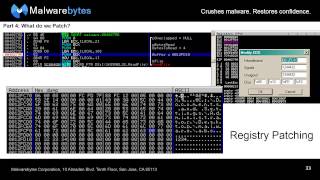
Yeah, sure thing, not a problem. I'll send them over to you after this. No problem. So yeah, like I was saying, modifying the buffer is so much easier. It's just a big old chunk of memory space. If anyone's ever messed around in a hex editor, similar, you know. You can also do this with the stack. I didn't go into talking about the stack at all because I really wasn't sure, like I said, where you guys' level was as far as familiarity with this kind of stuff. I figured that the stack was probably something that really didn't need to be talked about. But as far as modifying the memory and modifying the process memory, you can do that all in OLLI and it's fantastic. So what do we patch? Like, what are we actually going to patch? What are we going to change? And there are 4 primary patch operations that has probably never been written down until now, honestly. There's the value change, which is super easy. Like I said, it's basically your flags. These things like that. Super, super easy. Registry changes, also pretty, pretty easy to do. The only problem there is it takes a little more awareness and responsibility in making sure you put in the right value, whether that's something you're gonna be pushing onto the stack to answer, to modify the output of a function of an API, or if it's an address that's going to be used that you're gonna modify so that you can, you know, have the the malware load something or save something in a place that you want it to rather than it wants to. Memory change, a little more difficult. Opcode change, you'll mess this up. I guarantee you that 90%— you know, I'm gonna be fair, about 60-70% of the time you will mess this up, okay? You will screw it up because it's so delicate. And like I said, I'll talk more about it. In a little bit here, but it's hard and I don't recommend doing it if you can avoid it, honestly. There's so many other easier ways to go around. For jumps, you need to identify the flag and modify the flag itself, the zero flag. There are multiple types of jump instructions, and if you're interested, you should go learn more about these, but I'm just gonna kind of go a quick little thing over it. The zero flag in this case, jump if not zero, JNZ. You see that in assembly, that means jump if not zero, and that's just checking the zero flag like I said earlier. If the flag is set to zero, it doesn't jump, right? If it is set to one, then it jumps. So if it's not zero, then it jumps. It's really basic, really simple. Just a whole logic gate and everything. So memory change for compares. Read and write ops and stuff like that, you want to modify the buffer value. So if you're having, like I said, input before that said write or execute or send, and you want to change what that input is, that's when you go in and modify the memory in the buffer. So this is for variable patching. In this particular instance, you I hope you guys can see this. I tried to make it big. A jump not zero command is highlighted right there, right? This wants to jump right now, and I don't want it to jump anymore. I think it's stupid to jump. Maybe it jumps to the next process. So what I do is I go and I double-click the Z that's in the registry or registers area in OLLI, in OLLI debug. You'll be able to see it clearer when you start looking at the program itself. But in this case, there's the flag. I changed the flag. Really easy. Double-click it. What? And you can't really see it. It was pretty quick. But if you look at that red line on the screenshot on the left, it changes to— oh, there it goes. It's gone. Now it's not gonna jump anymore. Simple, simple, easy. Memory patching. Like I said, this is about medium. So if you look in, look here on the left on the screenshot and you see this particular entry, gen code. Now that's a built-in value into this piece of malware. That's hardcoded. I don't know what it's going to use it for. It could use it for anything. It could write it into a file. It could use it as a popup or something. It could use it as traffic, you know. Either way, I open it up, I edit the data. So at the bottom there, you see the actual hex code, and you can modify it that way. I like to just go up to where it says ASCII, double-click that, and just type in like a normal human because I don't think in hex. And so I modified it. And you see that now it's inside the data. Now a fun little trick that I like to do sometimes, you know, I like to see the results of my efforts. So if you guys are familiar with Process Explorer, correct? Yeah, yeah. And you know, in Process Explorer you can look into the properties of any particular process and look at the strings and you look at the memory strings. And if you do that while this thing is currently running inside of the scope of it being run by Ollie, then there you go. You get a nice bite me in the memory. So this is a little fun thing just to make sure that what you're doing, you know, makes a difference. It might not be anything to you, you know, or to anyone else but you, but that's all that matters, honestly. This is— this kind of work is the kind of work where you bang your head against the keyboard a billion times until one day it all clicks and makes sense and you feel like like immortal, you know. So little, little victories. All right, registry changes. So when you want to modify the registry, just double-click the registry and modify the value. Opcode changes— they must be the same size as previous opcodes. This is something, like I said, I'll go into more detail about, but for now I'm telling you, if you try to put a particular opcode in or change the opcode to something else, it has to take up the exact same room as the previous opcode. Otherwise you're gonna get some overriding code. The next few lines may get overwritten by NOPs, which are basically just empty areas of memory or space because this new instruction takes up, you know, so much that it now that it needs to take from other places. It's bad. You can either edit the binary or just type it out. Like I said, you can go into the same kind of screen where I put the ByteMe and everything like that, and you could fill it in that way if you want to, or put in the actual hex opcodes themselves, or you could type it in, you know, English or plain text anyway. But like I said, unless you are copying it from somewhere else or you're just a master at this, I wouldn't recommend doing it that way because it's so easy to mess up. And the debugger might have a certain kind of syntax that it wants to do that you may not be aware of. So just be careful with that, you know. This is useful for redirecting code or adding new functionality, which I've done plenty of times, and honestly, it's a lot of fun to do. Permanently modifying how the program runs. So if you have a program that is going to always check for a certain type of whatever, AntAnalysis thing or AntVM thing. If you say this is the only thing holding me back from running full-blown dynamic analysis and saving myself about 10 hours, then modify the code. You know, go in there, say you don't exist anymore, or just completely jump over that check. And in that instance, you just dump the binary and then you can run it normally. And it'll run normally except it will jump over where it was supposed to do that check. So that's always fun. Registry patching. In this instance, there's a call to read file, and when— for those of you that aren't too familiar with reading assembly from the debugger, everything's kind of backwards to where the Everything, you start at the top and you move your way down, right? So when you see things being pushed, they're being pushed on the stack in a certain way, and, and they need to be pushed so that when, when you make the call, that all the parameters for that particular function are in the correct order. So they go in backwards and they come out normal, right? The typical queue style, or that other thing, I don't know. So in this case, the buffer is being pushed onto the stack, and it's a buffer that's being loaded. The address for this particular buffer is being loaded by a register, which is EDX in this instance. I go into EDX and I modify it, and I say I don't want it to be here, you know, for whatever reason I decide that this is a bad place to put a buffer, or maybe I want it to go somewhere. It doesn't matter. You know, there's so many different dynamic instances that you could want to do something. So in this instance, I'm just showing you how to do it. And you can see there, I put it not too far away from where I wanted to put it, but just a chunk of memory that I know is empty, that's not going to be used in the immediate future, and move on from there. So I change it, and I did here. And you can see here, it's actually the 1234 at the bottom there. That's 12FD10, which is the memory address that I pushed onto the stack that I told ReadFile to do, and it decided we're gonna put whatever we read into that area. So just neat little thing, neat little thing to move around. Good when you're dealing with variables that when the malware decides to use registers to actually call something and push something onto the stack. Opcode patching, now the fun part. All right, so in this case we have a jump. It's gonna jump somewhere. I decide I don't want it to jump where it's going. I want it to jump somewhere else. Maybe I'm tired of analyzing this stupid thing and I want it to exit prematurely so I can tell someone that I'm going home for the day. I don't know. And so I modify the code, all right? I change the address where it's going. To a chunk of code that has previously— there's nothing there. There's just an empty chunk of memory. And what I decided to write there is an exit process, a call to exit process. So previously that was not there. And you can see this because Ollie will often change around color schemes and everything like that when you actually input your own code. It's not gray or anything like that. It's all red because I put it there myself. So that's— That's an instance. But see, if I tried to do jump not zero like I showed you earlier instead of jump, the jump not zero opcode requires more space than the jump does. And can you guys see my mouse? Ah, probably not. Yeah, you can? Okay. This, if you're looking here, right underneath the jump, about the next 3 operations are wiped out if I try to make that a jump not zero. And there's a lot of problems associated with that. And I'm about to go into that, actually. So let's move on. This will make a lot of sense when I get through this. Any questions so far? I like the, you appreciate the bite me. I'm glad I've done something for you, you know?
Alright, cool.
Oh, gone.
Alright, cool. Oh, I was just saying, no questions, my bad.
Oh, okay. I thought you said, "I got a question." I'm like, "Oh cool, what's the question?" Alright.
So the top—
We thought there weren't any.
I'm just hearing things. I just love feedback. I'm just making it up myself. Good job, Adam. Oh, thanks guys. Hey buddy! So the top 5 dangers associated with patching. Number 5: taking a wrong turn. You are looking at your map and then you decide, well, I'm gonna go and not jump where I could have jumped before, and it turns out to be a horrible mistake. Feeding the malware false input. You try to feed the malware something you thought it would like, a command you thought that it matched, you know, what was supposed to get, but maybe you misspelled it, maybe you mistyped it, something happened, you got pissed off. Writing over legitimate code, like I told you guys, you mismatch the sizes and you're, you're in a world of hell. You know, you're in a world of pain. You don't— it's not good, it's bad. And that's because all the things I just mentioned will crash the malware. Possibly might crash malware. The fifth one, maybe not. The others, yeah, you're going to crash the malware that way because malware isn't written like legitimate software, OK? Legitimate software is supposed to check its input, right? Well, I don't think that there would be a security industry if that was the case. But Malware definitely doesn't check its input because it doesn't care. It's malware. It's written by guys who probably have guns to their heads or something. So, so it won't check the input and it will crash. And finally, the number one danger is destroying the sample itself. Like, you, you're analyzing it, you mess it up so much, you screw around with it so much that now it's just unusable completely. And since we're all Malware analysts in here, then we all should know that the best safeguards are to take a whole lot of snapshots and use a virtual environment. When you're reverse engineering, VMWare stuff doesn't matter anymore, okay? You can get malware when you're trying to run it dynamically that says you're in VMWare, you're in VirtualBox, you're running analysis tools, I'm not gonna do crap. You're screwed. You're shit out of luck. Then you have to go run a bare-bones box, and that's just a pain in the butt. With reverse engineering, it doesn't matter because you're going in there and it says, "Oh, I'm going to check for VMware." You say, "No, you're not." Jump or change the value to say, "No, there's no VMware." You know, use Jedi mind trick. This is not the virtual machine you're looking for, you know? So you want to take a lot of snapshots every time you're about to modify value, modify memory, and especially, especially modify an opcode. Even I, while I was making this, while I was taking those screenshots for the opcode portion, I screwed up once. That's why I had the example for the jump not zero, because I tried it and screwed it up. And I'm glad that I took a snapshot beforehand because I was able to go back and, using a virtual machine— now this is actually a very mild version of what my snapshot managers usually look like. This is very small. Multiply this by about 20, and that's usually what I deal with, okay? So snapshot, snapshot, snapshot, snapshot. You make it to a good point, you take a snapshot. You reach a part that you didn't think you'd get to before, you take a snapshot. You know, naming conventions, eh, you know, I obviously don't care for them. I just write whatever is on my mind at the moment. And, but some people, you know, like to put down, well, this is where I'm at. And that's good for you, you know. That's why I'm not a programmer. And if you ever saw any of my actual code when I did write programs, then you'd see that my naming conventions for variables were just as bad. Some words to the wise. Clear out your snapshots every so often. They take up a lot of space. If I could show you I can show you, actually. I'm on my computer right now. I'll show you in a second. But my drive devoted to VMs is almost completely full. And practice, practice, practice. You know, as with anything, practice makes perfect. You do this stuff more and more often, it becomes easier. Like I said, when you first start doing the code analysis, it gets confusing. You get lost. You end up looking through, you know, some Windows API for 4 hours and not sure what's going on entirely, and then you realize, oh, I'm not supposed to do this, or this is the wrong memory space. You guys are talking like, what's up with the nachos, man? Now I want some nachos too.
I'm craving some.
It's nacho time. Anyway, practice, practice, practice. Keep it up. Play around with things. Like I said, the tools that I showed you, IDA Pro, it's version 5. I think they're on version like 8 in the actual release, which is really cool, but version 5 does the trick, you know, does the job. And an OLE debug, you know, play around. There's the Tuts4u website. Forums. I'm sure you guys are familiar with those. They got some really great stuff. The Lina reverse engineering tutorial is also great. I highly recommend those. So you learn a lot. Experience is probably one of the most important things to doing this kind of stuff. You can, you can learn in a book all you want, but until you actually see it in the wild, you know, and mess around with real malware, then you're not gonna really know what you're going to deal with. And now for some examples. I actually will show you guys an example. Can you still see my screen and everything? Yep. Okay. Oh, real quick, let me pull up— here we go. Okay, X here, Analysis, that's where all my VMs are, and that's where all the snapshots are. And before, about 3 or 4 days ago, that was in the red. Okay, you guys still see everything?
Yep. Okay, not necessarily read everything.
Okay, I don't think you're going to increase the size of the font.
All right, let me do what I can here. I'm just— I was gonna show you I still can't. Can you read that?
Yeah, great.
All right, this is, this is some actual malware that we're looking at right here, and this one in particular is just a real pain in the ass for looking at stuff when it comes to analysis systems. So at first, it's just looking for things. Joe Sandbox Control, Joe Beck. So it's looking for a sandbox. Wireshark, you know, we all use that. SysAnalyzer, some people use that. You gotta get tick count, which may or may not be used in the course of identifying whether or not a file's been analyzed or being analyzed. Sometimes malware will do that, will take a snapshot in time and be like, how long has it been since I did this again? Oh, not 5 milliseconds? Well, then obviously something's wrong. But if we go right here to this particular function, now this is IDA Pro, by the way, I'm sure. As I'm just going to zoom back, you don't have to read any of it. I'm just going to show you this entire function. This is all one function, um, is made to detect, uh, an analysis system. Okay, but we're just going to really focus right now on the part that's looking for VMware. This— I'm in VMware, and right here, uh, I don't know how many of you guys have seen or heard of, it's not really a problem anymore with more updated versions of VMware, but it used to be a problem with the magic number. And you can see right here, it's moving some hard-coded value into AX here, into a register, and we wanna figure out what it is. IDA Pro's awesome, it could just show us VMXH. Now that's the VMware magic number. In here, in this particular function.
What's up? You, uh, you right-clicked. I, you know, you can change the character or decimal or whatever. What was that that changed that to the VMX? Does that interpret as string, or what is that?
Uh, yeah, I think it's string, or it just, it just switches it over to ASCII, I think.
That's got to be a function of like one of the more expensive versions because I don't have that in mine. This has got the crack 6.6.
No, this, this is Ida 5, man.
Fuck them for charging for it.
There, freeware version 5.
I have no idea, maybe I never saw that before.
All right, it's not always there. No, it's not always there though. It's, it's not always there. That's That's one of the problems is that VM, uh, IDA Pro is very finicky about what it wants to do. It's not like it's a broken program, but you have to fit certain parameters. And in this case, we're lucky because, I mean, I can see something like this 9 times out of 10 and it won't give me the option to make it something that I could read. Monty Scott. Yeah, right. So yeah, this is checking for those magic numbers, and then basically what that happens is that, uh, The malware will queue or query the processor for a certain value. It'll get it from the, you know, deep down in system settings, things like that, and it comes out with a magic number. If it's the VM, if it's VMware, it will come up with this VMEXIT or VM or VX, one of these two options, and then it will compare. The malware will compare that value to the hardcoded values, and if it determines, oh yeah, this is totally what I'm seeing, then it'll return back a value that— let's see right here, AL, AL, that's EAX. And I'll show you in a second inside of the debugger what that looks like. But it's testing to say, is this— if it's 0, then it'll return a certain value. If it's 1, it'll return a different value. So it's not going to return a 0, it's going to return a 1. And that one is going to lead us to an exit process. Okay. So we know what the problem is. You know, we see, all right, this is gonna kick my butt. What do I do about it? I know this is gonna be even harder to see. I'm so sorry. Hold on. Let me see if I can make it even bigger. Giant.
All right, let's try 18.
Okay, you guys see? All right, so let's see, uh, where are we?
Right.
I believe. Oh, it's there. Test right here. All right, this is the— I can put a note here, a label. Check for VMware. Don't, whatever. Okay, well anyway, breakpoint, take me there. Or don't. Oh crap, this is why I need to record things instead of just running them.
Did you forget to sacrifice to the demo gods this morning?
I might have. I might have already been to this point and then I was like, oh, let's do it again. One second, get back to where I'm supposed to be. Another problem that you may or may not encounter and I hope you don't because it's awful, is look over here on the left. You see these addresses, the CF183000? Yeah, that doesn't match up with what you see in IDA. You can change IDA's base, but it's a real big pain in the ass. And when they match up, it's fantastic, you know, but when they don't, you have to be creative. So back to Start here. 185. Yeah, all right, sorry guys. There you go, 185. Go.
Thank you.
All right, this crap here. Anyway, I don't know what's going on, why it's not working for me right now. I do apologize for that.
One second.
Just lost like 15 points of credibility.
No.
All right, let's try to get back there.
What the hell am I?
All right, I don't know. I don't know what's going on, uh, but basically I'll show you what I would have done, okay? And you could have— you could imagine, um, where I'm going from there. Yeah, okay, so basically here's the test, right? The test is gonna return a certain value. I can tell you right now that the value coming out of this function right here, the VM checking function, is going to give you an EAX of 0x01, like just 1. That's gonna be the return value out of that particular function. This is gonna test, say, whether that's 1 or not. What you do is is say it's zero now. And when the test comes back and it says, oh no, it's zero, it's equal, everything's fine, and then it'll jump to the next check and the next check and the next check. And I can show you a little bit if you wanted to see what some of these types of malware do. Back up some of these. All right, well, this is looking for certain file, probably associated with either a sandbox or antivirus or something. Same thing with this sample.exe. This one messes around with SCSI ports. Yep, so I mean, that's the kind of, that's kind of malware you're going to be dealing with sometimes, and that's when this stuff comes most in handy, honestly. Dealing with other malware, reverse engineering and being able to patch and stuff like that, it's nifty, it helps, but it really is the most useful when you're dealing with malware that won't execute. It won't run inside your analysis environment, or is doing something that you know, you know, what else it could be doing is far more dangerous. You know, my experience, I used to tear things apart completely, and I'd spend weeks tearing apart malware and figuring out every single command it could take and everything else, and that's when this stuff came the most in handy. These days you have new variants popping up every other day, or every day even. Hundreds and hundreds of different kinds of samples of different variants of the same Maurer family. And so it's kind of unrealistic to sit there and take apart every single one. But when the time comes that you come across something like this, you're really gonna be happy that you have the analysis skills skills and you know how to do it, you can get it done quickly and efficiently. So, are there any questions?
Yeah, I'm curious as to like what it's like to be on a malware analysis team. Like, like, where do you— like, how often do you guys actually do the samples? Where do you get your samples from? What do you do with the information you get from them? I'm just kind of wondering what's like everyday life kind of as an analyst.
Okay, well, you've got two— I mean, honestly, these days there really is a two-route system for that. There's the route that I took, and there's the route that other people take. My personal one— and I will talk about the others because I know what they do— but my personal one is, is a route of being a voice. You know, I'm the kind of basement dweller that can actually speak to people. And so I do that. You know, I'm here, I'm talking to you guys, and I go and I talk to the media, and I go to conferences, and I talk to things like that. And I work malware intelligence, and so I stay, you know, 3 steps away from sitting in the— what do they call them— the foxholes, you know, and things like that. And that's what I choose to do, you know, but that's not for everybody. And a lot of people on our dedicated research department don't. And what they do is that every day they get up, you have dedicated malware hunters. Obviously there's sources that they go to, you know, certain lists and sites and things like that. Obviously we have a lot of connections with VirusTotal pulling down, you know, valid malware or ones, anything we don't detect, things like that. But we also employ our own honeypots to collect new malware from exploits in the wild, and we get those URLs for those exploits also from lists and other sources that we have. We have dedicated, like I said, dedicated hunters. These guys will go around into the, you know, the cyber underground and be able to pull out new samples or new things. So we get it from all over the place, really. And once they come in, it's usually divvied up, you know. Certain samples that seem to be more difficult are given to certain analysts that have, you know, higher skill, and the easier ones might be given to ones that are not quite as highly skilled. And through whatever method that's required— I can't obviously go into a lot of detail about how we do things, but at Malwarebytes, specifically, but for the most part, the whole industry has moved toward much an automated approach. Some places are trying to do automated signature creation or threat profiles or whatever you want to call them. There's— if you listen to anybody who's in the business part of this industry, you know, obviously the whole world's against definitions, you know, they're against signatures. There's like Why are we going after malware after the fact? And the fact is, we're not. You know, this is the most effective. It always has been. How often do you hear, if, you know, heuristic analysis is the future and the way to go, then why isn't everybody using it? You know, why isn't everybody in that route? Why is there still malware? Why is it still a problem? And that's because we're not dealing with a computer. You know, we're dealing with people. We're dealing with bad guys who change as often as we do. We've seen malware that targets the exact methods in which we used to detect them, and they change just slightly enough, just a very, very small amount. It might be this one value being changed, and, and that's it. And then we say, oh, you son of a bitch, we'll take this, you know. We go back and do the same thing to them, and it's a cat-and-mouse kind of thing for now. But like I said, most most companies, most organizations are going toward a more automated approach, whether that be the, the approach of getting computers to write your definitions for you, or what I prefer is just using it as a tool to where you've got sandboxes, you've got, you know, databases, you've got computer learning and things like that being used to help you identify weak points better, or being able to identify groupings and relationships. That's, that's something that's really really going to be the future in my opinion. But back to just the daily life, they go through the samples, you know, they do what they do, they run it through FP checkers obviously because that's the last thing you want is a false positive going out there. And as far as Malwarebytes goes, we push updates about 10 times a day. So I mean, we got a team that's just busting their ass all the time. And when they finish their chunk, I mean, some of them say, alright, I'm done, and other ones say, "I don't sleep anyway, so what does it matter? I'll keep working." That's basically the day in the life of a malware analyst. Like I said, for me, it's more of a— I kind of live in between the research space and kind of a marketing press side, which is very confusing and loud. I miss the days when I used to just do nothing but stare at a screen and hide in my cave. But somebody's got to be out there telling people about this stuff, you know? So does that answer your question?
Yeah, yeah, thank you. And then we had a question in the chat from Cody.
If you see that, yeah, how often in practice do you mess a patch up and then the malware ends up running, causing you to snap back to the last snapshot? Oh, all the time. Every single time. That's why snapshots are so important. Because you will literally need them almost every time. Every time I analyze malware, even if I'm just doing dynamic analysis, I will take a snapshot before. And I mean, part of it is because you will get infected, you're going to infect yourself. Yeah, but also, you know, setting up the tools, it takes forever. But yeah, I mean, don't, don't think of yourself any less because malware escapes your grasp and you end up infecting yourself. It happens all the time. That's why we all work in, you know, isolated environments, since we have dirty networks and closed-off systems. And so we don't connect ourselves to the internet. We work in VMs and things like that because we're dealing with radioactive material, you know. It's— we're dealing with explosives. And that's what a lot of people like to use the term instead of executing the malware in an analysis environment, you like to say detonate the malware. Whoa, detonate, come on, you know, this isn't a grenade. But some people think it is, you know, and honestly you can kind of compare it. We have the Enterprise Edition, he's telling the truth. Which part of the truth? The good truth or the bad truth? We have like maybe 4 or 5 updates a day. It's like almost updated every 30 minutes to an hour. Yeah, it's like version 4.8.9. Yeah, there's a whole bunch of them. So a lot of work. Yeah, well, you know, we at Malwarebytes specifically, we stick to the brand new stuff. If we haven't seen a certain definition hit for like, I don't remember exactly the time timeframe, probably a year, then we take it out of our database and we say we're not detecting this anymore because it's not out there anymore, you know. Like I said, we have exploit honeypots, we have methods of collecting brand new malware, the malware that our consumers and our customers are facing right now, which is always the juiciest stuff, obviously. But we always tell people to use an AV as well because we're anti-malware, they're antivirus, they can deal with the old stuff, they can have their heavy database and everything else, but at the end of the day, if you look at the testing, if you look at just, you know, what people say, I mean, we kick butt. But we're not the end-all be-all, you know, solution. And honestly, that's a big trend that's— if you guys don't already, you know, talk about this or have talked about with your friends and family, the layered approach is necessary. You know, you can't— the malware Malware is one aspect of this, and honestly, it's not even a hard aspect of it. The malware has not changed in the last decade just a whole lot, okay? I predicted, and I'm sure a lot of other people predicted, the emergence of CryptoLocker. You know, it was going to happen because that's just kind of the lifestyle, the life cycle. What else would have happened? You know, you see Revitin-type ransomware, the FBI ransomware that we saw maybe a year or two ago. I'm sure most of you guys Remember that? And everyone was like, "Oh no!" You know, and they fell for it. And I don't know, I got calls from about 3 different people that I was related to about the same thing about Reviton. And I'm sure you guys dealt with that too. But if you actually go back to the early days, the first days of malware back in the early '90s and stuff like that, you look at some early ransomware that actually, you know, there was ransomware developed and some of it did some encryption and it was very light encryption. It was really easy to get around. And the encryption avenue was something that a lot of the more modern ransomware creators decided not to deal with. They're just gonna block it or lock down the system in some way, and then people just get upset about that. But you could tell that, all right, this is an effective method, it's worked really well, people aren't gonna fall for the whole FBI thing anymore. But so you're gonna need to say, all right, we need the same kind of attack but from a different approach. And then you All right, what's next? Encrypting files, obviously, in full-blown, real, you know, real ransom kind of stuff. So, and like I said, it's the malware itself, not, not what it used to be, you know. It hasn't changed a whole lot. The attack methods also haven't changed a whole lot in the sense of how they're technologically done, but how they're done in reference to how they attack the user. See, that's, that's a whole different game that we've been dealing with for the last few years. Like I said, the ransomware stuff, the FBI ransomware— I saw a ransomware that not only accused the user, excuse me, of, of like looking at child pornography, but actually put an image of child pornography on their system for them to look at. It said, this is that image. And that was just the most despicable and disgusting thing I I had ever seen in this industry myself, you know. And I've seen a lot of like other gross stuff, but that took the cake, you know, because it was a psychological attack through and through. The actual technology behind it, the coding of the malware, not that intricate, not that hard to get rid of. But to someone who doesn't understand this world, you know, to someone who's even just a novice, or, you know, someone who didn't grow up with it, or or always stayed away from it, you know, suddenly you have the FBI apparently telling you that there's something wrong with your computer. But even if you heard about this FBI ransomware and said, oh, well, this probably isn't real, now you've got this like totally disgusting, totally illegal, totally something that you think people would judge you for if they thought that that was actually on your system thing on your, like showing on your screen and saying pay us $300 or you can face the embarrassment of going to your tech support or going to your friend and saying, hey, I got this infected, apparently it thinks I have child porn. And then, you know, the psychological damage that does to a person is ridiculous, you know. So that's the future, you know. The layered approach is not just keep buying more products, but education, giving people the tools they need to understand the threat landscape and to deal with it, you know.
Let's see, if anybody has any questions that are remote, you can unmute your microphone and ask them and then mute again, or you can paste it in the chat. I've got a question.
What's up?
Y'all hiring?
For what? What do you want? Do you have work? Yeah, yeah. Well, we have a whole— if you go on our website, narwhalbites.org, we have a career site, and right now we have a couple of openings. I'm not sure how much longer they're going to stay open, so I would move on it quickly. But we definitely look for— I mean, experience is always great, but just education and ability to learn quickly and a passion for the job is is probably key. So I know that the research guys, they've, they've been down the road of hiring people that don't know how to do the job and try and train them. And it was just hell for them. And they're like, swear off it now. Like, so, but, uh, but yeah, apply, apply and see what happens. If anything, I mean, we have support positions or point you in a different direction. You know, there's this industry is going to keep getting bigger and bigger. No. Which is good and bad, you know. I always say we're all in the habit or that we're in the industry of trying to put ourselves out of a job because all of us want to protect the users and get rid of all, you know, the dangers of the internet. But if we did, we wouldn't need us anymore, you know.
So yeah, that's probably not likely.
Exactly. It's ever going to happen and it makes you sad, you know.
Sad. And another question. This is sort of off topic, but we are coming up on the second year of our Illini CTF, or UIUC CTF competition. That'll be towards the end of the year. I'll be looking for people interested in creating challenges for us. It seems like you know your way around reverse engineering and And we're wondering if I could bug you later on this year for possibly writing a challenge for me.
Yeah, sure thing. I can't promise anything, but I'll definitely see what I can do.
Awesome.
Or point you in the direction of somebody who I know can do a good job.
Right, yeah, that would work as well. You can use an unpaid intern or, you know, your basement dweller of choice would be great.
We're all basement dwellers. Wellers.
So I got another question. What movie is this gift from?
This is from Short Circuit.
Yeah, okay. I've never—
you guys want to see number 25?
That's a good movie. Number 25. Yeah, input.
Input. That might be the number 2.
Yeah. All right, another question on topic. Ish. So where do you guys use— well, I guess first of all, do you guys— are you guys only doing Windows malware, or do you guys do stuff for other operating systems like Linux?
We have a mobile product for Android, and I can either confirm or deny whether we're working on other stuff, but we might be.
I didn't know if you could shed any light on like tools that are used to in the GNU/Linux world and the Unix world?
Well, I mean, as far as Linux goes, you know, the primary targets of any sort of malicious activity for Linux are aimed towards servers, right? Because that's primarily where the money is when it comes to Linux. You're not gonna go after a Linux user because, you know, they're usually smarter than your Windows user when it comes to security and computing and things like that, right? Mac users, not so much, and that's why a lot of Mac malware is actually kind of script-based. It's not even a real— like Windows malware, it's some serious stuff, you know, it's hidden behind the scenes crap. Everything else is more of a social engineering attack and then social engineering plus scripting. That's why, you know, you see stuff like, you know, there's pups that are emerging on Mac systems that we see more of and You know, there's the occasional Mac malware. Is it a completely secure operating system? No, obviously not. And to think that is foolish. I mean, I think we all should know that there is no completely secure operating— you know, the most secure computer ever is one that is unplugged and at the bottom of the ocean. You know, that's the most secure you're ever going to get, because if you connect that thing regardless to the internet, you're doomed, you know. But yeah, mobile malware is pretty bad too. There's a lot of mobile ransomware going around. But it's— it's—
you see a lot of stuff from like people downloading from like an Android app store? Is that what you're talking about?
There's third-party apps, yeah, but we've also seen instances of malvertising and like drive-by exploits that are specific targeting malware or Android users. So even if it's not rampant right now, you know, because, you know, we obviously read a lot about it in the news, you know, new mobile malware, ah, but the reality of it is that it may not be super rampant in the States. It's crazy in Eastern Europe, just nuts over there, but it's also evolving. And, you know, we see new evolutions all the time. They're getting better and better at making this stuff. So it's just a matter of time before it becomes a really serious threat. And in the meantime, everyone else just kind of starts adopting these technologies as, yeah, I use this every day for everything, me included. So it's, it's the usual course of technology versus security where, you know, innovations always take center stage over protection. And things like that.
I have a question back on the operating systems.
I know nothing's ever completely secure and it never will be, but do you think that as the new OSes are all getting more and more complex that the security features of them are actually getting better in general?
Yeah, yeah, I absolutely do. You know, the—
even much, much, much harder to get at. I mean, obviously everything else will be getting more complex and advanced as well.
Yeah, well, look at Windows 7. I mean, Windows 7, Windows 8, and then soon to be Windows 10. The user access control features, fantastic, revolutionized everything. The built-in security suites, Windows Defender or whatever the hell it's being called these days. I use Windows 7 still, and so I use Microsoft Security Essentials. Because I'm cheap and I have Malwarebytes and Microsoft Security Essentials and I'm happy, you know. But it's nice to have on there. It's a free product. It's built in now with Windows 8 and going onward, Windows 10, the ability to kind of exploit things. It's basically the— I think the creators of the systems have decided, all right, look, back in the day we thought we want this to be super easy. User-friendliness was paramount, right? You want to make things super easy for people because they never used computers before. We don't live in that world anymore. We live in a world where everybody uses computers, so you can go up a level when it comes to how technical— technically savvy they need to be to use the system. And with that in mind, you can make things a little more difficult, sense of authentication is required. You still get a lot of people that are like, I don't ever want to click that, I hate clicking that stuff. But you know what? There's victims and then there's people that are yet to be victims. You know, it's— that's how it works. You know, you either have been through it or you're either concerned about it or you will be concerned because you're gonna get infected or something's gonna happen. You know, I mean, there are those people out there, the loud mouths that I'm sure you guys will hear lots of being in this industry now, that say, ah, you don't need antivirus or any malware. You know, you just— all you have to do is safe surfing and you You think to yourself, well, you know what, to you that makes sense, and to us that makes sense too. But there are still, you know, people like at Apple getting hacked. There's the governments with, with multi-billion dollar budgets and security getting attacked, you know, getting infiltrated. Huge corporations like Sony and Target getting infiltrated, you know. This isn't just a deal where, you know, you can't get attacked because you know, you just keep an eye on things or you just avoid going to a sketchy porn site. You know, that's, that's not how it works anymore. And, uh, of course, you know, your children and elderly people are still the biggest targets because they're the easiest ones for the bad guys to go after. But, um, that isn't, that doesn't mean that, you know, everyone's safe. In fact, I've often referred to our time in history now, as far as the development of how secure, safe the internet is, as a world war. We're in a complete world war right now when it comes to, to the cyber threat landscape. And not by company, by countries, but by individuals, you know, as we are all kind of our own individual countries and, you know, nation states and things like that with our systems and our property and our things we need to keep safe. So we get invaded all the time. Used to be the Old West, the Wild West, you know, now it's a war.
One further question on that, just, I know you have no answer for it, but from the landscape—
I can say a lot about no answers.
From the landscape that you're seeing, do you feel like there's more, like the percentage of people who are going after more of the making malware versus making non-malware is getting you know, there's a higher ratio of it or there's a less rate, there's a smaller ratio?
Obviously there's more, there's more developers. Yeah, there are more. The development of variants, that's also something that's pretty rampant. You do have a lot more people involved in the whole industry, and as far as the cybercrime goes, and keep in mind it is an industry, it's an organizational thing. It's the mob, it's the mafia, you know, this isn't dealing with some, you know, angry teenagers in their parents' houses. These are cyber criminals, these are organized crime syndicates that employ, you know, cyber criminals. So is there more of it? Absolutely. One thing that is probably of interest to you is that where does the line between not malicious and malicious, you know, where is that drawn? And the reality is that we've been seeing over the last couple years that that line is becoming a little more fuzzy when you see things like potentially unwanted programs that are now being targeted by companies like mine. But there's a reason for that, not just because they're an annoyance, you know, because we've seen Malware being pushed with search toolbars, with weather apps, with stuff like that, you know. It's— I've seen a Bitcoin miner being installed because of a potentially wanted program. A freaking Bitcoin miner. I mean, malware is one thing, but a Bitcoin miner will destroy your system, you know. If your system is not built for that kind of stuff, it will destroy it. It will wear down your hardware, you know, and that's a huge danger to you. You're losing money at that point. You know, it's not a matter of maybe I will, maybe I won't. As far as credit cards go, it's definitely you will be losing money. I hope that answers your question a little bit.
Yeah, thank you.
No problem. Happy to answer whatever you guys want. I mean, you're the— so, so how you guys— I'm actually kind of confused as far as how's the whole class structure work, and, and like, is this part of an overall degree program or is it just an individual class?
This is actually ACM SIG, special interest group.
Okay, so you guys aren't even a class, right?
Right.
Yeah, and it's also at the same time it's a professional group of, you know, incident response, uh, forensics. So we kind of straddle the line between student group and professional organization there.
I know that nowadays there's a lot more, uh, of a cybersecurity, you know, curriculum in a lot of colleges and stuff like that. They didn't have that really when I was going through. Um, I like, I'm an old man or anything, but, uh, yeah, we have some of that new and some of us are involved in all that too. I was just curious how those, how those played out. I mean, yeah, well, cool. Um, it's a great industry, you know, and, uh, it's, it needs more people, it needs more talent. You know, we still get people to come in there, and you hear about them all the time, that say, I'm getting into this industry because I want to make money, because I know it's gonna make me money. And you hear that, it breaks your heart, because I know guys who, you know, who will work 12, 14 hours a day because they are passionate about this. You know, I've got guys that, that go out there and they hunt down everything from not just you know, websites that are, and, you know, groups and things like that are pushing malware, but fake pharmaceutical sites, tech support scammers. I mean, I don't know if any of you guys have followed how much work we've done with trying to shut down tech support scammers, but we've had some of our guys testify against some of these organizations because they're screwing people over, you know. So this isn't, this isn't an industry where, yeah, probably going to make some money, but at the end of the day, you gotta love the work. You know, and you gotta be a little insane, I think. One thing I always say to people is that to do reverse engineering, to do malware analysis at all really, but especially reverse engineering of malware, you have to be a little crazy. And to like it, you have to be full crazy. So you enjoy it, you know, because it is, like I said, a lot of pounding your head on things. But the payoff is worth it, and I used to work for government agencies in the past, and my work of report writing or whatever else I did, it just vanished into the ether, into the never-ending file cabinet. Never saw it again, never saw what happened to it. But on the outside, working for Malwarebytes, I get pulled over both when I'm at conferences, but also just walking down the street if I'm wearing my Malwarebytes hoodie or something like that. And I get emails and messages, I see the in the forums and comments on our blog about how we've helped people, you know, and our efforts have made a difference in people's lives. And that's worth it, man. That's why you do it, you know? Because otherwise, I don't think there is an amount of money that can really, you know, make up for what I would say is kind of realization about how bad people can be. You know, and not the people you're trying to protect, but the cyber criminals, you know. They, like I said, this is, this is beyond just computer versus computer. We're dealing with psychological attacks against users to, in effect, to extort the harm, you know. And it's, it's ridiculous, and it's disgusting and sad that this no place, this should never have been involved, you know, in our wonderful utopia of the internet, of, you know, things like that. Yes, we're superheroes. We can't save the world though. We can't just make everybody understand or see the way things are. That's the other hard part that you guys may or may not experience is that, you know, you get people that will come to you when they need your help and you help them. And when you try to tell everyone else, hey, you know, be secure, be safe, learn these things I'm trying to tell you. I mean, I My team runs our blog, and so I know firsthand, we write articles, we talk to people, we're trying to push out this education and inform folks about the real dangers out there, and we get a lot of people that push back for whatever crazy reason, or they just don't care. They don't read it, they don't, they don't, it doesn't make, it doesn't matter to them. And that's also a disheartening part of it where you're gonna hit a lot of brick walls. But like I said, at the end of the day, it's you versus the bad guys. And, uh, and it's worth it to see the people that do, you know, appreciate your help. I could rant forever, guys, so I'm gonna probably wrap up here.
Yeah, I think I was gonna thank you for coming out, Adam. This has been a really good talk.
Not a problem. I've loved it.
Uh, your knowledge.
I hope some of it is useful to some of you guys. I know a lot of it was technical and some of it might have been below your expectations. If so, I'm sorry. I don't know what you're expecting to learn. Honestly, if you've ever tried to give a talk on remote analysis, you realize pretty quickly that unless someone's got a computer in front of them and the tools that you're trying to show them, it's kind of hard. But the methodology, that's honestly the most important important part. You can learn all the tools, you can learn all the tricks and the technical part, but the mindset of an analyst, of someone trying to tear apart malware, that's something that you can't teach from a book, in my opinion. So experience, you know.
Okay, well, that concludes the meeting. I want to say a few things here. So again, this is the last meeting of the semester, and we will resume again in, uh, for fall semester, I believe it is.
Yep.
And, um, we have all those projects going on over the summer, uh, so if anybody's interested in working on the— working with the courses or the lab or helping us, um, redesign our website, uh, or even submitting graphic ideas or graphical designs for t-shirts and stuff, uh, let us know. We'll continue, uh, trying to organize and get all that stuff ready to go and squared for next semester. And I guess that's it. Take care, everyone.
All right, thanks a lot, guys.
Thank you. Thank you. Thanks for coming.
All right, take care.
Oh, I guess everybody who could, that would like to talk to, thank him for coming with a tweet or something.
More from Jon


What No One Knows the Podcast / Vodcast featuring The Tampa Bay Wave and Jon Schipp

Meeting the Exposure Management Challenge: Key Use Cases for Success | @OfficialRapid7 #SolutionSpotlight

Spot Security Control Gaps and Non-Compliant Resources Across Your Attack Surface






