OpenNSM (Reverse Engineering Cryptolocker - Brandon Tansey)
The OpenNSM group meeting began with administrative updates covering the OpenNSM Twitter account, a new tiered sponsorship program, the migration to a GitHub organization, applications for AWS and OSU open‑source lab grants, and the deployment of a Xen‑based lab server managed with Puppet. The meeting then moved to a news roundup highlighting recent releases of Suricata, rsyslog, Snort, and pfSense, as well as the Facebook Networking at Scale conference. A brief tool spotlight introduced Sysdig for system‑level forensics. Guest speaker Brandon Tansey (LANCOE) presented a deep dive into malware analysis using CryptoLocker as a case study. He argued for the value of analysis despite arguments to avoid it, outlined basic static techniques (strings, import inspection) and dynamic techniques (Process Monitor, Wireshark), and demonstrated how to extract high‑value indicators such as registry persistence keys, command‑and‑control domains, and encrypted file activity. Tansey reverse‑engineered CryptoLocker’s domain‑generation algorithm (DGA) by tracing WinHTTP calls in IDA, re‑implemented the DGA in C to predict daily domains, and discussed packing, sandboxing, and tool alternatives (IDA Shareware, Radare2, Hopper, objdump). He concluded with practical advice for newcomers: use isolated VMs, leverage online sandboxes (Cuckoo, Malware.com), and focus analysis on the information most relevant to one’s role. The session ended with Q&A, discussion of tool licensing, and plans for future OpenNSM talks.
Chapters
Alright, it's time again for another OpenNSM meeting, the Open Network Security Monitoring Group at the University of Illinois at Urbana-Champaign. We're going to go right into the group updates. So we have a Twitter account @OpenNSM, so do follow that and see our tweets about our projects and our guest speakers and so on and so forth. Also, you can use the hashtag #OpenNSM to talk to us. We monitor that. Sponsorship, I actually updated the sponsorship document again, and now we have a tier-based ranking program. So if you want to contribute anything, whether it's a credit, service, hardware, or monetary donation, you can check out the tiers and see what you will get for it. It's mostly just advertising. And we also have more details on the particular projects we'd like to get started with, beginning with the NSM Lab and moving down to our website, the research that we actually want to perform, and other things like product reviews and training that we're interested in. So do check out that if you are a corporation or an organization that is interested or willing to sponsor us. We do have a GitHub organization now. I converted about a week or so ago. I converted our GitHub account to an organization because it made a lot more sense. So if anybody's interested, send me your GitHub account information and I can add you as a collaborator based on what you're interested in. We'd like to pool a bunch of resources and have a lot of different people contributing to projects that we would like to store there. So do check out that. Also, I applied for Amazon AWS grants to actually build a lab in the cloud. I also applied for an Oklahoma State University open source lab grant, which allows you to have specific services hosted by them. They'll actually provide the web hosting and such. So I applied for one of those as well. Do you know who the contact is there? No, I do not, but you can check out the addresses on their osuosl.org. Right there. But they might be looking into you for some other projects too. Because anybody— like the Bro just got accepted on that as well, the Bro platform. So they're gonna be moving some of their stuff over as well to there. And it's completely free. So they do stuff, they sponsor open source projects. Okay, and then finally, sorry I moved my mouse a little bit. We have a Zen project system up now. I bought a machine at Hamvention last year. And it's now running Xen. We do have it racked inside the ACM server room, and you can— and right now only I have access, Waylon and Shane. But as we build more trust with the community and they show more interest, we will allow other people to actually use it. And right now it's just a development box. And speaking of which, I do have a Puppet configuration on it now. So you can— on our private repository, we have a number of modules. I just started out with— I started writing some for sudo ssh hosts and etc. just to get us started. Soon we'll have modules for various network security monitoring applications to install those automatically. And if anybody's interested a little bit more about OpenNSM or want to point somebody to an open— an article about us that's different than the website, might have a little more personal perspective, do check out this link here under "What is OpenNSM?" It's something I wrote on my blog. And that concludes group updates. So we're going to move into meeting sections now. And now we have NSM in the News. So Suricata released 2.0.7 the other day. And this is actually a bug fix release. Some things were caught, like I think the DCE parser, that there was a bug and that was corrected along with another item. There's no new features with this particular one. And also Security Onion actually packaged that up and that is now available in Security Onion. So you can do your apt-get commands to actually pull that in and use it. Rsyslog announced 8.8.0 stable, which is also a bug fix release. Snort— Snortball came out with the article on their new HTTP inspect preprocessor for the up-and-coming Snort 3.0. And you can check this out. It's not complete, but they have some information about what they're doing with it and where they'd like to go, including HTTP/2 version 2 support. The pfSense crew released an interesting roadmap article out, which is kind of nice. And their roadmap looks really sweet. There's a lot of big changes coming for them. One is that they're moving from PHP to Python. They're going to have a REST API. And the other big one that— besides they're using— they're going to plan on using the Intel DPDK framework for fast packet processing. But the big one was that you can actually just build it directly on top of FreeBSD. So pfSense is more like a package. So that was really cool. And then finally, Facebook hosted the Networking at Scale conference, so if you're interested in a lot of net— videos on people that are using high-performance, high-speed networks to solve big problems, do check out that conference, At Scale, and the videos are up online. Moving into Conference Corner, which is where we talk about various events and conferences that are coming up. Security Onion is having a 4-day training class in Houston. So if you're interested in that, check it out. Also, the United— or excuse me, UI, the University of Illinois Urbana-Champaign is hosting their— C-Pony Group is hosting their own CTF, their own Capture the Flag program or event. If you'd like to check that out, it's on April 3rd. It's gonna last 24 hours, and a few of us at this meeting right now are actually involved in creating some of the challenges. So do check that out and participate if you're interested. Tool trade, so Dustin Weber, came 2 weeks ago, I believe, to talk about a tool called Sysdig, or he gave us a quick mention actually of a tool called Sysdig, which I'm actually gonna talk to, I'm gonna try to get in touch with them and have them on. This is a really cool tool for actually doing troubleshooting and incident response and forensics on your system. 'Cause it can do all kinds of correlation, it actually stores historical data so you can actually look back in time. It's almost like, and you can look at the syntax right here, it's actually tcpdump-like. So we can actually record information to a trace file and then read it in again and pull out information based on specific queries that we want to use with the Sysdig query language. So that's— it's a really cool tool that definitely I want to get more use out of. And hopefully we can actually have a workshop or something on it in the future. It'd be really sweet. And that concludes all the meeting sections. I'm gonna go ahead and give it up to Brandon. Brandon's our guest speaker today. He works at LANCOE. He does a lot of stuff with incident response and flow detection and has some experience with 86 Assembly and reverse engineering. He also gives talks, given talks at conferences like Phreaknik. So I'm gonna go ahead and hand it over to Brandon. I wanna thank him for coming out. He's gonna be discussing the basics of reverse engineering malware. Thanks, Brandon.
Hey guys, thanks. Let me just get the screen sharing set up. Should just be a second and we'll get going. Oh, I can't share while you're sharing, so you gotta kill that. Cool, and there's some kind of hissing going on. I'm not sure if it's me or not. But if whoever that is can mute it, it would be pretty handy.
Yeah, let me check on that.
Okay, cool. Do you guys see the right view, the regular old slide or the presenter view or the other desktop?
Yep, I see your malware analysis slide. Let me go ahead and meet a few people, one second.
Okay, great.
It does look good. All right, I believe everybody's muted for now except you and the conference call.
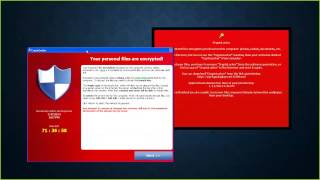
Excellent. Cool, I'm just trying to get this one little window out of the way. Okay, cool. Thanks for having me, guys. This talk is Malware Analysis: Getting the Most Bang for Your Buck, Time, and Know-How. I'm having a little bit of an arrow key problem. There we go. So my name is Brandon Tansey. I'm not in Atlanta, but I'm pretty close. Suburb of Atlanta in Georgia. Excuse me. And right now I work for Lancope. I'm a security researcher. I'm part of their research team. You can reach me in a few different places. You can shoot me an email, find me on Twitter, or on IRC. I'm in the OpenNSM channel right now. I'm probably not gonna be paying too much attention to it, but I have it open and I have the chat open, so feel free to, I guess, drop a line or ask me a question. Just as a note, if you do try to send me an email, that is a zero in Xoinks, not an O. The guy who owned the regular designx domain wanted like $10,000 for it. And I figured for $10,000, I could just go with the zero. So cool. Let's get rolling. So I initially kind of gave this talk at Freaknik. I think it was actually Halloween weekend last year. So a few days before Freaknik, I was at an event at Georgia Tech. Again, I'm right outside of Atlanta. Called the Georgia Tech Cybersecurity Summit. It was a really cool event. I think it was kind of like a half-day thing that had some posters and a few talks. And Dave Ittel gave the keynote. And there was kind of a quote in his presentation that caught my eye a little bit. Just as a note, this here is a link. I realize that you can't click it right now, but I have the slides up online. I can shoot them out to the list if anybody would like to, would like to go through them. So if you'd like to kind of dig through this talk that I'm talking about, there's a link here. Anyway, there was a quote on one of the slides that said, "The answer is not better malware analysis. The answer is to never do malware analysis." And this was kind of funny to me because I was maybe 2 or 3 days out from giving a talk on why you should do malware analysis. So naturally, I kind of paid close attention to it. So for a little bit of context, this followed the statement— now I'm paraphrasing here— "Anomaly-based self-death. Instantly rebuild at any sign of trouble." So what he was talking about was the fact that, you know, if you've got a computer or say, you know, you work for a company and someone comes to you and says their computer's acting funny and you're not sure what it is, just give them a new one, right? Forget it. Don't try to save it. Just blow it up and give them a new one. And I don't disagree with that, but I still think that doing malware analysis on a machine you suspect to be compromised is worthwhile. And just to kind of go a little bit further into that, there was another quote that preceded the one I just showed you. I've added a little bit of extra text here for context, but the gist of it was a problem with some threat intelligence feeds is that— and this part was his quote— "Your company gets the same anomaly model as every other company." One of the things that he took issue with, the reason he didn't like threat feeds, was that they're generally not specific to your environment. And the interesting thing, though, is that I believe this is kind of it directly contradicts the last thing he said. So just kind of in the interest of full disclosure— oh, yep, there's a slide in the, a link, excuse me, in the group chat. Perfect. So just for a little bit of full disclosure, I work for a company that has a threat feed. So just wanted to throw that out there as you hear me defending them. But I'd like to also tell you why. And that's kind of because all malware leaves behind some information of its own. So typically when people hear malware, they think about malware excuse me, what they think about is data going out or getting destroyed, right? They think about data being exfiltrated, people snooping on your webcam, or people, you know, rm-ing or deleting your disks. That's kind of what comes to mind first. Now, to be very fair, that is an incredibly reasonable first thought, right? But it's also really helpful to kind of recognize that malware will again also kind of leave behind some information. A few examples of kind of high-level categories of information are things like command and control hosts. So if you're working on a security team, a blue team, for example, at some kind of company, you're just, you know, an independent researcher interested in looking at kind of weird stuff that goes on on the internet, you can often find things like command and control hosts. You can find domain names and IP addresses. And these are really good ways to either further your investigation, or if you do, you know, you are on a security team, to look for different people on a network that you kind of monitor who've already been compromised by the same thing. You can find encryption keys that can, for example, help you kind of reveal information that wasn't accessible to you before. For example, contents of encrypted command and control traffic or things like configuration files that malware often uses. You can find implementation flaws. So I guess most people are online, but if anyone in here has ever written code, which I assume quite a few of us have, you know, you've likely seen that things don't always work out in the way you kind of expect them to, right? Sometimes you have issues, you have bugs. Malware is the same. So an example of that was a type of malware called CryptoDefense, and it's been a little bit now, but I think it was kind of a direct follow-up to CryptoLocker instead of CryptoWall. I think it predated CryptoWall. And it appeared to at first soundly encrypt all of the files of the victim's computer, all of the files it wanted to at least. But ultimately people began to reverse engineer it, and what they found was that it was using the wrong key size, if I remember correctly. So, people were actually able to decrypt their files because the keys used to encrypt them were far too small. Sometimes you can find things like exploits that people use to either propagate their malware or gain particular permissions. You know, if it's in the code, you can find it. And I don't mean to say that every piece of malware you're gonna rip open is gonna have Oday sitting in there for you, but it's the kind of thing you can find. Additionally, and what I think is kind of most important, you can find out about a piece of malware's capabilities. 'Cause like if you, you know, you wanna know what a book is about, you read it, right? You don't just look at reviews and see what other people have posted. So if you have questions to answer, the best way to do that is to kind of go directly to the source. So this isn't an exhaustive list of things that you can find in malware, but what I'm kind of hoping to get across here is that there's good information in malware basically no matter what position you're approaching your investigation from. And along those lines, and to get back to what the quote that I put up earlier. The reason I think they're contradictory statements is because no information can be more specific to your environment than the information you pull out of attacks that actually took place inside of it. So if you don't like threat feeds and the reason why is because they're not specific enough to you, you're really giving up a really valuable source of information if you're letting this malware that's attacking you and compromising you go by unanalyzed. So the act of pulling that information out of a piece of malware is malware analysis, excuse me, which is conveniently the topic of today's conversation. So I've got a few goals for the presentation. One is to kind of demonstrate the value of analyzing malware. Again, whether you're part of an incident response team or just kind of a hobbyist looking for something to do, and if that is the case, there is no shortage of malware, I promise you, so you'll never go bored. But additionally, to suggest a few things that you should kind of consider to make malware analysis work for you given the conditions you're in, right? Whether it's a certain amount of time that you have or certain skill sets that you've got or certain amount of money you can or can't spend, right? There's some kind of information that you can get out of basically any circumstance. So to enable— excuse me— in order to kind of discuss different types of malware analysis, I'm gonna break kind of techniques up into a few categories. And the first kind of breakup that I'm gonna have here is is dynamic analysis and static analysis. So dynamic analysis is running the code, right? It's maybe running it in what's hopefully a VM and watching to see what it does. Whereas static analysis is basically everything else. And we'll talk more about that in a moment. So for people here who are familiar with like the Gartner Magic Quadrant, right, or basically any comparison graphs, typically people talk about the top right as the place to be, right? In Gartner's case, people kind of call it the Gartner Magic Quadrant. But that's not really the way that you should look at this here, at least, because the top right isn't necessarily the best for you. It might be the worst for you. So again, it's not really a ranking in that sense. Anyway, like I said, static analysis is basically anything that's not running the code. So we'll talk a bit more about that. But I'm also going to have kind of a separate breakup. So in addition to static and dynamic analysis, There's also kind of basic and advanced things that you can do to look at the malware. And basic and advanced, the terms here, they kind of represent not only the kind of amount of know-how required, but also kind of the amount of time investment that certain kind of techniques take. So to that point, this is a graph I showed it during the Freeknicke presentation, and I refer to it all of the time. Excuse me. It's not a formally peer-reviewed graph, but it's one that I kind of like and serves purpose here. And the point of this graph is to kind of show you that spending as much time as possible might not be necessary for what it is that you're actually looking for and what perspective you're approaching a piece of malware from. So for example, spending a couple minutes might get you, you know, the most return per, I guess, minute spent out of your entire project, right? But if you need to get every piece of information possible, which is kind of a kind of a funny term, but if you need to get as much as possible, the amount that you'll get back will kind of slow down over time, kind of a diminishing returns thing. But additionally, I wanted to kind of show you that you don't have to go, and this is like an air quote situation, but basically none of us are in person, including me, air quotes, you don't really have to go all the way to the end of a piece of malware to see some value. So instead, what you have to consider and kind of what the basis of the presentation is and the talk is, is that you have to think about what information would help you specifically. So like I was saying, there's kind of a chance that you're a malware researcher, you know, hobbyist or professional, whatever, and you're looking to publish a complete write-up or walkthrough of an individual sample. You're trying to talk about every line of code, you're trying to talk about, you know, every instruction, and you wanna know every single thing that a piece of malware can do. That's really cool, right? It's valuable information, but that takes a lot of time, and it's not always the level of detail you need. Maybe you're in a SOC, or a security operations center, you've got other tickets waiting and you just want to see some IPs and domain names that you can look for in order to block them and to look for other people who've got them. Perhaps you manage an endpoint solution, right? You want some kind of host-based indicators to look for. Maybe you're in incident response, you're trying to figure out what encrypted traffic was that left the computer. You know, all of these things are kind of looking for different sets of information. And if every time you have any question you try to head to toe figure out a piece of malware, you're gonna have a really long queue of things to look for. So, for a lot of these things, a line-by-line disassembly really isn't needed at all. So, this is the one slide I have that's all related to work. And the reason that I show you this is because what I'm talking about here is figuring out what perspective you have going into malware and what information is important. So, I'm not trying to sell you anything. In fact, I don't have the ability to do that. But what instead what I'd like to do is again, give you some context by showing you what's important to me when I look through a piece of malware. So basically, the 10-second summary of this is that we make network visibility products focused on NetFlow. So again, the information that's valuable to me as a researcher here is network traffic, and I'd like to look for things that I can identify as distinct network traffic in some way. So you should do the same for yourself, right? If you're just trying to produce as much information as humanly possible, then you're just kind of going line by line, and that's cool. I'm not saying it's not. But you don't always have the ability to do that. So if you work at any kind of product vendor, think about your products, right? If you work on a security team, think about the type of tools and the visibility you have. For example, say, you know, all you have is DNS logs. File hashes might not be the most useful thing in the world for you, right? So you're not gonna focus your time on finding as many as you can. Cool. So we've got that out of the way. That's the last work type slide you'll see. But again, I just thought it was kind of necessary. To inform, I guess, the rest of the talk. So the, you know, the half disclaimer is at first, do not try this at home, but that kind of defeats the purpose of the talk. So feel free to try this at home, but do it in a properly prepared environment. So this isn't a talk on just building your malware analysis environment, because that in itself is quite its own topic. I'll talk a little bit about that more later, but it's incredibly important to do. Even when you think you don't have to do it. So also, what was kind of funny timing, as you can see here, the time on this article, the date, excuse me, was October 27th, 2014, and the presentation just happened to be on Halloween a few days later. So kind of funny headline came out, which is very, very relevant. Just to read a little bit from it here for you. A vulnerability in the widely used Strays utility could spell trouble for malware analysts. One of the first things a malware analyst does when encountering suspicious— excuse me, a suspicious executable file is to extract the text strings found inside it because they can provide immediate clues about its purpose. This operation has long been considered safe, but it can actually lead to a system compromise, as security researchers found. So what this goes to say, and it's kind of funny because generally the very first thing you'll do is run strings, and it's actually the first thing I have in my set of slides here. But even an activity you think is safe, like static analysis, might bite you when you're not expecting it. So, again, please do use a prepared environment. Super important. And like someone said in chat, strings -a. But the problem is right now we don't know of an issue with strings -a. But a couple months ago, we didn't know of an issue with strings. Right? So even though there— excuse me. Even though there is a fix for that particular issue, we don't know where there are other issues. So you always want to kind of be as safe as possible, right? You don't plan to fall off the bike, but you still hopefully, you know, wear a helmet or something. So on to the actual malware analysis stuff. So the first thing that we'll talk about is basic static analysis. So I kind of liken it to trying to figure out what's in like a birthday present or, you know, a holiday present, whatever, before you're allowed to open it. Now this is kind of like a callback to a long time ago. I don't, you know, haven't had this happen in a while. Nobody really Sends me wrapped gifts, I guess. But sometimes the night before, you know, we got a gift. You were allowed to try and figure out what was in it without, again, opening it. So maybe you shook it, you checked out how heavy it was, you looked at its shape, you know, depending on all sorts of things you could do, right? But you couldn't open it. This is very similar to basic static analysis. The idea is to try and find interesting information by looking at this kind of meta-information about the executable or the binary. Or some results of just kind of basic parsing. So speaking of strings, like I said from that headline from just a moment ago, this is an example of me running it. So a couple of months ago now, I think it was early October or maybe late September, I'm fortunate to say that I've kind of forgotten a little bit, Shellshock happened, right? And it was this bug that most people have heard of, and those who have heard of it have probably heard about it kind of ad nauseam. It's almost hard to listen to anymore. So I'm not gonna give you the rundown on the bug, but the important part about this was that it was a bug that seemed kind of prone to being turned into a worm. So a worm is a type of malware that can spread itself, and Shellshock just happened to be the type of bug where that seemed like a real risk because there wasn't a lot of work required to exploit it. It was a bug found very commonly on the internet, on remotely listening servers that were kind of exposed to the internet. So people were really concerned about a worm. And to me, this was actually kind of exciting, right? Because on one hand, I didn't want to see all these people get owned, but as someone who enjoys malware analysis, you know, real live, like, modern worm is, you know, frankly kind of exciting. So I think it was the night after Shellshock was disclosed, we almost immediately saw malware being distributed by Shellshock exploits. So what we kind of had to do was figure out which one is the worm, if any of them, right? And what are these malware samples? It was kind of, it was literally the early day stuff, so time was very, very important. So again, what we want to be able to do is pretty quickly, I guess, identify what different malware was able to do. So like the article said, one of the first things that I do, and I suspect a lot of people do, is kind of run strings on a binary. So in a matter of seconds, we knew these things here. So this is actually kind of fortunate that a lot of people are attending by computer instead of in person, because this can be kind of hard to read on a slideshow. Hence the giant blue neonish arrows and labels. But by a computer, hopefully it's visible. So going from the bottom up, we see just a few things. Again, just from running strings, right? No real technical work required. We see some things that look like usernames and passwords. Root, admin, user, login, guest, tor, which is root backwards. We see an IP address. We're not entirely certain what it is, but it's a good thing that we can search for in our network or kind of investigate on the internet. We see some things that look like they're referencing DDoS functionality. Things like junk flooding, UDP flooding, TCP flooding, hold flooding, right? And all these stats. We see something referencing a scanner. And then we see some weird BusyBox thing. Now, at first I didn't recognize that, but it's a kind of distinct looking string. So I Googled it and found out that it was a BusyBox exploit. So again, pretty immediately, as in running strings and scrolling through the list to look for things that look like text, we immediately had some kind of idea about the functionality. I'm not going to tell you we knew everything or that this was kind of the end of the story, but again, for the amount of time invested, it was a pretty good return. Additionally, we can look at things like included resources or imported symbols. So, just as a heads up, this screenshot is from a utility called IDA Pro. It's a really cool tool. But it's also pretty expensive. That said, this is not the only place you can get this information. There are lots of free tools that do the same thing. And I'll kind of give you a list at the end of the presentation of all the tools that I mentioned. So if you're interested, you don't have to kind of take notes. But IDA Pro is one of the tools that I work in a lot. So it's where I happen to take the screenshot from. But again, given the whole false focus, I just want to kind of make it clear that this is certainly not false. Where there are some free-ish tools that you can use. Anyway, what you can do is you can look at different functions that certain binaries are importing sometimes. Now, this doesn't tell you the whole story of a piece of malware, but it begins to hint at some of the functionality you might see. So, this was from a different piece of malware. This wasn't that Shellshock malware. But what we see here are a bunch of, for example, WinHttp imports, which is the library instead of function calls that Windows the Windows API provides to you to make HTTP and HTTPS calls. So, immediately, we kind of have some idea of what this is gonna do. Now, again, this isn't the whole story, but given the nature of static analysis, it's kind of some quick info without much effort required, which is pretty awesome when time is kind of, I guess, a concern to you. But one thing that's a little bit of a bummer is that that type of analysis, that basic static analysis, is not unlike kind of looking for low-hanging fruit. Right? It's really cool when you find some. You often will. I don't mean to say that you won't, because again, that was real-life malware that we often see looking like that. But you shouldn't count on the fact that you'll find it, because it can kind of be prevented easily. So something that we see a lot in malware is packing or crypting. Packing kind of obfuscates a binary, and this is a very short summary. Packing obfuscates a binary or an executable to try to conceal it. Make it not look like every other piece of malware out there so the hashes don't always match, and it tries to protect the true nature of its functionality. So the kind of TL;DR of it is that packing is kind of a reversible scrambling process, which includes a method for the processor to unscramble it at execution. But again, since it's scrambled— encrypt isn't really the proper word, but since it's scrambled, we might not see real strings or real function calls. So, that's a way to kind of defeat something simple like strings. That said though, I don't want you to think that doing basic static analysis is kind of an antiquated thing. So, Sony Pictures, I'm not sure if anyone heard, got kind of owned pretty hard a few weeks ago, maybe a month, a few months ago now. Wow. And I kind of spent a good amount of time working on the Sony Pictures malware. And one of the really interesting things, especially given the scale and scope of the attack, was that the malware was not packed. So again, you might think that only like super amateur stuff is unpacked. That's not the case, right? We see real malware and real attacks that oftentimes doesn't get packed. So this stuff is really certainly viable to do and try. Anyway, speaking about packing, on kind of the bright side of packing, packed malware isn't very effective if it can't actually be executed. Right? It's like, let's say I write the meanest, most wicked malware ever written, and I encrypt it so soundly that you can't decrypt it. Then I send it to you, and you double-click it, and nothing happens. It's useless malware, right? So, what people have to do with packers and packed malware is make sure that the processor has a way to unpack it and run it. So, one of the ways to kind of defeat basic packing like that is to just run the malware and watch to see what happens. And that's what dynamic analysis is, especially basic dynamic analysis, which we'll go into just a bit. So this is just kind of a repeat of the earlier disclaimer saying a prepared environment is super important in static analysis, but it's even more significant in dynamic analysis in a very significant way. So I kind of joke a little bit, but it's also not entirely untrue that dynamic analysis, which is, you know, again, when you're running malware, is not very far off from just accidentally getting owned, right? There's a very thin line, so you try to make the best use of it every time it happens. And there's a few reasons for that. So the first one is that you are literally executing malware, right? This code is written to be run on people's computers to do harm in some way, generally. So you're running it on your computer knowing it's meant to do harm, so you need to be prepared for that. So typically that comes in the form of running your malware on a VM, but there are still questions to answer. Just a few of them, you know, for example, is there anything on this box that you wouldn't want exfiltrated or taken or stolen? Are you prepared to immediately blow the box up or revert it if it's a VM? Can your malware reach the internet? Sometimes you want it to, but you don't want it to without you realizing that that can happen and thinking about what that means. Can the malware reach other hosts on your network? So say you've got a properly set up VM and you run your malware on your work network. It can suddenly talk to everything else inside, right? Unless you're prepared for it. So these are all things you need to consider. But important from kind of a different perspective is the fact that your eyes alone kind of make really poor observation sensors, especially, you know, for like a 2.5 GHz processor, right? It can do things really fast. Your eyes, I guess, can't keep up. So what you need to do is obtain the right tools to monitor activity that might be valuable to you. And again, I'll tell you all the ones that I'm using as we go forwards and kind of put them on a list at the end. But you're gonna want to monitor things like file system changes, registry changes, network traffic. The whole point of dynamic analysis is to watch what your malware is doing. So you need to be able to kind of save records of it to review after the fact. So that said, let's get moving on here. So what I'm about to kind of show you is Cryptolocker. We're gonna talk about its activity and then some of the code inside of it we'll show you. It's actually defunct now and it has been for a little bit after a thing called Operation Tovar. So, a kind of cool bit of trivia is that Operation Tovar utilized some of the same things that I'll show you in this presentation to defeat CryptoLocker. Anyway, one of the reasons I still like to show it despite the fact that it's now defunct is the fact that A, it's something people have heard of. Right, so when I say CryptoLocker, not necessarily everybody, but I expect some people will kind of have a little bit of background information and know what it's gonna do. That way when you see the logs, it'll maybe make a bit more sense. You'll be able to connect it to things. And two, to be entirely frank, I find it just disassembles and analyzes very, very nicely. So for the nature of the presentation, it seemed to be a helpful sample. So just to kind of break for a second, I'm not sure if you guys can see my mouse moving around here. But there are two screenshots here. The first one, the one I'm kind of moving the mouse on now, if you can see it, is the window that pops up once you've been compromised by CryptoLocker. And it basically tells you what happened and says you need to pay up. This one here, the one in the foreground, is the background that it puts on your desktop after it's kind of installed itself and did some initial things. So what I kind of wanted to begin doing was Sometimes people at work or around your dorm or wherever don't lock their desktops. Right? So sometimes it's kind of fun to mess with them a little bit. What I wanted to do was kind of begin dropping this on everybody's computer who I found unlocked and changing it to their background so that they saw it and freaked out. But a few reasons that's bad. Because for one, even though I'm pretty sure there's nothing executable about this, in fact I'm just about proof positive there's nothing executable about this, You're never entirely certain. But more importantly, I don't know if you guys can read the text, but it says a few things. It first introduces Cryptolocker and basically tells you what that means. But then it says, "If you see this text but do not see the Cryptolocker window, then your AV has deleted Cryptolocker. If you need your files back, you have to re-download Cryptolocker in order to kind of get back in touch with us for your key." And then it provides you what was at the time a live link to download and install Cryptolocker. CryptoLocker. So, with my luck, I kind of would have put this on people's desktops and they would have actually downloaded and installed CryptoLocker, and it would have kind of been a joke gone wrong. That said, I still like to tell the story because it, you know, I like to dream of what could have been. Anyway, so what we're looking at here are going to be logs from a freely available tool called ProcMon, or Process Monitor. It's from the Sysinternals suite. Freely available by Microsoft on their website. I don't think it's open source, but it's free as in beer, so that's a better start than IDA, I guess. Anyway, it helps us kind of see what's happening on the box that we're going to infect. And again, this is something where it's much more useful than your eyes are because things will happen at incredible speeds and you'll want the ability to keep going back over it. So the first thing that we see here— can people see my mouse when I move it around? I'm not sure if it's just sharing. Yes. Great, thank you. So what you see over here is the process name. This happens to be the name of the binary that Cryptolocker was in when I analyzed it. I'm not gonna try and pronounce it, but just know that this is what that process is. So, okay, so the first thing that you see here is me executing the binary, right? So I have it in a folder on my desktop and I just double-clicked it to run. So immediately see process start and it creates a couple threads. So we sort of get the handle of what these logs look like. Spy. So, immediately after that, one of the first things that we see happening is that it begins reading a file, rsaenh.dll. Okay, so at first I wasn't sure what DLL that was, but Googling it told me it was the Microsoft Enhanced Cryptographic Provider. Again, now that we know it's Cryptolocker, that kind of makes sense, but this is the sort of information that at first, you know, might have been kind of easy to look over, to overlook, or to look over. Anyway, we kind of begin to see it do a little bit of interesting stuff. Right? So we see log lines flipping back and forth. We see read file, write file, read file, write file, over and over and over again. And the file it's reading from is on my desktop, the working directory, and the binary. And it's writing it to local settings application data. So it's making a copy of itself. Okay. So that's good to know. We've got a second copy of this binary on our system somewhere. Nope, okay. And then what we see is it opens up another process of the binary it just moved over. Okay, nothing super interesting so far, but we're kind of noticing some things that we wouldn't have if we were just watching, right? Okay, then the first interesting thing happens. So I'm not sure how familiar people are with the Windows registry, but it's, I guess the two-sentence version of it is it's like a hive of saved settings. So, what we see here are a couple calls. We see RegOpenKey, RegQueryValue, RegCloseKey, RegOpenKey, RegQueryValue, over and over and over again. So, what we see here, and this will— this continues happening the whole time. I just kind of took a screenshot of some— excuse me— some of the log lines. Now, what we see here is that the keys are Run, RunCryptoLocker, RunOnce, RunOnceCryptoLocker. Huh, okay, so I mean, if you were unfamiliar with the registry, you might not know what that key did, but it might look really interesting to you. That said, if you kind of do malware analysis, one of the first registry keys that you learn to kind of recognize are Run and RunOnce. Because what these keys do is they tell your computer what to, what applications to execute on startup. So what this is is, what this is is Cryptolocker continuously making sure these keys are there so that anytime you reboot your computer, Cryptolocker is gonna come back. So, okay, we kind of see what its persistence is. It's just gonna keep doing this and keep spamming those registry keys the whole time. Okay, and this is where I kind of stumble upon what I'd consider gold, right? So I told you guys that what I was interested in was some kind of interesting network traffic, right? 'Cause that's the visibility I have. Now, again, what's important to do is to kind of recognize what information you care about. If you were looking for endpoint indicators, these registry keys might have been exactly what you wanted. But again, I'm looking for network things, right? So what I see here immediately piques my interest. We see, we see some TCP send and TCP receive events. So what I'll do at this point is I'll switch over to this Wireshark capture that I have going. And this is the same screen, it's just made a little bigger. Now, what we'll see here are tons and tons and tons of DNS requests. They all look like they're basically gibberish. Hmm, okay. So at this point, I'm not really sure what's going on here, right? But I see it's looking for tons of what I assume are command and control URLs that kind of look like gibberish. Every now and then, we stumble over a sinkhole. For example, up here, this domain is sinkholebyabuse.ch. Just for some background information, what a sinkhole is, is someone who's registered a domain to see, I guess, who hits it, right? So if I know a piece of malware is going to try to go to evilmentbadserver.com and I register it, or have it seized and, I guess, handed over to me, I'll know how many people have been infected by this malware. So people will sinkhole it to get some statistics. So it keeps querying, it finds a sinkhole, and then it keeps going on. And it goes on and on and on. We see hundreds of these attempts over, you know, a matter of minutes. But eventually, we see what looks like valid command and control. So it finds one that it liked, and it made a web request, an HTTP request, excuse me, over port 80. So it downloads something that I assume is command and control, whatever its payload is, and then it stops with the network traffic. So, okay, I kind of get a little bit of a hint of what's going on here, right? It found whatever its command and control was, decide to go kind of back along this way. So then I immediately kind of see some more things that are interesting. It creates a registry key called Cryptolocker and then a version number, which is pretty indicative of what's going on. These are the real names, by the way. This is what Cryptolocker really did. And then it set a value for a field called public key. Okay, we don't know for a fact that it's a public key, but it's certainly some good information. And then it began to kind of increment through my file system. Now, this is again the same picture that I just showed you bigger. So what we see here is it's touching every folder, every directory, and every file that I have. And here it found a PDF, a README.pdf, and it kind of began to read file, write file— excuse me, create file and then write file out. So here I'm not entirely sure what's going on, but the cool thing is since I'm really running the malware, I can look. So, when I looked, that PDF to me was no longer accessible. It just looked like garbage. And that's what an encrypted file looks like. So, it scanned all of my files on the file system, and then it even looked for attached network drives until it eventually came to the end of my file system. It iterated over everything. So, we see it looked for a few more keys. We see it look in public key. We see it check private key. And then we see it kind of log the files over here that it had encrypted. Okay, so once it did this first iteration over my file system, it just kept doing the same thing over and over again, looking for new files. And that's when these screens were presented to the user, basically letting them know they've been compromised. So here we've kind of given it a full iteration, a full run of the malware, I guess, over my, my bugged, if you want to call it that, analysis VM. So it's time to ask ourselves a few questions. What do we know? So just as a little bit of a hint, know is underlined and bolded. The entire heading here is bolded, but that would have been extra bolded if I had the option. Maybe as a hint for what's coming in a moment. Anyways, what do we know? Well, for one, we know some domains and IP addresses. So again, if I'm looking to try to kind of figure out what their entire infrastructure looks like, I can pivot off of these things off of the internet. For example, saying what other domains have pointed to this IP address, things like that, or how many IP addresses have pointed to this domain. I can ask questions like that to try to kind of discover their infrastructure. But if I'm on an internal security team, like I said earlier, I can look to see other people who have spoken to those addresses in order to kind of see other people who've been infected. And I also know some things like registry key names. So that can be, again, valuable information if you're looking for some kind of endpoint indicators. All of this is information that can be super useful to somebody on a blue team. But kind of the more important question here is, what do we think we know? So we have some kind of higher-level observations, right? For one, we think that maybe it takes advantage of kind of advanced public key cryptography. So I Are people in general familiar with public key cryptography? Yes. Okay, figured I'd ask. So basically, just the maybe 30-second summary of it is that in public key cryptography, you have what's called a key pair. You have a private key and a public key. If I encrypt something with my public key, it can only be decrypted with my private key. Is basically, again, it's a complicated subject boiled down into a few sentence or two, but that's kind of the gist of it. So we see that it makes use of public key cryptography through A, the fact that it's importing this cryptographic provider, and B, it downloaded a public key and made registry keys for a public key and a private key, which was empty. We saw it loop through tons of DNS requests that looked like kind of gibberish until it found an active, real one. And we also saw that it didn't try to encrypt anything until it got what might have been a public key from the command and control server. But whatever that payload was is what kind of prompted it to start encrypting. So here, this to me gives me kind of a battle plan going forwards, right? So I may have kind of identified a bottleneck in that what I'm interested in is network traffic and things that I can look for happening over the network. And here what I found was something, a situation where I'm pretty sure it requires successful command and control before it'll encrypt. That's a pretty valuable thing that I might be able to attack, or the way I can kind of, in air quotes, solve my problem. And also, up to this point, it maybe took about half an hour's worth of work, right, to run it and begin to parse through those logs for myself. So without any really— not to say experience won't help you recognize things, but without any really kind of super advanced ability, I have a really good set of information about this binary that was unknown to me about half an hour ago. So that's pretty useful. So now what we want to do is kind of begin to learn a bit more information. So the last two slides I had distinguish between things that we know and things that we think we know. And the reason that it does that is because when you run malware to watch what it does, you don't know everything. You know at best what happened at the time or times that you ran it, right? We don't know code paths that we didn't take, nor do we know things that we didn't see or manage to capture. For example, maybe on like the third Tuesday of every month, Cryptolocker, instead of encrypting your computer, just deletes the whole thing, right? I don't know. Now, that's kind of a crazy made-up situation, but from that kind of dynamic analysis, you can't guarantee that's not the case. Because we haven't kind of explored everything. So, kind of Occam's razor often holds true in that, you know, not too often is there some kind of crazy situation like that. But there certainly can be. You need to recognize that when you're just going off dynamic analysis, especially that type of dynamic analysis, you only know the things that you've seen and captured. So, again, it's just important to note. That said, this is kind of the point where you need to think about what type of information you really need and how much time you have to spend. Right? Because doing what I kind of just described and showed you will give you a pretty good ROI as far as like the time invested goes. But if you need a more complete and reliable truth, you're gonna want to keep going. So this is where I have kind of the things listed as advanced come into play. So for the sake of the presentation, I'm gonna kind of merge advanced static analysis and advanced dynamic analysis. So the things that kind of group them into the advanced section is that they deal with the actual disassembly of the malware. So we'll show that off in just a moment. So a lot of times when people hear reverse engineering, especially in the context like computer science and malware, what comes to mind is disassembly, right? And that's what we're about to go through. Oops, sorry about that, excuse me. So when you write code in a language like C, you write it in what some people would consider human-readable language, right? But when you go to run it, it gets compiled. And it's turned into something that's kind of very difficult, especially for a person, to read. So, to kind of make a complicated subject pretty short, compiling your code turns it into a form that the processor you're compiling it for can then read. So, kind of as a consequence of how compilers work, this is, for the most part, a one-way process. So, if we were to— let me just check on what that is. Someone's blowing me up. I was getting pinged a lot. I wasn't sure if it was from someone in here, but it's not. So, excuse me. As a consequence of how compilers work, like I was saying, this is for the most part a one-way process. Decompilers do exist, but they're very expensive and they're not perfect. Right? It's not like— I don't know. I'm kind of blanking on an example, but it's not a reversible process. So, if you were to dive straight into a binary or a piece of malware, what you'd see is something like this. So, this is the hex representation of a part of this piece of malware, of a part of CryptoLocker. If you were to just run hexdump on it, and I forget the exact arguments to get you the addresses and the ASCII, this is what you'd see, just straight up hex. And maybe you're like super, you know, analysts, but to me this isn't very helpful. But what is helpful to me is a view like this. So, this is assembly language. Now, what you might see here is that the section of code that I'm showing you is actually contained— oh, hello— is actually contained in here. So, it's literally part of the same thing. There's just more on this first line. So, just as a quick timeout, like I said, this was a talk that was presented at Freeknik a couple of months ago. It was actually a 2-hour block. This was the second hour. The first hour I gave an introduction to x86 32-bit assembly language, which is what you're looking at here. The goal of the talk wasn't to kind of teach everything there is to teach about assembly language in an hour, because A) I can't do that. Not even the hour part. I just don't know everything there is to know. But B) an hour is a very small amount of time. Instead, the goal of the presentation was to kind of dispel the fact that x86 assembly, or assembly as a whole, is some kind of wizardry, some kind of voodoo, right? So if anyone here is interested, I can share the link along with this link, and you can take a look at the slides. I like to think it's kind of broken down in a good introductory way, and there's a lot of comments there, so you can kind of read the presentation to yourself. So just know if this kind of thing, assembly, interests you, I can kind of share something after the presentation. Anyway, as the second kind of footnote, we're also looking at IDA Pro again, which like I said is kind of prohibitively expensive if you are, you know, an independent researcher or you work somewhere that doesn't specialize in disassembly. I think a basic license is about $1,500, but there are a bunch of alternatives that are free, if not much lower cost, and I will talk about those at the end. But again, IDA is just kind of the software that I use. But all of this functionality can be, for the most part, recreated in other disassemblers. Okay, so we're back. So this is a disassembly of a piece of malware, and kind of one downside of looking at a disassembly is that it's very low-level code, which means it can be kind of difficult to just glaze over and get it, right? It can be hard to just plain understand it. Fortunately, thanks to the fact that we kind of did some of that basic analysis earlier, we know for the most part what type of functionality we're looking for. Because again, remember, what I'm looking for is that network traffic and a way to kind of hone in on something related to network traffic. So that's what we're gonna look for. And fortunately, there's a really, really good way to do that. So this screen might look familiar to some of you guys. This is a screen of the imports of this binary. So what we see here are some of the Windows API calls that it makes. In particular, we see a very handy library here, WinHTTP. In specific, we see some— yeah, perfect, someone just put the assembly presentation and this presentation in the chat. So, you guys are more than welcome to download those along with the notes. Thanks for putting that in there. Anyway, what we see here are the Windows HTTP calls. Now, this is super handy because the binary that we're looking at is dynamically linked, which means we can see all of these calls and we know where to start. Right? So, like I said, if you want to go line by line, you'll learn a lot. It'll be really cool. But I didn't really have the time to do that because that can take a very long time. So, instead, what I'm going to do is I'm going to start with this function. So, what's kind of handy for WinHttpConnect— well, I guess for any of these Windows API calls as a whole— is that they're documented. Right? So, if I just Google WinHttpConnect, specifically looking in the Windows API docs, What I'll see is the function documentation. And what I see here pointed out by the red arrow, I'm going to read to you a little bit, is an argument, the server name argument. I'm not going to read it. I'll just explain it. That's kind of verbose. But basically, it is what's passed into this function is an IP address or a hostname of a remote server to connect to. So immediately, that's valuable, right? Because if you remember, we have that weird DNS lookup thing that happens quite a bit, and then we make a network call out over HTTP. So, if I wanna find that functionality, kind of going in backwards through this function is gonna make my life a lot easier. So, that's where we're gonna start. So, using IDA, and again, this is something you can do in tools that aren't IDA, I look for what's called kind of a cross-reference. So, I look to see where throughout the CryptoLocker disassembly when HTTP connect was called. And what I found was this spot. So, what we can do from here is begin to work backwards. So, I'm not going to explain every single line of assembly, but I kind of will give some of the details that you absolutely need to know here. So, when you're writing high-level code and you want to pass an argument to a function, you typically, depending on the language, you put it in a set of brackets or parentheses. Parentheses, yeah. Excuse me. Sometimes I forget that term. You put them in parentheses. You don't really have any kind of syntax like that in Assembly. Instead, what you do is you push arguments onto the stack and they get passed through to the function. So what we see here is WinHttpConnect, and since it's a known Windows function, my arguments that are going to get pushed in and passed through are labeled. So what I see here is the server name argument, which is the one that I care about. And if you're curious about how I know what EBP server plus server name the offset is, take a look at the assembly top. But what I do know here is that the one argument passed into this function is this server name. So what I'm gonna do is see who called this function. So to continue to work backwards. And that's what we've done. So the function that we just jumped out of was this one here, connection— excuse me, my mouse is on the wrong screen— was this one here, connection check, pointed at by the red arrow. That's where we came from. And again, we know that the server name was pushed in as an argument. So what we're gonna do is look for the argument that's pushed in. And we just see the one. We see push EDI. So that tells me the information that I'm looking for is contained in this thing called a register. So what I'm gonna do is follow the register backwards, right? It's very— reverse engineering is sometimes a very literal term. So what we're gonna do is we're gonna continue to step backwards a bit and follow to see what gets assigned into EDI. So, okay, this doesn't change anything. And then what we see is here: mov edi, eax. So edi here is the destination and eax is the source. So now eax is what we care about. What populated eax? Okay, so in a lot of programming languages, when a function ends, you have the option to return a value, right? You type, you know, return x, whatever, and that brings the value that you just whatever your function is returning back up to the function that called it or to whatever piece of code that called it. In assembly, the way that works is that functions typically return a value to the EAX register. So what we think here is that whatever this function call is populated EAX, which has my hostname in it, which has my kind of pot of gold there, right? So I'm gonna dig into this function here. But before I do that, I'm I'm just going to show you a little bit more context. So hopefully this looks familiar because kind of for the most part it's the same screenshot as before with just a little bit more added at the end here. Anyway, what we can see is that the things in blue are my comments, which might make it a little bit more clear, especially if you're not an assembly person. But we see there's some kind of counter, and then we see it's doing a sleep and it's looping. So, okay, that kind of makes me think we're on the right track, right? Because a bit earlier, what we saw was it kept doing those DNS lookups until it found one that it liked. So here it's doing something that's giving us a domain name, it's checking it, and then it's looping it. Or it's not looping it. One of the two. So again, this looks like where we want to be. So we're gonna dig into that function that's pointed out by the blue arrow. And what we dug into to see was this. So we saw just a few arguments were passed in, and I'm not going to step through all of them. Just again, people as a whole aren't, I guess, Assembly people here, or are you? I guess the safe assumption for that is no, which means it might be a little tough to, I guess, look at for too much of an extended period. But we see a few things pushed in here. One of them that I have labeled is the key, and the other, as you can see down here, EBX is a counter. So we push in a counter and a key. Okay, so compares one of my arguments to 1,000, or 3E8 in hex. That's 1,000. And it makes a jump based off of that. So okay, we think it's going to do this up to 1,000 times. And then we have a key, which is ultimately passed into this function here. So what that kind of indicates to me is that this is our lucky pot of gold, right? And when we dig into that function, we find out that were right. So digging into that, what we saw was basically logic that was reproduced here, just to make it a little bit easier to explain. So we continued through the disassembly from here, and what I found was a kind of control flow like this. And this is what's called the domain generation algorithm and was really kind of the pot of gold that I was looking for the whole time. So by finding this code and reproducing it, what it allowed me to do was to say, given the date because what— I'll step through the logic a little bit, actually. Excuse me, let's backtrack just a moment. So what Cryptolocker would try to do is it would generate some just initial values and produce a key based off of the date. Given that key, it would pass it into this right here DGA function, and given the key, which is based off the date, it would try to make a domain name, and then it would check to see if that domain name was valid. If it was, then it got what it needed and it can go on. If it wasn't, it would try again, just incrementing the key every single time. Right? So this reflects what we saw in that packet capture, the Wireshark packet capture. So by rewriting this logic with all of the right values and arithmetic, what I was able to do was have a snippet of code that, given a date, would be able to tell me with 100% accuracy what all of the Cryptolocker domains for the day would be. So for me, this was my win, right? Because like I said, we, you know, I help with a threat feed. One of the things it does is provide people with malware URLs given network traffic. So what we were able to do here was reproduce all of these domain names reliably and ahead of time and populate them in the threat feed. So again, for me, this was my win. For you, it may have been something else. It may have been, like I said, registry keys, or maybe you wanted to look for a bug in the cryptography. There's all sorts of things you could have done, but the trick here, kind of what I'm encouraging, is to target your analysis based off of what you'd like to see. And the reason why I unfortunately don't have the absolute numbers here, but I have percentages, which are real, real numbers and close enough. Unfortunately, I forgot the actual numbers. So in order to find out what we just found, given the starting point that we had, we only had to touch 2% of all of the functions in the malware. That's quite a bit. So there were just a couple hundred. Unfortunately, I wish I had the regular number for you. I don't. But instead of having to go through hundreds of functions to figure out what each one of them was, I was able to work backwards and only touch, you know, 1 out of every 50, right? Which made this a lot easier, more time effective, and less painful to do. So what I hope to show isn't just that this kind of thing is doable, but also that by knowing what you're looking for, you can kind of do it pretty quickly, especially as you become better and more I get used to it. So, just to kind of wrap up a little bit here, and I'll be around for questions if anyone has, I kind of wanted to list some of the tools that I use. So, most importantly is kind of your favorite search engine, right? This isn't by any means a complete list of tools. They're the ones I used, and kind of the search engine or the internet is, I think, the most important, right? Because there are very few things that Google can't help with. Just as an interesting example, At one point, I— to go back a few slides, where it made the seed, it generated the seed, there was this really interesting hex value that kept coming up. And I had no idea what it was. For some weird reason, I Googled the value. And it took me to the Wikipedia entry on this thing called the Mersenne Twister, which is a random number generator. And it wasn't one that I was familiar with. But seeing the sample code on Wikipedia, it was— it almost looked like it was copy-pasted into the malware. So again, just Googling things that you look— that you're seeing and you're curious about can be super, super helpful. Additionally though, the actual software I used. So my malware analysis VM has more tools on it, but the cool thing is that everything that I did here can be accomplished with these tools. The first set is Sysinternals, specifically Process Monitor. So like I said, Sysinternals is freely provided by Microsoft. Basically, like, any OS stats or functionality you want to find can be kind of monitored and tweaked by sysinternals. Really cool stuff. Additionally was Wireshark, right, that just network packet capture, um, slash dissector parser tool. Strings, which printed to me any of the ASCII-readable strings in a blob that I put into it. And then IDA Pro. So like I said, IDA is pretty expensive, especially if it's just kind of a hobby for you, or for anyone really, you know, it's expensive software. But some free alternatives are IDA Shareware. So IDA Shareware is IDA made by the same people and it's free, but it's a few versions old. The UI isn't as pretty, but I mean, given if you're just kind of looking to explore disassembly, it is totally a suitable piece of software. There's also Radare, Hopper, and objdump. I kind of recommend Hopper if you're looking to get into things. It is unfortunately not free, but it is much less expensive than IDA and quite comparable, right? It's not like you're making a huge, huge, huge sacrifice by using it over IDA. I think the license— I don't sell it, by the way, just to kind of throw that out there. I'm not pitching it because I kind of have any investment in it. But it only runs on Linux and OS X. The cool thing is it can still disassemble PE binaries or Windows executables, but you can't actually run the disassembler on Windows. But that said, I think it's kind of the next best thing if you've got a couple extra bucks to spend. If not, you can definitely take a look at objump and GDB. And then finally, just some additional resources if you'd like to learn more. I hope people have heard of opensecuritytraining.info, and again, I have no connection to it. Normal connection to any of these. Have heard of opensecuritytraining.info? They provide tons of awesome— I'm almost hesitant to call it coursework, but they kind of have on-demand classes, I guess, that you can download. A lot of them have PowerPoints, videos that you can watch, and labs, and they are seriously fantastic. It's almost hard to kind of overstate how awesome these courses are, so I strongly recommend taking a look. There's also a really good book, Practical Malware Analysis by Michael Sikorsky and Andrew Honig. It has a lot of cool introductory things and even some more advanced chapters, but the coolest part is that all of the lab malware that they provide was custom written by the authors, and the actual answer section for the malware is almost as big as the rest of the book is. So there's a lot of really detailed explanations if you try to do the lab exercises and get stuck. And then finally is the IDA Pro book. And again, this is— it's sort of IDA-specific. There's some non-IDA-specific things, But if you happen to be somewhere where you have access to IDA, I suggest taking a look at the book. So that's what I've got for you. So thanks again. If you'd like to reach me, you can shoot me an email, find me on Twitter, or on IRC. And again, there's still a zero in that Zonks there. So with that said, if anyone's got any questions, I guess I'm home already, so I got nowhere to go.
Well, first I'd like to say thanks for the presentation, Brandon. I really enjoyed it. It was really nice also that you actually focused on a specific piece of malware and actually walked us through. I think that was especially helpful in getting a sense of how this process works or how this process is laid out. I was going to ask a question about Hopper, but I think you already answered it. Sure. I've been meaning to play with it. But yeah, for anybody that's interested, I think the license is like $70. So compared to what's IDA Pro, which is I think over $1,000? Yeah. Definitely worth checking out. Again, it's—
well, so there is also a trial of Hopper. And I may be misstating this, so double-check, but I think you just can't save your disassemblies and it limits you to like 45 minutes at a time or something. But if you just like to take a look at it, that's certainly a fair way to go. But yeah, Hopper is totally, totally a suitable alternative when spending $1,500 isn't an option. Sure, yeah, right, right.
By the way, if anybody has questions that are remote, you can unmute yourself and then ask a question and mute yourself back, or you can type the question inside the chat window and one of us can look at it and read it off. I do have a question about the DGA algorithm and how you reversed that. How did you actually increment through everything to actually get the list? Did you just patch the program but change the value? Or did you like figure out the code then write it in something else?
Yeah, so it was as simple as reimplementing it in C. Okay. You could have rewritten it in anything you want. So just as a little bit of an anecdote here. I spent a lot of time trying to figure out this part, the generate and process seed array. But unfortunately— not unfortunately, but it's kind of a lesson learned. Lesson learned. This part was not at all necessary. It just determined where in the list of domains your individual computer started looking for. So, this was just— this was already implemented in C. Now, just as an example, kind of unfortunate thing, not unfortunate, but CryptoLocker is one that I did for work, so I can't really send out the source for that, but there are open source DGA implementations for bunches of different families. So, if you're curious as to what that looks like, I can certainly send a few links out.
Yeah, that'd be helpful for sure. Anyone have any questions?
Can you hear me? Yep. I don't really have any questions. I just wanted to say thanks, and I thought that was a really clear and helpful talk. Oh, cool. Thank you.
Thanks, Brandon. Thank you. So Brandon, do you run all your stuff in virtual machines? Yes. When you're doing these analysis?
Yeah, as much as humanly possible, and sometimes— And the reason I stressed it so much is kind of projecting. But sometimes it's easy to— I don't know why I'm looking through the slides. I guess it's not super important. But sometimes it's very easy to kind of not worry about a VM when you're trying to analyze something statically. But I think the whole strings debacle was kind of eye-opening, at least to me. So I try to do as much as I humanly can. I'm not sure where the slide— there it is. I try to do as much as possible in a VM, but especially all of the dynamic stuff.
Yeah, that was really interesting when that story broke. Yeah, we did coverage here at OpenNSM. It was really cool.
Because I mean, there's the whole example of, you know, how do you— you know, when people are actually kind of coming after the malware analysts themselves. So I didn't see any malware. I haven't heard of any. That was actually exploiting strains. But it was definitely kind of an eye-opener for some people, myself included, because sometimes you kind of take certain things for granted.
Well, do you have any other tips on, say, someone wants to get started with doing their own Malware, you know, on their workstation or something? Like building a web app or anything?
Yeah, actually, so one thing that I didn't think to mention, which I should have, was there are some really cool tools that do sandboxing for you online. So a few of them are— I'm just gonna— I'll put them in chat. There we go. Malware is an example. There's also— There used to be ThreatExpert. I unfortunately don't know if it's still around. Team Cummery has one that I forget the name of. I can send these out in like a post thing, email follow-up. But what's really cool about these online sandboxes is they will run them for you and then provide you with reports of certain things. Things like certain network connections they made or strings they found or maybe even some screenshots. They give you some really cool info. Now you're certainly not gonna learn as much as you would have had you kind of set up your own environment. But in a pinch, if you're just looking to see what some of these reports look like, they can be very, very helpful. And just something you should know, though, is that you should consider any binaries you put up there public. Any executables you put up there public. So, you know, if you have some kind of like work confidential file that ended up being malware, don't put it there. Because other individuals or antivirus companies can generally access them once they've been submitted. There. But there are really cool utilities. So the one that actually powers Malware, malwur.com, is called Cuckoo Sandbox. And that's actually something you can set up for yourself. It's open source software that will kind of do automatic sandboxing and report generation for you. So it's a pretty neat, pretty neat tool to have. But again, the whole thing is not to And this was also kind of the point behind my Assembly talk is that you don't have to know everything to get started, right? You don't have to know everything to produce valuable, useful information. So even just kind of doing some of the stuff that I showed here in the basic section will begin to familiarize you with what certain log lines look like or sort of how different types of malware behave. So if this interests you, you definitely spin up a VM, turn off the networking, and get rolling, you know?
Yeah, malware.com is really cool. I'm actually working on a Cuckoo sandbox installation over at the NCSA. Exactly. Hopefully Open NSM will actually have a machine that can do that as well, so once we get our lab rolling, so that'd be cool.
Yeah, awesome, man. I do have one more question.
No, please. From the malware that you analyze, I mean, how often do you find that the executables are packed?
It depends on the type of malware. So, packing is very common. I don't mean to suggest that it's not. But it's not something you'll see always. Like I said, the Sony malware I spent quite a bit of time on, and it was really interesting because it wasn't packed. So, there are some types of like super complex packers where, for example, they will only decrypt or unpack certain sections of code at a time, so it's never all in memory at the same time for you to dump. And that's kind of a pain in the butt, but that's not really the sort of thing I actually encounter super frequently. It's out there, but a lot of, like, you know, crimeware-y type malware will still be packed, but not in a way that you can't really kind of get around. So, as a kind of—
What do you mean by that? Oh, go ahead, sorry.
You know, no, as a kind of cool note, a lot of malware sharing communities, people will, even like open forums, people will post unpacked samples of malware. So being able to unpack malware yourself will be a very valuable skill if you get into it. But if you're just looking to get started, looking for pre-unpacked samples can be very, very helpful.
Right, right. Do you come across any that there's no, you know, publicly available unpacker? I know there's quite a few packing algorithms online that you can actually use to actually unpack a piece of code, but I didn't know if you've found any that were like custom and not released.
All the time. All the time. So typically, like sometimes people use things like UPX, which is kind of funny because UPX is not in any way supposed to really obfuscate. So the same tool that packs can unpack, and it's freely available. But a lot of times you'll find custom packers. But like I didn't go too far into it, but like I said around here, one of the easiest ways to defeat that is to just let malware unpack itself. So typically when, if you look for like walkthroughs of how to unpack certain pieces of malware, you'll see people telling you to set a breakpoint, for example, in the debugger on function X, because by the time it's gotten there, it's unpacked itself. So, I mean, you can kind of manually try to like bit fiddle to reverse an actual packing algorithm, but typically the easiest thing to do is to just let malware unpack itself. 'Cause like I said, if it can't, then it won't execute. So. Right. Okay, cool.
Does anybody else remote have a question?
I have another one. Yeah. Brandon. Yes. Can you hear me? Yep. I think you probably heard Jon mention this at the beginning of the meeting, but we are having a Capture the Flag tournament in about a month, and I was just going to ask if you had the time and/or inclination to possibly create a reversing or exploit challenge for us. So, it's actually funny you ask, because I don't have the time to make a new one, but I do have an actual malware command and control based reverse engineering challenge that I wrote for an event maybe a year or two ago. So the solution never ended up online. So there were some things I wanted to do to maybe make it a little bit less time-consuming. But if someone follows up with me and you're interested in a challenge that's already been used but not, I guess, publicly solved, you're more than welcome to it. Yeah, that might be something we're interested in. I will definitely follow up. I'll do about that. Thank you. Okay. If there's some— it might be good if there's someone who's not going to be playing. And the reason I say that is because there are, depending on, you know, certain factors, basically there's some tweaks I might make to make it either easier or harder. So if there's someone I can talk about the solution with, that might be helpful. Oh, great, great. Yeah. Yeah. And if there's anything you could do that would tweak it just to make it so that it's not exactly the same challenge as a year and a half ago. Oh, yeah. No, that's something I can do very, very— yes. Yeah, someone just follow up with me, I guess, after the fact, and we can get you guys set up. Absolutely, thank you. Yep. I'll get your email and stuff from Jon. Yeah, perfect. I can put it back up too. Eventually. I've got a lot of slides, I guess. There we go. Ah, there's links. That's right. I remember now.
Excellent. And thank you for donating your time, Brandon. We would actually probably like to have you out again sometime in the future if you'd be interested. So I just want to thank you again for giving this talk. It was wonderful. And this will be recorded and available online this evening, and I'll have it posted on Twitter, Facebook, and the mailing list. So everybody else can see it and share it. Cool.
If I forget to follow up with something that I said I would, feel free to ping me. But I think I know what I have to follow up with. So, cool, guys. Thanks for having me. Definitely more than happy to give another presentation in the future.
That'd be great. Thanks for your time, Brandon.
Yep. Let me give you back the presentation thing. There we go.
Alrighty, well, that concludes the Open NSM meeting this week. Next week we do have another guest speaker, and it is from a guy from Forensics 505, and he will be talking about the ELK stack. So Logstash, Elasticsearch, and Kibana. And that is our talk next week, and we hope to see everyone then. Do follow us on Twitter. Do give us feedback. If you have any criticisms or suggestions, let us know. And we will see you all next time. Thank you and goodbye.
More from Jon


What No One Knows the Podcast / Vodcast featuring The Tampa Bay Wave and Jon Schipp

Meeting the Exposure Management Challenge: Key Use Cases for Success | @OfficialRapid7 #SolutionSpotlight

Spot Security Control Gaps and Non-Compliant Resources Across Your Attack Surface






