OpenNSM (Sagan - Champ Clark)
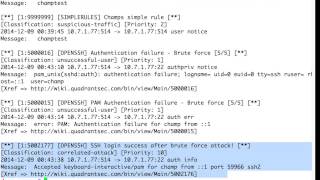
Champ Clark demos Sagan, a real-time log analysis engine that uses Snort-like rules to detect threats in syslog data. It processes logs from syslog-ng or rsyslog, correlates Bro alerts, and can trigger active responses through SnortSAM. The tool integrates reputation services, GeoIP, and unified2 output for Snort pipelines.
Chapters
Alright, time for another open MSM meeting. Server updates, or I should say group updates. So we had a server that we talked about that we were going to use for KVM. However, I just found out last night while standing it up that it does not have Intel VT chipset. So we're going to have to use something different. I think we're going to do Xen project. And then from there, I think we're going to link it to the Lunt group. Linux user group on campus and then have Ganeti to actually make a cluster out of this so we can share VMs across there. That would be really nice to play around with. And again, this is— we talked about the server before. This server will be used to actually stand up our NSM lab. So we're going to have a number of tools available. And hopefully we can maybe get some access to some network traffic on campus through a tap or something. Maybe we can get a research proposal or something to work with some interesting data. So that's something to look into for the future. Leading sections, we're gonna start with NSM in the news. So one thing is that Security Onion had a new package now that allows you to, allows ELSA to actually parse RADIUS, SNMP, and X.509 logs from Bro. So it'd be queryable via ELSA. Bro Walldog has announced a subscription service. So you can actually get professional support. Also, there was a decent article from Ars Technica on the wiper malware that was used to cause havoc at Sony. It was essentially a piece of malware that used existing functionality of Windows like WMI. And once it was on the network, it pretty much just attacked Windows only and it ended up creating a large share out of the entire drive, the disk drive of all those machines. And then data was exfiltrated, and then after that they would wipe the drives. So very nasty stuff. Look at that link for more info. There was a Linux virus called the Retaliation virus that someone did an analysis of. You can find it at the link. The link is, or the document is very long. It looks really interesting though. They go through it, you know, they disassemble it, they debug it, etc. You can take a look at that. It's probably a really good learning guide for reverse engineering. The Linux kernel in 3.18 announced that they have a BPF system call now. And then there was another thing in the news where Target had a bid that basically they wouldn't have responsibility for the breach. And basically a judge said no. That's not going to happen. So what that means from now is that it's possible for banks to sue the company for being negligent when it comes to their security of their systems. So that court case is going to still play out a little bit, but that's something that's fairly interesting. So that will provide— it could provide— well, it will provide an incentive in the future for businesses to further secure their things. But that's something interesting. Move on to paper period. We didn't have anything— well, we did, but I actually didn't have time to read it. I was going to read the paper that came out from the guys, the core pro developers on the SumStats framework. However, I again didn't have time to read that. So hopefully we'll be able to do it next meeting and cover that. Signature selection. So this is a section where we actually talk about an interesting signature. And there was a guy that wrote a gross script to do detection of the exploit kit. And I actually haven't had a chance to look through this all the way. I was trying to do it before the meeting. But essentially what we have here is, maybe Justin can help me with some of this stuff, is that there's a set of type string for a portable executable file for .docx and you have another set for the known exploits for the file types, PDF, ZIP, so that's where they would actually receive the exploit properly. And then what we do on a new file event when a new file is detected by Bro and that event handler is generated, then we actually test for if the MIME type field is there. And then what we do is we look for what is in this exploit file type set, the data structure. We look for those values inside that MIME type field. If they're there, then we go through the connection identifiers and then from here I don't know what current is. So what it's doing is it looks for either a PDF, a ZIP, or a Java applet first. It's actually in the wrong order. So the second if block at the bottom, all the way down, that's what it actually does first. So if you download a PDF or a Java applet or a ZIP, then it starts monitoring that host. And then if one of those hosts downloads an .exe, then it does the code above. Oh, okay. Which at that point is probably someone that just got exploited. Right, right. So they added to a data structure for monitored hosts. Yeah, like he said, if they're in that, the test for here, if it's in that list of monitored hosts, then we'll actually generate the notice for exploit kit suspicious download because they did download that. And then it looks like they special case the part that's cut off, I've done before. And I don't know why it's written like that, but they're checking to see if the user agent itself had downloaded an .exe with Java, and it changes the notice. Because any time Java downloads an .exe, you're pretty much compromised. Pretty much. All right, well, thanks for the help with that, Justin. Yeah, who posted that? Because I could fix that up a little bit. Oh yeah, sure. Sushi. It's in the notes, but yeah, sushi. Yeah, they're doing a little couple of weird things there that could be made a lot simpler. Cool. All right, now it's time for Daveve to talk about Sagan. Go ahead and give a little intro. So Daveve is, or Champ, is a CTO at Quadron Information Security based out of Jacksonville, Florida. He's the founder of an awesome freaking group called Telephreak. That used to have a conference. It's still up and running and it has a conference. You can dial in and talk to other hackers and freakers. I actually used this in late high school, early college. I remember seeing it on the Binary Revolution forums, so I dialed in a few times. It's a really cool service. There used to be lots of guys hanging out late at night chatting up about various things in tech. He also runs the Dathrow OpenVMS cluster, which is an open— I guess that's an open version of a VMS operating system. And you can actually go there and try it out. I believe they hand out shells for that. He's done various talks over the years at DEF CON and HOPE, and I remember seeing a notable one on X25 scanning, which was really cool. And he does a lot of stuff with word dialing. He wrote iWord. And he's been an author for the Asterisk book. And now he does a lot of stuff with log analysis. And he's here today to talk about his project, Sagan, which is a real-time log analysis tool. Now I'll end it. All right, now I'm going to pass it over to you, Beev. Okay, I made you a presenter. You should see a pop-up box. Okay, I can see your screen now. Is your audio on?
Can you hear? OK. Sorry about that, guys.
Real quick, I want to mention something real quick. So I created a— a Sagan Docker container for i-Lit. If anybody wants to try it out while Champ's talking, you can. So you can go to sshdemo@ilit1.jonschipp.com. And you can log in with the password demo. And then I will be a choice from the selection menu, then launch a container that you can actually play with it. It's number 6. So you can actually use that if you'd like to try it out. I'll go ahead and post that in the chat real quick. And then we'll be good.
OK.
I almost forgot to mention that. All right, man, it's all yours.
OK. As Jon was saying, hey, first off, thanks for letting me come here and talk a little about SAGIN. It's a project that I've been working on for quite a while. And I really like logs. I'm very strange that way, but I really enjoy them. I'm a little bit sick, by the way. Hopefully that won't inhibit me being able to talk about SAGIN. I like to talk about it any time I can. So again, I really— I really appreciate the opportunity. So one of the primary reasons— and can you guys see my screen okay, first off?
Yeah, the colors. Can you make the back— well, the colors are hard to see, like the purple.
Can you make the background white? I could probably do that. Here, give me just one second. Sorry about that, guys. No problem. I just got to remember how to do it. It's under View, Window, Window. Again, I apologize.
Yeah, that bit, Profiles. It's Profiles.
Profiles, thank you. That one?
Or— Dark background, I guess is how you do it. Is that regular iTerm? I have iTerm too.
I think it's the—
I mean, we can see it. If it's too much, we can dial it. It won't be a big issue.
No, I'm sorry. I should have sort of thought about that before. Here we go. This is where I know how to do it usually. Background, let's go white.
Better? Yeah, then we'll just need to— now we can't see the text, so you got to change the—
You can't see this text? Oh, yeah, yeah, duh. Thank you very much. All right.
No problem. And then can you increase the font size just a little bit?
Bigger font. How's that? Good to go?
That's good. Awesome. Yeah, excellent. Looks good.
All right, well sorry about that guys. So anyways, I started working on Sagan, as I said, several years ago. So Sagan is not meant to be a thing like Elsa or Splunk or anything like that. What we're trying to do is detect threats in logs in real time. That's one of the major motivators that I had for writing writing Sagan was that we saw people who had things like Splunk in-house, but what they were doing is detecting things like compromises a week, two weeks, six months after the fact because they were going back retroactively and looking through logs and not doing it usually very well. And by the way, if you guys have any questions as I come along, please feel free to ask at any time. Like I said, I got a little bit of a cough there. So what I was going to do here was to start off by pretty much just getting Sagan and just building it and just walking through the config really quick. So as you can probably tell, it's over on GitHub. That's our primary repo. Whenever people are trying out Sagan, I like them to usually try to get it from GitHub or get the most stable version off of our site. The reason is because it is a moving target at all times. And I'm going to download our rule sets. From within Sagan, it's your traditional configure, make, make install kind of thing for Linux, excuse me, and OpenBSD or FreeBSD or whatever you might be running. And basically before I go into configuring, let me explain a little bit what it does. So what Sagan does is he reads in logs As I said, he uses signatures, reputation databases, GeoIP information, all kinds of data to examine logs and see if it can identify threats out of them. Sagan is multi-threaded, meaning that if you have 8 CPUs or 8 cores, it will take advantage of all those cores, or as many as you want. We do that because many environments that we're in We're seeing anywhere up to 10,000 log lines a second or 10,000 events per second and to do anything in a single-threaded operation like that, it would just eat up 100% CPU. Plus we have a lot of rules in our environment because we're looking for a lot of different types of indicators. So we typically try to use all the resources that the machine has available to it. Hopefully that makes sense. What I'm going to do here I'm just going to go ahead and just configure it straight out of the box. There's only a couple of dependencies that— one of them is libpcre. That's the Perl regular expressions library because we can use regular expressions in SAGIN. And then the other one that I like to go ahead and get out there is libdnets or some distributions call it libdumpnet. And what it allows SAGIN to do is generate sudo packetsuit or unify2. I'll go into that a little bit deeper here in a few minutes. So what I'm going to do is go ahead and build Sagan, and we're actually going to just run Sagan out— everything out of this particular directory. So what I'm going to do is copy over our Sagan config file. Now what Sagan needs access to logs. The way we do that is through usually your system daemon. I tend to use syslog-ng a lot, but it works with rsyslog. This has to be a fairly modern syslog daemon. It can't be like the old traditional syslogd because modern syslog daemons have features in them that older logging type of platforms don't have. So basically all we're saying here is listen in on this incoming for. What I have is several Linux servers in my kind of demo environment here logging to this particular machine. So this is our source. We're going to listen on UDP 514. We have this thing out here. It's a FIFO which it will write the logs out to in this particular format. You'll see where it says source IP, facility, priority, level, tag, and all that fun stuff. And then, here, let me make sure this is— and then we have to, we tie everything together basically. So from right here, where we have Sagan Linux, this is coming in on a network. We want it to write to the FIFO. And then from our kernel, we're going to do our local stuff here, our local logs as well. We have this source, which is our local system logs. So we're gonna take our local logs and also write those to the FIFO. And then we're also gonna take kernel logs and write those to the FIFO as well. Now I've already kind of done this for us already. So what I'm gonna do here is just kind of show you what the Sagan FIFO kind of looks like. If we look here, we'll see there's lots of fun logs. These are active syslog messages coming in. So if we look, they stay in this kind of format. There's the source IP address, facilities and stuff like that, program that generated, and then the actual message. This is basically how Sagan is able to partially parse some of the logs. As I said, we're trying to do everything kind of in real time. But that's how the logs get into Sagan. That is, they come in through a facility like rsyslog or syslog-ng. With that specialized kind of template that we have. And on the SAGIN website, it goes completely into this template up here, which you actually can't really see very well in here. It's not wrapping properly. But what we're going to go ahead and do is configure SAGIN. Now SAGIN has a lot of options. One of them, /var/sagin— I think that was it. /var/sagin— Second FIFO. Okay, yes. So what we're going to do here, this is where the FIFO that gets fed from our syslog or syslog-ng from. That is, whenever we open this FIFO, we expect to see logs in here. Now, I know you guys are big Bro users. Do you use anything like Snort or Suricata or anything like that?
I've been a Snort user in the past, so I think I should be good.
Okay. The only reason I bring that up is because the rules that we create for Sagan are very similar to how Snort rules are structured, and they're done that way for a reason. And actually, some parts of this config file will look very much like a Snort config file. Just keep in mind it's Sagan. So this is where our master rule set is, and actually we're going to change that here. We'll grab this and we'll say— because we're going to run everything kind of locally. And then we'll leave our PID file. But then if we keep going down, there are some variables in here. We won't even bother going necessarily out and changing all these. But these kind of tell Sagan whenever it sees these particular variables, for instance like telnet_port, that means 23. It's configuration values. There are some instances where Sagan needs to know its own IP address. So in this particular case, I wonder what— oh, actually I already know what it is. We'll go ahead and give it that information. And there's a whole bunch of— there's tons of stuff in here. For instance, like max processor— how many threads do you want Sagan to utilize? This can affect things like how many CPUs are being used. It's multi-threaded, so for instance if you have some processors is what we call them. In Snort they call them preprocessors. We call them just processors in Sagan. That are very, not necessarily I/O intensive, but take a while. Luckily using threaded applications we can have 20 threads going out doing one thing and not holding up the whole system from analyzing logs. Excuse me, Vic. Sorry. Country code, we can build rules based off of country code information. So for instance, one thing that we like to do is we can monitor for instance Cisco Web VPN logs. So whenever we see a log message come in from a Cisco like AnyConnect or something like that, Sagan can say, okay, if you see somebody log in, that's fine, but based on their source IP address, that's what I'm really interested in because all my users might be in United States and Canada in this particular case as we have it here in the default demo. Configuration file. So I might be more interested if Mary suddenly logs in from Russia rather than the United States or Canada. So we can write rules basically that will allow us to detect those type of events. Windows domains, I won't go into this one right now, but you can also do things like for instance, some events you might be more interested being triggered at certain times of day or certain days of the week. For instance, I'm sorry for the constant coughing there. But let's just say, for example, you're a small organization and RDP sessions should be fairly not normal at 3:00 AM. It would be possible to write a rule that says on particular days monitor for different types of events that happen at different times. So we can build signatures based on that. This is an example of a processor. Basically all it does is keeps track of who has been logging to Sagan. That is, for instance, it keeps track of systems that are up and down. So for instance, if you have 100 systems and they are all sending you logs, and then suddenly you have 99 systems, you know that one of the systems went offline. And Sagan can generate an alert based on that information. Perfmon is for of course performance monitoring. Websense is— at Quadrant where I work, we're a partner with Websense, and we use their Threat Seeker network which is a— basically it's a reputation database to do IP lookups. So any log that comes into Sagan we can say regardless of whether it triggers on a signature or not to do a reputation lookup. And that leads us to find some interesting things. So for instance, if we're looking at Cisco ASA logs, for example, which will have things like session build, tear downs and build ups and stuff like that, we can test those and we've had instances where using reputation data we can identify machines that might be talking to botnet command and controls. Sorry. What we are doing, I'm not sure if you guys are familiar with CIF, the collective Intelligent Framework. It's kind of— OK, cool. Awesome. So one processor that I'm in the process of building out right now would work almost exactly like this one. As I said, this is a reputation database. Well, there's nothing to stop us from using SIF. So I'm in the process of building a processor that will use SIF. So every time an IP address goes through by a log analysis is identified, we can have it go up and look it up in SIF to see if it has any kind of bad reputations. With it. Blacklist is kind of the same thing, but these are flat files. So basically we can pull out of a flat file. We have customers for instance that are constantly getting updates from the FBI about possible threats, and they give them a big old list of IP addresses. We can stack those IP addresses into a file and Sagan can keep an eye on those. And same thing for search processor which Basically allows us to look for things like URLs and things of that nature. External system call, this allows you to write your own— so Sagan identifies something by a signature or whatnot. Whenever he identifies it, you can actually then have Sagan call an external program to do whatever you want. That external program can be written in any particular language that you desire— Python, Perl, C, whatever it might be. This gives us a little bit of flexibility if we want to do extra things whenever certain types of events are caught. Of course, it can email you, but this is the big one right here, Unified 2. The reason I say Unified 2 is kind of the big one. If you have used anything like Snort or Suricata, What happens is when Snort or some kind of detects an event on the wire, that is through a packet analysis, whenever he detects something bad, he writes the information out in a file called a unified2 file. And these are basically things like the source address, destination, things of that nature. Actually we can probably— I'll type utspew in here, var/log/c and we'll just find like an old u2 file. What it does is it stores this, this is a binary format. I'm using a program called utspew that comes with Snort to decode it, but it gives you a bunch of information based on it. And this is the quote packet. This is actually payload of the packet. And then, excuse me, this is the signature that generated it, the generator revision, the source, the destination, and all that fun stuff. So the reason that they do this is so that Snort does not have to deal with writing directly to an SQL database. What was happening is back in the day Snort used to actually be able to write directly to SQL databases, but if it's watching on the wire and it finds bad things happening and he has to stop packet analysis to go insert into a database, he's dropping packets. So what they end up doing is writing out to this thing called a unified2 file. Unified2 basically takes all the information and just writes it straight out to the disk. And then you have another program like Barnyard2 which will read it from the disk and then insert it into the database. So it kind of acts as a spooling mechanism. It acts as a spooling mechanism in that, so for instance let's say you take your database down for 15 minutes. Well Snort, or in this case Sagan, can still be writing to this unified2 file, queuing up events, and then as soon as the database comes back up, Barnyard can reconnect and start sending this data back over to the database. This is ultimately how whenever you want to get your events into something like Snorby or Squeal or— sorry— anything or even Base for example, old Base. This is ultimately how they get in there. Sagan mimics the configuration of Snort in this aspect. We can also do things like sniff logs off the wire, so if you have a span port or tap, we can actually snatch logs off the wire without having to reconfigure For instance, imagine you're in an environment and you say, I want to install Sagan, but we already have, I don't know, Splunk running. We already have all of our routers going to Splunk. And me telling my management that I want to take all of our routers and point them to the Sagan box, this is not going to fly. Well, if you can give Sagan a span port or tap, he can actually sniff those off the wire and inject them back into himself. So it kind of makes it so that you can use Sagan even in environments where Sagan is— you're unable to change configurations. SnortSAM allows Sagan to do some firewalling by himself. It's a great project called SnortSAM. It's been around for years and years. We can of course log to syslog. I'm going to kind of skip on down here until we get down to our actual kind of meat of it. These are Sagan normalization files. These actually can help Sagan tear apart messages. That is, for instance, find usernames, IP addresses, URLs, and things of that nature within a log message. It goes off of this project called liblognorm, which is written by Rayner, who also is the author of rsyslog, and it uses kind of a really cool unique way of doing it. Just to give you kind of an idea, I'm just going to do it here in this file. Imagine your log message is invalid login Bob from 10.1.1.1. So what LibLogNorm does, it uses a masking type of thing. So in order for me to extract things out of here, my mask might look like invalid login username. Which is a word, from, and then source IP IPv4. You see I'm creating a mask for that log entry. So the next time that Sagan sees this, he'll know exactly where to grab the username and the IP address from. So these can actually, these files basically inform Sagan how to strip apart log messages. We actually have quite a few tricks that we use for doing that. But that's one of the more fun ones. As I said, we can do things like GeoIP, so these are some of our GeoIP rules. Sagan, as you can see, comes with lots and lots and lots and lots of rules. But what I'm gonna do here, 'cause we wanna kinda keep it simple, and by default Sagan comes with all these rules enabled. You almost never want to have them all enabled. So what we're gonna do as our test which hopefully works, is you'll see that I already created this include rule path. Oops, I don't need that. I already set that as my rule path. Simple rules. Simple rules. Okay, with any luck, maybe we can get this to start without any big hassles. As you recall, I've already built Sagan out here. And in the source directory, I have a program called Sagan, which gives you a little bit of help about what you can do with it and whatnot. But what we're going to do is run Sagan. We're going to give it our new configuration file that we just built, home/champ/open/sagan.conf. And we're going to run it in the foreground. Let's see what happens here. Uh-oh. Already messed up. So, Sagan expects certain types of files just like Stork does. So what we're going to do, we're going to keep this easy, just copy our simple rules over to Sagan rules. And I'm going to modify this to the very top. Okay. Then I'll show you how a simple rule actually works here. Oops. All right, there we go. Now if we hit enter, it gives us some basic statistics about what Sagan is seeing. We see right here we have the number of events in a process, average events per second, signatures matched, alerts. And there's actually the more features that you turn on, the more statistics of course come out of it. But we just wanted to make sure it ran. We could also do debug syslog and watch the logs as they come in. So we're actually watching Sagan take the logs, decode them, things of that nature. But we don't really have Sagan doing a whole lot quite yet because what I wanted to do is show you how a basic Sagan log— whoops— what it looks like. Now remember we have the simple rules. This is a super, super, super simple rule. I'll explain this part shortly because it by default doesn't— it works the opposite of Snort. But this part right here is the human readable and why am I not word or line wrapping? Oh, I bet I know why. Hold on. Sorry guys, that was— okay. So if we look here, you'll see there's a content at the very end there. Or actually, I'll break it up a little bit. See right here? Let me get a part. What we're telling, just like Snort, we have a thing called content where we can use a simple string matching and say look for the word champ test in any logs. If you see a log with the word champ test, we are going to classify it as suspicious traffic and we want to give the signature of this ID number and this revision number. That's basically how it works. So if we do something like this maybe, we can take this really simple rule and see if we can't get it to work. And then what I'll do is I'll just step through some of the more complex uses because I might even, if I have time, show off one where we use things like Flowbit to remember previous logs and base decision on previous events to figure out if it's an event that we care about. It's like going back— anyways, I'll show you in a minute. Open— say again, not config. Yeah, I won't do it in debug. So I'm going to start up Sagan here. Oh, I actually named it for Dustin Weber. That's awesome. So what we have here with just a really basic event, we can say, "ahem test." If we look out here— actually, let's do this. Log, say, and alerts. Let's put it in the background. Sophie, say logger, ChAMP test. We hit it. You see it's generating this alarm right here. And that's like a super, super basic rule. However, that in and by itself is not always terribly useful. But I have to kind of show that just to give a basic idea of how it works because what we could do we can start expanding upon this. So what I'm going to do, let's look at, for instance, flowbit. So what we can do, as you can see, this rule, for instance, is a little bit more complex. What we're looking for here is you'll see where it has authentication failure. That's the content. But we're doing this thing where we actually set a thing called a flow bit. We actually set 2 flow bits here for 300 seconds. What we're saying is when this event happens— well, let me go back to it. When this event happens and we have, for instance, after it happens 5 times within 300 seconds, so within a 5-minute period, we want to set this flow bit here called brute force Unix SSH. Now basically what we're doing there is we're telling it to remember that this event happened so that later on we can do something like— I don't know where I'm gonna use that. Or is it is not set? So we can do something like this where we say if we use— and here we're starting to use regular expressions— if we see somebody authenticate and this flow bit is set— see how we have the— that is, it is set— then we want to generate event. Basically what it's saying is we just saw somebody brute forcing a username and password. They may have been trying for an hour. They may have been trying for days or whatnot, but what What happens is Sagan sets that flow bit and he says, okay, I'm going to remember this guy by his source IP address that he is constantly trying to log in. Then after a long time, let's say he actually manages to get in. What we do here, since we have this flow bit already set, we can actually generate this alert based on that information. So we should be able to give it kind of a try. So if we say Oops, I think it's— yeah, it's that one. So what I'm going to do is I'm just going to do it in Split PQ again. I can probably do it in Screen, but— Alright, so now let's see if this works. I'm gonna tail this file over here. So, champ@localhost. So we're gonna do, now you notice we don't really get any alerts because it hasn't gotten past the point where it's determined that this would be a brute force type of attack. No, actually I'm gonna have to do something too. Okay, you see now since we did it X number of times, he considers that a brute force type of attack. However, there's gonna be a problem here. What we're gonna do is cheat here for a second. That's right. Oops. So if we look at those last two events here, I'll get out of Split BT. There's our brute force and he's remembering that this IP address is doing the brute forcing. Now we have this actual event set for one day, so if he logs in 6 hours later and then says, okay, wait a minute, he actually from a previous address where he was doing a brute force attack and then suddenly he logs in, we can generate the event. That he logged in. This is the event that we give a shit about, pardon my French, that we care about. The reason is because these happen every single day. What we want to know is whenever something is successful. We can also take that, as you probably saw in the rule, I'm setting actually more than one flow bit. So I can say things like just remember that this guy has been attacking us so that we might want to use that data later on for different types of attacks. So for instance, sure I'm seeing it via SSH right now, But what if he somehow gets into an RDP session? Well, since we already have associated him with a different type of— or a previous attack, we've set up a little bit on that way, now suddenly he logs in with an RDP session, we can correlate those two together and say, well, wait a minute, that IP address was just attacking me, now suddenly he's logging in. If that makes hopefully some sense there. So we also do some stuff with— and as I said, I was noticing you guys like to use Bro a lot. So for instance, we have lots of alerts in here that do various add-ons to Bro that we use. So basically what we do here is we have directions at the very top that tell us— that basically give you just a rundown of how to get Bro logs over to your Sagan box. So in this particular case, we're looking for this particular content. Now what's interesting about this is because, as you remember, as I said with SIF and things of that nature, we were actually using Bro and we were getting, oh here it is, this one right here, this certificate errors. From a client. And Bro was complaining left and right that— oh wait, actually that's not the alert, I don't think. Well anyways, it was basically Bro was complaining that it was seeing lots of invalid SSL sessions. Actually no, that's probably it right there. Yep, that's it. So that in by itself was pretty cool. So in our console like Snorby or something like that, we pull it up and we have this message in our console that actually says, you know, I've gotten 10 invalid SSL certs within the last 30 seconds. And there it is, it's in Snorby, everything is good in the world. And that's what I mean by acting as glue with Hagen, because Bro doesn't natively log out to UniFi 2, but we can actually do that backend legwork for it. So we have this signature that triggers off and he writes out to UniFi 2 which ends up into Snorby for us to, for further analysis. But what ended up being cool about these type of events is Remember, we can also pass these, the source and destination IP addresses through things like SIF or our WebSense Threat Seeker. So we were not only getting these particular messages. Now keep in mind our Snort sensor was not triggering on anything. It didn't see, no signatures were tripping off, no preprocessors were tripping off at all. But we did have this PC out here and now he's making all these invalid SSL sessions. Over and over and over again. Sorry guys. What ended up happening though is that whenever we were doing those reputation lookups, every time it would do a reputation lookup based on those invalid certs, we would see that it was involved with some sort of botnet command and control. So while the Snort side, the signature side kind of failed on us, and the fact that no signatures were tripped, Bro handing us the information saying, hey, I got this PC over here that is making hundreds of invalid SSL connections. You might want to look into it. And then to back that up behind it, our reputation database saying, oh, and these connections that are related to these invalid certs appear to be known botnet command and control. We'd be able to say, well, we probably want to go ahead and get that machine off the network because while we haven't identified exactly what is malicious with it, odds are something is malicious with it. So we can do that with various pieces of software. So whenever we get into things like Flowbit and stuff like that. So imagine we have a situation where we're getting Snort information via log analysis and we're getting something from like a wireless— not wireless, a web application firewall, something like Imperva. So whenever Snort comes through and sends out a log and he says, hey, I just saw an SQL injection attack, and the Imperva comes back and says, I just stopped an SQL injection attack, we use Sagan as the glue to pull those two events together. Because while it's interesting that there was an SQL injection attack, ultimately what we want to know, was it successful or not? Let's say Snort saw an SQL injection an attack, he sends his logs to Sagan and Sagan never receives an Imperva log, then that's whenever we want to start looking into maybe something happened a little bit deeper than what we thought. Does that make sense so far? I know I'm kind of moving maybe a little bit fast. Are there any questions about it so far?
Yeah, so is there— you know how there's modifiers, like you can use content and and specify the stuff to match after. Since you normalize, can you do like, is there like, I want to only match the username in the log message? Anything like that without you having to use content?
I'm not quite sure how you mean. So content's just used as a thing to actually match on something.
Yeah, so since you normalize and you already know where the username is. Can you just do like user colon and the username in the rule or something like that?
You can. You can actually do this thing that's called meta-content, which might be kind of more up your alley. So if we look down here, meta-content. It might be. So what we could have here is /users/frank, mary, and bob. OK. Then within a rule, I wonder if— I'm not sure if— oh, wait, wait. Helps if you're in the right directory. I'm going to add contents. So let's take like— What I can do then is you see right here, I can say meta content username: Sagan:. And basically what that will do is remember that variable that I made that had Frank, Mary, and Bob? That will make this match either for user Frank, Mary, or Bob. Including the user part. Is that kind of what you mean?
Yeah, yeah. So that matches on the user field of the log message then?
Is that right? Correct.
Rather than the whole message?
Correct.
Yeah, that's exactly what I wanted.
OK. And we actually use that— metacontent can be really useful for a lot of things. Like this is part of a hash-to-hash detection thing that we were using— actually it was a document from the NSA on— what was it called? Something along the lines of detecting your adversary through log analysis or something like that. Ironically, we found that this idea of theirs doesn't really work all that great practically speaking. I mean it works from probably a historical standpoint, but anyways, meta-content can be used for a lot of different lot of different things. There's a ton of different, um, Sagan, um, oh, I know where I'll go. Wiki. Oops, sorry about that. I'm assuming you can still see my browser there? Yeah. Okay, so these are all the different options of things that you can do with Sagan. Down from country code. Remember how we were talking about country codes and stuff like that? So this gives you kind of a rule reference of all the different abilities or different things that you can do. Country code is kind of an interesting one. So we can say OpenSSH I'm sure has some country code. Home country. Maybe not. Oh, you know what it is? GVP. So we can do things like, for instance, here's our human-readable authentication success from outside home country. We want to look for the user— the term, in this case, accepted password. This is actually how we're going to normalize it, but what we're interested in here is we want to track the country by source, and it is not our home country. Do you remember whenever I was saying our home country in the previous thing? So in this case, in our example, this is United States and Canada. So if we start seeing, for instance, logins from Russia, then that might be kind of an issue, or VPN logins is kind of the idea from that. So we actually have a lot of different ways that we can do— okay, China. I meant China is what I meant to say. Or maybe just Canada. So we have a lot of different methods that we can go through and look for different identifiers within logs using things like everything from GeoIP to time of day to Flowbit is like the really, really big one for us because, as I said, it allows us to tie multiple events together. So for instance, somebody is hitting my OWA server and doing a brute force over there, and then suddenly they log in by VPN. Being able to tie those two events together is the idea. You guys have any questions?
Yo, can you hear me? Go ahead.
Yes. Yes, go ahead.
Oh, so I was going to ask, can you hear me?
Yes, yes.
OK. Yes, this is Dustin.
I was going to ask a question.
So one of the hard problems with log aggregation in general is kind of like the transport layer.
So I was curious, like if Sagan—
in the future, or even now actually, if you guys look to support message brokers like Kafka or Storm? Because I mean, the actual transformation that you guys do is awesome. It makes doing that stuff really easy. But the hard part is the actual collection. Do you guys do anything for that now, or have any plans in the future to do anything with that?
We haven't really talked about it. I mean, we kind of talked about it in-house. That'd be actually something— Probably be great to talk to you on a later date on. But as it stands right now, most of the information that we get— we do have some things like database connectors and stuff like that. So for instance, Oracle likes to store all of its audit logs in of course a database format because they're a database company. So where we can go through and pull stuff like that, or even doing things like Windows WMI and stuff like that. But most of the stuff that we get is through SNMP trap traditional syslog and things of that nature. So there's probably areas that we should start looking into.
Makes sense.
Thanks. Right. And what we also find too is most of— well, as you know, almost everything nowadays, especially down from your your network gear, the Linux boxes, almost all of that support some sort of network logging protocol directly out of the box, be it syslog or SNMP trap. It's just figuring out which one ends up being better for that. For things like Bro and software like that, we can use built-in functions of the native logger. So for instance, Bro doesn't have any means, as far as I know, you guys probably know better than I would, of sending logs to a remote server built in. So we can use things like syslog-ng and then say actually give me that file over there from Bro and pipe it over to me. And that's usually stuff that's usually pretty easy and pretty straightforward to do. It's just directing the administrators of the box to do it. Sorry. But I can certainly— as I said, there's a lot of different ways to go. And actually, I should point out Dustin is the author of Snorby on here, which is by far the best interface around there out in the open source side, and probably closed source side too. Do you guys have any other questions there? Yeah, I got one more.
So whenever you're running Sagan in the packet sniffing mode, can that work on syslog sent over TCP?
No, it's pretty much built for UDP. You'd be surprised, a lot of people still use UDP for they're back in. And obviously if they are doing something like TCP with SSL and stuff like that, obviously you can't use it. But to be quite honest, I haven't seen that many places that actually go that far. They usually try to keep it as simple as possible, so they end up using good old-fashioned traditional stateless UDP. Of course there's problems with that because you can drop events and all kinds of fun stuff, and there's pretty much no security to it whatsoever. But it was actually a quick means for us to just, in those situations where the logs were already being sent somewhere and we wanted to do a quick analysis of it without having to reconfigure anything in the network.
— if there's any incentive to add that in the future, if you think that could be done.
There could be, actually probably not from the Sagan standpoint. Here's the reason why. I know that I was looking at— oh, TCP Replay actually has some features in it that'll do things like take in, for instance, a UDP packet and then I want it modified and spit out on this interface over here. It kind of makes the plog ID in Sagan not as useful as it once was for us. It's called TCP Bridge, it's part of the TCP replay package and you might be able to do something with that, like a span port and a tap and fool Sagan into thinking that it's receiving logs from a system that it's actually not. I haven't actually played with that part, I've only played with it for doing UDP packets. From a standpoint— I'm sorry guys. I'm still a little bit sick there. But one thing that we constantly do need, and actually as Dustin was asking, is people have access to a lot of equipment that we don't necessarily have access to. So one thing that I really like to get are things like Sagan rules, basically rules that you might be using in your environment. So for instance, you guys were just talking about using Bro and some new Bro scripts that you've run upon. Well, that in turn generates different types of logging that we also can sometimes find interesting as well. Or you might have access to hardware or you might have Rookus wireless access points that we have never even seen anything from. So we really, really, from a contribution standpoint, we really like to see things like rules. We like code and documentation as well. Documentation is always a hard one. We like code as well for any new features or even sometimes just ideas for new features that you might want to see. We're constantly trying to— come out with different ideas based on log analysis for different types of rules or even different types of concepts to use to detect bad things happening in networks or even things like normalization rules. So if we look out here, oops, we have Under normalization, we have a lot of things out here, but obviously there's a lot of things that could be added to it from a normalization standpoint. And these help Sagan a lot in the methods that it can normalize stuff. I should point out we do have things like parse source. Oops, that was probably too much. Let me minimize this. And it's easy to get lazy with these sometimes, but we have these things like parse source, which basically you can tell the rule where in the log message to expect the source. So basically what it does is it goes through and tears apart the log message, and whenever it comes across an IP address, the first IP address that it comes across, he'll say, oh, that's probably the source IP address. And the reason is because when Sagan tries to normalize stuff, he actually puts it in the UniFi 2 as the source and destination. In this case, I was doing it back to localhost, of course. But my point being, whenever you go into, for instance, like your Snorby console and you pull it up and you say, show me all events that have a source of 10.7.1.77, in this particular case. What it allows you to do is not only get the packet level stuff, for instance from Snort or Suricata or whatever, but also pull your log events as well. So you have them all there under kind of one pane of glass, so to speak. So we're always looking for things like even normalization rules or what you might be doing, or just different types of equipment and gear. Sorry, guys. Are there any other questions on that?
Yeah. OK, so whenever you call another script, like you did earlier, you showed that you could do that.
Yes.
Can you pass variables to that script? Like say if I want to have a script that will run an iptables rule. Packet, can you pass the iptables or can you pass the source IP address to a script like that?
Yes. So you see this part that says parsable right here? Yeah. That actually tells how to pass it. So whenever he passes it to the program, he's going to pass all the information that he has by a standard in, and then you can just strip it out. I used to have I think an example script out here. I'm not sure. Extra. Oh, you know what? I bet you Cygwin GTK does it. Oh, maybe not. No, that one doesn't. So, the parsable gives it by a standard in things like source IP address colon then the IP address, destination IP address colon destination. And then the alert method, it will hand it by standard in just like this, like this type of format, which is not as good for parsing, but it will hand it to the script on individual lines. So one particular— all the same information as in classification, correlated attack, new line, Source IP address, new line, stuff like that. So actually, for instance, if we— let's see, an external— oh, it's an output processor. External. Sorry. So there, it will do like that. ID, message, classification, whether it needed to be dropped or not. But you mentioned something about firewalls. I would tell you not to do that. That way because— wrong file. As I said, we use a thing called SnortSAM. So what SnortSAM allows you to do, it allows Sagan to communicate with these SnortSAM stations, so to speak. And what it allows it to do is whenever Sagan sees something bad that's happened and a rule has been triggered that you feel deems enough to firewall it, he'll communicate to SnortSAM and automatically firewall it off. And what it does is it can write an ACL for anything from your Cisco ASA to Linux box to IPF to whatever type of— what's that? What's that? So what it allows you to do is it will automatically go out here and firewall these type of things. It's a much easier system to set up than doing it through, for instance, like shell scripting or trying to write a Perl routine that will go out and attempt to do, like OSSEC calls it, active response. It's a far better way to do it because then I can actually say, Sagan will say, by— you'll see in some of the rules there's this thing called fwSam which is the same way that Snort does it. But if we look here, fwSam, and we pick one, we're saying we want to call this, we want to firewall it by the source address for 1 day. And then whenever he can connect up to the SnortSam server which is in our Snort Sagan config, SnortSAM and send an ACL. And that SnortSAM server can then communicate with any number of your perimeter type of gear back in. To me, doing things like write a Perl routine that goes out and runs iptables, it just ends up being kind of ugly. And actually SnortSAM has been around for a very, very, very long time. We've actually written output plugins for SnortSAM to do some weird stuff with. BGP stuff, but it's just a much cleaner way. Also Snort SAM is smart. It will do things like you pass it an IP address. Let's say you normalize, you tell it to normalize the traffic, but you get your source and destination mixed up, and then Sagan goes out and he says, oh, I need to firewall this thing. This bad event just happened. For instance, call this off. And then things got swapped around. Whenever it communicates to SnortSAM, SnortSAM will say, wait a minute, this is my internal network. I'm not firewalling this. I'm not a fool. I'm not going to— and then pop back a warning to you saying, I'm not going to do that. It's just a much cleaner way, in my opinion. Unfortunately, I wish I had a console up for you, but like I said, I was mostly just showing from the configuration standpoint. And as you can see with things like content, we can do anything basically that Snort can do that we can do. So you have things like depth within, distance, offset, all that fun stuff. So you can tune down these rules quite a bit. So for instance, if we have a rule that's misfiring a lot, it's easy for us to go back and modify the rule to make it that much more accurate. Any other questions on that? And I said if you look here in our lists we support— oh, that's kind of like on Dustin's question. He was talking about different types of log aggregation. Cisco uses this really silly protocol on their older IDS systems called SDEE which we can support. We also can support stuff like— I've forgotten— different types of NetFlow, Cisco NetFlow data. So we can take in Cisco NetFlow and run it. That information we treat just as kind of like what we do with a log. And then we can take that and look for instances, for instance like malware. Basically, so if we take for instance here, let me minimize this. Based on the NetFlow data, if we see lots of this particular UDP port, connecting and it goes past a certain threshold, then we can be fairly certain that that's probably zero access related. So we use that in different ways to even go through and try to identify different types of malware within networks. And of course being able to look for different types of— oh, here goes another one for instance, our FlowBit. This is actually probably a better example just briefly. So imagine whenever a user reboots a machine, one of the first things it does is shuts down antivirus. So you get a Windows message that basically says antivirus is being stopped. That in by itself you can't really do a lot with. However, before that there should be a reboot message. So what we do is we can actually say, we have a rule in here that looks for reboots from a particular machine. This way if we see that for instance antivirus is being stopped, the stop control, and we have not set this flow bit for this particular source address, then we know that it's being stopped but the machine is not going into a reboot state. So now why is my antivirus being stopped is basically what it boils down to. We might want to take a look at that. Of course, we can also look for different types of services that have common misspellings, basically different types of things that might give indications of possible malware on different types of servers. That's pretty much it in a nutshell there, guys. Unless you guys have any other kind of questions. What's that?
Maybe we'll let you go rest now.
No, I always have a good time talking about Sagan. But thank you guys.
When we get our lab up, we're definitely going to have that running in there. Want to play with it for a while.
Well, whatever you do, as I said, from our standpoint whenever we look at Splunk, Elsa, stuff like that, we're trying to accomplish things slightly differently from that point. I actually like those tools quite a bit. We're just trying to do more detection. For instance, I always give the example whenever I do talks where I watched a guy sit down and he's going to find all the invalid logins in his network. And so he starts doing keyword searches and he's doing all these things. But did he happen to remember that Oracle databases, they use ORA code 1017 for invalid login? He probably doesn't know that. So all those ORA codes are going unmissed. That's the entire premise of Sagan is that it does know that so that whenever it sees that type of activity, it can let you know. It might not look interesting to you, but At least it'll be able to let you know what is actually happening.
Excellent.
All right, guys. Well, thank you very much.
Thanks for coming out, Cody. We really appreciate it.
Well, thank you.
All right, man. Take care.
All right. You too.
All right, that concludes this meeting. Christmas break is next week, I believe, for the students. So we will not have a meeting then. And we'll probably resume sometime in early January. And if you have anything you want to talk about at future meetings or give us workshop tutorials, cover your tools, et cetera, let us know and we'll have you on. Thank you guys, and see you later.
Thank you.
More from Jon


What No One Knows the Podcast / Vodcast featuring The Tampa Bay Wave and Jon Schipp

Meeting the Exposure Management Challenge: Key Use Cases for Success | @OfficialRapid7 #SolutionSpotlight

Spot Security Control Gaps and Non-Compliant Resources Across Your Attack Surface






