Jon Schipp shows how installing Wireshark on OS X 10.6 creates an access_bpf user group that lets regular users run tcpdump and Wireshark without sudo. The installer sets up BPF device nodes with read/write permissions for group members, so desktop users can capture network traffic without root access.
Chapters
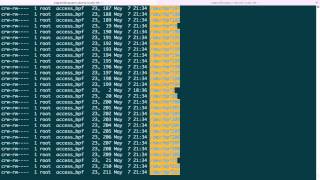
I want to make one more point regarding permissions on OS X specifically. So there's a difference when you actually have Wireshark installed. So let's go through that to demonstrate it. So I'm going to Google, grab Wireshark, find the download link. Stable. I want to choose OS X 10.6. It'll be done in just a moment. Go ahead and click on it. Take me over to this window. Open up the package. Continue. I agree. And go ahead and authenticate. So I can install the package. Okay, it's installing. And this is important because it actually changes the behavior of the way we saw tcpdump work. Okay, it's installed. Great. So let's come over here. So you saw that the— we actually use on OS X and BSD systems use the BPF devices, right, for permissions. Well, If you do the same thing after installation of Wireshark, you'll notice that for one, there's many more BPF devices, and two, there is a new group called access_bpf. So it's safe to say prior we did not have Wireshark installed, and after Wireshark made these changes because this is new. So what does this mean for us? Well, you can also see that with the new group the read/write bits are set for people in that group. And this is actually what allows Wireshark to run and sniff on an interface as a regular user. Might take a little bit to load, which is not important because this is not the Wireshark module but the tcpdump one. But if we actually use tcpdump now Yeah, so if the easy way, if you don't want to set the permissions on the BPF devices yourself, then you should install Wireshark so that you're ready to go. And this will apply for all the tools that will use those BPF devices. So anything else that you would install, the normal user, that is, if this is your workstation, your desktop user will actually be able to run these tools without the need for sudo or the need for becoming root. With su and other commands. Okay, thank you.