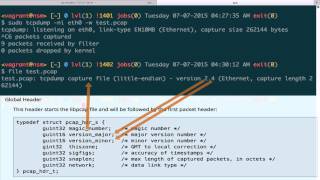
Jon Schipp breaks down the libpcap file format for storing network packets: a 24-byte global header followed by 16-byte per-packet headers with fields like magic number, version, and timestamps. He shows how to capture packets with tcpdump, inspect the file structure with hexdump, and extract specific sections by calculating byte offsets to isolate Ethernet and IP data.
Chapters
The libpcap file format, also known as the pcap file, is the most popular format for storing packets that were captured. So most tools support the pcap file format, including tcpdump, Wireshark, and a number of others. The pcap file format has been superseded by the pcap-ng file format. However, that has not received widespread adoption yet, so typically you'll find that most tools do not have support for pcap-ng but do support the pcap file format. The pcap file format is a very simple file format. It includes a number of fixed-length fields and is comprised of two different headers. Let's go down to the file format section. You can see that there is a global header. There is one global header per pcap file, and then there is a per-packet header. That is, this packet header exists for every single packet that is in the pcap file. So if there are 10 packets, will be 10 packet headers. The packet header contains metadata describing specific aspects of the packet. If we go down to the global header, we can see that this is the data structure used to store the data in the pcap format. So if you're a programmer and you want to either read in pcap files or you want to write them, you'd actually utilize this data structure right here for the global header. Below, we actually have the per-packet data structure, and these together make up the pcap file format. Now let's move over to a terminal window and begin a capture on eth0, and we're going to use the -w option with tspeedump to tell tspeedump to write a pcap file, and we're going to say write it to test.pcap. Go ahead and kill it now. You can see that I've captured 6 packets. Now what we're going to do is use the file tool from the standard Unix command line toolset to read the magic number on the pcap file and print the description after it does a lookup in its database. And you can see that file says it is a tcpdump capture file. The data is stored in the little-endian format, and it's version 2.4, which is the pcap file format version number. Next, we're actually going to use the -r option of tcpdump to read in this pcap file. And we're only going to print 2 packets so we don't take up too much of the screen. Now let's notice a few things. One is we have the link type printed right here. The link type en10mb refers to the Ethernet interface, and this is a specific link type that is described in the libpcap documentation. When tcpdump read this file, it was able to determine the type of network interface or the link type that the capture took place on, and that is because this value is stored in the pcap file. Also, we have the timestamp. This timestamp is actually located in the pcap file in the per-packet header. Every packet will have a timestamp with it. The timestamp is seconds.microseconds. And this timestamp was the time captured by the kernel on the host that was conducting the capture. So if your friend captured these packets on his computer and then sent you this test.pcap file and you read it in, this would be the time that your friend's computer stamped the packet as it entered the kernel and then wrote it out to the file. So this would not be your time, but it's something to be aware of. Next, we actually have the packet contents. You can see here, this looks like a high-level view. It just shows the source IP address, the source port, the destination IP address, and destination port. And a few other things. However, there's a lot more stored here in the pcap file. You just have to tell tcpdump how to extract it. For example, we can use the -x and -e option to print the Ethernet data as well as print the, the entire packet contents in ASCII and hex. If we do that, we actually can see the Ethernet stuff data right here, the MAC addresses, and then all the payload data for each packet because they're stored in the pcap file. In this segment, we'll try to have a little fun messing with the pcap file. So let's try to extract the magic number. So the pcap global header is 24 bytes in length. So we'll use hexdump to print the first 24 bytes, and we'll say test.pcap, and you can see here The magic number is actually 4 bytes, and we know that because it was a 32-bit field. And if you go over to our web browser here, magic number, the reading application will read either this value or this value. And we can see that based on ours, that is this. So we are reading the magic number out of it, D4C3 B2A1. Voilà, we found the magic number. Now let's try carving out other portions of the pcap file. I'm referring to an article I wrote a few years ago on header dissection. Look at the top here, we have hexdump using the -s option to skip 24 bytes in. That is skipping the global header because the size of the global header is 24 bytes. Once it reached the 24-byte offset, it uses the -n option to read in 16 bytes. And the 16 bytes that it reads in is the per packet header data. Then if we want to actually get the data for the first packet, you would have to add 24 for the global header plus 16 for the packet header, which is 40 bytes. At the 40th byte offset, you actually get the packet data for the first packet in there. And you can see here regarding the first packet, we actually have the Ethernet destination, Ethernet source, the eth_type, and the IP version decoded here. You can go all the way down the line to IP, then the UDP in this particular packet if you wanted to. But this should give you a key insight into this particular file format.