Jon Schipp covers how packet capture works: network packets flow through physical cables to your network interface, then the OS exposes them via raw sockets (AFPACKET on Linux, PFINET on BSD) so tools like tcpdump can grab them. Berkeley Packet Filters let the kernel filter packets before your application sees them, reducing overhead.
Chapters
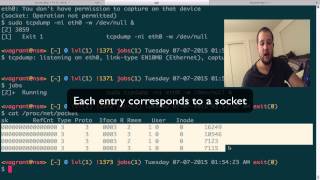
All right, let's talk about packet capture basics in this video. We're going to answer the question, what is packet capture? Well, packet capture is the retrieval of packets directly from your computer system's network facilities. So you may ask, what are the network facilities? Well, typically you can think of hardware as being the primary network facility. That is, that could be the physical medium from which the network data exchanges, such as the fiber optic cable or the Category Network Ethernet cable. These two types of mediums pass impulses, electrical impulses, to a network interface controller that resides on a network interface card. This network interface card is able to interpret these impulses and do something with them in a more logical way. It passes them to what we call in the software layer the operating system. The operating system was actually— provides the facilities that we're gonna speak of today in this video. The operating system provides the interface between the actual packet as they arrive physically to the representation in memory that is available to the packet capturing application. So what is the packet capturing application? Well, that is what we call a sniffer or a protocol analyzer. There's a few other terms that you'll, you'll come across, but they mostly refer to the same thing. And this is a tool that is able to utilize the operating system's networking facilities to process these packets as they come from the memory in the operating system. Things that packet capturing applications typically do is they write the packets to disk so that you have a historical archive of packets of network traffic. They also allow you to decode packets so that it's not merely represented in the binary form, but they're able to pull out further data and able to make it in— or I should say human readable toward the user of the application. Providing some sort of English language, for example, around the different fields of the packets based on their specification. Furthermore, we also have sockets. That interface I was talking about, the operating system provides that the packet cr— or capturing application uses is typically a socket, and the operating system provides a socket called a raw socket that is used to capture these packets in their low-level state. That is, this is able to gather the headers, or able to retrieve the headers of the packets all the way down to the link layer. So we consider this a special socket that gives direct access to packets. Also, a socket in this, in its programmatic definition, is a system call. Is a way to ask the operating system for resources from the hardware. And this type of system call, the socket, creates a communication endpoint from which these packets can be received and sent. On Linux and BSD systems, we use a specific type of socket, and these, based on the system, are either the af_packet socket, if we're referring to a GNU/Linux system, In a BSD system, or OS X included, which is a BSD derivative, we are talking about the PF_INET socket. But the big key thing here is we both pass to these sockets specific arguments, and the one that's common upon both of them for sniffing applications is SOCK_RAW, which gives us a low-level access to the particular packet. Also, there's these things called Berkeley Packet Filters, or BPFs. These are actions that you can take upon packets as they come in. So you apply a BPF filter, or a BPF to a socket, and this allows you to basically filter on certain key things or key aspects about a packet. And these— the filter allows you to decide whether to keep, based on the logic that you use and the language that you express with the filter, whether to keep the packet or to discard it. Thus, the packet never enters the actual application, the sniffing application. It gets thrown away in the kernel. So let's move, let's move along here to the terminal window I got open. Right now I have a GNU/Linux distribution running right here. It's Ubuntu. And we're gonna actually run a, our first packet capturing software. If you haven't done it before. We're gonna sniff on interface eth0, and I'm gonna write the packets to /dev/null, 'cause I don't wanna actually keep anything. And we need to have sudo here, 'cause it says you don't have permission. Boom. Now if you type jobs, you can see that it's running. We type procnet-packet. It's a file provided by the kernel, the Linux kernel in this case, that allows you to see what kind of pf packet or af packet sockets are listening. And programs like tcpdump and other packet sniffers such as Wireshark, Snort, etc. use these types of sockets. You can see here we have multiple applications listening, and if we go ahead and kill tcpdump and run it again, we now have one less. So right now at this point, there are 3 applications using, using a PF packet socket to access the lower level packets from the network facilities of the operating system. And what's commonly used here is DHCP client. So if we, if I bet, if we do pgrep -lf dhcp, we'll find, yep, 3 cases of DHCP running. These 3 lines in the procdep packet file refer to each of these DHCP processes. And the reason the DHCP client needs to be able to listen on these PF or AF packet sockets is because it requires the ability to utilize the lower-level frames that are received. Because typically in DHCP, you start off with the broadcast, and a broadcast is Layer 2 traffic. So we need to have access to the link layer. That is why DHCP clients utilize the AF packet sockets. Now we're going to turn over to FreeBSD. Got it open in another terminal window here. Okay, so I'm logged in as a normal user, and now what we're going to do, we're going to do the same thing. We're going to use tcpdump to sniff on an interface, and in this case I'm going to do this roughly the same commands I used earlier. Write to /dev/null, put it to the background, and we are now listening. I'm going to use netstat -B to print sockets that are using the BPF devices. As we'll explain in later videos, the BSD operating systems use these pseudo-BPF devices to access the raw packets. You can see in the output that there is a tcpdump process. This is the one that was running in the background right now. Now that we know that packet capturing is the process of receiving network packets from the operating system's facilities, we can then utilize this particular process to serve our ends. And this typically refers to the goal of this course, is which is to teach you more about networking for one, but specifically how to monitor your network in a manner that deals with security.