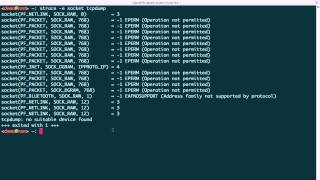
Jon Schipp explains why packet-sniffing tools like tcpdump need elevated privileges on Linux. He demonstrates the permission errors unprivileged users hit, uses strace to show the failed socket() calls, and walks through two fixes: running tcpdump with sudo or switching to root.
Chapters
In this video, I will discuss, uh, Linux socket permissions as they pertain to tcpdump or other network sniffers. This video is designed to give you a fundamental understanding of socket permissions because as a beginner you may encounter issues where you're trying to sniff on a live interface and it's not allowing you to. This explains how and why. We had to get started. Um, the way we're using socket here is we're referring to a system call. A system call is an interface that a program uses from userland to ask the operating system kernel for information or resources. The particular type of socket we're using creates a low-level packet interface from which Packets can be seen from the device driver level, or the, our layer 2. And this particular type of socket is called an AF PACKET socket. And we're also passing a SOCK RAW argument to these types of sockets. So these two attributes, the AF PACKET and SOCK RAW arguments passed to the socket system call, are what is commonly used in sniffing applications. Another thing to be aware of is that the sockets require— these types of sockets, the af-packet-sock-raw sockets, require a user to be a superuser to actually open the socket. So let's go ahead and move over to our demo system here. So you can see I'm running Ubuntu 14.04, and I am user ID of 1000, so I am a normal user, unprivileged. I'm going to do my first step by launching tcpdump. It says that there's no suitable device found. Well, we need to see if there are suitable network devices, so let's type ip link, and I see that there are 3. So let's try this again, say hey, I'm listening on the interface with the -i option, and then I want to use eth0. It says you don't have permission to capture. Okay, so this is a little bit more informative. Operation not permitted. So you can see it's a socket error. So what's the difference? Well, how come the other one said no suitable device found? Well, let's figure it out. So let's use what's called a system call tracer on Linux called strace. We'll pass an argument, argument of socket to say only print socket system calls. It's a filter. And run tcpdump. Go ahead and clear the screen here. Oh, there's a bunch of them. So what this did was it launched tcpdump with strace attached to it, and it, uh, before each entry of a system call and exit, it records the information from the system calls. So you can see here's the system calls and then the error messages that are returned on exit. And you can see there's a bunch of sockets created or tried to be created. They all failed though. Operation not permitted. Nothing was successful with the 0, mostly -1 EPERM issues. It even tried to do a Bluetooth socket here, and of course it's— we don't have that support for that device. So, um, essentially what it looks like is that tcpdump, when you just issue tcpdump like that, it tries to look for all the interfaces and bind to a socket for each one. And so we can try to double-check that with just specifying one interface, and you can actually see it just only uses— it only tried twice. And you can see it's for— since it's a network or Ethernet interface, it tries to use pfpacket and then sock_raw and then some buffer size. Um, so first let's go ahead and open up the manual page for socket. And you can see that it creates an endpoint for communication. Here's a bunch of types that we saw, and the one we're specifically looking at is afpacket. It's a low-level packet interface, and there's a reference to the man page just for that. Also, it says the socket has the indicated type. Here are the clearly defined types, and the one that we're looking for sniff— for sniffing, that's what we're concerned with, is soc_raw, which provides a raw network protocol access. So let's go ahead and try that other man page, packet 7, or man 7 packet, because it's in section 7. And you can see that packet sockets are used to receive or send raw packets at the device driver level. So this is what we actually would need to to actually take advantage of the benefits of tcpdump whenever we can actually see things like the Ethernet frame header. And that typically includes the source MAC address, the destination MAC address, any protocol field that specify what that Ethernet frame will be carrying above it, such as IPv6. And this, the argument that we saw, the sock_raw, is what actually allows you to get that link-level header information I just talked about with— in the case of Ethernet, which gives you the Ethernet header, it's the sockraw option passed for pfpacket. So it gives you a little bit. You can take a look at this man page for more if you're interested in it in further detail. So go back to my notes here. What we need to do now is show you how you can actually use the interface whenever it needs privileges it doesn't have. So you see sudo, right? So in Ubuntu we'll have sudo. So I'm just going to use sudo and, um, use tcpdump. And what actually happened was it bound to the first interface it could find, and this one was eth0. And I'm actually now sniffing traffic. I could also do -i to say, hey, I want to specify a specific interface. I can try eth0 that way as well, and you can see that it is working. Another way we can do is we become root, um, so we can do su And let's see what my root password is here. Now I'm root, and now I can also listen on the interface live. And of course it picks it up automatically. Alright, that concludes the requirements for sockets, for creating them and using them to sniff on an interface.