Tcpdump - Advanced 3 (Seq & Ack Numbers, Buffer Size)
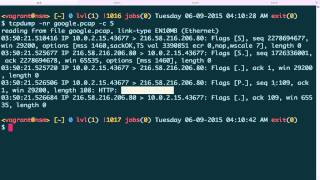
Jon Schipp shows how tcpdump displays TCP sequence and acknowledgment numbers in relative or absolute mode using the -S flag, then explains how libpcap's default 2 MB buffer overflows under heavy traffic. Increasing buffer size to 4 MB, 8 MB, or 12 MB reduces kernel-dropped packets.
Chapters
So in this video, we're going to learn about the two views for sequence numbers and acknowledgment numbers in TCP segments that tcpdump has available. So let's start off with a pcap file. I got one that's called google.pcap, which just contains a request to Google. And go ahead and print out the first 3 packets. So by default, tcpdump will use, uh, relative acknowledgment numbers, though only after the 3-way handshake, and up— not just, I guess, the completion of the 3-way handshake, but up until the last segment of the 3-way handshake, this one. This is where it starts to use the relative sequence numbers. For the SYN bit that's sent out in the TCP segment that says, hey, this host of 10.0.2.15 wants to synchronize with google.com on port 80, the google.com port 80 responds to my host and says, yes, I'll synchronize with you. And it does this by confirming that, and then as a way to say, or just say acknowledging that. And then in this, in this packet, an acknowledgement number appears right here. In addition to acknowledging my sync, my request for synchronization, the Google server then asks to synchronize its connection with me. And then I respond, I of 10.0.2.15 respond to Google in the last part of the 3-way handshake and say, I acknowledge, I acknowledge your request to synchronize with me. So we're both synchronized to each other now, which is 2 flows in each direction making a connection. And you may— let's take a look at that, just, just a break from this for a moment. Let's move to the TCP header. So I just Googled for TCP header and images and found one. Um, let's see if I can actually bring this up. Yeah, okay. So here we have, uh, the sequence number. It comes after the destination port and the acknowledgement number. These are both 4-byte fields. Another way to say this is they're both 32-bit fields. They can fit a pretty large number in there that has a value of over 1 billion. Now you may ask, what are these numbers for? Well, these are both— both numbers together are used to count, to keep track of bytes between each side. And this is used in TCP for things such as retransmission of lost packets. So going back to our example of, um, relative sequence numbers, we see that there are 2 absolute ones, so that is the full sequence number is printed there, and then there we begin the relative ones. So again, tcpdump only prints the relative numbers after the 3-way handshake is initiated and does it for the first 2 packets but not the 3rd. And then after the 3rd and after for that connection is printed in relative sequence numbers, otherwise it's absolute. So let's just go ahead and print the same thing using absolute sequence numbers. And to do that, we can use the -S option. And now you can see sequence number here here, and the acknowledgment numbers in there, all the full 32-bit number. So now let's, let's do this again and clear the screen here and print the first 5 packets. And, um, you can see that here again, they are all absolute. But now we're gonna do it in a way that prints them in the default mode of relative. Okay, so now you can see only the first 2, and the rest are relative. ACK 1, ACK 1 through 109, and our sequence number is 1 through 109, and ACK 109. Let's explain this a little bit. So in the TCP segment, when we're synchronizing with the host, we're setting our first sequence number. This is chosen by the operating system, specifically the network stack code, and it's called the ISN, or the initial sequence number. There's different algorithms for this, but this is just chosen. Then what that is, that is what it's actually used to sync with the other host that this connection is is working with. And then in our case is Google server. So whenever I receive, or when the— I'm sorry, when the Google server receives— this is Google right here— the request, he sets his sequence number, okay? And he also sets his acknowledgement number. And the reason why he has an acknowledgement number in this case is, again, as told before, referring to this, this is a way to acknowledge the sender's SYN. And he does that by saying, hey, I'm gonna increment this by 1. So the formula here is ISN, or initial sequence number, plus 1 for the beginning of the 3-way handshake. So you can see that the last 2 digits is 77, so increments it by 1, and he acknowledges to 78. That's a 1-byte acknowledgement from the packet. Next, what actually happens is the client that is me requesting, originating the request to google.com, then sets my ACK, acknowledgment number, one more than his sequence number. But here we turn to relative sequence numbers, and so it's not clear what that looks like. So we can actually just quickly move back to the absolute mode here again, and you can see here it is, there's the sequence number, and then my acknowledgment number in this case is again, one more, the ISN 1, than the sequence number of the packet prior. So let's go ahead and clear the screen and go back to the 5 count that are relative sequence numbers. And now you can see that me, that is the client, sent the GET request to google.com and asking for their website page, their web page. And the sequence number I have is in the relative form is 1 through 109. And if you think about that, that is actually 108 because we're starting at 1. And you can see that the length of that packet contains 108 bytes. Then the Google server responds, okay, and acknowledges the 108 bytes by saying ACK 109. So here again, we're pressing 1, we're saying, hey, one more byte, because that's what— that was the difference, because there's no data being carried in this particular segment. We're just saying 'Cause you can see length is 0, we're just acknowledging that, hey, we got yours, and that increments it by 1 if there's no actual data being sent. Okay, well, I hope that kind of clears some of the stuff up on TCP sequence numbers in tcpdump. Okay, thank you. tcpdump allows you to set the buffer size of libpcap in cases where there's more packets than your system can keep up with. And the buffer that happens to be there overflows, and the result is that tcpdump has to discard packets. It is not— they're not able to get processed. They are thrown away at the kernel. So this option of tcpdump that allows you to specify the buffer size is -b. You can also use --buffer-size, but we're gonna use -b for short. And it is measured in kilobytes, so 1024 bytes. And to, to pick a number, so by default it is set to— here I'm looking at the pcap-linux.c code for libpcap, and the default buffer size is 2 megabytes right here for the ring buffer. So if you need something more because you have a higher rate of traffic coming, you can specify it on here. So if you want to increase it to 4 megabytes, what we can do is we can see what the number would be. So 4096 divided by 1024, so I'm gonna specify 4096, and that is, is 4. So 4 megabytes. So what we're gonna do is we're gonna say, hey, tcpdump, I want to set a buffer of 4096 on, on this interface. And what I'm going to do is to let it print to the screen. Give it sudo. There's really not much going on this interface. Let's try the other one. Yep, coming in. And you can see that 15 packets were dropped by the kernel in this case. Let's try it again. Quick kill it. 40 packets were dropped by the kernel. So what happens if we increase this number? So let's do echo, um, 4096 times 2. We have 8192. 8192, and see what happens. 2, 3, 4, 5. You can see that 0 packets were dropped by the kernel. Let's try it again. 1, 2, 3, 4, 5. Only 1 packet dropped by the kernel, but you can tell that we've already, we're already doing much better than we were whenever we set the size to 4 megabytes. And then we can actually increase it. So again, let's do it, multiply it by 3. 12,288. 12,288. Okay. Oops, sorry. 1, 2, 3, 4, 5. 0 packets dropped by kernel. 1, 2, 3, 4, 5. 0 packets dropped by kernel. Excellent! So in this case we increased it large enough that we were not able to drop any packets for the time that we were capturing. Great! So that concludes this video.
More from Jon


What No One Knows the Podcast / Vodcast featuring The Tampa Bay Wave and Jon Schipp

Meeting the Exposure Management Challenge: Key Use Cases for Success | @OfficialRapid7 #SolutionSpotlight

Spot Security Control Gaps and Non-Compliant Resources Across Your Attack Surface






