Jon Schipp shows OpenBSD tcpdump features including privilege separation that reduces attack surface, passive OS fingerprinting via the pf.os database, and deep integration with the packet filter. He demonstrates logging firewall rules through pflog0 and using BPF filters to verify which packets match specific pf rules.
Chapters
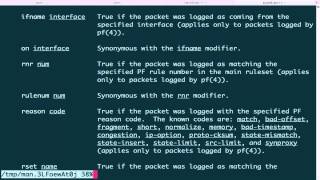
All right, let's talk about the features of tcpdump on the OpenBSD operating system, which is well known for its priority on security. So first off, we have a simple one, and that is tcpdump on OpenBSD uses privilege separation. So let's just go ahead and demonstrate that. So tcpdump -ni, and we'll listen on my em0 interface. I'll write to a test.pcap file and send it to the background. Now if we do pgrep for tcpdump, you'll see that there's two processes for this one I launched. One that is invoking the privilege separation mechanism that P.S., um, was able to show, and the other process. So the idea with privilege separation is it divides a program into parts. One with more privilege than the other, and that way we can limit the scope, the attack surface that is, of the particular program. And this is built right in. So tcpdump on OpenBSD supports the pf.os fingerprinting service. So this is one of the man pages of the pf.os service. You can see it is the formatted of the operating system fingerprints, and it is able to be used with the pf firewall and tcpdump. For IPv4 TCP connections, IPv4-based TCP connections. There's a number of different, uh, this is the rule format file. So basically, if you want to write your own formats, uh, or your own detections, then you look at this, you can look at this file. So I'm going on the very bottom here, show you what a rule actually looks like here. This one detects OpenBSD 3.3. So let's actually then go to the actual rules files. So for the Passive fingerprinting rules, it's /etc/pf.os. We'll scroll to the bottom. You can see there's a bunch of Windows stuff there, FreeBSD, even Sony PlayStation detection, Sega Dreamcast, etc. Now, how do I utilize these? Well, with tcpdump, you can actually just specify the -o option for— to enable the fingerprinting. So let's go ahead and do this, and then I'm going to sniff on my em0 interface. And I'm just gonna look for, uh, whoops, I'm gonna look for traffic that matches port 80. I'm gonna background it. And now I'm just gonna make a request to google.com. And if I scroll up here, there's a lot of data there. You can see that for this particular packet, it was able to detect the source OS, that is my machine, that it is running OpenBSD 4.9. So that's really cool. So one of those fingerprints match this particular packet on the SYN. Notice it doesn't match for every single one. So let's just verify that. You can see that I am running OpenBSD. However, I'm not running 4.9, I'm running 5.6. So it's not exactly 100% accurate, but that's, that's a decent— at least it knew what the operating system was. So now they just need rules to match my particular version. This next extension is my favorite, and that is an integration with OpenBSD's pfSense. Or packet filter program. So let's take a look at the manual page for tcpdump. I'm gonna go ahead and search for pf and kind of next through it. All right, here we go. This is where the new stuff starts. So here we can actually apply filters, BPF filters that is, on pf-related objects and items. So like, for example, you can filter on the rule number that matches for a particular packet as it passes through the packet filter. You can do it, you can specify the interface, you can match rule sets, particular actions. It's— this is really cool. So let's begin by testing this out. Go ahead and clear the screen. So right now, um, let me use pfctl to enable, uh, pf. You can see I already have it enabled, and we're going to go ahead and take a look at the rules I have available. So I'm going to use -sr to print the rules. So there's only 3 rules at this particular point in time. We want to use that rule num option. So first of all, let's go ahead and list the interfaces. And so you have a few different ones: lo, em0, pflog, and this other one, enc0. So let's go ahead and try to apply a rule num filter on em0. Say rule number 1. Oh, and you can see that the rule number, which is also called RNR, filter is not supported on this particular link type. Okay, that's what I expected. Just want to demonstrate that for you because to actually use these, these special filters, you need to take advantage of the pflog interface. This is a pseudo interface, it's not real, that is used to access the packets that match or that pass through the packet filter. So we can actually just sniff on this interface. Of course, we don't have anything now because to actually utilize this interface, while there is traffic coming to this machine, to actually utilize this interface, you have to use the pflog option to say, hey, log these packets, packets on certain rules. So what we gotta do next is we got to go to edit the pf.conf file. Go down the bottom, and I got two lines here. I go ahead and create it, and it says pass in. So any traffic coming in, log it all and then pass it to pflog0. And this one does the opposite. It passes it on out or it matches it on out to the logging device. So whenever the packets leave my machine. Okay, go ahead and do that. Now what we're gonna do is we're gonna actually apply this and go ahead and -v, make sure its syntax is okay. Oops, sudo. Okay, now let's go ahead and apply it. We'll get rid of the VN. Boom, it's applied. So now let's actually run -sr and see our new rules. Okay, you can see we have a few more now, and these are the new logging rules. So now if we run tcpdump on that pflog interface and I actually generate some packets— give me just a second here. Google.com. Voilà, I'm getting packets. Okay, go ahead and quit that out. Okay, and let's take a look again at the— I'll just go ahead and do it the long ways. And actually, there's no bash installed on OpenBSD, so I'm using the Korn shell. I'm not as good with it as I am with bash. Okay, so what we're gonna do is actually we want to print the rule numbers now, so we'll do vv -sr. So for example, double verbosity to the rules that are running. You can see that the beginning of the line actually prints a number now for each rule. So now what we can do is we want to match. So just so you know, for all the, all the, the pass-in stuff, it's matching TCP-based stuff. So here, pass all flags, all packets matching the flag SYN and SYN-ACK for TCP. So we're going to match that now and we're going to say which interface we want to match it on. So we're going to use tcpdump -ni pflog 0, and then we're going to say on em0 and rule_num equals 1. Background that. Now I'm going to run my wget again, go to google.com, and you can see, voilà, it's got the packets for that. So this is a way we can actually match packets that, that are passing the filter on various actions. And this is great because this is how you can test your filter, your firewall rules, etc., to see whether packets are being made or are actually hitting the firewall or performing a certain action on the firewall, etc. So it's a very way— good way to get really in-depth detail on what your packet filter is doing.