Jon Schipp breaks down ICMP packets using tcpdump, showing how to filter for ICMP traffic and read the 8-byte header. Echo requests have type 8, replies have type 0, and the ID and sequence fields match them together. Payload contents differ between Linux and Windows.
Chapters
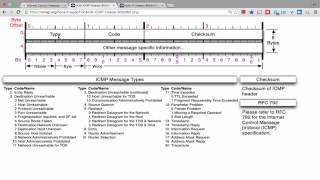
Let's get started with the protocol review of ICMP, which is also a simple protocol like UDP. So go to Wikipedia and take a look at the ICMP segment structure. And we also have an 8-byte ICMP header. And the data portion of the ICMP packet is variable length. So each header, as it says here, starts after the IPv4 header, of course, and is identified by the protocol number 1. And let's go back here. Of course, we can use our trusty, uh, on the Unix system, our /etc/protocols file, and you can see that 1 is the value to refer to ICMP in the IP header. It says all ICMP packets have an 8-byte header and a variable size data section. The first 4 bytes have a fixed size format while the last 4 bytes depend on the type code of the packet. So there's multiple different types and codes. Here's all the control messages here. Um, we're only going to talk about the most common one in this review, and that is, um, for ping. So here's another, actually a better looking image header for ICMP. So let's go to our VM, and I'm going to read in an icmp.pcap file, and we're going to search, we're going to use a filter to say filter for ICMP, but we could also do like before, proto, and then escape ICMP. That's another way to perform the same filter. Or we can do -ip if you only want to look for ICMP and IP packets. Or we can do -ip6 if we wanted to do that as well, to look for ICMP messages in IPv6. So different ways to do the filter. So let's go ahead and clear the screen, add the verbose option, and then print the data in hexadecimal and ASCII. And we do have quite a bit here. Oh, I forgot to do my filter one more time. Let's clear the screen. Now apply my filter. There we go. That's what we want right here, these two packets. So in the first one, we have a machine sending an ICMP echo request to another machine. And there is an ID field in ICMP and a few other things. So let's go ahead and go back to the header here. You can see that the first byte is called the type field and the second byte is the code field. For the echo request, we need to find the type, and if we follow the chart here— look at the list here— we can see that echo also known as echo request, is type 8, because I believe in the RFC it's just echo and not echo request. And then the actual type for the echo reply is 0. And then we also have a code field, but we can see here that there's no— like in this case of the 3 for destination unreachable, and it has a number of values underneath it. Well, as you can see, ICMP echo and echo reply are actually very simple and they don't need code fields, so they actually don't have a code value. It'll just be 0. So let's go ahead and find that inside the ICMP packet here. So remember again, the IP header starts in with this first byte here, and the 4 is the version number of the IP header. Version number of the IP protocol, I should say. So IP version 4. The next nibble in this 1 byte is the number of 32-bit words inside the IP header, and a 32-bit word is equivalent to 4 bytes. So you take 4 times 5, which is 20, and that tells us that there will be 20 total bytes in the IP header. And the 9th field here The 9th field offset is actually the 01 that we saw, or the 1 in the ICMP protocol, um, number. So this is what— if we would go in here and take a look at this 9th offset, so here's the 8th byte, then here's the 9th byte offset right here. The protocol field is value 1 if it is ICMP, and we saw that by looking at the /etc/protocols file. Then after that we have, um, the other data in the IP header. So if we go ahead and get rid of this first 16 bytes, here, um, is where— I guess we can do the printf thing here and go ahead and print the value of that. So 0x0010, you can see that's 16. So these are in 16s, so 16, 32 offset, etc., go on so on and so forth. So 16 bytes into it, these two fields— this would be this part right here would be— so 18 and 20. If you have 16 all the way across, bytes total, then we have 18 bytes and then we have 20 bytes. This part marks the IP header beginning and end. So this is the first byte right here of the actual ICMP header, and this is an ICMP echo request again. So the first byte is the 08 as we expected, which we saw um, here for the type. So that's the type field, and it's 8 for echo. Okay, so it's a value 8. And then the byte down here for the same field in, or in the same, this packet in the ICMP echo reply, it's actually set to 00. That's because, of course, the echo reply is type 0, and the fields after in both of these are 0. 'cause there's no code for these particular ones. Later on, actually, if you take a look, all ICMP packets have— or all ICMP echo and echo reply types have a payload of some characters: 0, 1, 2, 3, 4, 5, 6, and et cetera, et cetera. And so Linux actually has this specific set, and if you actually send an ICMP echo and reply, blah, blah, blah, on a Windows machine, it's actually something a little different. I think it's A, B, C, D. It's all the way through, and then some numbers, I believe. But it's different, this— each OS will have a different payload there. And the next field we want to concern ourselves with is the ID field. And this is just a way to match requests with responses. So for a request to match a response, the ID field needs to be the same value when it comes to ICMP echo and ICMP echo replies. If you go ahead and do a ping of, um, say this address here, let it go 3 times. Then we have the ICMP sequence number just set for the program instance. So here, that's where this is set. And we also have the TTL set, blah blah blah. But the time it took to respond was 0.2 seconds. So here, what's actually— what it actually shows is that ping sent out an ICMP echo 3 times. And then we know this because we see— well, first we can see this down at the bottom, 3 packets transmitted. But each one of these lines is actually a response, each one of these. So, and that's how it knows it gets the proper response. So if, if it received a response of an ICMP packet with, from the request, if it was set to ID 7055 and the response was 8088, for example, then you would not receive— you would not see the response back because that wouldn't match up. It's from a different— it was from a different, uh, host, possibly different packet, etc., a different process. So that's just how we actually match that stuff up with ICMP. To see the length of the ICMP packet, we can do what we always do, and that is take a look at the size of the IP packet, which includes the payload, which is in our case is ICMP. So IP says, hey, there's an 84-byte packet length. This, and this does exclude the Ethernet header or the link layer data or link layer protocol. And then you can see on the line with the ICMP tag here is that it's a length of 64 bytes. Well, if you subtract 84 from 64, you actually have 20 left, and that is the, the length of the IP header. That's one way we can see that, hey, if this number is subtracted from this number and it's 20, and, and this 5 is here, then that means that that's the remaining amount of bytes for the IP packet. So here we can see that the ICMP payload is actually, uh, 64 bytes in length.