Tcpdump - Protocol Review 4 (DNS) - Draft
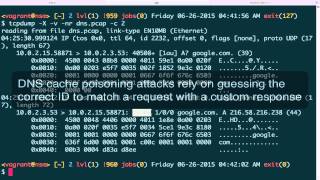
Jon Schipp captures DNS traffic with tcpdump and dig, breaking down request and response packets for google.com and yahoo.com. He shows how to spot the transaction ID, answer sections, and MX/NS records, then explains how counting NXDOMAIN responses can reveal malware or misconfigured servers.
Chapters
Let's begin talking about one of the most important protocols on the internet, and that is DNS, the Domain Name System. Go ahead and begin by opening up tcpdump, and we're gonna search for UDP name server. And this brings up two sections for requests and for responses. In this section, these two sections in this TCPdump manual page are basically discuss how TCPdump interprets the various fields of the DNS packets. So I highly recommend familiarizing yourself with these texts, and we'll cover some of them in this video. So next, what we're going to do is we're going to generate, we're going to record and generate some packets that match for DNS. Start off with my eth0 interface. I'm gonna write to a dns.pcap file, and I'm gonna say, hey, match only traffic that's UDP and port 53, which is normal DNS traffic. We're gonna background it. Now I'm gonna use a domain internet groper program called dig to make a request to google.com. Okay, and I'll do one more for yahoo.com. Got my results there. Bring, uh, Teasemon into the foreground, and we'll kill it. Now we have 4 packets here. And these are our DNS packets. Alright, let's begin by looking over the basic packet structure. Gonna read in the dns.pcap that we generated, and I'm just going to go ahead and print out one packet. Actually, let's do this with -x and -v for verbose. Okay, so here we go. So the verbosity line gives more information about the IP. Header. Then the, the rest of the data is printed in hex and ASCII because we specify -X. Let's begin looking at it. So in this case, DNS relies— is transported by the UDP protocol, the User Datagram Protocol, in almost all normal cases. It can be transferred by TCP, for example, in the case of very large UDP sizes in the response, or whenever there is a zone transfer. That's typically between two DNS servers, that's typically done over TCP. So to begin, we want to verify that we have IP, and this 4 indicates this is the IP headers version 4. Then the 5 is the internet header length, um, nibble, and this is the number of 32-bit words. That are present inside the IP header. So 32 bits is equivalent to 4 bytes, so we multiply that 4 by 5 and we have 20, and that tells us that, hey, there's 20 bytes available in this IP header, which is the minimum header size. Then after that, we have the UDP header, and we begin with the source port and the destination port, and this will be 53 in hex. Let's go ahead and verify that. See, that is 53, and that matches up to this port here that we're sending to. And then we have, um, the length field and then the checksum for the UDP header. After that is where we actually have the interesting DNS information, and that's what we're going to get into next. Okay, for DNS requests, let's go ahead and take a look at the packet structure again to look at a request here. Let's go print out two of them. Whoops. TCPdump. Okay, so here's the two packets for that are from the query for google.com. And first off, We have, after the IP header and UDP stuff, we have the rest of the— or we have the, the payload, which happens to be DNS in this case. And this first packet here is a DNS request for an A record, and that's indicated by the capital A for A record and the question mark, which indicates that it is a request. The first number here is the ID field in the DNS packet, and this field is used to associate a DNS request with a DNS reply. So this means that the actual reply to say that we actually got the appropriate, uh, the appropriate response back has to actually match that number. You can see that 40508 for the request and 40508 from the response. So next we have the— this particular field right here, which refers— this number refers to the number of certain record types that are tested for anomalies in the particular request. And this means there's gonna be one answer record and one additional record count in the packet. So finally we have the actual request, or the actual domain that we requested the IP address of. That's listed here, google.com. You can see the ASCII data out here, it's easy to see. And this number right here refers to the length of the DNS packet and is the length, uh, without the IP and UDP headers. If you want that information, you should take a look at this one. Next, we have the DNS response, and let's go down here again to this information. We talked about how the IP— or excuse me, the DNS ID had to match for this to be the appropriate response to this particular request. The first field here, this, this 3-field delineated by a forward slash, and these are different— these signify different types of data that are set inside the packet. And the first one is that there's one answer. The second one, which is a 0, says that there is no name server records in the response. The third one says there are no additional records in the response. And here it actually keeps track of what this, uh, the request had. So it stores that information in there. And then we actually get the A record again, what we saw up here. They had the question mark to indicate that was a response. Here we just see it by itself, which means that this— or indicate that this is the request. Here we see it by itself, which now indicates that it is a response. And its answer is this IP address. This is how we refer to google.com. Let's view it again without the extra information, and let's just get rid of that too so we get all 4 packets. You can see for us, look at the Yahoo one. This particular DNS ID is associated with this response. This packet is a little different. Everything else is the same except the response has 3, 3 A records in it, and each one of those records is an IP address. And that is because Yahoo is returning multiple IP addresses, and that's because it's probably distributed across different systems to keep up with the load. Okay, now let's look at a few more types of DNS packets. What we're going to do is we're going to generate some more data. So sudo— oops. Let's just do— just type it over. Um, eth0, and then we're going to generate or write into a file called dns.pcap again. UDP port 53, write it to the background, or run it in the background. And now we're going to use dig again, except we're going to query for other things. Let's query for an MX record, which is for the mail exchange servers. Let's query for an NS record to get the domain name servers for google.com. And then now let's go ahead and query for something madeup.com. I suspect that won't return anything. Okay, now we're going to bring it to the foreground, quit out. Let's begin reading this pcap file. Okay, got a bunch of information here. I'm gonna go make the screen a little smaller for formatting purposes. Okay, now what we've got going on is my request to google.com for an MX record. Before you saw the A, now we see the MX, which asks for Google's Mail Exchange Servers so that when they— when you send mail google.com, it knows where to find the mail server that handles that for mail for the domain. You can see there's quite a few of them right here. You have ASPMX.l.google.com, ALT 3 through 4, or 1 through 4, and then different weights for each one. Next we have the name server request for google.com down here. You can see that's set with the NS record acronym. And here we have again the division in the response that shows how many particular field entries are in the DNS packet. In the response, we have 4 here for the answer record, 4 here for the name server field, and 8 for the additional field. And then let's just go dive into that a little bit more. So let's go ahead and add the view here and then pipe it to less. And I'll go ahead and make the screen bigger again so I can scroll sideways now. Okay, so here, here it is for this particular packet matching 44 and 8. And here you can see, here's the— to save space, it doesn't do ns2.google.com, ns4.google.com. It just does it once and then don't domain section and then the prefix to— or the subdomains of that domain to save byte space inside the packet. And these are actually— these 4 are the same, the 4 answer records and the 4 NS— the name server records, because they are— our answer to— from this pack, from the request, is to have Since it requested for the name servers associated with google.com, the answer is that they are name servers because we asked for name servers, but also in the name servers field that is incremented to 2 because there are 4 name servers. In the additional field, this is completed with 8 different items which are not of importance right now. Let's go back to the other view. And we have the final one that I'm concerned about is this one to this strange domain I just made up. And again, it's a query for A record. The response is though this time NXDOMAIN, which stands for non-existent domain. And given that the response is non-existent, everything is set to 0. There is no record returned. And this is a very important one to know about because when you're working with DNS traffic A lot of the times, like malware generation algorithms for— or domain name generation algorithms that pieces of malware use commonly will make requests to domains that are no longer available, and the response will be NX domain. You could also identify misconfigured servers that are sending requests to places that they shouldn't be, like specific servers that actually don't have the answers for those requests. I've encountered this a couple times at different businesses. And network security monitoring allowed me to find that these things were happening. And in this particular— these particular cases, you can actually identify this stuff with tcpdump by beginning to count up how many NX domain records you can see. It's one way to start anyway in a particular trace file. If you see quite a bit of them, like maybe more than actual legitimate DNS traffic, there might be an indication that something is actually wrong with the network.
More from Jon


What No One Knows the Podcast / Vodcast featuring The Tampa Bay Wave and Jon Schipp

Meeting the Exposure Management Challenge: Key Use Cases for Success | @OfficialRapid7 #SolutionSpotlight

Spot Security Control Gaps and Non-Compliant Resources Across Your Attack Surface






