Tcpdump - Protocol Review 5 (TCP)
Jon Schipp walks through TCP internals using tcpdump: header fields like sequence numbers and flags, the 3-way handshake, TCP options including window scaling and timestamps, and the 4-way teardown. Packet-level examples show how to read hex output and track the phantom-byte concept in connections.
Chapters
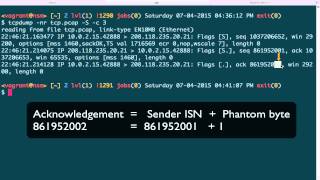
Okay, let's get started learning about TCP, the Transmission Control Protocol, a connection-oriented protocol that— where two sides synchronize with each other, and that is a— when those two sides synchronize, we are— that it's called a connection. And TCP works with connections. So here's an example of a TCP header. I will say that TCP is far more complicated than the other protocols we've discussed so far, and for that reason we will not spend a whole lot of time with it. We'll cover most of the stuff you need to know just for basic use, and if you'd like to learn more, I suggest you consult the documents, um, or maybe even the RFCs such as RFC 793 for specific details on the TCP flags. Okay, let's go ahead and get started here. All right, in the TCP header, the first two fields are the source port and the destination port. Each of these fields are 2 bytes in length. Now let's go ahead and move over to our terminal window where we can utilize tcpdump to view these. We use the -X option to print the ASCII and hex values, and then we're gonna say read in from a file. I got a pcap here called tcp.pcap. I'm going to just use one packet so we don't clutter up the screen too much. Okay, so if you recall from the IP video that in the first byte of the IP header, if the second digit is 5, that refers to the number of 32-bit words in there. So you multiply that by 4 and you have 20. So that means the IP header is going to be 20 bytes in length. So it goes ahead and begins here and ends here. So here's where the TCP header begins. And here we have the 8788, or A788, um, values for this particular 2 bytes. And if you use printf, this should match up with the source port, A788. And we have 4288. And if we look in the packet here, here's the IP address from the source and then that port number. And if you recall from the header that we just looked at, the second 2 bytes after are the destination port field. And if we do the same thing, that should be 21. And again, it matches the 21 here. So going back to the header, we have the next two fields, sequence number and acknowledgement number. These are 32-bit fields, that is 4 bytes each. So let's go ahead and take a look at these now. Go ahead and clear the screen and, uh, run it again. Okay, so now we can see at the top it says the sequence number here is this large number. Well, if the source port here is here, the destination port is here, then the sequence number, which again remember is 4 bytes, so this, these two sections, because each section here is where the space is, the divider, is 2, is 2 bytes, So we take this number now and use printf, and we do have that number, that large number right here. It does match with this one. The next 2 fields are— or the next 2, the next 4 bytes is the acknowledgment number. And this particular packet, since it's the first one, does not have— it has not acknowledged anything from a sender. Because it is the sender, the originator here in this case. So this is not— nothing is set there. Now let's go back to the TCP header. Here in the next field we have is the offset field. If you look down here, it says the number of 32-bit words in the TCP header multiplied by 4 to get the byte count. This is exactly the same as the IP header field, or excuse me, as the field in the IP header that we It's called the, um, international or the internet header length that we just talked about where the 5 was right here. The same, uh, method of doing the calculation for the size of the header. After that, in the next, uh, nibble, these two are— this is one byte right here. This is the first nibble, which is the offset, and the second nibble, which is the second half of the byte, is the reserved field. And here, this is just a field that's set for reserve, really doesn't have any function at this point. After, we have the TCP flags, and these are really important. And this is how TCP uses— or is able to signify whether certain pack— or certain TCP segments are intended to bring up a connection, tear it down, or pass certain types of data. So one way, according to at least Daniel Mesler, who created a nice mnemonic device to remember the important ones of these, beginning with U for urgent to F for finish. You can say unskilled attackers pester real security folk. It's a nice mnemonic device to actually remember these 6 bits of the TCP flags. Um, the C and E bit is not used so much, at least you won't have to worry about it so much in investigations. So I just remember, learn about that in the future. We won't cover it here. Next, we have a 2-byte window size field, and this field is actually used to determine from the receiver how many bytes of the buffer that can be filled with TCP bytes of data. So what happens is when a packet is sent out from— so a sender sends a packet, and in that packet it has a field with the— called the window size, where it has a number in it. And then the receiver of the packet sees that field, sees the number, and based on the number can determine how many bytes the sender is allowed to receive if the receiver wants to send them bytes. So it's a way to do flow control. It's a way to say, hey, don't send me more bytes than X. And this window size continues to change over the TCP connection based on how many bytes are sent, the buffer size, and etc. The next field we have is the checksum field. This field is used to do a checksum calculation over the TCP header. The field after, which is another 2-byte field, is the urgent pointer. This is only used if the U flag or the urgent flag is set, and it points to the urgent data in a TCP segment. Just a way to say, hey, these particular sets of bytes at this offset are urgent and they need to be passed up first to the application. And then after that, just like in the IP header— IP, the IP header has a number of optional things, so does TCP. So this is the TCP options field after the 20th byte. So anything after will suggest that the TCP header has variable length options that can be set. Okay, so let's go back to the tcpdump output here. And if we go up here at the top again, we can see that in this case the flags— tcpdump was able to parse and say the flags in this packet have the S, have S here. And what this means is the synchronize bit of the TCP flag, which we saw right here. So this, this particular guy, the S, and that is a way to say, hey, this packet wants to synchronize with our host 10.0.2.15 wants to synchronize with 208.118.235.20 on port 21. Then remember that window, um, size field that I talked about in TCP/IP? Well, this is it right here. The window size is set to 29,200, so that's the number of bytes that the receiver can send back if it should, should send data. Then we have a number of TCP options right here. The first is the maximum segment size. So I guess one thing to point out right here, um, because there's options and TCPMSL parse that out, we don't see that number 5 down here, which is where the options would go. Because remember, again, we have the source port, the destination port, the sequence number, the acknowledgment number, and then the first byte here, specifically the first nibble, this letter A, which is right here, this offset field, is not 5. And if you, in hex, A is 10, we just go ahead and verify that. So A, letter 10. So 10 times 4 in this particular case is 40. So we actually have a TCP header of 40 bytes. And this is common on the first, uh, for the host that is initiating the TCP connection, they'll have a number of options typically set. To help further create specific conditions for the connection here on out with the receiver. So in this case, the maximum segment size is the maximum amount of data that can be sent in the TCP, or let's say in the entire packet actually, because, well, because in this case the maximum segment size does not include the TCP or IP header. So we have 1,460 bytes that can be sent of data. If you add 20 for the TCP header, and it's a normal header length, then you'd have 1,480. And you add for the standard size of the IP header, then you would have 1,500 bytes right there. And which we know is the MTU, the maximum transmissionable unit, the standard MTU on Ethernet. So, coming up next is we have the selective acknowledgement scheme. This is a way to say, hey, we do accept selective acknowledgements. Then we have another field that is called the TS field, and basically this is used for timestamps, and this value is used to help aid in the case where sequence numbers can wrap, because if you have a large connection where you're, uh, TCP, where you're transferring, say, very, very large files, this is only, the sequence number is only a 32-bit number. So at some point where there's more than 4 billion odd bytes, that number can wrap. And in that particular case, you need a way to say, hey, if something wraps, we need another way to track it so that we're not referring to specific bytes that were sent a long time ago. And that's what this TS value field is for. Also, there's an ECR field used to do round trip time estimations. And then we have this no operation, or this NOP field, which, which is used to indicate additional padding so it's on a 4-byte boundary. And then we have the window scaling field, and this is a way, since the window field you saw earlier is actually 2 bytes long, so it's 16 bits, It doesn't give us a full amount. You can't— you're limited based on today, or you're limited on the amount of outstanding bytes that can be sent. Because today with these modern fast networks, you can send more than 2^16 because modern hosts can keep up with that. So the window scaling mechanism is a way to multiply. It's a multiplier for the window size so that you can do larger or send more bytes than to the 16, which is 65,536. So we can do more than that at a single point in the connection. So in this, this last field we have here, it's not indicated in the segment here, but this is what TCPdump is able to tell us, and that is there's a length of 0 for the TCP segment. And that means that it's carrying no data because this is just the synchronization This is the first TCP packet sent from the originator to the destination. It did not— all it wants to do is synchronize. It doesn't want to do anything else. It didn't carry any other data with it. Okay, let's learn about the important TCP 3-way handshake. This 3-way handshake is used to create what we call a TCP connection. A TCP connection is a synchronization between 2 logical endpoints to communicate data. Back and forth. So every TCP connection is preceded by a 3-way handshake. To begin, let's open up the tcp.pcap we were working with earlier. We're gonna go ahead and read that file in. What we're also going to do is pass the -S letter as an option, and this prints the absolute sequence numbers. And this is actually the legitimate numbers that are in the TCP segments. By default, tcpdump and other programs like Wireshark will use relative sequence numbers to make it easier to understand. Next, we'll say, hey, read in the first 3 packets. And these first 3 packets comprise of the TCP 3-way handshake. It is just 3 packets. Okay, to begin, we have this endpoint, or this host, sending data to this host, which happens to be the GNU's public FTP server. My machine sending port data to port 21, or it is trying to, I should say, it is not sending data, but it's actually trying to synchronize with port 21. And my machine opened up a logical port 42888 for this connection. Okay, so the important thing about this particular packet that is initiating the TCP handshake is that over here you see the TCP was able to say that, hey, there are TCP flags present, and the flags that we have present are the synchronization bit, the synchronization flag, and this is indicated by the capital S here, and this is used to synchronize one side of the connection with another. So he's essentially asked— this packet is essentially asking, hey, GNU's FTP public FTP server, would you like to synchronize with me? Then the GNU's FTP server responds, sends the TCP pack or TCP segment to my local 42,000— our port 42,888 that we saw up here. And what he does is he acknowledges with this period in the flags field the synchronization of that I, the originating host, sent. You can see there then also in this case the acknowledgement number is filled out. Okay, then you can see that the S field is also, or the S bit is also present. Remember, the S is the synchronization bit. So this flag is set in this packet also, and this is used to communicate back with the originator and say, hey, I want to sync with, synchronize with you. So we synchronize in both directions in this case. So the final part of the 3-way handshake is me, the host, sending one final TCP segment to the destination, the GNU's FTP server on port 21, acknowledging— again, the period is an acknowledgment— acknowledging the synchronization that GNU's FTP server wanted to indicate or to communicate with me. You can see that again, the, this server up here tried to use, set the synchronize synchronization bit when it sent a packet to me. So now at this point we are synchronized in both directions. And why this is important is this synchronization is used to create the sequence numbers that will follow. So up at the top in the beginning, the first packet again, you'll see that there's this sequence field the TCP was able to parse out. And this is a large number. It is a 32-bit field. And this is— this first one is called the ISN, or the initial sequence number. The operating system's network stack chooses a random number, or based on the particular algorithm— I think a lot of them are random— to begin as a point, a relative point to start data transactions and the tracking of bytes. So it chose this number, which is over a billion. Next the ISN from the— from GNU's server also generated a sequence number, and it's right here, and it's not quite as large. So you can see that it's right there. Each operating system will have their own way of identifying or creating a sequence number, and in this case, the acknowledgement number is right here. So here we have what is known as— okay, so the acknowledgment number is a way to acknowledge the number of bytes received by a sender, and this is a way to do flow control in TCP. So that if there wasn't— so if someone sent us 3 bytes and we acknowledge— if we didn't acknowledge those 3, then they were missing. So that way TCP can recover that by sending those those 3 bytes again. And once we acknowledge those 3 bytes, then we can move on to the next 4 or 5 or 6 bytes. During the TCP 3-way handshake, which is also called the TCP startup and also the teardown, there's a thing called the phantom byte. And that is used to say, hey, we acknowledge a segment, TCP segment, with the SYN bit set or the FIN bit set, because those do not carry, normally do not carry actual payload data, the length 0. So we have to have a way to say we receive those, and we do that by indicating or using a thing called a phantom byte, which is just a way to do the initial sequence number plus 1. It's not a real byte, but we use that to keep track of whether we received the SYN or a FIN. And that is, these particular pieces, these particular packets do not have any sort of data associated with them. And how do we know that? Well, for one, we can look at it, but tcpdump already tells you here at the end the TCP length of the data length is 0 for each one of these. See, length 0 for each of these packets, and this is not including the headers. This is the data portion, the payload. You'll notice that in this case we have this large number that ends in 52. In the response, the acknowledgement is 53, so we're actually acknowledging a byte. So, but the difference here is that we didn't actually— this, the sender didn't actually send any bytes. It says zero length, and this is what's referred to as the phantom byte. So in the case of TCP, when you're using the synchronization flag, there will be a phantom byte that is not real used to indicate that we received the SYN packet. Okay. And moving on, the destination here, in this case the GNU FTP server, sent— whenever he tries to synchronize with me, he sent a sequence number, his first one, and it ends in 01. Well, if we look back at the receiver of that, my host, I said, hey, you know, I used the ACK field to say, hey, I have an acknowledgment ready for you, and I acknowledged that with a 02. That is one more than the 01 number. And this is another way, this is another way to indicate that I received the synchronization bit, again because of the phantom byte. Also in the 3-way handshake, the first packets, the first 2 packets from the sender and the receiver will have the TCP options filled out. We talked a little bit about this earlier, and this is used to help create conditions for the connection from here on out. You can see that the max segment size was set here for the first packet, and then the also the res— the res— or the responder in this particular case, the GNU FTP server, and responding back says, oh, my maximum segment size is also this value. Now that we know that sequence numbers and acknowledgement numbers provide some sort of flow control in a TCP connection, we can then continue following these numbers and the data that's actually transmitted outside of the 3-way handshake into the data portions of the packet. So I'm gonna go ahead and clear the screen here, and then I'm going to set the count of packets to print to 8 instead of 3. Okay, so first off, there's a lot of stuff here. We actually already covered this. These 3 were the TCP 3-way handshake. So now we're moving along into the first data packet that's being sent, and it's this guy right here. It is from the GNU Public FTP server headed for my client, and here we have a different flag that's actually set, different TCP flag. You can see the capital letter P for push. This is a way to indicate to the receiver that the data should— that the data that the TCP segment is carrying should be passed immediately to the application that's listening on the logical port. So the server is sending us a greeting, it's saying FTP 220, which is an FTP status code, GNU FTP server ready. One thing about this output that you'll notice is that this particular packet is carrying a length of 27. And remember, when we're referring to the length regarding TCP packets, this does not include the TCP header, the IP header. This is the payload that's being carried. That is, this text here ends up being 27 bytes in length, where each character is a byte. Now, also notice that the sequence number field looks a little different. We have a sequence number, and we have a colon, and then another number. So first off, this is the real sequence number right here. The co— after the colon is something tcpdump adds to say, hey, The acknowledgement number that should come back for this is this value. So if we look here, the sequence number is this large number and the last two digits are 02. And if you add 27 here, if the length of bytes to the 2, you get 29. And in this case, it is ended— indicated by the 29 as the ending two numbers for the expected acknowledgement number to come back. Also in this packet we have the dot again indicating that there is an acknowledgment number present. This is the ACK field, and this is a value of this large number, and the last few digits are 53. This particular acknowledgment number is acknowledging the phantom byte in this TCP segment. That is the third packet that was sent, and that is the final TCP segment or sequence of the TCP 3-way handshake. And notice in this particular packet, and only the acknowledgment bit was set, and there wasn't any sequence number shown. Well, why is that? Well, if just the acknowledgment bit is set, TCPdump actually does not show you the sequence number, but there is one there. It is in the TCP header. It has to be. It's by, it's by the convention of the protocol. So the acknowledgement is for this, the last 3 digits of 53. You notice in the first packet that we sent, which is the originating host, my machine, started off with 52 as the initial sequence number. So given that the phantom bit adds 1 to it and this is a length of 0, then that would be acknowledging 53. So let's actually find out how we can see this sequence number that is in this packet but not visible via tcpdump. Okay, so now we need to figure out a way to actually print the more detailed contents of the packet. So let's go ahead and clear the screen here. What we're going to do is we're going to print the first 4, that's all we need to demonstrate this. Then we'll use the -X option to print the hex and ASCII values, uh, the contents of the packets. Okay, so this third packet right here is the one that does not have the sequence number shown because tcpdump, given that it has only the acknowledgement there, tcpdump doesn't really actually print that, but it's there because it's part of the protocol standard. So giving a standard, uh, 4— or a standard 20-byte IP header indicated by the second nibble of the first byte in the IP header, which is a 5, multiply that by 4, that says 20. So this is where the IP header ends. The TCP header begins right here. The first 2 bytes of the TCP header, if you recall, are the source port. The second 2 bytes are the destination port. And the sequence number is actually a 32-bit field that is 4 bytes. So we need to copy these two sections here, and we're gonna use printf to actually convert the values. And you can see, here it is, the sequence number that was carried with that packet. It ends in the 53. That's the one that the packet carried and that TCPdump did not show. So now going back to this one, you can see again that there's the acknowledgment number acknowledging this particular sequence number. Now let's go back to again to the packets that we were looking at prior. So now we are at a point where we pass this one and we're on to this next packet. And again, here there's no sequence number shown because it only— the ACK bit is set here, the acknowledgment. So we could do the same thing to get the the sequence number it needs to acknowledge, but we don't really need to do that 'cause now we know how to do it. So this is my host, 10.0.2.15, sending an acknowledgement for the packet prior, which is this one, the one where the server says, "Hey, I'm ready to negotiate FTP with you." Next up, we have my machine sending an FTP response back. You can see the data length is actually 16, so we're actually carrying data here. And it's an FTP command USER and then the argument of the user I want to log in to authenticate to the system as. And I said anonymous. So in this case, um, I'm acknowledging here the last sequence number of the— that the server sent to me. And you remember it was the dot 29 here. So I'm acknowledging that in this packet, but at the same time I'm sending this payload information of FTP to log in to say, hey, FTP server, I kind of want to log into you. And this sequence number is— ends with the 53 here, and it's expected given that there's 16 more bytes to end in the 69. So that'll be the next number that, that the— when that— when the server receives that packet or receives that TCP segment, its acknowledgment number will be that 69. And that actually occurs in the response right here. Again, we don't see that number because TCP hides it by default if it's only an ACK bit in there. And finally, in this case, the server responds back to my machine, and we have a PUSH bit here set, that's the payload data directly to the application. And in this case, we have a lot more bytes, there's 72 bytes in this case, and here we have a TCP status code of successfully authenticated, took my credentials, and it prints a banner after. And so it'll be across the next couple packets because the banner's long. This is, hey, due to US export regulations, all cryptographic software on this blah blah blah. So this negotiation of— or this flow control method of identifying each byte that's being sent from either side and then acknowledging them It repeats throughout the entire session. So now that we know how to follow it, you know, I recommend practicing going through a TCP session of your own and just kind of go through the numbers and see how they match up from the sender to the receiver as each extra byte is sent. In this final section of this video, we're talking about the TCP teardown sequence. So if you recall, bringing up or starting up the TCP connection involves a 3-way handshake, that is there are 3 TCP segments sent to comprise the handshake. Well, in teardown there's actually 4. It is a 4-way handshake to bring down the TCP connection, that is to successfully end it. This requires both sides to say, hey, we're not receiving, we're not accepting TCP data anymore. Go ahead and clear the screen here. What we're gonna do is we're gonna print all the packets in this to get the last 4, and since each packet's on the line by itself, by default we can use tail to say print the last 4 packets. Okay, so here they are. And here we start off with my machine bringing the connection to a close first. You can see that the TCP flag bit set here is the FIN bit, which stands for finish. Hey, I'm finishing from my side of things. Also, there is the acknowledgement bit set, which is acknowledging the prior— the data that's sent prior. Here the sequence number ends in the 28, in 28. So if we know, if we look down at this one, this one, the sequence number, or this acknowledgement number is 28 also, but this happens to be out of order. So if you actually look down at the third packet, given that there's a phantom byte on the FINs too, we should see an acknowledgement number of 29, and that's where this is. So these two are a little out of order. So the acknowledgement number here, this .29, is acknowledging that of this packet, which ends sequence number in 2.8 because of the phantom +1 byte. Then also here in this, in the second one, we have the server, the FTP server from GNU, sending a FIN bit also. And this sequence number ends in 79. And if you do the phantom byte plus 1, because again, these, all these packets are carrying a length of 0 payload bytes, then we need to add 1 to 79, which is 80. You can see the final packet's acknowledgment number is acknowledging that plus 1 byte, so it's acknowledging this particular packet here. And in this case, these two, these FIN ACKs, FIN ACKs sent, and these TCP segments are, are the final arbiter as far as, hey, this TCP connection is now over. Once these 4 are sent, the ports, the open ports are then relinquished, at least on the ephemeral side, and the particular process, whether it was forked or not, is probably gone, has gone away depending on how the programmatic design of the, the actual application on the server side.
More from Jon


What No One Knows the Podcast / Vodcast featuring The Tampa Bay Wave and Jon Schipp

Meeting the Exposure Management Challenge: Key Use Cases for Success | @OfficialRapid7 #SolutionSpotlight

Spot Security Control Gaps and Non-Compliant Resources Across Your Attack Surface






