Tcpdump - Protocol Review 6 (HTTP)
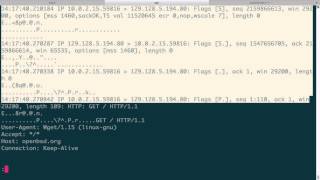
Jon Schipp uses tcpdump to break down HTTP GET and POST requests with live packet captures. He shows the TCP handshake, request headers like User-Agent and Host, server responses with status codes and chunked encoding, and how POST bodies are sent after headers.
Chapters
Today we'll be looking at HTTP, the Hypertext Transfer Protocol. It's a pretty simple protocol to understand. So in the two diagrams on this page, we have on the left-hand side a request example, and on the right-hand side we have an HTTP header response. So we'll start with the left-hand side. So whenever you go to a website, you're filling out an HTTP request behind the scenes. So whenever you go to Google or you go to your browser, you type google.com, what will happen is it will actually generate a line that— or a field that looks similar to this under the request line. First off, in the field, we'll have something called an HTTP method. This is to specify the type of request, and for most things that you're doing, like going to google.com, it'll actually be a GET method, capital G-E-T. Following that, there will be the resource location that you're requesting, and in this case would be the, the URL. In this case, it would be rockydog.com, also, or google.com if you want to refer to that example. Then after that, your client will specify an HTTP version number so that the server knows to associate— how to, how to interpret the packet based on the version. Next, we'll have the MIME header, and this has a bunch of options and arguments that can be set by the client, such as the user agent string and, and the type of content that can be sent, etc. So this is all filled out by your client, and you— like, many clients like to specify these by default. And based on these, the server can actually read this in and do some sort of a particular response based on these specific settings. For example, many websites for the user agent string, many websites will block things that are made up or fake user agent strings, things that appear, uh, unnormal. And they do that by parsing that field, reading it in from the web server, and then matching against a list. Say, oh well, this is not Mozilla, this is not Chromium, this is not IE. Etc., then we're not— we're going to deny. We're not going to send out the proper response. So this kind of thing is a way to do some ACL stuff, but more importantly, there's things that are, that are more critical to the protocol in here, which we'll get into later. Then on the response side, go to the right-hand diagram. The server response responds with a protocol version number as well, a response code, and then the English version of that response code. In this, in this case, a 200 code of 200 means okay, that is, I'm able to fulfill your request. The server also has a MIME type header with a bunch of content, and here we have the date, which is the date the response, or the time that the date and time, the date and time that the response was carried out. Has the content location of the response. It has the content length field, which is the total number of bytes specified to carry out the response. So if you have— you can see the packet numbers or the byte numbers really large here, 7,931. And you know, a typical Ethernet maximum transmissible unit, or MTU, is 1,500 bytes. So the content will need to be spread off across multiple packets. Then we have the content type here in this field. This says, hey, this is the kind of content I'm returning to the user. It's going to be text/html, which is common. It could also be a file if you're downloading a file. And then we have a few other fields that we'll defer for now. Let's head over to the— our Linux VM. What I'm going to do is I'm going to go ahead and set up a capture for traffic to a particular website, and we're going to look for port traffic on port 80. I'm going to write it to a file called http.pcap. I'm going to background it, and then I'm going to do is I'm going to make a request to openbsd.org. I'm gonna write the output to /dev/null because I don't need to save the file or anything or fill it up on the screen. Okay, so now we have it. So we'll pull up our pcap file and we'll kill it, and you can see that we captured 21— oops, 21 packets captured. Now we're gonna read it in, -nr, and we're gonna specify— well, actually, first let's just look at it without the data interpretation. Got a few different packets here, quite a few. You can see we start off with, remember, so HTTP relies on TCP, the Transmission Control Protocol, as its transport. So we have the first TCP segment sent out with the SYN bit set to synchronize with the web server. The web server sends a response back to synchronize with the client. The that is my machine, and then it acknowledges. So we have an acknowledgement number over here. That particular synchronous bit that I sent, or that synchronous segment. And then finally, my machine acknowledges they're synchronous, they're wanting to synchronize with me. And this right here, these first 3 packets complete the 3-way handshake. The next what happens is we send a TCP segment with the push bit set. To send the data directly to the application. And here in this case we have a GET request, is what you saw in the diagram. So whenever I went to openbsd.com, my client, in this case wget was my web browser, my client filled out this HTTP header part with a GET request for the root of openbsd.org and set the HTTP version number to 1.1 And then the rest of this is the response from the server. Says, hey, we found the document. And then it's going to actually do a redirect because of the way that worked with the 302 Found. And then we'll make another request. And then the server, again openbsd.org, finally says, oh, 200, okay, we actually— this is the resource that I am able— that you wanted, that I'm able to complete. So it's tagged as 200. And it's sent back across the next couple packets here as the body of that. Okay, so now let's do a more detailed view of this particular session. Okay, so we'll get right down to— skip the first 3 packets, which was the TCP handshake. We're gonna move right into the— whoops, handshake. We're gonna move right into the GET request. Alright, so my machine sent the GET for the root of openbsd.org. While it sent that, the actual MIME type fields are: User-Agent string wgit/1.15, which is the version of wgit I'm running. Accept— we can actually go look up what the Accept is. We can go to— so Wikipedia has this nice page on the list of HTTP headers. And then we can just actually search here. It says content types that are acceptable for the response, and you can see here it specifies text/plain. So if I would— if wget would specify that, it would only find text/plain as acceptable, thus the web server would have to respond with that particular type for the client to accept it. But in this case, you can see we have the /*, which means it accepts just about anything. Actually, it does accept anything. Then we have the host, and this is the hostname of the server, and this is openbsd.org. And then we have a connection parameter that tells that we can allow keeping the connection open, so we have a persistent connection. So moving along, the openbsd.org server responds with a 302 Found, and it says, hey, I'm running the server Apache. The— in the 302 Found, it has a redirect. It wants me to actually use this web page. This refers— this is what the location field is for. It says, hey client, you need to redirect to this because I don't have anything for you at this particular location. Then it sets up a keep alive for the persistent communication, which allows us to, instead of making multiple requests over different TCP sessions, we can keep the same TCP session and every single request will go over the same one. So we don't have to keep breaking down or keep completing the 3-way handshake for every new and then tear down the connection for every new HTTP request. So we actually reduce overhead on TCP. In this case, we have a timeout. This can be open for only 5 seconds. That is the persistent connect— persistent connection. And there can be a max of 30 particular HTTP requests inside this HTTP or this TCP session. Next, we have again the connection keep-alive, which says that both the— both the client and the server both agree that we can do this persistent connection, we can keep it open. Then we have a type of transfer encoding. We take a look over here, it's just a way of encoding the data. Encoding, the form of encoding used to safely transfer the entity to the user, and there's a number of different ones. And we have chunked. If you want to look more information, take a look at chunked. It's a data transfer mechanism, mechanism in version 1.1 of the TCP protocol. Which data is sent in a series of chunks. Fairly simple. So we'll go back. Next, we'll look at the content type. In this case, this is what the HTTP server is sending us. It is sending us a text/html, uh, file or document. Um, that's the data it's sending back, and with a particular character set of this standard, this ISO standard. If we go down here, we actually have the HTML right there, and we can see, and what it says is, "This document has moved as expected," and this is where the 302 Found is printed in the HTML. And then of course, wget's smart and can follow redirects, and then it actually goes to the URL that they want us to go to right here. So once that happens, we actually go to that URL now. And we send another GET request for— with the particular www.openbsd.org. And that's the difference here, is that the reason it wanted us to go— it goes to www because it doesn't accept connections for our original one. If you go back up to the top here, was just host openbsd.org. So they want us to use www.openbsd.org. As the host. Okay, so go back up a little bit. Kind of got ahead of myself. And again, with this particular request, we set out the same information— the keepalive, the user agent string, etc. So now moving along, we get the final okay, the 200 OK or status code response. And this is where we're actually getting the results, the web page of openbsd.org. And the date again is the date and time of the response when the web— when the web server fulfilled it. This is the server that the web server is using. It's using Apache. We have the last modified date, which is used for caching. We can make sure that the date— we can check at a certain interval based on this date prior to using the cache to see if it's stale or not. We also have an ETag, which refers to a particular version of the website or the resource. And we have Accept-Ranges. So we can actually— what this means is that the web server will actually accept byte ranges. So you can, you can actually just pull out what you need. If you only want the first 400 to 800 bytes, it's possible to do that because you can limit it, you can set it by bytes from the client. Also, we have the Content-Length, and again, this is the Response length in bytes, so 4928, which will span over probably about 4 packets because the MTU size is 1500. Again, we got the keepalive stuff because we're going to be keeping state over this or keeping it on one TCP connection. And then we have the text/html content-type, which means that this website openbsd.org— or excuse me, in this case www.openbsd.org— is returning HTML data. And we take a look, this is actually all the data it's returning here. And then we have another packet which, again, with the push bit sent, it has the next part of the web page. Source, resources, etc. Let's just go ahead and open that up just so you can see how it compares. Open BSD.org. And, um, take a look. Where's resources? Resources. That might be it. And so, yeah, so we have here getting OpenBSD. This is matching this. Getting source here. This is matching getting source, getting OpenBSD resources again, matching this and all the links underneath. So this is how— this is what's returning in our browser is interpreting this markup language. And printing out the results of it. And again, we have another packet. You can see the length for all these are 1448 bytes. And this last one, the— all the ones prior are 1448, but the last one is 876, and that'll fulfill the, the length of the content length specified in the server header response. Alright, and that concludes the GET request method of HTTP. Alright, now let's talk about the HTTP POST method. So the POST request is a special type of request where the data that you want to send is actually in the body, and that's the big difference between it and between the POST method and the GET method, where the GET is in the request line. So we're going to go to give an example of this by using the httpbin.org API web front that's publicly available, and you can use it to play around with this API and learn how to do requests for GET and POST, etc., from the command line or within your applications. So first, let's go ahead and start sniffing again on an interface. And I'm gonna do write out to http_post.pcap, and what I'm gonna do is say, like, once again TCP port 80, put in the background. Okay, and then I'm gonna build out a URL or a request with curl. We're gonna say --request POST --data --ascii, and we can actually send ASCII data. We're gonna say testing. 123, and then we're gonna give the URL of httpbin.org/post. Go! And now it is sending the data, and we actually got a response in with JSON data, and you can see that it returned back the thing that I sent, which is testing. So let's go ahead and pull up the pcap file, or tcpdump, kill it out, or quit it, and then now we're gonna open up that pcap file, http_post.pcap, pipe it to less. Okay, so again, the first 3 packets are the 3-way handshake. We have the SYN bit, the SYN-ACK, and the final ACK. Then we send the first HTTP request, and that is with a TCP segment with the push bit set to send the data directly to the application once the server receives it. And here you can see that the request line that has POST instead of GET this time, and then the /post— this is the request line in this case— and then the version header just like before. However, what's different is after we pass the MIME header information, we actually go down to the bottom. We can actually see our testing123. This is the big difference here. That's all, all what happens with the POST request is that, or the POST method, is that we specify where the data that we want to send is put in the body, and the web server knows how to find it and interpret it there. Then after that, we get the response back from here, the web server. You can say again, it's, it verifies the version, and then it says 200 OK. So a status code of 200, which means OK, and we're sending the results. And this is the output right here that we actually saw on our screen where it verified— or it actually just echoed back what we sent, and that is testing 123. And then we tear down the connection. That is all. There are many other types of HTTP methods including the ones listed here. We have, besides GET and POST, we have HEAD, we have PUT, DELETE, CONNECT, OPTIONS, etc. We cannot cover these, all of these, in the protocol review. However, we covered the two most popular ones, but in later videos, the ones that specifically deal with network security monitoring investigations, we'll cover a few others that pertain to that. I hope this has enabled you to have a better understanding of the HTTP header, and thank you.
More from Jon


What No One Knows the Podcast / Vodcast featuring The Tampa Bay Wave and Jon Schipp

Meeting the Exposure Management Challenge: Key Use Cases for Success | @OfficialRapid7 #SolutionSpotlight

Spot Security Control Gaps and Non-Compliant Resources Across Your Attack Surface






