Jon Schipp and Speaker B explain how to safely capture network traffic with tcpdump. Use the -Z option to drop root privileges after opening the socket, restrict pcap file permissions to the owner only, and verify integrity with sha‑sum hashing to detect tampering.
Chapters
I want to make a quick point here that when you're doing these long-running captures, there is a security concern because there have been vulnerabilities in tspeedup in the past. To help mitigate those, what we can do is we can specify the -Z option. On our long-running captures and then specify a user. And what this will do is tcpdump will become root to open up the socket that it needs to listen on for the raw packets, but then what it will do is drop its privileges down to this user. You can see that it says privileges dropped to vagrant, and my username is vagrant, I am the vagrant user. So if you're going to do these long-running pcaps I highly recommend that you use the -z option so you can drop privileges and thus mitigate some potential vulnerabilities in long-run captures.
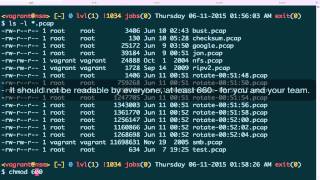
Often pcap files will contain sensitive or confidential information. This is because they typically are traffic captured from a web server that could be customer/user-facing. They could have— if they're a capture of general network traffic, they could have employee or customer data that was in transit, thus then those packets are in those pcap files. So we need to make sure that we, we lock down and keep them safe. One way to do this is to set permissions for your pcap files. So make them readable only by the analyst. And one way to do that, you can see that for all these pcap files here, we have read/write permissions for the owner of the file, that is the person that created it, and we have read permissions for any group that is a group owner of the file and read permissions for everybody else. What, what we should typically do is we should make it readable only by me. So if there's no one else in that group, then you can do— then you can set the group to read and write by you. But I'm going to go ahead and just be standard across the board and say only the owner of the file. And let's just do this for John.pcap. I don't need to do this because it was created by root because we used sudo when we launched that pcap or that tcpdump instance to capture that. And then we'll say jon.pcap and you can see now it is only owned by root and it is readable and writable by root. So using my tcpdump and I'm the vagrant user, I can try attempt to read this file and permission is denied because I'm not able to read that file in the file system. So it's important to do these sorts of things to keep your files safe. And also never expose your— or have your TCP or your pcap files available like on a public-facing web server or an NFS mount, SMB share, etc. Keep them so they're only accessible by the analysts that need them. Another important security concern when dealing with artifacts and evidence which is what pcap files contain, is the integrity of the files. That is making sure that the content is the way— is represented in the way that it was when it was originally created. So to do that, we can use a thing called hashing algorithms. So let's go ahead and take a look at a pcap file I have here, john.pcap, only readable and writable by root. And remember, I am a normal user here as Vagrant. So what I want to do is I want to take this file and generate a cryptographic hash of the file that represents this file at its current state. If a single bit of this file is changed, then the cryptographic hash, hash, when running through this file through another cryptographic hashing algorithm, will be generated and it will be different than the one prior to the change. So any change in the file will result in a different cryptographic hash. So we're going to use ssh-sum. Many systems also have md5sum, but md5 is a more broken cryptographic hashing algorithm because there's a lot of known collisions against it. Let's just use sha-sum, and then we're going to specify the file. And I'm going to need sudo because I have— it's ownable by root and readable and writable by root. So put it in there. You can see that generated a hash for me. And from here on, whenever I have this pcap file, I would keep the hash in a separate file on a separate system. And then whenever I need to use this pcap and to do investigations with it, which I'll— I may have to present in court cases or to detect a specific attack or trend in the traffic, I want to make sure I can guarantee this is the same pcap file that I— that when it was originally captured. It's the same one that I actually want to work with. So this is a way to notice if there's been tampering involved. So just record this pcap— I'm sorry, record this hash and associate it with the pcap file. And then next time you go to use it, you can verify just by running the hashing algorithm again and see that it matches what's on your piece of paper, what's in your notes, etc.