AI Assistant for Your Painting Business
A painting business owner walks through building a ChatGPT assistant that answers customer questions and schedules estimates. The setup uses Zapier to connect your website to Facebook Messenger, Instagram, or Slack, costs about $0.25 per response, and takes 1-3 minutes to reply. The presenter also offers a done-for-you service at $4,997 per year.
Chapters
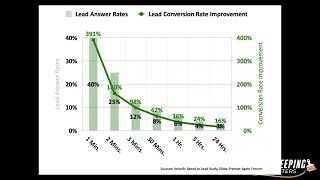
All right, so cool. We'll go ahead and get started building an AI assistant for your painting business. All right, so this is the agenda. Um, as you might have heard in the news recently, everyone's trying to take this ChatGPT technology and put it to work in their business. So you got like, uh, Google and Microsoft, you know, battling this out. Then we're going to go into, okay, how can we actually take that ChatGPT technology and put it to work in our own business for like a painting business and have it actually doing things like an employee would? I'm going to do a live demo of an AI assistant with company knowledge and memory like I discussed. We're going to go through some use cases of how— trying to give you some ideas on how you could use an AI assistant in your business. And then I'm going to go through the overview of the process of how the AI assistant should operate, like what are the kind of the big picture, um, ways that it should operate, and then a step-by-step way to actually build this using Zapier. So, and then at the end I'm going to cover how we can help, but the whole goal for this is basically you can watch this webinar and then go build a Zap and, and do what I'm talking about, which is build an AI that knows your business and has a memory of your business and put it, you know, put it somewhere like Slack, Facebook Messenger, Instagram business page, whatever the case is, whatever you want. All right. So first, the AI arms race I had mentioned. So we have, you know, Google and Google Search and Microsoft Bing. They're trying to put this chat technology into their business so that they can actually use that technology. And if— real quick admin note here— if you can mute your microphone, if you haven't done so already, just so it doesn't interrupt, go ahead and hit yourself mute, please. Please, I appreciate it. All right, cool. So, um, so how can we actually take that ChatGPT technology and put it to work in our own painting business? So basically the, the recipe here is that it needs a company knowledge base. It needs information, um, you know, that your customers would ask, like frequently asked questions, the services you provide, the hours of operation, all those that knowledge base, right? It needs to know that stuff in order for it to be useful, you know, for you to actually do things for you. It also needs to have some sort of memory, you know, if it's talking to, to your leads or to your team or to your customers, whatever. It needs to have a memory and a context for what, what's happening. It can't, you know, in order for it to be more useful. And then it also has to be aligned with what your goals are. What do you want it to do in specific contexts? Like, do you want it to try to book an estimate for you? Do you want it to just be helpful to your team to find resources about your internal processes? You have to give it those goals. So obviously ChatGPT can't out of the box, you can't go to ChatGPT and ask it what kind of services does my painting business provide? Because it won't know, doesn't know anything about your specific painting business. It doesn't know, you know, any kind of conversation history with your leads or your customers. It doesn't know your goals and, you know, what you want an AI assistant to do. So out of the box, ChatGPT can't do that. And also, ChatGPT is living on a web page, right? It's not— you can't put it on your Instagram, at least out of the box. There is a way to do it, but How do we actually get it to live somewhere where we want it to be, like on your Facebook business page or Instagram business page or your website, etc.? So these are the things that we need to consider when building this. All right. So we'll jump into a live demo so you can kind of see, you know, what are we actually talking about here? So I'm going to hop out of this, pull up some Slack. I'm going to say, "Can you paint brick?" So what I'm doing here is, this is a Slack channel that I started for purposes of this demo, and I basically built an AI assistant that lives on the Slack channel, and so I can ask it questions, and it has the memory and the knowledge base of a painting business called Alliance Painting out of Texas. Thanks, Ryan, for letting me use your painting business for this demonstration. So basically I asked a question here, hi, can you paint brick? So the context of this question would be something like maybe you have this AI living on your Facebook Messenger on your business page, right? Or maybe it's on your Instagram business page, whatever the case is. So you have a lead that comes to your, your Instagram or your Facebook, and it just, you know, wants to ask you a question and says, hey, can you paint brick? And then so now it comes up with this answer. Hi Daniel, thank you for reaching out to us. Yes, Alliance Painting does offer brick painting services. Cleaning the brick surface with soap and water is an important step, blah blah blah. If you're wanting a whitewash effect, you'll need to apply this thing. Alliance Painting DFW also provides lifetime warranty, all interior services, etc., etc. And then it offers— says we do financing. For more information, you can visit the website, fill out the form. Would you like me to send you the link for— to schedule a free estimate? So it provides— it answers the question. It knows that it works for Alliance Painting, basically. It's using a bunch of information that it— gets off of Alliance's website, which is alliancepaintingdfw.com, and, you know, is trying to be helpful and provide some in-depth knowledge about their question, and then says, hey, you know, here are the next steps, you know, would you like me to schedule an estimate, right? Yes, I would like an estimate. So I'll ask that. It takes about a minute to 2 minutes to respond, so I give it these little prompts to give me an idea of where it is in its question-answering process. So as we wait for that answer to come through, it takes about a minute. Basically, its knowledge base is literally just the text from Alliance Painting's website. Um, so there's an easy way where you can basically scrape your website of all the text. Um, and the reason why we're using the website here is because, um, especially if you're talking to leads, like, you probably already have all the information you want your lead to know about your business, right? Because your website has like, what services do I provide? Um, you know, what's about us, learn more about us, what areas do we serve. Frequently asked questions. Your website probably has all the things that a lead or even a customer might ask, so that's why we're using the website. It's kind of like the knowledge base. All right, uh, let's— all right, so it answers the question. You can visit the website and fill out the form, um, and it tells you what you have to enter in there. Once you've completed, just submit it. So yeah, gives an answer on how to go to the website or whatever. All right. So that's just a demo of what's possible. Obviously, this can be— it could be better. You know, always looking to improve, but it's pretty, pretty good at this point. So let's go through some like case use cases, and I've kind of mentioned some of these things, but let's just kind of go through them a little bit. So use case number 1, what I mentioned, nurture leads and get them to book an estimate on Facebook Messenger, Google My Business, Instagram, your website widget, or SMS text. And so, um, you can— I put the, the demo that we just did was on Slack, but obviously, you know, um, You can put it on different places. You can put it on Instagram business page, your Facebook page, whatever. Right now, actually, Bookkeeping for Painters on Instagram has something like this on Instagram. So it definitely can be done. Use case number 2 is like a rapid response to leads. So like if you get, if you have any lead sources that you get, HomeAdvisor, Pathfinder, Painter's Choice website form. If you get like a lead coming in, inbound, you could set up an automation to basically reach out to them, text them, like, hey, you can schedule an estimate here. Do you have any questions? And if they have questions, then you would push that, those questions to the AI bot, that the AI assistant to field questions that's using knowledge base from your website, for example. So that, that's another use case you can do. And for these two use cases, it's pretty valuable considering almost 80% of business goes to the first responder. So, you know, as you probably already know, if you're not getting back to leads very quickly, those leads go bad very fast. And this is a chart just to illustrate that, that point. From Velocify Speed to Lead study. So basically after 2 minutes, the value of a lead is just almost nothing. So having automation paired with AI, very impactful to get those leads turning, turn them into prospects. All right, use case number 3 is having an internal, using the AI assistant as like an internal team resource on Slack to answer questions or wherever. And so maybe you have, you instead of loading up your, well, you could load up your website information just for basic information, but maybe also you load up your, all your company processes, like, like just all your companies, if you have all your processes typed out or even in a video, you could change the video into text, but basically get all your processes in text and then load it up into the AI and then it will be able to basically field questions on that, on that data. So that's another use case. All right. So I'm going to pause real quick. I just want to make sure I'm not— does anybody have any questions before we go forward? I kind of just to make sure that I'm not like speaking too far above anybody's head. Is what I'm saying making sense so far? If there's any questions. All right. I don't see any questions, so we'll continue. So what's the— all right, I got one.
Here.
So the lag time, basically, which we could look at what we just did here, but basically it's, it's within a minute right now, but it's about a minute. It depends on how much, how much knowledge base basically has to go through. And also Zapier, like Zapier, you know, sometimes it's slow and stuff like that, but I've seen it about a minute to 3 minutes is kind of generally how long it takes to respond, which is not too bad. So the general process for your AI assistant, first, the first thing, and we're going to go through these, this in detail, how to set this up in Zapier, but you know, this is kind of the big picture idea before we get into details. So first of all, the trigger for this process, no matter what your use case is that you're thinking about, is an inbound message from a human from a particular platform. So, you know, a lead asks a question on Facebook business page, a lead asks a question on the Instagram business page. An employee asks a question on a Slack channel, whatever it is, that's the trigger for the process. And then step 1 for this automation is for the automation to gather historical information on the human to provide context to the inbound message. So basically, you want your AI assistant to have some sort of context to, to what was being what's being said. You know, if I ask about brick painting and then, and then I, you know, and then I say, can I have an estimate? It knows that you asked about brick painting previously. And so it can follow the thread of the conversation is basically what you want it to do is, is know the context of what's being said. Step 2, you want it to— the automation to evaluate if the knowledge base can be used to answer the question. That was asked, if there was a question. So we need to have the automation look through a knowledge base, like we said, which is like the website or something like that. And then step 3, prompt the AI with the goal to answer the human with the gathered memory in the knowledge base. So you have to give it kind of a goal, the AI a goal in the context of the memory and then the knowledge base. So lead answers, asks a question on a Facebook business page. It has the memory and the knowledge, but what is its goal? What is it trying to do? Is it trying to help the person? Is it trying to get them to schedule an estimate? What is the goal for the AI so it knows how to respond in the best way for you? So that's the third step. And then fourth step is to send the response to the the platform in question here, whether it be Facebook Messenger or whatever. All right, so let's go through the steps to build your AI assistant. So this is now taking the kind of the strategy that we just went through. Now, how do we actually employ this on a tactical level right now? Okay, so step 1 is to turn your website into text. So there's a, there's a cool tool that you can go to. I'm gonna put this in the chat. It's free, and you basically can use this tool to convert your, your website into text. So you literally just go to your website, and you'll have to do this page by page, but it's easier than copying and pasting everything into a Word document or something because it has a bunch of pictures and stuff. It's kind of hard to copy and paste everything. So easier to just grab the URL here at the top and then paste it here into the field and say convert to text. And it's going to spit out a bunch of text for the website. So we're going to copy this text. And then put it into a Google Doc or whatever. Just put it somewhere so you have your website information in one place. And so we'll have to do this page by page, or at least for anything you want the AI to know. Frequently asked questions might be a good one. So take the frequently asked questions page URL and paste that into the into the convert to text here and then copy the text and then paste it into our Google Doc. And so the end state here is just go to page by page, pull the information that you want your AI assistant to know and put it in a Google Doc. All right. So that's, that's step 1, which is pretty easy. Maybe take you 5 minutes. All right, the next step here is to create a Google spreadsheet. So this is going to be our memory. So basically, you just create a Google spreadsheet. Oh, and the columns I have here are user, datetime, conversation, and AI bot notes or AI notes, whatever. There's just 4 columns. And so that's all you need to create, just a spreadsheet, call it conversations or something, and then have those 3 columns. That's, that's, you can get more complicated than this, but this is the straightforward way and it will accomplish what we already talked about. So That's all you got to do for this step. Pretty easy. Should take you 30 seconds. Step number 3 is go to the OpenAI API. So this link here, I'll go ahead and paste it in the— paste it in the chat here. Okay, so that is the OpenAI for OpenAI. And so OpenAI is the, the folks that came up with ChatGPT. So when you go to the, this website, you'll see something like this or a login page. Just create, create a free account. You can sign up for free. Once you sign up for free, you'll just need to create some, you'll need to create an API key. The API is basically the way that we're going to interact with the technology, the ChatGPT technology, and get it to do the things we want it to do for our painting business. It does cost money, one thing I should say, but it's pretty cheap. We're talking like— let me just go to the pricing page real quick. I've been testing it and using it heavily, and I've maybe spent $20 over the last couple of months. It's not that much money considering all the things that it can do. For language models, you'll be like 2 cents per 1,000 tokens, which And the typical request that we'll do is going to be about 4,000 tokens. So it's going to be like 8 cents per. So your Zap might cost to run a full Zap that we're going to build. It might cost, you know, 25 cents or something like that per Zap run, you know, to, to basically enter your lead or whatever you want to do. So relatively inexpensive. Once you've signed up, and you'll need to add a credit card because, you know, you have to pay, you'll be able to view your API keys. And your API keys are basically your secret tokens to add to Zapier. And so you'll need to copy this once we get to the step in Zapier to paste your secret key into your your Zapier. All right, so that is that step. It's pretty straightforward. We covered that. All right, so step 4 is build— building the Zap in Zapier. So I've obviously already built this, but we're going to walk through it together. The first step here at the top is the trigger. So this is, this is the inbound message from a human, right? This is, um, so right now it's set up for Slack, but like I said, it could be other things, um, whatever you want to go with. Uh, so inbound message, um, here. Now you'll, you might need to Yeah, so inbound message. So I can't go through all the different triggers this could be, but basically for— this is what it looked like for Slack. You're getting an inbound message to a particular channel. And let me edit this so we actually see what's going on here. So whenever the channel Webinar Demo, whenever a message is posted there, this is going to kick off the Zap. So it's going to send this message information over. All right. So the next step is like send a channel message. So you notice that it said, give me a minute, loading memory. So that's, that's what that step is. It's not AI, it's just an automation just saying, got your question. And so the next step here is on the Google Sheets side, and it's— Zapier's being weird right now. Can everyone hear me still? I just want to make sure I'm not, like, losing internet or something. If someone could put in the chat, like, hey, I can hear you. Okay, cool. I guess Zapier is being weird. So the next step is going to be look up a spreadsheet row. And so this is where the conversation Google Sheet that we created in one of the prior steps, we're basically going to go and look up the user's name or email depends on what platform you're using, but maybe email would be the most common one. You're going to look up the, the user column. The user column is right here, and you're going to look up that user's either name or email so that it can basically pull the previous conversations, because this is like the memory, and you want it to pull from the from bottom up, because later on in this Zap, we're going to— every time there's a conversation, it's going to summarize and put the conversation at the bottom here. It's going to add a row here, bottom. So we want it to search from the bottom up because the most recent conversations are going to be the most pertinent to what's being discussed. So, so You know, you look at a spreadsheet, user, look up the user and pull the last 10 rows from the bottom up is what we're doing here. And then yes, as it's going to be a success if nothing is found, because sometimes no, there's no contacts to be had. So there will be a recording of this later on. There's a question. So yeah, we'll record this. All right, the next step is basically the same type of step, look up spreadsheet rows, but only pull the last 3. And so this is going to make more sense when we get later on in the Zap. But basically what I'm doing here is, as we said earlier, you have the user, the date/time, the conversation, and the AI notes. So there's the conversation is the transcript of what was said. The AI's notes is basically a summary. The AI is— we're going to have the AI summarize what was talked about. And so this basically saves our working memory because one of the problems with AI is that it has a small memory. So we got to kind of summarize things a lot for it to be able to work. So we're basically what we're doing here is we're pulling the last 10 summarized notes for context and the last 3 transcripts of the conversation from the bottom up again, because the bottom is the most recent conversation. So that's what we're doing in this step. And then the next step is— this is the knowledge-based one. So this is where you would connect your, your OpenAI. We talked about grabbing your API keys here. So this is where you're going to have to add a step for OpenAI, and you're going to connect your account. It's going to ask for API key, plug it in, and connect it, which of our— it's already connected here. And then this is the setup action here. So the query is coming back from step number 1, is this is the message from the human. So this is the message. So this is the query. So what we're doing here is we're We're searching. It says search embeddings. This is the step that we're using. We're basically, we're telling OpenAI to search embeddings of an embeddings are basically a bunch of text. And this is our website information that we copied from our step previously where we went to the website, pulled all the website information. We're pasting all the website text into this, each of these fields here. Each field can take basically 3 or 4 pages of text. You'll notice, just scroll to the bottom, there's a lot of text here. In this field here, I can paste about 3 to 4 pages of text, and this is the knowledge base of the AI assistant. Again, I've I've converted all my website to text, copied it over, pasted it into this step, and what's happening on the step is I'm telling OpenAI to search embeddings using the human's response, human's message. So the human said something and it's reviewing all the knowledge base to see if there's anything that applies. To what their question or whatever they said. And it says searching through all this crap. There's just a lot of text. So you can put a lot of stuff in here. All right, so that's that step. So it's basically copying and pasting a bunch of text from your website or whatever knowledge base you want to use. This send message is just the In the demo, I said, you know, give me a minute, and then it says almost done. That's the almost done one. So, so for the search embeddings, before I move on from this, actually what it's doing, the result is giving us the best response. So each of the fields is going to look through each of the fields we paste it in, and then it's going to return the section that is the most pertinent to the user's question. So in this case, for this one, the, the home page was the most pertinent source of information. So it returned that. It also returns all the other values like scores each, each line with a score, 1 being like the highest score. So this, the first, the first value was scored at 0.69 and then the second value is scored at 0.69, different, slightly lower. So it's scoring each of the parts of the website to basically— it's called a semantic search to see which part most pertains to the message. And then this step 7 is basically— it's like some really just simple Python code here to basically say— to get us the second result, because it gives us the first result, and you could probably just use the first result in this case. So if you— this starts going over your head, don't feel bad or anything, because you could take the first result and pretty much do what— the same thing we're doing. The second result here, I'm putting a little bit of Python code to basically tell it to get the second result for me and give it back to me. And I'll paste that in the, the code in the chat here. But all that's doing is basically just grabbing the second the second result, and then the same code goes in step 8 and step 9. And what that's doing is basically getting the top 4 results related to the question that was asked by the human. So that we have, you know, because there's probably, you know, there's probably like 20 fields, you know, so taking the top 4, the best 4 results. And then what we're going to do is basically summarize these, each, each result. We're going to summarize it to condense it down because, again, AI has a very small memory, so we have to shorten things down. We got to summarize things so when we feed it the final answer, it's going to be able to take all that information because the limitation is the the short memory, so we have to make everything bite-sized. This next step is taking the top 4 results. This one's taking the first result. It's taking the first result, so this is a portion of the website, maybe it's the homepage, and basically I'm giving the AI a prompt. This is send prompt step. We're basically sending a prompt to the text DaVinci 003 model, which is a ChatGPT basically equivalent, and we're giving it a prompt of saying, hey, read this expert excerpt of the knowledge base, which is basically the home page in this case. Take detailed notes on the knowledge base excerpt to help answer the user's question. If nothing useful is found to the answer, reply nothing found, because obviously not every time someone asks a question, it's going to be pertinent to the knowledge base. So We basically just want us to take— have it take notes on if it applies to something, you know, take note, take detailed notes. Otherwise, just say nothing found. And so we could run a test on this and it would reply with the answer, you know, the things that pertain to the user's question or nothing found. And then the same step is going to be repeated for each 11, 12, and 13. We're basically taking the notes from the previous steps for the second result, the third result, and the fourth result, taking notes on how it answers the question. If there's nothing there, we return nothing found. So it's the exact same prompt, just using the different results from the previous steps. So same prompt, just different, you know, results, the top, We're doing this for the top 4 results. All right. So now what we have is basically the top 4 results pertinent to the user's question in a summarized format. So this next step, we're going to take those summary notes and tell it to write a detailed answer to the user's question using the summaries below. If nothing useful is found, reply nothing found. So, you know, it's going to say nothing found on one and it gives a couple answers on the other ones. And it's going to read all of this. And again, we have to summarize it because if we give it, you know, your whole website, it's not going to be able to— you have a limit on how much you can give it to think about at one time. So that's why we got to summarize it down. Condense it down. So it's going to read all this stuff and then it's going to give us an answer to the question or reply to the, the, the message from the human, or reply with nothing found. So that is that step. Then this next step, this is the final kind of formulating the response with the knowledge base and the memory is bringing everything together. So again, using the same DaVinci 003, which is basically ChatGPT. And so the prompt is this. So your name is Ashley. So we're just giving it a name. Obviously you name it whatever you want. I want you to act as a lead nurturing chat support specialist for a house painting company. Your role is to provide potential customers with information about the company's services, answer questions, and guide them through the process of booking an appointment using the knowledge base answer and the link to schedule a free estimate. You should be able to provide helpful answers to customers' inquiries, be friendly and professional, and support customer decisions. Use the last conversation exchange notes and the last 3 conversation exchanges to understand the context of the conversation. If a lead asks you a question that is not in your knowledge base answer, say something like, 'That's a great question. I'll need to ask the team about that and get back to you.' Do not mention the phrase knowledge base in your reply. Your replies should not include sales pitches but rather inform customers of of the company services and help them decide whether to book an appointment. End your response with a leading question. So there's a lot of stuff in here, but basically let's, let's kind of go back through that. So the knowledge base answer here, well, I'm gonna start at the top. So we're saying that name is Ashley, we're telling them who they are, so they know who they are and who they work for. And what their role is, what their role is and what they're supposed to be doing. And then we're saying, okay, now refer below. I'm capitalizing the things that I want to look at. So knowledge base answer. So this is from the previous step where we summarized all the website information and to answer the question of the human. So this, and it's going to either say nothing found or it's going to have some sort of information about whatever. Uh, and then I also said, you know, look the link to the schedule of free estimates. So if you want them to provide a link, you know, you can be explicit and say, hey, here's the link, make sure you provide this. Um, and then use the last 10 conversation notes here. So what this is, is basically all the summaries of the previous 10 conversations, so it can look through those. So if there's a long conversation happening, it will still remember what was said, you know, several exchanges previously. And then the last 3 conversation exchanges, and this is the transcript of the last 3. So this is not just the summary notes. This is the actual transcript there. And then I'm giving it a couple explicit things like, hey, don't mention the database in your answer. Or I'm sorry, this one is, uh, if it's not in your database, in your knowledge base, don't make something up. So this is like a problem just generally with ChatGPT is like it will just kind of make up an answer. It'll try to use, make up the best answer it can based off the question. It won't— you have to kind of tell it like, hey, don't just make something up. So if You know, for example, if, if a client asks about, hey, do you do popcorn ceiling removal? But you didn't have that in your knowledge base about whether you do or not, it will, it will make up an answer, most likely say, yeah, we do popcorn ceiling removal. So that's why I'm putting this thing here, like, hey, don't— if it's not in the knowledge base, they ask a question, don't, don't like make something up. Say that that's a great question, I'll need to ask the team, get back to you. And then also I told them, told the AI, don't say knowledge base in your reply because otherwise it's going to say that wasn't in my knowledge base and they're like, what are you talking about? So those are the, that's the prompt kind of running through that. Gave it all the information. Also here at the bottom, I said, you know, most recent message from user is this user, and, and I gave it the time and the message that was sent from the user and a prompt like, okay, Ashley, now it's your turn to respond, right at the end. So that's kind of the, the, the main delivery for the automation here. And that's going to give us the response. So the next step is basically just sending it back over to In this case, Slack, or wherever, you know, this would be your step to send the message back to whatever platform you're trying to do this on. In this case, we're doing Slack, so message text goes in, you know, we put the choices text. That's what the, the, that's what the result is from the AI is they call it choices text and send that over to Slack. This next step is basically just putting— taking the— taking the user question and the AI's response and putting it together so that we can then summarize the exchange. So again, the reason how we have to basically put the notes. So we're gonna have the AI bot put the notes of what happened, 'cause we wanna record what happened. So we actually have a record of what happened. And so we're basically telling the AI, hey, write a summary of the conversation below in a hyphenated list. Summarize what the user said and what the AI bot said. Keep timestamp at the beginning of the summary. And so we're just telling it to write a summary, and then we're gonna add the last step, add the spreadsheet row to record the exchange in the memory. So it's going to add a row here, um, at the bottom of our spreadsheet. You know, it's going to put the, the summary, um, it's going to put the transcript, put the date time, and then whoever the, the person that was being spoken to there. All right, um, so that is the run-through of this Zap. I, um, I would share this Zap template, but I It won't allow me to because there's code. For whatever reason, it doesn't allow you to share templates that have code in them. So, but this is, this is the, this is the formula here. So you should be able to follow through, follow, follow step by step to build this app. Let's see. Go ahead and start thinking of your questions here. I'm going to give a couple of words of caution as you guys think through your questions. So words of caution: AI is not always going to give you the right answer. You got to make sure you put a good prompt. That's what I was talking about, like, hey, you know, if they ask a question that you don't know, don't just make up an answer. Say, that's a good question. I need to get to my team about this question. You know, something like that. You got to specify. And tell it, you know, you have to look up the knowledge base for the answer. Otherwise, they're going to give— it's going to give you questions, you know, answer questions that you don't want it to answer. So that's kind of a key piece there. The other thing is, this is new technology. I'm not a lawyer. There might be legal implications for this. I don't know. So Putting AI on your Instagram or Facebook, who knows if they ask, how do I make a bomb? And then it gives you a reply as a painting business AI assistant. I don't know if that's going to be your fault. I don't think that's actually going to give you a reply if you ask, because if you ask ChatGPT how to build a bomb, it's not going to tell you anyway. But there might be some things, um, and it's kind of a new technology, so who knows? Um, uh, and then the other thing is just keep an eye on the pricing. Um, I mentioned that before, it's pretty cheap. I don't know if the pricing is going up. Um, like I said, it's probably to run this full Zap, it probably costs about 25 cents, uh, for OpenAI. All the queries we did for OpenAI, um, probably about 25 cents. So, you know, pretty minimal, but, you know, depending on how you build it, it could become more expensive and also OpenAI could raise the prices. So, at this point, I'll pause for questions before I go into the last part here. Right, everyone, everyone has it. Everyone's building their AI assistants right now, deploying them on all their Instagram pages. Okay, awesome. All right, um, so the last part I'm just going to go through, uh, you know, obviously if you don't, if you're not able to do this on your own, um, or or you want to do things like this, but you don't have time or the bandwidth to do it, you know, we can help you. So at Bookkeeping for Painters, we have our Automation for Painters Done For You system. So you can leverage the power of automation and AI in your business, help you get more leads, close more work, get more customer reviews, get paid faster, get colors easier. So that, that we do help folks with this kind of stuff. And so for the next 3 businesses that sign up for this program, I'll help you deploy your AI Assistant. Let me put the— if you want to schedule something, you can go to automation4painters.co/how-we-work. And I think I got a question here. Okay, I got a question. Instead of copy and paste the knowledge base in Zapier, could instead pull that text from Google Doc file? Maybe. I'm not sure. I'm still learning too, so that would be cool, but I am not sure. I know it does work if you copy and paste it, but I'm not sure. I did try to do the Google Doc thing. I wasn't getting it to work, but doesn't mean it won't work if you, you know. Um, so good question though. All right. No problem. All right. So, uh, yeah, if there's any other questions, let me know. Um, next 3 businesses to sign up, I'm going to, I'll help build an AI system. I'm only doing 3 because like I said, this is new to me. Um, I know I've done it a couple of times now and I know it can work. It's— I'm actively using it, Bookkeeping for Painters. You can message us on Instagram. I think it's— should we still be working on Instagram? So we got another question. All right, cool. Yeah. So yeah, if you're interested in the Automation for Painters Done For You system, now might be a good time to sign up if you want to get an AI assistant built for your painting business. And now just to go through like what the Automation for Painting system is, for those of you who are not tracking, basically it's a done-for-you system where we, we help you set up retargeting, rapid response emails, direct mail, text, apps, artificial intelligence automations. We set that all up for you based on your holistic plan. Then you get expert support, quick question, quick response time to answers and tech fixes. And then we host your apps, host your automations, and cover the costs. So that's basically what we do. To go into a little bit more detail here, in key component number 1, which is the done-for-you system, we, we help you do retargeting, rapid response to leads. So those help you get more leads and get more estimates. We help put some automations in your sales process, help you close more deals by sending out direct mail. Text, email, get more touch— more quality and more, more quality touch points in your sales process to build trust faster and get more sales closed. Then we also help with customer onboarding process, help you get colors easier, get paid faster, review capture automations to help you get more reviews by just incorporating that into your process, newsletter nurture to help you get more repeat customers. We can basically send out, you know, e-newsletters and direct mail newsletters in this holistic system for you. So you're constantly reaching out to all the customers to get more repeat work. And then we can also help you streamline and automate your subcontractor onboarding process with just basically getting the W-9 subcontractor agreements, all that stuff from very easily. Um, all right. So retargeting, um, just going in more depth and the Done For You System retargeting, we can help you basically just put some, uh, retargeting on your website. So when someone visits your website and they don't schedule an estimate, they start seeing your ads everywhere. They're like, oh, these guys must be a big deal. Let me, uh, go back to their website and schedule an estimate. Um, and that's what, uh, ad retargeting is. Then we also do rapid lead response. So like if you have a lead come in from HomeAdvisor, Painter's Choice, Pathfinder, whatever, we can set up a process to basically quickly send out a text to those new leads automatically to get them to schedule on your website or whatever the case is. Help you set up— we have soft— the software that will get you on is the Automation for Painters app, which has a built-in scheduler. So we, you can embed this on your website or whatever the case is with and has all the same capabilities as something like Calendly or You Can Book Me or whatever. Um, the Automation for Painters app also has a dashboard so you can see, you know, what your close rate is, all your numbers, unlimited users to track and close leads. You also get two-way text and email communication and also inbound outbound calls. Records the calls, basically consolidates all your client communication in one, one view. So you can see what they said, what you said. So it's all there. So it's very transparent on what's going on with each customer. And then we can, in your sales process, set up pre-estimate emails, texts, recorded voice messages. Direct mail flyers, all that stuff we can build into your whole process. Um, so that you're, you're, uh, basically setting yourself apart from the competition. All right. And then, um, we can also sync your different apps together. So maybe using Estimate Rocket, Pain Scout, uh, you know, Monday, whatever, we can sync your, your data across all those different apps. You're not having to spend the time entering it in everywhere. And then we'll also, you know, develop your direct mail pieces and do it all for you so you don't have to. If you say you want to put some direct mail into your process, we'll do it for you so you don't have to worry about designing it. So this is built so you can command premium rates for the services you provide. So that's the sales process. Now the customer onboarding process. We can automate, you know, when they sign that Pain Scout proposal or when they sign the Estimate Rocket proposal or whatever, we can set up an onboarding sequence to send them a next steps email so that, you know, automatically send out your, your invoice from QuickBooks Online with, you know, 25% of the, to get the 25% deposit you take or whatever. Then also, you know, send in that same next steps email, say, you know, step 1, pay your deposit. Step 2, click this form below to get to provide us your colors, which we put together for you. And then step 3, you know, give in, or if you have a color consultation person, get them automatically connected with a color consultation person. We can set up like automated thank you cards sent to new customers to show your professionalism. Written by robots, send out tasks to your team to provide, you know, to do certain things. And then all the data that is gathered from the proposal being signed, from the proposal, can be pushed over to your QuickBooks Online or to your project management software. So new customers make up their minds about your service in the first 72 hours of signing up. So it's important to have a streamlined, strong onboarding process. So you should be able to expect higher satisfaction rates because it's easy to do business with you because they— you clearly, right when you— they signed up, you had clear next steps, easy to provide the colors, easy to give you the deposit, and they knew what to expect moving forward. So you do the job, but now you need to automate review capture because Google reviews are like gold for your business, as you probably know. So we basically set up automated— once the job is complete, a request to say, hey, how was your painting experience? They respond, and then we use AI to basically evaluate if that was a positive or negative response. It's a positive response, send them a link to give you a Google review. If it was a negative response, send it to you, notify you so that you can investigate why they gave you a— they said something negative so you can try to fix this situation. Then I mentioned monthly newsletter and nurturing. So after you complete the job, you know, we can automatically put them in a nurturing sequence. So they're getting regular newsletters from you and also direct mail newsletters. And we can, again, we can put all this together for you. All you have to do is say, yeah, I want that, and we'll, we'll do it all for you. So past customers are worth on average $1,500 in average sales per year. So definitely want to make sure you're staying top of mind with your prior customers. Then we also do subcontractor onboarding automations. The sub signs up for an interview, they get a next steps email. Automatically, and, and then some e-signature requests to get their W-9 signed, their subcontractor agreement signed. And then when they sign that stuff, it all gets automatically stored in your Google Drive and organized in a way to make worker comp audits super easy. And so that's built so you can easily bring on more workers to help you execute more work. So that's key component number 1, which is basically the done-for-you system. And then key component number 2 is your expert support. So with 3 team members, we're pretty responsive. You know, our average response time is like an hour, I think. So you can book one-on-one calls to cover process or ask questions and all you have. And then, and we've worked with scores of painting businesses to, to get their systems straightened out and improve significantly. So you're not only getting the answers you need, you're getting them fast to keep your system running at peak performance. And we're also— if there's any tech fixes you need along the way, like, you know, because you might change from EstimateRocket to PainScale, or there might be some sort of, you know, issue with the API changed or whatever. So we're there to help fix those things. Without charging you more money. Basically, we're there for your kind of in-house automation team. Key component number 3 is your hosting. So we host and pay for all your automations and on the Automation for Painters app and also on Zapier. And we set up everything for you so you can focus on what you do best. So all the technology that we're bringing on this offer, it is listed here. I mean, it, it has the capability of a CRM, uh, Speak to Leads, CallRail, Zapier, Acuity Scheduling, Mailchimp, SMS marketing, e-signature software, ringless voicemail drops. So all that stuff is included in your hosting. So if you're out and purchase this, you know, you know, one by one, it would cost you well over $600 a month. But we're providing a solution that has all the core capabilities of these things that are listed. So that's over $600 worth of apps and core functionality of these apps are included in your hosting. So that's key component number 3. So let's recap what you can get so far. 3 components: the done-for-you system, the expert support, and the hosting for as long as you're a member. Um, so getting everything that we just covered would normally cost you like $40,000, at least $40,000 a year. And good luck finding an office worker to actually design and create ads to get you more estimates, to respond to leads at all hours within seconds, design and send compelling emails, voice messages, postcards, invoice new customers quickly and correctly, consistently send thank you cards. Consistently get and organize your subcontractor paperwork, and consistently keep all your software updated with your prospect and customer data. But you can get all this for $4,997 per year, or a one-time $697 setup fee, and then it's just $497 a month for continued Expert and hosting. And if in— within the first 30 days, if for no reason at all, you just want your money back, we'll give it back to you, no questions asked. So that is what we offer here at Automation for Painters. I'll go ahead and pause for any questions about either the AI assistant we went through or what we do here at Automation for Painters. You can go ahead and send it my way. Everyone's got it, I guess. No, no questions. Cool. Is anybody actually working on deploying this right now in their business? I appreciate it, Ryan. Thank you. Yeah, no, no issue at all. Is anybody like— I'm just curious, like, anybody like building this now or having their team build it? All right, I'm going to go ahead and I'm going to post the recording. In, in the, uh, I'll post on YouTube but also put in the membership area. Um, so if you need to refer back, I know I went through some stuff quickly, but hopefully, you know, being able to pause and like see what I was doing on the screen will help. Um, I had a question. I have a marketer who goes to groups. How can we use ChatGPT for this? I'm like, right. I'm just gonna unmute you if to click. Can you clarify?
Yeah. Can you hear me?
Yes. Yeah.
So she basically, you know, I hired her to kind of do social marketing meeting, like organic, get organic leads on Facebook and Instagram and stuff like that. Maybe even LinkedIn, whatever. So she's got a full-time job as a marketer at a company, but she's doing this kind of on the side for me. Me, um, and charges me per lead or whatnot. Um, but so she'll post different things in, in these social media groups to get me leads, and it's been working, but it's kind of like one of those things where like I'm having to respond to answer her questions and this and that and blah, blah, blah. Um, my guess is that we could figure out how to use this ChatGPT or whatever it is to basically cut her out of the mix and Unless she's posting, I don't know. But somehow to respond to these clients versus her, or I don't know what are your thoughts there?
Yeah. Where are the clients posting questions?
Like, you know how in Facebook you've got different groups that people are a part of? For instance, this location of the city over here has a group. Different, different cities have these different groups for their neighborhoods and all this kind of stuff. And other groups too. I mean, I don't know what all groups she's getting involved in and posting, but they're different groups within my, my area. Yeah. On social media that she is organically posting little posts about my company, or she'll get on there and ask people, hey, do you guys, or is anyone interested in painting? We're offering this right now, blah, blah, blah.
Yeah.
And so, but I'm running into a lot of, hey, just me having to communicate her with, through her throughout the day, or her texting me the leads, or, you know, I don't have a really good system for it quite yet.
I just started with her, but yeah. So, what the, the, the solution that I think, so you wouldn't be able to have the AI respond into the various groups, at least a way that I would know. That would be pretty complicated, but you could have like an internal Slack channel for her and you, or for her and the AI. So if she gets asked a question that she doesn't know, you would just have the AI on the channel and then it would just reply. You give it the knowledge base of your, of your website and any other things that you need her to know about. You know, and just have that all housed in that Slack channel. So instead of asking you, she would just ask the AI, um, and the AI would give her the answer based off the knowledge base that you had. Um, that's, that's probably like the most straightforward thing that I can think of. I mean, you, because, uh, the use case that we talked about before with Facebook, you could have it deployed on Facebook business page. If clients ask you questions there, you could have the AI go direct to the customer. But if it's like in desperate, you know, different Facebook groups, that wouldn't really be able— they wouldn't be able to communicate directly with an AI. But yeah, go ahead.
So like if she's in a group and she's in like a post and they're commenting on that post, it wouldn't be able to reply to those comments versus her replying?
Yeah. Again, it might— someone maybe figure that out. I'm not a Maybe somewhere somebody has figured that out, but I don't know of a way to do that. That would be super complicated. I think the most straightforward implementation would be if you had a Slack channel or whatever, where she could query an AI that had all the knowledge base of all the things about your company, like all the data from your website, all your internal docs about your company, she could just ask it a question and then it would search through all that stuff and compile the best answer and then answer her for her to give a response. Sure. Good question.
Yeah, thank you.
Absolutely. Yeah, does anybody— that's a good question. Does anybody else have like a question that they'd like to ask. All right, cool. Um, all right, like I said, I'm gonna post all this stuff on the membership area on YouTube. I'll send out that email. Um, oh, Eric has a question. Eric, All right, yeah, there we go. Um, on your automation for painters thing, do you guys— you guys set up— you had mentioned Paint Scout. Um, do you do the setup on Paint Scout or Estimate Rocket as far as pumping in all the production rates and setting up templates and, and estimates and all that? I don't, but I think Paint Scout will do that for you if you sign up for them. Does anybody— I'm pretty sure that's what they do. Does anybody know? Yeah, I know they do. I just didn't know if you were also doing it, maybe at a cheaper rate. They want like $1,500 or something like that to set up. Okay. So no, so I figured maybe with your Automation for Painters bundle there, maybe that was a part of it, but gotcha. No, I don't. What I can help you with is basically connect PaintScout with the, you know, with your CRM, with your whole system, your QuickBooks Online, for example. So it sends out the invoice from QuickBooks Online automatically and just incorporate Pain Scout into the system so you don't have to do double entry everywhere. That's what I can help with. But yeah. Okay, right on. Cool. Any, any other questions about anything else? If you do have a question, just let me know in the chat, um, and then I can unmute you. I don't know if, uh, All right, cool. Well, I appreciate everyone's time today. Like I mentioned, if you're interested in working with or interested in the Automation for Painters program, you can go to the automationforpainters.co/how-we-work. Ryan, if you— Ryan is already a member, so If you want to deploy that Slack channel that we were talking about, Ryan, just email me and we can coordinate a time to go ahead and set that up. And yeah, all right, cool. I appreciate everyone's time and I will get this posted soon. I hope you all have a great weekend and No problem, Todd. Have a good one. Have a good weekend, and I'll, I'll talk to you all later. No problem, Eric. Have a good one.
More from Daniel






What’s REALLY Holding Your Painting Business Back? (Find Your Bottleneck in 5 Minutes)