Learn how to generate and customize a Profit & Loss report in QuickBooks Online. The video walks through setting date ranges, adjusting columns, hiding zero rows, and using the Percentage of Income option to see gross profit and margin percentages at a glance.
Chapters
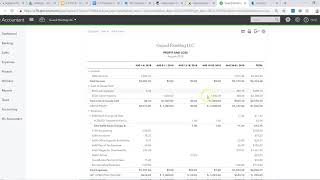
Alright, this video is how to run a profit and loss for your painting business in QuickBooks Online. So from the dashboard, what you want to do is go on the left side and look for Reports. Click on Reports, and this tab you'll see Favorites, Business Overview. Um, if you're looking for profit and loss, it's usually under the Favorites column here at the top, and you just click Profit and Loss. Now Here is— this takes you to your profit and loss. Now what you want to do is either manipulate the dates here if you want to look at a certain range, you can do that here. If you want to look for like a year, year-to-date, or you can kind of choose from the options here on the left if you want to look at last year or the last 60 days, 90 days. So let's say you just want to look at last month. You just set the dates appropriately. You can also tweak the columns if you want to look at quarters, weeks, or days. You can actually change so that the columns show you by week or by month, which is usually pretty useful. Or if you only want to look at the total, you would just leave it there, so it would only have one column there. And, um, if you want to take out any zero-column rows, you can just hit the non-zero and adjust it there. And then you also have, if you want to compare it to previous year, so say, um, you want to compare how you did this year compared to last year, you can check that box there and hit Run Report, and it will give you a column of how you performed the previous year. And then the accounting method, accrual versus cash. Accrual basically will look at what you've invoiced so far during that period, so it looks at your invoices. And the cash looks at, um, if you select cash, it only looks at what cash you collected from customers. So that is kind of depending on what you're interested in looking at. Now Customize button is really important. The Customize button can give you a few other options. The most— the option I like the best is under the Rows and Columns option. You can click on Percentage of Income. And this is good for understanding what your margins are as a percentage of your income. So for, for example, um, gross profit is a common one that you want to understand. Um, so that will give you that and also your profitability margin at the bottom. So that is how to run a profit and loss in QuickBooks Online. Um, if you want to understand how to analyze your profit and loss, please click the video in the description.