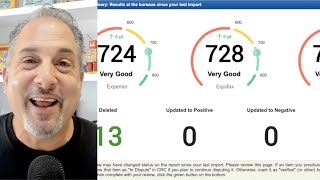
Daniel Rosen demos Credit Repair Cloud's new RE Import Summary feature, which refreshes credit reports and shows score changes across all three bureaus, deleted items, and updated accounts in one dashboard. You can download a PDF summary and tag disputes directly from the preview.
Questions this video answers
RE Import Summary
Chapters
Hey, credit heroes. Daniel here at Credit Repair Cloud headquarters and I am so excited because we are launching a brand new feature today and you are going to love it. This is something that people have been asking us for for years. Literally for years. Okay, let me set this up. Here's the scenario. You've been working with a client for over a month. You started by importing their credit reports and then you sent off all their disputes. And now a month has passed and you'll want see what has changed at the bureau. So you want to see what has changed on those credit reports, right? Well, in the past we had no way to show you this in Credit Repair Cloud. You'd have to go through the reports yourselves. But not anymore. Check this out. Okay, I'm here in the client's dashboard and I'm clicking the button that says one click import. And now there's a brand new button that says re Import Credit report. So I click connects to the credit monitoring system. It accesses all the report data and then it imports and it analyzes all the things that have changed on that client's credit reports. And bingo. It now shows this amazing dashboard at the top. It shows you all three scores at all three bureaus and it tells you exactly how many points they've gone up or gone down. It shows you exactly how many item have been deleted since the last import. How many have been updated to positive, updated to negative, or how many new accounts have been added. And then if you scroll down, you can see all the details of all those items that have changed since the last import. And if you want to get granular, you can click on the little eyeball icon and it'll show you even more detail. And then if we scroll all the way to the bottom of this RE Import summary, this there's a button to download this summary as a PDF so you can share the good news with your client. And then you can click here on the green button to continue to the credit report preview page where you tag any new items for dispute. So again, this new feature is called the RE Import Summary. I know you're gonna love it. I hope you get a chance to use it today and keep changing lives. See y.