Richard Cotton walks through pandas sorting with sort_values, selecting columns with bracket notation, and filtering rows by numeric thresholds, text matches, and dates. Learn to combine conditions with logical operators and use isin to filter categorical variables.
Chapters
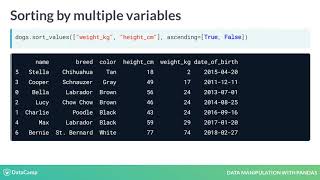
In this video, we'll cover the two simplest and possibly most important ways to find interesting parts of your dataframe. The first thing you can do is change the order of the rows by sorting them so that the most interesting data is at the top of the data frame. You can sort rows using the Sort values method, passing in a column name that you want to sort by. For example, when we apply sort values on the weight kilograms column of the dog's dataframe, we get the lightest dog at the top, Stella the Chihuahua, and the heaviest dog at the bottom, Bernie the St. Bernard. Setting the ascending argument to false will sort the data the other way around, from heaviest dog to lightest dog. We can sort by multiple variables by passing a list of column names to sort values. Here we sort first by weight, then by height. Now Charlie, Lucy and Bella are ordered from shortest to tallest, even though they all weigh the same. To change the direction values are sorted in, Pass a list to the ascending argument to specify which direction sorting should be done for each variable. Now Charlie, Lucy and Bella are ordered from tallest to shortest. We may want to zoom in on just one column. We can do this using the name of the data frame followed by square brackets with the column name inside. Here we can look at just the name column. To select multiple columns, you need two pairs of square brackets. In this code, the inner and outer square brackets are performing different tasks. The outer square brackets are responsible for subsetting the data frame, and the inner square brackets are creating a list of column names to subset. This means that you could provide a separate list of column names as a variable and then use that list to perform the same subsetting. Usually it's easier to do in one line. There are lots of different ways to subset rows. The most common way to do this is by creating a logical condition to filter against. For example, let's find all the dogs whose height is greater than 50cm. Now we have a true or false value for every row. We can use the logical condition inside of square brackets to subset the rows we're interested in. To get all of the dogs taller than 50cm, we can also subset rows based on text data. Here we use the double equal sign in the logical condition to filter the dogs that are Labradors. We can also subset based on dates. Here we filter all the dogs born before 2015. Notice that the dates are in quotes and are written as year, then month, then day. This is the international standard date format. To subset the rows that meet multiple conditions, you can combine conditions using logical operators such as the and operator seen here. This means that only rows that meet both of these conditions will be subsetted. You could also do this in one line of code, but you'll also need to add parentheses around each condition. If you want to filter on multiple values of a categorical variable, the easiest way is to use the ISIN method. This takes in a list of values to filter for. Here we check if the colour of a dog is black or brown and use this condition to subset the data. Now it's time to practice your sorting and subsetting.