R Markdown lets you write reports that mix text and R code, then compile them to HTML, PDF, Word, or slides with one click. Your code runs automatically and inserts results into the document, so reports update whenever your data changes. You can add other languages and Shiny for interactive outputs.
Chapters
R Markdown is a new tool for reporting your results with R. It brings together the best ideas of literate programming, dynamic documents, and reproducible research to help you become a fast and efficient scientist. With R Markdown, you supplement your R code with narration to create a complete report. It's easy to update and work with the code in this form because the code is all still there when you're ready to deliver results. R Markdown uses your code to build a final report. This report can be an HTML web entry, a PDF paper, a Microsoft Word document, or a slideshow. R Markdown can build each format from your code, which means that you can distribute results in multiple ways. And if your data ever changes, you can just rerun your code to build a new report. Let's see what this looks like in real life.
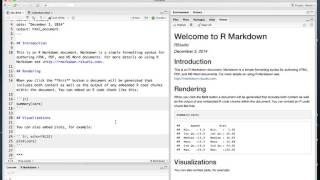
This is an R Markdown file that I've opened in the RStudio IDE. R markdown files are written in Markdown, an easy to learn shorthand for writing formatted text. For example, the document here has some bold text, a web link, and some section headers. The document also has sections of R code embedded throughout the text. With the click of a button, you can compile any R Markdown document into multiple types of output. You can turn your document into an HTML file, A PDF, A Microsoft Word document, Or even a slideshow. When you compile your document, R Markdown will run the R code chunks in the document and add the results to the final output. This creates an ideal format for reproducible research. Use R code to create the numbers, tables, and figures in your report. Your report will contain all of the code needed to reproduce your results. The narration in the report will make the code easy to understand, and if you find a mistake or if your data ever changes, you can easily re render the file to create an up to date report. R Markdown reports are very versatile. You can pair them with multiple types of code, not just R, and you can add R elements from the Shiny package to create interactive output. For example, this R Markdown file uses functions from Shiny to create an interactive slideshow.