David Trainer walks through New Constructs' Premium Stock Screener, showing how to sort stocks by sector, index, and ticker using metrics like ROIC and Gap, download reports, and access Analyst Notes for idea generation and portfolio protection.
Chapters
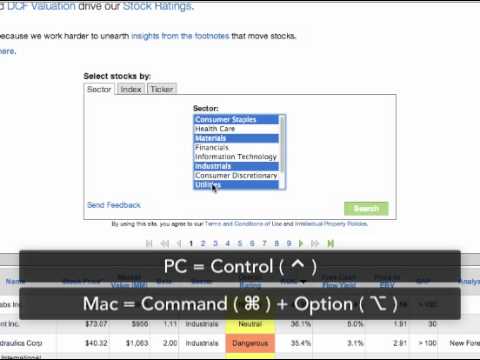
Welcome to the New Constructs tutorial for our Premium Stock Screener. Our Premium Stock Screener is a wonderful idea generation and portfolio protection tool. It's also a great tool for getting multiple stock ratings at once. Subscribers can access our Premium Stock Screener by logging in and clicking the Stock Screener tab. They'll automatically be directed to the Premium Stock Screener by default. Guests will be directed to our Basic Stock Screener, where access to select metrics and our overall ratings is restricted. Our premium stock screener lists stocks under coverage sorted by overall rating. You can sort the list by clicking any column header. You can also download our report for any stock by clicking the corresponding download button. We provide you with key metrics that will allow you to narrow your search along with our analyst notes. Analyst notes feature insights into corporate events or disclosures that cause us to question the validity of a company's financial reporting or the efficiency of the market for its stock. For more information on our Analyst Notes, click the link appearing on your screen. For our institutional clients wanting even more metrics to screen, we offer the Custom Stock Screener. For more details on this product, see the tutorials. Our screener allows you to select stocks by sector, index, or ticker by clicking the appropriate tab. Perhaps you're looking to add a very attractive stock to your portfolio from the industrial sector with high returns on invested capital. Click the Sector tab and select Industrials, then click Search. Sort the list by ROIC by clicking the ROIC column header, then choose the stock that best fits your criteria. Take your analysis a step further by doing some additional research and downloading our report. You can also select multiple sectors to screen at once. For PC users, hold down the Control key and select your desired sectors. For Mac users, hold down the Command and Option keys and select Sectors. Maybe you don't have a sector in mind but are looking for a large-cap stock with the shortest gap. Click the Index tab and select S&P 500, then click Search. Sort the list by gap by clicking the Gap column header. Maybe a client has sent you a list of tickers he or she would like your feedback on, or maybe you have a list of your own. Click the Ticker tab and paste or type the tickers of the stocks in the box below. Tickers can be pasted from lists in Word, Excel, or any other location they're copied from. Tickers can also be typed in the box and should be separated by a space, comma, or semicolon. Tickers are also not case sensitive. Once your tickers are pasted or typed in the box, click Search to run your screen. You can now make a recommendation to your client based on the results or easily download reports for more analysis. Take advantage of our powerful stock screener to protect yourself from blowups or generate your next great idea.