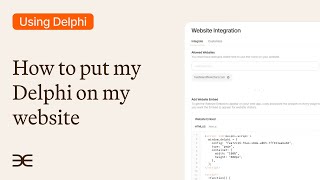
A walkthrough of embedding a digital clone onto your website using Clone Studio. The video shows how to create website embeds and add chat bubbles so visitors can interact with your clone directly on the site.
I'm going to show you how easy it is to embed your clone on your website. Let's get into it. From the overview page of your Clone Studio you want to go to the integrate tab on top and on the left hand side find website integrations. Click that and this is the page where you can create a new website embed. You can select from your dropdown. If you have other instances, you would just select which clone you want to integrate. In this case, you know, I can select this one and, and create a new embed. In this video I'm going to show you the one I already have created and we're going to get into it right now. Once you have that first step to do is allow the website that you want your clone to be embedded on. I already have done that here. But if you say example.com boom. Okay, well if I had that domain now you can embed it there, scrolling on down. You have a couple of options. The first one is add website embed. This is an iframe, very simple, you want to copy and I'm going to show, I'm going to embed it right here on this page right above. I'm just going to go into my WordPress in this case in the code paste. Boom. And I'm going to show you what that looks like. Scroll on down and there we go. We have a fully usable clone right here. Suggesting questions and everything. Now if I go back to Clone Studio and the website integration page, I can also add a chat bubble that pops up on the bottom right hand side. So let's grab that piece of code, just top right copies it and go back to my code, delete what I just had there on top and paste in that code that new code preview changes. And then we will have a new chat bubble on the bottom right hand side. When someone clicks that, you could see your clone now pops up fully usable. Suggested questions. People can call in and do everything right there and then they can collapse it when they're all done.