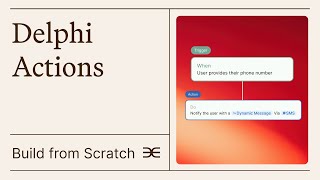
Learn how to build an automated flow in Delphi that captures user location after five chat messages. The tutorial walks through setting triggers, actions, and properties to automate user data collection in minutes.
In this video, we're going to create a flow from scratch, specifically one that updates user properties using Delphi Actions. Your Delphi naturally gathers data through conversation. As your Delphi chats with users, it can automatically tag them, send data to external apps through API, and store evolving user details as properties. Tags are preset groups you create and add as labels to users based on specific events, like when they end their first conversation, reach 1,000 messages with their Delphi, or upgrade their membership tier. Unlike tags, which are simple yes no categories, Properties are dynamic groups that populate based on information users share with your Delphi. For example, a location property would update when someone mentions moving from Dallas to Houston. Unlike tags, which are preset groups for organizing people, properties work more like flexible metadata that doesn't need to be predefined using Actions. We want our Delphi to automatically capture a user's location during conversations if the user sends more than five messages. When you click on New Flow, you will be given the option to create a trigger. Click Add Trigger. When you first open the trigger block, you'll see various events that can activate your Delphi's automated responses. For a comprehensive guide to all possible triggers, check out this link. In this case, we'll select Usage as the trigger type. Now we want the trigger to activate the first time a user sends five chat messages to your Delphi. Note that Chat Messages specifically refers to messages sent through the web based desktop app, not SMS texts or phone calls. Let's select this option from the dropdown, then set the number here to five. Since we want this action to apply to all users, we'll set the tag filter to none. Finally, we want this action to occur only the first time a user reaches five messages, not every time they hit this milestone with your Delphi. Therefore, let's set the Trigger option to First Occurrence. Now let's add an action. Remember that our goal is to have users share their location after they've sent five chat messages to your Delphi. We'll select Send Message, then contact User and reply in conversation. In the instructions, you can tell your Delphi to acknowledge the user's last message and also ask for their location. Set the timing to immediately so users receive the location prompt right after sending their fifth message. For more details about the Send Message feature, see this video. Now that users have shared their location, we're going to want to store it as a property. Now let's add a second action. Click on Add Action at the top left corner. For the action type, select Update Property, which lets you set or remove properties based on triggers in the case of capturing someone's location, we'll stick to Set Property from the dropdown menu, either select an existing property or click Create Property to make a new one. Give your property a name, then specify how your Delphi should capture it. In this example, we're telling our Delphi to extract the user's city and state when they express it in conversation, which we've given them an opportunity to do through the message sent to them beforehand. Once that's done, select your newly created property from the property to set dropdown, and select a delay to give the user time to respond to the message sent by the first action. In this case, we'll say 10 minutes. Click Save at the top right to save your action and you're all set. When someone sends five messages, they'll be asked for their location, and once they answer, your Delphi will automatically save and update it as a property specific to that user. Want to learn more? Delphi Actions has many other powerful features beyond property management. Check out our complete guide to discover all the possibilities. SA.