Good Day Google Plus - How to use LinkedIn Effectively
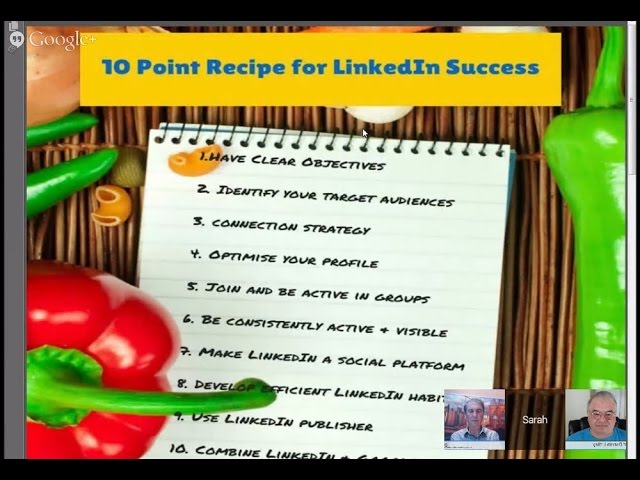
Sarah Santelis and Greg Cooper walk through a 10-point formula for LinkedIn success, from defining objectives and optimizing your profile to using LinkedIn Publisher for long-form content. They cover practical tools like Canva for banners, scheduling posts, and combining LinkedIn with Google+ for wider reach.
Chapters
Hi everyone, welcome to Good Day Google+. I'm Chef Dennis and today I have with me two special guests, Sarah Santelis from Switzerland. How you doing, Sarah?
I'm doing well, thanks so much for having me.
Oh, it's a pleasure. I'm so glad you could join us. And it's about 8 in the evening there now, or what time is it?
Yeah, it's 7 PM.
7 PM. Has the sun gone down yet, or we still have some sun out there?
No, it's the end of the summer, so no more sun at 7.
We still have it in Florida, but it's starting to— we're starting to lose it. It's getting towards that earlier sundown time for us too. And coming from the UK, I have Greg Cooper. How you doing, Greg?
Yeah, hi Chef, very good, thank you.
And how are things across the pond? In England?
Well, we've had an excellent summer, and in fact, yesterday was the last day of the summer. Well, that doesn't feel like it, so it's still really warm and nice here. We're enjoying it.
I love that picture behind you.
Thank you. Yeah, that's New York, because my daughter's in New York and it reminds me of— she works there as a fashion designer.
Oh, how about that? Yeah, I was thinking, first I saw the bridge and I thought it was the Millennium Bridge, No, it's not. That's not it.
Yeah, you fooled me too.
I knew that. Yeah, well, we have a famous bridge here in Bristol, the Clifton Suspension Bridge, built by Brunel, but I'm still trying to get hold of the big picture of that. So for the moment, I've got Brooklyn Bridge.
Brooklyn Bridge, that'll work, you know. Well, thanks for joining us today, and we have a special edition of Good Day Google+. You won't see me on Friday this week because I'm heading back up to Pennsylvania to meet with some friends for the big autumn potluck. And it's really a kind of a real fun event for us, and they made me promise last year that even though I was moving, I would come back up. So, you know, chef keeps his word, and I'll be flying up Friday morning to visit with a lot of old friends over the weekend and eat a lot of good food. A lot of good food. Too much. So, but today we are going to talk about One of my other favorite social media is one that I don't understand, but I think is probably one that we need to start using and start using right. So I brought Sarah and Greg on with us today to talk about LinkedIn and what they think are ways that we can improve our use, use it more effectively, and start to gain some ground on that media. Because, you know, everybody talks about Facebook Everybody talks about Twitter, and LinkedIn is like that stepchild that we visit but we don't know why. So let's learn why today. So I'm going to turn it over to you guys, and Sarah, are you going to start us off?
Yeah, I will. That's actually nice how you said that. You know, it's kind of like that stepchild. You go there but you don't know why. You have connections. It's kind of like a Rolodex. You put the business cards and then they just collect dust. There's more to LinkedIn than that., and we want to show you tonight, you know, what this is all about. Well, tonight for me, but not tonight for everybody else. So we actually, Greg and I, Greg had the great idea to put together a recipe because, you know, chef, chef Dennis Littley, well, we have to come up with a recipe. And so Greg had this great idea to put together a 10-point recipe on how to use LinkedIn effectively. And my son Simon was good enough to put a nice little picture on camera, and I'll share that with you. He's 11, by the way. And so this is the 10-point recipe for LinkedIn success, and that's kind of the agenda we have for you guys tonight. So we're going to talk about clear objectives, identify your target audiences, connection strategy, optimize your profile, Join and be active in groups, be consistently active and visible, make LinkedIn a social platform, develop efficient LinkedIn habits, use LinkedIn Publisher, and combine LinkedIn and Google+. Of course, since we're on Google+, that's what we want to do. So that's the agenda for tonight, and I say, Greg, do you want to start maybe with the first point and talk about that a little bit.
Sure, thanks Sarah. We're just going to alternate on these points and then we'll go later on to a Q&A, so if you've got any questions please save them up and we'll be very happy to answer them. So going back to our recipe that Sarah and I have been cooking up for the last few days, point number 1 is to be clear about what you're trying to achieve on LinkedIn. Why are you here? And there are many reasons to be on LinkedIn, Could be broaden your reach, could be to foster your professional identity, could be to build your brand, it could be to generate leads, drive traffic to your website, it could be to establish thought leadership, or to gather market intelligence, because LinkedIn is a great facility to research companies as well. Or it could be something else. But as a starting point, it's very important to be clear about why you're actually here on LinkedIn, what your objectives are. I hand back to you, Sarah, for the next point.
Excellent. Alright, so point number 2 was to, you know, figure out your target audience. Of course, that's the case with anything you do on any platform. Who's your target audience? If you don't know that, that, well, you have to back up and figure that out first. But it's important, especially on LinkedIn, because on LinkedIn you have a very specific target audience. You know, the users of LinkedIn are kind of a unique crowd. You obviously know it's a professional network, so a lot of people are either at big companies or they run their own business. And then as a kind of rule of thumb, the average income of a LinkedIn user is higher than on other platforms, so that's good to know if you want to sell something, sell your services. LinkedIn users have a higher average income than other social media platforms. So figure out your target audience, and that's how also you're going to build your connection strategy, and, and that's what Greg is going to talk about in a second. In order to build a network on LinkedIn that will, you know, generate leads for you, you need to have a clear picture of who you want to connect with. And yes, it's going to be other people in your industry and competitors and colleagues and things like that. But most of your connections should be, you know, people from your target audience. So eventually that visibility will turn into leads. So Greg, I hand it back to you for the connection strategy, unless Dennis has a question about that.
I did have a question about that. When we're talking about connections and making them, say, you know, I'm connected with all First, like, I go after food people, I go after local people, but then what if I want to become a thought leader in another area? Is it advisable then to try and reach out to these people that are possibly experts in those fields, or, or not necessarily experts, but just they provide good content in those fields, to try and make some connections so I can learn more about it and then eventually become more of a, one of those leaders in that field?
Sure, yeah, I mean, I think this works exactly the same as on Google+, where you can identify people who have influence in a particular area. And as we'll talk about later, you know, if you want to be noticed on LinkedIn, the best thing is to get out there and notice other people. So it's, you know, one of the things I really love about LinkedIn is it's got such powerful advanced search facilities. You can pretty much find anybody you want on LinkedIn. So you can do it by relationship, by location, by industry, by title, by company size. You can even do it— I realized this week, it's something I'd forgotten about— you can do it by postcode. So there are tremendous facilities there to find individuals, and there's great facilities within LinkedIn to start engaging and connecting with those individuals.
Good advice.
Thank you. So we're going to say something about connection strategy, which is sort of like the next thing that follows on from what you were saying, Sheff, really. I would say there's two high-level connection strategies, a choice to be made. Either you can go for what I call the open networking approach, or you can go for what I call the niche approach. So when I first joined LinkedIn, and I suspect Sheffield, and also Sarah, the instruction from LinkedIn was only connect with people who you would recommend. Now, that's obviously changed a bit over the years, so these days people tend to very much go more for an open connection strategy. The maximum number of connections you can have is 30,000, but there aren't many people who have that number. Personally, my strategy is to I will connect with about 70% of people who send me a request. So I'm not— I am discriminating, but at the same time I'm quite open to the idea of connecting with people. Essentially, the logic behind that is the bigger your network, the more connections, the more opportunities that you'll find, the more exposure you get. So I think that's been a trend, really. Wouldn't you say, Sarah? Larger networks over the last few years, last couple of years?
Depends where. In Switzerland, I'm still struggling to convince people of that strategy. Here it's like, I haven't met you in person, I'm not going to add you to my LinkedIn profile. So I think it depends on, you know, the mentality of people. Over here in Switzerland, we still have a very closed mentality where we think, okay, we first need to meet and then I add you to my LinkedIn network, which if you run a business is not the way to do it, because how are you, you know, going to sell more of your services, or how are you going to get this increased visibility if you only limit yourself to connect with people you've actually met in real life? So I also tend to say open your network a little bit. It doesn't mean you have to accept everyone, it still has to make sense for your business or your personal life, because Some people maybe on here are not using LinkedIn for business, but they're using LinkedIn to, you know, generate future opportunities in their job search. So have a strategy in place, have some criteria in place where you decide, you know, depends whether you are running an online business or you're running a brick-and-mortar business. Obviously, if you're selling bagels, first of all, maybe LinkedIn is not the best choice, but then if it's a local business, there's no point in me connecting with people in Australia. Where if you run an online business and you can pretty much work with anybody on this planet, then connecting with people from any kind of location makes sense. So just in general, kind of open that network and think about your strategy, and I think I always accept invitations when they're personalized. So if I get a personalized message saying, I read your blog post, or I heard your podcast, or anything like that, I will always accept, no matter where they are or what they do.
There was an interesting post this week I saw, Sarah, from a guy called Larry Kim. I don't know if you saw that one. It's, uh, it was about binging on LinkedIn contacts. It was about his experience of actually acquiring 10,000 LinkedIn connections and all the unexpected benefits that that brought in. So really interesting article, I'll put it in the comments afterwards.
Okay, great, yeah, I didn't see that. What about you, Sheff? What was your strategy up till now? Did you accept anybody, or how did you manage your network?
I pretty much accept anybody, except I've noticed I've been getting a lot of requests from, from third world nations. I don't want to say them that way, but not necessarily people that would— that I would find a benefit from being connected with. And it seems like sometimes you get on this list and then you start getting more and more. I've been getting the same thing on Facebook, and if they are in some type of business that I think is helpful or social media or something that I can work with, then I'll accept them. But I don't just accept them if I don't see any kind of connection there. And lately I've been getting more of those as well. I like to find some kind of connection, whether it's in one industry or another, to accept. But like you said, I pretty much— if anyone went to the trouble to send a personalized message about something, then I do accept them as well too.
Excuse me.
It's always a nice touch.
Yep. Should we talk about optimizing the profile, Sarah, which is a pretty important part of the LinkedIn presentation?
Yeah, let's do that. Let me share my screen and we'll go into the actual profile. So hold on one second here. Alright, so what we decided to do is use a profile that LinkedIn actually uses for their corporate trainings, so this is a real person, but he probably agreed to being the guinea pig here and having people analyze his profile, and Greg and I thought that was a good example. It's not, you know, there's still things that in our opinion could be improved, but in general it's a good start. So what we'll do is we'll just go through the sections and kind of give our comments, share our comments, and hopefully you can take these comments and then apply them to your own profile. So a quick comment about the picture, obviously a picture is a must on your LinkedIn profile, that's how people recognize you, it's your personal branding. For Michael, me personally I would have gotten a bit of a better headshot, not so much tie, I almost see see more tie than head, so maybe a little bit more zoomed in, but otherwise it looks fine. Greg, do you want to comment on the picture or go directly to the headline?
No, I agree with you, Sarah. I think the thing for me that is really missing on that top of the profile is there's no company name in there. The guy works for Viacom, but if you look, you can see it doesn't appear in that very top of the screen.
Yeah. To me—
So you were going to talk about the headline first, Sara, weren't you?
Yeah. You're talking about this part, right, Greg?
About the headline? I just noticed that the company that he works for, Viacom, doesn't appear in that first top part of the profile at all.
OK. Well, I actually don't recommend— sorry to contradict you here, Greg. I don't actually recommend that. Especially for business owners, for small business owners or solopreneurs or entrepreneurs. I agree, Viacom is a big company and maybe it would be good to show it off, but for example, my company is called Simplicity. Probably nobody knows about it, you know, but if they know me, they will know my name. And so I don't actually use my company name in the headline because I think it's such a key area here where we can use keywords that the company name to me is not as interesting as keywords or what I bring to the table. But that's my opinion. I guess again, like you said Greg, this guy is working at a company, so maybe it's a different approach. But I would say for small business owners, don't use General Manager or Director at this and this company, because most people, if you have a small business, they don't know your company name.
Actually, yeah, I was agreeing with you, Sarah, on that. The company that I referred to was— I wasn't referring to the job title. I was referring to the actual company name underneath the professional headline. Down here?
Yeah. It does show here, though.
Did you see? Does it? Yeah. Sorry, it's too small.
I missed that.
Yeah.
So why don't you tell a little bit more about the headline and how to use it.
Yeah, what I like about what Michael's done on this headline is it defaults to the job title, but what he's done, as you can see, he's put in some bullet points, some keywords of key skills that he has. We have to remember that LinkedIn is also a— it's a purchasing database, and people, purchasers, are searching for people with skills, and these keywords are very important. So So that's the— I like the way he's done that. I think that's good.
Yeah, I agree. So really, you know, use these 2 to 3 lines to market yourself and not just use it as a generic job title like director or owner, okay? So that's pretty much the main points here. Then you have this field where it says contact info. What we're missing on Michael's profile is a phone number and an email. You know, it says contact info, but how do I contact you? There's no way to contact him. So please add your phone number and email here so people can actually contact you when they find you on LinkedIn. Something that we find is well done here is that he has linked it to Twitter. So that's nice because people can go over and check him out on Twitter and see what he's posting there. So it's a good idea to link your Twitter account here. Greg, do you want to comment on the public profile URL?
Public profile URL, yeah. LinkedIn gives you the ability to customize your LinkedIn public URL. If you don't, you end up with a LinkedIn address that has lots of horrible numbers on the end. In this example, Michael's customized it in a rather interesting way. He's customized it not with his name, but I think it's advertising sales executive, doesn't it, Sara?
Yeah, let me try to increase the size a bit here.
And I think maybe the reason for that is to make himself more visible to recruiters. I don't know. It's not something I particularly advise to people, but I would advise people to actually take the time to customize their LinkedIn address.
Yeah, and you— would you also recommend them to use their first and last name if it's available?
Wherever possible, yeah. I mean, obviously if your name's John Smith or a really common name, it's going to be more difficult. You were lucky, Sarah.
Yeah, that's true. It's hard to pronounce, but it's definitely not that common. All right, great. Why don't you continue with the summary?
Okay. The summary section is a really important section because it's the next thing that people look at when they've been drawn in by your picture and your headline. So the summary is a great opportunity to tell people who you are now, what your expertise is, what your skills are, and to invite them to contact you. So I find a lot of people will have a legacy career, like myself, got a legacy career, and if people just look at your experience section they don't necessarily get a good picture of what you're doing now. I quite like the way that Michael set this out. Obviously he's done a lot of keyword stuffing in his first paragraph there. LinkedIn is very, very dependent on keywords for finding people, so I can see the logic in doing that. Slightly difficult to read, I would say, the first paragraph, but below that, you know, I like the way he's done his expertise. It's clear, it's quick to read. Yeah, that's good. Do you have any thoughts on that one, Sara?
Well, we were commenting on the nice visuals below. In his experience, he has these rich media files, as we call them. He could have done that also in the summary section. So you can upload any kind of rich media, meaning PDFs, videos, audios, PowerPoint presentations on slides. SlideShare, so he could have easily also uploaded them up here in the summary section. So that's what I would suggest, maybe in addition to the summary.
I really like the visual impact of those media files that he's made, but when I was looking at it earlier, I noticed that actually none of them links through, so that seems like a bit of a wasted opportunity to me because they're literally just images.
Oh really? Okay, they're not links.
They're not links, no.
So you need to use them as links so you can link to an opt-in form, for example, and it will pull in the ebook cover, or you can link to, I don't know, your website or your podcast or anything. These are huge opportunities because, yeah, they draw the eye and people can click over and check them out. Any thoughts on that, Dennis?
I'm wondering how to do that, actually, how you add the links in. See, I'm not as familiar with working with it, and I actually pulled my LinkedIn page up while we're talking to see where I could make improvements, and my summary is not very good, and I like how they had done those different things there. So that might be something if you can point out. And before we get to that, though, Denver Prophet wanted to go He asked about the contact info and phone. Is that under advice for contacting? I mean, I don't have my phone number. I rarely list it on anything. Is that a good idea?
Yeah, it depends. If you have a, you know, a business phone, then I would say it's okay. I wouldn't use your cell phone or personal home phone line, of course. And it's up here under the first header. Where it says Contact Info, not under Advice for Contacting. The Advice for Contacting is all the way at the bottom. He doesn't even have it.
It gets hidden away, doesn't it?
Yeah, he doesn't even have it on his. So yeah, it would be right up here at the top.
Okay.
Let me just quickly show you on my profile how to edit that, how to add those rich media files. So You'll have to go into Edit Profile, and just to show you where to add the contact info, that's up here where it says Edit Contact Info. There you can go in and add the phone number. And then to add any kind of visual, you would have to look for the screen with a plus sign.
Okay.
And there, if you click on it, it will ask you for a link or upload a file. And so you really, you can link to any, anything and upload, I think, PDFs or pretty much any kind of visual document.
You can even put videos in, can't you, which is great.
Yeah, Hangouts recordings.
Yeah, absolutely.
Yeah, so that screen with a plus sign is pretty much on every section, so not just in the summary but also in the in the experience section underneath every experience you can add that in.
Great. Yeah, you can see that Sarah's got some Hangouts on hers as well.
Excellent. Yep. All right, so where are we? We're down here, so we've talked about the experience section, let's just scroll down, so he really did a good job with the visuals, it really looks like a mini website in my opinion, It's just a pity that they don't link to anything. Then we have the skills. The skills are basically hidden keywords as well. They're important on your LinkedIn profile because that's what will show up when people search for what you have to offer. So make sure you fill in this section with the skills that you have. It seems kind of, you know, silly to give yourself 50 skills, And people always tell me, I don't think I have 50 skills. Well, some of them are just different words to say the same thing. And it's really— it helps the LinkedIn algorithm if you fill out this whole section. So 50 skills seems like a lot, but it makes sense to fill out this section. And Greg, do you just want to comment maybe and explain the difference between these endorsements and recommendations?
Yeah. Endorsements and recommendations are social proof. They're your credibility. They're independent validation that you, you can do the things that you say you can do. So it's really important to go out there and both to give recommendations and endorsements to people and to request them, and also to make sure that you're getting endorsements particularly for the skills that you want to be endorsed for. The difference between the two is recommendations is a more considered, it's a written endorsement of your skills, and generally will carry more weight. The thing with endorsements, it's very visual, people can do it very quickly, so the endorsements are kind of like a quick snapshot, but the recommendations are where people will go to get more meat and more social proof.
Yeah, I agree. So the recommendations are below here, and you actually have to ask someone specifically to give you a recommendation, where the skills are up here, and it's basically, you know, kind of similar to Klout, where people will click on certain skills and say that way, yes, I think Greg has this skill. All right, I think we made it all the way to the bottom, so that was the the profile review in a quick overview.
We do have another question on that before we do go on. Lorraine Dow wants to know, it's a fantastic banner image behind your profile, Sarah. Can you advise how you did that?
Sure, yeah, you just go to canva.com and that will be a great tool for you to use and you need to make sure that it's the right size, and when you upload the— Greg, do you remember the exact size? I don't have it.
I don't, Sarah, no.
Yeah, there's no template for it yet. They have Twitter template and Facebook, no LinkedIn, but when you do go into edit profile, it will tell you the size that you need to upload. So just go over to Canva.com.
I think that that custom background is available at the moment to premium— no, it's premium and—
It's both now. At least, you know, some people— I have a free account and I now got the customized header as well.
Yeah, I think it's rolling out now, isn't it? Yeah.
Good question.
Shall we talk a bit about groups, Sarah?
Yeah, go ahead.
Okay, so for a lot of people, groups are the place on LinkedIn where things really happen, and this is a place where you can demonstrate your expertise, you can find customers, you can start to engage with people. So it's— I recommend people go join groups where their customers, potential customers, and collaborators are likely to be. I find quite often what people do, they go and join groups for their industry, which is great, and it's great to learn, but actually that's probably not where your customers are going to be. So that's the first thing, go find groups where your customers are going to be, start to engage with the customers, connect. You can join up to 50 groups and up to 50 subgroups, so that's potentially 100 groups you could be in. Obviously that's completely unmanageable, so my recommendation is to be active in 5 or 6 groups. You can change your email notifications on LinkedIn so that you get notifications from the most important groups on a daily basis, and then perhaps for the other groups on a weekly basis, so you don't miss anything important in your top groups, and you're able to still check in from time to time in in the other groups that you're interested in without having to constantly be bombarded by email notifications in your inbox. Any other thoughts on groups there? I know we're doing this fairly quickly today, but it's an important part of LinkedIn, isn't it?
It is, and I think the way I use groups is really via the email digests that I get. So I subscribe to about 2 or 3 groups where I want to know every day what's going on, and I just get the emails, and then I scan through the email and see what kind of discussions are going on, and from there I decide, is this worth my time to go over to a group? Because if you just browse around on groups and see, okay, what's going on, where can I jump in, that's going to eat up a lot of your time. So since the topic is how to use LinkedIn effectively, well, base yourself on the emails that you get and and only from there decide whether or not to comment on the groups directly. I think that would be my point of view.
Yeah. So what would you say, Sara, about being active on LinkedIn, the visibility generally, sort of your general participation on LinkedIn, what would be your advice there?
Well, up till now, you know, especially the profile, is kind of the passive approach. I always say there's two approaches on LinkedIn, a passive and proactive. Until now, we only talked about the passive approach. It's our profile, and we optimized it so we get found for our skills and our services. But now comes in the, you know, the social platform part where LinkedIn is just like any other platform out there. Yes, it's more Yes, it's more professional, but you still have these updates that you can send out in order to create that visibility for yourself. So that's what is important, is to have that consistent, continuous visibility by sharing updates. And what are you going to share? Well, just like on any other platform, what are you sharing on Google+? Pretty much the same content would will also fit on LinkedIn. So it could be other people's blog posts, your own blog posts, videos— probably not the cat pictures, they belong to Facebook— but anything professional that you think is of value to your network, go ahead and share that because that's how you position yourself as a thought leader. Dennis Littley was asking at the beginning, how do I do that? Well, you do that the same way as you would on Google+. Plus you create visibility within your network.
Do you recommend scheduling the posts or using something that pushes them out as you make them? Like, I blog, so I have DoShare or whatever it is I use, and it sends them out to LinkedIn and Twitter and other sites.
As long as it's, you know, and the message is formulated in a way that is okay for LinkedIn users, I would say it's fine to schedule. What I don't like is when I can immediately tell that this is a tweet that's supposed to be going out to Twitter and it appears on LinkedIn as well because the person has just posted it everywhere. That I think you will get unfollowed or kicked out of people's network really fast if you do that. So, you know, respect the platform and respect that this is a professional platform, and people on LinkedIn are not necessarily on Twitter, so you can't speak the same language.
I think it's important also if you're scheduling posts to make sure that you're around to respond to people's responses to your posts. You know, that's only respectful, really.
Yeah, maybe I just want to share my screen again and show people 'cause sometimes when I work with clients, people don't even know where to share an update. They just think of it as a profile and they haven't even figured out that you can share update just like you would on Facebook or anything. So on the top of your homepage, that's where you share an update. And just like on Facebook, you can post in a link here and it will automatically bring in the title and the description, just like you see underneath here. And so that update is then shared with people in your network, and they will see it on their newsfeed, just like I see people's updates right here. For example, here's Mark Terpeken. And so that's how you get this visibility. Obviously, people need to go into LinkedIn. They're not going to receive an email message, but it's the same on Google+. Unless people are on Google+, they're not going to see your updates. So that's how you share an update. You can also attach files here, so if you add a special image, that's over here. Also, maybe one more thing here, we're going to talk about this point a bit later, but we need to make LinkedIn more personal. It's boring because we don't make it personal. And so people don't know, for example, that you can mention people's names in these updates. So earlier when I was sharing the update of our show, I would mention Dennis and he would then get this mention in an email. It would also show my updates to Dennis' network. So this obviously increases your visibility, you know, I don't know how many times, but a lot of times. And then if I add Greg to it, well, I just increase my visibility even more. And by doing that, you're also kind of, you know, tapping these people on the back because you're saying, hey, I appreciate you, or I appreciate your content, I'm sharing your content, things like that.
So I think that's a really great tip, Sara, that mention tip, because this is a social platform at the end of the day.
Exactly.
You know, if you're going to really benefit from LinkedIn, you need to use it socially. And what I mean by that is the best way on a social platform to be noticed is to go out and notice people. So to go out and like people's comments, to comment on their posts, to share their posts. And pretty soon, if you're noticing people, they're going to start to notice what you do too. The other thing I'd say with the update field is that sometimes I find people worry about posting too much. But LinkedIn actually recently have introduced some statistics so you can see how often your posts are being viewed. And I can tell you that most posts will not get more than 5% views from your connections. So you really don't have to worry about making too many posts on LinkedIn. There is one exception to that. One Sunday morning I was sitting at home and one of my connections made 59 posts, completely clogged up my homepage. But I think that's the exception. For most people, you don't have to worry about too many posts on LinkedIn. But another aspect, of course, is getting into a good habit with LinkedIn so that you are actually posting regularly. I think Sarah is going to say something about developing efficient habits for LinkedIn.
Yeah, I'm just going to ask Sheff if there's any other questions.
Uh, no, we've had a couple comments. Let me find one here. And this is from Kim Armstrong. So when we search and find people we may like to connect with, do we just ask them to connect and check the box 'I don't know this person'? They have that note 'important: only invite people you know and who know you.' So she thinks that's kind of discouraging.
Yeah, yeah, LinkedIn is really not doing a good job helping us building effective networks, really not, because they're giving us this default text that we should use to, you know, it just says optional to add a customized message. Well, it's not optional, it's a must to customize the invitations, and they give us these default categories that we can fill out I wouldn't say I don't know this person, I would usually choose either that you have a group in common, so that helps definitely, always when you have something in common that's a good starter, or otherwise I would just use friend because that's kind of the default category that people seem to be using. What do you think Greg?
I think one of the best tips around that is to join the groups that the people you want to connect with are members of. Because one of the benefits of being in a group is that you can send a connection invitation or a message to anybody in that group. So you don't have to be a— you don't have to put friend, you don't have to have their email. So that's a really great benefit for being in groups, you know, sharing a group with somebody.
Yeah, it opens your network to a lot, lot more people. I agree.
I have another question here from Nazim Beltran. In Milan, who we just left, is it a good idea to have a serious tone, or is a sense of humor a negative?
No, I don't think— you have to be true to yourself, you know, you need to be yourself. If you're a goof offline, then you're kind of going to be a goof on LinkedIn as well. But in general, yes, the tone is a bit more professional, That's why I said no cat pictures, no cute dog videos, but other than that, no, I think you should be your real self, and that's also the people you can have in your network.
But maybe don't bother with the LOLs.
Yes, definitely. But I think the one thing that you're saying that I don't think I ever really thought of it that way is LinkedIn is a social network.. And it's okay to be social on it, or it's even a good idea to be a little more social on it. I mean, I'm social on Google+. I don't enjoy Facebook because I don't find it to be as social, or Twitter. But I think maybe it is what we make of it. So if I approach LinkedIn with more of a social demeanor, I'm liable to gain a lot more from it.
Absolutely. So someone who maybe perhaps endorses you, who you haven't spoken to for a while, LinkedIn gives you the option to send them a message. You can say, hi, thanks very much for the endorsement, that was really kind of you. How are you? How's the family? We haven't seen you for a while. Let's grab a coffee. You know, all of a sudden there's an engagement opportunity. Mm-hmm. Excellent.
Rose Nolan just posted this. She's been putting some nice comments in. LinkedIn encourage using your individuality and personality when reaching out to others. I reached all-star status and have one of the highest response rates. I try to customize notes according to the person.
Yeah, good job.
Yeah, absolutely. Yeah, agree with that. Okay. Yeah, and I think we're going to do a couple more points. Are we doing all right on time, Jeff?
Oh, we're great. You're good.
Yeah. Okay. So I just wanted to talk very briefly about the— LinkedIn Publisher. Earlier this year, LinkedIn opened up its publishing platform.
We got an echo.
There's an echo. Do you hear that as well? Yeah.
I'm trying. I don't know what that is. Yeah, LinkedIn opened up its publishing platform to all members. Now, that hasn't been completely rolled out. I think there's about 15 million people who currently have access to that. I was lucky and Sarah was lucky in getting fairly early access to that, so we've had some experience of what it's like to post and what the responses are to those posts. And I have to say, I think that LinkedIn Publisher has been a fantastic success so far. Everybody that's used it reports really good results. I mean, I know for myself, I'm really impressed with the level of engagement on some of the posts that I make. I've had a number of posts which have been shared 150 times, which— okay, so I'm not in the Mark Trafagan sort of stratosphere, but for me, you know, if I were getting 150 shares on my ordinary website blog, I would be really pleased. But I'm getting that fairly easily on the LinkedIn publishing platform, so I'm really, really pleased with it. There was actually also, I'll mention a couple of things here. One is that Sarah did a great post herself on people who want to do their first post on LinkedIn Publisher, so I'd encourage you to go and look at Sarah's profile to read that particular post. And there was another piece of research that was published this month by a guy called Paul Shapiro who actually reviewed and analyzed 3,000 successful LinkedIn posts. Guy must never have gone to bed, you know, but he's done some really, really good analysis and identified some of the things that make LinkedIn posts successful. I will put the link to that in the comments.
Yeah, I haven't seen that. That sounds interesting.
Yeah. Sarah, what would you say about the publisher?
Yeah, I would also definitely encourage people to use it. It's a great addition to your own blog. I would always I would just say be careful, it's not your own blog, so you never know when they close it again, but while you can, use it because it will really get you some great visibility beyond maybe your LinkedIn network. You're thinking it's just within your network. No, you can have a reach that goes way beyond your network, and if LinkedIn actually picks up your post and puts them in the LinkedIn Pulse, which is their own kind of content aggregation tool, you can reach, you know, 10,000— on your post. So I encourage everyone to use LinkedIn Publisher, but kind of tell them, be careful, don't just give up your own blog because LinkedIn has kind of this tendency to start things and then, you know, who knows how long we're going to have them. So use it while you can.
OK, Greg, you have a question up there from Nazim.
Yeah. Nazim says, I know I arrived late, but have you discussed the bothersome issue of endorsements? Most of the ones I get are from people I've never worked with or known. So I'd say— about that, Nazim. One is that you only get endorsed by people who are your first-degree connections, and secondly, that before the endorsements, there was no validation system at all. So you could put that you were a brain surgeon, an investment banker, and there was no way anybody had any independent validation on that. So those are two important points. The other thing I would say is that when endorsements were introduced originally, they were introduced very clumsily, but since then things have evolved. You can turn them off, you can turn off individual endorsements, so it's much more flexible now. Sarah, any points on that question?
Yeah, as you know, Greg, I'm not a big fan of the endorsements either. I think they're they're kind of LinkedIn's way of being a bit gimmicky, but they're there now to use, and LinkedIn's search algorithm does give them some weight, so just go with the flow. The ones that you don't like, you take them off. The ones you like, you leave them there.
That's good. And Greg, if you click on that comment, it'll get your picture back too.
Okay, cool.
There we go.
You're back.
He's back. Okay, sounds good.
Just a final point.
If you have any other questions before we go on, leave your questions now, guys, if you have questions for either Sarah or Greg on LinkedIn. Okay, Greg, go ahead, it's all yours.
Yeah, there's just one point I think we need to cover on our 10-point recipe, Sarah.
Yeah, and that's the combination of LinkedIn and Google+. I'm just I'm sorry about this echo. I don't know if anybody else hears that, or if it's just me. Is it okay? Does it sound okay?
I don't hear it now, but that doesn't mean it's not going to show up later on the film.
All right. I'll just go ahead and hear myself talking. Yeah, the point, the last point we wanted to talk about is the combination of both networks. So you're obviously on Google+, otherwise you wouldn't be watching this, or maybe you're watching the replay on YouTube. But Google+ is, you know, obviously it's a great place to socialize and it's really a social platform. To me, I've been using LinkedIn for many years, but when I started on Google+, it's like, wow, this is another world. People are actually friendly and, you know, they say, how can I help? And so this is still very rare to happen on LinkedIn. But I do have to say that most of my business does come from LinkedIn. It does not yet come from Google+. And so I think for people in the B2B sector, I think the combination of both platforms will be really the winning recipe here, is to use both, to have Google+ yes for engaging and yes for being social, but try to kind of bring that social aspect over to LinkedIn and Yes, the platform is not ideal, but if you make it what you want it to be and you make that effort to be a bit more social on LinkedIn, I think you will really see great results. Greg, what do you say?
Yeah, I think there's great opportunities with Google+ and LinkedIn for cross-fertilizing both the contacts and also the content. You know, I regularly will post my LinkedIn posts on Google+ and content from Google+ on LinkedIn, and you're reaching a bigger audience, and the content's getting shared, and you're making new connections. Whatever network you have on LinkedIn, it will be different from the network you have on Google+. So there's plenty of opportunity to cross-fertilize those two networks.
Yeah, and one example is to take the recording of a Hangout and just post it over at LinkedIn, you can get both.
So it is a good idea to put your Hangouts over there too then?
I would say on the profile definitely, on the updates maybe use an edited version, one that's a bit shorter because I don't think LinkedIn user, typically LinkedIn user will have 40 45 minutes to an hour to watch.
Something like the Scott treatment where he takes the key points and does them will be a good idea then.
Yep.
Excellent. Okay, so we don't have any other questions. Everybody's thanking you for all the good advice, and I guess that's about it. Do you have any last thoughts on LinkedIn then, or advice for us to go out and get moving moving or to get us inspired? Sara?
Yeah, I would just say again, make it personal. LinkedIn is all about building relationships, so you go out there to meet new people, not just add people to your network that you already know. Meet new people and build relationships and don't just add numbers to your network. So it takes some effort, but it will be worth it.
Very good. Greg?
Yeah, maybe I can finish with a funny story if we've got time involving Richard Branson, and it illustrates our last point about Google+ and LinkedIn. Sure. I'll try to make this a short one. Many years ago, back in the '80s actually, a friend of mine was a sound engineer for Mike Oldfield, who you might remember was Virgin's first big megastar. And we went to one of his concerts, and Richard We went out for a meal afterwards and Richard Branson was there. I didn't know who he was and he didn't know who I was even. But Richard Branson paid for the meal. There was a bit of a kerfuffle because he was very scruffy and the waiters didn't think he should have a gold credit card. They didn't think it was his. Anyway, moving forward 25, 30 years, Richard Branson is one of the great publishers blog posters on LinkedIn, and when I put one of my first posts on LinkedIn, I wrote about how wasn't it great that LinkedIn had brought Richard Branson and I back together again. And I didn't think anything more of it then. And I noticed a few days later that Richard Branson was posting on Google+ because he's a big Google+ fan, and I wrote a comment in his thread to say I'd written a comment about our meeting 30 years before, and the next day I got a post back from Richard. So, you know, it's really interesting that the two can work together. You know, if I hadn't been on both platforms, then that connection might never have been made.
Of course, not everybody meets Richard Branson, you know.
I still owe him a meal.
Well, that's a good enough reason to get him out sometimes. Just send him a post saying that you owe him a meal and want to get together. See if you can bring Paul McCartney in too while you're at it.
Yeah, sure, will do.
Well, folks, so it's been a very enlightening session on LinkedIn, and I think the biggest thing I got out of this is to put the social into LinkedIn. We are here because of social media, and I know I have never treated it that way, so I think if I start doing that, it's gonna— I'm gonna start understanding why I have over 20 meteorologists in my, in my list. So maybe I can do something with them. So thank you all for coming. Thank you for the great questions. Sarah and Greg, it was such a pleasure having you on today, and enjoy the rest of your day across the pond. It's just midday here, so I A lot to do yet on my schedule.
Thanks, Dennis Littley.
Thanks, Dennis.
Bye.
Bye, everyone.
Bye-bye.









