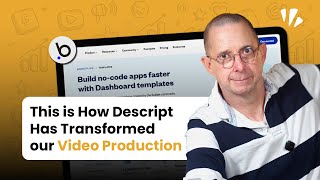
Dennis Lewis walks through Descript, a video editor that lets you edit by editing text instead of timelines. It removes filler words automatically, clones your voice, and handles transcription so you spend less time on technical work and more on actual content.
Most content creators waste 80% of their editing time fighting with complicated timelines, confusing interfaces. But what if I told you there's a video editing tool so simple you can edit videos just like a document? My name is Dennis Lewis from Ratio.dev. i've been building applications and teaching the process for over 40 years, from IDMs, creating early days to building multi million dollar applications. And I can honestly say this tool has completely revolutionized how I create content. In fact, it's so powerful it eliminates filler words, automatically removes retakes with one click, and can even create YouTube chapters without lifting a finger. But here's what blew my mind the most. This isn't just a video editor. It's like having an entire production team in your computer. And I'm going to show you exactly why. Descript is the number one video editing tool for regular people who want professional results without professional headaches. Let me paint you a picture that's probably way too familiar. It's Sunday night, you've got content to publish tomorrow, and you're sitting there staring at a timeline that looks like someone threw spaghetti at your screen. You've got 47 different tracks, you're hunting for that one sentence you need to cut, and you've been working for three hours just to remove the ums and ahs from a 10 minute video. What if I told you that that same edit could be done in about 30 seconds? And I'm not exaggerating with descript, editing video is literally as easy as editing a Google Doc. You see your transcript right there, you highlight the text you want to remove, you hit delete and boom, it's gone from your video. No timeline scrubbing, no hunting for clips, no pulling out your hair, which I can't do, to be honest. Less work, more flow. Text based editing. That is what makes Descript so amazing, in my opinion. But it does a whole lot more. You can remove the backgrounds, you can fix the eye contact, you can make your audio better. And obviously, like I've said, it will do a bunch of fixes on your video automatically. They have this really cool feature called Underlord, which you can just talk to it and say, hey, make this video better. And it will do that. So let me just dig in a little bit deeper into what I think makes descript so awesome and why I think it's worthwhile that you consider using it if you're not interested in hiring a full time professional video editor. If your objective is to create decent, good video, get it out there and start attracting an audience and start building authority in the marketplace, then this is the tool that you need to be using. By the way, if you want to see a complete list of the vetted tools that we use, if you want to learn to up your bubble development, if you want to just find great podcast episodes and books to read, then I definitely recommend you go to ratio.dev and sign up for our no Code Resource Center. We update it every week and it has all of that in there for free. All you have to do is put in your name and your email and you get access. And I really think that it is something that you shouldn't miss out on. But here's where it gets really interesting. Most people think descript is just for doing what I've mentioned, removing the filler words. And that's like saying a Ferrari is for going to the grocery store. It just doesn't get. One of the problems I faced a lot of times is you've sat there or stood up. I'm standing up right now, recording a video and you misspeak a word and you just keep going. And then you get back later and you realize that instead of video editing, you said video edit. Now what do you do? You go back, you try to make the lighting look the same. You've already changed your shirt. You kind of make a retake for that. With Descript, all you have to do is say, use my voice clone and change the word and boom. How cool is that? So not only does it have your back making your video more polished, but it helps you fix your own mistakes. And let's face it, I make a lot of them. So I think that's really good. It automatically transcribes your videos, so that means can just look at the text and see the mistakes or see the parts that you want to get out, or you can actually grab and cut and paste and change the order of what you want to talk about in video. All of that is easy as doing it in a Google Doc. And you want YouTube chapters, it'll just do that. Do you want to add captions to make it more engaging? It'll have a whole suite of different caption styles that you can put in. You can make the whole video captioned. You can make little sections captioned up to you. Do you want to add professional B roll or from stock videos or images that comes in the box? It's all right there. I know what you're thinking, Dennis. This sounds too good to be true. Look, I've been in text before. The Internet was A thing. I was part of IBM's original AIX operating system development team when it was top secret. I've seen every revolutionary tool come and go. But here's the difference. Companies like Think Media Creators with millions of subscribers are using descript as their primary editor. And these aren't small channels experimenting with new tools. These are professional operations that depend on efficient workflows to stay competitive. Because, let's face it, traditional video editing is broken. You've got Final Cut Pro that costs a fortune and requires a film school degree to understand. You've got Adobe Premiere that crashes every time you look at it wrong and charges you monthly for the privilege. And don't even get me started on trying to sync audio, color, correct footage, or God forbid, collaborate with team members. It's like all these tools were designed by engineers who've never actually had to create content under a deadline. But that's where descript really comes in. It's a tool designed by people who actually understand the content creation workflow. People who know that speed and simplicity aren't just nice to haves. They're essential for anyone trying to build a business and who needs to incorporate content into it. And that's exactly what descript gives you. It's video editing for people who have better things to do than become video editing experts. I think I've explained in a nutshell why I believe that descript is a great tool for you. You can literally have your video ready to go half an hour after you've finished shooting. And in my opinion, the key bullet points that you should take out of this is that the reason descript is a game changer. It's text based editing, automatic filler word removal and mistake fixing, studio sound. Automatic transcription screen recording that records the screen in a separate track from the camera. So that means that you can mix and match different formats in post afterwards. You don't have to think about it. You don't have to have one of these cool gizmos that changes the format as you're recording. And you have to keep all that in your head. No, it records those separate tracks and then you can mix and match the formatting afterwards. By the way, for podcasts it does the same thing with guests. So you can record in 4K quality over the Internet and it records locally and then integrates the high quality video so you don't have that grainy zoom meeting look to your podcast. Really sharp. That's called rooms. You can do a lot of other fancy stuff. You can use avatars, you can translate into a bunch of different languages. If you want, you can really dig in and do some professional stuff. But the key question here is that if you're interested in using video as a content piece to your marketing strategy, there's no reason you should be using anything else other than descript. So if you like this video, leave a comment. Subscribe that would be awesome. Don't forget to go to ratio.dev and sign up for our no Code Resource Center. You won't regret it. It's free, it'll take you five minutes, and if there's anything that we could help you with here@ratio.dev just reach out to us. We'd be glad to hear what kind of projects you're interested in building. Hope you've enjoyed this video. If you have, stick around. There'll be more to come later. Bye for now. It.