
7 Steps to Automate ANYTHING (STEAL This Framework)
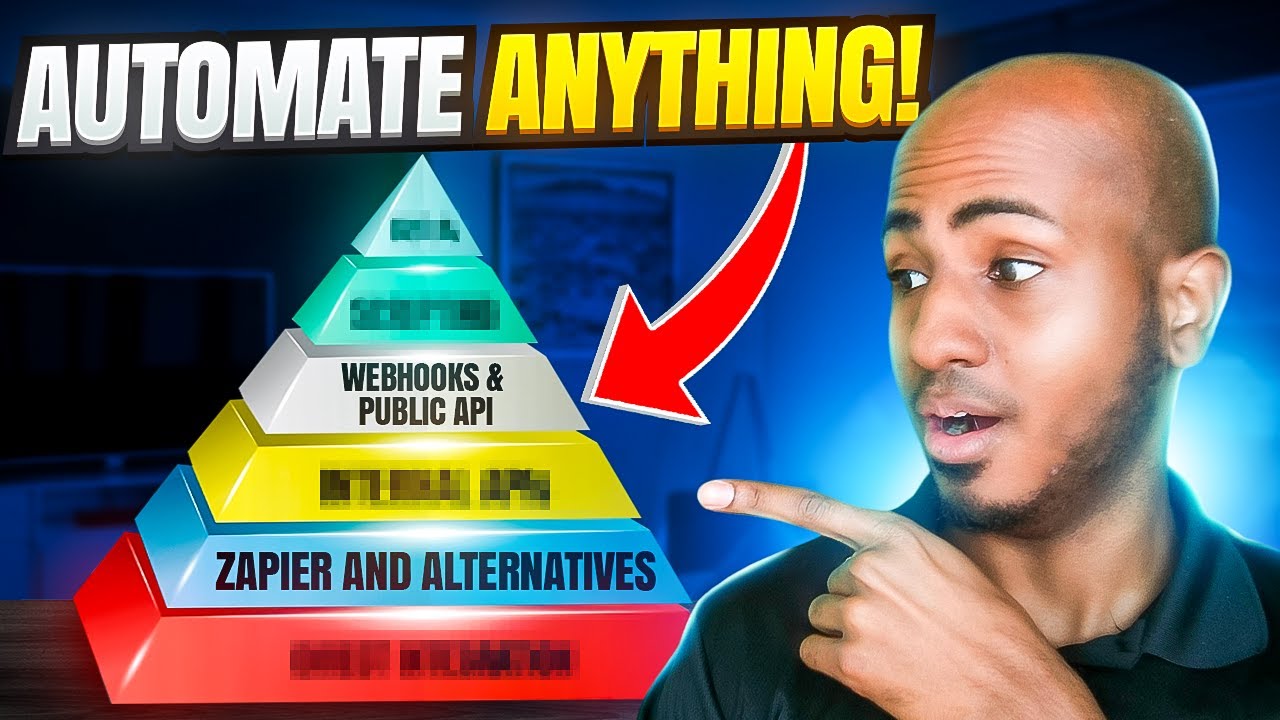
Isaac P. breaks down the Integration Progression Pyramid, a seven-level framework for automating tasks. Start with built-in integrations like Calendly reminders, move to Zapier connections and Google Sheets flows, and only climb to complex solutions like internal APIs or RPA when frequency and value justify the added complexity.
Chapters
So moving on to 7 steps to automate anything. This is essentially a framework that we put together of how do we think about the different stages we go through, the different methods we evaluate to know whether we want to— we can automate something or not. Typically seeing what are the integration capabilities of the platform and going through you know, from easiest to hardest on what we believe we can do with it. I've called this the integration progression pyramid, and I'm gonna show you that in a second. This is a way just to simplify where we start looking to automate something. And I'd like to believe I coined the term and that I put words to this in a way that people haven't in the past. I'm open to being wrong. So there's any, uh, evidence out there that someone else put something like this together. I'm sure someone probably thought about something similar, but this is my own original version of, um, how we think about automating stuff. Okay, so let's start at the very bottom. There are 7 stages here, 7 steps, and the first one, it's direct built-in integrations, direct built-in integrations. If the software apps you wanna integrate can do so natively, I'm the first one to tell you, you don't need to use Zapier. You don't need to use us potentially. If the tool does what you want it to do or connects directly with the tool you wanna use, you have no need to use Zapier or similar tools. Okay. I think I've had a couple clients say, hey, we want that When Calendly comes in, we want to send these reminders. And I was like, well, have you explored Calendly meeting reminders? They have that built in. And unless their built-in features are not enough for what you want or the built-in integrations have limitations, then yes, absolutely explore the other things. But this is where you start looking because this is the easiest one to set up. It's the easy one to troubleshoot and get help with because the platform itself can potentially give you support. And it's the easy one to make— easiest one to maintain as well. So requires relatively little maintenance compared to the other ones we're gonna talk about. The second step, it's Zapier and alternatives. So any Zapier competitor will fall into this category. It's the next easiest option. And of course, it has a lot of built-in tools that we've already covered that you can use to expand its possibilities. We already covered this, but if you click on— if you look on zapier.com/apps, you'll be able to check whether the tools you want are capable of being integrated. And one note is that sometimes you may not see the tool there. But it may still be integratable. So you can always do a separate Google search to make sure that's the case. And I'm gonna show you a quick example. This is a tool that I was deploying for a client. It's called Proposal. It's gonna have proposals. If I go to biz.sapier.com/apps, you'll notice if I write here Proposal, It will not come up. Proposal. No results found. However, if I look for Proposal Sabio integration, you'll see that there's a link from the website itself. And what happens is these integrations are in beta mode, but when they launch first, There needs to be, at least the last time I checked that resource from Zapier, they said there needs to be at least 1,000 users before they show it in the public, in their public search engine. So here you simply click and follow the prompts. It will tell you, hey, this is like a private invitation of sorts where you'd be able to integrate this tool, but only through this link. If the link is not publicly available, it's possible that you have to actually log in or sign up for the tool. And within the settings of the tool, that's where you're going to find a link to be able to integrate with Zapier. Moving on, the 3rd step is gonna have the middleman integrations and/or the built-in automations. Okay, this is a little different. Okay, the direct integrations we talked in the first step is just like tool 1 to tool 2, immediately integratable, and you move on. Now we also have the middleman integrations where, for example, let's just say you have a new form solution that's not supported by Zapier. We did Paperform early on. Imagine something similar that does not integrate with Zapier, but it integrates with an app that is supported by Zapier, like Google Sheets. So in that case, what you can do, you can plug the form into Google Sheets and then you could create a Zap that goes ahead and takes a trigger from that Google Sheets and then you do whatever it is that you want to do. So that's one example of the middleman integrations. Regarding the built-in automations, it's also possible that the tools you're working with have some sort of automation capability built into them. Many of today's popular tools do actually, most of them. For example, HubSpot has very extensive workflow automation tools built into it. Airtable have their automations. Calendly, even Calendly, which is a relatively more simple tool, have sort of automations built into it that you can explore. They're often limited. That doesn't mean they're worth exploring, especially if, as I said, and as you've seen in this pyramid and in this order, especially if they don't integrate with Zapier and you already explore these first 2 options. Okay, technically these are like 2 things, but I like to put them in the same bucket. Because they're similar enough, in my opinion. Moving on, and we have to start to get a little bit technical. But here's where we want to explore our webhooks. If the platform allows for webhooks and if the platform has a public API that we can use. For those that don't know what API is, in very simple terms, Just like you have a UI, which is the user interface where you as an individual, as a human, log in and manipulate the data within the tool, meaning you create stuff, you delete stuff, you edit stuff. In the same way, there's an application programming interface. Imagine like a login page for a robot that if you tell it how to log in, AKA authenticate, you can manipulate the data within the tool. So you can find stuff, you can search, you can delete, you can create, you can edit, et cetera. For simplicity, that's essentially what a webhook is. And they are same, at least the way I see it, they are very intertwined, right? They're concepts that you use in the same context. Well, so for example, just for simplicity, typically if you're using a tool that doesn't, and you want to use that tool, you're using a tool that doesn't integrate with Zapier and you want to make sure that you have a trigger within that tool, meaning in the case of the forms, when a new form is filled out, you want to use that to send data to Zapier to trigger something. Typically you use webhooks for that. And typically the API actions that you put in will also be webhooks. Technically speaking, this is where it gets a little technical. So sorry if I'm losing people here. But in the API case, you'll be using it to manipulate the data within the platform. So at a high level, for simplicity, for now, we're gonna dive deeper into this. You would find— you would look for webhooks when you want to use a trigger app, right? You want to substitute that first step we talked about in this app and give it actions for everything else. Let's talk about scripting. This is where you would use code of some kind, JavaScript, Python, or other programming languages to expand on what the automation is capable of. Because, of course, no-code tools have limitations. And even if you don't identify yourself as a hardcore developer that, you know, knows the ins and outs of a particular programming language, I would still encourage you, if you are maybe a business owner that you're still doing the automation yourself in your business to not necessarily shy away from this. Because typically the codes and the scripts that need to be created for automation purposes aren't as complex. They're not like this 300-line pieces of code. They're typically simple codes that allow you to do certain things. And one of the examples I recall, one of the first project where I had to duplicate a Google Drive. Sorry, where I have to use code, it was to duplicate certain Google Drive folders. So by default, you can actually duplicate a folder with Zapier, like with none of the options that we've discussed up to this point. Technically, the APIs you can, but this is something we did through a script, through a platform. It's called Google Apps Script. And that's how we were able to easily duplicate a Google Drive folder. In this case, was for agency client that wanted to duplicate Google Drive folder when a client signed up. And that's a use case where you might want to, for a relatively simple goal, duplicate a folder, use code for that. Now the last 2 steps are Definitely beyond the scope of this training, but I want to touch on them real quick. Both of them rely on what I like to call a simulated user interface. There's probably a— there's probably another name for it, but this is how I like to think about it. All of the cases that we've talked about here below actually rely on the API. In fact, Zapier The 3 letters it has in the middle, it's API. It's because at its core, Zapier is like an API integrator. It makes connecting APIs simpler. So all of these things are essentially relying on the backend. These 2 aspects though are simulating a human being to one degree or another. So in the case of the internal APIs, it's essentially trying to replicate what you want done in the user, in the, in a browser, and trying to see if the browser is performing certain requests. And again, because this is a lot more complex than, and I don't, I don't wanna dive deeper into it, but at a high level, you're looking at the browser, you're seeing what the browser is doing. And you're trying to replicate that into a webhook. Essentially, this is somewhat related to this. The only difference is that in this case, the API is public and you can— they essentially teach you how you would call it and how you do that. Here it's not public and you're trying to understand it through a trend. You're trying to reverse engineer it essentially. The last step here is RPA. Which is again very similarly something that you're trying to replicate clicks and keyboard inputs to, for example, automatically log in to a certain platform and download or upload or edit certain things. The challenge with these is that typically, for example, the internal APIs relies on the user session. So if I log out, and for if, if, if I log out and the request I'm doing is relying on my user session, it's gonna stop working because it's simulating that I am the one clicking here and clicking there. If I log out already, I don't have the authentication or the authorization to do those requests anymore, and the RPA It's literally replicating the clicks and the keyboard inputs that you would normally do. So that's it for this, for this particular lesson, for this particular part of the presentation. What I do wanna emphasize that each level gets harder to create, it gets harder to troubleshoot, and it's often less reliable. If you think about it, as I was saying here, if you look at from the bottom to the top, if there's a direct integration, it's probably— it probably works forever, right? If it's Zapier or built-in automation, you know, you can start to have a couple of bugs here and there. Here would be a lot harder to troubleshoot. It requires code, it requires understanding the public API. APIs sometimes are updated every so often. It may require some maintenance or updates. And here is something as simple as someone logging out or the user interface changing, right? The button's not where it used to be, or the button says something different. All of a sudden you would have to update those bots, those automations for those reasons. So it doesn't mean it's not worth it to explore those harder options, but would always depend on how frequent, how urgent, and how time-consuming task you're automating is. If you have something you only do once a month and it can wait for a week for it to happen and doesn't affect any other process and it takes you 1 minute, then absolutely don't, don't. It's probably better kept manual and not— you wouldn't want to go deeper into all of these steps. But if you have something that happens every day and takes 30 minutes and the quicker it happens, the better. then absolutely you may want to explore these different levels and see, at least based on your skill, based on the skill of your team, if you have any, where can you essentially push to based on the skill of yourself, of your team. In case it's relevant, internally we don't Currently have talent that can do RPA or internal APIs. We are looking to potentially add some RPA developers and contractors to the team in the future if we see the opportunity to help clients that have the use case for it. And that's it for this lesson.
More from Isaac




This Boring AI Automation Could Save Your Accounting Firm 40 hours (But most ignore it)

How to Build AI Systems With Claude (So Your Accounting Firm Runs Without You)





