
Digital Marketing Trends - Recap from WSI's European E&I Conferece
Eric Cook and Jeff Simpkins break down digital marketing trends from WSI's Barcelona conference. They cover Facebook's Pages-to-Watch feature, LinkedIn social selling, expertise-driven SEO, and tools like Contactually and Hootsuite. The focus: systematic follow-up and personal branding to convert leads into sales.
Chapters
Greetings everyone. Welcome to the Wednesday, June 25th, 2014 episode of Free Webinar Wednesdays. This is Eric Cook and I'm with WSI Internet Marketing where we work with businesses and organizations on helping them leverage the power of the internet as a strategic business tool. You can learn more about me online at www.poweredbywsi.com. With me this week is my good friend and Free Webinar Wednesday partner, Mr. Jeff Simpkins. Jeff, say hello to everybody out there in Free Webinar Wednesday world.
Greetings everybody, this is Jeff Simpkins. I'm with Community Bank Consulting, Inc. You can learn more about me and Community Bank Consulting, Inc. online at www.communitybankconsultinginc.com.
communitybankconsulting.com. Excellent. So what's new in your world, Mr. Simpkins? How's your week been?
My week has been very good. It's, uh, interesting in working with banks, one would not think of business as being seasonal, but, uh, this tends to be a little bit slower time of year when you're working with banks. I think a lot of folks are Out with kiddies out of school and family members on vacations. Yep.
And we've got the 4th of July here in the States coming up. I know our Canadian friends have their holiday on the 1st. I've gotten some notifications from a few of the partners that we have up in Canada that they're not going to be around on the 1st, and we're not going to be around on the 4th. So we get into the summer months with vacations, and it It's getting a lot harder to catch people on the phone and get an email other than an autoresponder when you send out messages. But yeah, I know exactly what you mean, exactly what you mean. Well, I had a rather significant accomplishment this past weekend. Went to Northern Michigan and with a couple of teammates survived, I'll say, because I don't think I really raced it, but I survived The Lumberjack, which is Michigan's first 100-mile mountain bike race. This was its 10th year of actually operating, and so there's only been 2 people, I guess, in the history of the Lumberjack that have raced and finished it in each of the 10 years, and the gal that won it was one of those. And so I did it in a little over 10 hours and 40-some minutes, and I was really, really happy to see that finish line, but it was a good accomplishment, and any other rides I do this year are going to be shorter than that, so I got the hard one out of the way. But it was nice to have that done.
Congratulations. Yeah.
So we've got a little bit of WSI cycling reference here. Today what we want to do is we're going to share some of the information that we talked about actually at WSI's European conference, our ENI conference in Barcelona. And some observations that I think have relevancy to all types of businesses and organizations and nonprofits. And even if you are a consultant or a solo entrepreneur, a lot of what we talked about really kind of sets the stage for where the digital industry is headed. So I was going to share some of those insights. But before we get started, I guess I probably should do my housekeeping things. First and foremost, today's session and all sessions are recorded. And archived and made available at freewebinarwednesdays.com. So if you'd like to go back and review today's session or share it with a friend or a colleague, you certainly can do that. The other thing that we'd like to mention is we enjoy comments and questions from the audience, so please feel free to use that chat box. And if you have a comment or question during today's session, go ahead, toss it in there, and Jeff and I will keep an eyeball on that. And we like engagement and hearing from the audience. So, but back on the kind of the formal purpose of today's session, we're going to talk a little bit about digital marketing trends and some things we talked about in our global conference in Barcelona. And you can see I've got a little snapshot picture here. They've got community bicycles in Barcelona. And unfortunately, I was bummed out to find that you have to be a resident. Apparently, there's some sort of a citizen card that you have to use in order to be able to get those. But it was pretty cool because I've been in a few other cities, Toronto for example, and I think even got to Paris a couple of years ago. You can pick these bikes up and drive them wherever you want to go, and they've got these kind of racks where you can go ahead and rack them, and they've got lights and little holders on the front for your briefcase or your bag. And we saw lots of people tooling around. So we've got a few of the folks that are part of our WSI cycling team were actually in Barcelona, and I think we even got one of them, Carlos from Mexico, is joining with us. I see his name in the attendee list. But we hopped on the old bicycles and made sure we get a picture. So as with most conferences, it's not all work. We did manage to have a little bit of fun while we were there, but we certainly learned an awful lot. So we're gonna dive into some of the observations from the conference, but there's a few other things that I wanted to mention because there are some tools and some other stuff that we've talked about in the past that are changing. One of the tools that I've mentioned a number of times is a service called Hyper Alerts. This was, and I say was because as of July 11th it's going to be no more, but it was a service that you could use that you could plug in anybody's Facebook page. Businesses could put other businesses in or put their own business Facebook page address. And Hyper Alerts would actually monitor for any posts or comments and send you an email notification when something like that took place. And I know a lot of our clients used this because I recommended using the service and I used it. It was a great way to kind of monitor to see what was happening with engagement. Are people interacting? And unfortunately they're going to go bye-bye. So I wanted to make an announcement just in case anybody missed it, if they are using the service, to make sure that you know that it's not going to send you notifications after July 11th. And also put a plea out there. I've done a couple of tweets and I've reached out to a few folks. If you happen to stumble upon a solution that is comparable to HyperAlerts, by all means dump it in the chat box and let us know, because monitoring yourself, what people are saying when comments go through, but also other sites and competitors, certainly something that I think all businesses want to take advantage of. With Hyper Alerts going away, unfortunately, it's not going to be as easy. One of the things that I think precipitated this, and this was actually on my chat list probably a couple of weeks ago, but we ran out of time, surprise, surprise, is Facebook is now providing the ability within their own Insights, which is their analytics tool, to monitor pages. You can monitor up to 5 pages. Hyper Alerts didn't have a limitation, so you could put as many in as you wanted to, which was great. But within actually Facebook now, you can monitor and just compare things. I don't think it gives you the notifications and the proactive alerts like what Hyper Alerts did, but I just wanted to point out in case you're wondering, and here's another reference to our WSI Cycling page. But if you go into your page manager, and I think everybody probably has been upgraded to the new version, the new layout now, but you can click on Insights And if you scroll down, you can see there's a section there now that says Pages to Watch. And you can see we've added the local bike shop. We've added our local trail. The lumberjack was put in there, but a couple of the bikes that are sold at our local store. Now I've already added all 5 of mine, so if I go to click on Add Pages, it's probably going to give me an error message to say— well, maybe I can even add another one here. If I wanted to add Free Webinar Wednesdays, we will go ahead and type that in. We will click on watch page and then we will click on done. See if it gives us 6. Cross your fingers, we will test it. Look at that. So from what I understood, they limited it to 5, but it looks like you can add more than that. This could be one of the ways that you could benchmark your organization against others. Again, it doesn't give you the proactive notifications when a post is made to any of these, but you can at least go in and see, well, how's my business doing compared to some of the others that I'm competing with? Jeff, I don't know if you've got thoughts or observations or comments on that, but I'll pause. No, I don't. Give you an opportunity to say something, because you know how I like to talk.
No, I don't.
Plus it gives me an opportunity to take a sip of coffee. So there you go. That's what I need, more coffee so I talk faster. The other thing I wanted to mention, it's not a secret really. I'm kind of a Google fanboy. Android phone, Google Apps, and I think, Jeff, you're more of a hybrid. I think you've got the iPhone, but you're also on Google Apps. In case you're wondering, Google I/O, which is their kind of industry conference, is going on right now, and you can watch keynotes and other presentations. They're making all sorts of cool announcements. There's discussions about wearable technology, like with a watch, or what's going to be the future of of the Google Glass. There's discussions on their buildable phone, different app developments. So it's kind of cool. If there's any geeks out there that are watching and interested, google.com/events/io or just google.com/io will get you there. They're streaming everything right directly through YouTube so you can watch it. It's kind of a cool thing to keep an eye on as far as what's going on in the Google sphere, what's happening with Gmail and Google Apps. One of the things that I hope doesn't happen, there's been a lot of discussion on the future of Google+ as a network. I know a lot of people aren't using it on a regular basis like maybe they are LinkedIn and Facebook. But one of the features that I think will survive regardless of what happens to Google+ as a social network is I've heard a lot of people comment about their images and how they're doing such a good job with photography and tying those things in and creating stories. And also their Hangouts feature, which is somewhat of a comparison to Skype where you can do voice and video conferencing, you can record those, you can syndicate them out live real-time. One example that I wanted to just show real quick because it ties into Barcelona and then we'll jump into some of the slides from our conference is when I was in Barcelona, I obviously was taking lots of photographs. When you go into your actual profile, there is the option to allow Google+ to synchronize your photos with your Google+ page, and it will keep everything secret unless you choose to share it out. But what it's doing now is it's taking a look at similarities with the types of pictures and the location of where the pictures are being taken, and it's creating these things called stories. And so these are automatically created. And Jeff, I think you and I had talked about the Auto Awesome feature. I think I showed an example of how It added twinkling lights to a Christmas tree or falling snowflakes to an outdoor snow scene. But now you can see my big old mug here. Had plenty of selfies while I was in Barcelona. But it knew that I was in Barcelona based on the location of my phone. And so there are a few pictures that it's gone ahead and created. I had an opportunity to go on a little bicycle tour and see some of the cool architectural elements. And it kind of just puts everything together for you. You can caption photos. It separates things based on the day and the date. There is the Olympic Village that they created when Barcelona was the host of the Summer Olympics a few years back. But it is really quite amazing. There is a shot of my fellow cyclist Carlos. He was a presenter there. So that was pretty good. Some colleagues from the Ukraine, Francois, who's actually been a guest of ours. There are some pictures of the bicycle team. But one of the other really neat features that I wanted to just get to real quick, because this is also an element of Google that I think was pretty cool, and I had an opportunity to kind of— I don't want to say rub it in the face, but my iPhone folks that were there thinking that their iPhone was all that and a bag of chips, The Android has this feature called Photo Sphere. And so what was really cool about Photo Sphere is you can take pictures and it stitches them together. And the pictures then create literally a spherical environment around you that you can go in and actually take pictures and it stitches it so you can see This is one of the churches that is continually being built. The architect Gaudí is actually the architect behind this, and this is from the main area. So it was really pretty amazing. And all of this I just mentioned because it's all part of the Google experience. It's all provided as part of the Google environment and all provided at no additional cost. It's just something that's done. Whether or not Google makes any announcements that the Google+ social network is going to change or evolve, I think what they're doing in photos and also in Hangouts and maybe some of their other areas are really kind of setting the stage for maybe some future areas, future development. So with that, I just think that's really cool. I just wanted to share that.
Awesome.
Anyway, we're going to go ahead and—
In the box, we've got somebody that said they've heard the pages you watch alert the businesses that you are watching them. Do you know if that's true or not?
I am not sure on that. That's something, again, with Hyper Alerts, they never receive notification. I'll have to double-check on that. That's a good question. So I don't know if anybody out there can, can also follow up and do any research on that one. But that's definitely something to look at. Because if you are going to spy on your competition, you may want to know if that is the case. So thank you for that comment.
And then Bob said one possible solution to Facebook monitoring may be Avax's MapMe Local. Not sure about the email notifications though.
Gotcha. Okay. Yeah, the, one of the production facility partners within the WSI network is a company called AVAX, and Vishay is a good friend of mine, and we've got a service called MapMe Local which does local reputation management. And, you know, I didn't think of that, Bob. I'll touch base with Vishay and maybe have a conversation with him. Actually, he and I have a scheduled chat later this week, so that'll be perfect timing for me to bring that up. And if that is the case, we will bring that back and maybe have a little bit more conversation about that. So thank you for the input there. So that is all the kind of Facebook, Google-ish stuff that I wanted to share. What I'm going to do now is really just kind of hop into— let's see if I can get into view, and we will go into slideshow mode.
While you are transitioning, I've got another comment here. Someone said they received notice that Google Places merged with Google+ to create Google My Business. Now their business has duplicate pages. Have you had this problem and how did you resolve it?
Well, you know, I don't know when did you receive that notification. I know we've talked about Google+ on a number of occasions and the Plus and the Pages and the Places and how those things are actually, you know, maybe stepping on top of one another. I know one of the things— it looks like my presentation is skipping ahead here, so let me go ahead and just throw it back a little bit.
The answer to your question was June 18th.
Okay, I've not seen that notice yet either, and I can take a peek. I see what organization you're from. I'll keep it secret to protect the innocent, but I'll take a peek. And maybe I can go ahead and look and see. I know one of the things that I've done on a couple of occasions for some other clients is there is a phone number option to call a Google representative. And if you're dealing with a Local Places or Pages situation, you don't have to be a Google Apps Business user. I know Jeff and I are Google Apps for Business, and we can call and get assistance on things like Gmail and calendaring and contacts and some other Google—
Right.
Google Apps type services. But I was very, very pleased with the response that I got with another bank that for whatever reason they had lost the username and password for the Places page that had already been set up for them. The prior marketing person that was doing things had left and didn't leave any notes. And I was able to get a hold of Google and pull a representative from the bank on the phone, and we were able to get everything taken care of. And it was a very painless experience. So worst-case scenario, we could go ahead and schedule a call actually with Google, and they may be able to talk us through some of that. So I think we've experienced that. I believe Tom Petty has been on the show a number of occasions, and we get really, really frustrated with some of the things that Google does sometimes, not necessarily always making sense and even sometimes contradicting themselves. So we'll see if we can locate the phone number for that, and maybe we'll post that up to the website. But certainly, we'll get it over to you directly so that you'll have access to it. Cool. Good. Thank you. Thank you. Thank you.
All right.
So now we're going to go ahead. Let me see if I can— we're going to pull this up and go into slideshow view here. I guess we're not going to be able to do that.
Let's see.
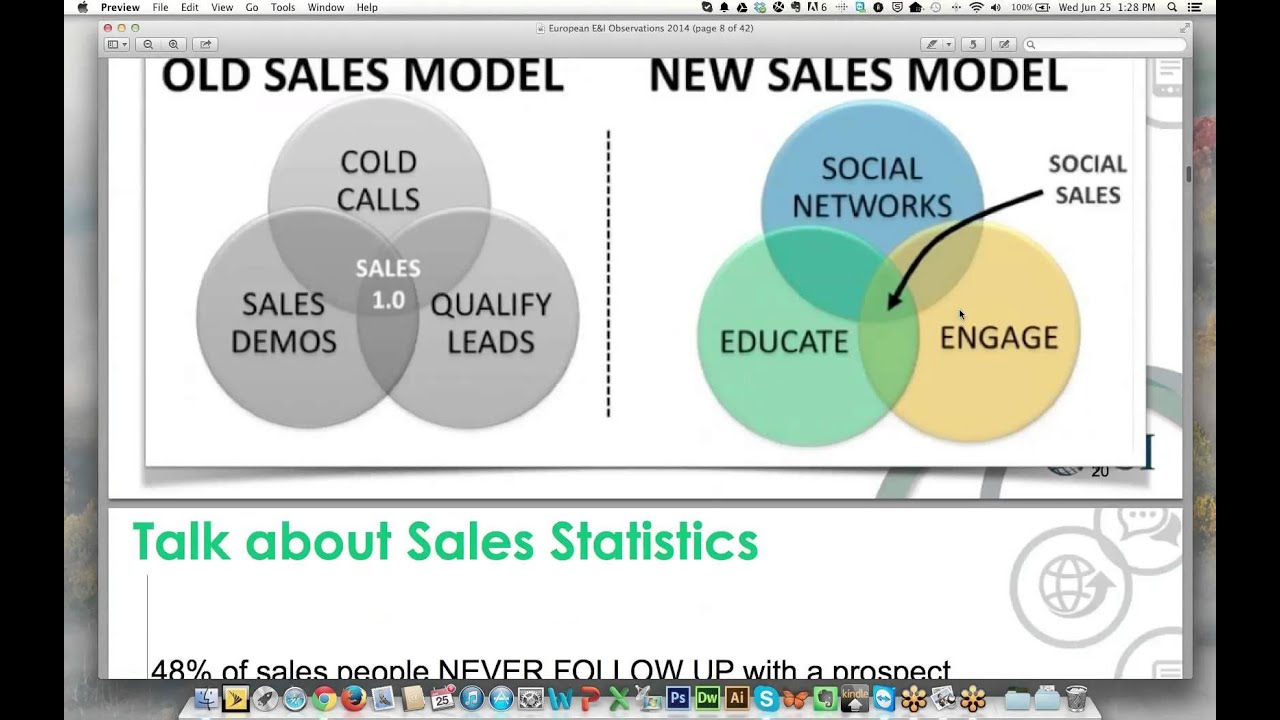
Alright, well, I'm doing it off a PDF instead of an actual PowerPoint, so we'll just kind of slide through these and we'll go low-tech. But looking at 2014, some of the trends that we've seen, and I think in the Free Webinar Wednesdays write-up we talked a little bit about the evolution of social selling, talking a little bit about paid search. There was quite a bit of discussion about the power of email marketing. And then search engine optimization. WSI is actually pioneering a new approach to search engine optimization called adaptive SEO, which focuses a lot more intensely on content creation and establishing kind of subject matter expertise and playing the role of an educator. So we'll talk a little bit about that, and hopefully some of these will give you some nice take-home nuggets. The big thing to keep in mind regardless of whether you are advertising or paying for it, or trying to create social awareness or getting organic rankings, is it's no longer about just the quantity of how much you are putting out. It's really about the quality of what you are putting out. Is it helpful? Is it shareable? Is it really of interest? So just doing a lot of things doesn't really have an impact anymore. In some instances it can actually hurt you. So make sure that when you are putting anything out on the Internet, you think through why you are putting it out, and if it is something that really can benefit the folks that you are reading. Facebook, and they've kind of not really called it their EdgeRank any longer, but their algorithm which determines really what shows up. I think the statistics that I've seen is at any point in time somebody on Facebook can see up to 1,500 different posts, or articles, or pieces of content. So there's certainly a lot of decision-making going on behind the scenes by Facebook to try to determine what actually makes it to your wall and to your feed and what gets hidden. It's no secret that from businesses, your organic reach is now being throttled significantly in some cases with as little as 5% or 6% viewership rates. So they are requiring businesses to actually go through through and pay or boost to have their posts actually seen through the social networks. But these are a few of the elements that we've found have an impact with regards to your post being seen on Facebook. So you can see popularity. You can see previous activity. You can see behavioral indications, user interactivity. Those are all factors that play into it. And the more unique and genuine and engaging you are, the more likely you have at tipping the scale so that it ends up showing up. Another thing that was kind of overreaching, and this kind of trickles down even at the employee level, is it's no longer kind of just the organization that is controlling the brand. Individuals are now starting to take ownership of the brand and talking about the business and making sure that you are talking really about your fans. It's not about you and what you can do, but it's sharing information and making sure that what you are putting out there either as a business or as employees of a business to educate the people that you want to influence. And the better that you do that, the more relevancy you are going to have, especially when you take a look in the social world. So when we talk about the concept of social selling, really we're looking at ways to take services, and primarily we're focused on LinkedIn, although there's some other tools that we use to support our LinkedIn efforts. But we're really talking about leveraging tools like LinkedIn to connect with your prospects and eliminate the cold calling that used to go on in an environment when you're trying to reach decision makers and to sell your products and services. So there's really 3 different kind of silos that social selling revolves around. You know, you want to discover more relationships, and that's where you're looking for opportunities to present your product or service, hopefully through building relationships and sharing content. You want to make sure that you nurture those and they don't leave. So this is kind of fixing the leaky bucket syndrome, because everybody's got information competing for your attention. And so if you can stay relevant and top of mind, and then taking those relationships and then expanding on them. So building more expertise and kind of adding to that so that you find them, you nurture them along, and they become genuine relationships. And hopefully at some point down the road, you're going to have an opportunity to do business with these folks. The goal of social selling really is to try to eliminate the cold calls. Now, you may not necessarily have a guaranteed silver platter handoff, but with social selling and the right type of research, kind of looking for opportunities to draw connections and similarities, you may not be able to have it be a totally hot call, but you can certainly make it a warm or even, you know, a lukewarm call when you want to go ahead and connect with somebody that might be a decision maker and have an opportunity to purchase what it is that you're doing. So the old sales model was really kind of always be selling, you know, cold calls, set up a demo, you know, make sure that you can qualify them. Do you have the budget? Are you the decision maker? You know, boom, boom, boom, boom, boom. And that's grayed out for a reason, because that's really the old sales model. And now what we're doing is we're really leveraging our involvement in social networks, and both Jeff and I are pretty active in LinkedIn and some of the others. But we're using those networks not to sell our stuff and to do demos and say, hey, let me talk to you about bank consulting or doing website development, but we're educating on the things that we do to basically provide people the knowledge. So if they wanted to try to do it themselves, they could, but if they need assistance, they at least know where to go. And through that, we create engagement. And so you can see social sales kind of sits right there at the crux of where all 3 of those circles actually kind of come together. Because it's a little bit of each of those. And so we're seeing some very powerful results from folks, not just ourselves as consultants, but there was a lot of case study examples that we were given when we were in Barcelona of clients that we've trained that have been able to grow their business. And they were skeptical at first and quite honestly amazed at how powerful— and I don't wanna say how easy, but, you know, how not as difficult as cold calling was in order to be able to get through. Because when you look at some of the statistics about your typical sales, you can see that when you start dropping down to— nobody buys on the first contact. Hey Jeff, would you like a website? Oh sure, not a problem. That rarely ever happens. Or hey, would you like bank consulting? No, I don't. But you can see how salespeople typically don't spend their time doing follow-up. They stop after the first one. Maybe they get a no, maybe they don't get an answer and they just kind of move on. I can attest to this and Jeff and I have talked about a few kind of keep-in-touch strategies that we're using. The platform that I've kind of rekindled the relationship with has been Contactually and Jeff, you'll be pleased to know that we're starting to work through some of the bugs that have impacted both of us over the last probably year or so. Contactually is what I'm using to actually make sure that I follow up, not just once or twice or 3 times. I'm trying really hard not to become a pest or a little mosquito, but making sure I keep in touch. Just today, actually, it was the 4th touch with somebody that I met at a conference in the late winter, early spring that finally circled back around and said, yep, we're interested. Can we schedule a time for us to have a conversation? It does make a difference and it is certainly an important part of the sales process to make sure that you keep in touch with folks. We've actually built a process around the social selling which we're pretty excited about. We've got some certified trainers in the network. That's one of my bucket list items is to also take a look at the certification process. But we've got a 12-week program that we run our trainers through, and this is the program that's actually delivered to our customers. And so you can see it's instructor-led, it's got hourly sessions, the webinars are recorded. We've actually built in assignments so that we're creating literally accountability for people that are going through, because a lot of organizations say, oh, we want to use LinkedIn better. And I think Jeff and I both talked to businesses where we give them some ideas and some thoughts, and then we kind of check in a couple weeks or months later, and, you know, the senior management still hasn't completed their LinkedIn profile, and they've got 15 connections and just really haven't put the effort in to really get the benefit. And so then it's, you know, doesn't work. So this is a program that we've developed some pretty significant structure around to try to help make sure things actually kind of move forward. So these are a few of the trainers, and I'm pleased to say that I think 3 of the 5 that are listed here have actually been guests on Free Webinar Wednesdays. So I'm pretty excited about that. So we'll have to reach out to Peter and Sharon to see if maybe they'd like to complete the roundup. But I think we've had David and certainly Francois, and we've had Rob on a couple of times talking about our social selling process. So Pretty cool list of folks there, and we got to chat with some of those individuals out in Barcelona. And then these are just a few of the tools. I'm also a big fan of services like Flipboard and Zyte, which actually Flipboard bought Zyte. I use Buffer app in addition to HootSuite. Pocket is a great little tool that you can use if you find articles that you like. You can go ahead and Save It to Pocket. And just kind of like the name implies, it gives you the ability to stick it in your pocket and save it for later so you can read it offline. Or, you know, maybe you don't have time to read it, but then you can pull it up later on. So a few of the tools that are there which are kind of cool. So that covers, I think, relatively quickly some of my observations on social selling. I think the important part is It's starting to become a very legitimate strategy within businesses, and when done correctly can be very powerful. Like anything, you gotta make sure you do it correctly, because if you go out and employ spammy tactics and don't do it the right way, you can alienate yourself very quickly and, and do more damage than good. So, Jeff, I just took a quick little peek at the chat box as I'm kinda rattling off, and I see that there's a few questions there. Is there anything that We want to go ahead and interject now and talk about.
You take a look at that first question while I handle the second one. Mark asked, do you find that Contactually is better than using LinkedIn for scheduling follow-ups? Absolutely. Contactually has some really wonderful features built into it for allowing you to do follow-ups. You can either use a date-driven follow-up if there is a specific date that you need to do follow-up, but what it works better for is just keeping your network active. So reminding you to periodically check in, and it gives you a lot of different ways that you can check in, whether it be phone, whether it be email, whether it be using LinkedIn to follow up. We've got Another person is asking about bugs in Contactually. The issues that Eric and I were having was it was not able to handle databases of names as large as ours. I think I had about 6,000 in Contactually and I was having issues with it being so non-responsive with such latency issues that it really wasn't working. Eric, you said there have been some fixes in the last few weeks. Do you want to talk about those?
Some of what I've found, because in Contactually you have the option to merge your contacts. If you've got maybe your contacts a couple of different spots, I found that a few of the problems that I was having actually were operator related. I had an example of an individual who shared an email address with another individual in the organization. And I merged everybody into the second person and I couldn't figure out why the first person wasn't present anymore. It was because it basically consolidated everybody up into one contact so I had to manually split that out. There was another situation where I had somebody that they were actually named the same person so I've got 2 John Does in my account. It merged both of those but it put it under John Doe #1's information but John Doe #2 basically disappeared. And I wasn't friends with John Doe 2 on Facebook but I was with them on LinkedIn. There was some of that that I took kind of the defaults when it said do you want to merge these connections and probably didn't pay attention as much as I should have. I've also gone through and in Contactually you have the ability to create what's known as buckets. A bucket can have a specific follow-up schedule which is where I completely agree with Jeff. Contactually is much better for scheduling follow-ups and reminders because you can put individuals in a hot lead bucket or a vendor bucket and you can define I need to touch base with these people that are defined as hot leads at least every 7 days, whether that's through email, social networking, whatever the case may be. What I ended up doing when I merged all of my contacts originally, is every group that I had created in Google Contacts created a bucket. So I had like 45 buckets and it was just unwieldy and just very difficult to manage. I blew away every single bucket and recreated and just started manually adding people one at a time to either a hot, a warm, or a cold lead bucket, a customer bucket, a primary connection bucket, a vendor bucket, and a follow-up someday bucket. And so now I've got much fewer buckets to manage. I've got fewer names in those, and I'm just kind of re-adding people. So it doesn't get me where I was before I kind of wiped the slate clean, but I'm building it from scratch essentially. And within the next probably 3 or 4 months, I don't think I'm going to— it probably won't even take that long. I think probably within the next month or 2, I'm going to have a very reliable database of names and bucket categories categorizations to make sure that I keep in touch with people. I will say their support platform has been really good. I've been sending tickets in, they've been responding to me. They send screenshots, I send screenshots. They're very, very eager and interested in fixing things and very appreciative. I'm much more of a Contactually— I've always been a fan, but I'm a much more optimistic fan now that some of these things are starting to get squashed.
They were pretty upfront about the fact that they released too many features too quickly. There was a period of time where they've got an email template feature that should be just absolutely outstanding, but unfortunately they released it and did not catch in testing that it could potentially pick up the wrong template or It was just a mess. That combined with the latency issues prevented you from really doing a lot of maintenance on your databases.
Yeah.
It was a good move to just take a couple months to let Contactually get their act together. I agree with you, they are just outstanding on their customer support. They bend over backwards to try to fix things. I think they just got too eager too quickly.
Yep, exactly. I've been asked to rattle off my buckets again. Again, these are the classifications that I have. I have a customer bucket which is just general contacts. If I ever want to send an update about what's going on, I have a primary contact customer which if there's any sort of web maintenance or a specific tactical or procedural thing that needs to be done. The presidents and CEOs typically are part of the general contact, but most of the time I've got either the IT person or the marketing director as the primary contact. A much smaller group, but they're much more targeted with specific ideas that they need to take action on. Then I've got 3 or 4 classifications of leads. I've got hot leads which are people that have said, yeah, we want to do business. We're interested. Let's talk. Warm lead which doesn't have as much of a frequency. Anybody that's gone cold, I can put them in there. Then a potential someday which is just kind of make sure I touch base with them I think once every 6 months or so. Then the last bucket that I've created at least at this point is a vendor bucket. All of the service providers that we partner with within the WSI world as well as some of the other ones that I've built in the banking industry in general, I can put in there. As things change and I want to make sure that my vendor partners know what's going on, I can easily connect with those folks.
If I'm not mistaken, they've revamped the bucket feature. When Contactually was originally released, you were limited to one bucket per content. If I read my released My release notes correctly, you now have the ability to add a contact into more than one bucket.
Yes, and that's what I've done. For example, when I talk about the primary contacts customer bucket, those are also part of the general because if I send a general message out, I'm going to want to include them, but they're also the only ones that are listed in the primary contact. They can be in 2 areas and that's a good point.
One of the other features that was not working correctly that I understand is corrected now is Contaxly actually has the ability to generate small groups of emails. Perhaps you want to email a group of 100 people that are in a specific bucket. That feature was not working at one time and I think that's been corrected now. It's very easy to maintain contact in a semi-personal way by working with groups of people like that.
The cool part about what Contactually does in its email, and we'll talk a little bit about this when we get to some of the email stuff with Constant Contact, but it personalizes it because it pulls the information directly out of your database that's been synchronized and it knows first name, last name, company name and you can build those fields right directly into the email. If I wanted to send a message and Jeff happens to be in my primary contacts, it says, hey Jeff. Then if I wanted to send it to Bob, it says, hey Bob. It's the same message but now it looks like it's personalized which is one of the big advantages of using a service like Constant Contact is you've got that mass customization capability to really make it look like it's a one-on-one conversation so you increase the likelihood that it's going to get read and appreciated. All good stuff.
One of the features that I found most valuable in Contactually that actually still works even though I haven't switched back to a paid account is it indexes all of your communication from multiple platforms. If I've communicated from my Google Apps for Business email account or LinkedIn, I think even Facebook, it's going to index all of that within Contactually so I can get a true picture of all the contact that I've made with that person.
Yep, absolutely.
Can you take that first question that's in the question box, Eric?
Yeah, and I'll be honest with you, I may not have really seen it. We're talking about Google+ listings and migrating into Google My Business. And I've not really paid much attention to Google My Business. You know, I guess at this point I think I need to probably spend a little bit of time reviewing that because I don't know— this probably has something similar to the prior question, getting multiple listings. But if you've got 4 accounts that need to be combined, you know, I don't know if now is the right time to migrate. I'd certainly be interested in catching what is going on over at Google I/O. And if they're talking about this, because with our conversations with Tom Petty, my colleague from California, he can also attest that some of these things have been ongoing problems, not just recent ones. So let's table that at this point. I'm sorry I can't give you a real good answer, but I think that provides an opportunity to do a little bit of research to figure out exactly what's going on. Maybe that could be another good show idea. I'm also thinking maybe we need to get a hold of Brian or somebody over at Contactually and have them come back and do a number 2 and give us an update on all the new things that they've been able to fix and some of the features that they've offered because it looks like we've got more than a few people that are interested in that platform and staying in touch, especially given some of the fact that we've got social selling and the weak follow-up capability that most salespeople have. I mean, if you think about this, this is not just what's going on in your organization, but if you recognize this and you fix this problem, chances are these statistics are remaining in your competitors' organization. They're not following up after a first, a second, or third. They're stopping. They're not getting action. And if you can leverage something that involves social selling with a keep-in-touch strategy and a platform like Contactually, You know, you now have an opportunity to play more of a proactive role and move the needle when it comes to generating sales and building relationships for your business. So let's continue. We may not be able to get through all of the slides because I see we've got about 15 minutes, but just wanted to quickly chat kind of opposite of building kind of an educating Pay-per-click marketing, we talked quite a bit about that. We actually had a presentation from one of the top-ranked PPC marketing individuals literally in the world who was present at the conference talking about some of the statistics and how there really is an opportunity here for businesses when done correctly. Like anything else, if you do it wrong, you can spend a lot of money and waste a lot of time, but you know, being able to leverage it and step in front of people when they're online proactively searching for what it is that you may be able to provide. So you can see that 3rd bullet there. If an organization is actually currently using pay-per-click and they're doing it correctly, they're seeing results, they're planning on increasing their budgets because they know that it works and it's driving actually traffic. And we'll see, other than email marketing, paid search is one of the highest ROI providers of any sort of marketing effort. And even though social selling is good at reputation, calculating an ROI off of social media still has been a little bit of a challenge. So paid search spending is increasing, using it for generating leads compared to television, certainly heads and shoulders above where TV is. And the average, if you just look at Google AdWords, a return on investment is you're getting almost a 2-to-1 payback on your advertising spend. So, you know, we finished it off and say obviously there's no guarantees, so every organization is a little different than the other, but paid search is one of the areas, at least for our business, we're starting to get more interest from our customers realizing whether it's paying for visibility in Facebook or in Google or Bing or Yahoo, realizing that some of the organic is is much more difficult to rank for because there's so much. And how mobile— we called it the connectivity tornado— but mobile is certainly becoming more and more powerful than the desktop, and people are using their devices to search, and paid search advertising on mobile is becoming very, very powerful as well. So you can see a lot of people are adopting mobile, but the awareness of being able to advertise on it is still pretty low. In making sure that when we do put together campaigns that they work across both platforms. So Google's going to raise their cost per click year over year, so it's, it's not going to get cheaper, which means you need to be smarter at it and do it more efficiently. You'll have difficulty differentiating because the right column may disappear when you do a paid search advertisement placement on a desktop. A lot of times your sponsored ads show up on the right-hand side. Well, on a mobile, it doesn't happen. You don't have the right-hand column. Everything kind of goes in one column. We're seeing things embedded within videos and maps and other sorts of elements. And then the conversation turned to remarketing, being able to proactively present information based on prior activity on the web. If you've ever searched for something, the example I like to give is Joseph Banks. If you go on their site and you look for dress shirts or ties, and then you start browsing around the Internet, you can very quickly see that they are identifying who you are, where you've been, and they are proactively sending advertisements to you and remarketing their messages. So mobile has to really be part of it, but making sure that you are spending money effectively. We will talk a little bit about some email. We did have an opportunity to have one of the very first, I think he was customer number 1, Ron Cates. He was actually present at our conference and was the very first Constant Contact customer, used it for his business and liked it so much he ended up working with the company and now he does a lot of speaking for them. Even though a lot of people think email is dead, the reality is almost 100% of internet users between 18 and 64 send or read email. So it definitely, you know, you have to have an email account. to get into a social network. That's where your updates go. So email is definitely something that's being read. Here's that ROI slide that we talked about. Email still has almost $40 on a dollar investment of an ROI here to be able to justify the expense that you're spending. It's not a real expensive medium. WSI was proud to announce in Constant Contact kind of jointly announced we've been anointed their, their first and currently only global partner. So we've got some pretty nice connectivity with our friends over at Constant Contact and some of the cool new things that are going on with their platform. But he talked about kind of 5 main areas. So best practices with email. This is an example of one that he got actually from his Audi dealership. You know, the images didn't load, the background color was terrible, the clicks didn't work right. Certainly this isn't a best practice. You can't afford to not send an email that important information is going to be hidden, because if the visitor or the reader has got their images turned off, you are not going to see what is going on. So a lot of the information that you want to present, make sure you put it in text. If you are going to use an image, make sure that you have some sort of a description around it. So it could say, the new Audi A6, click to view. They can see that they want to turn images on so that they can actually check out a picture of what the car is. Best practices there, even the big dogs are getting it wrong. Making sure that you're growing your list. A lot of people say it's so hard to get email subscribers. Over half of consumers will actually give you an email address if you ask them. In the banking world, a lot of times we get email addresses because people are signing up for online banking. Making sure if you're a business, would you be interested in subscribing to our email list? We send out notifications and updates or coupons or special offers. Over half of the time you're going to get a yes, which is a pretty good close ratio. There are other ways that you can actually grow your list. So within Constant Contact actually itself, you can generate QR codes. So you could put those actually at your checkout areas so people could scan them and opt in directly. You could send text messages directly from Constant Contact. It even has a pretty nifty little Facebook embed widget that you can go and install the app directly on Facebook and people can sign up directly from there. The data collection process, you want to make sure that you're getting information from your visitors and helping them tell you what they're interested in. This is an example of a tennis store that he gave. Where you can see we're asking for an email address and zip code, but then we also give them the option to pick what list they want. Do you want specials and offers, or do you just want the newsletter? Because if you don't want specials and offers, we're not going to send it to you because we don't want to offend you and cause you to unsubscribe down the road. But if you're interested in specials and offers and saving money, so making sure that you're gathering the right information and then looking for ways to monetize that. And so continuing with his theme from the, from the tennis store, this was a racket that was referenced, and you can see they send a little note out. They've got a new racket they just tested, click here to buy. So if somebody's interested, and it's a very easy process for them to click, visit the website, and then they can go ahead and actually purchase it right directly through an email. And because you're using email marketing your opens, your clicks, all those things are tracked and measured so you can determine what's going on. And then lastly is making sure that your messages get delivered. Now normally, and he gave a pretty funny example where he created an email which in all intents and purposes probably shouldn't have been delivered because he used terms like free and spam and Viagra and sale with a bunch of exclamation points. Even though these are all trigger terms, because he's using a platform like Constant Contact that has a lot of checks and balances in place to prohibit people from using rented lists and spammy tactics, this email actually still was delivered. You want to just be careful if you're not using a service like Constant Contact. Make sure that you're using a reputable service. Certainly don't just put people in the BCC field and click send. That can get you in trouble. It can get your domain name blocked and blacklisted, which is not an easy thing to undo. So using a service like Constant Contact or any of the others, but obviously we're preferential to the folks at Constant Contact, certainly is one that we think is pretty important. So I'm going to Hit the pause button here. We may want to go ahead and actually table— I know we were going to talk about search engine optimization and our adaptive SEO process, but I'll be honest, I don't think I'm going to have an opportunity to burn through that in 5 minutes. So we— Jeff, do we have other questions in the chat box maybe we can go over for the next 5 minutes? And maybe an adaptive conversation is something that we could circle back around on a following show.
Mark asks, does traffic to a website from an email newsletter get collected by Google Analytics?
Yes, it does. And actually within Constant Contact, one is you'll see that as referral traffic, so it will identify Constant Contact as the source of the referral. But you can also within Constant Contact include your own Google Analytics code to measure and monitor what's actually happening in the newsletter itself. So that is one of the features. Again, there are other services out there like MailChimp, and Vertical Response, and AWeber. I don't know whether those platforms have the same capability, but seeing that I use Constant Contact, that is what we use for the Free Webinar Wednesdays notifications. You can actually put your little Google Analytics UA code directly in the settings and have Google Analytics monitor your email newsletter So you can track it on both sides. So that's a really good question. One of the other things, I guess as long as we're kind of on that tangent, I'll flip over here real quick, is you also may want to think about using what's known as a tagged URL. And I've created, if you go to bit.ly/gub, so Google-URL-bit.ly, Builder. So bit.ly/gub. What this does is it redirects you to Google's kind of analytics URL builder campaign within Google Analytics. If you're using Google Analytics to track statistics on your website, you can go in and if I just want— let's say I'm a bank, so I'm going to put in, if I typed it correctly, http://bankname .com/home loans. So let's say I've got a link in my newsletter and I'm interested in trying to get people to click on this link to go to my home loans page. What I can do here is I can go in and this is a newsletter and maybe I'll put in 2014-06 because it's 2014 and it's the June newsletter. Let's say this is a banner image and it's the square one that I have in my newsletter. Maybe there's a couple different ones. I'm not really doing a paid keyword on this so I can leave that empty. If I had 2 different versions, so let's say maybe there was a picket fence or kids playing in the front yard, you could differentiate between that. But then this is get a home loan. Get a home loan. So now what you can do is you click on the submit button, and if you've ever clicked on a newsletter link, chances are you've seen this yourself where you've got the actual URL that shows up and then you've got a little question mark with UTM source, medium, campaign, blah blah blah. What that's going to do is that's going to feed data directly into your Google Analytics so that you can go back and actually determine whether or not people are visiting from your newsletter. If you're advertising with the local radio station or the newspaper or doing anything, this is a good way of tracking to see whether that activity is being done. It's similar in nature to using like a call forwarding number in your Yellow Page ad so that when you When you determine whether or not people are actually calling you from that phone number, you can see whether anybody is calling that number that is being forwarded to you. So again, it is bit.ly/g-u-b for Google URL Builder. And I'm going to go ahead and throw that up here again real quick. My hands still aren't working that well after the lumberjack, so I apologize. There it is, bit.ly/gub with dashes in between. You can get to that page. This will just redirect you. You can also just go to Google URL Builder. You can Google for that and it'll get you this URL as well. That's one other way when we talk about actually tracking and monitoring effectiveness, not just within an email campaign but also in other areas where you've got links that are pointing back to your site. Whether it's paid search and PPC, or banner and display, or you're paying for it, or it's part of your newsletter, even campaigns that you're doing in Facebook, you can go ahead and indicate that this is a Facebook promotion so you can see whether people are coming back to your site from Facebook.
So there.
It looks like we are at the top of the hour. Jeff, how are the questions looking?
I think you addressed everything. Hmm.
Well, on my to-do list, I can see, Jeff, you and I need to probably schedule some time to maybe have a Contactually conversation. I didn't get a chance to talk about our adaptive SEO, and looks like we need to do a little bit of research maybe in the Google arena, and will be certainly interesting to see what they talk about at I/O and Maybe that could be a show for next week, talk a little bit more about Places. And we've got some follow-up folks.
Cool.
Let's see, we have one more question about Google indexing. So yeah, if you'd like to go ahead and ask that question, we'll go maybe a couple minutes over and we'll see if we can answer it for you. But if not, we can follow up with an email as well. Ask away. The clock is ticking though. Tick tock, tick tock. This is where we hum the Jeopardy song, and you don't want me humming.
So there's a quickie. Worth it?
If you're a financial institution, I would say probably not. It depends. If you are selling things that come across very nice visually, if you're a restaurant or if you're a clothing store where you're trying to set a mood and photography can help kind of play off of that, then yes, I think Pinterest, Instagram, any of the, you know, the image-based social networking platforms can be very powerful. You just want to think about your audience, what it is that you're selling, and the type of story that you're going to be kind of putting out there. You know, in the digital marketing world, there's a lot of people that are putting out things like Infographics that help explain maybe more complicated social networking and digital marketing tactics. So we've seen some success in there. If you go to Pinterest and just do a search for infographics, you can find a lot of really cool examples of infographics.
I'm thinking if your target market is fishing and hunting, you will not get very good results on Pinterest. Not saying you won't get any, but I'm saying you probably won't get very good.
Yep, exactly. Exactly. So there is a follow-up question talking about pages being dropped on Webmaster Tools. Yeah, that's a tough one. Google, depending on why your pages were ranked, we've seen some clients and certainly some folks that we've talked to that we would like to become clients. Being impacted by Google's Webmaster Tools and seeing pages getting dropped from the index or certainly degraded. They're releasing updates to their algorithm all the time. We've had Baltich Gill on before, and he's talked about Penguin and Panda and most recently Hummingbird and some of the other changes. And these are all going after spammy links, valuable content, fresh information, semantic search. So there's an awful lot of kind of what-ifs around that. I may suggest if you wanted to maybe do a follow-up, or I can drop you an email afterwards, we can maybe take a little bit more look at that offline and see. That's one of the areas where our adaptive SEO really tries to make more of an impact because it's, it's designed as much more of a long-term strategy. But we're actually being hired by people now to go in and undo bad SEO that's actually penalizing customers now because they got short immediate returns by spammy tactics, and now Google has picked up on spammy tactics and penalizing people for those. And the only way to get that fixed is either to release your domain name and start over again, or to find all these spammy links and go to try to get them unlisted, which is very, very difficult and very, very expensive. So not an easy thing to do. So, well, I think that about runs out. I know we've still got a few other questions, and I agree, Chris, we do need to get Tom Petty back on. And he's going to be my next call probably to say, hey, are you watching Google I/O, especially being in California? And I think he'd be a good one to have come back on and have a chitchat. So keep your fingers crossed that we'll have our digital marketing rock star Tom Petty Back with us. So cool. Excellent. All right. Well, with that, Jeff, we've consumed an hour very, very quickly, but thanks to everybody. Thanks for all the great questions. I see that there are still some questions in the box, but we'll go ahead and the system tracks that. We'll get your email and we'll send you some follow-up. So until next week, this is Eric Cook and Jeff Simpkins signing off.
Thanks, Eric.
for another episode of Free Webinar Wednesdays. We'll look forward to seeing you next Wednesday and every Wednesday at 1 PM Eastern time here at freewebinarwednesdays.com. Until then, have a great week everyone. Bye-bye.







