
Free Webinar Wednesdays 2016 Holiday Wish List Show
Eric Cook, Jeff Simpkins, and Gregory McPherson share their holiday tech wish list. They cover Amazon Echo and Alexa devices, Eneloop rechargeable batteries, the NES Classic retro console, Apple AirPods, and smart notebooks like Livescribe and Rocketbook, discussing pricing and how each integrates with other services.
Chapters
Greetings everybody, welcome to the Wednesday, December 14th, 2016 episode of Free Webinar Wednesdays. This is Eric Cook and I'm with WSI Digital Marketing where we work with businesses and organizations in helping them better understand and leverage the power of the internet as a strategic business tool. You can learn more about me and all the cool stuff we get to do over here at WSI at www.wsidigitalmarketing.com. powered by WSI.com. And if you don't put the W's in, it will still work, but I just, force of habit, always say www. So anyway, with that out of the way, I would like to take this opportunity to introduce my good friend and Free Webinar Wednesday partner, Mr. Jeff Simpkins. Jeff, say hello to everybody out there in Free Webinar Wednesday world. Hello everybody, this is Jeff Simpkins, and I am with Community Bank Consulting, Inc. And you can learn more about me and Community Bank Consulting Awesome. Thank you, Eric. I have gone in and done the maintenance so it'll work without the www as well. I think we all do that. What's really funny is when somebody says, well, visit me at http:// and then when they say backslash, that just really gets me because Those are forward slashes, folks. They're not backslashes. We use forward slashes on the internet. If you're saying backslash this, that, the other, geeks like myself are going to look down the nose at you. We might not say anything, but a little public service announcement for you. Sorry, I just got on my geek soapbox there. Where'd that come from? Must be the snow. It's got me going. We have an unscheduled but yet very exciting special guest. We've actually been trying to get Mr. Greg McPherson to join us for a few episodes in the past to talk. Those of you that have not had an opportunity to be on a show with Greg, Jeff and I usually accuse him of costing us money. 'Cause he hops on the show and has always got cool little gadgets and gizmos that we end up taking off and buying at some point down the road. And so I was really crossing my fingers that Greg would be available for today's holiday wish list show, and he is, and he is on the line. And so my good friend and Marshall High School classmate and local area real estate— Uh, Professional, Mr. Gregory McPherson. Welcome back to Free Webinar Wednesdays.
Thank you very much. That was a very generous introduction. I appreciate that. Absolutely. There's a little something extra in your stocking for you.
Nice. Our regular audience member Jim said he thought Santa Claus was the special guest. Jim, you never know, Greg. I bet you may have been caught running around in a red furry suit from time to time. Well, I will tell you, those of you that haven't seen me in a while, fat bike season is upon us here in Michigan. The snow has started to fall, and I bought me a fat bike last year. Didn't get much chance to ride it in the winter, but with fat biking and cross-country skiing, I'm growing a little bit of a fuzzy beard, and it's getting a little longer, and the longer it gets, the whiter it gets. So I'm by no means Santa Claus quality whiteness, but I got a little gray floating around in there. So— That would be me. Exactly. And I want to give a shout out to Mr. Perry as well, who had an epic tweet this morning, and I can't believe I didn't think of it. But given the fact that we're probably going to be talking about gadgets and gizmos, he said, be sure to join Free Webinar Wednesdays, and then made mention to tech the halls, which I thought was just brilliant. So I promptly stole that and turned it into a hashtag, and I'm sure we'll be seeing a lot of that. I've been using that. Kudos and hat tip to you, Jim, for the tech the halls comment. I don't know if you thought of that yourself or is that something that you saw someplace else, but I'm giving you full rights and credit to that. Way to go. He's chiming back. Did he post a comment? I see somebody posted something here. Yeah, that was Jim saying tech the halls with a smiley face. Nice, good, good. Fa la la la la la la la la. Exactly. I was trying to think of other technology Christmas carols that might fall into place there, and my creative juices just weren't flowing this morning. But Tech the Halls, we'll just use that. So every time I hear something with the Deck the Halls, Tech the Halls theme, my mind flashes to that scene over Christmas dinner in the movie *The Christmas Story*. Nice, nice, nice. Well, I can't remember, Jeff, when we started this, but we've been doing this for a good number of years. And when we roll into the end of the year, we kind of started with, you know, what's on our list for Dear Santa, and it seems to have been one of our more popular shows. And, and so with Greg now back, I've got a list of things that I've lined up I know Greg's got some stuff and you've got some stuff. One little PSA, it's not going to cost you anything. And a couple of shows ago when we talked about kind of social media tools to help with your social media engagement, one of the ones that stuck with me is this little Zest. So Zest is, it's a little marketing float. Tool that rolls into your tab on Google Chrome. Anytime I open up a new tab, I've got content that it pulls in for me. You can see I'm picking a variety of different topics here that it's bringing in. I've been a big fan of Nuzzlr. I've been a big fan of Flipboard, a handful of others. But I will tell you, when I use Zest, I'm getting articles in Zest that are a wider variety and a bigger cross-section than some of the other areas that I've actually been finding in some of our other content. If you're looking for a great little tool that will give you some nice content that you can share with your network and give you inspiration for blog posts or articles or something that you want to distribute out to LinkedIn or Twitter or whatever, give the folks at Zest a try. It's zest.is. It's just basically the little plugin that you install in Chrome. When you fire up a new tab, it just automatically populates it for you, and it's got really, really good stuff. I've picked up a couple of really cool articles, and I've been seeing a lot more engagement on my Twitter stream in particular with some fan growth and some articles that I posted out to LinkedIn. Actually, several of the articles that I posted exceeded the 50 individual engagement rates where LinkedIn will send you a note and say you've got 50 likes or— so good stuff. It's a freebie, doesn't cost anything, but one of my little gifts that I'm glad that I found out about. They actually gave us a little bit of Twitter love and helped promote that show when we went through. If you go down and take a look at the social media tools, we talked about that plus a variety of other ones as well. Check out Zest. All right, Greg, I want you to go first, our guest of honor. I'm gonna go ahead, I've got my tab pulled up here. I'm gonna overwrite my Zest stream, but give us the, the first little item that's on your Dear Santa Greg's Been a Good Boy list.
All right, this might be a little underwhelming, but actually I think it's pretty good.
Alright.
This is something I'm not sure how many people are aware of or use, but you think Christmas time and you think gadgets and everything, and obviously you think batteries for all these different gadgets. And over the last year, I actually came across something called, and I think it's pronounced Eneloop, and that's E-N-E-L-O-O-P, and it's a power pack. And on the face of it, it's not that unique. It's rechargeable batteries, which Obviously, you know, it's been around for a long time. The way that they are packaging this though, it caught my eye and it's actually— I think I would probably never buy regular batteries again. This power pack comes with 12 AA batteries and 4 AAA batteries, and the batteries are all white so they're never confused with, you know, something that you might throw away accidentally. But the appeal to this is this. If you look at what you just pulled up there, they have spacers. And what that means is, like, you'll see what appears to be like a B-size battery and a D-size battery. What you actually do is you slide the AA batteries into those spacers, and then those batteries will work, you know, in any item that needs that size to be qualified. So it's really slick because it's kind of a one-size-fits-all solution. The batteries last a long time, they're very efficient, and it's like I said, when you pull out a battery and you need a special size, whether it's a D or a B or so forth, you usually end up having to run to the store to pick up something. This kind of does away with all of that. I've used it over the last 6 months. I'm actually buying another package of them because pretty much everything in my house now that has batteries has one of these batteries in it. Again, it's— I don't know how high this is on the fun factor, but it's pretty high in practicality.
Wow. I'm looking over at the desk that's right behind me, and I've got a 12-pack of Eneloop batteries, the rechargeable AAs, but I'll be honest, I had no idea that they had the ability to turn into Ds and Cs. So we started moving towards the rechargeable scene, and I agree, it's not exactly the sexiest gift, but when you start thinking about, you know, you're keeping crap out of the landfill and you don't have to worry about tossing stuff away— they're a little more expensive, but I've always got batteries available, which is, which is great. So yeah.
And they are, they are pre-charged. I mean, when you get them, they're ready to go. Again, I know what you're saying, they are a little bit more expensive, but honestly, if you were to go and look at a large bulk amount of AAs or AAAs, it's pretty shocking. They're not cheap.
Yes.
They're $30, $40 if you buy a reasonable amount of them, and then of course it's the one use and you toss them in the trash. So like I said, the fact that these spacers are there, it really makes that kit particularly, just a very— it's just convenient. It's just very productive. It's like I said, I've used the Ds. I've found myself— it's just nice to be able to think, okay, I've got to run to the store and I've got to buy 2 Ds and I have it.
Yeah.
I'm actually going to— like I said, I bought the super pack there probably Less than 6 months ago and I've used the spacers, I've used all of the AAAs, all of the AAs and I'm actually going to end up buying another package of them.
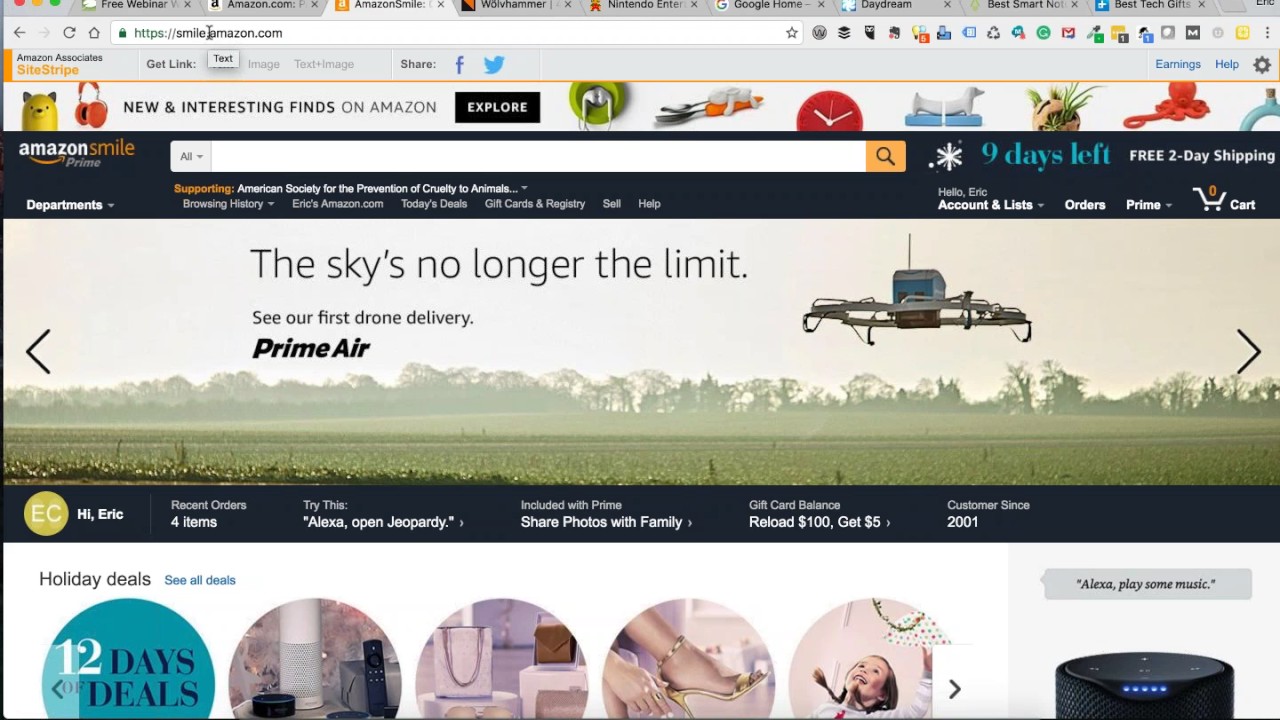
Cool, cool, added to my wish list and it's arriving before Christmas. How about them apples? Very cool, good deal. Cool. While we're on Amazon, I don't know, and Greg, I don't know if you do this or not, or Jeff, but one of the things that I discovered a couple of years ago, and I just happened to have Amazon, I don't know how they knew that I was into animals and dogs, or if it just kind of was pure happenstance, but if you go and you use Amazon and you put smile in front of that, Gives you the ability to browse Amazon just like you normally would. Your prices remain the same. It works whether you're a Prime or a non-Prime member. But the cool part about going smile.amazon.com is a portion of whatever you buy ends up getting allocated back to— and for me, it goes back to the ASPCA for child— or for child— our golden retrievers are our children— for animal cruelty protection. And a little Freudian slip there, so sorry for those of you that have 2-legged children and I just called them dogs. carbs, but that's the way it is in our house, as I'm sure it is in yours too. If you buy a lot of stuff on Amazon, go to Smile.io, and it's not a ton of money. I go to my Amazon and I take a look and I see— if I do the dropdown, you can see I've only generated not even $3. If you just think of the number of people that are on buying stuff, even a little portion of that that gets carved out by Amazon and sent back to some of these charities, you can see that it's some pretty cool stuff. So when you're browsing, when you're shopping, it doesn't do you— you know, it's no negative, your prices don't go up. Just go to smile.amazon.com, and I think you can even pick like the Red Cross or a couple of others as well as your charity of choice, and you'll be doing some good for another service.
Awesome. Yeah.
Do you use Smile? Either one of you guys use that, or is this news to you? Yeah, Jeff, are you a Smile guy? Yeah, I use it. Cool. So, right, uh, Eric Daniel wants to know the URL for Zest. Zest, Z-E-S-T dot I-S. So Z-E-S-T dot I-S. Zest is Because Zest.com, I'm sure, is gone long ago. You can go ahead and you can get Zest. You want to use it with Chrome. You can see I've got the little plugin here in my browser. Once you get it installed, it'll just— anytime you open a new Chrome tab, it'll give it to you. You'll get a bunch of really great information. I use mine in combination with Buffer and Hootsuite. I pull up Zest. Find an article, click to it, load it up into HootSuite or Buffer, and then post it out. Like I said, getting really good engagement. It's worked out really, really well. Cool. All right. You want to do a twofer, Greg? What else you got?
Well, I guess one thing, just a quick mention I think. Kind of staying with your Amazon theme there, if people aren't familiar with or thinking of or not, you know, they should at least take a look at Echo Alexa. I don't know if that's anything you're familiar with.
Remind me my Alexa.
Yep. I actually, it just logged on at my house because I said the name.
I'm going to have to—
Anyway, it is actually playing music now. Hold on just a second, that's crazy. Can you hear that or no?
No, we can't hear it.
Okay, I'll keep going then.
A little background ambiance for us.
The short version is this, it has a ton of functions. You can place orders verbally, if you belong to the Prime account it will look through through your past orders and it will see that you've made them and it will go ahead and reorder those items for you. It will also stream any kind of a music service, whether it's Amazon or Spotify. It's kind of like Siri for the home, meaning that if you ask any general questions, it will—
Siri.
You can ask what year was a movie made or who was the starring actor or who won best actor in the year of whatever. It's just really a very robust platform and it's got an open API so that other software and app producers are able to tie into it. I can control my phone or my home rather my Hue lights, my Nest thermostat, you know, just from basically speaking the name and then, you know, telling it to adjust the thermostat or to dim lights or turn lights on, turn lights off. It is very impressive. And as far as what I have seen, I know there's some other options out there that Google's introduced and so forth, but this seems to be the most robust option right now for some sort of a home controlling system, you know, verbally. So obviously both of you are familiar with it. It sounds like you've had a similar experience.
Yep, yep, I love it. I actually presented earlier this year at a conference, and one of my sessions was on— I think it was called There's an App for That. And I started the conference session, I brought in Alexa, and she's downstairs so she can't hear me talking about her. Of course, if I'm on speakerphone right now, you may— I may trigger yours. But I actually started the session with Alexa, and I had her pull up a couple of things, asked her about the weather, told a couple of cheesy jokes, which was kind of fun, and they're all clean, which is good. But yeah, in this time of year, I'll tell you the biggest thing And the reason that she's downstairs and not up here in my office is my wife likes to say, Alexa, play Christmas music. And it goes out and it finds a random channel, and sometimes it picks a country-western channel. So she'll say, Alexa, play contemporary Christmas music or classic Christmas music. But she grabs all that information and kind of brings it back, and it's just really nice to have Her just kind of in the background, but we use her for the shopping list and other little quick questions. One of the items that I don't have on my list for the show, but this reminds me, they have come out with actually a rechargeable base that you can use because they've got the one of the other Echos that you can use.
Right.
That's more of a mobile, the Tap. But they've got a mobile base now that you can charge up, and then you can drop your regular Echo in that, and you can take it on the road and not use the tap. And so the charging base is on my list, but I forgot to put it in my Fire Up tabs here.
So I will say this because you're right there. There is the Echo, which is kind of their premium version of it, which is like, I think, $140 or something like that. And the biggest advantage to that is supposedly the speaker is a bit more premium. So if you want to stream music and so forth, you've got pretty good sound from a very reasonably small speaker. If you go back up, Eric, the very top unit, that's what I was gonna mention. If someone's just—
Yeah, the Dot's on my list.
That is honestly— I've got, you know, one of those in my bedroom so I can turn lights on and off. You can listen to music. The speaker is not as robust, but it's more than adequate, meaning if you're not some sort of an audiophile, it's certainly adequate to wake you up in the morning with a sound or song or whatever. But again, you're talking about a $100 difference, so if clarity of sound isn't that big of a deal musically and you're just looking for the functionality of it, For $40, it is— it's really staggering what this thing can do.
Yeah, you can also, with the dock, you can connect it to a Bose or some sort of external speaker.
That's correct.
Exactly. Yeah. So if you've got an awesome sound system and all you need is some intelligence baked into it. Yeah. Question for both of you on, you know, let's say somebody wants to get one of these devices, but They're not a Prime member, so they don't get access to all the extra Amazon, you know, the music and whatnot. Is there still a good reason, or is there enough usefulness in these devices without being an Amazon Prime member?
Jeff, you want to go?
I don't have one yet, so I don't know, but from what I've been able to see, you can do some things, but it would It would be a huge disservice to yourself to have it without Prime.
I will say this, I absolutely feel like yes, regardless of Prime. I, I mean, again, the things that I just said are not Prime—
Regardless of Prime.
Absolutely. The things that I just mentioned, for example, tying into my thermostat, which is a Nest thermostat, tying into all my lights in my house, which are Hue. I can say Echo, I won't say the name so it doesn't keep popping up, but I'll say Echo, dim lights, or Echo, turn off lights, turn on lights, whatever.
Yep.
Or dim them 30%, dim them 70%. It's just once you kind of have that, it's kind of weird. It's not like you can't throw a switch and turn something on and off, but To have that kind of control to where you can, like you said, walking through the house, add to my grocery list eggs or buy more shaving gel and it will automatically do it. It's instant. Now that is a prime feature probably, the reordering. Like Jeff said, if you've got a Bose speaker or something like that and Again, with Prime you have Amazon Music, I don't even know what their service is called, but you can go in and I'm really thankful for this. Amazon allows you to go in and change your default streaming service and I use Spotify and I prefer it. I've made Spotify my default streaming service so I don't even have to say play song X by band Y on Spotify. I just simply say, Play song X by band X, and it just goes to Spotify. So again, for $40, I can't even imagine another thing that can do everything that this does for next to nothing, effectively. For $40 to be able to— and again, it's more robust than Siri. I mean, you can say, what's the weather? You can say, how long would it take me to get to Milwaukee from here? And I mean, the answers, it's shocking that I'll ask sometimes a question just to see if it can suss out an answer for me. And I mean, I would say 75% of the time it's able to understand natural language and give you an answer that you're looking for.
Cool. I actually tried out and have stuck with the Amazon Music Unlimited, which is Well, it's like the Prime Music only on a whole lot of steroids. And it's probably $40, maybe $50 a year cheaper than Apple Music, their unlimited service.
Yeah.
And it's awesome. It's sort of like having, you know, the entire music collection in the world linked to your Echo device.
Very nice.
You can also set it up as a— it does not have— I'm a Google Play Music subscriber and I got in when it was like $7 a month, same thing as what Jeff said, but I feel like I've got the world of music at my fingertips with just $7 a month. And even though I can't have Google Play Music as a service on the Echo like what Greg's talking about with Spotify, you can set the device up as a Bluetooth speaker and pair it. So I can play my Google Play Music on my new Pixel, and I can push it to that as a speaker, and it'll just use it as a speaker. So if you've got another device and you want to be able to play it, it'll actually function as a Bluetooth speaker as well if you want. Amazon Music Unlimited has an Echo plan as well that's $4 a month. The downside of that is you can just use it to play music through the Echo. You can't use it on your phone or computer or other devices, but it's only $4 a month if you want an unlimited music collection at a pretty reasonable price to play through your Echo devices. Cool. Okay, good. Well, let me— I'll go ahead. This one's going to be a little bit Probably not something I would almost be willing to guarantee is not on either of your lists, but I had mentioned the scruffy beard is coming in and spending a little bit more time outside. These boots are on my list to be able to go out of doors, and if you've ever seen anybody riding a bike within the last few years, you'll notice that Clipless pedals where you've got little cleats that snap in, pretty much are all kind of the general course. And what most cyclists do is they get a pair of neoprene bootie covers and they put those over the shoes to try to make them stay warmer. But when you go out and you're trompsing through the snow, those get filled up. This company, 45 North, has got some awesome boots that are SPD compatible and clipless, and they are going to keep my toes nice and toasty. So, um, these are on my list to be able to go out and, uh, and do what this guy's doing, carving it up in the snow on my fat bike. So, uh, again, I'd be willing to bet there's probably not anybody even listening to the show right now that is a fat biker looking for one of these, but I'm super excited to hopefully get a pair of these. And if Santa doesn't bring them— and I've been debating just going and buying them myself— but if Santa doesn't bring them, I'm certainly going to go get them myself. But he's been told in no uncertain terms I better have a pair of Wolf Hammers waiting for me under the tree. In your case, she's been told. Well, that's true, yeah. Although it may have gotten disseminated through the family, but yes, so she's been told. Greg, tell Alexa to play Nancy Sinatra for her. There you go.
I'm sure that would work.
So, and the other thing that may be on some of your lists, and I would be willing to bet you guys are familiar with this little puppy, although they are sold out. I've seen them for $200-some on eBay, which is ridiculous. It's hilarious.
I have it written on my list right here to mention.
Yeah, so this is pretty much— my brother and I have already determined that if we can find these, he's getting one from me and I'm getting one from him. This is basically our reciprocal present, and that way we're going to each have it. This is totally blowing back to the '80s and giving me an opportunity to relive my childhood. While you're not going to get graphic capabilities anywhere close to the Xbox One or PS4, you know, we're—
You're going to get exactly what you got in the 1980s.
Exactly. I am just hoping to God that this is something that becomes available because it's got a list of all the different places that allegedly are selling them, and Walmart, Target, Best Buy, Amazon, every place is sold out of these puppies. I'm hoping that they're going to come back in. It's only $60. This is another one of those, if you were a kid and you played any of these games, you kind of, you know, you can't not have this in your house. And then if you've got kids, even better to show them what we did when we were growing up to say—
Antique toys.
They're pixelated for a reason. But yeah, you can just see, I mean, and 30 games are loaded on this puppy, you know, all the classics.
Did you see what it said at the very bottom of that screen, Eric?
Mild violence. Not NC-17 or anything like that or whatever. Yeah, yeah, so it's probably Punch-Out!! You know, that's got a little violence. You got the dude, or you're knocking a Donkey Kong, a gorilla, off of his perch with some barrels. Yeah.
So if your kids are not up to that, you might want to pass on this.
Yeah, exactly. So I was curious, actually, if this was on your list, and you did confirm that it is. So we're both in the same boat. Dorky 8-bit winter wonderland. I'm just hoping that they're going to finally become available because they are sold out everywhere. I've been sending tweets to our friends over at Nintendo asking them, you know, what's up? When can we buy this? When can you take my money, please?
Yeah, nope, I did. I had it actually written down as something to mention, and it's preloaded, as you said, with 30 games. $60, I mean, that's the cost of one cartridge today.
Oh yeah.
It's got the nostalgia factor alone is definitely— there's value there. But like you said, if you go to Amazon right now, they have people who have snapped these things up and they're reselling them for $200+. I don't know, it's funny. Supply and demand. I mean, I wouldn't go anywhere near that. For $60, it's got a lot of value.
Yeah. Well, I remember when they came out with the Atari controller that was the black stick with the orange button, and they had— that came before Nintendo. So when Nintendo showed up, that was like leap years in technology. But the Atari, you could get Missile Command and Asteroids. And everything was actually installed on the actual controller itself. And so you can still get those and some classic Atari stuff. But I'm just waiting for Nintendo to get me my retro games and grab a couple of cold ones and head downstairs, which I headed downstairs, but I wasn't drinking cold ones when I was playing as a kid. So We'll make it a little bit more of an adult experience. But so anyway, Chad says he still has game cartridges and asking if the device will play those. No, the device has everything all preinstalled. There's no way to add, there's no insert, there's no slot. It's just basically you get all of them. One of the games that I have, and my brother and I used to be big fans of this, was the game I think it was Contra, kind of like Arnold Schwarzenegger.
Aliens.
And that is not part of this 30-pack. So I don't know if at some point down the road you'll be able to connect it to a Wi-Fi network and possibly get an over-the-air update with some more games, or if they'll provide you with— I doubt it. I doubt it. I think you get these 30 and that's it.
I don't know if you can see the size, Eric, but the size of this thing is— it's not the size that, you know, the original. You can hold this in your palm. It is tiny. Yeah, it's very bare-boned. I mean, the other one was probably, what, you know, 4 times that size?
Oh yeah, absolutely. Yeah, because I remember hauling it out and the big old cords and all the games, and you had to You wanted to hunker down and play some games, you know, my parents weren't ones to let, you know, crap just kind of laying around. So we had to put it away and pull it out to this little thingy, slap it in your pocket and take it with you if you wanted, for that matter. So all HDMI. So, so yes, Chad, if I don't get my wish from Santa Claus, maybe the next time I'm in the neighborhood, we can, we can play a little Classic Edition. on the old-school device with the actual cartridges. Very cool. Hey, you know what? Go back.
What's that say right there, Eric?
What's that? Works with—
go back where you're at. I was just reading that. Go back up. I thought it said works with and it said certain games, so maybe it does work with those.
Let's see here.
I don't know where you were just at, but as you were moving the screen, it said works with and then it said It said something about certain— oh, right there. Works with NES Virtual Console games on Wii U too. So I don't even know what that means.
I'm not sure what that means.
All right.
Yeah. I don't— Yeah. It almost looks like it's got a little door that opens up here, but I don't know if that door is wide enough or big enough to actually let a regular game sit in. But again, for $60, I'd take that risk even if I've got a basket full of games that I can't use. Just kind of cool to have something like this that you can take it with you. So cool. All right, well, I think I stole one of yours, but Jeff, why don't you go ahead and hop in here? Give us one of yours. Well, my biggie was the Amazon Dot.
Well, it means at least we're consistent with what we want.
Mine are kind of nothing groundbreaking. Eric or Gregg, why don't you go ahead and take another one? What do you got, Gregg?
Let's take a look here. I actually have One item, and this is kind of nice just because I think affordability, and again, I don't know, it depends on someone's interest. It's a niche interest, but this is an app that I don't even know if I've mentioned it to you guys before, but it's called Day One. And all it is, is it's a journaling app, which again, if you have any need for any reason to journal something, and I don't mean like a diary, but whether it's just— it's not for scheduling or things like that, but whether it's ideas or thoughts or you write or you're going on a trip, this is the most robust platform, and I just think it's a steal. The reason I enjoy it so much is because it is obviously, as you're seeing there, it's available on all platforms. You can use it on an actual mobile device. You can also use it on PC.
Not on Android. That's true.
I think they try to play to the stronger platform. Jokes aside, it's very, very slick and I'm not going to try to bore you with all the features but it makes it very easy for you to journal whether it's a vacation or just day-to-day thoughts. It's nice because obviously it syncs between the mobile device and then whatever— I'll use the term PC— you happen to be using. It'll even pop up with little reminders if you want. At the end of the night at 10 o'clock, it could say, add some sort of comment or whatever. Then if you want, and you want something to inspire you, It can even ask you questions to kind of inspire you to write something, such as, what are your thoughts on this? Or, what are your thoughts on that? It's kind of a tickler. If you have any level of interest of putting things down or talking about a trip and so forth, it's very, very slick. One of the neatest features that is in this new 2.0 version is, let's say you just take a bunch of pictures. When you open up this app and then you go to add a new item to the journal, it'll automatically see all those pictures and it'll say, do you want to base your entry off of this picture and so forth?
Cool.
You can see that you took a picture in the Virgin Islands at 3 PM, that was yesterday and it will say, do you want us to base this on that location, on that timeframe? of the image that was taken from the metadata. It's slick, it does a lot of the heavy lifting for you. I actually use it, I like it. It's kind of nice to be able to scroll through things and see things that are concentrated as opposed to— if you look at my images on my photo roll in my phone, they're just a mess. professional and business and otherwise. This is something where you can kind of hone all that out whether it is on a trip or whether it is personal or whether it is business. The other thing that allows you to do as well is multiple journals. You can literally add those things to a specific journal and keep all of it separate. I've been using it for, I don't even know now, a few years and it's not something I do regularly but it is a slick app.
That's cool. Does it give you the ability to share it?
Yeah, absolutely.
I've been using it for a number of years as well and I love the app.
Oh great, fantastic.
Very cool. I've got it set up on both of my Macs plus my phone.
Very slick. Do you like the little reminder? Do you have it do that where it'll kick in and just say, make entry here? Do you like that or do you not use that?
I have it turned on. It sends me a note at noon every day and asks me, reminds me to do a journal entry. The newest version I think has a compelling question that pops up. The questions are kind of cool. They really are things that if you want to preserve something for your kids or something to get together with friends or that kind of stuff, The questions are kind of neat. They're things like, describe your first high school dance. Tell us about your first car. How old were you when you got your first kiss? That kind of stuff. So it's really, it's really cool stuff that does help you take a trip down memory lane. And it's, you know, you can pull in pictures and, and really make it like a photo journal and tie it in with words and pictures and all sorts of things. Actually, I think you could probably— I haven't tried this, Gregg, but can't you pull audio in as well?
I think so, absolutely. I am very, very finicky about apps. I just don't have a lot of tolerance if it's a poor interface or user experience or if it's glitchy. Journaling is just to me, I want it to be easy. I want it to be very aesthetic. I've looked at other things and if you are interested in this at all, this is the app. It's just head and shoulders. Matter of fact, I'm sure that if you look at it, it's probably the best-selling app on the store in this class. It's very robust and like you said, Jeff, it's got endless features. It will tell you if you're riding, like if you're traveling in a car and let's say you're a passenger, and you're journaling in this, it will say that you were traveling in a car doing 30 miles an hour and the weather was 89 degrees when you wrote this entry. Then it puts that all at the bottom in a very faint font to where it's not obnoxious and it's not something that you necessarily are trying to record. It just softly throws it at the bottom very subtly so that you can look down and go, wow, okay, yeah, I remember that now. It's It does everything very, very well.
And it pulls in historical information. For example, I don't know that I've done this, but I've done something like this. I graduated high school in 1982. If I had updated the date on my picture to indicate it was June whatever, 1982, and pulled it into Day One, it's going to pull in the weather and the temperature and things like that from that actual day.
That is correct. It is really one of those apps where if you just throw it on your phone, you play with it. If you have no interest in journaling, it's probably going to be deleted in 2 days. If this is something that you actually do have a level of interest in and you really start chasing this down the rabbit hole and you see what all this does, it's kind of mind-blowing. It does a lot of things very subtly. There's not a lot of loud whistles or bells. It just does it. Then when you start kind of going back and looking and you see all of this data that's collected and it's just there for you if you really wanted to see it. It's very slick, it really is.
It's a whole lot easier, at least for me, in the way my personality and characteristics work. It's a lot easier to me to pull together photos and comments and things like that here As opposed to in a photo app.
100%, 100%. Because you're actually, like you say, Jeff, you're picking something, like if there's a certain image that you liked, rather than, like you say, a photo app where there's now 1,000 pictures, you're kind of overwhelmed with it. At least I am, and I'm like, eh, you know, close enough, I've got the pictures. But if you get into this app and you think, you know what, today was a good day, and that was a nice picture at the party or at the park or on the water or whatever, You pull it into there and then you make a few comments. All the data, as you said, is pulled into it and it just kind of preserves something very specific. Again, very slick.
That's really cool. Continuing on the app theme, I'm going to go off of my list. As you're kind of talking about journaling and self-improvement and whatnot, this is an app that works. Works regardless of iOS or Android that I actually downloaded and purchased. I normally don't buy apps. I normally just all use free stuff, but I think I subscribed to this for like $49 a year. It's from the folks that run Tastic, but it's called Results. It is a great little app that you can tell it how many times per week you want to work out, and you can do like a little fitness test at the beginning where it says how many push-ups, sit-ups, leg lifts, squats, whatever. It's all bodyweight exercises. You don't have to have any sort of barbell or pull-up bar. Everything is done just under your own bodyweight. It takes the, what do I want to do this morning? What exercises should I work on? It takes that decision basically off of the table, and it builds a workout plan for you. If you want to work out 3 days a week or 4 days or 5 days, it's all up to you. days, and it just sets up a workout routine for you, and it gives you little videos on the different workouts so that you make sure that you're doing them correctly. There's some nutrition information. You can take photos of yourself if you want to do before and afters that you can either share or just keep secret. But I have been really enjoying this app, and when I'm not on my bicycle or out for a run, this is a good way where if I just need a workout, I don't need to think about it. They're all about half an hour long. You will sweat and you will appreciate and know that you've done something. But there's, you know, I don't know, over 100, close to 200 different bodyweight exercises that it just automatically builds for you and puts a program together. I've been really, really happy with it. And I've paid for it and I'm I'm glad I did, and I'm going to let it renew when it comes up again. This is kind of my— when I travel and at a hotel, I just kind of fire this up in the morning. Half an hour, I know I'm done, and I'm hurting, but in a good way. If I spend $50, am I going to look like him?
Yeah.
Complete with the beard that does not look like Santa. I know. Of course, they don't have overweight, like real people doing all the exercises. It's like, look at all these hard bodies rolling around on the mats and doing stuff, but it gives you some good inspiration. I'm looking at the site. It looks like they've got a free version and a premium version. Yeah. The free version I started, you have access to a handful of the different workouts. It won't build a custom plan for you. I used the free version for probably 2 or 3 weeks, and then I said, you know what, I want to do more of this. I tend to do a lot of cycling and cardio, but I don't do a lot of body strength stuff, and I know I need to balance that out. And I figured, you know, it's only $50 a year, but it's still a financial investment on my part. And if I pay for it, I think there's a psychological, hey, you bought this app. And it will sit there in the background gently reminding you. Greg, you mentioned the whole, you know, day 1 nudges, you know, hey, don't forget to journal. If you don't check into the app for a couple of days, you'll get a push notification if you turn those on. It'll say, hey, don't forget to work out. You know, it's been a couple of days, you're almost there. And so it's kind of your little digital coach kind of nodding and prodding you along. Very cool. Yeah, I actually used to work out with a trainer a few times a week, and he specifically sung the praises of bodyweight exercises. So this seems like a really cost-effective and outstanding way to get some good muscle-building exercises. Yeah, so planks, I've learned, are my enemy, as most people would attest. But yeah, it's a great little app. Greg, I want to do one that pays homage to you, and I'm going to pull over another one of the little tools that you shared with us a few years back.
That's on my list too.
Is it?
Absolutely.
I have kind of fallen out of grace with my Livescribe. I will admit. I used to use it. For whatever reason, the pen just wasn't comfortable for me to write with, and I just kind of stopped using it. And it was one of those, I'd show up to a conference— for those of you that aren't familiar, it's a pen that has an infrared sensor and special paper that it recognizes where you're writing, and it also has the ability to record audio around you. So if you're in a meeting taking notes, you can then go back to the actual piece of paper and touch on the note itself and when you were writing, what people were saying at the time that you wrote it down. So it's got some really, really slick technology baked into it. I don't know if the new pen is more comfortable or not. Maybe you can share. But I found, I found this Which is kind of a low-tech version that I wanted to share.
Unbelievable, Eric. That is the other item I have written down right here. I swear to God, both of those things are still in my bag. Go ahead.
Yeah, so Rocketbook is— I think this was an Indiegogo campaign if I'm not mistaken, but it was crowdsourced. This uses just— there's a type of pen That when you put it in the microwave—
By Pilot.
By Pilot. So you don't have a special pen, there's no electronics involved, but you use a special pen by Pilot, you write on this book, you can see that the book itself has got little QR codes in the bottom corner and you can scan it and the scan works because I actually tried buying the Evernote pen book and that didn't work because it didn't have an Apple or it didn't have an Android app, so Handwriting recognition didn't work, wah wah wah. But this, you write on this book, and when you're done with it, you fill the book up, you pour a cup of coffee on it, stick it in the microwave, and it wipes your notes out, and you can reuse the notebook again.
The other thing you can do is just use a hair dryer.
What's that?
I said you can just use a hair dryer. The microwaves are real Yeah, the microwave is a real, you know, visual image, but if you just use a hair dryer, it does the same thing.
Okay, so this thing is $27 for the pack. That's pretty awesome. Yeah, so I've actually been thinking about pulling the trigger. So anyway, in the last few minutes that we've got, wow us on Livescribe if anything's new, and then Did you get a Rocketbook? Do you like it? Give us pro/con and we'll kind of wrap up with handwriting, good old-fashioned handwriting for notes versus on the computer.
I have both of those items and they're both written here for me to talk about if time allowed. The Livescribe 3 is one step forward, two steps back. And what I mean by that is you are not going to overcome your And I have the same feelings you do. The pen is just not elegant. It's big, it's fat, it's got a lot of technology crammed into it. You know, I'm not saying it's uncomfortable to use, it's just oversized. And it's just, you know, if you're kind of a pen snob, which I am, I like a, you know, a nice pen that writes well. It's— you're using it for the, you know, for the practicality, not because the pen is a, you know, a smooth instrument. I will say this, that's the 2 steps back, no strides there. 2 steps forward, they have now tied this in. As you remember, Eric, it was a very easy process but you had to occasionally plug your pen in and it would dump to your computer the audio and the writing and so forth. Now it's all tied in with Bluetooth so as you write, it literally shows up on your phone or your iPad or whatever. It literally As soon as you're writing in your book, you can see your phone, it's writing across that as well. It does the same thing, it collects the audio, all the things that you just said, but the whole process now is pretty much seamless. The major thing about this that is a game changer for me, and there's nothing that compares to this, is this. It did this in the past, and it still does it, and it does it well, if not better. It makes your notes OCR, optical character recognition, like nothing else. If I go in and I write in my notes and I write— my handwriting is, I'm not sloppy but it's not exactly precise. I can go in, write with this pen all these different things and then if I need to go back, I can go to the app on my phone and I can type in Let's say I'm looking for a phone number and I know it's a 269 area code. I can type in 269 at the top of this app and it will pull all of the handwritten items to the top that are handwritten 269. It is unbelievably powerful in that sense.
Yeah.
I still have to tip my hat to them. I agree with your assessment. The pen itself, it's not difficult to use. It writes well. I don't have a problem with any of those, but it's just oversized and it just feels very heavy, you know, in your hand. But if you're taking notes and you want to collect that information and data, I just cannot imagine any, any other, you know, tool that would be as efficient as this. The last thing I'll say on that, if you're gonna go to Amazon and you are purchasing this, they package it a lot of different ways. They package it with books and they package it with additional subscriptions to Evernote and all these things. You do not need any of that. All you need is the Livescribe Smartpen right there and for that price it's $130. As you can see, you go up and there's the Smart Pro Edition and that's $190 and on and so forth. If you're going to buy it, don't worry about all of the other little perks and packages. Buy the pen, buy a notebook, and you have everything you need. You don't need the leather carrying pouch that you're going to throw away. You don't need the Evernote subscription. You can go ahead and buy that if you felt it was necessary. I still like it, I have it, I use it. But again, what you said from the very beginning, I agree with completely. Just the use of the pen itself is a bit awkward.
Yeah.
The other thing, the Rocketbook. Here's the advantage to that. The magic to this is truly in the pens, and they have nothing to do with the pens. The pens, as I said, are made by Pilot and called FriXion pens, and that's F-R-I-X-I-O-N.
I-O-N.
And what they do are basically you can write multiple colors and so forth, and you can also erase at the top of the pen. You can erase with them. So in other words, you know, they're erasable pens. If you, as you said, you microwave this or you hit it with, you know, a heavier heat like a blow dryer and so forth, it will wipe out the notebook. So what the notebook excels at is As you said, it's got grids and at the bottom it has little tick boxes where you can assign things. You can have one tick box be Dropbox, you can have another one be email, you can have another one be Evernote. If you're taking a note that you want to go to a special thing, you can tick that box and then when you take that picture with their software, it'll automatically shoot it to those items. Your Dropbox, to email to Jeff, to whatever. The whole microwaving it and getting rid of the image again, I don't know, it's one of those things where it sounds good in function but in truth, you can still see the indentations of where you've written before. You can certainly reuse it so there's a certain amount of value there but to me, the only reason this is kind of a— and I like it, I do, I'm glad I have it. But I like the fact that, like, let's say I was going to do something and I wanted it to be handwritten, and let's say it was notes for something, let's say it was graphs, let's say a recipe or something like that. You go ahead and you write it in this thing, and the software, which is really their special sauce, does a fantastic job of lifting it and then shooting it to all these different applications. And, you know, the image and everything looks very clean and robust. and it preserves it well. I don't know that I'm ever going to blow out my whole notebook and just reuse it and stick it in the microwave or blow dry it. I could, and obviously if you're not reusing them, the notebooks are very expensive.
Yeah.
But to me, I guess if I have all that stuff laid out, That's my physical copy of it. If I ever wanted to go back a year later and go, okay, great, I can send this to Jeff. He wanted this chart. You take that picture and with a simple click, it's on its way to him. Again, the notebook itself, the only thing it really does is by ticking the boxes at the bottom, It allows you to route the data after you use their phone. As far as the microwaving and all of that go, that is all the pen and you can buy that pen for $4.
Okay, $7. 3-pack for $7.
Again, as far as the disappearing ink and all of that go, that's, you know, and I think when people are purchasing this, I think a lot of people think it has to do with the notebook and it does not.
Yeah. How's the comfort on the pens? I know Pilot, I had a couple of them and I kind of like, they feel better than maybe what you're getting with the Livescribe banana pen.
The pen writes well. The only thing I will say is because it is like a proprietary ink, you know, it's not smooth. It's not, you know, again, I'm not saying it's clumpy or, you know, that there's any kind of a problem. It's legible and so forth. forth. But I think even back in the '80s when they had erasable ink pens, I don't know if you guys remember that, but you could use it and it wrote, but it was always a little— you could tell whatever was coming out at the end wasn't like a traditional ink.
Yeah.
So this is the same way. It comes out, feels a little— and again, it's not to the eye, but it just feels a little gloopy when you're writing with it. It's not as It's just not as smooth. Again, it writes well, it's legible, there's no problems. It's just if you're somebody that notices that, you'll certainly notice it. Those are those little tick boxes.
Yeah.
At the very bottom there, you can see a bell and a leaf. You go into the software and you can say, okay, I want the diamond to go to Dropbox. I want the cherry to go to email to Jeff. I want the bell to go to my desktop on my Mac onto my iCloud account. You can check one or as many of those as you want. As soon as you click that image, it dumps them to all.
Cool. I think I might give this guy a shot. I kind of agree with you. I've read there's a faint hint to the You know, what was written there before, even when it's erased. I probably would just keep it as a regular so I've got a hard copy of it, but I like the fact that you can digitize it and then you've got some color combinations as well. And those colors also go up into the, into the scan. So— One thing I would—
I bought one and I bought the one that you see there down at the left. I think it's like the $27 one. I think that's the standard size. I would buy that one right there that you're looking at now.
The executive size?
Yeah, the one I bought is the more square one, which is fine. It's fine, but it's an odd shape. So if I had to do it again, yeah, that's the one I bought unintentionally. I was looking at the executive and ended up with the standard. So if I had to do it over, I would pick up the executive.
Cool. Good, good, good, good. One last question from our buddy Jim, wanted to know if either of you iPhone guys are using the new wireless headphone earbuds. Yay, nay?
You're talking about the new AirPods that just came out?
Yeah.
Yeah, they're almost— I mean, if he is, I would love to hear about that. They just came out, I think, 2 days ago. They've already been sold back. They're pushed back for 4 weeks. The rumor was that they were having trouble with— since both EarPods are using Bluetooth for connection, that the data was not going simultaneously to both EarPods at the same time. So there was a bit of a staggering delay from one EarPod to the other.
Yeah.
I'm very interested in it. I use EarPods— not EarPods, but headphones and so forth a lot when I'm talking on the phone. So I'd be curious to see really how that ends up working, but a little disappointed in Apple lately. They've introduced some products and it seems like they haven't really got their glitches completely ironed out before they've made the announcements. So I'm anxious to see what it is, I really am, but no, I have not.
Yep. Gotcha. Jeff, any other thoughts on that one? No, sir. I am not using those. No. I switched over to the LG, which is they just kind of sit around your neck, and I've been super happy with them. I can't remember which model I've got now, but I use them for listening to music when I'm rolling through the airport, when I want to listen to something and I'm in bed and my wife doesn't want to be disturbed. I've been super happy with these. Sitting around your neck, the chance of losing them is almost eliminated because they're so big, but they are not cumbersome whatsoever. Forget you have them on.
One last thing, and this is for you, and you guys can look at this yourself. Look at Hereone, H-E-R-E-O-N-E. And what this is, is it's a new approach to headphones, and I've really got my eye on this. This is going to be coming in the first quarter of next year, but it's a different idea. You put these headphones in, they're wireless, and they approach it a bit differently. You're now able to use your phone and say exactly what it is. If you're at a game, a sports game, and you don't want to hear the crowd, you hit a button and the crowd is completely deafened, and then you can listen to the play-by-play from the radio and watch the game. If you are at— if you are, you know, listening to someone playing acoustic guitar and you decide that you want more reverb, you can, you know, add the reverb by yourself and listen to it. If you are talking to somebody in a restaurant and it's crowded and you can't hear them and you want to hear their, you know, just their vocal voice and, you know, remove all the white noise, you can do that. This has my attention.
Nice. See, I thought I was going to get away without spending money on something because most of what you've talked about, then you got to go throw this in. So I'm going to be doing a preorder. But yeah, this looks super cool.
If you watch the audio and so forth, or the video rather, the demos, it's going to be in the first quarter. They're not out yet, but this is kind of— I wish this is what the AirPods Pods would have been. I wish it would have been more about controlling your listening environment. That was kind of what they used to do, was be a little bit more innovative and take old technology to new places. I haven't felt that in a little while. I feel like they just kind of keep— and I'm the biggest, as you guys know, I'm the biggest Apple fan guy on the planet, but this would have been neat. This would have really been cool if they would have done something like this.
Cool. Good. All right. Well, we're a little bit over. Thanks for everybody that's kind of hung on there. I didn't get a chance to talk about Google Home, which I'm curious as an alternative just because I've got so much in the Google Cloud. And then I did allude to my Pixel. I think I need to have some augmented virtual reality action in my life. So This is on my list as well, so I'll just give Google a couple of little nods there. But for the most part, I think we are well out of time. But under-promise and over-deliver, is that what they say? So you got your money's worth here at Freewheelin' Wednesdays. Google Home actually made it on Modern Family a week or two ago, their episode Thanksgiving week. I think they Used the Google Home in that episode. Yeah, so very cool. I will tell you, and I think we need to have a show on the Pixel, Google's Assistant is pretty mind-blowing just with what she has been able to do with artificial intelligence they've got baked into this little device. So that'll be That'll be for another show. A little bit of a cliffhanger there, but I think we are at the end of our time. Greg, thank you so much for sneaking us in last minute and sticking around for a little bit of overage. It's great to have you back, and lots of cool stuff, man. Thanks.
It's always fun. I always enjoy it.
Yeah. All right, Mr. Simpkins, I think that's it. We are rolling into the holidays now. I don't know if we want to maybe try to do one more show or if we'll take some time off, but I don't think we need to make that call right now. We'll post updates on our Facebook page and we'll just kind of see what's happening in our holiday world. So maybe we'll have one more show before the close of 2016, but if not, we'll see you in the new year. And thanks again for everybody that's been part of our Free Webinar Wednesday family.
Thank you.
This has been a lot of fun, and we love sharing stuff with you. And thanks for all the positive comments and participation today in the chat area. So with that, we will bid you all adieu. Have an awesome week, everybody, and we'll see you online at freewebinarwednesdays.com. Take care. Bye-bye. Bye-bye.







