
Kicking off 2018... LinkedIn, Marketing Automation, Chromebook Pixel and More
In this episode of Free Webinar Wednesdays, host Eric Cook (WSI Digital Marketing) chats with guest Jeff Simpkins, who recently rebranded his firm to CBCI Consulting. The conversation weaves through several practical topics for marketers and bankers: (1) Jeff’s name‑change and expanded focus on small‑business consulting; (2) a hands‑on look at the Rocketbook Everlast note‑taking system and its cloud integration; (3) Jeff’s upcoming trial of Google’s Pixelbook and a brief comparison of Pixel phone, iPad, and Android tablets; (4) Eric’s deep dive into LinkedIn social selling, including the Sales Navigator subscription, Social Selling Index (SSI) metrics, and LinkedIn Learning (formerly Lynda.com); (5) a recap of a recent full‑day LinkedIn boot‑camp delivered to commercial lenders, the challenges banks face in encouraging employee social media use, and the perceived risk of “head‑hunting” employees; (6) discussion of marketing automation tools (email, visitor tracking, reverse IP, lead scoring) and how WSI partners with platforms to help clients capture buying signals; (7) broader trends affecting community banks such as fintech, AI, bot technology, and the need for digital transformation. Throughout, both speakers share personal anecdotes (e.g., Rocketbook, Pixelbook, puppy Winnie) and encourage listeners to experiment with the tools discussed and suggest future topics.
Chapters
Greetings everybody. Welcome to the Wednesday, January 10th, 2018— I have to get into the habit of saying that— 2018 episode of Free Webinar Wednesdays. This is Eric Cook with WSI Digital Marketing, where we work with businesses and organizations in helping them better understand and leverage the power of the internet as a strategic business tool. You can learn more about me and all the fun stuff we get to do here at WSI online at poweredbywsi.com. With me for the first show of the year is my good friend and Free Webinar Wednesday partner, Mr. Jeff Simpkins. Jeff, say hello to everybody out there in Free Webinar Wednesday world.
Hello, everybody. This is Jeff Simpkins, and I'm Saying this for the first time, new year, new name. We transitioned the company name to CBCI Consulting effective on January 1st.
Oh, ho, ho!
We do do work with more than community banks, and I've been thinking about it a long time, and now it's official.
Wow, I'm gonna have to get like in a totally new routine. My good friend Jeff Simpkins from CBCI. I'm sure I'll mess that up at least a dozen more times down the road, so feel free to jump in and correct me when that happens. So, well, congratulations on that shift, Mr. Simpkins.
Thank you. We're doing it through a transitional period. Everything for the time being says CBCI, formerly Community Bank Consulting, Inc. Cool.
So before we jump in and I guess do our official show, is there any other update or news or product services or anything else that you're doing that might also be worth mentioning and get it saved for posterity's sake in the wonderful world of webinars?
Right this moment, I'm working on some new product development, so stay tuned.
Cool. But as far as the operational assessments and efficiencies and, you know, everything else that you've been doing, there's no plan on removing services at this point, so those will all still be, um, Part of your bailiwick. Is that a correct statement?
Exactly, exactly. For a number of years, uh, I've worked with some credit unions, some finance companies. Um, as you know from discussions we've had over the years, I've also got a significant amount of business and a significant amount of experience in working with small businesses. So I actually would like to add some opportunity to do some work with small business and startups again. So hence the decision to change the company name.
Yeah, cool. Well, for, I guess then for any bankers that are listening either live or on recording, obviously CBCI is still available, but now you can maybe even make an introduction as a business partner and bring Jeff in and work his magic with some of your clients to help them, you know, on the more on the business commercial lending side of the fence. So that, that makes good sense. I've had a couple of banks that have actually introduced me to some of their commercial clients where we've done some web development for them, and they've given my name to one of their customers that's talking about a new website or interested in ADA compliance or thinking about doing digital advertising but don't know really where to start. We probably don't pursue that maybe as— I don't want to say aggressively, but we probably don't pursue that avenue as much as maybe what we could because we really love serving banks. But like you, we do work with, you know, businesses outside of the banking space as well. And actually had a nice appointment last night with an engineering firm over in the Detroit area. And, you know, so banks are a lot of fun to work with, but sometimes getting outside of banking, you kind of are reminded that not everybody is as concerned about compliance and board approval and regulatory oversight as maybe our banking brethren. So things move a little bit faster sometimes in those worlds, but doesn't mean we love banking any less. So, well, cool. Well, good for you, Mr. Simpkins. That's awesome. So, yeah, so, and, uh, since this is kind of the first show, I guess, of the year, I know we had some challenges towards the end with the holidays, and then last week, um, stuff just didn't work out. Um, a very happy New Year to you. How's your year starting off? Anything that you've got set as a resolution? Obviously, the name change is probably the biggest one, but any, any plans or thoughts for 2018 that you'd like to share with us, as long as we put you on the, you know, the therapy couch and start asking you more questions?
I actually pulled the trigger on something we talked about on One of the shows way back.
Okay.
My good friends at Amazon delivered a Rocketbook Everlast to me this week. Whoo!
Now that's the Chromebook, right? With the Chrome OS?
No, the Rocketbook Everlast. I'm surprised you don't have one of these. It's the notebooks that you— It's a resin material page that you write on with the— I think it's a Pilot.
Oh, gotcha.
Okay. And it's got an app that you just check a little icon on the page and take a picture of the page with the app and it uploads it to Google Drive or email or Evernote or Many different services.
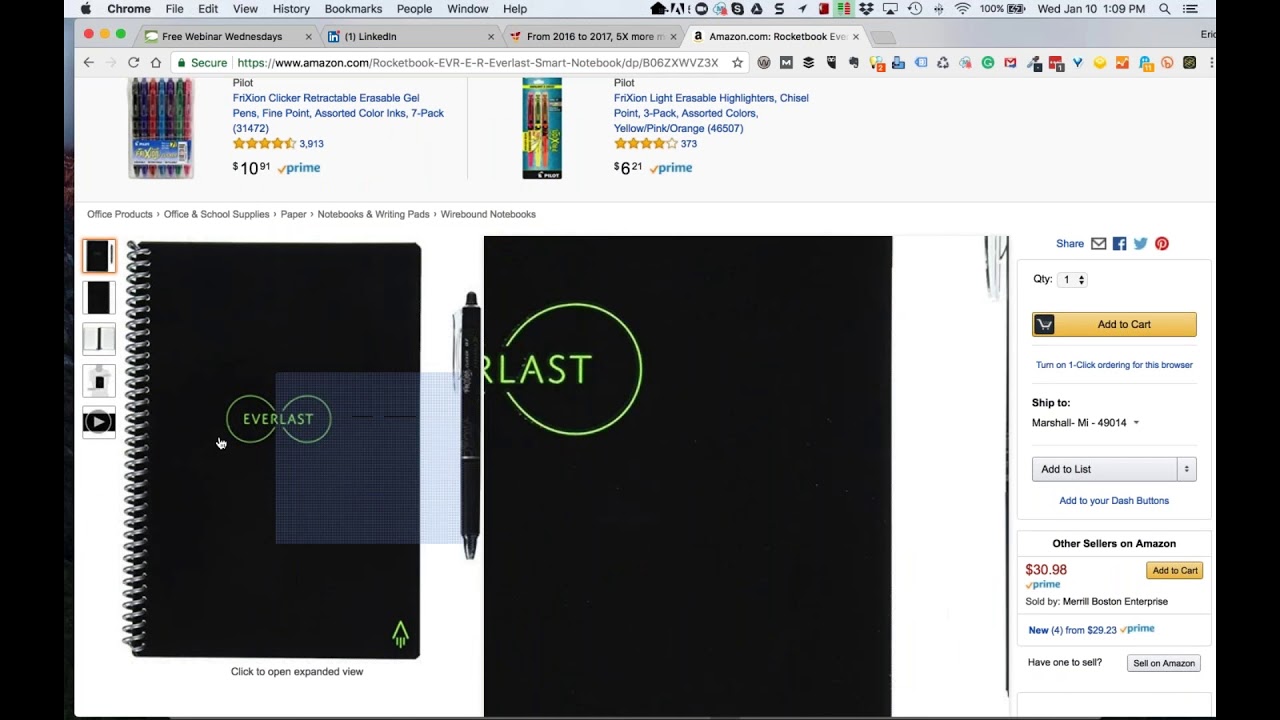
All right, so I'm pulling it up here. So I've— I still have yet to do my housekeeping announcement, but now you've got me chasing a shiny, so I, I need to take a look at this and remind me. So, all right, so I've got the Rocketbook Everlast. Now it's coming back. Is this the one that you stick in the microwave?
Uh, this is not the one you stick in the microwave. This one actually comes with, uh, A little cloth, and you just put a few drops of water on the cloth and wipe it off like a whiteboard, and take the dry area of the cloth and shine it up, and you are ready to go. The microwave version of the Rocketbook, I think those are only good for 5 zaps in the microwave.
Okay.
These claim to to be usable indefinitely.
Interesting. So this is kind of— and for those of you that have been part of Free Webinar Wednesdays for a while, Jeff and I have talked about pen-to-technology capabilities a number of times, and the Livescribe Is probably what I'm thinking of mostly, which was the special paper with the textured kind of background, and the pen itself had an infrared scanner that tracked where you were writing, and it would scribe it. And also had an audio recorder that would record what's going on around you while you're actually writing and synchronize that up. So obviously, this isn't— This isn't doing that level, but you don't have to remember to recharge the pen. There's no technology involved. I suspect that the pen's probably more comfortable than the Livescribe pen. I just couldn't get comfortable with that big old clunky device. I think they've made it a little bit better, but as I look down at my drawer, I can see it sitting there staring me in the face. So how—
I think I finally sucked it up and threw the $200 device in the trash a while back.
Yeah, yeah, it went in my my archive box along with my Palm V PDA and a couple of other technologies that at some point I'll pull out and my nieces or nephews' children, I'll wow them with the— it'll be like going upstairs in your grandparents' and finding the old megaphone-based record player that, oh my God, can you believe they actually used to do this on a Palm Pilot? So yeah, history in the making. So have you used this much? And any, you know, any initial thoughts? Is it easier for you to record your info? Is it synchronizing the way you wanted it to?
Yeah, I love it. And as you can see, you've got the executive size, $29.23. Click on the letter size. Oh, it's $30.75. So it's like a tiny little investment. If you get a pack of 7 pens with all of the shiny colors, that's about $9, I think. So, you know, $40 and some change investment. Yeah. And the thing I like about it is I have a ton of meetings that I take notes in, and if I use different notebooks, that means I'm juggling 2 or 3 or 4 or 5 notebooks. And what I like about this is I have this one notebook. I think it has 38 pages in it, and I can take my notes and dedicate a page to each project or activity that I'm working on, keep taking notes, and when the page is full, I just snap a picture of it with the, with the app and check the little box at the bottom of the page, and it sends it to either Drive or Evernote. I think it also will interface with the Microsoft version of Evernote. What is that called? OneNote.
OneNote. Huh, but, uh, interesting.
It's pretty cool.
Yeah, there you go. Well, very cool. Well, keep us posted. I'm, um, it's nice that a shiny object's not a couple hundred bucks, um, because you chase too many of those couple hundred dollar shinies and it starts to add up. But $30 is not that big of a deal, and you talk a couple pens in there. So that's pretty cool. So excellent. Unexpected. Wow, you're just chock-full of surprises. Anything else you want to spring on me?
Sorry, the exterminator just came to the front door. Could you ask that again?
No, I said you're just chock-full of surprises today with the new company name and I thought for sure when you said Rocketbook, because I know you talked about the potential of moving over into a Chromebook, the Chrome OS, so I thought that was the direction you were going to go. So you surprised me here. So I was wondering if there's any other surprises you want to make an announcement on today.
I am going to try a Chromebook. I picked out the one that I'm going to try. So, cool. Is not here yet, but will be shortly. I'm gonna try the Pixelbook. I don't know if you've looked at them. I think you may have talked about the Pixel phone.
Yep, yep, I have a Pixel phone actually. Yeah.
I read the reviews on the Pixelbook and they're amazing. Yep, all of the reviews come up, takes no time to fire up the machine. Everything that's available in the Google Play Store that you can use on your, on your Pixel phone or your Android phone, those apps work on the device.
Cool.
Has a keyboard so you can use it like a traditional computer. It has a touchscreen so you can use it as a touchscreen, and it folds over and you can use it as a tablet.
Nice.
You can use it tent style. You can use it in your lap like a tablet.
So it's really, really flexible.
Sweet.
Good. All right. Well, do keep us posted on that too. I'm actually— you're an iPhone person getting a Pixelbook, and I'm a Pixel phone user spending more time on my iPad Pro. Or not the Pro, the iPad. So we're kind of crossing in different directions there, but so, but such is life. So I need to make sure I'm familiar with the old— not Microsoft, the Apple environment, because we've got a lot of clients obviously that are using the iPhone. And so the tablet holds its charge way, way better than my Nexus tablet ever did. So I can stick it in my bag and pull it out a week later and the battery's not dead, which was a big frustration. is why I'm not using my Android tablet any longer.
So anyway, Google says that the Pixelbook will last up to 10 hours. Based on the reviews that I've read, yeah, you can probably get about 8 hours out of it legitimately.
Sure.
Since we're talking about Google devices, You can do your spiel if you want, but why don't we take a minute and you can talk about Pixelbook? We'll kind of tie these together.
You mean my Pixel phone?
Yeah, your Pixel phone. I'm sorry. Yeah.
Yep. Well, I just have the first-gen Pixel phone. So it's the second-gen, they've been having some reports of screen burnout and a few other things. But when Google came out with the whole Pixel line. Those of you that have got phones from carriers know that unless you've got an iPhone, the carriers are notorious for bloating those up with all sorts of extra Samsung stuff or Verizon stuff or Sprint stuff. And the Pixel line is really kind of the first pure version of Google. We're already upgraded to the Oreo operating system, which is their latest and greatest. And most of the Android phones out there are still Back a generation. I am experiencing some battery life issues. I think that's probably just because I'm such a hardcore app monger that I've got so much stuff running in the background. Probably once every 12 to 16 months, maybe even sooner than that, I probably need to just do a complete restart and build it back up from scratch because there's probably a bunch of things that are running in the background. But I really like the pure Android environment that the Pixel provides. And being a G Suite user and its integration, they've recently allowed for you to share Google Photos libraries. So you can pick a trusted individual. And so my wife and I both have the same Pixel phone. And so now when I take a photo, it shows up on her phone and vice versa. So we were using a Dropbox synchronization for that, and we no longer need that, although we're still doing it just for backups. But the Google environment has kind of made some leaps and bounds over the last few months with new looks and feels for Google Calendar and some other stuff that's come around that's made it pretty cool. But the Google Photos synchronization now with a trusted— I think they call it a trusted agent or a trusted connection— makes it really nice. Since we have a new puppy in the household, I don't know if you knew that. I Maybe you've seen some posts on Facebook.
That's your news.
So that's my news, but we welcomed an 8-week-old golden retriever whose name is Winnie into the home on December 23rd. So we're taking a boatload of puppy pictures. And so now if Alicia catches her in an innocent moment or I do, we now have the benefit of seeing that regardless of who takes the picture. And if you can catch a puppy in an innocent moment, that's a good thing.
So, yeah.
So, but I suspect that the Pixel phone and the Pixelbook, you know, the whole Pixel ecosystem, you know, it'll be interesting to see how that evolves even more so this year because I've heard the plans to kind of— they're going to bring the Pixel Chrome OS versus the Android OS, if they're going to look at merging those and making them a little bit easier to work with. I know that's always been a concern or a question about some of the Mac users is, is there a way to take a tablet operating system and merge it and make it more compatible with the laptop and create a seamless one-device experience instead of having 2 separate ecosystems? And that could very well be what Android is trying to do with their Pixel line because they've made it easy for people to download apps from the Play Store regardless, but still use it more on a laptop-style environment. So I'll be anxious to hear your thoughts. I know you're a pretty particular user and have some things that you like. So I value your opinion and We'll see how you like it.
Well, for many of the reasons you mentioned, uh, is why I decided to give the Pixelbook a try. Um, I was, as you probably remember, a couple years ago I switched to, uh, an iMac. So my primary computer is a desktop computer. I have kind of surprised myself with this. I truly am no longer tied to a computer. Any of my Computers could die and it would be perfectly okay because I've done such a good job of moving stuff into a cloud environment. Google has really helped me with that. G Suite for Business, I would say that's probably the most significant software you and I both use in our businesses. Or at least one of the top 5.
Absolutely.
But both of my notebook computers died within the last year. My MacBook Air that I bought in 2011 finally bit the bullet and won't even power up anymore.
Bummer.
Figuring out what I was gonna do to replace that, I decided to give the Pixelbook a try.
Cool, good.
Just a comment, you mentioned you have battery issues with your phone. Same is true of my iPhone. I think because I started using so many services that use geofence when I, I'm down the street from the house after dark now, it turns the lights on and does some things like that. I think that probably on any phone just does a number on the battery life.
Yeah. Cool. Well, keep us posted. This will be exciting. So I know there's a handful of programs that I use that I've got to have a traditional operating system for. So So at this point, knock on wood, my laptop is still rocking and rolling and doing a good job. But I can see this as being maybe more of a travel device or being able to have something that's a little bit smaller form factor and toss it in a bag. It's not a lot of extra bulk, easy to use. So, you know, in an airplane seat and not having to worry about battery dying on you because it's going to last a little bit longer. So yeah, be cool. Keep us posted, Mr. Simpkins.
Will do. Sweet.
Well, the couple things that I actually had planned to talk about revolve around LinkedIn, and we talked a little bit last year about Microsoft's acquisition of LinkedIn a few years ago and some of their plans, we actually performed our first of what I hope will be many more to come full-day LinkedIn social media kind of social selling boot camp training classes. We traveled over and Ellie from our office actually joined me. Her and I have been working on putting together this training guide that's about close to 100 pages with screenshots and ideas and thoughts and other sorts of Kind of strategies based off of the social selling certification that I got with WSI back in October. And so we did a training session last Friday for about 10 commercial lenders over in the Ann Arbor area for a big regional bank and went through and helped everybody kind of recreate their headline, build out summary information, tips on creating content and engaging with people and sending invitations. And that went over really, really well. We got some really good feedback. And then the manager of those lenders has been having one-on-one meetings all week this week, and he and I are scheduled for a follow-up conversation on Friday just to get a recap, because my goal obviously would be to get them to be excited about this training program and bring it into other areas, because they're in a lot of other states that The gentleman that brought us in, he was in one of my banking school classes and was really intrigued by the whole concept of social media and building a brand for yourself. And to their credit, a lot of the banks and some businesses probably are this way as well, are somewhat resistant in training their employees on how to be maybe a LinkedIn rock star because I think the fear The old-school style of thinking is, well, if, if, Jeff, if you work for me and I'm your manager and I teach you how to use LinkedIn really, really well, and you start sharing content and everybody starts seeing you as being an expert, that's going to make you more of an attractive target, and maybe you're going to leave me or somebody's going to headhunt you and cherry-pick you. And so we hear that sometimes. Where, you know, I don't want my employees being great on LinkedIn because then somebody's going to hire them away, which to me is a chicken and the egg thing that you'd rather have your employees out there, you know, putting no content into social media, looking like they don't understand what the heck they're doing, their profiles are incomplete, because they're going to stay an employee of yours longer versus teaching them how to use the service better as a tool, growing more business. And the hope is that they'll appreciate that and stick around. And if somebody's going to leave you, they're going to leave you anyway. So there's really not anything that you can do but prepare them as best you can so that they can make the biggest impact and be most successful. So, so to this bank's credit, they're like, you know, we understand this is your profile, you can do what you want to it, we can't make you do stuff. But if you want to use this as a tool to grow business, we're going to show you how to do that. And we brought Eric and his team in to help us explore that together. So we were there literally from like 8:30 to 5 and went through a ton of stuff. And everybody that was part of the group also opted into the 30-day trial for the LinkedIn Sales Navigator, which is the premium version. And I actually did that before I went to training and then ended up pulling the trigger and decided that I was going to go ahead and So I bought the annual subscription to premium. I know we've gone back and forth on the show a number of times, and since using LinkedIn starting in 2007, I've always been a free member. Never really saw the benefit to going to the premium. Um, but having Sales Navigator available to me and the Learning Center, plus you've got much greater visibility to who's viewing your profile.
Yeah.
who's stopping by, which I've already noticed a few things and turned some opportunities into leads. So I'm following them better. So kind of walk through that with everybody. And, you know, if employees for this bank feel that they're going to get a benefit out of it, the bank's even willing to, you know, fund that cost, you know, annually. I think it's like $600 or $700 to be able to use it, but they see the value in it. So, so it was, it was pretty exciting. So I'm gonna pause there and see if you got any questions or comments or thoughts on that.
Sounds like a fun day. Those are the kind of, kind of days working with clients I enjoy.
Yep, absolutely. So, so At the, at the Sales Navigator level, one of the cool parts about Sales Navigator is, well, I've got 3,600 connections in my network, which are all people that are posting stuff that I can see on my wall when I show up here. The nice part about Sales Navigator is you can restrict that down to individual leads and accounts, which are people and businesses. It's showing your social selling index.
out of the bat.
So you can easily get to— and if you've not checked yours before, you can just go to linkedin.com/sales/ssi. But this gives you your Social Selling Index and shows you where LinkedIn stacks you up on a 1 to 100 scale based off of the 4 main areas of social proficiency. And it ranks you within your industry. So I'm in the internet industry. Obviously all of the bankers were in the banking and financial services industry. And it also compares you to those that you're connected with. And so we kind of explored these. So when you run these numbers, if you're a banker and you see that you're in the, you know, the top 15% for banking, but maybe in the top 20% for your network, then that means that you're a little bit ahead of the curve compared to the bankers, but you're connected with folks that are a little bit ahead of you, which is why the number maybe is a bit bigger here. After my— when I went to training with WSI, I was around a 76, 78, somewhere around there. And taking some of the things that I learned got me up into the 80s. I've seen this as high as 85, 86, 87. But I was, you know, top 1 or 2% industry and top 3 or 4% network. And been able to obviously push that up to one percentile. So, not that the number necessarily means that you're guaranteed networking and LinkedIn, but this is one of the variables that you can use to help measure your success and develop what sort of a strategy you have in place. So, when I came out of training, I had a good professional brand, and I had a good. Relationship score were the 2 areas that seemed to be lacking for me. So I've spent some time, and the LinkedIn Sales Navigator has helped, kind of doing searching and finding the right people to connect with, and then spending time on the insights engagement where people are— if they're doing a post or if they're sharing information, making comments, and just trying to be more part of the conversation on a proactive basis. And so these are the scores that have been moving more so than others because I really can't get any higher than the relationship score because I'm 25 out of 25. And there's not a whole lot of more room here, although I can still certainly do some stuff as it relates to establishing brand professionalism. So, so yeah, it was, it was pretty exciting. And, you know, tell the story when, when we're talking with clients. And other folks about this. This is not just banking related, but kind of more to your point with regards to small businesses. Even in the non-banking space where businesses are probably more likely to be interested in B2B sales and connections, you know, this could be an element that a bank could sponsor and bring in and do some training for their small business customers. Or, you know, we actively go out and seek small businesses as opposed to bankers because the compliance world and inaccessibility to social media on bank computers and devices still is a little bit of a challenge. But we're pretty excited about where the LinkedIn training has the potential to make an impact in 2018. So the other cool part about the Sales Navigator is the LinkedIn Learning, which LinkedIn, prior to Microsoft's acquisition, bought a company called Lynda.com, L-Y-N-D-A, and their subscription for their online learning portal is about $30 a month. So as part of your Sales Navigator subscription, you get access to all of these different online courses. And when you complete a course, that course can actually be posted directly to your LinkedIn profile as a proficiency and a skill. So if I finish a course on Facebook or Google AdWords, that then goes up into LinkedIn. It says I've completed a course and received certification from LinkedIn Learning. It goes out to my network. So even more ways for you to demonstrate subject matter expertise And kind of what you do. So on the business side, obviously, you know, commercial lenders maybe won't really give a rip about proving that they know Excel or Office 365, but they can go through and look at things like, you know, customer service or creative planning, or if they want to get into some HR or leadership and management. These are all areas that would be nice to demonstrate, you know, if you're a commercial lender. You know, what can you learn about small business and entrepreneurism that might give you the ability to have a better conversation with your small business and entrepreneur customers that might help them in their day-to-day operations? So, so some cool learning opportunities just to make sure that you're always moving your brain forward. So the biggest challenge is just finding enough time to make sure that you get it all scheduled and done. But You know, when you look at all the stuff that you're able to get, and these all have got their own dedicated apps, you can take these courses and you can download them directly to your tablet or your phone. So while you're out of the office and traveling, you can actually go through and it, much like the Kindle app, it'll synchronize where you're at in the training when you get back online. And, you know, if you've gotten 4 or 5 pages into training, it'll remember when you get back to your computer and move you forward. So. Kind of a, kind of a cool little thing. So if nothing else, the, the 30-day trial, when you've got a block of time and you're, you know, interested in giving it a shot, it's, it's something that I think would be worthwhile to pull the trigger on just to play around with it. So have you, you ever taken the upgraded trial just to kick the tires?
I have not. I got invited to try the Lynda.com and did not, but it looks interesting.
Yep, kind of cool. So, so yeah, so anybody out there interested in chatting about LinkedIn, hit me up because I'm pretty excited and we've been seeing some pretty cool stuff. So And I've been kind of following some other people that are much further down the line than I am, developed online learning courses and training. There's a guy by the name of Josh Turner. We sat in on a couple of his webinars and actually pulled the trigger on one of his books called Connect. So we're going to go through that. And I got the Kindle version with the Audible option, so can listen or read. And, you know, I'm thinking with LinkedIn now being integrated more intentionally into the Microsoft arena with things like Outlook.com and Office 365 and Microsoft Dynamics, their CRM, you know, when you get into a Microsoft product and go to fire up an email, you very well could be seeing somebody's LinkedIn profile in the right-hand rail of your email program saying, hey, before you click send, would you like to know what Jeff Simpkins has been talking about on LinkedIn? And, um, there's been apps out there like Reportive and a handful of others, um, that have integrated some of that. But now Microsoft's kind of building this into their ecosystem. Um, and there's— so, so the more we see this as being kind of a business tool, I think that just kind of further justifies and warrants why all types of organizations should rethink their LinkedIn and kind of professional business strategy if the B2B space is an area that they want to be relevant in over the next, you know, 12 to 18 months. So, and you can, you can see I signed up for Danny Sullivan's SEO course, but I haven't gotten very far through it. But he's pretty much a guru in the world of SEO, so I'm looking forward to spending some time with Danny. The— I guess the other thing that I wanted to mention, just as it relates to our business and kind of what we've been keeping an eye on from a WSI perspective and the evolution of connecting and engaging with consumers, is whether you're in banking or business or whatever, the whole concept of marketing automation. And this is an interesting article that one of my colleagues out of Toronto found over at Chief MarTech that just talks about the number of players that have entered the marketing automation space. And by marketing automation, we're talking about the ability for a system to send email, track site visitors, do things like reverse IP targeting, so we can determine if a business visits a website, what IP address are they coming from, and what business is that IP address registered to. So if, if somebody from XYZ Corporation stops by my website, I can see XYZ Corporation in my visitor list. Google Analytics isn't giving you that data, and a marketing automation platform does. And so if, if you just left a chamber function or a business networking activity and talked to somebody and at XYZ Company and you see that someone from XYZ Company visits your website the next day and looks at a handful of pages on your website that happen to have been things that you were talking about, there's a pretty good shot that you piqued an interest in that individual and either he or she or someone in their office has decided to come on your website to learn more because they liked what you were talking about. You know, hey, I just met this guy Jeff, hop over to the CBCI site and look at some of his, you know, operational efficiency services that he offers. And, and so as you're looking for buying signals and other sorts of, I guess, positive indicators that, you know, people are interested in potentially doing business with you, that marketing automation code and its tracking tied into things like email and web forms and lure pieces like PDF downloads and other sorts of things can be pretty powerful. But this infographic is kind of interesting because back in 2011, you look at the number of companies that were really focused on marketing automation, and now you look at 2017, you know, just the explosion. And, you know, WSI has picked a couple of companies that we partnered with that hopefully help folks like myself avoid chasing squirrels and finding a couple that are really good because Everybody has kind of a niche, but most 80 to 85% of what you're going to find in a lot of the marketing automation platforms are going to be pretty similar. It's just what that 15% or so offer that what's really going to be the right fit. So, but we're seeing some pretty good interest from our commercial clients and the marketing automation space with email and workflow and automation. And everybody that participated in our LinkedIn training is going to get an invitation to join a LinkedIn Tips newsletter, which will deliver a LinkedIn little nugget of wisdom every week on an ongoing basis. So, so we're using marketing automation to be able to deliver those. And as people click and open and read It's going to track and monitor and, you know, kind of give us some indication as to who's interested and where potential next opportunity might be or referral. So if, if you're listening to this and you've not really explored marketing automation, it's probably worth putting on your radar screen for 2018. So, but those are really the The 2 things that I kind of wanted to mention just as far as kicking the year off and where we see some opportunity. I know there's been a lot of discussion, at least in the banking space, about things like business and artificial intelligence and bot technology and the whole concept of fintech, which is a little bit of a challenge for some of our smaller community bank clients.
Right.
having so much reliance on their core processors and data centers. But, you know, the days of, you know, somebody walking into the office, whether it's a bank or any business, and deciding to do business with you, just good old-fashioned, is starting to become harder and harder. So the digitization and online relevance just continues to gain importance, so which is keeping us nice and busy and hopefully gainfully employed for the long-term foreseeable future. So, so with that, that's about all I've got, Mr. Simpkins. Anything else on your brain that you'd like to toss out there for the good of the order? No.
Sounds good. Sounds very interesting.
Sweet. When's your Pixelbook getting in?
Probably this week.
Cool. When you get it, call me. I'm very excited to hear how it goes. So we'll make sure that you get GoToWebinar installed on it and you can give us a tour. You can give us, give us a tour when you get a chance to get your feet wet.
We'll have to get Greg on and talk to us about his ideas on the Pixelbook.
Yeah, that would be, that'd be a cool conversation. So good. Well, I think that brings the show to a close. We'll wrap a little bit early, which actually kind of works good for me because I've got a 2 o'clock that I need to prep for, and I was kind of hoping we'd Not squeeze that too close. So, look forward to future Free Webinar Wednesdays at freewebinarwednesdays.com. But thanks for joining us live and/or listening to the recording. And if you've got a thought or an idea or a suggestion for a topic that you'd like to see covered in a future show or a guest that you think might be a good addition to the Free Webinar Wednesday family and And maybe they've got some interesting information to share, feel free to let us know. We've kind of gotten away from bringing guests on over the last several months, and I think when we did that, it was kind of nice, although I also enjoy my Jeff time every week. So, but if those of you that are listening to the show have got a suggestion or something you'd like us to cover, In a little bit more detail, we're always open to ideas and feedback. So drop us a note, and we'd love to hear from you. But until next time, Eric and Jeff signing off. Have a great rest of your week, everybody, and we'll see you online at freewebinarwednesdays.com. Take care, everyone. Bye-bye.







