
New LinkedIn Features You May Have Missed
Eric Cook breaks down LinkedIn's newest features and how banks use them to engage customers. Six habits stand out: share helpful content and respond to comments, use video to humanize the brand, employ chatbots, separate brand and support accounts, add personality with hashtags and emojis, and tailor content across platforms. LinkedIn's Social Selling Index score, Find Nearby tool, and voice messaging let you listen first, then reach prospects where they actually are.
Chapters
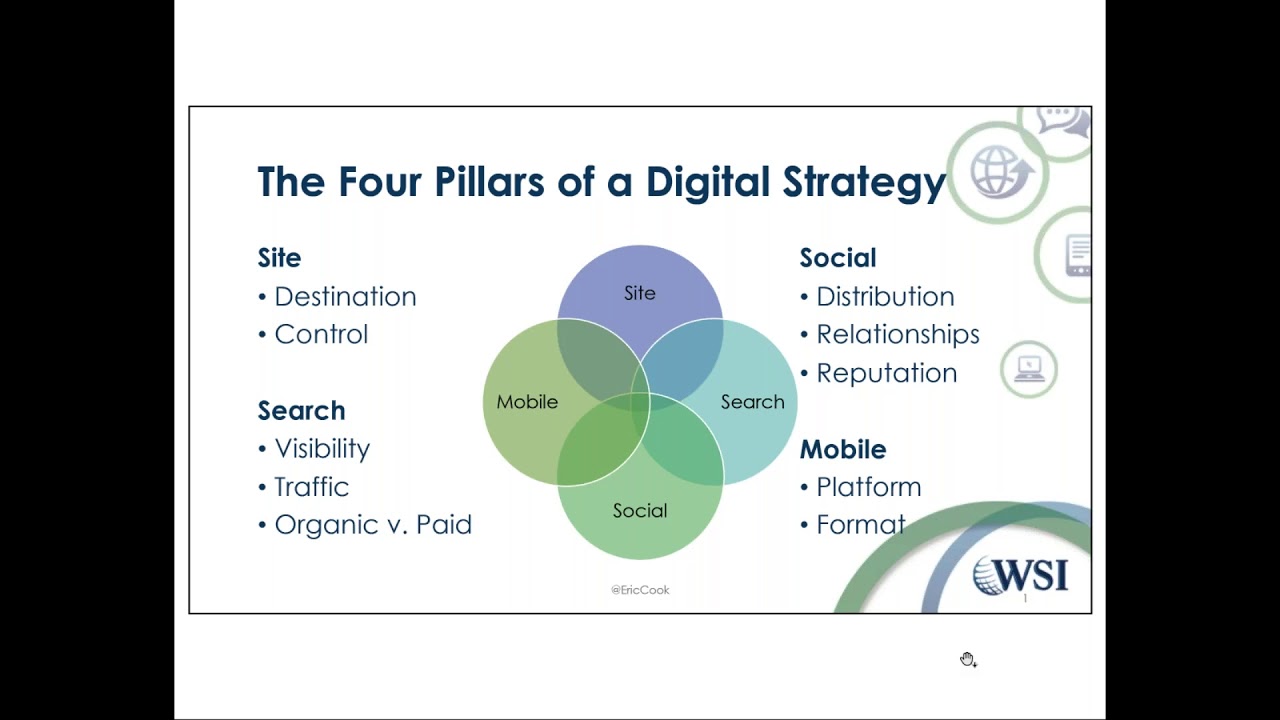
Greetings everybody, welcome to the Wednesday, October 3rd, 2018 episode of Free Webinar Wednesdays. This is Eric Cook with WSI Digital Marketing, where we work with businesses and organizations on helping them better understand and leverage the power of the internet as a strategic business tool. Hop on over to www.poweredbywsi.com to check out all the fun stuff we get to do. on a day-in and day-out basis. Basically, we get paid to play on the internet, which is kind of a fun thing. So it's good to say that you love your job. And hopefully those of you that are joining today can say the same about where you work. My good friend and Free Webinar Wednesday co-founder and partner, Mr. Jeff Simpkins, is again missing in action. Offsite, I believe, someplace in Montana, if I'm not mistaken, on a rather large project. So probably gonna stop saying that Jeff's not joining us just because I don't think that he's gonna be back anytime soon. But I'm happy to carry the torch, and certainly the door is always open for Jeffrey to come back and co-host. But I think things have changed a little bit in his world, and that's totally fine. So, um, today's show and all shows are recorded here and made available at freewebinarwednesdays.com. So you can hop on out to the website and check it out. Last week's show, I spent some time rambling a little bit about why marketing automation technology should be on your radar screen as it relates to business engagements, lead management, website analysis. So there's a lot of really good reasons why I think marketing automation needs to make it to your list. We talked about 2 of the platforms that we're familiar with. One of them is a, is a company called SharpSpring that has an agency model approach where they work directly with agencies like WSI in providing services to their customers. The other one is a company called HubSpot, which is basically the granddaddy of inbound marketing. They coined the phrase many moons ago. And so both of those, proud to say, are partners of us here in the WSI world and available for our clients. But both sites have got a ton of information, as we do on our Powered by WSI slash marketing automation page. So hop on out, check those out, and if marketing automation decides— or you decide to put marketing automation someplace in your 2019 bucket list of things that you want to talk about, hit me up and I'm more than happy to have a conversation and help you strategize. For today's show, I'm gonna spend a little bit of time giving a sneak peek. I'm doing a full-day digital marketing session next week up in Minneapolis for the Independent Community Bankers Association. So the ICBA is having me come in, I'm gonna do a whole day with digital marketers from the banking space, and we're gonna talk about a ton of stuff. I've carved out a little bit of that presentation and discussion. I'm going to mention a few things that we started getting a little bit of traction on as it relates to LinkedIn, more on the business-to-business professional social networking side of things. And so I'm going to share some of that with you, give you some ideas of some of the new things that have come along in LinkedIn. And if your business is interested in doing business with other businesses, And even if that's not necessarily the case, at the end of the day, let's be honest, we're doing business with people. And while they may work for an organization, it's ultimately the individuals within that organization that are going to be the ones that are going to decide whether or not they want to do business with you. And so LinkedIn, while in a lot of the, you know, I guess circles is considered more of a B2B social networking environment. You're really always going to be dealing with people. And so some, some new ways that we've kind of come across as far as how to, how to share, how to engage, how to do some stuff cool with those folks. So with that, we're going to go ahead. I've actually prepared some slides. I know, shocker. But we're going to walk through and just kind of share some slides. Give you some screenshots, some ideas, some of the areas where you can maybe test some of this out yourself, and then you know play around with it and see if that has any sort of an impact on your LinkedIn efforts. So LinkedIn certainly fits the four fillers, the four pillars of a digital strategy. That's one of the great parts about doing a live webinar like this is when my tongue gets tied and I start trans. transposing words and first letters. Everybody gets to enjoy that. So hopefully that is, is what makes me human, because it's not exactly a polished presentation. But the 4 pillars of a digital strategy are really at the focus of what I'll be talking about next week. And you've got site, search, social, and mobile. And we'll talk more today around social because it's really got a focus on LinkedIn, but we'll, we'll talk about how that actually interacts, you know, from a mobile perspective because there's things that you can do on the LinkedIn mobile app that you can't do on the actual website. We'll talk about how driving traffic back to your website if you're sharing content, whether that's information that you've produced on your website like a blog or a press release, news articles, testimonials, In the world of banking, the website is a very, very important component to a digital strategy because that's the entity, the digital presence that you have total control over. So in the banking world, we obviously need to be concerned about things like compliance and disclosures and security and whatnot. So while we're using social and other areas to distribute and try to gain visibility, it's ultimately the goal— the, of the strategy to pull people back to the website, which is where if you're a business and you're selling stuff, if you want to do lead gen, if you want to have people opt in and subscribe to your newsletter, whatever the case might be, your site's really going to be the custodian of all of that great interaction. And then search, certainly making sure that when people go online looking for you, looking for what you do, looking for what you offer, being part of LinkedIn, And search used to mean making sure the website shows up in Google. Now people are going to the different platforms themselves. So I might not go to Google. I might go directly to LinkedIn and do a search in LinkedIn to see who I know, or I might go directly to Facebook, or I might go directly to Twitter. I might go directly to YouTube and do a search in those areas. So we kind of want to get out of the mindset of thinking that While Google certainly is the custodian for a lot of search activity, being present in all these other platforms helps increase the likelihood that when somebody is in those platforms and they search for you, they're going to find you. And so search certainly goes into traffic generation, why it would be to the best interest of that platform to list you, which you get into different things like content. And then you're getting into organic, you know, SEO versus paid search, and you can do that and all the different social platforms now with advertisements, etc. But basically the 4 pillars of a digital strategy, social is where we're going to just spend a little bit of time talking today about some of the LinkedIn stuff. When I got ready for my presentation, and I think even though this has got some banking reference here, the site Financial Brand does an analysis of the top 100 banks and credit unions on social media, on Facebook, on the web, And they update that on a quarterly basis. So this is the most recent report from the Financial Brand. And while banking, I think, maybe, I don't know whether it's unique in the sense that we've got regulations that we deal with, I think the lessons that I took away from visiting at least the top 10 banks really cross over into any type of business that wants to be able to use social media effectively. So you could go to the Financial Brand and take a look at the Power 100 list and you can kind of browse those. Those of you that are bankers on the list certainly can do that. If you're not a banker, might still be interesting to see kind of how they're using it, gives you some ideas. But when I went through and looked at what the performers were doing on a consistent basis across the board, I came up with these 6 items. So the first one is When they post something and they're doing a really good job of sharing content that's not just product-focused, but it's helpful, educational, informational, consultative, as opposed to just sales-related. But they're posting, but they're also responding and interacting with the comments. It's important that your following on social media understands that you're not there just to spit out content and hope somebody reads it and then not be there as part of the conversation. It's no different than saying good morning to somebody. And them saying good morning back, and then there's no additional conversation. You just ignore them and walk on. So it'd be, morning, Jeff. Morning, Eric. How was your weekend? Oh, great. Super. What'd you do? Oh. And now you've got some conversation. You're a little bit more engaged. And at scale, you may not necessarily be able to interact with every person that comes into contact with you that makes a comment, but I've not seen, even though at the, at the large scale that these institutions are at, I've not seen them, you know, run out of time or, oh, there's just so much engagement I couldn't possibly react to everybody. And it's not saying that you have to say something to every single person, but making sure that people that go to your social profile or your page or your instance, whatever you want to call it, knows that there's a real person behind it and you're interested in interacting with them. They're using video to tell their stories, whether that's through live Live stories, live video, or they're just doing, you know, video content and posting it up. Video is a very powerful way of delivering your personality and to interact, and especially when you think about live video being a way to interact and have a real-time conversation, and the added bonus of that video lives on once it's done. They're being proactive using messaging and chatbot applications. We had a discussion a couple of weeks ago that talked about chatbots. David from ChatPath, which is now part of Digital Airstrike, which is another one of our WSI partners. But being able to use Messenger as a way to invite conversations, I think I, I alluded to the topic or the idea of conversational data acquisition, being able to pull somebody in, ask them questions, get them to respond. Maybe some of that's driven by artificial intelligence, AI. Maybe some of it's actually legitimate conversation with humans or you trigger a switch, but being able to use Messenger or other sorts of chatbot technologies to have real-time conversations, there's a tremendous amount of statistical data that says people like chatbots, they enjoy that, they like it better than email, maybe even better than a phone call, and I can tell you when I go to a site, if I'm needing support or I'm looking for something and I see that there's a chat option, I go to that first. I don't even go to search, I don't even try navigating the page. If there's something I'm looking for, I'm gonna hop right on the chatbot. I'm gonna use that and I'm gonna do messaging. They're separating on Twitter the brand from their help account. So, you know, I think one of the, one of the old examples that kind of came around back in the day when I started really spending some time on Twitter was Comcast, the cable company. And they've got Comcast, the actual Twitter account, which shares all the different things that Comcast is doing and the programs and the lineup and all the different things that are happening in the world of them as a media provider. But then they also have Comcast Cares, which is their help account, and that helps separate anybody that's having a problem with the message that they're trying to convey on their main account. So a lot of these banks had a main account where they're sharing things like financial literacy and community involvement and security tips and budgeting and And if somebody has a problem getting into their account, the ATM's not working correctly, their statements didn't arrive, whatever the case is, then they can post those directly to the help account. So anybody that's interested in knowing what the business, the bank, is talking about is seeing the content that they're producing, and it's not getting cluttered with people that are complaining that the system's down or stuff's not working. And from the customer's perspective, it gives them a dedicated channel that they can go to. And one of the things that Twitter has now made available is, is as a brand, if you wanted to allow anybody the ability to send you a direct message, you can activate that and turn it on. Normally in Twitter, you only have the ability to send a direct message to somebody that follows you and you follow them. And you can open that up as a brand to use Twitter as a customer service channel, so you don't have to follow them back as a brand. You can just say, hey, send us a direct message with your phone number or an email address or whatever, so you can respond to the actual question or the concern. You can take the conversation into a private conversation with a direct message, and then it gives you the ability as the business to follow up directly with that individual and help them out. We're seeing an increasing utilization of other sorts of— I'll call them— I don't even really say media, but extra stuff. So they're using hashtags creatively, whether those are specifically for events unique to the institution or they're more global events, you know, #fintech when they talk about something that's really cool that the bank has just released, you know, to help label the conversation. Or maybe it's an activity that the bank specifically sponsors and it's only related to the bank. Animated GIFs, you know, those are kind of fun and it helps convey a little bit of personality and show a humanistic side, and even using the emojis with the smiley faces and the winky faces, but dropping in some of the other stuff. You know, we've got a money bag and a house, which actually pulled off of one of the Twitter accounts for one of the banks when they were talking about saving for a home and budgeting. Just again, make it a little bit more like what we talk about and how we interact and use social media as humans. Let's let the brand, the business, actually do the same. And then the last item that I noticed is they're not just settling on one platform. And yeah, these are much, much larger organizations than probably a vast majority of you, so I don't expect all of the small businesses out there to be on, you know, 10 different social platforms. But they do understand that their customers, their audience, maybe isn't always going to take in information in one area Maybe you want little bite-sized nuggets on Twitter. You want to spend a little bit more time browsing some cool photos on Instagram. Um, maybe you've got your employees trained on how they can leverage and distribute content and build more personal interaction and engagement through LinkedIn. So you've got a LinkedIn page, but you've also trained your employees how to use LinkedIn properly. Um, but they're using multiple platforms to help make sure that their message gets seen. And the content isn't always a one-for-one copy because what you're going to post into Twitter may not necessarily be the same thing that you would post on LinkedIn, and you may need to do something even different on Instagram. But the theory, the message, the theme can be similar. You just have to format it a little differently across all those different platforms. So those are some of the top performer observations, and regardless of whether you're a bank or some other type of business, I think those 6 things really carry through as, you know, maybe goals that you should hope to aspire to as it relates to your own social media utilization. So when we talk about social utilization, I also have some other things to keep in mind, and usually I spend more time talking about the first and the last bullet. And we talked about engagement already because that was one of the things that I saw So we won't spend much time on that last bullet, but the first one there, especially as it relates to Twitter, because I oftentimes will talk to folks and they'll have a Twitter account, but they're not really using it because it seems very cumbersome and there's a lot going on. And it just, you know, maybe isn't a network that they necessarily think they need to be involved in. The first thing that I recommend as part of a social strategy when talking to folks Is spend about a month just listening, asking questions. Where are your customers? Where are your prospects? Where's the audience that you're trying to influence spending their time? It's no different than if you and your buddies were going to go out for a fishing trip. You would want to spend some time figuring out where the good fishing holes were, where the fish are swimming. And that's where you're going to likely take your boat because you have a highest chance of catching fish. In the areas where you think or you maybe even know that the fish are spending their time. So you may find out that, you know what, Twitter really isn't that big of a deal because we don't have a lot of customers, not a lot of people within our sphere of influence really spending time on Twitter, so maybe that's not necessary. But if you find that a lot of your businesses that you are working with now, your existing customers, your good customers are on Twitter, and you're not there, you should at least have a presence and make sure that you put them into a list of some sort, or make sure that you're paying attention. So even if you don't want to retweet or comment or share their information, you can still send them an email, you can still pick up the phone. So when they start posting information and maybe they're bragging about an award that their company received, or an employee got recognition, or, you know, something else good happens, if you're not listening and paying attention to what's going on with your customers to protect that relationship or opportunities for other people that may be interested in doing business with you down the road, others are going to be doing that and your competition is going to, before you know it, sneak up behind you and maybe even pass you. So the power of listening in social media is one that oftentimes gets overlooked because most of the people think, Well, I got to go on social media and I got to be pushing content and sharing stuff, which is why they also miss out on the engagement part because we're so focused on post, post, post, share, share, share that we're not paying attention to when somebody interacts or shares something and comes back to us and we've got some conversation. So the other bullet points certainly are important, but I think those are the 2 main items on this slide that if I were to say remember those 2, those would be the 2 most important things. The other thing that I talk about when it comes to social is separating the institution or the organization or the business with the employees. And the business is going to be the entity that is going to produce the official content. So in the world of banking, there's certain things that you can and cannot say. And if we started allowing all the employees within the organization to post directly As the bank, we'd probably get in trouble and the compliance officer would freak out. And you may be from an industry that doesn't have a compliance officer, but you probably still have branding standards, a company voice, maybe some guidelines that relates to graphics or logo or other sorts of things, or how you refer to your products and your services. It's always the job of the organization or institution, as it says here, to be able to produce that official content. But what you really want to be able to figure out a way to do is to train and empower your employees to be the advocates and the distributors of that content to their own individual networks, because they're going to have more connections likely than the business has. They're going to have the one-on-one relationships with the people, and in many of the networks, the organic visibility for a brand post For example, Facebook, a visibility of a Facebook post for a brand is now hovering right around 1 or 2% of all of your followers. But if you get an employee or somebody that is, is, is a human that shares that content, that gets it to the people that are connected to that individual, you're gonna have a much greater likelihood of making sure that your message gets seen. And as long as you're not spending all of your time producing content that's salesy, that's pushing out, you know, just, hey, buy this or purchase that, it's going to be a whole lot easier for your employees to get behind sharing that information because they're sharing helpful content, not feeling like they're basically being the mule that's distributing the advertisement, which really nobody wants to do. So it allows you to break through those organic limitations that exist at the page or the brand level and get a lot more genuine connections because your employees are likely connected to way more people than are currently doing business with you. So you've got some nice expansion. The other thing that I think is important, especially as it relates to LinkedIn— so now we're going to start talking about LinkedIn a little bit more specifically— is Microsoft acquired LinkedIn about a year and a half, maybe 2 years ago for, I think, right around $24 billion. And so they are starting to integrate LinkedIn data into Microsoft products. And when I talk to small business owners and bankers, I say, imagine a world where you get ready to send an email to either one of your really good customers or a prospect that you are hoping to earn the business of. And when you open up Outlook and you start typing in the person's email address. I type in Jeff Simpkins and all of a sudden on the right-hand side of my screen Microsoft has said, hey, here's Jeff Simpkins' LinkedIn profile. Would you like to take a look at it before you go ahead and click send? And I'm going to do that because if I get ready to send Jeff an email, I'm going to hop over and I'm going to see, has Jeff shared anything on LinkedIn recently that I might be able to work into the conversation? Maybe he got an award. Maybe he just shared a cool article that I thought was really interesting. Maybe he and I went to the same school or we have a similar interest as it relates to philanthropic and charitable organizations. Whatever the case is, this eliminates me from saying, which is what I used to say, is you better be involved in social networking at some level as an individual because people might go out and Google you to see what content you're posting and do a little research. And now that, hey, somebody might Google you is becoming less relevant because I don't even have to make an effort to leave Outlook to go out to Google to do a search for Jeff Simpkins to find out what he's talking about. Microsoft is bringing that directly to me right within my inbox. So flip that and imagine that you are now on the receiving end of an email and you have a prospect that's getting ready to send you and maybe 2 competitors some information, and that prospect types in your email address and your LinkedIn profile doesn't have anything on it. It hasn't been updated, your picture's old, you've got 230 connections, you don't have any shared information, there's no recommendation. I mean, it's just crickets. And maybe one of the other competitors has spent some time beefing up content, adding information, making sure that they've got content that is interesting and not just salesy. When that prospect gets ready to send that, they may not necessarily work that into their email when they're sending it to you, but LinkedIn has now just given that prospect a pretty significant education on how digitally prepared I am and how my competitor is to be able to be that partner that's going to take them down the road or be the right fit. So it works both ways. Hopefully you're much more on the side of, I've got really good information and bring it on, Microsoft. I want you to show my contact information to everybody that's sending me an email from a Microsoft product because I'm proud of what's there and there's good information and I've got recommendations and referrals. But if you don't, think of that the next time you go on LinkedIn and say, if somebody were thinking about doing business with me, and saw this, would that convince them or sway them or push them away or maybe be neutral in their decision-making process? That's all I really want to say about that. So here's some statistics on LinkedIn that as of 2018 that you can get. Certainly the largest business-related social networking on the planet. There's a couple of others out there that are starting to think that they're going to do something very similar. And the one that maybe the live audience can help me out. There's one out there that I'm thinking of that is just drawing a blank on me right now. It's not Indeed. Anyway, if you can think of the, the other platform that is trying to build business connections, let me know because I'll say it out loud. But, you know, I get those invitations. I accept them because you never know if something's going to catch on. But it, it just gives us the ability to maybe spread that information about us into different areas. But I'm really not spending a whole lot of time there because LinkedIn is really kind of where it's at. So some of the newer LinkedIn features that I'm just going to kind of go over here real quick. And then I've got a couple of slides that'll support some of this. They've got a new profile layout that I think is rolled out to everybody. They've taken the actual photo and they've moved it from center justification to the left side. That caused some problems with folks because if your photo that was your cover image had information on the right and the left, now your photo actually covered that up. So you had to move that more centrally located. We'll talk about your social selling index. I've chatted about that a couple of times on free webinar Wednesdays, but I think it's really important that you know what your SSI is. We'll give you an example of their new Find Nearby functionality, which I think is pretty cool. On the mobile app, you've got the ability to share native photos and video, and I believe I have a screenshot of that as well that I'll show you. The messaging capabilities— we'll just review real quickly what the green dots mean as part of your interaction that gives you a an idea whether somebody's actually online. Some of the other mobile app options that are there, so talk about Kudos is another really cool thing. I did one of those just the other day for my buddy Francois, who is our internal LinkedIn guru, sensei, ninja, whatever you want to call him. And so you can actually follow hashtags. LinkedIn was one of the probably the, the last social networking platforms to officially embrace hashtags, but now you can actually subscribe and follow a hashtag much like you can do on Instagram. So it gives you the ability to say, I wanna— anytime somebody puts the hashtag community banking, hashtag fintech, hashtag small business, you know, hashtag whatever, you can add those to the content that you're following, and that will make sure To increase the likelihood that those articles are showing up, even if it's somebody that's posting something that you're not even connected to. If they post an article that says #communitybanking, #fintech, it'll show up in my stream and I'll have an opportunity to see it. And then that could present an opportunity for me to find out, well, who is the person that's sharing it? Maybe there's a connection opportunity there to grow my network. And then the last little item that's related to the mobile app is, is you can actually Send a voicemail message in the mobile app up to 60 seconds. And here's those GIFs. You can send little animated GIFs. I know some people are a little bit on the fence with this feature only because if it's a business social networking platform, do we really want to give everybody the ability to send voicemails? And are salespeople going to abuse that, or are GIFs a little too funny and should be reserved for Twitter and Facebook? Or is it okay? But I know a lot of people that are connected with others in LinkedIn that are more than just business relationships. They're good friends. And so I think as long as you use those sparingly, it shouldn't, shouldn't be a problem. I'm still waiting for the live audience to get me the name of that other business-related social network. I know it's not Indeed because that's a hiring platform. I think it starts with an I. So come on. Come on, chat room, don't let me down. I know we've got some live people out there. So back on the Social Selling Index, this is available regardless of whether you're using a premium— maybe it's alignable, maybe that's it. Let me know if that sounds right. I'm not going to flip over and do a search on that, but maybe somebody out there can check and see if it's alignable. You do not need a premium or a Sales Navigator or a business. You can do this on the free account, although getting your index to increase. It's going to be easier if you're using one of the platforms. Thank you, Bob. Alignable is indeed the correct— I knew if I gave my old brain just enough time, it would come to me. So thank you for confirming. Um, so you go to your linkedin.com/sales/ssi. This is going to generate a score for you on a 1 to 100 with 4 areas With a maximum score of 25 points each. And so this is going to give you a score that you're going to then use as a baseline for any future initiatives, effort, whatever you want to call it in LinkedIn. This is kind of how you can measure your effectiveness and not to say that you want to game the system and only try to get a higher score. But if you're doing things in LinkedIn that are moving the needle for your SSI, chances are you're going to be doing things that are going to help you build relationships. Share content, you know, be a better LinkedIn person, and that's going to hopefully generate some business for you down the road because this, you know, will get noticed. But you don't want to do this just to get the score to say I went from a 40 to a 60, but you want to do that to get a better score and then hopefully recognize that this is actually producing more results for you and you're getting some business benefit out of it. So I won't ask you to type in your SSI unless you're willing to do so, and if you do, it'll be private. Now let me see it. But you can go ahead and do this, and then what I suggest is put a little reminder in your calendar with this URL. And so the first of the month, you just go out to LinkedIn and you type in linkedin.com/sales/ssi and see what your score is, and hopefully it goes up. You were 60 last month, maybe you're a 65 this month. Whatever the case is, I've been hanging around right around between 83 and 85. Sometimes if I'm on a long travel schedule and I don't pay a lot of attention. This has dripped down into the mid-70s, and then I look at it and say, oh shoot, I got to do a little bit better. So I do some stuff and kind of get that back in alignment. But it's a good idea to kind of drop this into some sort of a tracking sheet so you can monitor it on an ongoing basis. This is what the 4 scores really consist of. SSI tells you. And so even though SSI has been around for a while, I still talk to folks and they think that this is just something reserved for the paid accounts or they don't have access to it. This is definitely a service that you have access to regardless of whether you're using the free account or otherwise. So make sure, check your SSI, check your scores, and then figure out, you know, how is it that you're going to be able to move the needle and do some things a little differently with your strategy. When we talk about relationship building, one of the pet peeves of mine, and usually I pretend like I'm hopping on a soapbox when I'm in person. This is a, it's a relatively older screenshot, but it still rings true of the Messenger platform on LinkedIn. LinkedIn, bless their hearts, try to do a good job of making it easy for you to interact with others with canned information. And while on the surface that seems good, when you get right down to it, that's really not building a relationship. And so this is a screenshot of an anniversary that came around, and a lot of people just went and said, congratulations on your anniversary, hope you're doing well. And so My LinkedIn filled up with a bunch of these canned responses. There was no human interaction to it. And while it was nice to hear from people, really didn't generate a whole lot of interest on my part. Now, sometimes I'll get these and I'll fire back a note and I'll say, well, yeah, I am doing well. How are you doing? What's new in your world? And I'll, and I'll try to force a conversation. Sometimes it's just to be a little bit of a, you know, cheeky monkey. Other times I'm genuinely interested. And they may not necessarily recognize that, you know, there's some opportunity to personalize that. But the very bottom is an example of one of my friends, Karen, and I got a notification that she was changing jobs. I could have very easily said, congratulations on your new job, hope you're doing well, and that would have been the end of it. But I changed it. I sent her a message, joked about how sometimes these little LinkedIn messages are cheesy, but, you know, hopefully you're doing well. And that initiated a conversation because she responded back to me. Now, she's a friend, she wasn't a business associate, wasn't a prospect, so there's really no opportunity to turn that into revenue. But you never know, she could have been moving back. I could be a mortgage banker. I could maybe answer questions for her about what real estate professionals she might want to take a look at. Maybe she had to rent for 6 months while she moved back. You know, wants to get together for coffee and talk about what mortgage rates are doing. So, you know, use your own industry, use your own example. You don't know what could potentially walk through the door when you make an effort to open it. And in the congratulations on your anniversary, hope you're doing well, you know, you're really not taking a shot at opening that door. So open that door, invite a conversation, engage. You never know where that might end up. This is also a pretty cool new feature that I've been kind of beating the drum on. So whether you do this at a conference or a convention or maybe a chamber mixer or a 501 party or business after hours, what, what I do and what I suggest our customers do is next time you're at one of those— and I grew up in a small town, so networks and connectivity really was all about, you know, bringing people together to do stuff for the town. The community that you live in. And the more people know who knows other people, the better networked you are. So I mean, that's kind of a universal theory around the board. So what I suggest— and paraphrase this however you'd like to— but what I suggest is, you know, go up and ask the event organizer and say, hey, I just discovered this cool new tool. It's available on LinkedIn to be able to help us all get connected. Would you mind if I just gave like a quick 5 minutes and maybe said something, and most of the time you're gonna get, totally, sure, not a problem. So I would get up and I would say something along the lines of, hey guys, I know we're all here, and I'm gonna pick Marshall, Michigan as my hometown. I know we're all here, part of the chamber, trying to make Marshall a better place to live and to work and, you know, raise a family. And the power of us being able to do things in Marshall is really us coming together as a network. And we're probably all on LinkedIn. How many of you are on LinkedIn? And everybody's gonna raise their hand. Say there's a new service, and I'll sometimes reference a show that I used to watch when I was a kid called Romper Room. And I'll say, does anybody remember the show Romper Room? And those older people in the room, the young 30-somethings won't know it, then I'll say, you know, go to YouTube and figure it out. But the older ones will kind of joke, and I'll say, well, what, what did Miss Nancy do at the end of Romper Room when she closed? She looked into a magic mirror. And if you were a kid and you watched Romper Room, you would want Miss Nancy to say that she saw Eric in her magic mirror because you thought that she was looking right through the television and she saw you, even though you know that your mother was probably on the, on the, on the other side of the TV just shaking her head going, my kid has no clue how a television works. But it was fun. So Find Nearby gives you the ability to have a Romper Room-ish type magic mirror experience. So everybody open up your phones, open up your LinkedIn app, and click on your My Network. And at the top you're going to see Find Nearby. And what that's going to do is if you allow and enable that feature, is anybody that's within roughly a 30, maybe 40-foot radius of you, your phone is going to send out a signal that's going to interact with other phones that are sending out a signal. And eventually you're going to start seeing names of individuals that are in the room that are on LinkedIn. And if you're not connected with them, you can click on the little person with the plus and get connected. And so what I'll sometimes do is I'll turn this on, I'll sit and I'll wait, and then all of a sudden I'll say, I'll see Jeff and I see Bob and I see Susan and I see Steve. And you kind of make a joke about it, but it plays off of the whole romper room thing. Now, when I'm doing this at a conference, I will also disclose I am not going to send anybody in here an invitation. I am the speaker. I am teaching you how to use this. I don't want to use this as a cheesy tool to sneak in and to try to snag a bunch of connections for my network. However, I'm here. You've seen my profile. If you would like to connect with me, please feel free to do so. I always love connecting with people. So handle it however you want so that people don't think that you're just doing kind of a cheesy way of getting connections. But this is one of the ways that you can build that relationship. Relationship and have a little fun. And I, I won't say I guarantee, but I almost guarantee that after you get done or your customer gets done and they say, great, you know, let's leave it on, we can have some more fun with it, but let's get back to the meeting, thanks for your time— when you get done and you step off of the stage or you hand the mic over, if you don't get 2 or 3 people that come up to you and go, dude, that is so cool, how did you hear about that, what other stuff are you doing, that's really neat, I would be surprised. Surprised because this is a service that still is somewhat in the weeds. Not a lot of people know about it, and you can position yourself as the, the cool person that knows the neat tricks to be able to bring people together. So enjoy, have fun with that one. A couple other things that I wanted to just make sure that you were familiar with: the green dots. So when you're on Messenger on your phone or when you're on the computer even, you're gonna see green dots showing up. And so the very bottom one there with Michael you can see he's got a green solid dot. That means that he is active on his computer. He's on a desktop. The other 3 in the middle are green dot with a white dot. That means they're active on LinkedIn on their mobile device. And then you can see John at the very top doesn't have a dot at all. So he either has decided he doesn't want to share his availability or he's not logged in. Now the reason that this is important to you is if you're going to start a conversation conversation with somebody, if it's the 3 in the middle, I know they're on a mobile device. I could say, you know, hey Kelly, I got a quick question, can you give me a ring? And I could go ahead and type in my phone number. And I know that because she's on a mobile device, all she has to do is touch my phone number and it'll dial the phone and she'll call me. Because if she's on a phone, she probably doesn't want to carry on a real long conversation. The Michael at the bottom that's green dot solid, I could send him a little bit longer message because he's sitting at a computer on a keyboard. Maybe he's in the office, maybe he doesn't have time for a phone call, but he could do some multitasking and we could carry on a Skype-like conversation that way. It just helps you frame that conversation better. The other item on the right-hand side that I'll show you is, is you now have the ability when you create a a post is you can do the native video, you can do the native picture, so you can take a photo, you can take a video, you can share it. At some point, I'm betting that LinkedIn is going to allow you to go live. LinkedIn, also part of Microsoft, is Skype. Skype did a lot of live video, so at some point, who knows, maybe those technologies will merge. Um, a couple of other things that you can do on mobile, I mentioned the kudos. If you're in And you're getting ready to create a post, you'll see— and I don't have a screenshot of it, but you'll see a little ribbon that shows up like a blue ribbon. You can click on that. You can give somebody a kudos if somebody did a really good job. They went above and beyond. They're a team player. They really helped you out. You can do that. And they've got ways that you can give kudos to other people, which is actually kind of a neat little thing. Shows you a little bit more on the engagement side. The other thing that— let me see if I can— I don't know if I can go back. We'll leave the book promo up here and I'll come back to this. But the other thing that you can do when you're messaging somebody is you're going to see a little microphone. That microphone is where you send your voicemail message. So you can touch the microphone, it'll come up, and if you've ever sent a voicemail to somebody, you just press and hold the microphone and you can talk directly into your device and it'll send the message to that individual as a voicemail. You want to probably be pretty careful that you're not abusing this and sending these to prospects. You know, use it for people that you know and are connected pretty well with, but that gives you at least another way of doing something a little different. I know there's a few of our clients that we've done some LinkedIn training for, and I've sent them little voicemails and said, hey, didn't know if you caught the little microphone, but if you're in Messenger, take a peek. You can go ahead and press the button. And so we've had some fun little exchanges, kind of cool. So wrapping up, this is a book we were already— I say already, it's been out for a couple of years, but we're talking about the 3rd iteration of this. But this is the 2nd edition of our Digital Minds book. We talk about 12 different things every business needs to know about digital marketing. Certainly social media is one of those. I had the privilege of being an author of for the first and the second edition. I wrote the chapter on mobile, or the chapters on mobile, but it's available as a free download on Amazon Kindle, so feel free to hop on out and snag a copy of it if you would like. Collaborated with a bunch of other consultants in the WSI world to be able to put this together. It was a great project, and I think it's been translated into 3 or 4 different languages, so kind of a cool bonus and available for you free of charge. So snag it if you'd like it. So there's my stuff. If you are interested in getting a copy of these slides, just drop me a note at eric@poweredbywsi.com and just put slides in the subject, and then I'll go ahead and I'll send you the PDF of these. Again, there's not a ton of them, but some interesting things to take a peek at. But shoot me an email. And I'll just quickly check and see if there are any other questions in the chat area. And if not, I know I said last week that we were going to try to keep these closer to 30 minutes. Looks like this one got a little bit closer to the 60 minutes, but hopefully you picked up some interesting things to use on LinkedIn. I'm curious to know which of those you think might be beneficial. So if you'd like to drop me a note, give me some feedback. I know when we do LinkedIn training for For example, it's always cool to hear from folks that, you know, hey, when I did your class or when I listened to your seminar, I was a 47 on my Social Selling Index and now I'm a 62. That always makes me feel good. So certainly this wasn't a deep dive class, but making sure that you're aware that the score is out there. If you'd like to talk further about training or any of that other stuff, hit me up because we've got programs that can do that. But hopefully this is giving you some good food for thought and some ideas. We will not have a Free Webinar Wednesdays next week. I'm gonna actually be at a couple of banking events, the one in Minneapolis and another one in Lansing. So we're gonna skip next week. Keep an eye on the schedule and we'll, I guess we'll see you online until then. But thanks for everybody that joined me live. Feel free to share this with friends and colleagues once it's posted up to the freewebinarwednesdays.com website, and I will see you down the road at freewebinarwednesdays.com. Take care, everybody. Bye-bye.







