
One Week, 30 Bankers and a Couple of Hashtags...
Eric Cook and Jeff Simpkins taught 30 bankers a social-media course where two classes competed with hashtags #FirstPCBS16 and #PCBSLife16, generating 1.8 million impressions. They measured success using Return on Engagement instead of ROI, tracked results with TweetReach, and showed how hashtags function differently across Twitter, Facebook, and LinkedIn.
Chapters
Greetings everybody, welcome to the Wednesday, September 7th, 2016 episode of Free Webinar Wednesdays. This is Eric Cook, and I'm with WSI Digital Marketing, where we work with businesses and organizations in helping them better understand and leverage the power of the internet as a strategic business tool. You can learn more about me and WSI online at www.poweredbywsi.com. With me this week, and it is good to be back after a couple of weeks off, is my good friend and Free Webinar Wednesday partner, Mr. Jeff Simpkins. Oh, I got all choked up there, Jeff. I'm so excited to be here. Mr. Jeff Simpkins. Jeff, would you like to say hello to everybody in Free Webinar Wednesday world while I mute my device and look for something to drink? Good morning, everybody.
Greetings everybody, this is Jeff Simpkins. I'm with Community Bank Consulting, Inc., and you can learn more about me and Community Bank Consulting online at www.communitybankconsulting.com.
I was, I was going to make a coughing fit joke given some of the recent news stories and headlines from our political candidates that seem to be having coughing spasms while at the podium, but I decided Maybe I'd better, better best keep political viewpoints out of Free Webinar Wednesdays. So I'll make mention of that, but you can take it how you will. So how's it going, Jeffrey? It's been a couple of weeks.
It has. It's going well. I'm sad to see summer winding down.
Yep, we, we're back up to the lake for a little bit, and the water levels are starting to drop, and the boats are being pulled out. So it's just a matter of time Old Man Winter, at least here in Michigan, will be here before we know it. But we've got a little bit of warmth and sunshine left in us before we have to worry about getting our boots and our gloves and ice scrapers. Although you probably don't have to worry a whole lot about that down in the North Carolina area, but up here in Michigan we're getting prepared.
Well, when I was in Minnesota for a couple years on a project. Actually, this was the month when it really started getting extremely pleasant. The temperatures were just perfect during the day and a little on the cool side during the night. So good things to look forward to this time of year as well.
Yep, makes for good sleeping weather. So yeah, well, today what I wanted to do since we were gone for at least a week or two is, uh, I was off over at the University of Washington at the Pacific Coast Banking School and was able to teach for the first year a full-blown week-long course on social media and digital marketing and all other little stories that just jumped into my head. You know me, Jeff, I'm one that likes to chase squirrels, so we ended up going down a couple of unexpected paths and sharing some stories, but It, it was a really good time, and I had 2 sessions, one at 8 o'clock in the morning and one at 10 AM, and went and had the idea of putting the 2 classes through a hashtag battle royale, if you will. So we, we went through to demonstrate the power of the hashtag and conversation and whatnot. So I'm going to share a story on that and kind of some observations that we gleaned off of it, and there will be some folks that I'll mention that will probably have their ears ringing at some point during today's presentation. But it was a great exercise, and I think everybody that was part of the class really had a good time doing it. So before I officially leap into my presentation and go over some of the metrics, I do want to remind everybody that are— that is joining us live that we do love and appreciate interaction. So if you have questions, comments, feedback, advice, etc., feel free to use the chat function in your control panel, which is likely floating in the upper right-hand corner of your computer screen. We'll keep an eye on that and happy to answer any questions or comments that you may have. And also, today's show and all shows are being recorded and made available at freewebinarwednesdays.com. So if we go through some stuff today and you want to go back and review it or maybe share it with someone else in your organization, Feel free to do so. We'd love that. So, but as the, as the description says, one week, 30 bankers, and a couple of hashtags. And while this certainly is, is a story around my time at a banking school, it does not by any means have to be restricted to only banks. I think the observations and the insight that we gleaned through the week-long exercise really validates the power of engagement, the ability to measure and analyze and determine really the impact of really what's going on. So before I jump into that, Jeff, I want to maybe throw you a little curveball and see if you would like to take a stab, because I asked the class to do this as well, of defining in your thoughts what the hashtag is or what it does or why it's used in social media? I know this is totally out of left field, so I'm going to make you think on the spot here. If I were to ask you that, what would you think?
My definition of a hashtag is it's like a label on a file folder.
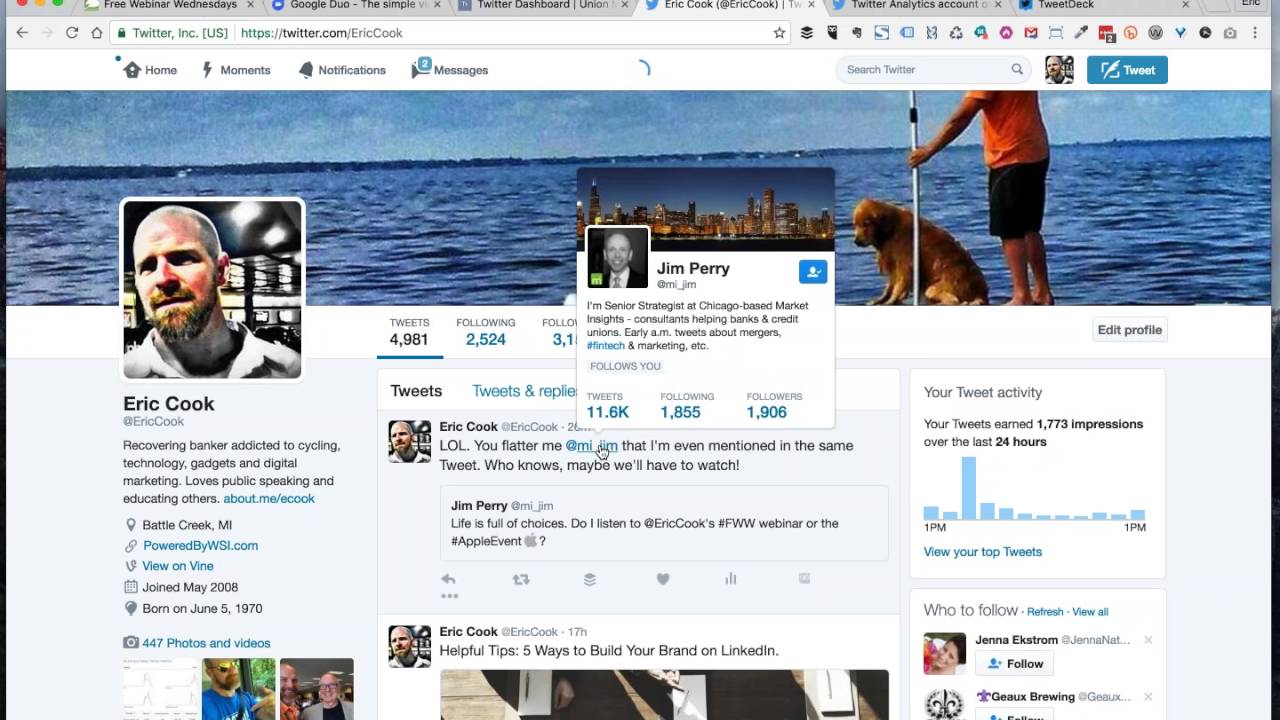
It's the piece of information that is shared that allows information on common topics to be easily indexed Brilliant, and I love the fact that you use the file folder analogy because oftentimes I'll equate Twitter or Facebook or Instagram or any of the networks that you can use where the hashtag is available as a clickable link as a giant file folder or file cabinet, and all of the tweets or the Facebook posts or the Instagram pictures are just pieces of paper that you put into that giant file cabinet. And without any sort of a consistent or easy-to-use label structure, it'd be very difficult once you get more than half a dozen or so images and pictures and conversations in there to be able to find it easily. And so what a hashtag does, like Jeff just said, is it gives you the ability to create some folders, stick some labels on it. So these are related to Golden Retrievers, these related to banking, these are related to digital marketing, and it makes it really easy for you to follow a conversation about a particular topic. The difference between— and this got asked in class as well— the difference between a hashtag and an account, particularly in Twitter, for example, is an account is, is something that starts with the symbol and goes back to the actual individual. Whereas the hashtag, the pound sign, is what precedes a keyword to go and look at a particular topic. And so in this example, our friend Jim Perry posted a little note here and said, wondering whether or not he listens to our Free Webinar Wednesdays or sits in on the Apple event. And hopefully we'll be able to wrap up in enough time to get everybody out so that they can catch the tail end of the Apple event. I don't see Jim logged into the portal, so I think he made his decision and he's checking out the new iPhone and iPads and all the other cool little gadgets and gizmos that Apple is announcing. But in this instance, you can see that Jim's name here is a hyperlink, and I can very quickly get some information about him. And then I can click on his name and I can get directly to Jim to see what sorts of tweets he's been talking about. And these are all from Jim. Or shared by Jim or promoted through Jim's page because DirecTV apparently feels that I'm a target of theirs. There's also the ability with the hashtag #fintech to be able to jump into that. Oh, and that's a lovely picture there that just jumps up with TransferWise. But you can see that the hashtag #fintech takes us in and it gives us the ability to see who all is talking about the issues related to financial technology. So what we did as part of our social media class is one of the things that I like to try to get folks to think about whenever we talk about social media, because oftentimes, again, whether you're a bank or just a business in general, your supervisor may, or your manager may say, well, what's the return on our investment? Are we going to get any new business from Twitter? Are we going to get any new loans from Facebook? One of the things that I try to get businesses and banks to think about is the concept of ROE with it being return on engagement and interactivity. Oftentimes you'll hear people refer to social media as an online cocktail party or an online networking event. If you go to the local Chamber of Commerce and you participate in a networking event, there's really no expectation that you're going to walk out of there with an order full of You know, widget sales or a loan application completed or, you know, money exchanging hands. But what you are going to hopefully come away from that event is some nice conversations, some interactivity. Jeff and I have a good chitchat and learn a little bit more about one another. And, you know, maybe we schedule coffee or we get together for lunch later on in the week. But the, the engagement that goes on between Jeff and myself at that networking event will hopefully lead to potential business down the road if we do a good job of maintaining our connection with one another and sharing information and kind of building that relationship kind of through social media, but other offline ways as well. And so the hashtag demonstrates our ability to be able to create content around a particular topic, and then within Twitter, it's made its API its application programming interface, it's made it available to other third-party services to easily pull that data in and analyze what's going on. So it's, it's not mission-critical that you have to embrace Twitter as your sole engagement strategy, because you may find that your key customers or prospects really don't participate in Twitter, and maybe Facebook's a better avenue or Instagram. But the reason that we use Twitter during class was it just is a very easy platform for us to analyze and take a look at results, but it's ultimately up to you as the business owner or the social media practitioner to determine what network is actually going to be best for you and where you're going to have the best chance of generating some conversation. One of the things to get started is you first have to select a hashtag. This was something that we did actually Monday morning, one of the first things we did in class. Is we have to make sure we, we pick a hashtag. And when selecting a hashtag, the easiest way to do it is just simply to go to Twitter and do a search to see if the desired hashtag that you want to use is being used at all. And if it is, you want to try to find a variation of it that does not seem to be used at all, because when you go back and you look for metrics, for example, if we had just done the hashtag #PCBS, for Pacific Coast Banking School and said, let's just do the hashtag #PCBS. Well, you can see that there's all sorts of other tweets that are being done around PCBS. There's PCBs, which are, you know, chemicals that you don't necessarily obviously want to associate with your brand. And so we learned that PCBS does not really suffice. So we chose 2 different options, and one, the first class that actually was there chose #FirstPCBS and we put 16 after it. So— If I'm lucky enough to be invited back next year and we do #FirstPCBS17, we can go ahead and distinguish those. But now the only people that were actually using this hashtag were the individuals that were part of the 8 o'clock class session. for the Pacific Coast Banking School. The other hashtag that we selected, and they chose the hashtag around #FirstPCBS because it was actually the very first class and the very first time that the PCBS had offered a class on social media. The other class, the 10 o'clock class, chose to go with #PCBSLife, and they also had a method to their madness. They researched and determined #PCBSLife16 was not being used by anybody else. So any tweets that had #PCBS16Life as a hashtag would be unique to them. But their idea was, why don't we capture what it's like to be a student at the PCBS and kind of observations on other sorts of things in the life of a PCBS student. And so each class, it was kind of interesting because they identified their own little strategy around it and kind of helped to actually frame the types of tweets that they would be sending as the class unfolded over the week-long process. So let's— I see that there's a question. So Jeff, do you want to take a quick peek at the question and see if you can go ahead and ask that for me?
Sure. I had forgotten to open that window. I see that Facebook has given some businesses @name. Is that Facebook version— is that a Facebook version of the hashtag?
I know you can use the symbol when you start off. If for some reason Facebook, when you start typing somebody's name, like if I'm on Facebook and I start typing the word Jeff, It'll immediately crawl through all of my contacts and it'll give me a list of the Jeffs that I know, and I can pick Jeff Simpkins. I can also force Facebook to look for an individual by putting the symbol in front of somebody's name. I'm not sure, honestly, I've not really tested it or paid attention whether the symbol stays on Facebook or if it just kind of helps reinforce the fact that you're looking for somebody. Facebook supports the native hashtag all by itself. And if I quickly pop over here and do a Facebook and just do a quick little hashtag search for, uh, #FirstPCBS16, much like we would have done on Twitter, you can see here's a couple of Facebook posts, one that I did One that Catherine Thompson from the PCBS actually shared. This is the videographer that was there, Mike. Cool dude. He's got a little bit longer hair than I do. Hey, Jeff. But we're both rocking some beards, so that's a good thing. Some faculty lounge. So you can see that the hashtag actually shows up in Facebook as well. Now I will tell you, the hashtag does not serve as an active hyperlink in LinkedIn. Although one of the ways that you could potentially use the hashtag in LinkedIn is when you're posting to LinkedIn, if you have your Twitter account connected, you can elect to post to Twitter and LinkedIn at the same time. And while the hashtag that goes on LinkedIn won't be an active hyperlink to give you the ability to search, when it's posted out to Twitter, the hashtag will then be searchable. So you can go ahead and use the hashtag out to Twitter. So, but hopefully that answers the questions and you can kind of see how the hashtag works over here on Facebook. So that kind of gives you an overview of some things. You can see here's the PCBS Life. This is the second one, pictures of graduation. The gentleman actually here featured is Dr. David Cole. He taught at the Bank School for 48 years. This was his last year of teaching. This was my first year of teaching, and he started teaching before I was even introduced to this earth. So he actually had done some consulting for us back in my Marshall Savings Bank days, and my father and one of our board members know him very, very well. So kind of a cool little connection there. But he was the commencement speaker, and there was a lot of hullabaloo going on around Dr. Cole's retirement, which was kind of cool. But here you can see Clay, who I'll talk about Clay here in a little bit, but he was actually the husband of one of the students in the second class and was one of the super engaged individuals. You can see the number of tweets and the followers that he has. So Kathy from our class actually enlisted the services of her husband to help amplify the reach of the PCBS Life hashtag. And resulted in us being able to get close to, oh, probably 1.8 million impressions from just 30 bankers over a week's long worth of tweeting. So it just kind of shows you the power of what happens. So here's the Twitter analytics. So I'm using a service called TweetReach, and I've talked about TweetReach before. The free version is the one that I've always used, but I did upgrade for the month at $99, which gave me the ability to run a tracker against 2 different categories. You can see down there in the bottom of the page, we've got the 10 AM class in the teal blue color and the 8 AM class in the salmon kind of orange color. It ran, you can see the number of tweets, you can see the number of contributors, you can see the total reach and impressions. And so talk a little bit about that. So obviously tweets and contributors are pretty self-explanatory. It's the number of actual tweet messages that were sent out and the number of people from each of those classes that used— and because each class only had about 15 people in it, you can see that there were several individuals that got pulled into the conversation, other students that were part of the PCBS that got on the bandwagon. Friends and colleagues, if there were individuals that were active Twitter users already. Although I'll tell you, a majority of the people in class did not actively use their Twitter account. Some of them had a hard time even remembering the password or getting it reset. So we ended up having to go through some of that with folks. But there were maybe a handful of people that were active Twitter users. Most everybody else, it was a pretty new experience for The reach is the number of accounts that the tweet actually got directly in front of. So if I've got 1,000 followers and I tweet that, then that's going to add 1,000 people to the reach. If those 1,000 people have got multiple people that they are connected with, that's where the impressions come through, because that's the total number of possible impressions or potential visibility. of each of the hashtags, and you can see the numbers got reran this morning. 1.8 million impressions over a week's long worth of tweeting from a handful of bankers out in Seattle, Washington. So kind of cool. If we scroll down, you can kind of see here's Kathy. She was a student, and here is Clay, her husband. Incidentally, he came in for graduation and I pulled him away from his lunch briefly and got a selfie with Clay, which is kind of cool because he was somewhat of a rock star. But Kathy was part of the 10 AM class, and even though the 10 AM class didn't reach as many accounts, even though they had more contributors and more tweets, the 8 AM class actually reached more accounts. The 10 AM class was able to reach many more impressions and create greater visibility. So if your business is thinking about participating or leveraging a hashtag as part of an upcoming event, a lot of organizations will sponsor local community events or activities, or they will participate in one. A hashtag is a great way to go in after the fact. And even if you are not paying the full $99 a month for a TweetReach account, you can get up to 100 of the past tweets as part of a free TweetReach account. And then for $25 a pop, you can actually download and get a full blown TweetReach report, which gives you a lot of really great insight, and you can kind of analyze those things. So if we pop over and we take a look at some of the snapshots, and this is going to give us a little bit more visibility on kind of what a snapshot typically looks like if you were to pull it off of just a traditional TweetReach account by itself. If we take a look at the PCBS Life one, for example, they're the ones that obviously dominated from an impressions perspective. Let's take a look at PCBS Life. You can see this was run a little bit ago, so it's not, I don't think, totally updated yet. But this goes through and it talks about the estimated reach of accounts, the exposure with potential impressions, gives you kind of a last few days worth of activity with the tweets and the replies and the retweets. The contributors are listed here. So again, there's Clay and Kathy and then the PCBS was also participating. And then it gives you some retweeted information. So I was able to take on the retweet when they chose the PCBS Life 16. So that was retweeted 8 times. And then down here, the contributors. This is one of the really cool parts about a hashtag and an event. If you're a business that sells locally within your own community, or you're interested in engaging with people that are following a particular topic or something of similar interest like the PCBS or a particular charitable cause or a community event that's going on. This gives you a quick and easy way of actually seeing who's tweeting, what their impressions are, how many times somebody's retweeted, and you can walk through and this gives you some tremendous insight on individuals that you as a brand may want to also follow or engage with or have some conversations with. And so if, for example, I was not following Clay and I see that he's doing a lot of tweeting and has some significant impression, and I would love to get connected with him because the next time I do a class, I'd like for him to be part of that dialogue, I'd want to follow him. Hopefully he'll notice that I follow him and he'll follow me back. Twitter gives you the ability to generate one-on-one conversations, so you could mention, hey, @ClayFranklin, thanks so much for helping with class. Which is something that I actually did. So when we got together and I saw him at the luncheon before graduation, you know, we had been tweeting back and forth and exchanging, and he says, I recognize you from your picture, and so vice versa. So this gives you a really good snapshot. And Jeff, one of the conferences that you and I were at last year, a couple years ago, down in Florida, the conference had an event hashtag, and I know I think you had said one of the individuals that you caught tweeting with the hashtag was actually a client of yours, and it was because of Twitter that you realized out of the several hundred bankers that were there, it revealed that you had a client that was there and you were able to get connected with him. But I'll frequently go in after an event is over and I'll just pay $25 for the report, and it gives me a list of every single tweet that was done at that event using that event hashtag. So I can go in, I can see what people are talking about, I can find— you can see here's JP Nichols actually created a— he took a picture, tagged me on it, so I could go back here and I can actually see what the picture is. But it almost gives you the ability to crowdsource notes because invariably you're not going to make it to every single event or learning session that goes on at those conferences, but there will be other people that will go through and tweet and talk and type and take pictures, and you can have access. So you can see I'm not even halfway through the list, and this is just one of the hashtags. So, Jeff, I'm going to pause here because I know I name-dropped you in that conference, and I thought you had been able to connect with one of your clients as a result of discovering that they were there on Twitter. You wanna maybe comment on that?
Sure. You posted a picture, a selfie of us at lunch, I think, and used the hashtag for the conference. And one of my clients who was at the conference using the hashtag saw the picture and shot me a text message, and we got together that afternoon and had a nice conversation. Yeah.
So I think, again, Twitter doesn't have to be the end-all be-all. If you're not comfortable in it or your clients aren't there, it doesn't mean that you have to use this, but Twitter just creates some really cool conversation options. So because Clay wasn't part of the first 8 AM class, you're not seeing as many Clay pictures here. So you can see, you know, me being the most active Twitter user in the room. Kind of pulled through. One of the other individuals, though, that was part of the 8 AM class, and I told Tony to be careful because his ears would likely be ringing, is Tony's a banker out of—I want to say he's out of Iowa, if I'm not mistaken—and he's going to listen to this. He's going to, dude, you don't even remember where I'm from, really? But anyway, he's a Wells, and he was already using Twitter quite a bit. We had actually met. And had some nice conversation at the Iowa Bankers Conference and kind of kept engaged. And when he saw that I was teaching, he shot me a note, and we actually started up some Twitter conversation before class even started, which was kind of cool. He was one of the ones that I suspect— remember I said the 8 AM class reached more accounts, but the 10 AM class had greater amplification through impressions, in large part due to Clay being tapped in. I think Tony was one of the reasons why we were able to reach so many accounts, because even though he may not necessarily be connected to as many people that have as many followers as what Kathy did with her husband, he was able to connect with a lot of different individuals and help the first session actually kind of take the lead as it related to the accounts that were reached. Shared a tremendous amount of great information. Drew's another individual that was there, and they had some conversation going on back and forth between them. And while at the PCBS they typically frown on student utilization of mobile devices during class, because you can imagine as an instructor it's pretty distracting, we actually got a waiver for that policy. And people were tweeting each other back and forth in class and sharing really cool, you know, animated GIFs and all sorts of other interesting things that then created some of that social cloud outside of the class that generated some awareness and some visibility. So each class, I think, demonstrated one of the kind of true powers of Twitter, whether it's through account reach or impressions. But it was a pretty cool week. We had some pretty good eye-opening experiences for folks that had left. One banker indicated that, you know, she created a Twitter account on Monday, and by the end of the week had said, She was going to brand herself. She already contacted her bank's marketing department. She was going to start working on developing a consistent stream of information around banking and finance and just have some fun with it, but really wanted to become the recognized expert in her market area around the topics of banking and financial information. I made her promise that she would keep in touch with me and keep me updated. She was pretty excited. The other thing that we talked about as measurement goes is certainly you have the ability to use a service like TweakReach where you can go out and you can look at the hashtag in general. But if your business or maybe you as an individual are going to be spending some time being more active in Twitter or any of the other networks, and again, this is one of the areas where Twitter really excels, is it gives you access to this analytical data. Facebook doesn't really give you analytical data unless you're using a business account. It has a service called Insights, but as a business you really don't have, or as an individual you don't have access to Insights. But if you go to your account and let me just show you here real quick. If you hover over your account and you go down to analytics, that'll get you into the backend of your Twitter account. If you don't have access to that, you can just manually type analytics.twitter.com, and I think you may have to sign up for a Twitter Ads account, but you don't have to put any payment information in there if you're not going to do it. But this is a good way to measure your own personal exposure. So you can see in every instance over the last week, I had some pretty significant bumps, and now that I'm back home, a little bit of a lingering going on. So I'm not tweeting nearly as much as I was when I was on campus last week, but my impressions are still up. Profile visits are up tremendously, the mentions are up, my followers are up. So if I was going to be engaging and really wanted to kind of build my personal brand in Twitter more so, I could come back in here and I could take a look at tweet reach report, which would show me that the hashtag that's being used is getting some nice visibility. And maybe that hashtag has your, your organization's initials somewhere in it. So maybe it's a hashtag that you've created for your own purpose because maybe you're sponsoring member or a donor or have a significant role in a big community event. But then you can go back into either your business or your personal account because on Twitter it's just an account, there's really no differentiation between the two. You can go in and you can actually take a look and see what is going on with your, with your actual Twitter statistics. So you can see here's One of my top tweets got me over 1,100 impressions where I snagged a picture of the graduating class on the steps of the library there at the university. Top follower here is Angela Brooks. I can go down here and get some other highlights of some things that are going on. I've got a little tweet— of course it's Seattle, so you know they know how to do their coffee there, but I had some pretty tasty mochas while I was in Seattle. So this just gives you a little bit of insight on kind of where you're at as an individual. So you can kind of flip through some of these and take a look and see the volume of tweets that took place last week. Wham, wham, wham. Some of the other statistics, some of the engagement rates. So most of the time when I talk to folks about Twitter, there's certainly a feeling that it's very much like a fire hose and it's difficult to discern what's going on. So you kind of have to search or hopefully sit in on a webinar like this to get some ideas as to where you can actually go to kind of glean some information about what's happening. So, Jeff, I'm going to pause right there. I'm going to show a couple of the other screens, but just catch and see if you've got any other insight or observations thus far.
Looks like you had quite a successful week.
Yeah, it was pretty fun. And I'll be honest, and I told the class, I said, you know, we're gonna, we're gonna be up front here. This is the first class, first time. We're gonna do a Twitter hashtag contest. I honestly have no idea if this is gonna work, if it's gonna flop on its face, or we'll be somewhere in between. But I think this, if it goes the way that I hope that it's going to go, It's going to reveal some pretty cool insight on how social media in general can be used to gain exposure and provide you with at least some validation that when you're participating in conversation and you're categorizing things, you can, you can get to the point where you can obtain some sort of measurement around what it is that you're doing. Because I think that's one of the fallacies is, you know, there's no way to measure social media because it's all you know, touchy-feely, warm fuzzy stuff, and there's no concrete data metrics that you can go off of. So, so the last little area that I was in was the audiences, and this is where it can kind of reveal who the individuals are that are engaged with you. And it's not really a surprise if you've been on Free Webinar Wednesdays before, and I know Jeff knows me probably better than most. No surprise that I'm into technology. Jeff and I both own our own business, so the entrepreneurism is not a surprise. Marketing, business, finance, banking is kind of rolling in there, obviously. So you can kind of get an idea of who the folks are that I'm communicating with. The reason that I think this is nice as well is as you continue to grow your audience, let's say for some reason I determine that I want more of a female audience. Maybe the data that I'm reading in research reports is telling me that if I want to connect with marketing professionals that are the decision makers in organizations that would have the likelihood of hiring me or buying my product, those are going to have a higher likelihood of being female. Then I see that I'm 60-39. I'm lopsided on the male side. So as I think about my following strategy and my engagement strategy, This would be an area where I may want to look at trying to intentionally seek out some of the female followers or female accounts or women marketing professionals, whatever the case may be. But at least you can get an idea of who it is that you're connected with, what their demographic information, age range, If nothing else, this is kind of a— I don't want to say spooky, but just like Facebook, the networks know an awful lot about us folks. So it might be kind of cool to pop in there and just take a look at things. Overwhelmingly Verizon, although— well, not overwhelmingly. I'd say Verizon and AT&T are pretty close to one another. But 28% iOS devices and Android. So if I was producing content or using a particular service that was only available on an iPhone, You can see roughly 30% of the people that I'm participating with would be able to interact with that. The last little element that I wanted to share is ongoing management. There's a lot of different platforms out there that you can use. Hootsuite is great. I use Buffer to post and schedule updates. But one of the platforms that I also wanted to make sure everybody was aware of because it got acquired by Twitter and it's kind of part of the Twitter platform now, it's called TweetDeck. And TweetDeck makes it nice because if we go over here to Twitter, for example, if I wanted to, you know, take a look and see, well, what PCBS Life 16, I kind of have to make sure that I search for it. If I clear this information, I can lose this. If I wanted to jump in, I created a list, for example. A list is a collection. I've got 28 individuals that are part of the PCBS 2016 list. These are people that were either part of my class or tweeted as a result of what was going on. I can very quickly jump in and you can see here's an individual that doesn't necessarily have, you know, they're not putting the actual hashtag in. I wouldn't catch it if I were to look for #PCBSlife or #FirstPCBS CVS 16, but she was part of— so Bessie was part of the social media class. If I wanted to jump in and just see what other things Bessie was talking about or tweeting about, it just gives me the ability to jump back in and kind of take a look at folks that I had in my class or interacted with when I was in Washington the last week in August. But if I use a service like TweetDeck, I can go in here, I can create a tweet directly from here, I can create additional columns. So you can click on this little guy. So you can see I've got a home column, and this is just going to roll. I mean, this is kind of like the proverbial fire hose. So you can see it's always updating, always updating, always updating. This is not an area where, for example, if I go to the home page, I don't usually spend an awful lot of time. You can see here's the Gizmodo Apple Watch, and if I go into TweetDeck, Boom, there it is. Well, all of a sudden now I've got another one, and if I wait, another one will come up. So it's really difficult to catch information as it rolls through the feed. But if I'm using TweetDeck, I can turn on notifications. So these are anytime somebody either follows me, interacts with me, mentions my name. These are specifically mentioned. So here's Jim again, we saw this tweet already. So I could go in, boom, here's Tony, we had a little dialogue. Was a little bit last minute, so my apologies for the delay in responding. Tony may have been able to actually sneak in. I've got a list called the banking industry which has a variety of individuals in it that are all related to banking, financial services, credit unions, or anybody else that touches the banking industry. Now I can go in and so I've got columns. I could jump right in and take a look at the 2 hashtags that we're running for the event. And I could go right here to the PCBS Life, which is the list that I created, and voilà, there's Bessie's tweets right here. So this gives me kind of a quick and simple boom, boom, boom. If I like this one, I could go retweet it. I already responded here. I responded here. So if this was something that I wanted to go into, but I can, I can interact and engage directly from the TweetDeck platform. And, you know, oftentimes I'll just leave this launched. I'll pop in, take a look at it, interact for maybe 2 or 3 minutes, get caught up on some things, minimize it, and hop back into my work. So try really hard not to let social media take over your entire being and dominate your workday, because then you won't get really anything done. But this gives you a quick and easy way of just jumping in, seeing what's going on, responding very quickly, and then get back to what what really matters. Well, not that social media doesn't really matter, but get back to your workday and get your regular work done. That really is the story that I wanted to share. I thought the class went really well. I was pleasantly surprised, and I think the observations of measuring engagement, creating impressions, building visibility certainly resonated with the bankers that were there, and If you're not in the world of banking, it's probably no surprise to you that bankers are a relatively conservative bunch. So the fact that we've got 30 bankers tweeting and generated that much exposure in just a week's worth of activity, I'm pretty proud of everybody that, that did that. So it was pretty cool. Jeff, any closing thoughts on your part?
I think we're on. There we go.
Yeah, well, thank you. So cool. Well, I will leave this last little parting Google shot. So I know that there's a big Apple event going on right now, and I'm going to hop over and check that out. But I wanted to mention a new app that Google has released, and this is kind of cool because I've got friends that are using Apple devices and they always brag about how cool FaceTime is because they can video chat with each other and it just makes it super easy. Google came out with their app called Duo, which now gives Android and Apple people the ability to essentially FaceTime and video chat between the phones and not have to be on the same platform. The downside is you do have to go out and download it if you are not using it yet, so it is an app that you have to pull down. The easy thing is all you need to know is the person's phone number. There's no account that you have to create. There's no setup. You basically both download the app and that's it. So there's no passwords to remember. And once you generate a phone conversation or a video conversation with somebody, you, you know, you've got quick access to their picture. All you do is touch it. The other thing that's kind of cool with Duo is it has what's known as a preview, and I think it's called like Knock Knock. So when you go to call somebody, so if I were to go ahead and want to ring Jeff, Jeff would actually see a preview of me before he officially accepts the call. So if the knock comes in and he sees that it's Eric and he's like, oh, I can't deal with Eric and all of his, you know, chatty technology, he's just going to talk about bicycling all day long, he can go ahead and ignore it. Or if he sees what I'm doing, And I'm someplace cool, or maybe I'm standing next to somebody that he also knows, maybe it's a mutual friend, he can swipe up and he can accept the call and jump in and say, hey, what are you doing there with so-and-so? So that's kind of a neat service. So if you are on Apple and you would like to have some video calling with your Android friends, please download Duo. It's a pretty cool service. I'm saying that to you, Jeff, because then we'd be able to have little voice video conversations and I'd get to see you more than, you know, just once every 6 or 8 months when we happen to cross paths at a conference. So there's my final public service announcement. So with that, we'll bring the show to a close. We'll let you take off unless there's any other questions or comments from the chat room. You can go ahead and we'll close it a little bit early today and get you off to the Apple event if you're so inclined to check that out and see what Apple's talking about. You know, spoiler alert, you're not going to get a headphone jack on the new iPhone, it looks like. So you'll figure something else out there. But who knows, maybe we'll, we'll get our buddy Greg McPherson to join us on an upcoming episode of Free Webinar Wednesdays, and we can go back over some of the Apple things that are announced depending on how groundbreaking they are. So with that, so Jeff, it's been a pleasure. We'll wrap this up. Anything you want to say in final? I know I did most of the talking, but that's usually par for the course since I'm a little chatterbox.
Everybody, thanks for attending or listening to the recording, and we look forward to seeing you on future Free Webinar Wednesdays.
Sounds good. Thanks, everybody. Have a great week. Bye-bye.







