A walkthrough of Schematic's platform using a test weather app for Bob's Burgers. See real-time usage tracking, plan management with overrides and prorations, a new data export feature, and the customer portal with a mobile checkout flow that handles seats, add-ons, and payment methods.
Chapters
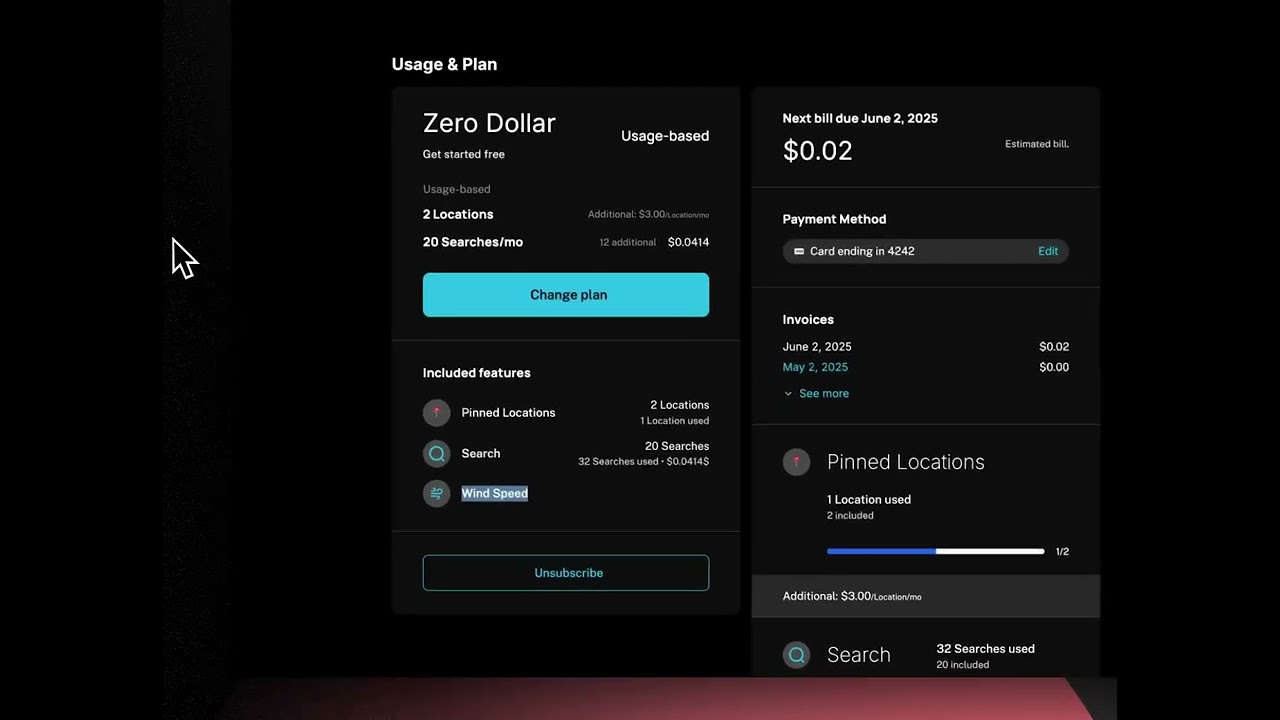
Here's a quick end-to-end demo for a schematic account with some data in it. So this is using our test app, which is a weather app, um, where you can pin locations and do weather searches. Um, this is an event-based feature. This is a tray-based feature, just for, um, context there. Um, and then we've got a customer portal that's been created in Schematic that allows you to do checkout, add-ons, and all of that. I can show you some of this stuff if you want, but just to show you on the things that you touched on, I've got in Schematic now, you know, my search feature. I can see usage of my search feature. I can see which companies have access and what their usage looks like. Let's take a look at that account, Bob's Burgers. So I can see here that they're using 1 of 2 pin locations. They've actually used 31 of their 20 included searches, so they're in an overage state and accruing, um, an overage there. I've got an override set here. I have the feature to see wind, and then I can go in and add an override for that feature. I can add an expiration date if I'd like, and then once that override is on, um, they'll have that feature. They'll also see it in their customer portal that it's included in their plan there. So that's an example of how an override works. I can also manage this company's plan. I can move them in between different plans and handle proration do add-ons, do discounts, choose how many seats they have. For example, I can move them to plans that are not listed, that are not your configured live plan. So this is where you decide what can appear in checkout and the order of the plans, the order of the features, which features are shown and which are not. Um, I can also set up a custom plan. So instead of showing a price I send them to a demo link. I've got my add-ons. I've got my trials. That's all set up here. And that's what you end up seeing in the component. You can see events coming in from that company and how they're getting counted towards a certain feature and also towards a certain entitlement. I can see those plans here too. So I'm using, I think I'm on the $0 plan. I can see that overage entitlement is set up here. Um, I can also go— something we just shipped is the ability to get an export, so I can bring all this data out, um, and send it to myself. Um, and that's going to be an export showing the company what plan they're on, what their limit is, what their usage is, what their soft limit is. Um, and then you can do all kinds of analysis with that. We're going to add more of that live in the product too, so it's easier to find. Filtering and sorting on the company list is coming. We've got those webhook triggers for plan changes and for when companies reach their limit. And I think just diving into the portal itself a little bit, we've got this— the builder here is where we've set it up. I can go and see what it looks like from the perspective of a specific specific customer if I want. We've also got a pricing table set up that we use on the marketing side. You can see everything, um, like in tablet mode and, and when in phone mode too, to make sure that all works. And yeah, I mean, within the actual experience you can do all kinds of things within checkout, like this particular plan has a pay-in-advance fee or entitlement. You can see, you know, details on how things are actually calculated and proration is calculated. I can choose how many of this unit I have, seats I have. I can do add-ons, one-time add-on, recurring add-on. I can set my payment method. I can manage payment methods and manage default payment methods. That's all there. So yeah, fully formed checkout flow, branded, mobile-friendly, all of that. So hopefully that's a good overview of just seeing an account with real usage and, um, how things look, you know, in practice.