College Financial Health Essentials Dashboard - Short Tutorial
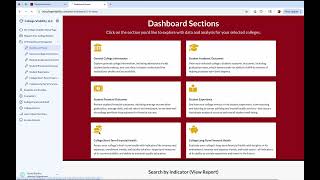
In this concise tutorial, the presenter walks viewers through the core functions of the College Financial Health (CFH) Dashboard. After logging in with a paid or trial account, users navigate to the Dashboard Home where they can add or update colleges, select or deselect the national median, and customize the list of institutions for analysis. The tutorial demonstrates how to access specific sections such as short‑term financial health, the VALS Overview text analysis, and college revenue (net tuition revenue over time). Viewers learn to use the indicator‑info feature for metric definitions and the search‑by‑indicator tool to locate all data related to a particular metric, exemplified by finding the 6‑year graduation‑rate percent change for the selected colleges. Throughout, the presenter shows how to return to the top of the page or back to the Dashboard Home, emphasizing the fluid navigation and data‑exploration capabilities of the CFH Dashboard.
Chapters
More from Gary


What does it look like when a college increases both total revenue and total expenses?



College Financial Crisis? We look at the financial health of Bay Path U. (MA) and Coe College (IA)


Private College Financial Crisis? We look at the financial health of Hobart William Smith College


Financial Compass tutorial (Private college version.) Financial statements compiled 2016-2025.