Submitting 8(a) Annual Reviews in certify.sba.gov
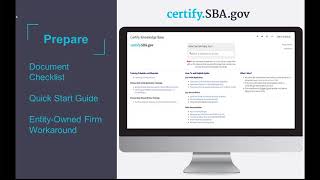
Webinar on submitting 8(a) annual reviews in the new Certify platform. Create accounts and update SAM.gov by March 21; submissions open March 22. First-time users upload five document categories, then complete questionnaires on eligibility, ownership, and control. SBA reviews in 15 days, you have 10 days to fix deficiencies, and a recommendation comes in about 30 days.
Chapters
Ladies and gentlemen, welcome and thank you for joining today's Web Conference 8 annual review and Certified for existing firms. Please note that all participant lines will be muted for the duration of this event. You are however, welcome to submit written questions throughout the presentation and these will be addressed during Q and A. To send in a question, select all panelists from the Send to drop down menu of the chat panel located on the bottom right hand side of your screen and then submit your question. If you require technical assistance, send a private note to the event producer or call our help desk at 1-888-796-6118. I would like to formally begin today's conference and introduce Von Tran, director of the 8 program. Please go ahead.
Thank you Tegan. So good afternoon everyone. Thank you so much for taking the time to join us in today's webinar. So who is excited? I am.
I can't wait.
As you know, we're going to launch the Annual Review this Thursday, March 22. We have been working so hard on making our ah, certification system much better, effective and efficient. So today Stephanie Grosser from our White House OMB who's going to talk to us about the process and how to show you how to upload and all that good stuff, as well as Rick Lee. They are so awesome. So glad they are here. So to you Stephanie.
Thank you Vaughn. So we're going to start by walking everyone through some slides to give you some dates so you know what to expect once we actually start this. But once I go through some slides I'm going to at that point turn it to Rick to log into the site itself so that he can show you hands on how to complete an annual review application and so you know what questions to expect. So on March 22 this Thursday, this is when firms will begin submitting annual reviews within Certify. As we said, in order for firms for all of you to actually submit your annual reviews, you'll need to have Certify accounts and SAM.gov profiles set up in advance. So we're asking all firms to actually create your account and make sure your SAM.gov profiles are active by March 21st tomorrow. Any firm with an anniversary date of March 22nd or after is required to submit their annual reviews in Certify. If your anniversary date is before then and you just started in BDMIS or you haven't started yet, then you could go ahead and just do it in Certify starting on Thursday and that's recommended. So in terms of the upcoming dates, the two dates we have which I just mentioned are March 21st to create your account and then March 22nd to begin submitting your annual reviews. Of course, your annual Reviews are due 30 days after your anniversary date and so you don't have to do it early and Certify, but it's available starting this Thursday. And so here you see a screen on how to create your Certify account in the platform. I'll show you on the Knowledge page how we we're not going to go over how to create your account today. All of you should have received instructions through SBA and through your SBA District office in two different ways on how to create your account. We also have a video tutorial of how to do that on our Knowledge page, so I'll show you how to access in a minute, but this is what that page will look like. And again, any firm, even if your anniversary date is not until November, every firm in the program should at this point in the next few days create their account in Certify. And that will enable you to get your notifications when your annual Reviews are due, 60 days and 30 days before the due date. So once you actually log into Certify, you'll see on your dashboard that you have an annual review that you can access and start filling out. You won't be able to do that until the 60 day point before your due date. So 30 days before your anniversary date is when the system creates that function in your Certify account. However, if you log in within that time period and you don't see your annual review, what you should do is contact the help desk@helpertify.sba.gov if you're trying to do that today or tomorrow, don't contact the Help Desk yet because it won't be available until March 22. If you have already submitted your annual review but you log into Certify on Friday and you see that it says you have one due and it shouldn't be there because you already finished this year. You can also contact the Help Desk and tell them you already completed yours in BDMIs and to remove it from certifying. So to help all firms prepare for their annual review, we've created a couple different documents that are all available through the Knowledge page. So to get to the Knowledge page, you go to certify.sba.gov and click on help and then it will take you to this page. And this page has the instructions for creating your account. It also has a document checklist of all the documents you'll need to upload. As you go through the Annual Review questionnaire online, it has a Quick Start guide of how to basically take every action you'll need to take. And then it has an entity owned guidance document that we're just finalizing and that will help give additional guidance to entity owned firms. I'm just going to switch on my screen that you'll be able to see Here is the SBA certified.sba.gov and you can see when I click on help, it pulls up the Knowledge Base page. And so this is where we keep all of our training resources, including this training is being recorded and it will be put up on this page. All of our previous trainings are also on this page. And then in the middle section you'll see the Quick Start Guide, the Annual Review Checklist and the Entity Owned Guide. And so when you click on the annual Review checklist, you'll see here it has. So we've gotten rid of all of the forms that you guys are used to and we've digitized them into different sections. And so it walks you through section by section with documents you'll be asked to upload. And so you can save time before you start your annual review by saving all the documents you'll need to an eligibility folder, a control folder, business development folder ownership. For each of those sections, just go ahead and save them to your computer and then it will be a much quicker experience once you log in. And then here is what the Quick Start Guide looks like. So you'll be able to see what task you want to take and then instructions on how to go ahead and take those tasks, do those tasks. So moving back. So that's for preparation. And then one thing I want to call out before we go into the demo. If this is your first time, which it is, filling out an annual review in Certify your first year, we're asking for some additional information to baseline the data that we have within Certify. And so there's five different things that you'll be required to upload through the annual review process the first time, but not in following years. So the first piece that's extra is you'll need all of your contributors, so not just DVDs and spouses, which are typical for a regular annual review, but also 10%, owners, directors, management members, managing partners and officers, which all contributed to your initial application. All of those individuals will need to be invited by you and we'll show you how to do that within Certify. In this computer screen you can see the full name and email address where you type in each of these contributors and then they'll receive instructions to fill out information on Certify and submit it as part of your annual review. So that's the first thing. And the reason why we are doing this with Inscertify is actually to protect both the pii, the personal information of the contributors, and the owner. And so the contributors who are given access to this piece to fill out will not be able to see the firm owner's information and the firm owner won't be able to to see the contributor's information. So we have a firewall between those two permissions to protect everyone's privacy. And that's why they're submitting it directly to sba. The second thing is the previous three years of personal federal tax returns instead of the one that you would normally need to provide. Similarly, the three previous years of balance sheets and profit and loss statements, all delinquent tax returns and SBA loans, and then finally documentation about the restrictions in terms of any retirement accounts. So those are all the documents you'll need the first time you do an annual review in Certify. If there are any firms who are on the call who applied in Certify for initial application, they won't need to do this their first time doing an annual review in Certify because they'll have already inputted all this information during their initial application in Certify. But anyone in here who has not done an initial application in Certify will need to provide those. So at this point, I'm going to hand it over to my colleague Rick Lee, who will be able to walk everyone through the actual demo of the site so everyone can see what the questionnaires look like and what you can expect when filling them out.
Thanks, Tiffany. So I wanted to show you a few components of the application. I know that a lot of you are new to Certify this point, so I wanted to run you through a few basic components, some places that you'll want to make sure that you pay specific attention to. So what I'm showing you here is myself logged in for the first time after setting up an eight application package. This is what you'll see after you enter your login and password. The assumption here is that you've already connected your business and set up your user account. So once you have done that and you log in, this will be your default landing screen. And what you're seeing here is all fake data. This is all in one of our development environments. So it's not going to make a whole lot of sense, the actual data, but it is a solid representation of what we're presenting in the application. So one of the reasons that we ask you to make sure that your SAM profile is active and up to date is because we actually pull about 50 different fields or data points from SAM.gov to eliminate your having to complete them. So we're trying to remove a lot of the burden on you. And this is done automatically. As Stephanie said, you can find instructions on the knowledge base on how to do that. But I just wanted to make sure that you that you're aware that this data is here and this will be part of and captured as part of your application or your annual review. A couple other key things to notice here is, first thing is the dashboard, which will actually bring you right back to this screen should you decide that you'd like to participate in other programs or apply for other programs. You can click on the Programs tab at the top, or if you scroll down, you can also use these links on your dashboard. The next really important component here is the Documents Library. So regardless of the applications that you've completed, all of the documents that are associated with your firm will always appear in this documents library. The purpose for this is, let's say you are an 8 participant, you're doing your annual report review and you decide you want to apply for wob, the Women Owned Small Business Program. You're able to, you don't have to upload and scan these documents all. Again, you can use these documents to complete your WOB application as well.
And before Rick leaves this page, a question we always get is, how can I delete files I've uploaded? You actually can't delete files, but you can archive them. And to archive them you need to go to this, this documents library against the black background on the top. Because you'll see when we're within the annual review, there's another documents library that pertains to that annual review. But to archive something, you have to click on the Overhead Document tab. And then that little garbage can is actually an archive box so that it takes it out from consideration even though it remains within the overall system.
Another thing to note. Thanks, Stephanie. Another thing to note is that for your own reference, I know you guys know there's a lot of supporting documentation involved in eight. We've given you the capability in the screen to add notes to the specific documents. So you can just double click in this table pane and add any comment that you would like. And these will be visible to the analysts when they get there, when they're doing your review. Okay, so the Profiles tab is pretty spartan right now. All that we allow you to change because we're pulling so much data in from SAM is your username and your email address. And it's important to note, too, that this email address is part of your user account in Certify. It's not the email address that you provided in sam. And the reason we do that is that the accounts are separate, they are different. So we use the same email address, or if you want to use a different email address, certified account. Okay. The next important thing is the notifications tab. This particular account doesn't have any showing, but if you receive messages from your analyst, from your BOS or your application, your annual review is returned to you for some reason, or an analyst requires additional information from you during your annual review, you'll get a notification here of that request. So you want to keep an eye on that. When a notification is sent, a little blue dot appears next to the word notifications, and that will indicate that you have something there that you haven't read. Okay, so let's go ahead and jump into the annual review. If you scroll down from your dashboard screen, you'll see that this particular account has an initial application. As Stephanie said, some of you will not have completed an initial application in Certify. Some of you will see something there called the BDMIS archive. And what we've done with that is we've migrated or transferred much of the information that you provided in BDMIS in previous years into certify as PDF documents for your reference and for SBA's reference as well. Well, okay, so to start your annual review, you'll simply click on this. So how does this appear? Certify creates this for you automatically. 60 days before your anniversary date. I'm sorry, before your due date. 30 days before your anniversary date. So you have 60 days to complete the annual review. We're sitting here that this is in draft. So when you see an application package that's in the draft state, that means that you can edit it. In this case, you simply click on the 8 Annual Review, and you'll see, as Stephanie referenced before, links to the questionnaire is broken out by sections, so we're no longer doing the numbered forms. We've aggregated those into questionnaires that are broken out by the eligibility criteria that you will be responding to. Again, we also offer links to the Quick Start Guide and the application checklist here at the top, and some basic information about you. We'll be adding more information to this bar as we go, so you'll see things fairly frequently become new in this interface. Don't be alarmed. And we'll be sending out emails too to inform you when that occurs. So what's important in this, what you're seeing here is related specifically to your annual review for the current year. Okay, so the overview is what we're looking at here. We also offer a messages tab, which, excuse me, has no messages at this time, but messages will appear here, either from your analyst or some will be system generated. One thing to note, if you receive a letter of deficiency from your analyst for any reason, that will be sent through messages and it will appear here and it will have a little SBA logo by it which will indicate that it is an official correspondence from sba. And also note too that the messages have. We have a read receipt feature that will. The system will log once you've read that message. So just be aware of that. New messages can't be started until the annual review has actually been assigned. And we realize that you all have assigned Boss. As it stands right now, for this particular launch, we have your cases assigned to the district office to which you are associated, and they'll be then assigned from there. Excuse me. The next tab over is your documents. So this documents tab has no documents in it right now, but this will house all documents uploaded by you that are related to this application. So up here we showed you all documents that are related to your firm. Once we're inside the annual review, we're showing only documents that are related to this particular annual review. Okay, so I'm going to go ahead and go back to the overview. Okay, so to begin a section of the application, you'd simply click on the section that you'd like to start and it will bring up the questionnaires. I'll turn this over to Shivani in a few minutes to go through those with you. I just wanted to show a few more features here. Excuse me. So each section has its own status. You can complete these sections in any order, but each specific section has to be complete within. Each section has to be completed sequentially. And the reason for that is that within each section we provide skip logic, which means that you don't have to answer questions that aren't relevant to you. So based on the previous answer, we determine what may be next or what's appropriate for you to fill out next, and we'll take you right there. So we're trying to minimize your burden and reduce the amount of information that you actually have to consume to complete your in. So when the section is started but not completed, it'll say in progress if you haven't started yet. Excuse me, Excuse me one second. Sorry.
So while Rick is just drinking some water, but while he is, I just.
Want to mention that we didn't mention.
This, but the person who needs to log in and actually fill out these applications and Certify is the firm owner. And so a lot of you may be used to someone else logging into bdmis and doing it for you. In this instance, the firm owner is the one who's required to create the account. Only the firm owner can create an account and certify. We are in the future going to build a way for third parties to be given access rights to help with those accounts. But for now, we've built it so the firm owner goes in and actually completes that form.
The business section. Thank you, Stephanie. Thank you. Apologize for the dry throat. Okay, the other important section to show you here is we also realize that you have folks in your firms that need to provide SBA information that they may not necessarily want to share it with each other or with the firm owner who will be completing all of the other sections. So we've classified each type of individual within this page of contributors and it's really important that you go through and read these in detail and understand which contributors that you need to add. The firm owner will automatically is labeled in the system as the vendor administrator and you can simply start your application by clicking on the start your individual application link. And again we're showing the status here as not started. To add a contributor, let's say you have your spouse. I am the firm owner and claiming disadvantaged status. My spouse needs to also contribute information. I can simply add her name here. And her email address and this will send an invitation to her. And she will need to then set up an account in Certify and she'll be presented only the information that she needs to provide. Okay, I am going to Teagan. I'm going to retain ownership of the screen, but I'm going to turn the call over to Shivani and she can start walking through the questionnaires.
Okay, thank you, Rick. As the folks have mentioned on the Certify team, we are going through the process of moving things over from BDMIS to the Certify environment. So you'll find some changes that you'll like in terms of being able to interact in one space without hard copy documents and with electronic signatures. And things of that sort. So as you go into your annual review, you'll want to make sure your SAM profile is current because if it's not, you won't be able to. It won't be able to sync up and certify and you'll end up with an error warning. So you'll want to make sure that you do the yes piece to allow you to move forward and you'll do save and continue. And this is going to give you sort of a screenshot of this is the live system of what the annual review looks like. We've tried to make it a little easier and as Rick mentioned, we moved away from a forms environment. So you won't be seeing Those typical traditional 1450 forms or 912 forms that you're used to seeing with the form number attached. It's one of the questions that support the control and ownership of your business. Ensuring that do the annual review to make sure that your firm is still eligible for the program. So we'll ask questions of this sort. In terms of changes, those are the big things we like to look for. Structure changes, ownership changes. If there are none, you would just say none and you could keep moving forward. If they do have changes, you would add documents according to what those changes are and the approvals that you have. As Rick also mentioned, the document library is going to be the place where that repository of documents exists for the duration of your nine year term, which is a nice place to make sure that the records stay there. The discussions related to your annual review should also be traveling through the Certify portal so that that's captured as official record as well. So we want to be moving away from the back and forth environment of email into the certify environment to have the discussions of your annual review material so that there's not a question in terms of what conversations have been had regarding the annual review documents. So Rick's showing you how you would upload a document in terms of making sure that the requested documents are in here. So you see bylaw, third party certification. And if there's anything else that you need to explain, you can do it in the text box here. And then as we keep going through, we ask questions. This used to Support the old 912form in terms of any previous character issues or any new character issues. So if there is anything here, you would add the document to support. If not, you would click on none and you could keep moving forward. And we ask for a little bit more detail around what that situation may have been. And you can go to save and next accordingly. In terms of the entity ownership piece, you would click on the yes or no here. And depending on the entity ownership piece, entities are required to fill out a benefits report. The template is provided in this link here. You would fill that out and you'd be able to add it into the system directly. In the past, that benefits report, some folks were using the template, some folks weren't. But this is an approved template that we are requesting for you to use. Next please. In the tax return section, we're looking to collect the most recent three years. Because the system is new this year for annual reviews, we would like you to upload three years to start so that we can make sure we have a size a size calculation that's accurate. So you'll want to make sure that you put in the three most current years of tax returns. So we have that information. Going forward, we won't need three years every year because as you know, the document library will just grow. So you'll just keep putting in the most current year. You'll upload it to the system and then you can do the mixed documents. You'll identify what type of document it is and then you save and continue in the financial statements the same thing. We're actually going to need three years on the front end. So we'll need the three most current financial statement years, Profit and loss statement, balance income sheets. Those things will be required from the front end. And going forward you'll just need the most current year. But for this year, because it's new, we'll need those three years in there again, it's uploaded and it's available for you and us to look at and reference at any time. And the details in terms of what types of statements and how you know whether you need audited or reviewed. Those pieces are detailed out on the bottom here, so you can see what type of statement you may need. These are the statement types that you've agreed to per your participation agreement and the initial onset of the program as you can go to save and continue, please. Okay, the next screen takes you to the revenue section. This is in order to ensure that you are meeting your business activity targets between 8 and non 8 sales. So as you get to year 5 in the program, there's a requirement to now have a certain percentage related to non 8 revenue. So you'll fill out those revenue pieces. We're doing it based on your financial statements per your fiscal year. So that's something that is a slight change from where we were that's something to make sure you note as far as when you work with your accountants as well. And then we detail out what's included for non 8 and what's included for 8 and along with the CFR reference if you need more information and that sort of thing. Next please. The annual review eligibility summary is basically going to give you the final pieces for that section related to the eligibility questionnaire. It's basically your answers, making sure that it shows you everything that you confirmed or answered earlier. And then it'll move you from there to the next, to the next box or to the next questionnaire section. So once you submit that earlier, Rick showed you that it shows when you started, when you finished that section. That eligibility section is now considered complete. You would go to the next section related to ownership. In this section we're looking at things related to ownership of your firm. So we're looking to make sure that you're not taking excessive withdrawals for regulatory requirements. So you'll add the pieces related to salaries, bonuses, advances, loans, distributions, dividends, and you'll put in the information right here directly in the system. In the detail box below. It'll give you the parameters that we have for excessive withdrawals so you know what types of things we're looking at. It will also ask you about loan information or anything else that gets calculated into our excessive withdrawal calculation. The blue box generally gives you a little bit more detail about the things we're looking for. And as you see the detailed parameters around the excessive withdrawal numbers, depending on your revenues, there's regulatory requirements around what's considered excessive and how we get to those calculations. Next slide, please. So that gets you to the summary section related to ownership. And it'll take. Once that gets submitted, that questionnaire is done as well. You move to the next one after that. So as you can see through from where we were in our BDMIS environment, this is much more cohesive to put everything into one document space and allow you to confirm what you're answering. So if you need to change anything, you can always go back into those sections. But we've tried to identify the section buckets to be very in line with what we need to look for from a regulatory standpoint for your control and ownership pieces. Thank you, Rick, for showing how you can go back. Okay, the next section looks at control and we go into the questions related to the control piece. When you start going into this, there used to be, well, still is a form called the 1790. We used to ask the question about whether you have outside assistance to help you get federal contracts. We're supposed to be asking the question twice in a year of your program year. So we've now asked for the first six months and the last six months. So if you answer no, then you can keep moving forward. If you answer yes, then you need to upload the 1790 form. And so that's basically how we've added that portion here to ensure that we meet the requirements. And you go save and continue. Many of you remember us asking you to sign and date this 1790 form so that if the answer is a negative and there's no, then there's no sign and date around that anymore. The next question relates to compensation. We're looking for ownership control here as well. So are you the highest paid employee in your firm? The yes question, the no question. If no, you'd have to elaborate as to why. And then you can save and continue. We're looking at affiliates as well. All these questions go back to control. So if there's affiliates, we need to a little bit more information on those things. We've defined definition of affiliation below along with our CFR citation of what exactly an affiliate is. Next section, please. And we get to the summary screen, similar to the other questionnaires you submit, and move forward to the next section. We talked about the contributor section, but ultimately that's who else in their business needs to be filling out some of these pieces. So see that section here?
And Shivani, we won't go through the whole individual contributor section, but we're pulling it up just so people can see what that looks like, so that everyone knows that you need to click into the contributor section both to fill out your own individual contributor section and to invite other people. So you need to take both of those steps in order to actually submit your annual review. And these are all the different sections within the individual contributor section. And the application checklist will show everyone what they'll need to have again ready to upload. So for now, we'll back up and show you the last section outside of the contributor section.
Perfect, thank you. Yep. And that's a great point. So all those detailed pieces that you remember about your asset information and your personal income and all those kinds of things, those come up during the individual contributor section. And it's still a part of the program. It's still required for us to review those pieces. So they're just in that contributor section. So it's just different as far as where you're used to seeing it. And then the last section related to business development in this space is looking at Mentor Protege. We are only concerned in this particular annual review section about your eight Mentor Protege. There is the All Small Mentor Protege program, which many of you are familiar with, but this is not addressing that piece. So you might have even applied to the all small program through certify.sba.gov, but again, this is focused on the annual review portion. If you've done eight offers, if you've been on eight work, then you probably have an eight Mentor Protege program along with possibly an eight joint venture. But this is where you would tell us about it. Next section, please. And new to this system is we are allowing you to upload your business plan here. So we're asking for you to upload your business plan. We don't necessarily require it to be in the 10 10C format that you were used to seeing. So sigh relief. I'm sure everyone's happy. Please just send it to us in the way that you use it. This can be a living document, of course. So we do ask for updates. If you've updated your plan, we would like for you to check the button. Yes. And then you tell us which sections you've updated. So we're not spending time reviewing areas that there's been no changes in. And the transitional business plan is required at year five anyway. So this is something that is supplemental to that. Saving. Continue. Save and continue. I see the button clicking. It's just taking a minute. Okay, thank you.
So you can.
What just happened is that Rick tried to press save and continue, but he didn't upload a document. So the message that is always on the page is if you cannot proceed, scroll up to see what you've done wrong. So Rick read that message. He scrolled up and saw in red that says you forgot to upload a document. So he went and did that and that's why he was able to then proceed.
Excellent. Thank you. That's a very good thing to know for folks that are doing the same thing. So we'll ask you when you entered the program. The transitional stage, as you know, is at years five through nine. When you click on those things, then it'll click you through the business Activity Targets piece related to 8 vs non 8 work. Okay. So new to the system. Now we're asking you to upload your marketing statement capability or your marketing capability statement. So we would ask you to do that in whatever format that you use it in, making sure that some of these parameters are followed. So that's something that we will be tracking going forward as well. And you go to save. Next we ask if there's been any updates and we ask you to detail some of those. If you've updated something, we ask about eight joint ventures. If you have any eight joint ventures, you would click on yes or no accordingly, save and continue. If you do have some, then you'd fill out the information related to duns and any information that might be tagged to that eight joint venture. Our role in the 8 program is to also ensure that the work is being performed by the eight firm and making sure that the limitations on subcontracting are being met. So in that same vein, we ask that you upload a contracts worksheet to support what work has been performed under the joint venture, how much has been performed by whom and who your subcontractors are. We tried to at least alleviates as much of the redundancy around some of this worksheet that we could. There's a lot of information in it. We know it asks for a lot of things if you perform work in that joint venture. But the scrutiny that we're required to provide as far as oversight on some of these programs, it's a little heavy. So we need to make sure that we are not having any situations of fraud waste. So that's essentially where that worksheet would be uploaded. You'll find the worksheet in the system and then you fill it out, you upload it. There's. And I think that takes us to the possibly the last piece of this questionnaire, the contract forecast. This is something that you typically include in your business plan and you would do the forecast piece here, you'd submit it and I believe it takes you to the final review screen for this questionnaire and you will be able to submit. So you see the final review summary sheet as far as the all sections and you would be able to press the final submit below. Correct me if I'm wrong, Rick. See it when we get down there. There it is. And so that is basically annual review submission. No hard copy signatures, no paperwork required to be printed, no upload to any system, no email to any system. So those are the things that have been the magic that we've been waiting for. So we really appreciate all the hard work that you all put into making sure that we get any reviews in a timely way and the dates and things haven't changed. 30 days from your anniversary date is when your materials are due to the sba. Thank you. I'll turn it back over to Tegan.
Great. So at this point, Teagan, if you can give me sharing permission again, I'm going to close out with a couple of slides before we get to the questions that all of you have asked. And so, as Shivani just said, and thank you, Shivani, for that overview of the questionnaires. Some of the questions you may think are missing could possibly be in the individual Contributor section, and so you'll find them there. We didn't go through all of those today, so we have time to answer your questions. So those are pretty straightforward. And as Shivani said, you don't need to mail in anything and there's no forms anymore. So reiterate those points. So what to expect once you press sign and submit, SBA will receive your annual review at that point, and they have 15 days to look at your annual review to make sure it's complete. If it's not complete, if you only uploaded, let's say one year of tax return instead of three, or you forgot other uploads, then they'll send back what's called a deficiency letter. Once they send a deficiency letter to you, you'll get an email in your normal email account that says you have a message in Certify, please log in. When you log into Certify, you're going to click on the Message Messages tab that you can see up here in the screen. And from the Messaging tab you'll click on Deficiency Letter. The deficiency letter is going to be a letter documenting within each section what you need to provide. There's no section where you could just go and upload 10 documents responding to the deficiency letter. You actually need to go into each section to respond to each question. So that's why in the deficiency letter they'll say in the section called eligibility, you need to upload these two things. In the section called Contributor, you need to upload this one thing. And so they will document those sections so you know where to go to upload the right documents to the right question. And so everything is very organized and certified so that everyone knows what has been uploaded and where in response to what. If you choose, you should not be updating anything that's not in the division, but if you decide to do so anyway, you need to send a message by clicking New Message to your SBA analyst. And that's who automatically gets your messages that you send in certify, telling them what you changed besides what was in the deficiency letter and where you had made those changes. And they'll make sure to review those questions. So just in terms of timeline, again, there's 15 days. That's how long SBA has to review your annual review for completeness. And within that time period, you'll receive a deficiency letter, unless you've submitted a perfect annual review. Ten days. That's the number of days the firm has to respond to the deficiency letter. Once you've responded to your deficiency letter, if your annual review is then substantially complete, SBA will start processing that for a recommendation. A recommendation could be to retain you in the program, to terminate early graduate or voluntary withdrawal. And SBA will have 30 days to make that determination, generally speaking. So with that, I want to turn it back over to Tegan, who is going to read questions for the last 10 minutes, and we'll try to knock out as many as we can. And the ones we can't get to, we will answer in a Word document and post that as a PDF on the Knowledge page. And Vaughn, do you have any statement you want to make first? I do.
Thank you, Stephanie, Shivani, and Vic for an awesome job. BMAS is currently offline. We are doing maintenance to it. I recognize there are some firms out there who are trying to submit their annual review information in bws. Your BOS has contacted our office and we are working with our BDS help desk. So just be patient with us. We will notify, put a message on BMS when it be up and running, so we will send you that notice. But right now, we acknowledge that our BMS system is offline. We will be working with your BOS in the field and provide them with further guidance so they can help you.
Thank you.
All right, ladies and gentlemen, if you would like to ask a question, please do so by selecting all panelists from the send to drop down menu before submitting your question. One of the questions we've received is, will they be receiving a copy of this presentation?
Yes. So this presentation has been recorded, and in a couple days it will be posted to that help page when you click on certify.sb.gov and then help, that will take you to our Knowledge page. And so that's where we've posted all previous trainings and where we'll post this training as well.
All right, and the first question we received, we were accepted to the 8 program last year and we will have our first review in 2018. Our revenue for 2017 was 2.16. I'm trying to read the number. I think it was 2,000,160. No, $2.16 million. I'm reading the 8 annual review document checklist, and it says firms with 2 to $10 million in revenue may submit annual financial statements prepared and signed by licensed CPA within 90 days of the firm's fiscal year. Can we submit financial statements prepared and signed by a certified enrolled agent? We have a certified accountant who is an enrolled agent, not a cpa, are licenses at the state level and can only practice in the state. Enrolled agents are licenses on a federal level. We have been working with our accountant for years and. Sorry, scrolled my view. We've been working with our accountant for years and he has all of our financial statements and documents. We are a small disadvantaged business and it will cost us a lot of time and money to change our accountant.
Thanks JE Kim, for the question. To answer that question we have right now in our regulation, it's a cpa, I believe, the enrolled agent, they are to represent the taxpayer or you in front of the irs. So I'm not sure how they work with, you know, maintaining your reviewing your financial statements and certifying that and completing all that information. So whoever answered that question, please send emails to your bos and then we will work with the bos, our legal automation institute, if that is acceptable. Right now in our regulation, it says CPA and also this. Teagan, as you're going through, I don't know if you know for those questions that are related to the program, you can certainly ask your bos, but we will take questions regarding to the system, the new system certified and relating to our BDNIS Certified. We'll take that.
Yeah. And just to add to that, when people are submitting their annual reviews, if you have technical questions about the platform, something's not working. You can't figure out how to access your annual review. Those go to the help desk helpertify.fba.gov unless it's an issue with SAM.gov in which case contact the SAM help desk. But if it's an issue about the program and you have a program question about interpreting one of the questions, you should be in touch with the district office and your bos. You can call them or email them and that's how you should be in touch with them. Don't send those types of questions to the help desk.
Okay. Another question that we received was can you have multiple people claim acompany on certified.sba.gov for entity owned companies?
I'm sorry Tegan, can you repeat that question again?
Sure. Can you have multiple people claim a company on certify sba.gov for entity owned companies?
So right now, so we're working on the capability to be able to do that. Right now you need to use a separate email address for each firm that you need to complete an annual review for. Again though, we are working to fix that and anticipate that fix coming in the Juneish timeframe.
Okay. Unfortunately, BDM is is no longer available and I wasn't able to complete my eight annual certifications. I'd like my annual certification documents to be added to certify.sba.gov how can I request semiannual recertification docs be added? And then they said great, I will contact them. So I guess their question was already answered.
Next, I'll just add that if you're only halfway through your annual review in bdmis, your files aren't transferred over to Certify. The only thing that's being migrated are previous completed annual reviews that is being transferred and you'll be able to actually see that in the BDMS archive in your certified profile. But if you only were halfway through and you didn't complete it, you need to re and let's say you don't make it in time. And if you want to start over in Certify, you'd have to upload everything anew. You can't assume that because you've submitted some things to BDA mis those are gonna migrate. You have to start over if you choose to do so in Certify. But again, anyone with an anniversary date of March 22 or later has to do it in Certify.
Okay, I'm currently in the middle of recertifying the current old way due in one week. Should I continue with the old process or start over with this new process?
What we recommend is that you start over with a new process and that will give your analysts more time to actually process it before BDMAS shuts down.
Okay, my firm's anniversary date is March 5. Can I still use certify.sba.gov or do I need to use the website used in previous years?
You can use certify.sba.gov starting this Thursday and again as long as you create your account and Certify by tomorrow. Then when you log in on Thursday, you'll see the annual review in there ready for you to fill out.
And just a reminder on that, please, please, please go to SAM and make sure that your profile in SAM is active. If your profile in SAM is not active, you won't be able to even log in and claim your business and.
Certify and Active doesn't mean that you can get into it. There's actually a status in SAM that says active and it needs to say that. And if you don't know what that means, if you go to again our Certify help page, just click in SAM profile in the search bar and it will come up a whole page about how to make sure your account is active in sam.
Okay, what if you log into Certify, you already see this information. DVDs, spouses, 10% owners, etc.
You shouldn't be seeing your annual review in Certify at this time. You can send the help desk a screenshot of what you're seeing if there's any confusion. But no one should be seeing an annual review until we launch on Thursday.
It is possible that you may be seeing if you applied initially for the 8 program in certify, you will see those things, but you will not. What you'll see as I showed you on that other screen under annual review on Thursday, you'll see eight Initial application versus BDMIS archive. That might be the only way that you would be able to see any of the DVD information.
Yeah, but anyone who's contacting the help desk, it's always helpful to include your DUNS number and a screenshot of what you're seeing and that will help them diagnose your problem faster. But a lot of issues if you just search for them in the help desk, they may just come up and they may be answered there. A lot of questions, questions we answer on the help desk, we put in the knowledge base as searchable questions. So that will be the fastest route if you want to try that first.
All right, next question is who is allowed to set up a certified account for an entity owned firm? It states it must be the owner of the eight, but there is not one owner in an entity owned firm. Is the SBA approved general manager for the firm allowed to create the account?
So we have actually. So on that help page we have a document called Entity Owned Guidance for initial application. You can look at that until we put up the entity owned guidance for annual reviews that will answer that question. So that won't change. We'll put up the entity guidance this week, but until then feel free to look at questions like that one on that document. Under the initial application section we are.
Working on specific functionality for entity owned firms. Just be patient with us.
Okay, next question I have is are you current if nothing shows up as required in the attachment?
I don't understand that question. Whoever asked that question can use that email or re ask that question Again.
So we're not sure which attachment. We have a time for. I know it's three o', clock, but we have time for a few more minutes of questions.
All right, let's go to the next question then. Does the notification from the BOS analyst only appear in Certify, or does the firm receive a separate email notification?
Whenever the firm receives a notification within the Certify system, they'll also receive an email telling them they have a message in Certify and that they should log into Certify to view it. Once they log into Certify, they should click messages in order to see that message.
All right.
And sorry, just one thing. I just want to make sure when the deficiency letter is sent for initial application. So we lost initial application and certified in November. And just like the deficiency letter, the SBA analysts were sending firms within 15 days an equivalent letter called a 15 day letter. And they weren't clicking messages to view that letter. Instead, they were signing in and then just resubmitting their initial application. So we want to make sure you don't do that. If you get an email saying you have a message in Certify and you log back in, you need to go into messages to read your deficiency letter. You can't just resubmit an annual review without making any of the edits in the deficiency letter.
Okay, next question. Can I grant authority for another person in my firm to also have access to our company and perform the certification on my behalf?
Not at this time. We're going to again in the future create that exact feature to give permission to someone else to do it for for you. But right now, the firm owner needs to create the account and then fill it out. Someone else could be sitting next to you and helping you, but the person who actually links their account to Sam needs to be the firm owner.
Okay, next question. We have two firms that are tribally owned. Can the general manager of each firm go in and complete for their individual firm?
So we'll refer that as well to the entity owned guidance document. And if you have additional questions that aren't answered there and again, wait, in a couple of days, we'll have it specifically for annual review. But if your questions on entity owned aren't answered there, then send another message to the help deck or to your bos.
Okay, next question is how did you get to the eligibility screen so that.
On the page that had all of the sections we just clicked on eligibility?
Okay. My spouse is not a part of my company, but I believe you need financial information in regards to him, do I still need to provide his email address or can I just provide his information as I have done in the past format?
No, you need to actually invite your spouse as a contributor, put in the spouse's name and email address and then the spouse needs to create an account, a name, then go in and fill out their sections.
Okay. How often does the SAM.gov sync with certified SBA.gov?
So the SAM data syncs with Certify weeknights every day, every 24 hours during the week. Sorry, and not on the weekends. So it could take if you submit a change after say 8 o' clock on a Friday, it may take until Monday to show.
Okay, I've uploaded my 20188 recertification information already. Please confirm. I just need to open an account in certify.sba.gov.
Hi, this is Von As Stephanie indicated, the annual review hasn't been launched yet. So I don't know what information you have uploaded into Certify or what you have uploaded. If you send that to your bos, the BOS shall have it. But that functionality for the annual review has not been launched yet until this Thursday.
Okay, next question. Will signed hard copies continue to have to be mailed in like today?
Nope, not anymore. Yay.
Okay, next question. Would an SBA approved Mentor Protege Agreement be part of the all contributors area?
Actually, that will be part of the questions. When you go complete your annual review, we'll ask if you have a SBA AJ mentioned Protege agreement and if you answer yes, then you will have to upload that agreement and then complete additional questions.
Okay, next question. To verify, the SBA8 firm's owner must complete the annual review. They cannot assign it to a third party or an employee.
True, but someone can sit with them and help them complete it.
Next question is that please say this is now like or you have to start over from the beginning every time.
They probably meant not like Sam.
I think.
I don't know.
Again, I think Steph Schiavone and Stephanie indicated since this is your first time doing your annual review in Certified, we ask that you have to submit a couple more extra things like three years of tax return, three year financial statements to baseline. But then moving forward for next year, you only have to submit only certain documents and everything else will be in Certify. But we recognize that there will be extra steps for you and your contributor to input into Certify and we actually have patient with us. You'll see the fruit of the system by next year when it's up and running and everything will be paperless and smooth.
Okay. I did not see where personal taxes and personal financial statements are to be uploaded. Is this still a requirement?
That's in the individual contributor section, so you'll see that once you go in there.
Okay. Can you explain the level of security for any information, especially the tax returns for these documents.
So without being technical, that's going to be difficult, but I'll give you a brief overview. So. So Certify is hosted in the Amazon Web Services cloud. We are atoed and we follow all NIST security recommendations. ATO meets authority to operate and that's a very strict set of guidelines that we have to follow to ensure that your information is as secure as possible.
Okay. Is revenue to be reported on an accrual or cash basis? Cases.
So we'll send the answer to that question out afterwards. We can go on to the next one. We're just going to get verification.
All right, let's go to the next question, then. Roll to find the next question. Will there be an extension for those who are due to renew while BDMIS is down?
Yes, we will work with you. We will not shut you out or cut you off. You have knowledge that BDIMIS is down and we intend this into certified system. So the field pos and we will work with you.
Okay. What if on your Certify account, when you log on, the application states initial and I'm sorry, this one I'm having difficulties reading. So Tammy Seiler, if you could resend in your question, that would be great.
Great.
We only have time for a few more questions anyhow.
All right, we'll go to the next one after that. Should sales be reported as of the time of contract, when revenue is earned or when invoices are paid?
I'm sorry, what was the question?
Well, I was going to say let's follow up on that one. Also, I want to see if there's any more questions about the platform itself.
Please set the expectation of approximately how long it will take to Help Desk to fulfill the request to transfer my ADI documents from the BDMIS site over to certify.sba.gov so I can continue to work on my annual review.
So.
This isn't a Help Desk issue, first of all. So this is something that we're doing on the back end. It will only. We're only transferring completed annual reviews. So if you have one in progress that will not appear in Certify, you'll need to start over again on certify. On Thursday.
Just to add to Rick. So if you are in the middle submitting stuff in PDMIS and you have been working with your field BOS on submitting it, we will work with you to finish out the process. If you think that if you want to restart and put into certify then that's your option. But if you're in the middle of completing the annual degree in Beta math, working with your field BOS and if you want to continue, you can continue working with your pos, but we recommend that you complete as soon as possible.
Are we time for just two final questions?
What if you have this message that keeps popping up because everything is up to date, no match found. Your records in sam.gov must be in the active status to be able to access your records and certified Please check your duns, tin, EIN and MPIN to make sure they match exactly as they are displayed in sam.gov the Duns and EIN should be numbers only, no spaces or dashes and your MPIN is case sensitive.
That's accurate. Thank you.
Okay, was there a question?
Well, I think that was yeah, they.
Want to know what if you have that message like they want to know what to do about that message.
Oh well, first step would be to try again and follow the directions of that message. Second step would be filing a Help desk ticket that includes your DUNS number so that the Help desk can follow up with you.
Okay, and really quick, sam.gov is going to be doing a beta Test to include 12 programs. Will this affect the Certify program and the syncing with certified.sba.gov so not immediately.
Eventually we will be working with the GSA and the SAM.gov team to integrate into their new platform, but it won't be taking effect immediately.
Okay, so we have a hard stop at 3:10, so we're going to call it a day. But we will look at the questions that were asked that we weren't able to respond to so we could send something out. But in the meantime, again, as you fill out your annual review, any technical questions about the platform, contact either the SAM Help Desk or the Certified Help Desk, depending on where the issue is. And then if you have any questions about the program and the interpretation of those questions, contact your district office and your BOS by email or call them and let us know how it goes. Be in touch for a few ideas for improvements to the site. Anything you struggle with, let us know and we'll put it in our backlog of future enhancements. So thank you all for joining us today.
Thank you to our speakers and thank you all for joining us. This conference has concluded, and you may now disconnect.
More from Your





President Donald J. Trump and First Lady Melania Trump Visit Grieving Texas After Deadly Floods
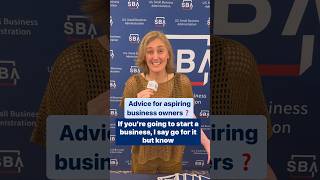
💪 Thinking of starting a #biz? Go for it! — Kerry Boyle, Vermont #SmallBiz Person of the Year

President Trump Participates in a Bilateral Meeting with the Prime Minister of Canada, May 6, 2025