Train the Trainer: Overview of 8(a) and Certify
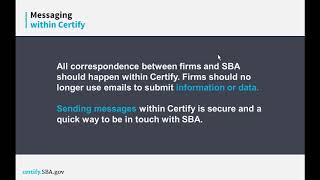
The SBA explains Certify, a new online platform consolidating program applications and case management. The 8(a) annual review moves to Certify in January 2018, with the old system fully shut down by April. The platform includes secure messaging, document storage, and contributor accounts for team access.
Questions this video answers
November 15, 2017
January 2018
Targeted by April 2018
helpcertify@SBA.gov or helpertify.sba.gov (transcript shows both 'helpertify.sba.gov' and 'helpcertify.sba.gov' variants; Knowledge Base Help tab lists the help address)
Chapters
Ladies and gentlemen, welcome and thank you for joining today's Web Conference. An overview of eight Annual Review and Certify for District Offices and Partners Please note that all participant lines will be muted until the Q and A portion of the presentation. We will provide you with instructions on how you may ask a verbal question at that time. You are welcome to submit written questions throughout the presentation and these will be addressed during Q and A. To do so, please select the Participants menu at the top of your screen and send your note to all presenters. If you are logged in with our web based application, you'll find the Notes tab on the bottom right hand side of your screen and you may address your question to all moderators. If you require technical assistance, please send a note to the ATTCES operator by clicking on the name in the software or using the Notes tab if you're on the web application. And with that I will turn the call over to Product Manager for Certify at sba, Francine Morris. Please go ahead.
Thank you.
Hi everyone, this is Francine and I just wanted to say thank you all for getting on the call today. This is an exciting time for SBA, especially with the 8 business development program. As you all know, on November 15th we launched the initial application and initial review of those applications online and we've had some great success with our firms coming in and actually applying for the program online. So this is just really exciting times for SBA and for all of us that have been diligently working on the team as well as working with our field and headquarters, our program offices and trying to develop this system. So I just want to thank each and every one of you for those who have already been working with us and helping us in our discovery phases and just helping us to build this a system that's good for everyone. This is going to be one of two trainings for Justice Overview. So it's if you're on the line today and you see this and there are other boss or resource partners that do not that are not here to see this presentation, they can come back on November 28th. We're going to do a repeat of training. So again it's a simple overview of the eight annual review and certify what it's going to look like and it's for the district offices and our resource partners. So without further ado, I'm going to turn this over to Stephanie. Stephanie Grosser is with our USDS team and she's supporting us with the comps and training with the launch. So Stephanie, all yours thank you.
Thank you, Francine. Hi everyone. For those who have been to some of our previous trainings for 8 initial application, some of this presentation may look familiar to you. But for those who haven't seen that, we want to make sure that our resource partners and district offices who are often going to conferences and meetings where you're showing firms what to expect when they apply for or when they submit annual reviews this coming year, we want you to continue using your BDMIS slides. We want you to use these slides instead. And so we'll be actually posting this whole PowerPoint presentation to our Knowledge Base page. And on the screen you see the Certify website. If you click on the Help tab within that page, you, you'll be directed to the Knowledge base. And that's where we keep all of our previous webinars and PowerPoints and you'll see all of our upcoming trainings and the dates for those as well. And so presentation available for you to download and give yourself as you work with firms in the future. So I just wanted to say that to get started. So as Francine said, starting in January of next year, eight firms are going to be submitting annual reviews in the Certify platform. And so this PowerPoint is going to show you the features of Certify and also the basic overview process of how firms will do that. So the mission of Certify itself is to create a one stop shop for small businesses to apply for SBA small business programs. And so you could already apply on certify for WASB Edwillsburg, now 8hubzone is being integrated. And now the newest thing that we're launching is as we mentioned, annual review. The second part of the mission is so SBA has an effective and efficient case management system in one place to allow for easy interaction with the end user, with the firms. And so the reason why we're doing this is before the process for both initial application and annual review was very paper based and very burdensome. It also costs hundreds of thousands of dollars annually to have firms and SBA mail these thousand page applications back and forth across the country. And so we really wanted to make it easier for firms to apply without having to print and upload documents and then re upload those same documents year after year for their annual review process. And so the four primary benefits that we're seeing for firms, one is as I just said, they could reuse documents. Two, there's online questionnaires. So before firms had to print out forms, fill them out, scan them in and upload them or mail them back to sba. Now they have actually been streamlined and converted into these online questionnaires that have logic, so you only need to answer the questions that apply to you and you don't need to keep filling out the same pieces of data over and over. The third is transparency. So firms used to call SBA for updates on where their case was or when their deadlines were. And now firms can just log into Certify to see the annual review or their initial application if they're just applying for the first time. And then finally, to protect firms personal data, of which SBA requires a lot for these programs, we have integrated a direct messaging platform into Certified so that firms aren't sharing personal information via unsecured email systems. So I'm going to show you, if you're unfamiliar with Certify, just a quick review of some of the primary features. So firms are going to see basically all aspects of their annual review on one page, which you'll see in one minute. But that includes the different sections of their application, their document library, their messages, platform notifications of what needs to get done, or notifications of contacts from SBA to the firm, and then the allowing of contributors or people involved with the firm to put their information directly into the certified platform. And so all of those different features that I just mentioned are visible here on the overview page for the firm. And so, so this page actually is the internal analyst view of the annual review application. And so this is a complete application for annual review that's already been submitted. And this is what the district office at SBA would see. And it's very similar for the firm's view also. But this has, as I mentioned, all of the major components that I just talked about. On the top you see the section SBA notes, messages and an activity log of what's new on the case. And then down below we have these sections or cards that have the broken down sections of the application. So before we had forms, and now we have these sections with questionnaires. So just to dive in a little bit more about these online questionnaires, I mentioned before there were PDFs or paper forms like the 14 that firms had to do, which were really lengthy. Now those have been streamlined, shortened a little bit and converted into these online questionnaires. There are five different sections that you saw previously. But this page takes you into one of those five sections, which is Business Development. On the left side you'll see a navigation bar of these different parts to the Business Development section and the system actually walks the firm through each question one at a time. If you answer yes to a question that would require an attachment, it would then update with a note that says, please upload the required document. The detail section for each question is very helpful. We really encourage firms to read the detail section before answering any questions. There will be a detail section for every question, and that really gives the firm tips on what we're looking for, what we're looking to see. The only way for firms to upload documents for their annual review, same with initial application, is through the questionnaires. And so because the firms are uploading documents in response to questions, the system actually names the document with a file type based on the question. And that makes it easier for analysts at SBA to quickly see what documents uploaded if they went into the firm documents tab at the top. But the analysts are also able to to look at documents within the questionnaires as they go through and review them. The document library is the second feature I'll show you. And so this, as I said, firms will upload documents only within the questionnaires, but then every document will be saved to their document library. And so here you're seeing the firm document page. So if a firm completes an annual update for year three, and let's say that January is their third year in the program, and they upload all these documents, and let's say for year four, they come back to certify, and they need to upload like, 10 of those same documents that they uploaded for year three. For year four, when they fill out the questionnaire and it says, please upload your taxes from 2016, they'll actually be able, instead of saying upload from computer, they could click the other option, which is look at document library, and then this will pull up their document library that you're seeing, and they'll be able to click on whatever relevant attachment they want to associate with that question, and it will just relink. And so again, they're reusing documents from year to year instead of simply having to go back and resend in that same file over and over again. The next feature I mentioned was messaging. And so this is what the messaging feature looks like. This is a very secure way to send messages to the SBA analyst. So any question that the firm has, they could just send it this way. One of the benefits, besides the security of the firm's PII is that if someone from the FDA goes on vacation or if there's staff turnover and someone else takes over the case, that person will be able to see the complete case file and all the messages between the firm and the analyst over time, because all the messages and all the notes are visible to anyone in SBA access to Certify. And then one really exciting feature is contributor access. And so firms are able to invite contributors, and a contributor is someone who is required to submit their information to the file. So for annual review, that would be the firm owner, any DVD who is a 51% owner, and then spouses of DVDs or of the owner. And so the firm, instead of handing out forms to all those people and then having to scan them in and reading their pii, their Personal Identifiable Information on that form, we've made it so the firms can just directly. And here on this page, you can actually see what this looks like. The firm can write the name and the email address of each contributor and then send an invitation to cooperate. And then that person will receive an email saying, please register on Certify. And then once that person logs into Certify, they'll see the application for them to submit their questionnaire. And once they do, the firm owner will be notified that that is a complete section. The annual review is not complete until all of the different contributors have submitted and completed their own section. One caveat I want to make to what I just said is that for eight firms who were approved in bdmis, so that's basically everyone except for the people who just applied since November 15th, all of those people, since this is their first time submitting annual review in Certify, they'll actually have additional questions to complete their first year using Certify that they won't be needing to do every other year for annual update. And that's for annual review. And that's because we need to establish their profile within the system. And so the system and the questionnaires will just walk them through those questions. But I just wanted to highlight that in addition to those additional questions, there's also additional contributors. And so even though annual review is only for CBDs and spouses and the owner and their spouse, all of the contributors that would have filled out their section for the initial application will have to do the same thing for the first time doing annual review in Certify. And so the system will let them add not just DVDs, but also all contributors and 10% owners and managing partners, that entire list of contributors. And then finally, the firm has a dashboard that is going to give them the status of all of their SBA applications and certifications. And so here you can See that this made up firm, DRD Farms, has an 8 annual review that's in draft form. So they could go in here and, and click on 8 Annual Review to get inside and start their application or to continue it. It's a draft, so that means they've actually started it. Or if they wanted to delete it, they could actually delete it from within here. And so I just walked you through the features. Now I just want to walk you through how firms would go ahead and complete their annual review in the system. And so to get started, firms would go ahead and click get started if you see a red arrow pointing to the orange box. And that will allow them to register on certify, which is going to ask them basically for their DUNS number, their MTIN number, which is a number that firms create when they register their entity in sam.gov and their tin number. If a firm doesn't have one of those, they'll have to do that. And they should all have that since they're already in the eight program. Once they have registered and linked their business and certified to their SAM profile, they the next page it will take them to is what you're seeing now, which is their dashboard. And they'll go ahead and click 8 Annual Review and that will take them to this overview page, which has the different sections. So there are five sections total for annual review. You have the eligibility section, the Ownership section, Control Business Development, and then the last section, which you're not seeing just because the screenshot cut it off, but the last section is the contributor section. And that's where you would fill out, the owner would fill out their information and then they'd be invited, they'd be asked to submit the email for all the other relevant contributors. And so here you're seeing the page for a contributor who's being asked to provide all of their basic information and upload any relevant documents from their end so they could put in their information directly. And I should mention that there's a firewall in place so that the firm owner cannot see the information the contributors put into the system and the contributors cannot see the information that the firm owner puts in the system. So all that information is securely sent directly to SBA without anyone else being able to access it. And then once all those sections so you guys saw those five sections on this page, you see that they all say complete. Once all of those and the contributor sections all say complete, it will enable the firm to submit their annual review. And so they will go ahead and submit that and they'll get emails from Certify asking for additional information from them for anything that's confusing or left out. And if the firm has any questions, they'd be able to also contact Certify through the messaging component. So just a couple quick dates. One is that November 15th we actually launched eight initial application. We we're continuing to iterate on that site and we have launches of features coming out based on feedback we're receiving every two weeks. So November 29th we have the first set of features coming out to just continue to iterate on the site and add some things that we think firms and SBA will find useful. January 2018 we are launching 8 annual review. And so that's when firms will be able to start submitting their annual reviews in Certify. And we will of course let all firms know who will be affected by that and when it's ready for firms to submit their annual review. Today's training was an overview, just so everyone is prepared to know generally what we're doing. And so research partners and district offices, as I mentioned before, will be equipped with this PowerPoint to be able to share this PowerPoint with other people to other firms so that they know what to expect. But then on December, and if you've seen our training schedule, we actually made some changes to the second training, the in depth walkthrough of the platform. We moved it a week back. And so instead of December 5th and 7th, that training is going to be December 12th and 13th at 2pm Eastern time. And so it's just one training. We're doing it twice just to have more people be able to hear the training. But that will actually walk you through in depth how to go through step by step to do an annual review. And then we're having the same training but for eight firms instead of for resource partners on the 13th and 14th. So before we open it up to questions, the one other thing I wanted to mention is that on the certified platform I mentioned that they're on the top right are the help. And so that Help tab, as I mentioned, brings you to our Knowledge page. Our Knowledge page I mentioned has webinars and we'll have this PowerPoint later today, this webinar, you can watch it over and over again if you want to from that page as well with the transcript. And then we are also producing an annual review checklist of documents that you'll need to upload as you go through those questionnaires and a quick start guide for how to complete surgeon tasks within the certified platform. For annual review those. We already have a quick start guide and an application checklist for the initial application process, but we're going to replicate those to make them relevant as well. Process. So with that, I want to leave time for questions. And so, Tanya, I'll turn it back over to you to go through any written questions or verbal that we've received.
Ladies and gentlemen, as we move to Q and A, please feel free to place yourself into our verbal question Queue by dialing 2 on your telephone keypad. If you're a voiceover computer user, you may select the raise hand emoticon from the top toolbar. You will each receive a notification once your line is unmuted, and then you may state your name and question. And as a reminder, if you prefer to submit a written note, please select the participants menu at the top of your screen and send your notes to all presenters. Or if you're logged in on the web, you'll find the notes tab on the lower right hand side of your screen and you may address your note to all moderators. And we do have our first verbal question in the queue. Joyce, your line is unmuted. Please go ahead. Okay, this is Alice Dodds from the Mississippi District Office. Will the firm still have to submit.
Hard copies of the annual review?
No.
No. So no hard forms will be required to be submitted anymore. Everything will be digital.
Hey, Alice. Going away from forms and we're making the system, you know, we're automating it so you won't have to worry about the forms. Ultimately there should be no forms, but maybe one.
Yeah, the caveat, I'll say is that there are like one or two forms that weren't digitized like the 1790, which is representative paid, used in compensation paid. There may be one or two others that are remaining. And so those forms will all be. When you go through the application checklist of documents, the forms that will remain will be within there as hyperlinks. So you could access those forms. Those forms firms will have to print, but they will not have to send them in. They could just upload them when they get to that question within the questionnaire.
Thank you. And once again, a reminder. If you'd like to ask a verbal question, please make sure to press pound two on your telephone. We do have a few written questions come in. The first one reads, when you send a link to another person in the company to upload documents, can that person see the other company docs that have been uploaded?
No.
No. So they could only access their own questionnaires, but they can't see anything that's been uploaded by the firm and they won't have access to the documents tab.
Okay, we did get another verbal question. Come in, caller. Your line is unmuted. Please go ahead.
Hi, this is Joel Auer from the Michigan District Office. I have two questions. One is from an internal standpoint, what would be the approval process for the district director to sign off on annual reviews? Won't the electronic piece rolls out? And then secondly, is there something in place where the FAR review, the field Accountability review folks are being updated to this new innovation so that when they do come out to the field, they're updated on, you know, there's no hard copies anymore. Everything's digital, you know, is there that conversation taking place too? Thank you.
Yeah. So for the first question with review, we didn't show that feature on today's call, but we will show it during the in depth walkthrough. It's already been built. And so basically when the bos, the business opportunity specialist and the district office finishes the review, they'll be able to make a recommendation to their supervisor and then that supervisor can make a recommendation to their supervisor. So that flow is all built into the certified platform. And, and there will be a record of who approved and what the recommendations were moving up the chain. And then in terms of visibility for other people at SBA who need to be able to see the file Certify actually works where anyone at SBA can actually log in and create an account using their Macs id. They would basically click on the Employees get started link that you see on the screen that's up right now. And then they associate their max ID to sign in. And then their supervisor would approve their permission system and then they would be able to see the status and the files of different cases. And so that's particularly useful if, let's say the field office gets a call from a firm saying, like, what happened to my initial application? OFO can actually see. They can look up the. Right now they can look up that firm's name and say, yeah, I see it in Larson processing, by the way. You could actually go yourself and check and look at the dashboard and see if they've been processing. But you don't have to call the CAHS offices anymore to ask those questions. But yeah, so the FAR folks would be able to get access as well. And then they would be able to access to the online files.
And moving on to our next caller. Clark, your line is unmuted. Please go ahead.
Hello, my name is Clark dehog with the Alaska District Office. And my question is, how long will BDMs run in parallel with Certify? The reason I ask is I have two concerns. One, will I be able to complete my annual reviews that were submitted prior to January 2018? And two, will firms be able to complete their annual update if they don't finish in BDMs by January 2018?
They're not going to.
So they will have time.
Okay. Although we say that EDMIS is going away, of course, we have been in tune with the timeline of as far as how the annual reviews are coming in. So we're not just going to immediately turn it off, we're going to phase it out. However, by April, we're looking for BDMIs to be completely decommissioned and everything will be coming in to certify. So we are definitely aware of this happening and we're going to phase that out. So we'll have the firms, we'll definitely let the field know those hard deadline dates so you all can plan accordingly. And we also are going to be communicating with the firms as well. So just like we did trainings with the community, the small business community for the initial application, we're also going to do those same trainings for our firms that are actually in the eight program. So we'll be working with everyone to keep in line with those dates.
Yeah. And I'll just add that for the initial application process, some of you may be aware that we sent out a list of dates where we said if you're a new firm, you have to apply the X date. And then there was a 45 day pause for new applications. And then we said, if you're in the middle of applying in BDMA, ask you, could you have 30 or 15 days to complete the application? So we did have a series of dates like that. And so we're in talk right now about formalizing what those dates will look like for the annual review process on this side. And once we have those, we'll make sure to communicate those on the website. And to all of you.
Now to our next verbal question in the queue, please go ahead. Your line is unmuted. Okay, we'll go back to that line. In the meantime, we did get a few more written questions. Next one, how will you address entity owned participants? We've already experienced issues with Certify application if an individual is associated with more than one participant.
We're working on creating the functionality that will allow PTAC or a SCORE Office to be able to help firms by having multiple firms associated with a single email address. There's some PII issues that we need to work through with OTC to make that happen. So I don't have a timeline for you specifically around that. We're also making other enhancements to the system to make entity owned firm applications and annual reports a bit easier. Obviously our first target here was the broader audience and now we're going to be working into some of those entity enhancements which I had a more concrete answer for you, but we're working on it.
Hi, this is Vaughn. Just to add on to Rick. So the question is for entity owned firms. I understand that, you know, one person can, like one manager can manage two firms so that one manager can complete the information for those two firms. So that manager, what that manager needs to do in the meantime is to establish a separate email account. So if he has company A and company B, he has to create a company, has to establish an email for company A and then establish another email for company B and then he can register, put in information for those two firms. That is the workaround for now.
Will emails sent directly to a BOS become part of the firm?
Record.
An email sent so it needs to be sent through the messaging platform within Certify. If it was sent via email, it should not be. The analyst should say please send me this message through the Certify platform and not through email to help firms get used to the fact that they need to start using messaging instead of email. If they did send them an email, that would not automatically be part of Certify unless the analyst took the time to download that email, save it, and then upload it themselves in the analyst document section, which is not preferred. What's preferred is to again use the messaging feature within Certify and again to.
Build on what Stephanie is saying. It's actually really, it's not just preferred. It's absolutely critical that we do conduct our communications as much as absolute whenever possible through the messaging service. The email presents a wide range of security vulnerabilities for firms who may be transmitting personal information through email. The other component of that is SBA benefits greatly by having a running record of any communications that have occurred with the firm. But the primary reason for messaging is to preserve the security of that information. So it's critical that we get away from using email.
And a follow up comment to that. I'll just read that out. We've considered unique emails, however, individuals that were a member rep on two firms in ddmis are being rejected on new certified applications. It is common for an individual to serve multiple roles on an entity owned participant, bank signer, board member, member repeating what is the technical help point of contact information for certify SBA?
So if there's a problem again on certify sba.gov if you click on the help tab, there is a knowledge base with a lot of information and also with the how can I help you Box where you could enter in your question and get answers immediately. And we've taken most of the questions that we receive in the help desk and translated those into questions on that page. So that's the most, that's the fastest way to get to hear back. If your question is not there, then we do have a help desk which is helpertify.sba.gov and we do ask that you be a little bit patient. People will get back to you within one or two days, but it won't be an immediate response. But you can always ask questions on that page to that email address. Again, helpcertify.sba.gov.
The next question now in BDMIS we submit the letter and 1729 do we still have to do that?
So for the analysis from the sba, this is not for the firm but for the analysts who are writing their recommendations, they can still do that how they've been doing it. And then when they are taken through the wizard of how to submit your recommendation, it will say please upload that form. And they could just upload a Word document that's editable. And so when their supervisor it's their turn to review the file, they'll be able to download that analysis and then make any edits to it and then re upload it with their initials at the end. And both versions will be saved within the analyst documents tab. Have on Certify.
Will exit interviews for eight final year be done on Certify?
Eventually, yes. There's a number of workflows for eight that we have yet to build. Exit interviews, graduation and termination, they're on that list.
And I'll just mention that I didn't say this before, but we are building the system as an agile iterative process. And so what Rick just said, we know that there are, we've mentioned a couple different features that we know are really critical and that we're working on for future enhancements. But the theory behind Agile is that you build in the critical functionality that you need to launch a product and make sure it works for users and then you keep adding on that versus a traditional IT project in government which could take five years and you collect all requirements up front and the thing may never launch and it could be billions over spending. And so we're really staying away from doing every single requirement that could have taken five years. Instead, we're launching this in months and we'll be able to make sure it works for the end user. And we've also been really happy that throughout this Agile process, we've involved both BOS and the field, who have been tremendous champions for this development process. And firms themselves have come in to talk to us to make sure that our designs and the questionnaires make sense to them and that they're in plain language.
Do you know when the Hubzone application process is due to be moved to certify.gov?
So the fall of 2018 is when we're looking to have all of Hubzone on. And as we're building the new things like hubzone, we'll be continuing to iterate on what's already launched, including 8 initial application and 8 annual review.
And that's important to know that while we're enhancing the product for what we've already pushed out, we're also building our other program products. So all of this is happening parallel and simultaneously. So you'll see what's neat about this whole thing is you'll see how the system is being built because you're going to be in it while it's being built and your feedback it will greatly help in order to make the system our system. So it's a great way of building something that's usable.
And the help page, the knowledge base, is available externally and on that page we'll be posting the updates of what features come out after the initial launch. And for internal, this presentation is for the end user, the actual firm, for you guys to be able to educate firms. But for anyone on the call from sba, we're going to have a separate in depth walkthrough for SBA staff that shows you all of the features that you guys have, which is different from the features that firms have. A lot of them are the same, but then things like make a recommendation or the ability to refer the case to a different office, or being able to upload documents to an analyst document section. We didn't go over those today because this training was focused on the firm. But something else that the analyst is has is internal SBA SharePoint site on certify and that's where we post all the internal documents for analysts to really be able to understand the system and for any updates on the analyst side, we'll be posting to that SharePoint page and we'll show you where that is when we do the in depth walkthrough for analysts.
Will Certify have the MP annual review form for 8 a firm with MPA.
That's something that's going to come later. Is that the question you're asking?
Could you read the question again?
I'm sorry, we couldn't hear.
Will Certify have the MP annual review form for eight a firm with MPAs?
Yes. The MPA form on the annual review will be an attachment, so you'll use the PDF form that you can be able to download and upload into the system initially. Ultimately, we'll roll that in as well.
The worksheet that checks.
Yeah, yeah.
To clarify.
Is the contributor function available during the 8A application process?
Yes. Anyone who is applying to initial application for 8 also has that same contributor screen where they can add all of the contributors and then they won't be able to submit their application online until all the contributors complete their application. There were initially some people who didn't see that that existed on the individual contributor page. They didn't scroll down to see that there were sections to add contributors. We reached back out to them to make sure that they saw that that is also on that page, and we're redesigning that page to make it more clear that they need to add all their contributors up front so that we receive a complete application. And the system also lets the firm owner, even though they can't see what's uploaded on their dashboard, they will see a note that says which of their contributors has finished and who hasn't. And for anyone who hasn't finished, the firm owner can just press one button to send a reminder to that contributor to please go ahead and sign in and complete their section.
If a message is sent through the messaging system in Certify, will the recipient get an email notifying them that there is a message in the system?
Yes. So we built in notifications and so anyone who gets a message, the analyst or the firm, either one, will receive a notification via email saying please log in to Certify to see your message from the firm or a notification that a document has been uploaded or that the case has been assigned. We have notifications built in. We also have read receipts for SBA analysts so that if the SBA analyst goes to the messages section, they'll be able to see if the message was opened and when it was opened.
Next question reads, I may have missed this, but when Boss Receive messages in Certify. Will we receive an email notifying us, or will we need to log on to Certify in order to know we have a message?
Analysts will receive notifications as well, telling them they've received a message and they'll be able to log in to that. They'll be directed to log in to read the message.
So that goes back to what we were saying, that we want to keep everything inside the system. So you're not the analyst won't receive the email. You'll receive a notification to go into the system to respond. And the firm will get the same thing. They will receive a notification to go to the system to respond. So we want to keep everything inside the system.
When will DSBS be moved to certify?
Can you say that question again, please?
When will DSBS be moved to Certify?
I'm sorry, I didn't hear the D. Okay, so DSBS is we'll probably come to certify. We'll probably start discovery around the end of 2018 into 2019 is probably when we'll start building on the DSDS system. So that's when we're looking right now on the roadmap. Please don't hold me to those dates, but we'll start. The plan is to start looking at the DSDS from a discovery perspective around the end of 2018. We want to get eight up and running. We want to get the Hubzone moving wob. We're looking at enhancements too, if that turns into a certification program. But DSCS is on the map to start being reviewed 18 into 19.
Our next question. We just have two more at this time. Initial eight. A reminder letter has been sent via certified mail recently. We were told to submit via email and obtain delivery receipt. Is there any way to create or submit the initial annual review reminder letter into certify in 2019? Don't want to begin sending emails then tell the firm no emails. Next message.
Yeah, we'll be building email reminders into the system. So it'll work in a similar fashion to any of the other official notifications that go out through the system. They'll receive an email telling them that there's something in the system that they need to do. They'll be able to come into the system, locate the reminder, and they'll also receive an IN app in application notifications. So yes, we will be observing that.
Next question. Will firms get the 8 approval letter through certify? I'm not sure if that's a repeat.
Yeah, so that's for the eight initial application process and they will be receiving when the head of GCBD affirms or declines makes the ultimate decision on application, he or she will be putting the approval letter or decline letter text into a message and then sending that directly to the firm. If it's a decline, that will have reconsideration instructions and that unlocks the application for the firm to start doing their reconsideration if they want to, immediately.
This is Vaughn, just to add on to Stephanie. So for the annual review, when you determine that the firm still remains in the firm and is still eligible to participate, you send out the approval letter as well. So you follow the same process as Stephanie indicated where the firm receives a notice to log into Certify. When they log into Certify, they will see the approval letter in the queue.
Next question. Many entity owned eight firms have a compliance manager or other person assigned to complete the annual updates for multiple 8A subsidiary firms. Will they be able to continue to do it this way in Certify?
So they will be able to do it. The only unfortunate reality right now in the system is that they won't be able to use the same email address to log in and do each one. You need a separate email address to associate with each firm within the system and so they'll want to use a separate email to be able to create all those individual accounts. We're hoping again as a future enhancement to be able to make it so one person could have multiple applications under that same email address. Especially for entity owned firms that makes the most sense. But we haven't built that into the the initial MVP minimal viable product that we've launched.
There were cases when I was out in the field that our agencies had email accounts for each of their eight firms and they were able to. The manager was able to have an email that was associated with each of the eight companies. So that may be a resolution for now, until we make that enhancement.
And before we get to our final question, once again, if you wish to ask a verbal question, please press pound two or click the raise hand emoticon in the software. If you prefer to submit a written question, please make sure to do so. To all presenters, our last question at this time and we did get one more in. Any chance you can set up a dummy training account@certified.sba.gov for resource partners like ptacs to use.
So we would love to do that right now. We haven't been able to develop the engineering resources to create a training environment that would be user friendly to the resource partner. What we do have, which is what we do have is again this knowledge base that has webinars and user Quick Start guides and application checklists. The other best thing we could do is we do have some links to to clickable prototypes that look very much like the site that you could use for training. We have that for initial application and we'll create something similar for annual review. And so that's probably the best thing. We're happy to share that prototype link, if it's helpful for people. Is not going to be 100% functional, but at least it's something you could click through and kind of explain to people generally how to go through the process. That's the best that we have, even though it's not, it doesn't. Again, it's not like every button will work on there and not every question and the questionnaires haven't been programmed, but it gives you an idea of the platform and what the basic functionalities are.
I want to add to that for now. I think with the system being new and newly developed, it's probably best if that training is coming from us right now and then as everyone gets more familiar with the system, then we can consider doing something like that. But for now I think it would be best for the trainings to come out of the certified team.
Our final question at this time, will we get an email regarding the new Training dates for current 8A firm?
So Von, once Von, we're just waiting for AT&T connect to send us all the final call information and once they do, Vaughn is going to circulate all the final training dates to all the resource partners and we'll also post those on that help page under upcoming Trainings. You'll be able to see all of that information. But we just moved, as I mentioned, we pushed back two of the trainings and so we just want to update that page and make sure that it has all the correct call in data so you can receive it on that page directly. And it will also come to all the resource partners in an email from.
Von and also I will be sending that spreadsheet to Michelle King who will then distribute it to all the boss in the field.
We did get one more question. It reads, I might have missed this. What is the email point of contact for technical help on the Certify website?
So the email is helpertify.sba.gov and if you go to that help tab again on the Certify website to look at the knowledge base on the bottom, it actually has that help email address right there if you forget it.
And at this time there are no further questions.
Great. Well, I just want to say thank you to everyone who joined again. In about three days, three business days, we will have this webinar up and available on that Knowledge Base website so you can refer to it and we'll have the PowerPoint there as well. So if you're giving any presentation on an overview of the annual review process for 2018, we invite you to use these slides instead of the BDMIS slides just so we're giving firms the correct information as we move into the new year. So thank you again. And I'm just going to pull up the last slide in our presentation actually had a link that you'll see up on your screen. And so that link is if you have any feedback or suggestions for certify, go ahead and send them there. We always look through that inbox to add different ideas and functionalities that we are missing to our backlog for our engineers to develop in future sprints. So with that, thank you again and have a great Thanksgiving everyone.
Thank you everybody. Have a wonderful Thanksgiving.
Thank you all of our speakers and to all in the audience for joining today's call. Your call has concluded and you may disconnect.
More from Your






President Donald J. Trump and First Lady Melania Trump Visit Grieving Texas After Deadly Floods
💪 Thinking of starting a #biz? Go for it! — Kerry Boyle, Vermont #SmallBiz Person of the Year

President Trump Participates in a Bilateral Meeting with the Prime Minister of Canada, May 6, 2025