Uploading Documents to your Application

How to upload documents to an 8A initial application on the Certify platform. Learn the file format and size requirements, then walk through associating each document with the right application question.
Chapters
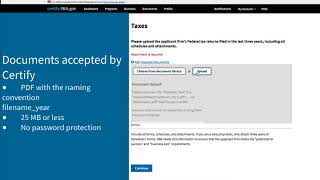
Uploading Documents Documents are Uploaded to your 8 initial application as part of each questionnaire. When a section of your 8 initial application asks for a document to be uploaded, you cannot skip the section. You must upload the document that's been requested, otherwise you won't be able to progress in that section. Documents will only be accepted by Certify if they meet the following requirements. Each document must be saved and uploaded as a PDF with the naming convention filenameyear. Each document must be 25 megabytes or less and do not use password protection on files you upload. In addition to uploading documents, you will be given the option to choose a document from your document library to associate to a question. The ability to upload and reuse documents is one of the features of Certify. Documents added to your 8 initial application are added to your firm's document library and are accessible for reuse with other Certify applications or for 8 annual reviews. As you see, all firm information and supporting documentation are submitted through Certify electronically. Paper and email documentation are no longer accepted by the SBA. For more helpful videos and training material on certify.sba.gov and the 8A initial application process, visit the help page on certify sba.gov.
More from Your

President Donald J. Trump and First Lady Melania Trump Visit Grieving Texas After Deadly Floods

💪 Thinking of starting a #biz? Go for it! — Kerry Boyle, Vermont #SmallBiz Person of the Year

President Trump Participates in a Bilateral Meeting with the Prime Minister of Canada, May 6, 2025